
留言與投票驗證
評論與投票驗證
FastComments 提供多種機制來防止垃圾訊息、管理使用者帳戶,以及降低新使用者在留言與同時建立帳戶時的阻力。
在本文件中您將了解 FastComments 的一個重要面向 - 評論與投票驗證。
背景 
為了區分真實使用者與垃圾機器人,但仍允許評論立即發佈,FastComments 引入了「未驗證評論」的概念。
當已驗證的使用者登入,或使用 SSO 時,評論和投票會立即被標記為已驗證。
未驗證的留言
未驗證的投票
如果允許匿名留言,未驗證的投票會像其他投票一樣立即套用。
然而,如果不允許匿名留言,未驗證的投票將會在驗證之前處於等待狀態 - 它們不會被套用到該留言 或以任何方式顯示。
驗證電子郵件
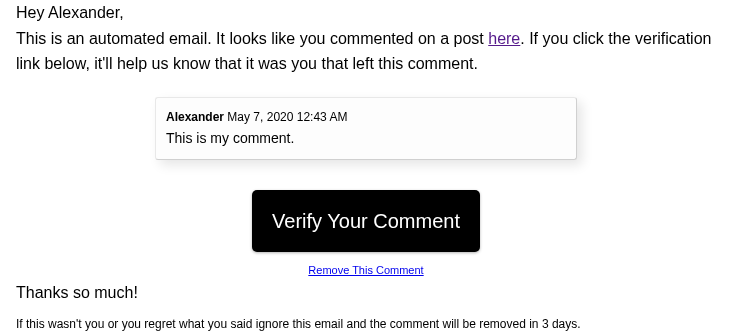
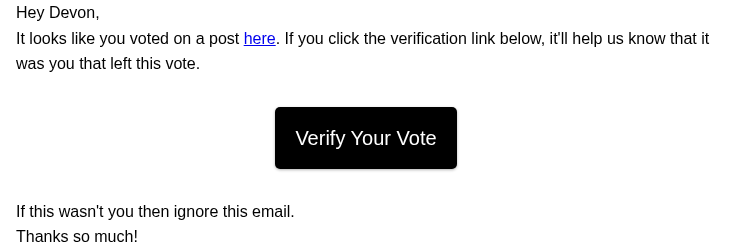
當使用者留言或投票時,如果他們尚未登入,或其帳號未經驗證,他們將會收到一封電子郵件,要求他們驗證此操作。
不過,我們會盡量不對您的使用者發送垃圾郵件,每個工作階段不會發送超過一封驗證郵件。詳情請參閱「工作階段」章節。
預設情況下,留言驗證郵件的外觀如下:
預設情況下,投票驗證郵件的外觀如下:
預設情況下,FastComments 會在這些郵件的頁尾顯示其標誌和名稱:

如果您使用 Flex 或 Pro 方案,寄件人名稱、電子郵件和品牌資訊可以自訂。
會話
FastComments 實作了一種獨特的使用者驗證解決方案,以減少傳送給您的使用者的電子郵件數量 我們稱之為驗證會話。
如果一位新使用者在同一頁面、同一個瀏覽器視窗中留下十則評論並投了兩次票,則沒有 必要向他們發送十幾封確認電子郵件。
取而代之,FastComments 在此情況下只會發送一封驗證電子郵件。
這不需要使用 cookies。
若瀏覽器視窗關閉,或使用者導覽離開,即視為該驗證會話結束。
即時留言
一旦留言和投票被驗證,不論驗證機制為何,更新會立即在線上發佈。
如果被驗證的是一則留言,且該留言已被核准,"未驗證留言" 標籤將會從所有 檢視該留言串的使用者處移除。
同樣地,如果一個待處理的投票被驗證,受影響留言的 karma 將會自動即時更新。
我們希望您覺得本指南對您有幫助。如果您認為我們遺漏了什麼,請在下方告訴我們。