
Memberstack으로 댓글 추가
FastComments를 Memberstack과 결합하면 회원 전용 댓글 기능을 설정할 수 있습니다!
코드 
작은 코드 스니펫으로 FastComments를 Memberstack과 쉽게 연결할 수 있습니다:
FastComments Memberstack Snippet
Copy 
1
2<script src="https://cdn.fastcomments.com/js/embed-v2.min.js"></script>
3<div id="fastcomments-widget"></div>
4<script>
5 window.$memberstackDom.getCurrentMember().then(({data: member}) => {
6 if (member) {
7 FastCommentsUI(document.getElementById('fastcomments-widget'), {
8 tenantId: "demo",
9 urlId: window.location.pathname,
10 simpleSSO: {
11 username: member.customFields.name || member.auth.email.replace(/@.+/, ''),
12 email: member.auth.email,
13 avatar: member.customFields.avatar
14 }
15 });
16 } else {
17 FastCommentsUI(document.getElementById('fastcomments-widget'), {
18 tenantId: "demo",
19 urlId: window.location.pathname,
20 simpleSSO: null
21 });
22 }
23 })
24</script>
25
사용자가 Memberstack을 통해 로그인한 상태로 귀하의 사이트 또는 애플리케이션을 방문하면 자동으로 FastComments에 로그인되며 해당 댓글은
Verified로 표시됩니다.
로그인하지 않은 경우에도 이름과 이메일을 남겨 댓글을 달 수 있습니다.
회원 전용 댓글
회원 전용 댓글을 원하시면 다음 코드 스니펫을 사용해 보세요. 단, https://example.com/login을 사용자가 Login 버튼을 클릭했을 때 이동할 위치로 변경하세요:
Exclusive FastComments Memberstack Snippet
Copy
1
2<script src="https://cdn.fastcomments.com/js/embed-v2.min.js"></script>
3<div id="fastcomments-widget"></div>
4<script>
5 window.$memberstackDom.getCurrentMember().then(({data: member}) => {
6 if (member) {
7 FastCommentsUI(document.getElementById('fastcomments-widget'), {
8 tenantId: "demo",
9 urlId: window.location.pathname,
10 simpleSSO: {
11 username: member.customFields.name || member.auth.email.replace(/@.+/, ''),
12 email: member.auth.email,
13 avatar: member.customFields.avatar
14 }
15 });
16 } else {
17 FastCommentsUI(document.getElementById('fastcomments-widget'), {
18 tenantId: "demo",
19 urlId: window.location.pathname,
20 simpleSSO: {
21 loginURL: 'https://example.com/login'
22 }
23 });
24 }
25 })
26</script>
27
도메인 오류
다음과 같은 인증 오류가 발생할 수 있습니다:
도메인 구성 누락
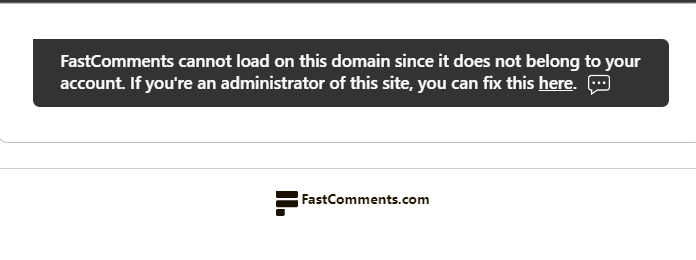
이는 FastComments가 이 도메인에서 귀하의 계정을 사용하도록 허용해야 한다는 것을 알지 못하기 때문입니다.
이 경우 해결 방법은 간단합니다. FastComments.com 계정에 사이트를 추가하기만 하면 됩니다.
맞춤 설정
FastComments는 귀하의 사이트에 맞게 사용자 정의할 수 있도록 설계되었습니다.
사용자 정의 스타일을 추가하거나 구성을 조정하려면 사용자 정의 문서를 확인하여 방법을 알아보세요.