
Add Comments With Memberstack
With FastComments, we can set up exclusive Members-only commenting when combined with Memberstack!
The Code 
We can easily connect FastComments with Memberstack with a small code snippet:

When the user visits your site or application while logged in via Memberstack, they will automatically be logged into FastComments and their comments
will be marked Verified.
They will also be able to comment by leaving their name and email, if they are not logged in.
Member-Only Commenting
If you'd like to have member-only commenting, try the following code snippet, but change https://example.com/login to where you want users to go when they click the Login button:
Domain Errors
You may get an authorization error, like the following:
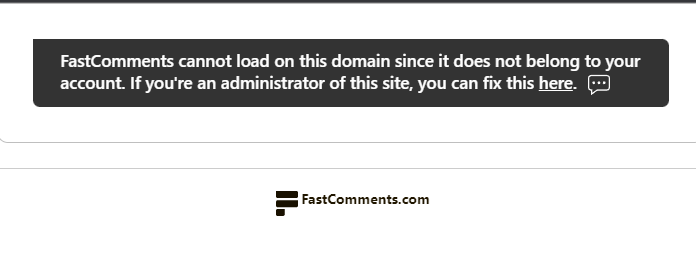
This is because FastComments doesn't know it's supposed to allow your account to be used on this domain.
In this case, the fix is simple. You just have to add your site to your FastComments.com account.
Customization
FastComments is designed to be customized to match your site.
If you'd like to add custom styling, or tweak configuration, Checkout our Customization Documentation to learn how.
Add Polls To Your Memberstack Site
Once FastComments is on your Memberstack site, you can also run live polls right in the comments. Turn on Enable Polls in your widget customization settings and a poll button appears in the comment toolbar. Polls take 2 to 10 options, results update live for everyone on the page, and you choose who can create polls and whether voting requires logging in. There is nothing else to install on Memberstack.
Try the Live Polls demo or read the Polls documentation to set them up.