
שיתוף קטעי קוד
שיתוף קטעי קוד
מהם קטעי קוד? 
קטעי קוד הם חלקים קטנים של קוד, ולכן "קטעים" של קוד, שניתן לשתף בזמן כתיבת תגובות.

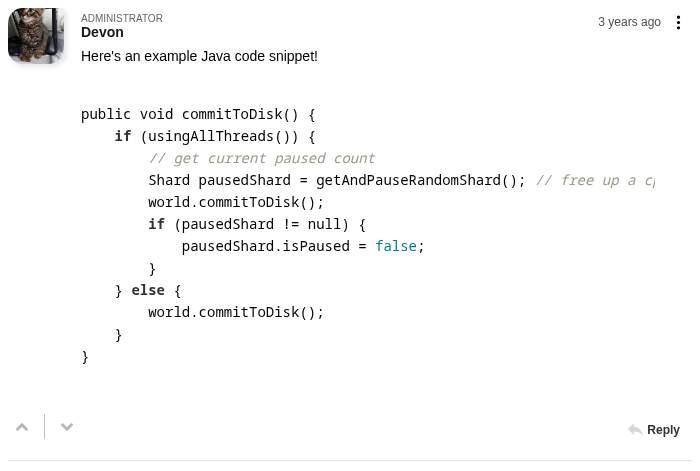
עם FastComments, פשוט הדבקת קטע קוד אמורה להיתפס אוטומטית ולהיות מעוצבת.
כאשר מגיבים, קטע הקוד יעטף בבלוקים של <code>, והעיצוב מתרחש
לאחר שתשלח את התגובה שלך.
העטיפה בבלוקים של <code> היא אוטומטית כאשר מדביקים קטע קוד, במגוון שפות.
לחלופין, ניתן לסמן קטע טקסט וללחוץ על כפתור Code בסרגל הכלים.
קהילות מפתחים
שיתוף קטעי קוד מועיל לקהילות שבהן סביר שיהיה שיתוף של קוד.
זה מקל על קריאת קטעי הקוד המשותפים ודורש מאמץ מועט מהמשתמשים שלך.
אנו מקווים שהתכונה הזו הופכת את FastComments לבחירה אידיאלית עבור אתרים הקשורים לתכנות ו יישומים.
שפות תכנות נתמכות
כשמשתפים קטעי קוד, FastComments עושה את מיטב יכולתו לזהות באופן אוטומטי באיזו שפת תכנות נמצא קטע הקוד, כדי לעצב אותו אוטומטית ולהחיל הדגשת תחביר.
FastComments syntax highlighting currently supports 39 common languages:
- .properties
- Apache
- config
- Bash
- C
- C#
- C++
- CSS
- CoffeeScript
- Diff
- Go
- HTML, XML
- HTTP
- JSON
- Java
- JavaScript
- Kotlin
- Less
- Lua
- Makefile
- Markdown
- Nginx
- config
- Objective-C
- PHP
- PHP Template
- Perl
- Plain text
- Python
- Python REPL
- R
- Ruby
- Rust
- SCSS
- SQL
- Shell
- Session
- Swift
- TOML and INI
- TypeScript
- Visual Basic .NET
- YAML
When sharing a code snippet in a language we don't support, it will still be rendered like code - but no syntax highlighting or reformatting will be applied.
הגדרת שיתוף קטעי קוד
אין צורך בהגדרה כדי להפעיל תכונה זו. היא זמינה אוטומטית למשתמשים שלך כשמשתמשים ב-FastComments.
שיתוף קטעי קוד
כדי להשתמש בתמיכה בקטעי קוד, פשוט הדבק כל קטע קוד שמזוח בשתי או ארבע רווחים, וכולל את התווים { או ( characters.
או לחלופין, הדבק את קטע הקוד שלך, סמן אותו, ולחץ על אפשרות Code בסרגל הכלים