
分享代码片段
共享代码片段
什么是代码片段? 
代码片段是小段代码,也就是所谓的“代码片段”,可以在评论时共享。
代码片段示例

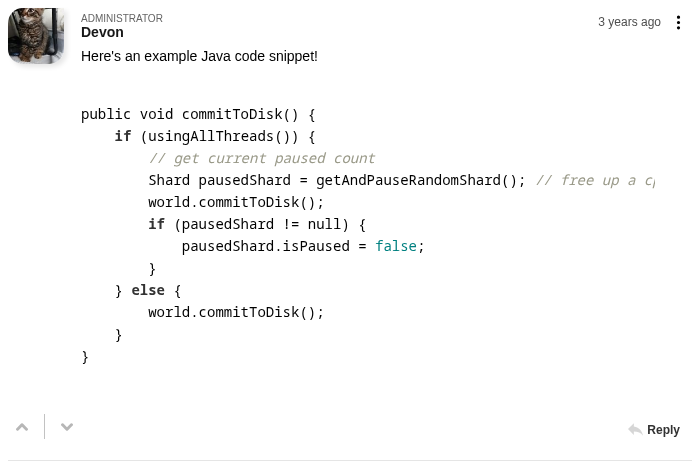
使用 FastComments,只需粘贴代码片段,即可自动检测并进行格式化。
在评论时,代码片段会被包裹在 <code> 块中,格式化会在提交评论后进行。
在粘贴代码片段时,自动将其包裹在 <code> 块中,支持多种语言。
或者,您可以选中一段文本,然后点击工具栏中的 Code 按钮。
编程社区
代码片段共享对于那些可能频繁共享代码的社区非常有用。
这使得用户可以轻松地阅读共享的代码片段,几乎不需要额外的努力。
我们希望该功能使 FastComments 成为与编程相关的网站和 应用程序的理想选择。
支持的编程语言
在分享代码片段时,FastComments 会尽力自动判断代码片段所使用的编程语言,以自动格式化并应用语法高亮。
FastComments 的语法高亮当前支持 39 种常见语言:
- .properties
- Apache
- config
- Bash
- C
- C#
- C++
- CSS
- CoffeeScript
- Diff
- Go
- HTML, XML
- HTTP
- JSON
- Java
- JavaScript
- Kotlin
- Less
- Lua
- Makefile
- Markdown
- Nginx
- config
- Objective-C
- PHP
- PHP Template
- Perl
- Plain text
- Python
- Python REPL
- R
- Ruby
- Rust
- SCSS
- SQL
- Shell
- Session
- Swift
- TOML and INI
- TypeScript
- Visual Basic .NET
- YAML
When sharing a code snippet in a language we don't support, it will still be rendered like code - but no syntax highlighting or reformatting will be applied.
设置代码片段共享
无需任何设置即可启用此功能。它会自动为您的用户可用 当使用 FastComments 时。
分享代码片段
要使用代码片段支持,只需粘贴任何缩进为两个或四个空格并包含 { 或 ( 字符的代码。
或者,粘贴你的代码片段,选中它,然后点击工具栏中的 Code 选项