
Typeflo.io ब्लॉग में लाइव कमेंटिंग जोड़ें
यह गाइड क्या कवर करता है
यह गाइड Typeflo.io ब्लॉग्स पर FastComments के साथ लाइव कमेंटिंग सेट अप करना कवर करता है।
1. कोड इनपुट खोजें 
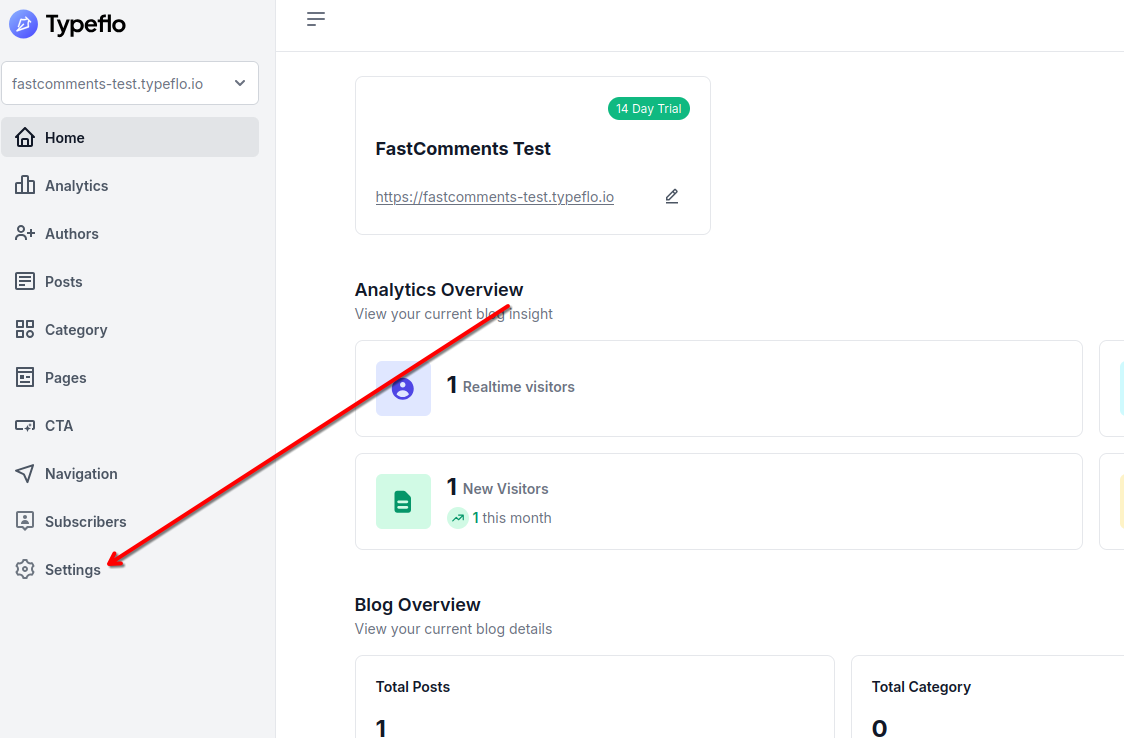
अपने Typeflo.io ब्लॉग में FastComments जोड़ने के लिए, सबसे पहले अपने ब्लॉग के डैशबोर्ड पर जाएं और बाएं साइडबार में Settings पर क्लिक करें।
इसके बाद, सेटिंग्स पेज के ऊपर Custom Code टैब पर क्लिक करें।
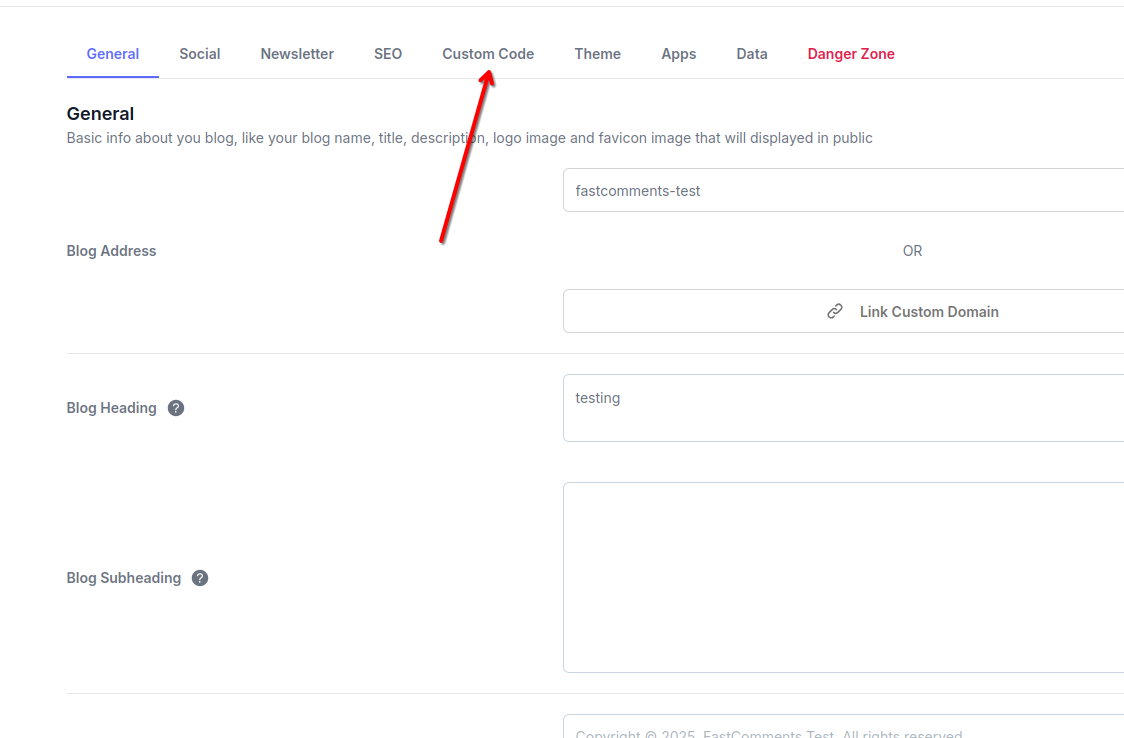
आपको कस्टम कोड जोड़ने के लिए तीन सेक्शन दिखाई देंगे: Header, Body, और Footer। हम FastComments के लिए Footer सेक्शन का उपयोग करेंगे।
2. कोड डालें
Custom Code टैब के Footer सेक्शन में, निम्नलिखित कोड पेस्ट करें:

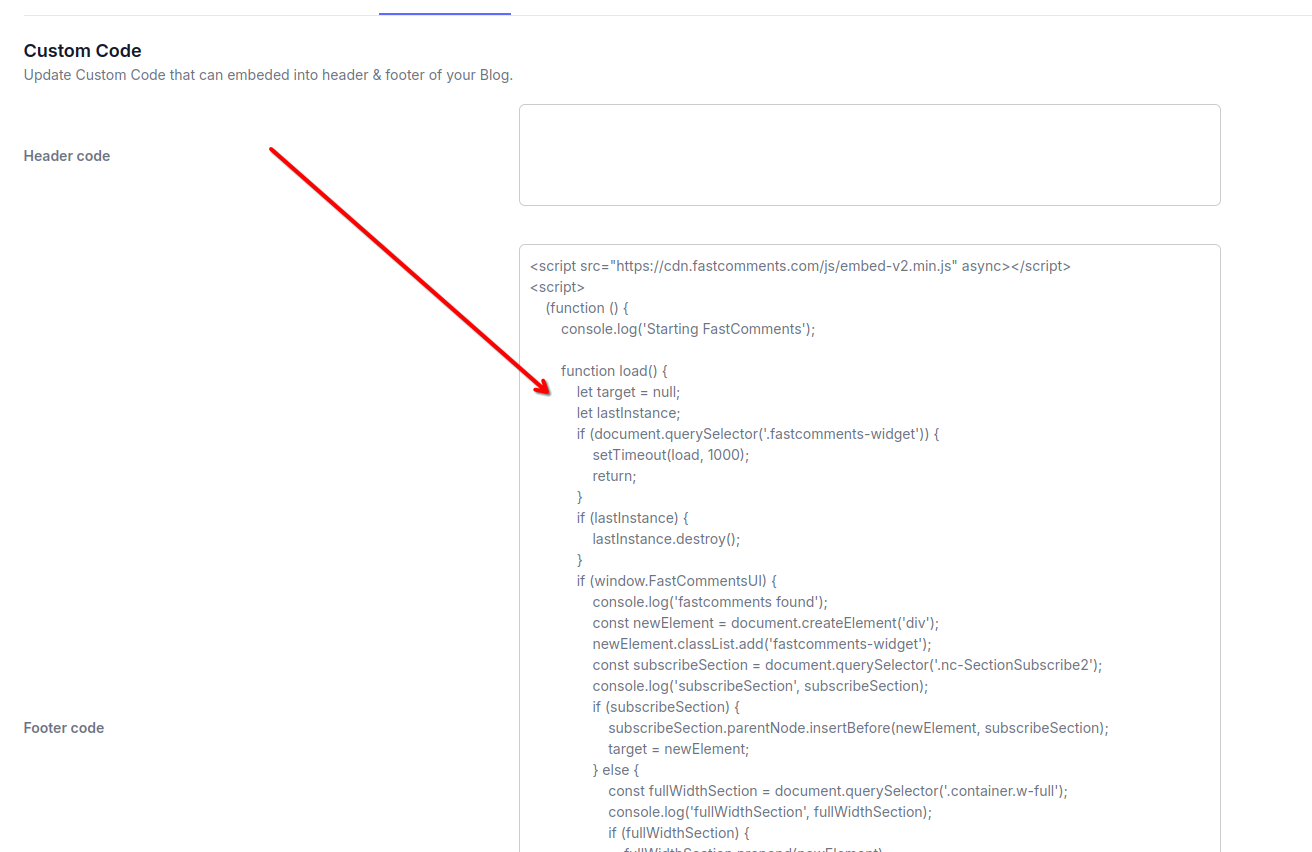
कोड पेस्ट करने के बाद, अपने बदलाव लागू करने के लिए Save बटन पर क्लिक करें।
नोट: इस कोड में वह लॉजिक शामिल है जो आपके Typeflo.io ब्लॉग पोस्ट पर FastComments विजेट को सबसे उपयुक्त स्थान पर डायनामिक रूप से रखता है। अन्य कोड स्निपेट Typeflo.io के लेआउट के साथ ठीक से काम नहीं करेंगे।
साइन अप करने के बाद 'demo' को अपनी वास्तविक FastComments tenant ID से बदलना न भूलें। यदि आप FastComments.com में लॉग इन हैं, तो यह पहले से ही बदला हुआ होना चाहिए।
सफलता
बहुत बढ़िया! आपने अपने Typeflo.io ब्लॉग में लाइव कमेंटिंग जोड़ ली है।
FastComments अब आपकी सभी ब्लॉग पोस्ट पर दिखाई देगा, जिससे आपके पाठक चर्चा में भाग ले सकेंगे।
यदि आपको permission denied त्रुटि का सामना करना पड़ा है, या आप FastComments को कस्टमाइज़ करना चाहते हैं, तो आगे पढ़ें।
कस्टमाइज़ेशन
FastComments को आपके ब्लॉग के डिज़ाइन से मेल खाने के लिए अनुकूलित करने के लिए डिज़ाइन किया गया है।
यदि आप कस्टम स्टाइलिंग जोड़ना चाहते हैं, या कॉन्फ़िगरेशन में बदलाव करना चाहते हैं, तो हमारी कस्टमाइज़ेशन दस्तावेज़ीकरण देखें और जानें कि कैसे।
Typeflo.io ब्लॉग्स के लिए, आप उसी Custom Code सेक्शन में कस्टम CSS स्टाइल जोड़ सकते हैं जहाँ आपने FastComments स्क्रिप्ट जोड़ी थी।
डोमेन त्रुटियाँ
आपको अधिकृत (authorization) त्रुटि मिल सकती है, जैसे कि निम्नलिखित:
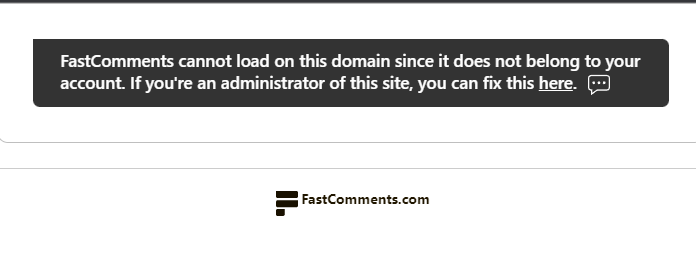
ऐसा इसलिए है क्योंकि FastComments को नहीं पता है कि इस डोमेन पर आपके खाते के उपयोग की अनुमति दी जानी चाहिए।
इस स्थिति में, समाधान सरल है। आपको बस अपने Typeflo.io ब्लॉग डोमेन को अपने FastComments.com खाते में जोड़ना होगा।
अपने खाते में अपनी साइट जोड़ने के लिए यहाँ जाएँ।
नोट: सुनिश्चित करें कि आप अपना कस्टम डोमेन (यदि है) और अपना Typeflo.io सबडोमेन दोनों जोड़ें ताकि FastComments सभी परिदृश्यों में काम करे।
अपने Typeflo.io ब्लॉग में पोल जोड़ें
FastComments आपके Typeflo.io ब्लॉग पर एक बार लग जाने के बाद, आप कमेंट्स के भीतर ही लाइव पोल भी चला सकते हैं। अपनी विजेट कस्टमाइज़ेशन सेटिंग्स में Enable Polls चालू करें और कमेंट टूलबार में एक पोल बटन दिखाई देने लगेगा। पोल में 2 से 10 विकल्प हो सकते हैं, पेज पर मौजूद सभी के लिए परिणाम लाइव अपडेट होते हैं, और आप तय कर सकते हैं कि कौन पोल बना सकता है और क्या वोट करने के लिए लॉग इन ज़रूरी है। Typeflo.io पर कुछ और इंस्टॉल करने की आवश्यकता नहीं है।
Live Polls डेमो आज़माएँ या उन्हें सेट अप करने के लिए Polls दस्तावेज़ीकरण पढ़ें।