
멘션
멘션이란 무엇인가 
Mentions, 또는 @mentions,는 FastComments의 기능으로, 자동완성으로 태그할 사용자를 검색하고 그들에게 알림을
보내 태그되었음을 알립니다.
사용자 태그하는 방법
댓글을 작성하거나 편집할 때, 단순히 @ 기호와 사용자의 이름 시작 부분을 입력하세요.
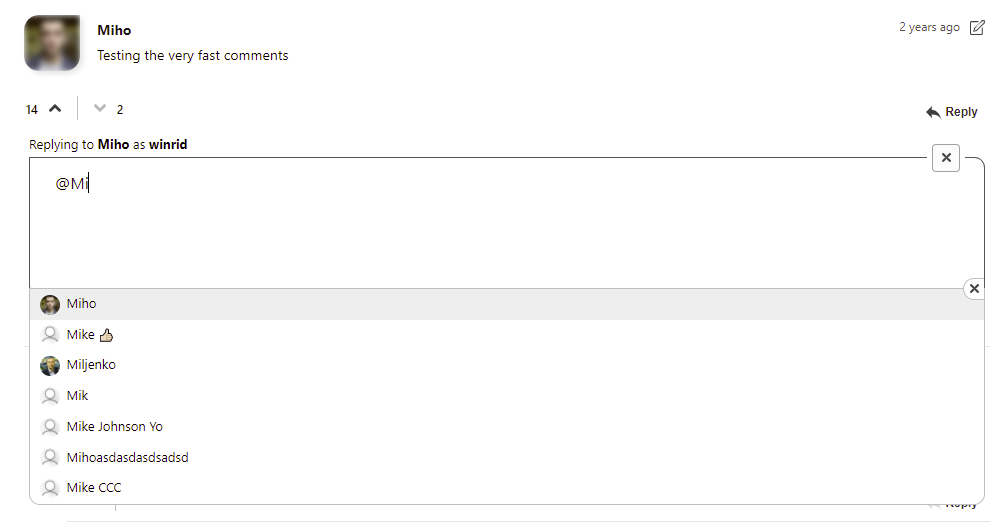
태그하려는 사용자의 이름을 클릭하세요.
또한 위쪽 및 아래쪽 화살표 키로 이 목록을 탐색할 수 있으며, 선택하려면 Enter 키를 누르고 취소하려면 Esc 키를 누르세요.
사용자를 태그하지 않고 @ 기호를 사용하고 싶을 수 있다는 것을 알고 있습니다. FastComments는 이를 감지하여 입력 경험을 방해하지 않습니다.
자동 완성은 먼저 대소문자 구분 일치 항목을 우선으로 검색한 다음, 대소문자를 구분하지 않는 결과도 검색합니다.
알림
태그된 사용자는 댓글에서 자신이 태그되었거나 멘션되었다는 사실을 알려주는 이메일을 받게 됩니다.
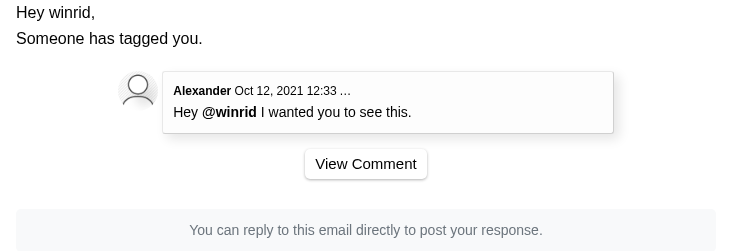
알림을 끄면 이러한 이메일이 발송되지 않으며, 모든 이메일에는 헤더가 포함되어 있어 이메일 클라이언트가 사용자가 원활하게 수신을 거부할 수 있도록 합니다.
태그된 사용자는 이메일 주소가 등록되어 있지 않은 경우에도 인앱 알림을 받습니다.
댓글이 관리자 승인 대기 중인 경우, 멘션 이메일은 보류되었다가 댓글이 승인되면 발송됩니다. 댓글이 스팸으로 표시되거나, 삭제되거나, 7일 이내에 승인되지 않으면 발송되지 않습니다.
멘션된 사용자에게 이메일이 발송되었는지, 또는 발송되지 않은 이유를 확인하려면 댓글 관리 페이지에서 해당 댓글의 댓글 로그를 열어 확인하세요.
멘션 자동완성 작동 방식
@mentions 자동완성은 여러 소스에서 사용자 이름을 자동완성하여 작동합니다.
자동완성 목록에 표시되는 사용자는 다음에 따라 결정됩니다:
- 동일한 페이지나 스레드에 댓글을 단 사용자.
- 동일한 사이트를 통해 FastComments 계정을 생성한 사용자.
- 현재 사이트의 모더레이터.
- 현재 테넌트에 속한 SSO 사용자.
멘션 채우기
@mentions 자동완성은 API를 사용하여 플랫폼 또는 애플리케이션의 사용자로 미리 채울 수 있습니다.
API를 사용하면 SSO 및 Tenant Users를 모두 채울 수 있습니다. 둘 다 그룹 구성에 따라 @mentions 자동완성에 나타납니다.
결론
Mentions에 관한 문서를 읽어주셔서 감사합니다! 질문이 있으시면 아래에 알려 주세요.