
Live-Kommentar-APIs
The FastComments API
FastComments stellt eine API zur Interaktion mit vielen Ressourcen bereit. Erstellen Sie Integrationen mit unserer Plattform oder sogar Ihre eigenen Clients!
In dieser Dokumentation finden Sie alle von der API unterstützten Ressourcen, dokumentiert mit ihren Anforderungs- und Antworttypen.
Für Enterprise‑Kunden wird jeder API‑Zugriff im Audit‑Log erfasst.
Generated SDKs
FastComments erzeugt jetzt ein API Spec aus unserem Code (dies ist noch nicht vollständig, enthält aber viele APIs).
Wir haben jetzt auch SDKs für gängige Programmiersprachen:
- fastcomments-cpp
- fastcomments-go
- fastcomments-java
- fastcomments-sdk-js
- fastcomments-nim
- fastcomments-php
- fastcomments-php-sso
- fastcomments-python
- fastcomments-ruby
- fastcomments-rust
- fastcomments-swift
Authentication
Die API wird authentifiziert, indem Sie Ihren api key entweder als X-API-KEY‑Header oder als API_KEY‑Abfrageparameter übergeben. Sie benötigen außerdem Ihre tenantId für API‑Aufrufe. Diese kann von derselben Seite wie Ihr API‑Schlüssel abgerufen werden.
Security Note
Diese Routen sind dafür gedacht, von einem Server aus aufgerufen zu werden. NICHT von einem Browser aus aufrufen. Dadurch wird Ihr API‑Schlüssel offengelegt – das ermöglicht jedem, der den Quellcode einer Seite sehen kann, vollen Zugriff auf Ihr Konto!
Authentication Option One - Headers
- Header:
X-API-KEY - Header:
X-TENANT-ID
Authentication Option Two - Query Parameters
- Query Param:
API_KEY - Query Param:
tenantId
Authentication Option Three - OAuth Bearer Token
- Header:
Authorization: Bearer fcat_...
Drittanbieter‑Anwendungen wie Zapier und Clients des MCP server erhalten ein Token über OAuth anstelle eines API‑Schlüssels. Dieses Token funktioniert bei jedem Endpunkt hier. Der Mandant ist im Token impliziert, sodass tenantId optional ist, aber wenn angegeben, muss es zum Token passen. GET‑Anfragen benötigen den read‑Scope und alle anderen Methoden den write‑Scope. Der komplette Ablauf, einschließlich Client‑Registrierung, PKCE, Refresh und Widerruf, ist unter OAuth Authorization dokumentiert. Die Entdeckung beginnt bei https://fastcomments.com/.well-known/oauth-authorization-server.
Reading Your Own Writes
FastComments bietet Active‑Active‑Verfügbarkeit. Anfragen aus Ihrem Rechenzentrum werden zu the nearest point of presence zu Ihrem geleitet. Dies geschieht automatisch, und normalerweise können Sie die Lese‑Schreib‑Semantik beobachten. Wenn Sie sicherstellen möchten, dass Sie Ihre eigenen Schreibvorgänge lesen, können Sie Ihre Anfragen an eine bestimmte Region binden, indem Sie diese Region als API‑Host verwenden (dies ist jedoch für die meisten Integrationen normalerweise nicht erforderlich):
- gdc-oregon.fastcomments.com
- gdc-virginia.fastcomments.com
- gdc-singapore.fastcomments.com
- gdc-falkenstein2.fastcomments.com
- gdc-sao-paulo.fastcomments.com
- eudc-helsinki2.fastcomments.com
- eudc-limburg.fastcomments.com
- eudc-france.fastcomments.com
Beachten Sie, dass Sie in diesem Fall möglicherweise ein Fallback definieren möchten, da wir in der Vergangenheit Einstiegspunkte eingestellt haben und neue Namen für den Umschaltvorgang verwenden.
API-Ressourcen 
Ressourcennutzung
Es sollte beachtet werden, dass das Abrufen von Daten über die API als Nutzung Ihres Kontos gezählt wird.
Jede Ressource listet die entsprechende Nutzung in ihrem eigenen Abschnitt auf.
Einige Ressourcen kosten mehr zu bedienen als andere. Jeder Endpunkt hat feste Kosten in Credits pro API-Aufruf. Für einige Endpunkte variiert die Anzahl der Credits je nach Optionen und Antwortgrößen.
Die API-Nutzung kann auf der Seite Billing Analytics eingesehen werden und wird alle paar Minuten aktualisiert.
Hinweis!
Wir empfehlen, zuerst die Pages-Dokumentation zu lesen, um Verwirrungen zu vermeiden, wenn Sie bestimmen, welche Werte für urlId in der Comment API übergeben werden sollen.
Webhooks
Webhook-Abonnements haben ihre eigene Anleitung. POST, GET und DELETE /api/v1/webhooks sowie GET /api/v1/webhooks/sample-payloads sind unter Managing Subscriptions via API dokumentiert, und die Ereignis-Payloads unter Webhook Structures.
OAuth-Autorisierung
FastComments ist ein OAuth 2.1‑Autorisierungsserver. Eine Anwendung kann ein Token erhalten, das an ein FastComments‑Konto gebunden ist, und es an jedem Endpunkt in diesem Leitfaden anstelle eines API‑Schlüssels verwenden. So verbinden sich die Zapier‑App, der MCP‑Server und andere Drittanbieter‑Integrationen.
Tokens werden über den Autorisierungscode‑Flow mit PKCE ausgestellt. Es gibt keinen Client‑Credentials‑ oder impliziten Grant.
Entdeckung
Endpunktadressen, unterstützte Grants und Auth‑Methoden werden unter der standardmäßigen Metadaten‑URL veröffentlicht:

Die Endpunkte, die es beschreibt:
Konten in der EU‑Region verwenden https://eu.fastcomments.com als Aussteller, mit denselben Pfaden.
Registrierung eines Clients
Ein Client benötigt eine client_id und eine registrierte redirect_uri, bevor er den Flow starten kann. Es gibt zwei Möglichkeiten, eine zu erhalten:
- Dynamische Client‑Registrierung.
POST /oauth/registermit einem JSON‑Body gemäß RFC 7591 (redirect_uris,client_name,client_uri,logo_uri,token_endpoint_auth_method). Die Antwort enthält dieclient_idund, für vertrauliche Clients, dasclient_secret. Die Registrierung ist nicht authentifiziert und pro IP rate‑limitiert. - Client‑ID‑Metadaten‑Dokument. Der Client verwendet eine von ihm kontrollierte
https‑URL als seineclient_id. FastComments ruft diese URL ab und liest dieselben Metadatenfelder daraus. Ein Registrierungsaufruf ist nicht erforderlich.
Partner‑Anwendungen, die im FastComments‑Dashboard aufgeführt sind, wie Zapier, werden von FastComments direkt registriert. Kontaktieren Sie den Support, wenn Sie ein Marketplace‑Listing erstellen und einen First‑Party‑Client benötigen.
Bereiche
Ein Antrag, der keinen Bereich anfordert, erhält beide. Der Benutzer sieht die angeforderten Bereiche auf der Zustimmungsseite. Ein Antrag auf einen anderen Bereich als diese beiden schlägt mit invalid_scope fehl.
Schritt 1 – Autorisierungsanfrage
Senden Sie den Browser des Benutzers zum Autorisierungs‑Endpunkt. PKCE mit der Methode S256 ist für jeden Client erforderlich.
Der Benutzer meldet sich bei FastComments an, falls nötig, und sieht eine Zustimmungsseite, die Ihre Anwendung, das Konto, mit dem sie verbunden wird, und die angeforderten Bereiche nennt. Der Benutzer muss die API‑Admin‑Berechtigung für dieses Konto besitzen; alle anderen sehen einen Berechtigungsfehler anstelle des Zustimmungsformulars. Durch die Zustimmung wird der Browser zu Ihrer redirect_uri mit code und state weitergeleitet. Eine Ablehnung leitet mit error=access_denied weiter.
Der Autorisierungscode ist 10 Minuten gültig und kann einmal ausgetauscht werden. Ein zweiter Austausch desselben Codes widerruft jedes Token, das der erste Austausch erzeugt hat.
Schritt 2 – Token‑Anfrage
Tauschen Sie den Code gegen Tokens aus. Der Body ist formularkodiert. Vertrauliche Clients authentifizieren sich mit client_secret_basic (HTTP Basic) oder client_secret_post (Geheimnis im Body). Öffentliche Clients senden nur client_id.
Fehler folgen RFC 6749: ein JSON‑Body mit error und error_description, HTTP 400 für invalid_request, invalid_grant, invalid_scope, invalid_target und unsupported_grant_type, HTTP 401 für invalid_client, HTTP 429 bei Rate‑Limiting.
Schritt 3 – Aufruf der API
Senden Sie das Zugriffstoken als Bearer‑Token. Der Mandant wird durch das Token impliziert, daher ist tenantId optional. Wenn angegeben, muss es dem Token entsprechen, sonst schlägt die Anfrage fehl.
GET /api/v1/me gibt den Mandanten, den autorisierenden Benutzer und die gewährten Bereiche zurück, was es zum richtigen Aufruf für einen Verbindungstest macht. Eine Anfrage mit einem abgelaufenen oder widerrufenen Token erhält HTTP 401. Eine Anfrage, deren Methode einen Bereich erfordert, den das Token nicht besitzt, erhält HTTP 403.
Schritt 4 – Aktualisierung
Die Antwort hat dieselbe Struktur wie der Code‑Austausch. Refresh‑Tokens rotieren: Jeder Refresh gibt ein neues refresh_token zurück und widerruft das alte nach einem 30‑Sekunden‑Grace‑Period für gleichzeitige Anfragen. Die Vorlage eines Refresh‑Tokens, das vor mehr als 30 Sekunden rotiert wurde, wird als Replay behandelt und widerruft das gesamte Grant. Partner‑Anwendungen, die von FastComments registriert wurden, sind von der Rotation ausgenommen und erhalten dasselbe Refresh‑Token, dessen Ablauf um weitere 30 Tage verlängert wird.
Ein Refresh prüft zudem erneut, ob der autorisierende Benutzer weiterhin API‑Admin für das Konto ist. Wenn nicht, wird das Grant widerrufen und die Antwort ist invalid_grant.
Widerruf
Das Widerrufen eines Refresh‑Tokens widerruft jedes Zugriffstoken, das aus demselben Grant ausgestellt wurde. Das Widerrufen eines Zugriffstokens widerruft nur dieses Token. Der Endpunkt gibt HTTP 200 mit einem leeren JSON‑Objekt zurück, unabhängig davon, ob das Token gefunden wurde, gemäß RFC 7009.
Benutzer können auch eine Verbindung über Connected Apps im FastComments‑Dashboard widerrufen. Jeder Token für diese Anwendung hört sofort auf zu funktionieren.
Daten aggregieren
Diese API aggregiert Dokumente durch Gruppierung (wenn groupBy angegeben ist) und wendet mehrere Operationen an. Verschiedene Operationen (z.B. sum, countDistinct, avg, usw.) werden unterstützt.
Die Kosten sind variabel. Alle 500 gescannten Objekte kosten 1 API-Credit.
Die maximal erlaubte Speichernutzung pro API-Aufruf beträgt standardmäßig 64MB, und standardmäßig dürfen Sie nur eine Aggregation gleichzeitig ausführen. Wenn Sie mehrere Aggregationen gleichzeitig einreichen, werden sie in die Warteschlange gestellt und in der Reihenfolge der Einreichung ausgeführt. Ausstehende Aggregationen warten maximal 60 Sekunden, danach wird die Anfrage zeitüberschritten. Einzelne Aggregationen können bis zu 5 Minuten laufen.
Wenn Sie verwaltete Tenants haben, können Sie alle untergeordneten Tenant-Ressourcen in einem Aufruf aggregieren, indem Sie den parentTenantId-Query-Parameter übergeben.
Beispiele
Beispiel: Eindeutige Werte zählen
Beispiel: Distinct Count
Antwort:
Beispiel: Werte mehrerer Felder summieren
Antwort:
Beispiel: Durchschnittswerte mehrerer Felder
Antwort:
Beispiel: Min/Max-Werte mehrerer Felder
Antwort:
Beispiel: Eindeutige Werte mehrerer Felder zählen
Antwort:
Beispiel: Abfrageerstellung
Antwort:
Beispiel: Kommentare zur Überprüfung zählen
Antwort:
Beispiel: Aufschlüsselung von genehmigten, überprüften und Spam-Kommentaren
Antwort:
Strukturen
Folgende Ressourcen können aggregiert werden:
- AffiliateEvent
- AnonymousVote
- BannedUser
- BatchJob
- BlockedUser
- Comment
- CommentDeleted
- CommentIdToSyncOutbound
- CommentScheduled
- CommentSyncLog
- CustomConfig
- CustomEmailTemplateRenderError
- EmailToSend
- EventLogEntry
- ImportedCommentScheduled
- ModerationGroup
- Moderator
- Page
- PageReact
- PendingVote
- QuestionResult
- SSOUser
- SentEmail
- SpamEvent
- Tenant
- TenantAuditLog
- TenantBadge
- TenantDailyUsage
- TenantInvoiceHistory
- TenantPackage
- User
- UserBadge
- UserBadgeProgress
- UserNotification
- UserSubscription
- UserUsage
- Vote
AuditLog-Struktur
Ein AuditLog ist ein Objekt, das ein geprüftes Ereignis für Mandanten darstellt, die Zugriff auf diese Funktion haben.
Die Struktur des AuditLog-Objekts ist wie folgt:
targetId und targetLabel beschreiben, worauf das Ereignis angewendet wurde; userId und username beschreiben, wer es ausgeführt hat. Bei Aktualisierungen enthält objectDetails.changes eine {field: {from, to}}-Karte dessen, was tatsächlich geändert wurde.
Das Audit-Log ist unveränderlich. Es kann auch nicht manuell geschrieben werden. FastComments.com kann nur entscheiden, wann in das Audit-Log geschrieben wird. Sie können jedoch über diese API darauf zugreifen.
Ereignisse im Audit-Log verfallen nach zwei Jahren.
GET /api/v1/audit-logs
Diese API verwendet Pagination, bereitgestellt durch die Parameter skip, limit, before und after. AuditLogs werden standardmäßig in Seiten zu 1000 Einträgen zurückgegeben, bis zu einem maximalen limit von 10000, sortiert nach when und id. Die Seiten sind groß, weil dieser Endpunkt normalerweise verwendet wird, um die Historie zu exportieren, anstatt interaktiv durch sie zu blättern.
Jede 100 zurückgegebenen Protokolle kosten 1 Credit.
Standardmäßig erhalten Sie eine Liste mit den neuesten Elementen zuerst. Auf diese Weise können Sie mit skip=0 abfragen und paginieren, bis Sie den letzten von Ihnen konsumierten Datensatz finden.
Alternativ können Sie nach dem ältesten zuerst sortieren und paginieren, bis keine weiteren Datensätze mehr vorhanden sind.
Sortierung kann durch Setzen von order auf ASC oder DESC erfolgen. Der Standardwert ist DESC.
Abfragen nach Datum sind über before und after als Zeitstempel mit Millisekunden möglich. before und after sind NICHT inklusiv und können jeweils einzeln verwendet werden.
Finding what happened to a person
Jedes Ereignis zeichnet auf, wer es ausgeführt hat (username, userId, ip) und, getrennt davon, worauf es ausgeführt wurde. targetLabel ist ein menschenlesbares Label für dieses Objekt, zum Beispiel jsmith (jsmith@example.com), und targetId ist dessen ID. Verwenden Sie target für eine Groß-/Kleinschreibung ignorierende Teilzeichenketten‑Suche im Label, wenn Sie den Namen oder die E‑Mail einer Person kennen, aber nicht deren ID.
Löschungen erfassen das Label zum Zeitpunkt des Ereignisses, sodass ein gelöschter Benutzer oder Moderator auch nach dem Entfernen des zugrunde liegenden Datensatzes noch identifiziert werden kann.
Managed tenants
Wenn Ihr Mandant andere Mandanten verwaltet, setzen Sie includeManagedTenants=true, um Ereignisse von Ihrem Mandanten und allen von ihm verwalteten Mandanten in einer Antwort zurückzugeben. Die tenantId jedes zurückgegebenen Protokolls gibt an, von welchem Mandanten es stammt.
Kommentarstruktur
Ein Comment-Objekt stellt einen von einem Benutzer hinterlassenen Kommentar dar.
Die Beziehung zwischen Eltern- und Kindkommentaren wird über parentId definiert.
Die Struktur des Comment-Objekts ist wie folgt:
Einige dieser Felder sind mit READONLY gekennzeichnet – diese werden von der API zurückgegeben, können jedoch nicht gesetzt werden.
Kommentar-Textstruktur
Kommentare werden in einer FastComments-Variante von Markdown geschrieben, die einfach Markdown plus traditionelle bbcode-artige Tags für Bilder ist, wie [img]path[/img].
Text wird in zwei Feldern gespeichert. Der vom Benutzer eingegebene Text wird unverändert im Feld comment gespeichert. Dieser wird gerendert und im Feld commentHTML gespeichert.
Die erlaubten HTML-Tags sind b, u, i, strike, pre, span, code, img, a, strong, ul, ol, li, and br.
Es wird empfohlen, das HTML zu rendern, da es sich nur um eine sehr kleine Teilmenge von HTML handelt; einen Renderer zu bauen ist daher ziemlich unkompliziert. Es gibt beispielsweise mehrere Bibliotheken für React Native und Flutter, die dabei helfen.
Sie können sich entscheiden, den nicht normalisierten Wert des comment-Felds zu rendern. Ein Beispielparser ist hier..
Der Beispielparser könnte auch angepasst werden, um mit HTML zu arbeiten und die HTML-Tags in die erwarteten Elemente zu transformieren, die für Ihre Plattform gerendert werden sollen.
Markierungen
Wenn Benutzer in einem Kommentar markiert werden, werden die Informationen in einer Liste namens mentions gespeichert. Jedes Objekt in dieser Liste
hat die folgende Struktur.
Run 
Hashtags
Wenn Hashtags verwendet und erfolgreich geparst werden, werden die Informationen in einer Liste namens hashTags gespeichert. Jedes Objekt in dieser Liste
hat die folgende Struktur. Hashtags können auch manuell dem hashTags-Array des Kommentars für Abfragen hinzugefügt werden, wenn retain gesetzt ist.
Run GET /api/v1/comments
Diese API wird verwendet, um Kommentare zum Anzeigen für einen Benutzer abzurufen. Beispielsweise filtert sie automatisch nicht genehmigte oder Spam‑Kommentare heraus.
Paginierung
Die Paginierung kann auf eine von zwei Arten erfolgen, abhängig von Leistungsanforderungen und Anwendungsfall:
- Schnellste: Vorkalkulierte Paginierung:
- So funktioniert FastComments, wenn Sie unsere vorgefertigten Widgets und Clients verwenden.
- Durch Klicken auf „Weiter“ wird einfach die Seitenzahl erhöht.
- Man kann sich das vorstellen, als würde es aus einem Schlüssel‑Wert‑Speicher abgerufen.
- Auf diese Weise definieren Sie einfach einen
page‑Parameter, beginnend bei0, und eine Sortierrichtung alsdirection. - Seitengrößen können über Anpassungsregeln angepasst werden.
- Flexibelste: Flexible Paginierung:
- Auf diese Weise können Sie benutzerdefinierte
limit‑ undskip‑Parameter festlegen. Übergeben Sie nichtpage. - Die Sortierrichtung
directionwird ebenfalls unterstützt. limitist die Gesamtzahl, die nach Anwendung vonskipzurückgegeben wird.- Beispiel: Setzen Sie
skip = 200, limit = 100, wennpage size = 100undpage = 2.
- Beispiel: Setzen Sie
- Unterkommentare zählen weiterhin in die Paginierung. Sie können dies umgehen, indem Sie die Option
asTreeverwenden.- Sie können Unterkommentare über
limitChildrenundskipChildrenpaginieren. - Sie können die Tiefe der zurückgegebenen Threads über
maxTreeDepthbegrenzen.
- Sie können Unterkommentare über
- Auf diese Weise können Sie benutzerdefinierte
Threads
- Bei Verwendung von
Precalculated Paginationwerden Kommentare nach Seite gruppiert und Kommentare in Threads beeinflussen die gesamte Seite.- Auf diese Weise können Threads auf dem Client anhand von
parentIdbestimmt werden. - Zum Beispiel, bei einer Seite mit einem Top‑Level‑Kommentar und 29 Antworten und
page=0in der API – Sie erhalten nur den Top‑Level‑Kommentar und die 29 Unterkommentare.
- Auf diese Weise können Threads auf dem Client anhand von
- Bei Verwendung von
Flexible Paginationkönnen Sie einenparentId‑Parameter definieren.- Setzen Sie diesen auf null, um nur Top‑Level‑Kommentare zu erhalten.
- Rufen Sie dann die API erneut auf und übergeben Sie
parentId, um Threads anzuzeigen. - Eine gängige Lösung besteht darin, einen API‑Aufruf für die Top‑Level‑Kommentare zu machen und dann parallele API‑Aufrufe, um Kommentare für die Unterkommentare jedes Kommentars zu erhalten.
- NEU seit Feb 2023! Abrufen als Baum mit
&asTree=true.- Man kann sich das vorstellen als
Flexible Pagination als Baum. - Nur die Top‑Level‑Kommentare zählen in der Paginierung.
- Setzen Sie
parentId=null, um den Baum an der Wurzel zu starten (Sie müssenparentIdsetzen). - Setzen Sie
skipundlimitfür die Paginierung. - Setzen Sie
asTreeauftrue. - Die Kosten in Credits erhöhen sich um
2x, da unser Backend in diesem Szenario viel mehr Arbeit leisten muss. - Setzen Sie
maxTreeDepth,limitChildrenundskipChildrennach Wunsch.
- Man kann sich das vorstellen als
Bäume erklärt
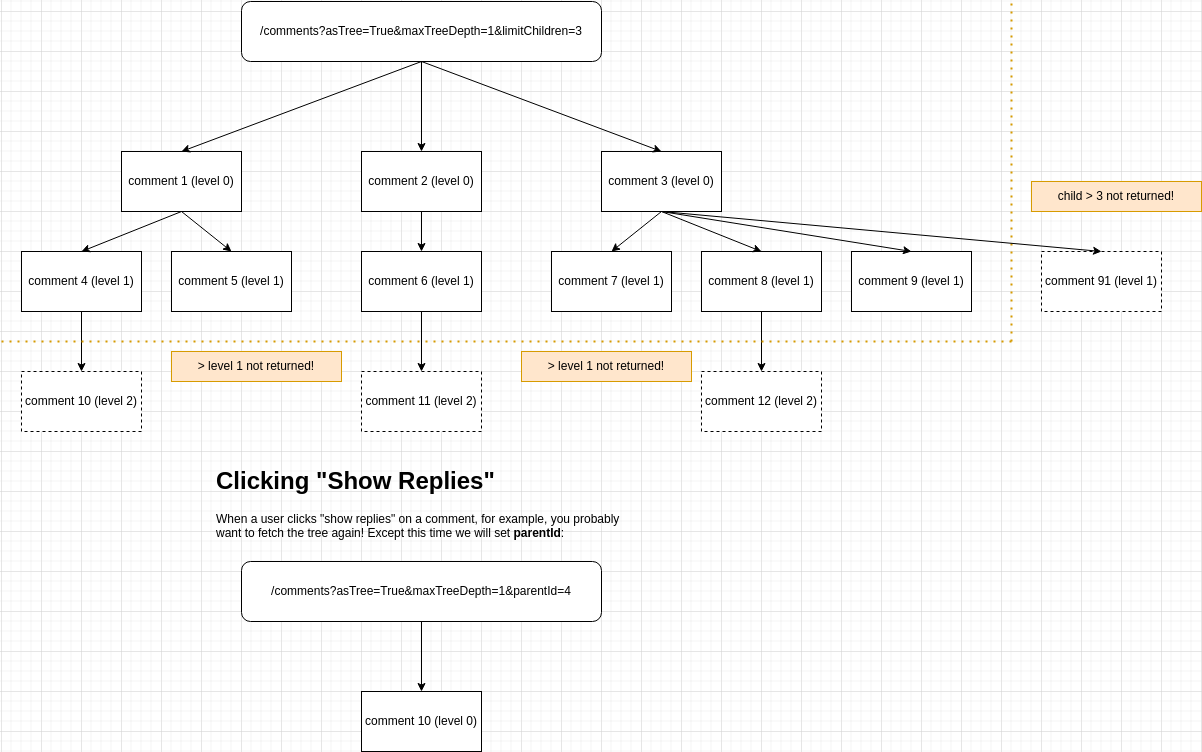
Bei Verwendung von asTree kann es schwierig sein, die Paginierung zu verstehen. Hier ist eine praktische Grafik:
Abrufen von Kommentaren im Kontext eines Benutzers
Die /comments‑API kann in zwei Kontexten für unterschiedliche Anwendungsfälle verwendet werden:
- Zum Zurückgeben von Kommentaren, sortiert und mit Informationen versehen, um Ihren eigenen Client zu bauen.
- In diesem Fall definieren Sie einen
contextUserId‑Abfrageparameter.
- In diesem Fall definieren Sie einen
- Zum Abrufen von Kommentaren von Ihrem Backend für benutzerdefinierte Integrationen.
- Die Plattform verwendet standardmäßig dies ohne
contextUserId.
- Die Plattform verwendet standardmäßig dies ohne
Kommentare als Baum abrufen
Es ist möglich, die zurückgegebenen Kommentare als Baum zu erhalten, wobei die Paginierung nur die Top‑Level‑Kommentare zählt.
Möchten Sie nur die Top‑Level‑Kommentare und die unmittelbaren Unterkommentare erhalten? Hier ist ein Weg:
Allerdings müssen Sie in Ihrer UI möglicherweise wissen, ob für jeden Kommentar ein „Antworten anzeigen“-Button angezeigt werden soll. Beim Abrufen von Kommentaren über einen Baum wird, falls zutreffend, eine hasChildren‑Eigenschaft an die Kommentare angehängt.
Kommentare als Baum abrufen, Suche nach Hashtag
Es ist möglich, über die API nach Hashtag zu suchen, über Ihren gesamten Mandanten hinweg (nicht auf eine Seite oder urlId beschränkt).
In diesem Beispiel lassen wir urlId weg und suchen nach mehreren Hashtags. Die API gibt nur Kommentare zurück, die alle angeforderten Hashtags enthalten.
Alle Anforderungsparameter
Die Antwort
Hilfreiche Tipps
URL-ID
Sie möchten wahrscheinlich die Comment‑API mit dem Parameter urlId verwenden. Sie können zuerst die Pages‑API aufrufen, um zu sehen, wie die für Sie verfügbaren urlId‑Werte aussehen.
Anonyme Aktionen
Für anonyme Kommentare sollten Sie wahrscheinlich anonUserId beim Abrufen von Kommentaren sowie beim Melden und Blockieren übergeben.
(!) Dies ist für viele App‑Stores erforderlich, da Benutzer in der Lage sein müssen, von ihnen sichtbare, von Benutzern erstellte Inhalte zu melden, selbst wenn sie nicht eingeloggt sind. Wenn Sie dies nicht tun, kann Ihre App aus dem jeweiligen Store entfernt werden.
Kommentare werden nicht zurückgegeben
Stellen Sie sicher, dass Ihre Kommentare genehmigt sind und nicht als Spam gelten.
GET /api/v1/comments/:id
Diese API bietet die Möglichkeit, einen einzelnen Kommentar nach ID abzurufen.
POST /api/v1/comments
Dieser API-Endpunkt bietet die Möglichkeit, Kommentare zu erstellen.
Häufige Anwendungsfälle sind benutzerdefinierte UIs, Integrationen oder Importe.
Hinweise:
- Diese API kann das Kommentar-Widget bei Bedarf "live" aktualisieren (dies erhöht
creditsCostvon1auf2). - Diese API erstellt automatisch Benutzerobjekte in unserem System, wenn eine E-Mail angegeben wird.
- Der Versuch, zwei Kommentare mit unterschiedlichen E-Mails, aber demselben Benutzernamen zu speichern, führt zu einem Fehler für den zweiten Kommentar.
- Wenn Sie
parentIdangeben und ein untergeordneter KommentarnotificationSentForParentauf false hat, werden wir Benachrichtigungen für den übergeordneten Kommentar senden. Dies geschieht stündlich (wir fassen die Benachrichtigungen zusammen, um die Anzahl der gesendeten E-Mails zu reduzieren). - Wenn Sie Willkommens-E-Mails beim Erstellen von Benutzern oder Kommentarverifizierungs-E-Mails senden möchten, setzen Sie
sendEmailsin den Query-Parametern auftrue. - Über diese API erstellte Kommentare erscheinen auf den Analytics- und Moderationsseiten der Admin-App.
- "Schlechte Wörter" werden weiterhin in den Kommentatornamen und im Kommentartext maskiert, wenn die Einstellung aktiviert ist.
- Über diese API erstellte Kommentare können bei Bedarf immer noch auf Spam überprüft werden.
- Konfigurationen wie die maximale Kommentarlänge, wenn über die Customization Rule Admin-Seite konfiguriert, gelten auch hier.
Die minimal erforderlichen Daten zur Übermittlung, die im Kommentar-Widget angezeigt werden, sind wie folgt:
Eine realistischere Anfrage könnte so aussehen:
PATCH /api/v1/comments/:id
Dieser API-Endpunkt bietet die Möglichkeit, einen einzelnen Kommentar zu aktualisieren.
Hinweise:
- Diese API kann das Kommentar-Widget "live" aktualisieren, falls gewünscht (dies erhöht die Grund-
creditsCostvon1auf2).- Dadurch kann das Migrieren von Kommentaren zwischen Seiten "live" erfolgen (Änderung von
urlId). - Migrationen kosten zusätzliche
2Credits, da Seiten vorab berechnet werden und dies CPU-intensiv ist.
- Dadurch kann das Migrieren von Kommentaren zwischen Seiten "live" erfolgen (Änderung von
- Im Gegensatz zur create API erstellt diese API NICHT automatisch Benutzerobjekte in unserem System, wenn eine E-Mail angegeben wird.
- Über diese API aktualisierte Kommentare können bei Bedarf weiterhin auf Spam geprüft werden.
- Konfigurationen wie die maximale Kommentarlänge, sofern über die Customization Rule Admin-Seite konfiguriert, gelten hier.
- Um Benutzern zu ermöglichen, ihren Kommentartext zu aktualisieren, können Sie einfach
commentim Request-Body angeben. Wir generieren das resultierendecommentHTML.- Wenn Sie sowohl
commentals auchcommentHTMLdefinieren, generieren wir das HTML nicht automatisch. - Wenn der Benutzer in seinem neuen Text Erwähnungen oder Hashtags hinzufügt, werden diese weiterhin wie bei der
POSTAPI verarbeitet.
- Wenn Sie sowohl
- Beim Aktualisieren von
commenterEmailan einem Kommentar ist es ratsam, auchuserIdanzugeben. Andernfalls müssen Sie sicherstellen, dass der Benutzer mit dieser E-Mail zu Ihrem Tenant gehört, sonst schlägt die Anfrage fehl. - Wenn der Zielkommentar gesperrt ist (
isLocked: true), wird die Anfrage mitcode: 'locked'abgelehnt. Entsperren Sie zuerst den Kommentar, aktualisieren Sie ihn und sperren Sie ihn anschließend bei Bedarf wieder.
DELETE /api/v1/comments/:id
Dieser API-Endpunkt bietet die Möglichkeit, einen Kommentar zu löschen.
Hinweise:
- Diese API kann das Kommentar-Widget bei Bedarf "live" aktualisieren (dies erhöht die
creditsCostvon1auf2). - Diese API löscht alle untergeordneten Kommentare.
- Wenn der Zielkommentar gesperrt ist (
isLocked: true), wird die Anfrage mitcode: 'locked'abgelehnt. Entsperren Sie zuerst den Kommentar, und löschen Sie ihn dann.
POST /api/v1/comments/:id/flag
Dieser API-Endpunkt bietet die Möglichkeit, einen Kommentar für einen bestimmten Benutzer zu melden.
Hinweise:
- Dieser Aufruf muss immer im Kontext eines Benutzers erfolgen. Der Benutzer kann ein FastComments.com-Benutzer, SSO-Benutzer oder Tenant-Benutzer sein.
- Wenn ein Flag-to-Hide-Schwellenwert festgelegt ist, wird der Kommentar automatisch live ausgeblendet, nachdem er die definierte Anzahl von Malen gemeldet wurde.
- Nachdem er automatisch nicht genehmigt (ausgeblendet) wurde - kann der Kommentar nur von einem Administrator oder Moderator wieder genehmigt werden. Das Aufheben der Meldung wird den Kommentar nicht wieder genehmigen.
Für anonymes Melden müssen wir eine anonUserId angeben. Dies kann eine ID sein, die die anonyme Sitzung repräsentiert, oder eine zufällige UUID.
Dies ermöglicht uns, das Melden und Aufheben der Meldung von Kommentaren zu unterstützen, auch wenn ein Benutzer nicht eingeloggt ist. Auf diese Weise kann der Kommentar als
gemeldet markiert werden, wenn Kommentare mit derselben anonUserId abgerufen werden.
POST /api/v1/comments/:id/un-flag
Dieser API-Endpunkt bietet die Möglichkeit, die Markierung eines Kommentars für einen bestimmten Benutzer aufzuheben.
Hinweise:
- Dieser Aufruf muss immer im Kontext eines Benutzers erfolgen. Der Benutzer kann ein FastComments.com-Benutzer, SSO-Benutzer oder Tenant-Benutzer sein.
- Nachdem ein Kommentar automatisch nicht genehmigt (ausgeblendet) wurde - kann der Kommentar nur von einem Administrator oder Moderator wieder genehmigt werden. Das Aufheben der Markierung wird den Kommentar nicht wieder genehmigen.
Für anonymes Markieren müssen wir eine anonUserId angeben. Dies kann eine ID sein, die die anonyme Sitzung repräsentiert, oder eine zufällige UUID.
POST /api/v1/comments/:id/block
Dieser API-Endpunkt bietet die Möglichkeit, einen Benutzer zu blockieren, der einen bestimmten Kommentar geschrieben hat. Es unterstützt das Blockieren von Kommentaren, die von FastComments.com-Benutzern, SSO-Benutzern und Tenant-Benutzern geschrieben wurden.
Es unterstützt einen commentIdsToCheck-Body-Parameter, um zu prüfen, ob andere potenziell sichtbare Kommentare auf dem Client nach dieser Aktion blockiert/entsperrt werden sollten.
Hinweise:
- Dieser Aufruf muss immer im Kontext eines Benutzers erfolgen. Der Benutzer kann ein FastComments.com-Benutzer, SSO-Benutzer oder Tenant-Benutzer sein.
- Die
userIdin der Anfrage ist der Benutzer, der das Blockieren durchführt. Zum Beispiel:Benutzer AmöchteBenutzer Bblockieren. Übergeben SieuserId=Benutzer Aund die Kommentar-ID, dieBenutzer Bgeschrieben hat. - Vollständig anonyme Kommentare (keine Benutzer-ID, keine E-Mail) können nicht blockiert werden und es wird ein Fehler zurückgegeben.
Für anonymes Blockieren müssen wir eine anonUserId angeben. Dies kann eine ID sein, die die anonyme Sitzung repräsentiert, oder eine zufällige UUID.
Dies ermöglicht uns, das Blockieren von Kommentaren zu unterstützen, auch wenn ein Benutzer nicht eingeloggt ist, indem die Kommentare mit derselben anonUserId abgerufen werden.
POST /api/v1/comments/:id/un-block
Dieser API-Endpunkt bietet die Möglichkeit, einen Benutzer zu entsperren, der einen bestimmten Kommentar geschrieben hat. Es unterstützt das Entsperren von Kommentaren, die von FastComments.com-Benutzern, SSO-Benutzern und Tenant-Benutzern geschrieben wurden.
Es unterstützt einen commentIdsToCheck-Body-Parameter, um zu prüfen, ob andere potenziell sichtbare Kommentare auf dem Client nach dieser Aktion blockiert/entsperrt werden sollten.
Hinweise:
- Dieser Aufruf muss immer im Kontext eines Benutzers erfolgen. Der Benutzer kann ein FastComments.com-Benutzer, SSO-Benutzer oder Tenant-Benutzer sein.
- Die
userIdin der Anfrage ist der Benutzer, der das Entsperren durchführt. Zum Beispiel:Benutzer AmöchteBenutzer Bentsperren. Übergeben SieuserId=Benutzer Aund die Kommentar-ID, dieBenutzer Bgeschrieben hat. - Vollständig anonyme Kommentare (keine Benutzer-ID, keine E-Mail) können nicht blockiert werden und es wird ein Fehler zurückgegeben.
E-Mail-Vorlagenstruktur
Ein EmailTemplate-Objekt repräsentiert die Konfiguration für eine benutzerdefinierte E-Mail-Vorlage für einen Tenant.
Das System wählt die zu verwendende E-Mail-Vorlage über:
- Ihren Typ-Identifikator, wir nennen dies
emailTemplateId. Dies sind Konstanten. - Die
domain. Wir versuchen zuerst, eine Vorlage für die Domain zu finden, mit der das zugehörige Objekt (wie einComment) verbunden ist, und wenn keine Übereinstimmung gefunden wird, versuchen wir, eine Vorlage zu finden, bei der domain null oder*ist.
Die Struktur des EmailTemplate-Objekts ist wie folgt:
Hinweise
- Sie können die gültigen
emailTemplateId-Werte vom/definitions-Endpunkt abrufen. - Der
/definitions-Endpunkt enthält auch die Standardübersetzungen und Testdaten. - Vorlagen können nicht gespeichert werden, wenn sie eine ungültige Struktur oder Testdaten haben.
GET /api/v1/email-templates/:id
Einzelne EmailTemplates können nach ihrer entsprechenden id abgerufen werden (NICHT emailTemplateId).
GET /api/v1/email-templates
Diese API verwendet Paginierung, bereitgestellt durch den page-Abfrageparameter. EmailTemplates werden in Seiten von 100 zurückgegeben, sortiert nach createdAt und dann id.
PATCH /api/v1/email-templates/:id
Dieser API-Endpunkt bietet die Möglichkeit, eine E-Mail-Vorlage zu aktualisieren, indem nur die ID und die zu aktualisierenden Attribute angegeben werden.
Beachten Sie, dass alle gleichen Validierungen für das Erstellen einer Vorlage auch gelten, zum Beispiel:
- Die Vorlage muss renderbar sein. Dies wird bei jeder Aktualisierung überprüft.
- Sie können keine doppelten Vorlagen für dieselbe Domain haben (ansonsten würde eine stillschweigend ignoriert werden).
POST /api/v1/email-templates
Dieser API-Endpunkt bietet die Möglichkeit, E-Mail-Vorlagen zu erstellen.
Hinweise:
- Sie können nicht mehrere Vorlagen mit derselben
emailTemplateIdund derselben Domain haben. - Sie können jedoch eine Wildcard-Vorlage (
domain=*) und eine domainspezifische Vorlage für dieselbeemailTemplateIdhaben. - Die Angabe von
domainist nur relevant, wenn Sie verschiedene Domains haben oder spezifische Vorlagen zum Testen verwenden möchten (domainauflocalhostusw. gesetzt). - Wenn Sie
domainangeben, muss es mit einerDomainConfigübereinstimmen. Bei einem Fehler wird eine Liste gültiger Domains bereitgestellt. - Die Vorlagensyntax ist EJS und wird mit einem Timeout von 500ms gerendert. P99 für das Rendern liegt bei <5ms, wenn Sie also 500ms erreichen, stimmt etwas nicht.
- Ihre Vorlage muss mit Ihren angegebenen
testDatagerendert werden, um zu speichern. Renderfehler werden aggregiert und im Dashboard gemeldet (bald über API verfügbar).
Die Mindestdaten, die zum Hinzufügen einer Vorlage erforderlich sind, sind wie folgt:
Möglicherweise möchten Sie Vorlagen pro Website haben, in diesem Fall definieren Sie domain:
POST /api/v1/email-templates/render
Dieser API-Endpunkt bietet die Möglichkeit, E-Mail-Vorlagen in der Vorschau anzuzeigen.
DELETE /api/v1/email-templates/:id
Diese Route ermöglicht das Entfernen einer einzelnen EmailTemplate nach ID.
FeedPost-Struktur
Ein FeedPost-Objekt stellt einen Beitrag in einem FastComments-Feed dar. Ein Feed ist ein Strom von Beiträgen mit eigenen Kommentar‑Threads, die vom Feed‑Widget gerendert werden. Jeder Beitrag hat einen Autor, optionalen Rich‑Content, Medien und Links und kann getaggt werden, sodass ein Feed gefiltert werden kann.
Die Struktur des FeedPost‑Objekts ist wie folgt:
- Einige dieser Felder sind mit
READONLYgekennzeichnet – sie werden von der API zurückgegeben, können aber nicht gesetzt werden. - Die Kommentare zu einem Beitrag sind reguläre Kommentare, deren
urlIdpost:gefolgt von der Beitrags‑_idist. Verwenden Sie diesen Wert mit der Comment‑API, um Kommentare zu einem Beitrag zu lesen oder zu erstellen.
GET /api/v1/feed-posts
Holt Beiträge in einem Feed, neueste zuerst. Die Paginierung ist cursor‑basiert: übergebe die _id des letzten erhaltenen Beitrags als
afterId, um die nächste Seite zu erhalten.
Kosten: ein Credit pro zehn zurückgegebene Beiträge, mindestens ein Credit.
POST /api/v1/feed-posts
Diese Route erstellt einen einzelnen FeedPost. Jeder Beitrag hat einen Autor, daher ist fromUserId erforderlich und muss die ID eines bestehenden FastComments- oder SSO-Benutzers
im Konto sein.
PATCH /api/v1/feed-posts/:id
Diese Route aktualisiert einen einzelnen FeedPost. Senden Sie nur die Felder, die Sie ändern möchten.
Hashtag-Struktur
Ein HashTag-Objekt repräsentiert ein Tag, das von einem Benutzer hinterlassen werden kann. HashTags können verwendet werden, um auf einen externen Inhalt zu verlinken oder um
zusammengehörige Kommentare zu verbinden.
Die Struktur des HashTag-Objekts ist wie folgt:
Hinweise:
- In einigen API-Endpunkten werden Sie sehen, dass der Hashtag in der URL verwendet wird. Denken Sie daran, Werte URL-zu-kodieren. Zum Beispiel sollte
#stattdessen als%23dargestellt werden. - Einige dieser Felder sind als
READONLYmarkiert - diese werden von der API zurückgegeben, können aber nicht gesetzt werden.
GET /api/v1/hash-tags
Diese API verwendet Paginierung, bereitgestellt durch den page-Abfrageparameter. HashTags werden in Seiten von 100 zurückgegeben, sortiert nach tag.
PATCH /api/v1/hash-tags/:tag
Diese Route bietet die Möglichkeit, einen einzelnen HashTag zu aktualisieren.
POST /api/v1/hash-tags
Diese Route bietet die Möglichkeit, einen einzelnen HashTag hinzuzufügen.
POST /api/v1/hash-tags/bulk
Diese Route bietet die Möglichkeit, bis zu 100 HashTag-Objekte auf einmal hinzuzufügen.
DELETE /api/v1/hash-tags/:tag
Diese Route ermöglicht das Entfernen eines HashTag-Benutzers anhand des angegebenen Tags.
Beachten Sie, dass Hashtags, sofern die automatische HashTag-Erstellung nicht deaktiviert ist, von einem Benutzer neu erstellt werden können, indem er beim Kommentieren den Hashtag angibt.
GET /api/v1/me
Beschreibt das Anmeldeinformation, das die Anfrage stellt: den Mandanten, zu dem es gehört, und bei OAuth‑Zugriffstoken den Benutzer, der die Anwendung autorisiert hat. Integrationen verwenden es, um eine Verbindung zu testen und zu kennzeichnen.
Bei einem API‑Schlüssel identifiziert die Antwort nur den Mandanten. Bei einem OAuth‑Bearer‑Token enthält sie außerdem den autorisierenden Benutzer und die gewährten Berechtigungen.
Moderatorstruktur
Ein Moderator-Objekt repräsentiert die Konfiguration für einen Moderator.
Es gibt drei Arten von Moderatoren:
- Administratorbenutzer, die das
isCommentModeratorAdmin-Flag haben. - SSO-Benutzer mit dem
isCommentModeratorAdmin-Flag. - Reguläre Kommentatoren oder FastComments.com-Benutzer, die als Moderatoren eingeladen werden.
Die Moderator-Struktur wird verwendet, um den Moderationsstatus von Anwendungsfall 3 darzustellen.
Wenn Sie einen Benutzer über die API als Moderator einladen möchten, verwenden Sie die Moderator-API, indem Sie einen Moderator erstellen und ihn einladen.
Wenn der Benutzer kein FastComments.com-Konto hat, hilft ihm die Einladungs-E-Mail bei der Einrichtung. Wenn er bereits ein Konto hat, erhält er
Moderationszugriff auf Ihren Tenant und die userId des Moderator-Objekts wird aktualisiert, um auf seinen Benutzer zu verweisen. Sie werden keinen API-Zugriff
auf seinen Benutzer haben, da dieser in diesem Fall ihm selbst gehört und von FastComments.com verwaltet wird.
Wenn Sie eine vollständige Verwaltung des Benutzerkontos benötigen, empfehlen wir entweder die Verwendung von SSO oder das Hinzufügen als Tenant-Benutzer und
dann das Hinzufügen eines Moderator-Objekts, um ihre Statistiken zu verfolgen.
Die Moderator-Struktur kann als Statistik-Verfolgungsmechanismus für die Anwendungsfälle 1 und 2 verwendet werden. Nachdem Sie den Benutzer erstellt haben, fügen Sie ein Moderator-Objekt
mit definierter userId hinzu und ihre Statistiken werden auf der Kommentar-Moderatoren-Seite verfolgt.
Die Struktur des Moderator-Objekts ist wie folgt:
GET /api/v1/moderators/:id
Diese Route gibt einen einzelnen Moderator nach seiner ID zurück.
GET /api/v1/moderators
Diese API verwendet Paginierung, bereitgestellt durch den skip-Abfrageparameter. Moderatoren werden in Seiten von 100 zurückgegeben, sortiert nach createdAt und id.
Die Kosten basieren auf der Anzahl der zurückgegebenen Moderatoren und kosten 1 Credit pro 10 zurückgegebene Moderatoren.
PATCH /api/v1/moderators/:id
Dieser API-Endpunkt bietet die Möglichkeit, einen Moderator nach id zu aktualisieren.
Das Aktualisieren eines Moderator hat folgende Einschränkungen:
- Die folgenden Werte dürfen beim Aktualisieren eines
Moderatornicht angegeben werden:acceptedInvitemarkReviewedCountdeletedCountmarkedSpamCountapprovedCounteditedCountbannedCountverificationIdcreatedAt
- Wenn eine
userIdangegeben wird, muss dieser Benutzer existieren. - Wenn eine
userIdangegeben wird, muss sie zum selbentenantIdgehören, der in den Abfrageparametern angegeben ist. - Zwei Moderatoren im selben Tenant können nicht mit derselben
emailhinzugefügt werden. - Sie können die mit einem
ModeratorverknüpftetenantIdnicht ändern.
POST /api/v1/moderators
Diese Route bietet die Möglichkeit, einen einzelnen Moderator hinzuzufügen.
Das Erstellen eines Moderator hat folgende Einschränkungen:
- Ein
nameund eineemailmüssen immer angegeben werden. EineuserIdist optional. - Die folgenden Werte dürfen beim Erstellen eines
Moderatornicht angegeben werden:acceptedInvitemarkReviewedCountdeletedCountmarkedSpamCountapprovedCounteditedCountbannedCountverificationIdcreatedAt
- Wenn eine
userIdangegeben wird, muss dieser Benutzer existieren. - Wenn eine
userIdangegeben wird, muss sie zum selbentenantIdgehören, der in den Abfrageparametern angegeben ist. - Zwei Moderatoren im selben Tenant können nicht mit derselben
emailhinzugefügt werden.
Wir können einen Moderator für einen Benutzer erstellen, von dem wir nur die E-Mail kennen:
Oder wir können einen Moderator für einen Benutzer erstellen, der zu unserem Tenant gehört, um seine Moderationsstatistiken zu verfolgen:
POST /api/v1/moderators/:id/send-invite
Diese Route bietet die Möglichkeit, einen einzelnen Moderator einzuladen.
Die folgenden Einschränkungen gelten für das Senden einer Einladungs-E-Mail an einen Moderator:
- Der
Moderatormuss bereits existieren. - Der
fromNamedarf nicht länger als100 Zeichensein.
Hinweise:
- Wenn ein Benutzer mit der angegebenen E-Mail bereits existiert, wird er eingeladen, die Kommentare Ihres Tenants zu moderieren.
- Wenn ein Benutzer mit der angegebenen E-Mail nicht existiert, führt der Einladungslink ihn durch die Erstellung seines Kontos.
- Die Einladung läuft nach
30 Tagenab.
Wir können einen Moderator für einen Benutzer erstellen, von dem wir nur die E-Mail kennen:
Dies sendet eine E-Mail wie Bob bei TenantName lädt Sie ein, Moderator zu werden...
DELETE /api/v1/moderators/:id
Diese Route ermöglicht das Entfernen eines Moderator nach ID.
Benachrichtigungszählerstruktur
Ein NotificationCount-Objekt repräsentiert die Anzahl ungelesener Benachrichtigungen und Metadaten für einen Benutzer.
Wenn es keine ungelesenen Benachrichtigungen gibt, existiert kein NotificationCount für den Benutzer.
NotificationCount-Objekte werden automatisch erstellt und können nicht über die API erstellt werden. Sie laufen auch nach einem Jahr ab.
Sie können den Zähler für ungelesene Benachrichtigungen eines Benutzers löschen, indem Sie seinen NotificationCount löschen.
Die Struktur des NotificationCount-Objekts ist wie folgt:
GET /api/v1/notification-count/:user_id
Diese Route gibt einen einzelnen NotificationCount nach Benutzer-ID zurück. Bei SSO hat die Benutzer-ID das Format <tenant id>:<user id>.
Wenn es keine ungelesenen Benachrichtigungen gibt, existiert kein NotificationCount - Sie erhalten also einen 404-Fehler.
Dies unterscheidet sich von notifications/count dadurch, dass es viel schneller ist, aber keine Filterung erlaubt.
DELETE /api/v1/notification-count/:user_id
Diese Route löscht einen einzelnen NotificationCount nach Benutzer-ID. Bei SSO hat die Benutzer-ID das Format <tenant id>:<user id>.
Dadurch wird der Zähler für ungelesene Benachrichtigungen des Benutzers gelöscht (die rote Glocke im Kommentar-Widget wird ausgeblendet und der Zähler verschwindet).
Benachrichtigungsstruktur
Ein Notification-Objekt repräsentiert eine Benachrichtigung für einen Benutzer.
Notification-Objekte werden automatisch erstellt und können nicht über die API erstellt werden. Sie laufen auch nach einem Jahr ab.
Benachrichtigungen können nicht gelöscht werden. Sie können jedoch aktualisiert werden, um viewed auf false zu setzen, und Sie können nach viewed abfragen.
Ein Benutzer kann sich auch von Benachrichtigungen für einen bestimmten Kommentar abmelden, indem er optedOut in der Benachrichtigung auf true setzt. Sie können sich wieder anmelden, indem Sie es auf false setzen.
Es gibt verschiedene Benachrichtigungstypen - prüfen Sie relatedObjectType und type.
Die Art und Weise, wie Benachrichtigungen erstellt werden, ist recht flexibel und kann durch viele Szenarien ausgelöst werden (siehe NotificationType).
Stand heute bedeutet die Existenz einer Notification nicht tatsächlich, dass eine E-Mail gesendet wird oder werden sollte. Vielmehr werden die Benachrichtigungen
für den Benachrichtigungs-Feed und verwandte Integrationen verwendet.
Die Struktur des Notification-Objekts ist wie folgt:
GET /api/v1/notifications
Diese Route gibt bis zu 30 Notification-Objekte zurück, sortiert nach createdAt, neueste zuerst.
Sie können nach userId filtern. Bei SSO hat die Benutzer-ID das Format <tenant id>:<user id>.
GET /api/v1/notifications/count
Diese Route gibt ein Objekt zurück, das die Anzahl der Benachrichtigungen unter einem count-Parameter enthält.
Sie ist langsamer als /notification-count/ und kostet doppelt so viele Credits, ermöglicht aber die Filterung nach mehr Dimensionen.
Sie können nach denselben Parametern wie beim /notifications-Endpunkt filtern, wie z.B. userId. Bei SSO hat die Benutzer-ID das Format <tenant id>:<user id>.
PATCH /api/v1/notifications/:id
Dieser API-Endpunkt bietet die Möglichkeit, eine Notification nach id zu aktualisieren.
Das Aktualisieren einer Notification hat folgende Einschränkungen:
- Sie können nur die folgenden Felder aktualisieren:
viewedoptedOut
Seitenreaktionen Öffentliche API
Page Reacts ermöglichen es Ihren Benutzern, eine Seite zu liken oder mit Ihren eigenen Reaktionsbildern darauf zu reagieren. Das Page Reacts widget und das Floating Likes‑Widget basieren auf diesen Endpunkten, und Sie können sie selbst aufrufen, um Ihren eigenen Like‑Button zu erstellen.
Im Gegensatz zum Rest dieses Leitfadens sind die Page Reacts‑Endpunkte öffentlich. Sie werden aus den Browsern Ihrer Benutzer aufgerufen, benötigen keinen API‑Schlüssel und kosten keine API‑Credits. Jede Reaktion gehört dem Benutzer, der die Anfrage stellt, sodass ein Benutzer nur seine eigenen hinzufügen oder entfernen kann.
Es gibt zwei Sätze von Endpunkten:
/page-reacts/v1/likes/:tenantId– ein einzelnes „Like“ pro Benutzer pro Seite. Verwenden Sie diese für einen Like‑Button./page-reacts/v2/:tenantId– mehrere Reaktionen pro Seite, jede identifiziert durch eine kurzeid, die Sie wählen (z. B.heartoderlaugh).
Beide sind auch in unseren SDKs als Teil der PublicApi verfügbar, zum Beispiel getV1PageLikes, createV1PageReact und deleteV1PageReact im JavaScript SDK.
Anzeigen, wer reagiert hat
Übergeben Sie includeUserInfo=public an die GET‑Endpunkte, um ebenfalls die Benutzer zu erhalten, die geliked oder reagiert haben, mit ihren Benutzernamen und Avataren, sortiert nach dem neuesten zuerst. Benutzer, die ihre Profilaktivität privat gestellt haben, sowie anonyme Benutzer werden weggelassen. Bis zu 100 Reaktionen werden zurückgegeben.
SSO‑Benutzer werden mit privater Profilaktivität erstellt, es sei denn, Ihre SSO‑Payload setzt isProfileActivityPrivate auf false; setzen Sie sie also für die Benutzer, die in diesen Listen erscheinen sollen.
Auf Seiten, die SSO erfordern, können nur SSO‑Benutzer, die die Seite ansehen dürfen, auflisten, wer reagiert hat. Andere erhalten einen 403 mit dem Code sso-required oder page-forbidden.
Von Ihrem Server aus geben GET /api/v1/pages/likes und GET /api/v1/pages/reacts dieselben Listen mit einem API‑Schlüssel zurück und akzeptieren außerdem includeUserInfo=include-private, um Benutzer mit privaten Profilen einzuschließen.
Identifizierung des Benutzers
Reaktionen sind an den Benutzer gebunden, der die Anfrage stellt:
- SSO‑Benutzer: übergeben Sie den
sso‑Abfrageparameter, der auf das URI‑kodierte JSON desselben SSO‑Objekts gesetzt ist, das Sie dem Kommentar‑Widget geben. Siehe SSO. - Anonyme Benutzer: wenn kein
sso‑Parameter und kein FastComments‑Login vorhanden ist, weist der Server dem Browser eine anonyme ID zu, die im FastComments‑Session‑Cookie gespeichert wird. Senden Sie Anfragen mitcredentials: 'include', damit das Cookie zwischen den Anfragen erhalten bleibt. Browser, die Drittanbieter‑Cookies blockieren, behalten die anonyme ID nicht, daher sollten Sie SSO verwenden, wenn jeder Benutzer zuverlässig erkannt werden muss.
Die urlId
urlId identifiziert die Seite, genauso wie bei Kommentaren. Verwenden Sie dieselbe urlId, die Sie dem Kommentar‑Widget geben, damit Likes und Kommentare auf derselben Seite gezählt werden. Denken Sie daran, sie URI‑zu kodieren.
GET /page-reacts/v1/likes/:tenantId
Gibt die Anzahl der Likes auf einer Seite zurück und ob der aktuelle Benutzer sie geliked hat. Seiten, die noch nicht existieren, geben einen likeCount von 0 zurück.
Verwenden Sie includeUserInfo=public, um ebenfalls die Benutzer zu erhalten, die die Seite geliked haben, wobei die neuesten zuerst angezeigt werden. Benutzer mit privater Profilaktivität und anonyme Benutzer werden ausgeschlossen, und es werden bis zu 100 Likes abgefragt. Hier wird nur public akzeptiert; include-private liefert einen 422 und ist über GET /api/v1/pages/likes mit einem API‑Schlüssel verfügbar. Auf Seiten, die SSO erfordern, gibt includeUserInfo einen 403 zurück für Benutzer, die die Seite nicht anzeigen können.
POST /page-reacts/v1/likes/:tenantId
Gefällt einer Seite als aktueller Benutzer. Jeder Benutzer kann einer Seite nur einmal ein Like geben: Ein erneutes Liken schlägt mit dem Code already-liked erfolgreich durch und ändert die Zählung nicht.
Die Seite wird erstellt, falls sie noch nicht existiert. Übergeben Sie title, um den Titel der Seite festzulegen oder zu aktualisieren.
DELETE /page-reacts/v1/likes/:tenantId
Entfernt das Like des aktuellen Benutzers von einer Seite. Wenn der Benutzer die Seite nicht geliked hat, schlägt die Anfrage mit dem Code not-liked erfolgreich ab und ändert die Anzahl nicht.
GET /page-reacts/v2/:tenantId
Gibt die Anzahl für jede Reaktion auf einer Seite zurück und welche Reaktionen der aktuelle Benutzer hinzugefügt hat.
Verwenden Sie includeUserInfo=public, um auch die Benutzer zu erhalten, die reagiert haben, als einen Eintrag pro Reaktion mit seiner Reaktions‑ID, neueste zuerst. Benutzer mit privater Profilaktivität und anonyme Benutzer werden ausgelassen, und bis zu 100 Reaktionen werden abgefragt. Hier wird nur public akzeptiert; include-private liefert einen 422 und ist über GET /api/v1/pages/reacts mit einem API‑Schlüssel verfügbar. Auf Seiten, die SSO erfordern, gibt includeUserInfo einen 403 zurück für Benutzer, die die Seite nicht anzeigen dürfen.
GET /page-reacts/v2/:tenantId/list
Gibt die Namen der Benutzer zurück, die einer Seite eine Reaktion hinzugefügt haben, alphabetisch sortiert. Es werden bis zu 100 Reaktionen abgefragt, und anonyme Benutzer sowie Benutzer mit privater Profilaktivität werden nicht einbezogen. Auf Seiten, die SSO erfordern, erhalten Benutzer, die die Seite nicht anzeigen können, einen 403 mit dem Code sso-required oder page-forbidden.
Um auch Avatare und Benutzer‑IDs zu erhalten, verwenden Sie GET /page-reacts/v2/:tenantId mit includeUserInfo=public.
POST /page-reacts/v2/:tenantId
Fügt einer Seite als aktueller Benutzer eine Reaktion hinzu. Ein Benutzer kann jede Reaktions-ID nur einmal hinzufügen: Ein erneutes Hinzufügen schlägt mit dem Code already-reacted fehl und ändert die Zählung nicht. Ein Benutzer kann mehrere verschiedene Reaktionen zur selben Seite hinzufügen.
Reaktions-IDs werden von Ihnen gewählt und können bis zu 36 Zeichen lang sein. Die Seite wird erstellt, falls sie noch nicht existiert. Übergeben Sie title, um den Titel der Seite zu setzen oder zu aktualisieren.
DELETE /page-reacts/v2/:tenantId
Entfernt eine der Reaktionen des aktuellen Benutzers von einer Seite. Wenn der Benutzer diese Reaktion nicht hinzugefügt hat, ist die Anfrage erfolgreich mit dem Code no-react und ändert die Anzahl nicht.
Seitenstruktur
Ein Page-Objekt repräsentiert die Seite, zu der viele Kommentare gehören können. Diese Beziehung wird durch
urlId definiert.
Eine Page speichert Informationen wie den Seitentitel, die Kommentaranzahl und die urlId.
Die Struktur des Page-Objekts ist wie folgt:
GET /api/v1/pages
Sie können derzeit nur alle Seiten (oder eine einzelne Seite über /by-url-id) abrufen, die mit Ihrem Konto verknüpft sind. Wenn Sie eine feinere Suche wünschen, kontaktieren Sie uns.
Hilfreicher Tipp
Die Comment-API erfordert eine urlId. Sie können zuerst die Pages-API aufrufen, um zu sehen, wie die verfügbaren urlId-Werte
aussehen.
GET /api/v1/pages/by-url-id
Einzelne Seiten können nach ihrer entsprechenden urlId abgerufen werden. Dies kann nützlich sein, um Seitentitel oder Kommentaranzahlen nachzuschlagen.
Hilfreicher Tipp
Denken Sie daran, Werte wie die urlId URL-zu-kodieren.
GET /api/v1/pages/likes
Gibt die Anzahl der Likes auf einer Seite zurück und optional die Benutzer, die sie geliked haben, zuletzt zuerst. Dies ist die serverseitige Version von GET /page-reacts/v1/likes/:tenantId.
includeUserInfo steuert, welche Benutzer zurückgegeben werden:
publiclässt Benutzer weg, die ihre Profilaktivität privat gestellt haben.include-privateschließt sie ein. Verwenden Sie dies nur, wenn die Liste nicht öffentlich angezeigt wird.
Anonyme Benutzer werden niemals einbezogen, und bis zu 100 Likes werden abgefragt. Seiten, die nicht existieren, geben einen likeCount von 0 und eine leere users‑Liste zurück.
Nützlicher Hinweis
Denken Sie daran, Werte wie die urlId URI‑zu kodieren.
GET /api/v1/pages/reacts
Gibt die Anzahl für jede Reaktion auf einer Seite zurück und optional die Benutzer, die reagiert haben, als ein Eintrag pro Reaktion mit seiner Reaktions‑ID, neueste zuerst. Dies ist die serverseitige Version von GET /page-reacts/v2/:tenantId.
includeUserInfo steuert, welche Benutzer zurückgegeben werden:
publiclässt Benutzer weg, die ihre Profilaktivität privat gemacht haben.include-privateschließt sie ein. Verwenden Sie dies nur, wenn die Liste nicht öffentlich angezeigt wird.
Anonyme Benutzer werden niemals einbezogen, und bis zu 100 Reaktionen werden abgefragt. Seiten, die nicht existieren, geben keine counts zurück und eine leere users‑Liste.
Hilfreicher Hinweis
Denken Sie daran, Werte wie die urlId URI‑zu kodieren.
PATCH /api/v1/pages/:id
Diese Route bietet die Möglichkeit, eine einzelne Page zu aktualisieren. Die entsprechenden Kommentare werden aktualisiert.
Hinweis
Einige Parameter im Page-Objekt werden automatisch aktualisiert. Dies sind die Zähl- und Titel-Attribute. Zähler können nicht über
die API aktualisiert werden, da es sich um berechnete Werte handelt. Der Seiten-title kann über die API gesetzt werden, würde aber überschrieben werden, wenn das Kommentar-Widget auf
einer Seite mit derselben urlId und einem anderen Seitentitel verwendet wird.
POST /api/v1/pages
Dieser API-Endpunkt bietet die Möglichkeit, Seiten zu erstellen.
Ein häufiger Anwendungsfall ist die Zugriffskontrolle.
Hinweise:
- Wenn Sie einen Kommentar in einem Kommentar-Thread hinterlassen oder die API aufgerufen haben, um einen
Commentzu erstellen, haben Sie bereits einPage-Objekt erstellt! Sie können versuchen, es über die/by-url-idPage-Route abzurufen, indem Sie dieselbeurlIdübergeben, die an das Kommentar-Widget übergeben wurde. - Die
Page-Struktur enthält einige berechnete Werte. Derzeit sind diescommentCountundrootCommentCount. Sie werden automatisch befüllt und können nicht über die API gesetzt werden. Der Versuch, dies zu tun, führt dazu, dass die API einen Fehler zurückgibt.
DELETE /api/v1/pages/:id
Diese Route ermöglicht das Entfernen einer einzelnen Seite nach ID.
Beachten Sie, dass die Interaktion mit dem Kommentar-Widget für eine Seite mit derselben urlId die Page einfach nahtlos neu erstellt.
Umfrage-Struktur
Ein Poll ist an einen Kommentar angehängt, anstatt ein eigenständiges Objekt zu sein. Es wird zusammen mit dem Kommentar erstellt (siehe POST /api/v1/comments), oder später zu einem bestehenden Kommentar hinzugefügt mit PUT /api/v1/polls/:commentId.
Die Stimmenzahlen werden direkt in der Umfrage gespeichert, sodass das Auslesen einer Umfrage Ihnen die Ergebnisse liefert, ohne dass Sie etwas zusammenzählen müssen. Die einzelnen Stimmen hinter diesen Zahlen sind PollVote‑Objekte.
Jede Option hat eine id, die beim Erstellen der Umfrage generiert wird. Diese id verwenden Sie, um eine Stimme abzugeben, eine Option umzubenennen und eine Option (und ihre Stimmen) beizubehalten, wenn Sie die Umfrage mit PUT aktualisieren und Optionen hinzufügen oder entfernen. Sie ist die einzige sichere Möglichkeit, sich auf eine Option zu beziehen – niemals auf ihre Position in der Liste.
Limits
- Eine Frage ist erforderlich und darf höchstens 200 Zeichen lang sein.
- Eine Umfrage hat zwischen 2 und 10 Optionen.
- Eine Optionsbezeichnung ist erforderlich, darf höchstens 100 Zeichen lang sein und muss innerhalb der Umfrage eindeutig sein (Groß‑/Kleinschreibung wird ignoriert).
closesAtmuss beim Erstellen der Umfrage in der Zukunft liegen. Um eine Umfrage sofort zu schließen, führen Sie einPATCHmit einem Datum in der Vergangenheit aus.
Site Settings
Umfragen folgen Ihrer Seitenkonfiguration, die Sie unter Customize Widget ändern können:
- Umfragen müssen aktiviert sein, bevor eine Umfrage erstellt werden kann, sonst antwortet die API mit
polls-disabled. - Die Abstimmung kann auf angemeldete Benutzer beschränkt werden; in diesem Fall wird eine Stimme, die nur mit einer
anonUserIdgesendet wird, mitpoll-login-requiredabgelehnt.
GET /api/v1/polls/:commentId
Liest die an einen Kommentar angehängte Umfrage, mit ihren aktuellen Stimmenzahlen.
Umfragen werden auch im Kommentar selbst von den Kommentar-APIs zurückgegeben, verwenden Sie dies also, wenn Sie nur die Ergebnisse und nicht den gesamten Kommentar benötigen.
Ein Kommentar, der keine Umfrage hat, ein gelöschter Kommentar und eine Kommentar-ID, die nicht existiert, antworten alle
auf dieselbe Weise, mit poll-not-found.
PUT /api/v1/polls/:commentId
Fügt einer bestehenden Kommentar eine Umfrage hinzu oder setzt den vollständigen Zustand der bereits vorhandenen Umfrage.
Der Body ist die komplette Umfrage, und die Optionen, die Sie senden, werden zu den Umfrageoptionen, in dieser Reihenfolge. Jede Option wird anhand ihrer id zugeordnet:
- Eine Option, die mit der
ideiner bestehenden Option gesendet wird, behält diese Option und deren Stimmen. Ihre Bezeichnung und Position werden auf das von Ihnen gesendete aktualisiert. - Eine Option, die ohne
idgesendet wird, wird hinzugefügt, ohne Stimmen. - Eine bestehende Option, die Sie weglassen, wird entfernt, zusammen mit den darauf abgegebenen Stimmen.
totalVotessinkt um denselben Betrag.
Um also eine Option hinzuzufügen, senden Sie die aktuellen Optionen mit ihren IDs plus die neue ohne ID. Um eine zu entfernen, senden Sie die Liste ohne sie. Die Options-IDs finden Sie in der Umfrage, die von GET /api/v1/polls/:commentId zurückgegeben wird.
Wenn Sie überhaupt keine IDs senden, werden alle Optionen ersetzt und jede bereits abgegebene Stimme in der Umfrage gelöscht. Hat die Umfrage Stimmen, erfordert dies replaceVotes=true; ohne diese Angabe antwortet die API mit replace-votes-required.
Die anderen Felder werden ebenfalls ersetzt: Wenn Sie closesAt, privacy oder requireVoteToSeeResults weglassen, wird der Standardwert wiederhergestellt. Um ein einzelnes Feld zu ändern und die anderen unverändert zu lassen, verwenden Sie PATCH /api/v1/polls/:commentId.
Other Notes
- Eine
id, die nicht in der Umfrage vorhanden ist, oder dieselbeidzweimal angegeben, schlägt mitpoll-invalidfehl. Ein Kommentar ohne Umfrage hat noch keine Options-IDs, daher muss jede an ihn gesendete Option dieidweglassen. - Die Umfrage‑Privatsphäre kann nach Stimmen eingeschränkt, aber nicht erweitert werden.
- Diese API beachtet Ihre Site‑Einstellungen. Wenn Umfragen für die Site oder Seite nicht aktiviert sind, schlägt sie mit
polls-disabledfehl. - Ein gesperrter Kommentar kann seine Umfrage nicht ändern und schlägt mit
lockedfehl. - Verbundenen Widgets werden live aktualisiert, sodass Betrachter die neue Umfrage ohne Neuladen sehen.
PATCH /api/v1/polls/:commentId
Bearbeitet eine Umfrage, ohne deren Stimmen zu verändern. Verwenden Sie dies, um einen Tippfehler in der Frage oder einer Option zu korrigieren, die Umfrage zu schließen oder wieder zu öffnen oder zu ändern, wer sehen darf, wer abgestimmt hat.
Optionen werden über ihre id adressiert, und ein PATCH benennt die von Ihnen angegebenen um. Um Optionen hinzuzufügen, zu entfernen oder neu zu ordnen, senden Sie die vollständige Optionsliste an PUT /api/v1/polls/:commentId: Optionen, die Sie mit ihren IDs senden, behalten dort ebenfalls ihre Stimmen.
Jedes Feld ist optional, aber es muss mindestens eines angegeben werden.
Weitere Hinweise
- Das Benennen einer Options-ID, die nicht in der Umfrage vorhanden ist, schlägt mit
poll-invalidfehl, anstatt stillschweigend nichts zu tun. - Bezeichnungen müssen innerhalb der Umfrage eindeutig bleiben, wobei die Optionen, die Sie nicht ändern, mitgezählt werden.
- Im Gegensatz zum Erstellen einer Umfrage kann
closesAthier in der Vergangenheit liegen – das ist die Methode, um eine Umfrage sofort zu schließen. - Die Umfrage-Privatsphäre kann eingeschränkt, aber nicht erweitert werden, sobald Stimmen vorhanden sind.
- Ein gesperrter Kommentar kann seine Umfrage nicht ändern und schlägt mit
lockedfehl.
DELETE /api/v1/polls/:commentId
Entfernt eine Umfrage aus ihrem Kommentar, zusammen mit allen darauf abgegebenen Stimmen. Der Kommentar selbst bleibt unverändert.
Das Löschen des Kommentars entfernt ebenfalls seine Umfrage und Stimmen, daher wird dies nur benötigt, wenn Sie den Kommentar behalten möchten.
Umfrageabstimmung-Struktur
Ein PollVote ist die Antwort einer Person auf eine Umfrage. Die auf der Umfrage selbst angezeigten Zähler werden mit diesen synchron gehalten, sodass Sie diese nur benötigen, wenn Sie wissen wollen wer für was gestimmt hat, anstatt die Gesamtsummen.
Ein Wähler hat höchstens eine Stimme pro Umfrage. Ein erneutes Abstimmen verschiebt seine bestehende Stimme zur neuen Option, anstatt eine zweite hinzuzufügen, und updatedAt zeichnet auf, wann das geschehen ist.
voterId ist die userId, wenn der Wähler eingeloggt war, und sonst die anonUserId.
Privacy
Die privacy‑Einstellung der Umfrage gilt für diese API auf dieselbe Weise wie im Kommentar‑Widget:
- Anonymous (Standard): Niemand kann sehen, wie jemand abgestimmt hat, daher können die Stimmen nicht gelesen werden.
GET /api/v1/poll-votesundGET /api/v1/poll-votes/:idantworten mitpoll-anonymous. Die Zähler der Umfrage sind weiterhin überGET /api/v1/polls/:commentIdverfügbar. - Admins und Moderatoren: Ihr API‑Schlüssel gehört dem Administrator Ihrer Seite, sodass er die Stimmen lesen kann.
- Jeder: Die Stimmen können gelesen werden.
Die Privatsphäre einer Umfrage kann nach dem ersten Stimmen abgegeben werden eingeschränkt, aber nicht erweitert werden.
GET /api/v1/poll-votes
Listet die einzelnen Stimmen hinter den Zählerwerten einer Umfrage auf, älteste zuerst. Ein Guthaben pro 100 zurückgegebene Stimmen.
Eine Umfrage gehört zu einem Kommentar, daher werden Stimmen jeweils einer Umfrage nach gelesen und commentId ist erforderlich. Eingrenzen kann man weiter mit voterId, um zu prüfen, wie eine Person abgestimmt hat, oder mit optionId, um alle aufzulisten, die eine bestimmte Option gewählt haben.
Pro Aufruf werden maximal 1000 Stimmen zurückgegeben. Verwenden Sie skip, um weitere Seiten abzurufen.
Die privacy‑Einstellung der Umfrage wird respektiert: Die Stimmen einer anonymen Umfrage können nicht gelesen werden, und die Anfrage schlägt mit poll-anonymous fehl. Siehe die PollVote‑Struktur für Details.
Counting Votes Per Option
Sie müssen diese nicht zusammenzählen, um die Ergebnisse zu erhalten – die Umfrage enthält ihre eigenen Zähler. Lesen Sie stattdessen die Umfrage mit GET /api/v1/polls/:commentId und verwenden Sie diese API, wenn Sie wissen müssen, wer abgestimmt hat.
Every Poll On A Page
Es gibt keine seitenweite Auflistung der Stimmen. Um über eine gesamte Seite zu berichten, rufen Sie deren Kommentare mit GET /api/v1/comments ab, die für jeden Kommentar die Umfrage und deren Zähler zurückgeben, und lesen Sie anschließend die Stimmen der Umfragen, die Sie interessieren.
GET /api/v1/poll-votes/:id
Liest eine einzelne Umfrageabstimmung anhand ihrer ID.
Eine Abstimmung bei einer anonymen Umfrage kann nicht gelesen werden, und die Anfrage schlägt mit poll-anonymous fehl. Siehe die PollVote-Struktur, um zu erfahren, wie die privacy-Einstellung der Umfrage angewendet wird.
POST /api/v1/poll-votes
Erfasst eine Stimme zu einer Umfrage.
Ein Wähler hat höchstens eine Stimme pro Umfrage. Wenn diese Methode erneut für denselben Wähler aufgerufen wird, wird seine Stimme auf die neue Option verschoben, anstatt eine zweite hinzuzufügen, und das Abstimmen für die bereits gewählte Option bewirkt nichts.
Die Antwort enthält die Umfrage, sodass Sie die aktualisierten Zähler ohne eine zweite Anfrage erhalten.
Anonyme Stimmen
Setzen Sie anonUserId anstelle von userId, um eine Stimme für jemanden zu erfassen, der nicht eingeloggt ist. Diese ID muss nicht mit einem Benutzer irgendwo übereinstimmen – sie identifiziert lediglich die Sitzung, sodass dieselbe Person nicht doppelt gezählt wird.
Anonymes Abstimmen muss für Ihre Seite aktiviert sein. Wenn das Abstimmen auf eingeloggte Benutzer beschränkt ist, schlägt eine Stimme mit nur einem anonUserId mit poll-login-required fehl.
Anonyme Stimmen werden ebenfalls pro IP und pro Umfrage rate‑limitiert, um zu verhindern, dass eine Person eine Umfrage manipuliert, indem sie ihre Sitzung löscht. Senden Sie die IP des Endbenutzers (ip), damit das Limit für diesen und nicht für Ihren Server gilt.
Weitere Hinweise
- Ein
userIdmuss ein Benutzer sein, der auf Ihrer Seite existiert. Stimmen für einen Benutzer, der zu einer anderen Seite gehört, werden abgelehnt. - Das Abstimmen in einer geschlossenen Umfrage schlägt mit
poll-closedfehl. - Diese API aktualisiert die Zähler der Umfrage und überträgt sie in Echtzeit an verbundene Widgets.
DELETE /api/v1/poll-votes/:id
Zieht eine Stimme zurück. Die Option, auf die sie abgegeben wurde, gibt ihre Anzahl zurück, und der Wähler kann erneut abstimmen.
Weitere Hinweise
- Das Löschen derselben Stimme zweimal liefert beim zweiten Mal
not-foundund die Zähler bleiben unverändert. - Wenn die Umfrage seit der Stimmabgabe ersetzt wurde, wird die Stimme entfernt, aber es ändert sich kein Zähler, da die Ersetzung bei Null begann.
AusstehendesWebhook-Ereignis-Struktur
Ein PendingWebhookEvent-Objekt repräsentiert ein in der Warteschlange befindliches Webhook-Ereignis, das aussteht.
PendingWebhookEvent-Objekte werden automatisch erstellt und können nicht manuell über die API erstellt werden. Sie laufen auch nach einem Jahr ab.
Sie können gelöscht werden, wodurch die Aufgabe aus der Warteschlange entfernt wird.
Es gibt verschiedene Ereignistypen - prüfen Sie eventType (OutboundSyncEventType) und type (OutboundSyncType).
Ein häufiger Anwendungsfall für diese API ist die Implementierung von benutzerdefiniertem Monitoring. Sie möchten vielleicht den /count-Endpunkt regelmäßig aufrufen,
um die ausstehende Anzahl für gegebene Filter abzufragen.
Die Struktur des PendingWebhookEvent-Objekts ist wie folgt:
GET /api/v1/pending-webhook-events
Diese Route gibt eine Liste ausstehender Webhook-Ereignisse unter einem pendingWebhookEvents-Parameter zurück.
Diese API verwendet Paginierung, bereitgestellt durch den skip-Parameter. PendingWebhookEvents werden in Seiten von 100 zurückgegeben, sortiert nach createdAt neueste zuerst.
GET /api/v1/pending-webhook-events/count
Diese Route gibt ein Objekt zurück, das die Anzahl der ausstehenden Webhook-Ereignisse unter einem count-Parameter enthält.
Sie können nach denselben Parametern wie beim /pending-webhook-events-Endpunkt filtern.
DELETE /api/v1/pending-webhook-events/:id
Diese Route ermöglicht das Löschen eines einzelnen PendingWebhookEvent.
Wenn Sie eine Massenlöschung benötigen, rufen Sie die GET-API mit Paginierung auf und rufen Sie dann diese API sequentiell auf.
SSO-Benutzerstruktur
FastComments provides an easy to use SSO solution. Updating a user's information with the HMAC-based integration is as simple as having the user load the page with an updated payload.
However, it may be desirable to manage a user outside that flow, to improve consistency of your application.
The SSO User API provides a way to CRUD objects that we call SSOUsers. These objects are different from regular Users and kept separate for type safety.
The structure for the SSOUser object is as follows:
Billing for SSO Users
SSO users are billed differently based on their permission flags:
- Regular SSO Users: Users without admin or moderator permissions are billed as regular SSO users
- SSO Admins: Users with
isAccountOwnerorisAdminAdminflags are billed separately as SSO Admins (same rate as regular tenant admins) - SSO Moderators: Users with
isCommentModeratorAdminflag are billed separately as SSO Moderators (same rate as regular moderators)
Important: To prevent double billing, the system automatically deduplicates SSO users against regular tenant users and moderators by email address. If an SSO user has the same email as a regular tenant user or moderator, they will not be billed twice.
Access Control
Users can be broken into groups. This is what the groupIds field is for, and is optional.
@Mentions
By default @mentions will use username to search for other sso users when the @ character is typed. If displayName is used, then results matching
username will be ignored when there is a match for displayName, and the @mention search results will use displayName.
Subscriptions
With FastComments, users can subscribe to a page by clicking the bell icon in the comment widget and clicking Subscribe.
With a regular user, we send them notification emails based on their notification settings.
With SSO Users, we split this up for backwards compatibility. Users will only get sent these additional subscription notification
emails if you set optedInSubscriptionNotifications to true.
Badges
You can assign badges to SSO users using the badgeConfig property. Badges are visual indicators that appear next to a user's name in comments.
badgeIds- An array of badge IDs to assign to the user. These are global badges visible on all pages. Must be valid badge IDs created in your FastComments account. Limited to 30 badges.pageBadgeIds- An optional array of badge IDs scoped to the current page (urlId). These badges are only displayed on the page where they were assigned. Different pages can have different page-scoped badges for the same user.override- If true, all existing displayed badges will be replaced with the provided ones. Global and page-scoped badges are overridden independently — overriding global badges does not affect page-scoped badges, and vice versa. If false or omitted, the provided badges will be added to any existing badges.update- If true, badge display properties will be updated from the tenant configuration whenever the user logs in.
GET /api/v1/sso-users
Diese Route gibt SSO-Benutzer in Seiten von 100 zurück. Die Paginierung wird durch den skip-Parameter bereitgestellt. Benutzer sind nach ihrem signUpDate und id sortiert.
GET /api/v1/sso-users/by-id/:id
Diese Route gibt einen einzelnen SSO-Benutzer nach seiner ID zurück.
GET /api/v1/sso-users/by-email/:email
Diese Route gibt einen einzelnen SSO-Benutzer nach seiner E-Mail zurück.
PATCH /api/v1/sso-users/:id
Diese Route bietet die Möglichkeit, einen einzelnen SSO-Benutzer zu aktualisieren.
POST /api/v1/sso-users
Diese Route ermöglicht die Erstellung eines einzelnen SSO-Benutzers.
Der Versuch, zwei Benutzer mit derselben ID zu erstellen, führt zu einem Fehler.
In diesem Beispiel geben wir groupIds für die Zugriffskontrolle an, aber dies ist optional.
Integrationshinweis
Daten, die über die API übergeben werden, können einfach überschrieben werden, indem ein anderer SSO-Benutzer-HMAC-Payload übergeben wird. Wenn Sie beispielsweise einen Benutzernamen über die API setzen, aber dann einen anderen über den SSO-Flow beim Laden der Seite übergeben, aktualisieren wir automatisch ihren Benutzernamen.
Wir aktualisieren keine Benutzerparameter in diesem Flow, es sei denn, Sie geben sie explizit an oder setzen sie auf null (nicht undefined).
PUT /api/v1/sso-users/:id
Diese Route bietet die Möglichkeit, einen einzelnen SSO-Benutzer zu aktualisieren.
In diesem Beispiel geben wir groupIds für die Zugriffskontrolle an, aber dies ist optional.
DELETE /api/v1/sso-users/:id
Diese Route ermöglicht das Entfernen eines einzelnen SSO-Benutzers nach seiner ID.
Beachten Sie, dass das erneute Laden des Kommentar-Widgets mit einem Payload für diesen Benutzer den Benutzer einfach nahtlos neu erstellt.
Das Löschen der Kommentare des Benutzers ist über den deleteComments-Abfrageparameter möglich. Beachten Sie, dass wenn dies wahr ist:
- Alle Kommentare des Benutzers werden live gelöscht.
- Alle untergeordneten (nun verwaisten) Kommentare werden basierend auf der zugehörigen Seitenkonfiguration jedes Kommentars gelöscht oder anonymisiert. Wenn beispielsweise der Thread-Löschmodus "anonymisieren" ist, bleiben Antworten erhalten und die Kommentare des Benutzers werden anonymisiert. Dies gilt nur, wenn
commentDeleteModeRemoveist (der Standardwert). - Die
creditsCostwird zu2.
Anonymisierte Kommentare
Sie können die Kommentare des Benutzers behalten, aber einfach anonymisieren, indem Sie commentDeleteMode=1 setzen.
Wenn die Kommentare des Benutzers anonymisiert werden, werden die folgenden Werte auf null gesetzt:
- commenterName
- commenterEmail
- avatarSrc
- userId
- anonUserId
- mentions
- badges
isDeleted und isDeletedUser wird auf true gesetzt.
Beim Rendern verwendet das Kommentar-Widget DELETED_USER_PLACEHOLDER (Standard: "[deleted]") für den Namen des Benutzers und DELETED_CONTENT_PLACEHOLDER für den Kommentar. Diese können über die Widget-Anpassungs-Benutzeroberfläche angepasst werden.
Beispiele
Abonnementstruktur
Ein Subscription-Objekt repräsentiert ein Abonnement für einen Benutzer.
Subscription-Objekte werden erstellt, wenn ein Benutzer auf das Benachrichtigungsglocken-Symbol im Kommentar-Widget klickt und "Diese Seite abonnieren" auswählt.
Abonnements können auch über die API erstellt werden.
Das Vorhandensein eines Subscription-Objekts bewirkt, dass Notification-Objekte generiert und E-Mails gesendet werden, wenn neue Kommentare am Wurzelknoten der zugehörigen Seite hinterlassen werden,
für die das Subscription gilt. Das Senden von E-Mails hängt vom Benutzertyp ab. Für reguläre Benutzer hängt dies von optedInNotifications ab. Für SSO-Benutzer hängt dies von optedInSubscriptionNotifications ab. Beachten Sie, dass einige Anwendungen möglicherweise kein Konzept einer webzugänglichen Seite haben, in diesem Fall setzen Sie urlId einfach auf
die ID des Elements, das Sie abonnieren (derselbe Wert für urlId, den Sie an das Kommentar-Widget übergeben würden).
Die Struktur des Subscription-Objekts ist wie folgt:
GET /api/v1/subscriptions/:id
Diese Route gibt bis zu 30 Subscription-Objekte zurück, sortiert nach createdAt, neueste zuerst.
Sie können nach userId filtern. Bei SSO hat die Benutzer-ID das Format <tenant id>:<user id>.
POST /api/v1/subscriptions
Dieser API-Endpunkt bietet die Möglichkeit, ein Subscription zu erstellen. Beachten Sie, dass ein Benutzer nur ein Abonnement pro Seite haben kann, da mehr redundant ist, und der Versuch,
mehr als ein Abonnement für denselben Benutzer für dieselbe Seite zu erstellen, führt zu einem Fehler.
Das Erstellen eines Abonnements führt dazu, dass Notification-Objekte erstellt werden, wenn ein neuer Kommentar am Wurzelknoten der abonnierten urlId hinterlassen wird (wenn parentId des Kommentars null ist).
DELETE /api/v1/subscriptions/:id
Diese Route löscht ein einzelnes Subscription-Objekt nach ID.
Mandanten-Tagesnutzungsstruktur
Ein TenantDailyUsage-Objekt repräsentiert die Nutzung für einen Tenant an einem bestimmten Tag. Wenn es keine Aktivität für einen bestimmten Tenant an einem bestimmten
Tag gab, wird dieser Tag kein TenantDailyUsage-Objekt haben.
Das TenantDailyUsage-Objekt ist nicht in Echtzeit und kann einige Minuten hinter der tatsächlichen Nutzung zurückliegen.
Die Struktur des TenantDailyUsage-Objekts ist wie folgt:
GET /api/v1/tenant-daily-usage
Diese Route ermöglicht die Suche nach der Nutzung eines Tenants nach Jahr, Monat und Tag. Es können bis zu 365 Objekte zurückgegeben werden, und die Kosten betragen 1 API-Credit pro 10 Objekte.
Antwortobjekte sind nach ihrem Erstellungsdatum sortiert (die ältesten zuerst).
Mandantenstruktur
Der Tenant definiert einen FastComments.com-Kunden. Sie können über die API von Tenants mit White-Labeling-Zugang erstellt werden. White-Label-Tenants
können keine anderen White-Label-Tenants erstellen (nur eine Verschachtelungsebene ist erlaubt).
Die Struktur des Tenant-Objekts ist wie folgt:
GET /api/v1/tenants/:id
Diese Route gibt einen einzelnen Tenant nach ID zurück.
GET /api/v1/tenants
Diese API gibt Tenants zurück, die von Ihrem Tenant verwaltet werden.
Die Paginierung wird durch den skip-Abfrageparameter bereitgestellt. Tenants werden in Seiten von 100 zurückgegeben, sortiert nach signUpDate und id.
Die Kosten basieren auf der Anzahl der zurückgegebenen Tenants und betragen 1 Credit pro 10 zurückgegebene Tenants.
Sie können meta-Parameter für die Tenant-Objekte definieren und nach passenden Tenants abfragen. Zum Beispiel können wir für den Schlüssel someKey und den Meta-Wert some-value
ein JSON-Objekt mit diesem Schlüssel/Wert-Paar erstellen und es dann als Abfrageparameter URI-kodieren, um zu filtern:
POST /api/v1/tenants
Diese Route bietet die Möglichkeit, einen einzelnen Tenant hinzuzufügen.
Das Erstellen eines Tenant hat die folgenden Einschränkungen:
- Ein
nameist erforderlich. domainConfigurationist erforderlich.- Die folgenden Werte dürfen beim Erstellen eines
Tenantnicht angegeben werden:hasFlexPricinglastBillingIssueReminderDateflexLastBilledAmount
- Das
signUpDatedarf nicht in der Zukunft liegen. - Der
namedarf nicht länger als200 Zeichensein. - Die
emaildarf nicht länger als300 Zeichensein. - Die
emailmuss über alle FastComments.com-Tenants hinweg eindeutig sein. - Sie können keine Tenants erstellen, wenn der übergeordnete Tenant kein gültiges
TenantPackagedefiniert hat.- Wenn Ihr Tenant über FastComments.com erstellt wurde, sollte dies kein Problem sein.
- Sie können nicht mehr Tenants erstellen als unter
maxWhiteLabeledTenantsin Ihrem Paket definiert. - Sie müssen den
tenantId-Abfrageparameter angeben, der die ID Ihresübergeordneten Tenantsmit aktiviertem White Labeling ist.
Wir können einen Tenant mit nur wenigen Parametern erstellen:
PATCH /api/v1/tenants/:id
Dieser API-Endpunkt bietet die Möglichkeit, einen Tenant nach id zu aktualisieren.
Das Aktualisieren eines Tenant hat die folgenden Einschränkungen:
- Die folgenden Werte können nicht aktualisiert werden:
hasFlexPricinglastBillingIssueReminderDateflexLastBilledAmountmanagedByTenantId
- Das
signUpDatedarf nicht in der Zukunft liegen. - Der
namedarf nicht länger als200 Zeichensein. - Die
emaildarf nicht länger als300 Zeichensein. - Die
emailmuss über alle FastComments.com-Tenants hinweg eindeutig sein. - Wenn
billingInfoValidauftruegesetzt wird, mussbillingInfoin derselben Anfrage angegeben werden. - Sie können die
packageId, die mit Ihrem eigenen Tenant verknüpft ist, nicht aktualisieren. - Sie können die
paymentFrequency, die mit Ihrem eigenen Tenant verknüpft ist, nicht aktualisieren.
DELETE /api/v1/tenants/:id
Diese Route ermöglicht das Entfernen eines Tenant und aller zugehörigen Daten (Benutzer, Kommentare usw.) nach ID.
Die folgenden Einschränkungen gelten für das Entfernen von Tenants:
- Der Tenant muss Ihr eigener oder ein White-Label-Tenant sein, den Sie verwalten.
- Der
sure-Abfrageparameter muss auftruegesetzt sein.
Mandanten-Paketstruktur
Das TenantPackage definiert Paketinformationen, die einem Tenant zur Verfügung stehen. Ein Tenant kann viele Pakete zur Verfügung haben, aber nur
eines zu einem bestimmten Zeitpunkt nutzen.
Ein Tenant kann für keine Produkte verwendet werden, bis seine packageId auf ein gültiges TenantPackage verweist.
Es gibt zwei Arten von TenantPackage-Objekten:
- Pakete mit Festpreisen - wobei
hasFlexPricingfalse ist. - Flexible Preisgestaltung - wobei
hasFlexPricingtrue ist.
In beiden Fällen werden Limits für das Konto definiert, das das Paket verwendet, jedoch wird bei Flex dem Tenant ein Grundpreis plus
die Nutzung berechnet, definiert durch die flex*-Parameter.
Ein Tenant kann mehrere Tenant-Pakete haben und die Möglichkeit haben, das Paket selbst von der Abrechnungsinfo-Seite zu ändern.
Wenn Sie die Abrechnung für Tenants selbst übernehmen, müssen Sie dennoch ein Paket für jeden Tenant definieren, um deren Limits festzulegen. Setzen Sie einfach billingHandledExternally auf true beim Tenant und sie
werden nicht in der Lage sein, ihre Abrechnungsinformationen oder das aktive Paket selbst zu ändern.
Sie dürfen keine Pakete mit höheren Limits als der übergeordnete Tenant erstellen.
Die Struktur des TenantPackage-Objekts ist wie folgt:
GET /api/v1/tenant-packages/:id
Diese Route gibt ein einzelnes Tenant-Paket nach ID zurück.
GET /api/v1/tenant-packages
Diese API verwendet Paginierung, bereitgestellt durch den skip-Abfrageparameter. TenantPackages werden in Seiten von 100 zurückgegeben, sortiert nach createdAt und id.
Die Kosten basieren auf der Anzahl der zurückgegebenen Tenant-Pakete und betragen 1 Credit pro 10 zurückgegebene Tenant-Pakete.
POST /api/v1/tenant-packages
Diese Route bietet die Möglichkeit, ein einzelnes TenantPackage hinzuzufügen.
Das Erstellen eines TenantPackage hat die folgenden Einschränkungen:
- Die folgenden Parameter sind erforderlich:
nametenantIdmonthlyCostUSD- Kann null sein.yearlyCostUSD- Kann null sein.maxMonthlyPageLoadsmaxMonthlyAPICreditsmaxMonthlyCommentsmaxConcurrentUsersmaxTenantUsersmaxSSOUsersmaxModeratorsmaxDomainshasDebrandingforWhoTextfeatureTaglineshasFlexPricing- Wenn true, sind alleflex*-Parameter erforderlich.
- Der
namedarf nicht länger als50 Zeichensein. - Jedes
forWhoText-Element darf nicht länger als200 Zeichensein. - Jedes
featureTaglines-Element darf nicht länger als100 Zeichensein. - Das
TenantPackagemuss "kleiner" als der übergeordnete Tenant sein. Beispielsweise müssen allemax*-Parameter niedrigere Werte als der übergeordnete Tenant haben. - Ein White-Label-Tenant darf maximal fünf Pakete haben.
- Nur Tenants mit White-Labeling-Zugang können ein
TenantPackageerstellen. - Sie können keine Pakete zu Ihrem eigenen Tenant hinzufügen. :)
Wir können ein TenantPackage wie folgt erstellen:
PATCH /api/v1/tenant-packages/:id
Dieser API-Endpunkt bietet die Möglichkeit, ein TenantPackage nach id zu aktualisieren.
Das Aktualisieren eines TenantPackage hat die folgenden Einschränkungen:
- Wenn Sie
hasFlexPricingauf true setzen, sind alleflex*-Parameter in derselben Anfrage erforderlich. - Der
namedarf nicht länger als50 Zeichensein. - Jedes
forWhoText-Element darf nicht länger als200 Zeichensein. - Jedes
featureTaglines-Element darf nicht länger als100 Zeichensein. - Das
TenantPackagemuss "kleiner" als der übergeordnete Tenant sein. Beispielsweise müssen allemax*-Parameter niedrigere Werte als der übergeordnete Tenant haben. - Sie können die mit einem
TenantPackageverknüpftetenantIdnicht ändern.
DELETE /api/v1/tenant-packages/:id
Diese Route ermöglicht das Entfernen eines TenantPackage nach ID.
Sie können ein TenantPackage nicht entfernen, das in Verwendung ist (wenn die packageId eines Tenants auf das Paket verweist). Aktualisieren Sie zuerst den Tenant.
Mandantenbenutzerstruktur
Der TenantUser definiert einen User, der von einem bestimmten Tenant verwaltet wird. Sein Konto steht vollständig unter der Kontrolle des Tenants,
mit dem er verknüpft ist, und sein Konto kann über die Benutzeroberfläche oder API aktualisiert oder gelöscht werden.
Tenant-Benutzer können Administratoren mit allen Berechtigungen und Zugriff auf den Tenant sein, oder sie können auf bestimmte Berechtigungen beschränkt sein, um
Kommentare zu moderieren, auf API-Schlüssel zuzugreifen usw.
Die Struktur des TenantUser-Objekts ist wie folgt:
GET /api/v1/tenant-users/:id
Diese Route gibt einen einzelnen TenantUser nach ID zurück.
GET /api/v1/tenant-users
Diese API verwendet Paginierung, bereitgestellt durch den skip-Abfrageparameter. TenantUsers werden in Seiten von 100 zurückgegeben, sortiert nach signUpDate, username und id.
Die Kosten basieren auf der Anzahl der zurückgegebenen Tenant-Benutzer und betragen 1 Credit pro 10 zurückgegebene Tenant-Benutzer.
POST /api/v1/tenant-users
Diese Route bietet die Möglichkeit, einen einzelnen TenantUser hinzuzufügen.
Das Erstellen eines TenantUser hat die folgenden Einschränkungen:
- Ein
usernameist erforderlich. - Eine
emailist erforderlich. - Das
signUpDatedarf nicht in der Zukunft liegen. - Die
localemuss in der Liste der Unterstützten Locales enthalten sein. - Der
usernamemuss über alle FastComments.com hinweg eindeutig sein. Wenn dies ein Problem ist, empfehlen wir stattdessen SSO zu verwenden. - Die
emailmuss über alle FastComments.com hinweg eindeutig sein. Wenn dies ein Problem ist, empfehlen wir stattdessen SSO zu verwenden. - Sie können nicht mehr Tenant-Benutzer erstellen als unter
maxTenantUsersin Ihrem Paket definiert.
Wir können einen TenantUser wie folgt erstellen
POST /api/v1/tenant-users/:id/send-login-link
Diese Route bietet die Möglichkeit, einen Login-Link an einen einzelnen TenantUser zu senden.
Nützlich beim Batch-Erstellen von Benutzern, ohne ihnen erklären zu müssen, wie sie sich bei FastComments.com anmelden. Dies sendet ihnen einfach einen "Magic Link" zum Anmelden, der
nach 30 Tagen abläuft.
Die folgenden Einschränkungen gelten für das Senden eines Login-Links an einen TenantUser:
- Der
TenantUsermuss bereits existieren. - Sie müssen Zugriff haben, um den
Tenantzu verwalten, zu dem derTenantUsergehört.
Wir können wie folgt einen Login-Link an einen TenantUser senden:
Dies sendet eine E-Mail wie Bob bei TenantName lädt Sie ein, Moderator zu werden...
PATCH /api/v1/tenant-users/:id
Diese Route bietet die Möglichkeit, einen einzelnen TenantUser zu aktualisieren.
Das Aktualisieren eines TenantUser hat die folgenden Einschränkungen:
- Das
signUpDatedarf nicht in der Zukunft liegen. - Die
localemuss in der Liste der Unterstützten Locales enthalten sein. - Der
usernamemuss über alle FastComments.com hinweg eindeutig sein. Wenn dies ein Problem ist, empfehlen wir stattdessen SSO zu verwenden. - Die
emailmuss über alle FastComments.com hinweg eindeutig sein. Wenn dies ein Problem ist, empfehlen wir stattdessen SSO zu verwenden. - Sie können die
tenantIdeines Benutzers nicht aktualisieren.
Wir können einen TenantUser wie folgt erstellen
DELETE /api/v1/tenant-users/:id
Diese Route ermöglicht das Entfernen eines TenantUser nach ID.
Das Löschen der Kommentare des Benutzers ist über den deleteComments-Abfrageparameter möglich. Beachten Sie, dass wenn dieser true ist:
- Alle Kommentare des Benutzers werden live gelöscht.
- Alle Kind-Kommentare (jetzt verwaist) werden basierend auf der zugehörigen Seitenkonfiguration jedes Kommentars gelöscht oder anonymisiert. Wenn beispielsweise der Thread-Löschmodus "anonymisieren" ist, bleiben Antworten erhalten, und die Kommentare des Benutzers werden anonymisiert. Dies gilt nur, wenn
commentDeleteModeRemoveist (der Standardwert). - Die
creditsCostwird2.
Anonymisierte Kommentare
Sie können die Kommentare des Benutzers behalten, aber einfach anonymisieren, indem Sie commentDeleteMode=1 setzen.
Wenn die Kommentare des Benutzers anonymisiert werden, werden die folgenden Werte auf null gesetzt:
- commenterName
- commenterEmail
- avatarSrc
- userId
- anonUserId
- mentions
- badges
isDeleted und isDeletedUser werden auf true gesetzt.
Beim Rendern verwendet das Kommentar-Widget DELETED_USER_PLACEHOLDER (Standard: "[deleted]") für den Namen des Benutzers und DELETED_CONTENT_PLACEHOLDER für den Kommentar. Diese können über die Widget-Anpassungs-UI angepasst werden.
Beispiele
Benutzerstruktur
User ist ein Objekt, das den kleinsten gemeinsamen Nenner aller Benutzer darstellt.
Beachten Sie, dass wir bei FastComments verschiedene Anwendungsfälle für Benutzer haben:
- Secure SSO
- Simple SSO
- Tenant-Benutzer (zum Beispiel: Administratoren)
- Kommentierende
Diese API ist für Kommentierende und Benutzer, die über Simple SSO erstellt wurden. Grundsätzlich kann über diese API auf jeden Benutzer zugegriffen werden, der
über Ihre Seite erstellt wurde. Tenant-Benutzer können auch auf diese Weise abgerufen werden, aber Sie erhalten mehr Informationen durch Interaktion mit der /tenant-users/-API.
Für Secure SSO verwenden Sie bitte die /sso-users/-API.
Sie können diese Arten von Benutzern nicht aktualisieren. Sie haben ihr Konto über Ihre Seite erstellt, daher bieten wir einen grundlegenden schreibgeschützten Zugang, aber
Sie können keine Änderungen vornehmen. Wenn Sie diesen Flow haben möchten, müssen Sie Secure SSO einrichten.
Die Struktur des User-Objekts ist wie folgt:
GET /api/v1/users/:id
Diese Route gibt einen einzelnen User nach ID zurück.
Abstimmungsstruktur
Ein Vote-Objekt repräsentiert eine Abstimmung, die von einem Benutzer hinterlassen wurde.
Die Beziehung zwischen Kommentaren und Abstimmung wird über commentId definiert.
Die Struktur des Vote-Objekts ist wie folgt:
GET /api/v1/votes
Abstimmungen müssen nach urlId abgerufen werden.
Arten von Abstimmungen
Es gibt drei Arten von Abstimmungen:
- Authentifizierte Abstimmungen, die auf den entsprechenden Kommentar angewendet werden. Diese können Sie über diese API erstellen.
- Authentifizierte Abstimmungen, die auf Verifizierung warten, und daher noch nicht auf den Kommentar angewendet wurden. Diese werden erstellt, wenn ein Benutzer den FastComments.com-Login-zum-Abstimmen-Mechanismus verwendet.
- Anonyme Abstimmungen, die auf den entsprechenden Kommentar angewendet werden. Diese werden zusammen mit anonymen Kommentaren erstellt.
Diese werden in separaten Listen in der API zurückgegeben, um Verwirrung zu vermeiden.
Hinweise zu anonymen Abstimmungen
Beachten Sie, dass anonyme Abstimmungen, die über diese API erstellt werden, in der appliedAuthorizedVotes-Liste erscheinen. Sie gelten als autorisiert, da sie über die API mit einem API-Schlüssel erstellt wurden.
Die appliedAnonymousVotes-Struktur ist für Abstimmungen, die ohne E-Mail, API-Schlüssel usw. erstellt wurden.
GET /api/v1/votes/for-user
Ermöglicht das Abrufen von Abstimmungen, die von einem Benutzer für eine bestimmte urlId hinterlassen wurden. Nimmt eine userId entgegen, die jeder FastComments.com- oder SSO-Benutzer sein kann.
Dies ist nützlich, wenn Sie zeigen möchten, ob ein Benutzer für einen Kommentar abgestimmt hat. Wenn Sie Kommentare abrufen, rufen Sie diese API einfach gleichzeitig für den Benutzer mit der
gleichen urlId auf.
Wenn Sie anonyme Abstimmungen verwenden, möchten Sie stattdessen anonUserId übergeben.
Beachten Sie, dass anonyme Abstimmungen in der appliedAuthorizedVotes-Liste erscheinen. Sie gelten als autorisiert, da sie über die API mit einem API-Schlüssel erstellt wurden.
POST /api/v1/votes
Diese Route bietet die Möglichkeit, ein einzelnes autorisiertes Vote hinzuzufügen. Abstimmungen können up (+1) oder down (-1) sein.
Erstellen anonymer Abstimmungen
Anonyme Abstimmungen können erstellt werden, indem in den Abfrageparametern anonUserId anstelle von userId gesetzt wird.
Diese ID muss keinem Benutzerobjekt irgendwo entsprechen (daher anonym). Es ist einfach ein Bezeichner für die Sitzung, damit Sie Abstimmungen in derselben Sitzung erneut abrufen können, um zu prüfen, ob für einen Kommentar abgestimmt wurde.
Wenn Sie so etwas wie "anonyme Sitzungen" nicht haben, wie FastComments es hat, können Sie dies einfach auf eine zufällige ID setzen, wie eine UUID (obwohl wir kleinere Bezeichner schätzen, um Platz zu sparen).
Weitere Hinweise
- Diese API befolgt Einstellungen auf Tenant-Ebene. Wenn Sie beispielsweise das Abstimmen für eine bestimmte Seite deaktivieren und versuchen, über die API eine Abstimmung zu erstellen, schlägt dies mit dem Fehlercode
voting-disabledfehl. - Diese API ist standardmäßig live.
- Diese API aktualisiert die
votesdes entsprechendenComment.
DELETE /api/v1/votes/:id
Diese Route bietet die Möglichkeit, ein einzelnes Vote zu löschen.
Hinweise:
- Diese API befolgt Einstellungen auf Tenant-Ebene. Wenn Sie beispielsweise das Abstimmen für eine bestimmte Seite deaktivieren und versuchen, über die API eine Abstimmung zu erstellen, schlägt dies mit dem Fehlercode
voting-disabledfehl. - Diese API ist standardmäßig live.
- Diese API aktualisiert die
votesdes entsprechendenComment.
Domain-Konfigurationsstruktur
Ein DomainConfig-Objekt stellt die Konfiguration für eine Domain eines Mandanten dar.
Die Struktur des DomainConfig-Objekts ist wie folgt:
Für die Authentifizierung
Die Domain-Konfiguration wird verwendet, um zu bestimmen, welche Websites das FastComments-Widget für Ihr Konto hosten können. Dies ist eine grundlegende Form der Authentifizierung, was bedeutet, dass das Hinzufügen oder Entfernen von Domain-Konfigurationen die Verfügbarkeit Ihrer FastComments-Installation in der Produktion beeinträchtigen kann.
Entfernen oder aktualisieren Sie nicht die domain-Eigenschaft einer Domain Config für eine Domain, die derzeit verwendet wird, es sei denn, das Deaktivieren dieser Domain ist beabsichtigt.
Dies hat das gleiche Verhalten wie das Entfernen einer Domain über /auth/my-account/configure-domains.
Beachten Sie auch, dass das Entfernen einer Domain aus der My Domains-Benutzeroberfläche alle entsprechenden Konfigurationen für diese Domain entfernt, die möglicherweise über diese Benutzeroberfläche hinzugefügt wurden.
Für E-Mail-Anpassungen
Der Abmeldelink in der E-Mail-Fußzeile und die One-Click-Abmeldefunktion, die viele E-Mail-Clients anbieten, können über diese API konfiguriert werden, indem jeweils footerUnsubscribeURL und emailHeaders definiert werden.
Für DKIM
Nachdem Sie Ihre DKIM-DNS-Einträge definiert haben, aktualisieren Sie einfach das DomainConfig mit Ihrer DKIM-Konfiguration unter Verwendung der definierten Struktur.
GET /api/v1/domain-configs
Diese API bietet die Möglichkeit, alle DomainConfig-Objekte für einen Tenant abzurufen.
GET /api/v1/domain-configs/:domain
Einzelne DomainConfigs können nach ihrer entsprechenden domain abgerufen werden.
POST /api/v1/domain-configs
Dieser API-Endpunkt bietet die Möglichkeit, Domain-Konfigurationen zu erstellen.
Das Hinzufügen einer Konfiguration für eine Domain autorisiert diese Domain für das FastComments-Konto.
Häufige Anwendungsfälle dieser API sind die Ersteinrichtung, wenn viele Domains hinzugefügt werden sollen, oder benutzerdefinierte Konfigurationen für den E-Mail-Versand.
PATCH /api/v1/domain-configs/:domain
Dieser API-Endpunkt bietet die Möglichkeit, eine Domain-Konfiguration zu aktualisieren, indem nur die Domain und das zu aktualisierende Attribut angegeben werden.
PUT /api/v1/domain-configs/:domain
Dieser API-Endpunkt bietet die Möglichkeit, eine Domain-Konfiguration zu ersetzen.
DELETE /api/v1/domain-configs/:domain
Diese Route ermöglicht das Entfernen einer einzelnen DomainConfig nach ID.
- Hinweis: Das Entfernen einer
DomainConfigwird die Autorisierung dieser Domain für FastComments aufheben. - Hinweis: Das erneute Hinzufügen einer Domain über die Benutzeroberfläche erstellt das Objekt neu (nur mit
domainbefüllt).
Fragekonfigurationsstruktur
FastComments bietet eine Möglichkeit, Fragen zu konstruieren und ihre Ergebnisse zu aggregieren. Ein Beispiel für eine Frage (im Folgenden QuestionConfig genannt)
könnte eine Sternebewertung, ein Schieberegler oder eine NPS-Frage sein (bestimmt durch type).
Fragedaten können einzeln, zusammen, über Zeit, insgesamt, nach Seite usw. aggregiert werden.
Das Framework hat alle Fähigkeiten, die benötigt werden, um clientseitige Widgets (mit Ihrem Server vor dieser API), Admin-Dashboards und Reporting-Tools zu erstellen.
Zuerst müssen wir eine QuestionConfig definieren. Die Struktur ist wie folgt:
GET /api/v1/question-configs
Diese Route gibt bis zu 100 QuestionConfig-Objekte auf einmal zurück, paginiert. Die Kosten betragen 1 pro 100 Objekte. Sie sind
nach Fragetext aufsteigend sortiert (question-Feld).
GET /api/v1/question-configs/:id
Diese Route gibt eine einzelne QuestionConfig nach ihrer ID zurück.
POST /api/v1/question-configs
Dieser API-Endpunkt bietet die Möglichkeit, eine QuestionConfig zu erstellen.
PATCH /api/v1/question-configs/:id
Diese Route bietet die Möglichkeit, eine einzelne QuestionConfig zu aktualisieren.
Die folgende Struktur repräsentiert alle Werte, die geändert werden können:
DELETE /api/v1/question-configs/:id
Diese Route ermöglicht das Entfernen einer QuestionConfig nach ID.
Dies löscht alle entsprechenden Frageergebnisse (aber nicht die Kommentare). Dies ist Teil der hohen Credit-Kosten.
Frageergebnisstruktur
Um Ergebnisse für Fragen zu speichern, erstellen Sie ein QuestionResult. Sie können dann Frageergebnisse aggregieren und sie auch
zu Berichtszwecken mit Kommentaren verknüpfen.
GET /api/v1/question-results
Diese Route gibt bis zu 1000 QuestionResults-Objekte auf einmal zurück, paginiert. Die Kosten betragen 1 pro 100 Objekte. Sie sind
nach createdAt aufsteigend sortiert. Sie können nach verschiedenen Parametern filtern.
GET /api/v1/question-results/:id
Diese Route gibt ein einzelnes QuestionResult nach seiner ID zurück.
POST /api/v1/question-results
Dieser API-Endpunkt bietet die Möglichkeit, ein QuestionResult zu erstellen.
PATCH /api/v1/question-results/:id
Diese Route bietet die Möglichkeit, ein einzelnes QuestionResult zu aktualisieren.
Die folgende Struktur repräsentiert alle Werte, die geändert werden können:
DELETE /api/v1/question-results/:id
Diese Route ermöglicht das Entfernen eines QuestionResult nach ID.
GET /api/v1/question-results-aggregate
Hier findet die Aggregation von Ergebnissen statt.
Die Aggregations-Antwortstruktur ist wie folgt:
Hier sind die für die Aggregation verfügbaren Abfrageparameter:
Hier ist ein Beispiel für eine Anfrage:
Beispielantwort:
Leistungshinweise
- Bei einem Cache-Miss dauern Aggregationen in der Regel fünf Sekunden pro Million Ergebnisse.
- Ansonsten sind Anfragen in konstanter Zeit.
Caching- und Kostenhinweise
- Wenn
forceRecalculateangegeben wird, betragen die Kosten immer10anstelle der normalen2. - Wenn der Cache abläuft und Daten neu berechnet werden, betragen die Kosten immer noch konstant
2, wennforceRecalculatenicht angegeben ist. Der Cache läuft basierend auf der aggregierten Datensatzgröße ab (kann zwischen 30 Sekunden und 5 Minuten variieren). - Dies soll die Nutzung des Caches fördern.
GET /api/v1/question-results-aggregate/combine/comments
Hier findet die Kombination von Ergebnissen mit Kommentaren statt. Nützlich zum Beispiel für die Erstellung eines "letzte positive und negative Kommentare"-Diagramms für ein Produkt.
Sie können über einen Wertebereich (inklusive), eine oder mehrere Fragen und nach einem Startdatum (inklusive) suchen.
Die Antwortstruktur ist wie folgt:
Hier sind die für die Aggregation verfügbaren Abfrageparameter:
Hier ist ein Beispiel für eine Anfrage:
Beispielantwort:
Caching- und Kostenhinweise
- Wenn
forceRecalculateangegeben wird, betragen die Kosten immer10anstelle der normalen2. - Wenn der Cache abläuft und Daten neu berechnet werden, betragen die Kosten immer noch konstant
2, wennforceRecalculatenicht angegeben ist. - Dies soll die Nutzung des Caches fördern.
Benutzerabzeichenstruktur
UserBadge ist ein Objekt, das ein Abzeichen repräsentiert, das einem Benutzer im FastComments-System zugewiesen ist.
Abzeichen können Benutzern automatisch aufgrund ihrer Aktivität (z. B. Anzahl der Kommentare, Antwortzeit, Veteranenstatus) oder manuell von Website-Administratoren zugewiesen werden.
Die Struktur des UserBadge-Objekts ist wie folgt:
GET /api/v1/user-badges
Dieser Endpunkt ermöglicht es Ihnen, Benutzerabzeichen anhand verschiedener Kriterien abzurufen.
Beispielanfrage:
Run Sie können verschiedene Abfrageparameter hinzufügen, um die Ergebnisse zu filtern:
userId- Abzeichen für einen bestimmten Benutzer abrufenbadgeId- Instanzen eines bestimmten Abzeichens abrufentype- Nach Abzeichen-Typ filtern (0=CommentCount, 1=CommentUpVotes, 2=CommentReplies, usw. Siehe die UserBadge-Struktur für die vollständige Liste)displayedOnComments- Nach der Anzeige des Abzeichens in Kommentaren filtern (true/false)limit- Maximale Anzahl zurückzugebender Abzeichen (Standard 30, max. 200)skip- Anzahl der zu überspringenden Abzeichen (für die Paginierung)
Beispielantwort:
Mögliche Fehlerantworten:
GET /api/v1/user-badges/:id
Dieser Endpunkt ermöglicht das Abrufen eines bestimmten Benutzer-Badges anhand seiner eindeutigen ID.
Beispielanfrage:
Run Beispielantwort:
Mögliche Fehlerantworten:
POST /api/v1/user-badges
Dieser Endpunkt ermöglicht das Erstellen einer neuen Benutzer-Badge-Zuweisung.
Beispielanfrage:
Run Der Anfragekörper muss die folgenden Parameter enthalten:
userId(erforderlich) - Die ID des Benutzers, dem das Badge zugewiesen werden sollbadgeId(erforderlich) - Die ID des zuzuweisenden BadgesdisplayedOnComments(optional) - Ob das Badge bei den Kommentaren des Benutzers angezeigt werden soll (standardmäßig true)
Wichtige Hinweise:
- Das Badge muss existieren und im Badge-Katalog Ihres Tenants aktiviert sein
- Sie können Badges nur Benutzern zuweisen, die zu Ihrem Tenant gehören oder auf Ihrer Seite kommentiert haben
Beispielantwort:
Mögliche Fehlerantworten:
PUT /api/v1/user-badges/:id
Dieser Endpunkt ermöglicht das Aktualisieren einer Benutzer-Badge-Zuweisung.
Derzeit ist die einzige Eigenschaft, die aktualisiert werden kann, displayedOnComments, die steuert, ob das Badge bei den Kommentaren des Benutzers angezeigt wird.
Beispielanfrage:
Run Beispielantwort:
Mögliche Fehlerantworten:
DELETE /api/v1/user-badges/:id
Dieser Endpunkt ermöglicht das Löschen einer Benutzer-Badge-Zuweisung.
Beispielanfrage:
Run Beispielantwort:
Mögliche Fehlerantworten:
Benutzerabzeichenfortschrittsstruktur
UserBadgeProgress ist ein Objekt, das den Fortschritt eines Benutzers beim Verdienen verschiedener Badges im FastComments-System darstellt.
Diese Verfolgung hilft zu bestimmen, wann Benutzer automatische Badges basierend auf ihrer Aktivität und Teilnahme in Ihrer Community erhalten sollten.
Die Struktur des UserBadgeProgress-Objekts ist wie folgt:
GET /api/v1/user-badge-progress
Dieser Endpunkt ermöglicht das Abrufen von Benutzer-Badge-Fortschrittseinträgen basierend auf verschiedenen Kriterien.
Beispielanfrage:
Run Sie können verschiedene Abfrageparameter hinzufügen, um die Ergebnisse zu filtern:
userId- Fortschritt für einen bestimmten Benutzer abrufenlimit- Maximale Anzahl der zurückzugebenden Einträge (Standard 30, max 200)skip- Anzahl der zu überspringenden Einträge (für Paginierung)
Beispielantwort:
Mögliche Fehlerantworten:
GET /api/v1/user-badge-progress/:id
Dieser Endpunkt ermöglicht das Abrufen eines bestimmten Benutzer-Badge-Fortschrittseintrags anhand seiner eindeutigen ID.
Beispielanfrage:
Run Beispielantwort:
Mögliche Fehlerantworten:
GET /api/v1/user-badge-progress/user/:userId
Dieser Endpunkt ermöglicht das Abrufen des Badge-Fortschrittseintrags eines Benutzers anhand seiner Benutzer-ID.
Beispielanfrage:
Run Beispielantwort:
Mögliche Fehlerantworten:
Abschließend
Wir hoffen, dass Sie unsere API-Dokumentation als umfassend und leicht verständlich empfunden haben. Wenn Sie Lücken feststellen, lassen Sie es uns unten wissen.