
实时评论 API
FastComments API
FastComments 提供了一个用于与众多资源交互的 API。您可以构建与我们平台的集成,甚至自行编写客户端!
在本文档中,您将找到 API 支持的所有资源及其请求和响应类型的文档。
对于企业客户,所有 API 访问都会记录在审计日志中。
生成的 SDK
FastComments 现在可以从我们的代码生成 API 规范(尚未完整,但已包含许多 API)。
我们还提供了流行语言的 SDK:
- fastcomments-cpp
- fastcomments-go
- fastcomments-java
- fastcomments-sdk-js
- fastcomments-nim
- fastcomments-php
- fastcomments-php-sso
- fastcomments-python
- fastcomments-ruby
- fastcomments-rust
- fastcomments-swift
身份验证
API 通过将您的 api key 作为 X-API-KEY 请求头或 API_KEY 查询参数传递进行身份验证。您还需要提供 tenantId 来进行 API 调用。该信息可在与 api key 同一页面获取。
安全说明
这些路由应当从 服务器 调用。请勿 从浏览器调用。这样会泄露您的 API 密钥——任何能够查看页面源代码的人都将获得对您账户的完整访问权限!
身份验证选项一 - 请求头
- Header:
X-API-KEY - Header:
X-TENANT-ID
身份验证选项二 - 查询参数
- Query Param:
API_KEY - Query Param:
tenantId
身份验证选项三 - OAuth Bearer Token
- Header:
Authorization: Bearer fcat_...
Zapier 等第三方应用以及 MCP server 的客户端通过 OAuth 获取令牌,而不是使用 API 密钥。该令牌可用于此处的所有端点。租户信息由令牌隐含,因此 tenantId 为可选项,但若提供必须与令牌匹配。GET 请求需要 read 范围,其他方法需要 write 范围。完整流程(包括客户端注册、PKCE、刷新和撤销)已在 OAuth Authorization 中记录。发现过程从 https://fastcomments.com/.well-known/oauth-authorization-server 开始。
读取自己的写入
FastComments 提供主动-主动可用性。来自您数据中心的请求会被路由到离您最近的 接入点。这一步是自动完成的,通常您可以观察到读写一致性语义。如果您想确保读取到自己的写入,可以通过将请求固定到特定区域的 API 主机来实现(不过大多数集成通常不需要这样做):
- gdc-oregon.fastcomments.com
- gdc-virginia.fastcomments.com
- gdc-singapore.fastcomments.com
- gdc-falkenstein2.fastcomments.com
- gdc-sao-paulo.fastcomments.com
- eudc-helsinki2.fastcomments.com
- eudc-limburg.fastcomments.com
- eudc-france.fastcomments.com
请注意,如果您这样做,可能需要定义回退方案,因为我们过去已弃用某些入口节点,并在切换时使用了新名称。
API 资源 
资源使用
需要注意的是,从 API 获取数据会计入您账户的使用量。
每个资源将在其各自的章节中列出相应的使用情况。
某些资源的服务成本高于其他资源。每个端点都有固定的每次 API 调用所需积分。对于某些端点,积分数量会根据选项和响应大小而变化。
可以在 计费分析 页面查看 API 使用情况,且该数据每几分钟更新一次。
注意!
我们建议先阅读 Pages 文档,以帮助在确定向评论 API 传递的 urlId 值时减少混淆。
Webhook
Webhook 订阅有其专属指南。POST、GET 和 DELETE /api/v1/webhooks,以及 GET /api/v1/webhooks/sample-payloads,在 通过 API 管理订阅 中有文档说明,事件负载在 Webhook 结构 中说明。
OAuth 授权
FastComments 是一个 OAuth 2.1 授权服务器。应用程序可以获取绑定到单个 FastComments 账户的令牌,并在本指南的所有端点上使用该令牌代替 API 密钥。这就是 Zapier 应用、MCP 服务器以及其他第三方集成的连接方式。
令牌通过带 PKCE 的授权码流程颁发。不存在客户端凭证或隐式授权。
Discovery
端点位置、支持的授权类型和认证方法在标准元数据 URL 上公布:

它描述的端点如下:
欧盟地区的账户使用 https://eu.fastcomments.com 作为发行者,路径相同。
Registering a client
客户端在开始流程之前需要一个 client_id 和已注册的 redirect_uri。获取方式有两种:
- 动态客户端注册。 使用符合 RFC 7591 的 JSON 请求体(
redirect_uris、client_name、client_uri、logo_uri、token_endpoint_auth_method)通过POST /oauth/register。响应中包含client_id,对于机密客户端,还会返回client_secret。注册无需认证,但每个 IP 有速率限制。 - 客户端 ID 元数据文档。 客户端使用其控制的
httpsURL 作为client_id。FastComments 会获取该 URL 并读取相同的元数据字段。无需进行注册调用。
在 FastComments 仪表板中列出的合作伙伴应用(如 Zapier)由 FastComments 直接注册。如果您正在构建市场列表并需要第一方客户端,请联系支持。
Scopes
如果请求未指定作用域,则默认授予两者。用户在同意页面上会看到请求的作用域。请求除这两种之外的其他作用域会导致 invalid_scope 错误。
Step 1 - Authorization request
将用户的浏览器重定向到授权端点。每个客户端都必须使用 S256 方法的 PKCE。
用户在需要时登录 FastComments,并看到一个同意页面,页面列出您的应用、将要连接的账户以及请求的作用域。用户必须在该账户上拥有 API Admin 权限;否则会看到权限错误而非同意表单。批准后浏览器会重定向到您的 redirect_uri,并附带 code 和 state 参数。拒绝则会重定向并返回 error=access_denied。
授权码有效期为 10 分钟,仅能兑换一次。第二次使用相同的授权码兑换会撤销第一次兑换产生的所有令牌。
Step 2 - Token request
使用授权码兑换令牌。请求体采用表单编码。机密客户端使用 client_secret_basic(HTTP Basic)或 client_secret_post(在请求体中提供 secret)进行身份验证。公共客户端仅发送 client_id。
错误遵循 RFC 6749:返回包含 error 和 error_description 的 JSON 体,invalid_request、invalid_grant、invalid_scope、invalid_target 和 unsupported_grant_type 使用 HTTP 400,invalid_client 使用 HTTP 401,速率受限时返回 HTTP 429。
Step 3 - Calling the API
将访问令牌作为 Bearer 令牌发送。租户信息由令牌隐含,因此 tenantId 为可选项。若提供,则必须与令牌匹配,否则请求失败。
GET /api/v1/me 返回租户、授权用户以及已授予的作用域,这使其成为连接测试的合适调用。使用已过期或已撤销的令牌的请求会返回 HTTP 401。请求的方法需要令牌未持有的作用域时会返回 HTTP 403。
Step 4 - Refreshing
响应结构与代码兑换相同。刷新令牌会轮换:每次刷新返回一个新的 refresh_token,并在 30 秒的宽限期后撤销旧的令牌,以支持并发请求。提供已在 30 秒前轮换的刷新令牌会被视为重放,并撤销整个授权。由 FastComments 注册的合作伙伴应用免于轮换,并返回相同的刷新令牌,只是其有效期再延长 30 天。
刷新时还会重新检查授权用户是否仍在该账户上拥有 API Admin 权限。如果没有,授权将被撤销,响应为 invalid_grant。
Revocation
撤销刷新令牌会撤销同一授权下所有已签发的访问令牌。撤销访问令牌仅撤销该令牌本身。该端点根据 RFC 7009,无论是否找到令牌,都返回 HTTP 200 并附带空的 JSON 对象。
用户也可以在 FastComments 仪表板的 已连接应用 中撤销连接。该应用的所有令牌会立即失效。
聚合您的数据
此 API 通过对文档进行分组(如果提供了 groupBy)并应用多个操作来进行聚合。 支持不同的操作(例如 sum、countDistinct、avg 等)。
费用是 可变 的。每扫描 500 个对象消耗 1 个 API 积分。
默认情况下,每次 API 调用允许的最大内存使用量为 64MB,且默认情况下您一次只能运行一个聚合。如果您同时提交多个聚合,它们将按提交顺序排队并运行。待处理的聚合最多等待 60 秒,之后请求将超时。单个聚合最多可运行 5 分钟。
如果您有托管租户,您可以通过传递 parentTenantId 查询参数在一次调用中聚合所有子租户资源。
示例
示例:统计唯一值
示例:统计不同值
响应:
示例:多个字段求和
响应:
示例:多个字段平均值
响应:
示例:多个字段最小/最大值
响应:
示例:多个字段统计唯一值
响应:
示例:创建查询示例
响应:
示例:统计待审核评论
响应:
示例:已批准、已审核和垃圾评论的分类统计
响应:
结构
以下资源可被聚合:
- AffiliateEvent
- AnonymousVote
- BannedUser
- BatchJob
- BlockedUser
- Comment
- CommentDeleted
- CommentIdToSyncOutbound
- CommentScheduled
- CommentSyncLog
- CustomConfig
- CustomEmailTemplateRenderError
- EmailToSend
- EventLogEntry
- ImportedCommentScheduled
- ModerationGroup
- Moderator
- Page
- PageReact
- PendingVote
- QuestionResult
- SSOUser
- SentEmail
- SpamEvent
- Tenant
- TenantAuditLog
- TenantBadge
- TenantDailyUsage
- TenantInvoiceHistory
- TenantPackage
- User
- UserBadge
- UserBadgeProgress
- UserNotification
- UserSubscription
- UserUsage
- Vote
审计日志结构
An AuditLog 是一个对象,表示对拥有此功能访问权限的租户的审计事件。
AuditLog 对象的结构如下:
targetId 和 targetLabel 描述事件作用的对象;userId 和 username 描述执行者。对于更新操作,objectDetails.changes 保存一个 {field: {from, to}} 映射,记录实际的更改内容。
审计日志是不可变的,且不能手动写入。FastComments.com 只能决定何时写入审计日志。不过,您可以通过此 API 读取审计日志。
审计日志中的事件将在两年后过期。
GET /api/v1/audit-logs
此 API 使用分页,由 skip、limit、before 和 after 参数提供。AuditLogs 默认以 1000 条为一页返回,最大 limit 为 10000,按 when 和 id 排序。由于此端点通常用于一次性导出历史记录,而不是交互式分页浏览,页面会比较大。
每返回 100 条日志消耗 1 积分。
默认情况下,您将收到 最新的项目在前 的列表。这样,您可以从 skip=0 开始轮询,分页直到找到您已消费的最后一条记录。
或者,您可以按最旧的在前排序,并分页直到没有更多记录。
通过将 order 设置为 ASC 或 DESC 可以进行排序。默认是 DESC。
可以使用 before 和 after(以毫秒为单位的时间戳)按日期查询。before 和 after 为非包含性,可单独使用其中任意一个。
查找某人的操作记录
每个事件记录了执行者(username、userId、ip)以及被操作的对象。targetLabel 是该对象的可读标签,例如 jsmith (jsmith@example.com),targetId 是其 ID。当您知道某人的姓名或电子邮件但不知道其 ID 时,可使用 target 对标签进行大小写不敏感的子字符串匹配。
删除操作会在事件发生时捕获标签,因此即使底层记录已被删除,仍可识别被删除的用户或版主。
托管租户
如果您的租户管理其他租户,请将 includeManagedTenants=true,以在单个响应中返回您租户及其管理的所有租户的事件。每条返回的日志的 tenantId 指示其来源租户。
评论结构
A Comment object represents a comment left by a user.
The relationship between parent and child comments is defined via parentId.
The structure for the Comment object is as follows:
Some of these fields are marked READONLY - these are returned by the API but cannot be set.
评论文本结构
Comments are written in a FastComments flavor of markdown, which is just markdown plus traditional bbcode style tags for images, like [img]path[/img].
Text is stored in two fields. The text the user entered is stored unmodified in the comment field. This is rendered and stored in the commentHTML field.
The allowed HTML tags are b, u, i, strike, pre, span, code, img, a, strong, ul, ol, li, and br.
It's recommended to render the HTML, since it is a very small subset of HTML, building a renderer is pretty straightforward. There are multiple libraries for React Native and Flutter, for instance, to help with this
You may choose to render the un-normalized value of the comment field. An example parser is here..
The example parser could also be adjusted to work with HTML, and transform the HTML tags into expected elements to render for your platform.
标记
When users are tagged in a comment, the information is stored in a list called mentions. Each object in that list
has the following structure.
Run 
话题标签(HashTags)
When hashtags are used and successfully parsed, the information is stored in a list called hashTags. Each object in that list
has the following structure. Hashtags can also be manually added to the comment hashTags array for querying, if retain is set.
Run GET /api/v1/comments
此 API 用于获取评论以显示给用户。例如,它会自动过滤未批准或垃圾评论。
Pagination
分页可以通过以下两种方式之一完成,具体取决于性能需求和使用场景:
- 最快: Precalculated Pagination:
- 这就是在使用我们预构建的小部件和客户端时 FastComments 的工作方式。
- 点击“下一页”只会增加页码。
- 可以将其视为通过键值存储检索。
- 在这种方式下,只需定义从
0开始的page参数以及排序方向direction。 - 页面大小可以通过自定义规则进行定制。
- 最灵活: Flexible Pagination:
- 在这种方式下,您可以定义自定义的
limit和skip参数。不要传递page。 - 也支持排序
direction。 limit是在应用skip后返回的总数量。- 示例:当
page size = 100且page = 2时,设置skip = 200, limit = 100。
- 示例:当
- 子评论仍然计入分页。您可以使用
asTree选项来规避此问题。- 您可以通过
limitChildren和skipChildren对子评论进行分页。 - 您可以通过
maxTreeDepth限制返回线程的深度。
- 您可以通过
- 在这种方式下,您可以定义自定义的
Threads
- 使用
Precalculated Pagination时,评论按 page 分组,线程中的评论会影响整体页面。- 在这种方式下,线程可以基于
parentId在客户端确定。 - 例如,页面上有一个顶级评论和 29 条回复,并在 API 中设置
page=0——您将只得到顶级评论及其 29 条子评论。
- 在这种方式下,线程可以基于
- 使用
Flexible Pagination时,您可以定义parentId参数。- 将其设为 null 只获取顶级评论。
- 然后要查看线程,重新调用 API 并传递
parentId。 - 常见的解决方案是先为顶级评论进行一次 API 调用,然后并行调用 API 获取每条评论的子评论。
- NEW 自 2023 年 2 月起! 使用
&asTree=true以树形方式获取。- 您可以将其视为
Flexible Pagination as a Tree(树形灵活分页)。 - 仅顶级评论计入分页。
- 将
parentId=null设置为从根开始树(必须设置parentId)。 - 使用
skip和limit进行分页。 - 将
asTree设置为true。 - 积分消耗增加
2x,因为后端在此场景下需要做更多工作。 - 根据需要设置
maxTreeDepth、limitChildren和skipChildren。
- 您可以将其视为
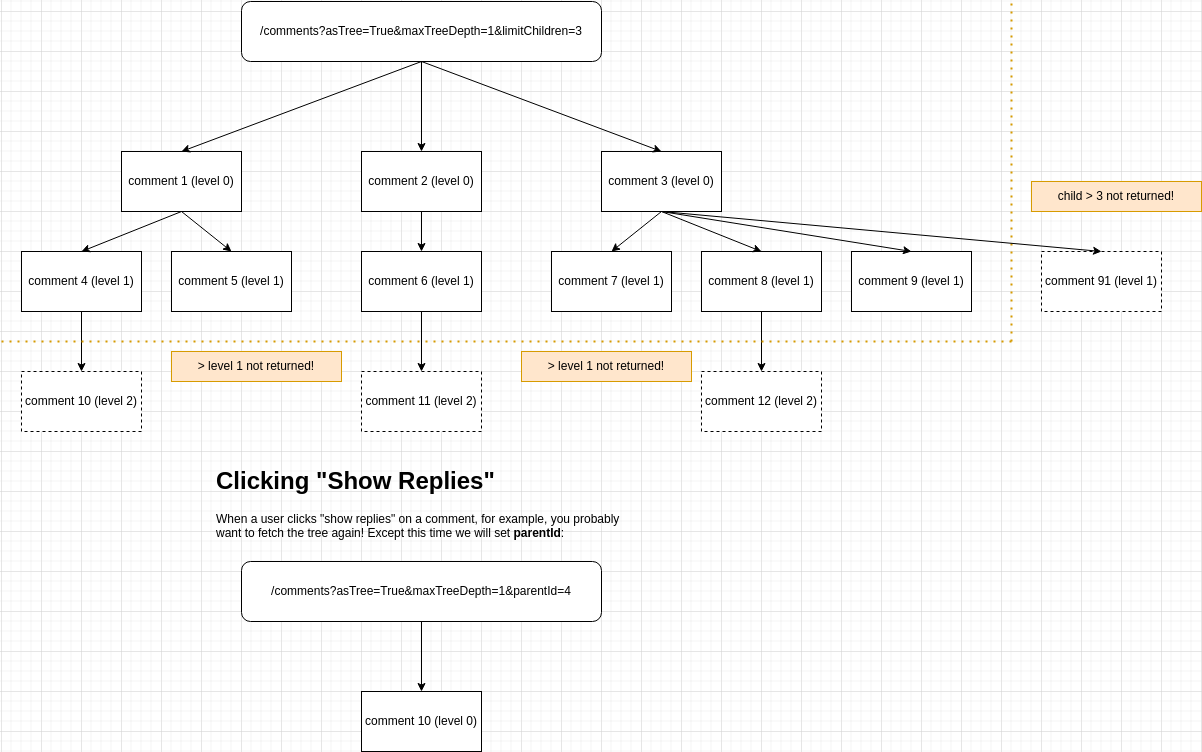
Trees Explained
使用 asTree 时,分页的推理可能比较困难。以下是一张实用的示意图:
Fetching Comments in The Context of a User
/comments API 可在两种上下文中使用,以满足不同的使用场景:
- 用于返回已排序并带有信息标签的评论,以便构建您自己的客户端。
- 在这种情况下,定义
contextUserId查询参数。
- 在这种情况下,定义
- 用于从您的后端获取评论,以进行自定义集成。
- 平台将在没有
contextUserId的情况下默认使用此方式。
- 平台将在没有
Get Comments as a Tree
可以将返回的评论以树形结构获取,分页仅计入顶级评论。
想只获取顶级评论及其直接子评论吗?下面是一种方式:
然而,在您的 UI 中可能需要知道是否在每条评论上显示“显示回复”按钮。通过树形获取评论时,会在适用的评论上标记 hasChildren 属性。
Get Comments as a Tree, Searching by Hash Tag
可以使用 API 按标签搜索,跨整个租户(不限于单页或 urlId)。
在此示例中,我们省略了 urlId,并按多个标签搜索。API 只会返回同时包含所有请求标签的评论。
All Request Params
The Response
Helpful Tips
URL ID
您可能想在使用 Comment API 时提供 urlId 参数。您可以先调用 Pages API,查看可用的 urlId 值是什么样的。
Anonymous Actions
对于匿名评论,您可能需要在获取评论以及进行标记和阻止时传递 anonUserId。
(!) 这在许多应用商店是必需的,因为用户必须能够标记他们看到的用户生成内容,即使他们未登录。未执行此操作可能导致您的应用被从该商店下架。
Comments Not Being Returned
检查您的评论是否已批准且不是垃圾评论。
GET /api/v1/comments/:id
此 API 提供按 ID 获取单条评论的功能。
POST /api/v1/comments
此 API 端点提供创建评论的功能。
常见用例包括自定义 UI、集成或导入。
注意:
- 如果需要,此 API 可以将评论小部件实时更新(这会将
creditsCost从1增加到2)。 - 如果提供了电子邮件地址,此 API 会在我们的系统中自动创建用户对象。
- 尝试保存两个电子邮件不同但用户名相同的评论,会导致第二条评论出现错误。
- 如果您指定了
parentId,并且子评论的notificationSentForParent为 false,我们会为父评论发送通知。此操作每小时进行一次(我们会将通知合并以减少发送的邮件数量)。 - 如果您希望在创建用户时发送欢迎邮件,或发送评论验证邮件,请在查询参数中将
sendEmails设置为true。 - 通过此 API 创建的评论会显示在管理应用的分析 (Analytics) 和审核 (Moderation) 页面中。
- 如果启用了该设置,评论者名称和评论文本中的“脏词”仍会被屏蔽。
- 通过此 API 创建的评论仍然可以(如需)进行垃圾评论检查。
- 通过自定义规则管理页面配置的设置(例如最大评论长度)也将适用于此处。
要在评论小部件中显示,提交的最低数据如下:
更现实的请求可能如下所示:
PATCH /api/v1/comments/:id
此 API 端点提供更新单条评论的功能。
说明:
- 如果需要,此 API 可以“实时”更新评论小部件(这会将基础
creditsCost从1增加到2)。- 这可以使在页面之间迁移评论变为“实时”(更改
urlId)。 - 迁移会额外消耗
2个积分,因为页面会被预计算,这会消耗大量 CPU。
- 这可以使在页面之间迁移评论变为“实时”(更改
- 与创建 API 不同,如果提供了电子邮件,此 API 不会在我们的系统中自动创建用户对象。
- 通过此 API 更新的评论仍然可以根据需要进行垃圾评论检查。
- 如果通过“自定义规则”管理页面配置了诸如最大评论长度等设置,那么这些配置在此处仍然适用。
- 若要允许用户更新其评论文本,您只需在请求体中指定
comment。我们将生成相应的commentHTML。- 如果同时定义了
comment和commentHTML,我们将不会自动生成 HTML。 - 如果用户在新文本中添加了提及或标签,它仍将像
POSTAPI 一样进行处理。
- 如果同时定义了
- 在更新评论的
commenterEmail时,最好也指定userId。否则,您必须确保具有该电子邮件的用户属于您的租户,否则请求将失败。 - 如果目标评论被锁定(
isLocked: true),请求将以code: 'locked'被拒绝。请先解锁评论,进行更新,然后在需要时重新锁定。
DELETE /api/v1/comments/:id
此 API 端点提供删除评论的功能。
注意事项:
- 如果需要,此 API 可以“实时”更新评论小部件(这会将
creditsCost从1增加到2)。 - 此 API 会删除所有子评论。
- 如果目标评论被锁定(
isLocked: true),请求将被拒绝并返回code: 'locked'。请先解锁评论,然后再删除。
POST /api/v1/comments/:id/flag
此 API 端点提供为特定用户标记评论的功能。
Notes:
- 此调用必须始终在用户上下文中进行。该用户可以是 FastComments.com 用户、SSO 用户或租户用户。
- 如果设置了用于隐藏的标记阈值,评论在被标记达到定义次数后将会被实时自动隐藏。
- 在评论被自动取消批准(隐藏)之后,只有管理员或版主可以重新批准该评论。取消标记不会重新批准评论。
对于匿名标记,我们必须指定一个 anonUserId。这可以是代表匿名会话的 ID,或随机 UUID。
这允许我们在用户未登录的情况下也支持对评论的标记和取消标记。这样,当使用相同的 anonUserId 获取评论时,该评论可以被标记为已标记。
POST /api/v1/comments/:id/un-flag
此 API 端点提供取消特定用户对评论的标记的能力。
Notes:
- 此调用必须始终在用户上下文中进行。该用户可以是 FastComments.com 用户、SSO 用户或租户用户。
- 在评论被自动取消批准(隐藏)后——该评论只能由管理员或版主重新批准。取消标记不会重新批准该评论。
对于匿名标记,我们必须指定 anonUserId。这可以是表示匿名会话的 ID,或一个随机 UUID。
POST /api/v1/comments/:id/block
此 API 端点提供封锁撰写特定评论的用户的能力。它支持对由 FastComments.com 用户、SSO 用户和租户用户撰写的评论进行封锁。
它支持一个名为 commentIdsToCheck 的 body 参数,用于在执行此操作后检查客户端上是否有任何其他可能可见的评论应被封锁/解封。
Notes:
- 此调用必须始终在某个用户的上下文中进行。该用户可以是 FastComments.com 用户、SSO 用户或租户用户。
- 请求中的
userId是正在执行封锁的用户。例如:User A想封锁User B。传入userId=User A以及User B所撰写的评论 ID。 - 完全匿名的评论(无用户 id、无电子邮件)无法被封锁,将返回错误。
对于匿名封锁,我们必须指定一个 anonUserId。这可以是表示匿名会话的 ID,或者是一个随机的 UUID。
这使我们能够即使在用户未登录的情况下也支持封锁评论,只要使用相同的 anonUserId 来获取评论。
POST /api/v1/comments/:id/un-block
此 API 端点提供解除对撰写给定评论的用户的封禁的功能。它支持对由 FastComments.com 用户、SSO 用户和租户用户撰写的评论进行解除封禁。
它支持一个 commentIdsToCheck 请求体参数,用于在执行此操作后检查客户端上其他可能可见的评论是否应被封禁/解封。
注意:
- 此调用必须始终在用户上下文中进行。该用户可以是 FastComments.com 用户、SSO 用户或租户用户。
- 请求中的
userId是正在执行解除封禁操作的用户。例如:User A想要解除对User B的封禁。传入userId=User A以及User B所写的评论 id。 - 完全匿名的评论(没有用户 id、没有电子邮件)无法被封禁,会返回错误。
电子邮件模板结构
EmailTemplate 对象表示租户的自定义电子邮件模板的配置。
系统将通过以下方式选择要使用的电子邮件模板:
- 其类型标识符,我们称之为
emailTemplateId。这些是常量。 domain。我们会首先尝试查找与相关对象(例如Comment)关联的域的模板,如果未找到匹配项,则会尝试查找 domain 为 null 或*的模板。
EmailTemplate 对象的结构如下:
注意
- 您可以从
/definitions端点获取有效的emailTemplateId值。 /definitions端点还包含默认翻译和测试数据。- 如果结构或测试数据无效,模板将保存失败。
GET /api/v1/email-templates/:id
可以通过相应的 id(不是 emailTemplateId)获取单个 EmailTemplate。
GET /api/v1/email-templates
此 API 使用分页,由 page 查询参数提供。EmailTemplates 以每页 100 项返回,按 createdAt 然后 id 排序。
PATCH /api/v1/email-templates/:id
这个 API 端点允许通过仅指定 id 和要更新的属性来更新电子邮件模板。
请注意,创建模板时相同的所有验证也适用,例如:
- 模板必须能渲染。每次更新时都会检查这一点。
- 同一域名不能有重复的模板(否则其中一个将被静默忽略)。
POST /api/v1/email-templates
此 API 端点提供创建电子邮件模板的能力。
注意:
- 在相同域名下,不能有多个相同
emailTemplateId的模板。 - 但你可以有一个通配符模板(
domain=*)和同一emailTemplateId的域特定模板共存。 - 指定
domain仅在你有不同域名,或想为测试使用特定模板(例如将domain设置为localhost)时才相关。 - 如果你确实指定了
domain,它必须匹配一个DomainConfig。发生错误时会提供一个有效域名列表。 - 模板语法为 EJS,渲染有 500ms 的超时。渲染的 P99 小于 5ms,因此如果达到 500ms 就说明有问题。
- 你的模板必须能使用提供的
testData成功渲染 才能保存。渲染错误会被聚合并在仪表盘上报告(很快也会通过 API 提供)。
添加模板所需的最少数据如下:
你可能希望为每个站点设置模板,在这种情况下你可以定义 domain:
POST /api/v1/email-templates/render
此 API 端点提供预览电子邮件模板的功能。
DELETE /api/v1/email-templates/:id
该路由用于通过 id 删除单个 EmailTemplate。
动态帖子结构
A FeedPost 对象表示 FastComments 动态中的一篇帖子。动态是一系列带有各自评论线程的帖子流,由 Feed 小部件渲染。每篇帖子都有作者、可选的富内容、媒体和链接,并且可以被标记,以便对动态进行过滤。
FeedPost 对象的结构如下:
注意:
- 某些字段标记为
READONLY—— 这些字段由 API 返回,但不能被设置。 - 帖子上的评论是普通评论,其
urlId为post:加上帖子_id。使用该值配合评论 API 可读取或创建帖子的评论。
GET /api/v1/feed-posts
获取 feed 中的帖子,按最新排序。分页基于游标:将您收到的最后一篇帖子的 _id 作为 afterId 传递,以获取下一页。
每返回十篇帖子消耗一个积分,最低消耗一个积分。
POST /api/v1/feed-posts
此路由创建一个单独的 FeedPost。每个帖子都有作者,因此 fromUserId 为必填项,且必须是账户中已存在的 FastComments 或 SSO 用户的 ID。
PATCH /api/v1/feed-posts/:id
此路由更新单个 FeedPost。仅发送您想更改的字段。
标签结构
一个 HashTag 对象表示用户可以留下的标签。HashTags 可用于链接到外部内容或
将相关评论联系在一起。
The structure for the HashTag object is as follows:
Notes:
- In some API endpoints you will see that the hashtag is used in the URL. Remember to URI-Encoded values. For example,
#should instead be represented as%23. - Some of these fields are marked
READONLY- these are returned by the API but cannot be set.
GET /api/v1/hash-tags
此 API 使用分页,通过 page 查询参数提供。HashTags 以每页 100 条返回,按 tag 排序。
PATCH /api/v1/hash-tags/:tag
此路由允许更新单个 HashTag。
POST /api/v1/hash-tags
此路由提供添加单个 HashTag 的功能。
POST /api/v1/hash-tags/bulk
此路由允许一次最多添加 100 个 HashTag 对象。
DELETE /api/v1/hash-tags/:tag
此路由用于通过提供的标签移除 HashTag 用户。
请注意,除非禁用自动 HashTag 创建,否则用户在评论时提供该话题标签时可能会重新创建它们。
GET /api/v1/me
描述发起请求的凭证:它所属的租户,以及对于 OAuth 访问令牌,授权该应用的用户。集成使用它来测试连接并对其进行标记。
使用 API 密钥时,响应仅标识租户。使用 OAuth 持有者令牌时,还会携带授权用户以及已授予的作用域。
版主结构
Moderator 对象表示版主的配置。
有三种类型的版主:
- 拥有
isCommentModeratorAdmin标志的管理员用户。 - 拥有
isCommentModeratorAdmin标志的 SSO 用户。 - 普通评论者,或被邀请为版主的 FastComments.com 用户。
Moderator 结构用于表示用例 3 的审核状态。
如果您想通过 API 邀请用户成为版主,请使用 Moderator API,创建一个 Moderator 并邀请他们。
如果用户没有 FastComments.com 帐户,邀请邮件会帮助他们完成设置。如果他们已有帐户,他们将
被授予对您租户的审核访问权限,并且 Moderator 对象的 userId 会更新为指向他们的用户。您将无法通过 API
访问他们的用户,因为在这种情况下该用户属于他们自己并由 FastComments.com 管理。
如果您需要完全管理该用户的帐户,我们建议使用 SSO,或将他们添加为 Tenant User 并
然后添加一个 Moderator 对象来跟踪他们的统计信息。
Moderator 结构可作为用例 1 和 2 的统计跟踪机制。创建用户后,添加一个定义了其 userId 的 Moderator
对象,其统计信息将会在 Comment Moderators Page 上被跟踪。
Moderator 对象的结构如下:
GET /api/v1/moderators/:id
此路由根据其 id 返回单个版主。
GET /api/v1/moderators
此 API 使用分页,由查询参数 skip 提供。版主以每页 100 条返回,按 createdAt 和 id 排序。
费用基于返回的版主数量,按 1 credit per 10 计算。
PATCH /api/v1/moderators/:id
此 API 端点提供通过 id 更新 Moderator 的能力。
更新 Moderator 有以下限制:
- 更新
Moderator时不得提供以下值:acceptedInvitemarkReviewedCountdeletedCountmarkedSpamCountapprovedCounteditedCountbannedCountverificationIdcreatedAt
- 指定
userId时,该用户必须存在。 - 指定
userId时,该用户必须属于查询参数中指定的相同tenantId。 - 同一租户中的两个版主不能使用相同的
email添加。 - 你不得更改与
Moderator关联的tenantId。
POST /api/v1/moderators
该路由允许添加单个 Moderator。
创建 Moderator 有以下限制:
- 必须始终提供
name和email。userId可选。 - 创建
Moderator时不得提供以下值:acceptedInvitemarkReviewedCountdeletedCountmarkedSpamCountapprovedCounteditedCountbannedCountverificationIdcreatedAt
- 当指定
userId时,该用户必须存在。 - 当指定
userId时,该用户必须属于查询参数中指定的相同tenantId。 - 同一租户中不能添加具有相同
email的两个Moderator。
我们可以为仅知道电子邮件的用户创建 Moderator:
或者,我们可以为属于我们租户的用户创建 Moderator,以跟踪他们的审核统计数据:
POST /api/v1/moderators/:id/send-invite
此路由提供邀请单个 Moderator 的功能。
向 Moderator 发送邀请邮件时存在以下限制:
Moderator必须已存在。fromName长度不得超过100 characters。
注意:
- 如果具有所提供电子邮件的用户已存在,他们将被邀请来管理您租户的评论。
- 如果具有所提供电子邮件的用户不存在,邀请链接将引导他们完成创建他们的账户的流程。
- 邀请将在
30 days后过期。
我们可以仅凭电子邮件为用户创建一个 Moderator:
这将发送一封类似于 Bob at TenantName is inviting you to be a moderator... 的电子邮件
DELETE /api/v1/moderators/:id
此路由用于通过 id 删除 Moderator。
通知计数结构
NotificationCount 对象表示用户的未读通知计数和元数据。
如果没有未读通知,则不会为该用户生成 NotificationCount。
NotificationCount 对象会自动创建,无法通过 API 创建。它们也会在一年后过期。
您可以通过删除用户的 NotificationCount 来清除其未读通知计数。
NotificationCount 对象的结构如下:
GET /api/v1/notification-count/:user_id
此路由按用户 id 返回单个 NotificationCount。使用 SSO 时,用户 id 的格式为 <tenant id>:<user id>。
如果没有未读通知,就不会有 NotificationCount —— 因此将收到 404。
这与 notifications/count 不同,前者速度更快,但不允许过滤。
DELETE /api/v1/notification-count/:user_id
此路由通过用户 ID 删除单个 NotificationCount。使用 SSO 时,用户 ID 的格式为 <tenant id>:<user id>。
这将清除用户的未读通知计数(评论小部件中的红色铃铛会淡出,计数将消失)。
通知结构
一个 Notification 对象表示针对用户的通知。
Notification 对象是自动创建的,无法通过 API 创建。它们在一年后会过期。
通知不能被删除。但可以更新将 viewed 设为 false,并且可以按 viewed 查询。
用户也可以通过将通知中的 optedOut 设置为 true 来选择不接收针对特定评论的通知。将其设置为 false 可以重新选择接收。
存在不同的通知类型 —— 请检查 relatedObjectType 和 type。
通知的创建方式非常灵活,可由多种情景触发(参见 NotificationType)。
截至目前,Notification 的存在并不意味着会或应该发送电子邮件。相反,通知用于通知提要和相关集成。
Notification 对象的结构如下:
GET /api/v1/notifications
此路由返回最多 30 个 Notification 对象,按 createdAt 排序,最新的在前。
您可以按 userId 过滤。启用 SSO 时,用户 id 的格式为 <tenant id>:<user id>。
GET /api/v1/notifications/count
此路由返回一个对象,该对象在 count 参数下包含通知数量。
它比 /notification-count/ 慢且消耗双倍积分,但允许在更多维度上进行过滤。
您可以按与 /notifications 端点相同的参数进行过滤,例如 userId。使用 SSO 时,用户 ID 的格式为 <tenant id>:<user id>。
PATCH /api/v1/notifications/:id
此 API 端点提供按 id 更新 Notification 的功能。
更新 Notification 有以下限制:
- 你只能更新以下字段:
viewedoptedOut
页面互动公开 API
Page Reacts 让您的用户可以点赞页面,或使用您自定义的一组表情图片进行反应。The Page Reacts widget 和 Floating Likes 小部件基于这些端点构建,您也可以自行调用它们来构建自己的点赞按钮。
与本指南的其余部分不同,Page Reacts 端点是公开的。它们从用户的浏览器中调用,不需要 API 密钥,也不消耗 API 积分。每个反应都归属于发起请求的用户,因此用户只能添加或移除自己的反应。
有两组端点:
/page-reacts/v1/likes/:tenantId- 每个用户每页仅有一个 “like”。用于点赞按钮。/page-reacts/v2/:tenantId- 每页可有多个反应,每个反应由您选择的短id标识(例如heart或laugh)。
这两组端点也在我们的 SDK 中作为 PublicApi 的一部分提供,例如在 JavaScript SDK 中的 getV1PageLikes、createV1PageReact 和 deleteV1PageReact。
Showing Who Reacted
在 GET 端点上添加 includeUserInfo=public 参数,可同时获取点赞或反应的用户信息,包括用户名和头像,按最近的先后顺序返回。将个人资料活动设为私密的用户会被排除,匿名用户也会被排除。最多返回 100 条反应。
SSO 用户默认创建为私密的个人资料活动,除非您的 SSO 负载将 isProfileActivityPrivate 设置为 false,因此请为您希望出现在这些列表中的用户进行相应设置。
在需要 SSO 的页面上,只有能够查看该页面的 SSO 用户才能列出谁进行了反应。其他用户会收到 403 错误,错误码为 sso-required 或 page-forbidden。
从您的服务器端,GET /api/v1/pages/likes 和 GET /api/v1/pages/reacts 在使用 API 密钥时返回相同的列表,并且同样接受 includeUserInfo=include-private 参数,以包含个人资料设为私密的用户。
Identifying the User
反应与发起请求的用户绑定:
- SSO 用户: 传递
sso查询参数,值为与评论小部件相同的 SSO 对象的 URI 编码 JSON。参见 SSO。 - 匿名用户: 当没有
sso参数且没有 FastComments 登录时,服务器会为浏览器分配一个存储在 FastComments 会话 cookie 中的匿名 ID。发送请求时使用credentials: 'include',以便在请求之间保留 cookie。阻止第三方 cookie 的浏览器将无法保留匿名 ID,因此在需要可靠识别每个用户的情况下请使用 SSO。
The urlId
urlId 用于标识页面,与评论使用的方式相同。使用与评论小部件相同的 urlId,这样点赞和评论会计入同一页面。记得对其进行 URI 编码。
GET /page-reacts/v1/likes/:tenantId
返回页面的点赞数量,以及当前用户是否已点赞。不存在的页面返回 likeCount 为 0。
传入 includeUserInfo=public 可同时获取点赞该页面的用户,按最近的先后顺序。私人资料活动的用户和匿名用户将被排除,最多查询 100 条点赞。此处仅接受 public;include-private 会返回 422,并可通过带 API 密钥的 GET /api/v1/pages/likes 使用。在需要 SSO 的页面上,includeUserInfo 对无法查看页面的用户返回 403。
POST /page-reacts/v1/likes/:tenantId
以当前用户的身份点赞页面。每个用户只能点赞一次:再次点赞会成功返回代码 already-liked,且不会改变计数。
如果页面尚未存在,将会被创建。传递 title 可设置或更新页面的标题。
DELETE /page-reacts/v1/likes/:tenantId
从页面中移除当前用户的点赞。如果用户尚未点赞该页面,请求仍会成功,并返回代码 not-liked,且不会更改计数。
GET /page-reacts/v2/:tenantId
返回页面上每个反应的计数,以及当前用户已添加的反应。
传入 includeUserInfo=public 还可以获取已反应的用户,每个 react 对应一条记录,按 reaction id 排序,最近的在前。私有资料活动的用户和匿名用户会被排除,最多查询 100 条 react。此处仅接受 public;include-private 会返回 422,并可通过带 API key 的 GET /api/v1/pages/reacts 使用。在需要 SSO 的页面上,includeUserInfo 对无法查看页面的用户会返回 403。
GET /page-reacts/v2/:tenantId/list
返回对页面添加了反应的用户的名称,按字母顺序排序。最多查找 100 条反应,匿名用户和拥有私人资料活动的用户不包括在内。对于需要 SSO 的页面,无法查看页面的用户会收到状态码 403,代码为 sso-required 或 page-forbidden。
若要同时获取头像和用户 ID,请使用 GET /page-reacts/v2/:tenantId 并添加 includeUserInfo=public。
POST /page-reacts/v2/:tenantId
作为当前用户向页面添加一个反应。用户每个反应 ID 只能添加一次:再次添加时会成功返回代码 already-reacted,且计数不会改变。用户可以对同一页面添加多个不同的反应。
反应 ID 由您自行选择,最长可达 36 个字符。如果页面尚不存在,将会被创建。传递 title 可设置或更新页面的标题。
DELETE /page-reacts/v2/:tenantId
从页面中移除当前用户的一个反应。如果用户未添加该反应,请求将以代码 no-react 成功返回,并且计数不会改变。
页面结构
A Page 对象表示许多评论可能属于的页面。此关系由
urlId 定义。
A Page 存储信息,例如页面标题、评论计数和 urlId。
Page 对象的结构如下:
GET /api/v1/pages
目前您只能获取与您的账户关联的所有页面(或通过 /by-url-id 获取单个页面)。如果您需要更细粒度的搜索,请联系我们。
有用提示
The Comment API requires a urlId. You can call the Pages API first, to see what the urlId values available to you
look like.
GET /api/v1/pages/by-url-id
可以通过相应的 urlId 获取单个页面。这对于查找页面标题或评论数量很有用。
有用提示
请记得对 urlId 等值进行 URI 编码。
GET /api/v1/pages/likes
返回页面的点赞数量,并可选返回点赞用户,按最近的先后顺序。这是 GET /page-reacts/v1/likes/:tenantId 的服务器端版本。
includeUserInfo 控制返回哪些用户:
public排除已将个人资料活动设为私密的用户。include-private包含这些用户。仅在列表不向公众展示时使用。
匿名用户永不被包含,且最多查询 100 条点赞。不存在的页面返回 likeCount 为 0,并且 users 列表为空。
有用提示
请记得对类似 urlId 的值进行 URI 编码。
GET /api/v1/pages/reacts
返回页面上每种反应的计数,并可选返回已反应的用户,每条记录对应一个反应及其 reaction id,按最近的先后顺序排列。这是 GET /page-reacts/v2/:tenantId 的服务器端实现。
includeUserInfo 控制返回哪些用户:
public排除已将个人资料活动设为私密的用户。include-private包含这些用户。仅在列表不向公众展示时使用。
匿名用户永不包含在内,最多会查询 100 条反应。不存在的页面返回没有 counts,且 users 列表为空。
有用提示
请记得对类似 urlId 的值进行 URI 编码。
PATCH /api/v1/pages/:id
此路由提供更新单个 Page 的功能。相应的评论也会被更新。
注意
Page 对象中的某些参数会自动更新。这些是 counts 和 title 属性。Counts 不能通过 API 更新,因为它们是计算得出的值。页面的 title 可以通过 API 设置,但如果评论小部件在具有相同 urlId 但不同页面标题的页面上使用,则会被覆盖。
POST /api/v1/pages
此 API 端点提供创建页面的功能。
一个常见的用例是访问控制。
注意:
- 如果您已经在评论线程中发表评论,或调用 API 创建了一个
Comment,您已经创建了一个Page对象!您可以尝试通过/by-url-idPage路由获取它,传入与评论小部件相同的urlId。 Page结构包含一些 计算得出 的值。当前这些是commentCount和rootCommentCount。它们会自动填充,不能由 API 设置。尝试设置这些值会导致 API 返回错误。
DELETE /api/v1/pages/:id
此路由用于通过 id 删除单个页面。
请注意,对具有相同 urlId 的页面的评论小部件进行交互将简单地无缝重新创建该 Page。
投票结构
A Poll(投票)附加在评论上,而不是作为独立对象。它随评论一起创建(参见 POST /api/v1/comments),或稍后使用 PUT /api/v1/polls/:commentId 添加到已有评论中。
投票计数保存在投票本身上,因此读取投票即可直接获得结果,无需自行汇总。这些计数背后的单个投票是 PollVote 对象。
每个选项都有一个在创建投票时生成的 id。该 id 用于投票、重新标记选项,以及在使用 PUT 更新投票时保留选项(及其投票),无论是添加还是删除选项。它是引用选项的唯一安全方式——不要使用选项在列表中的位置。
Limits
- 必须提供问题,且最长 200 个字符。
- 投票必须包含 2 到 10 个选项。
- 必须提供选项标签,最长 100 个字符,并且在同一投票中必须唯一(不区分大小写)。
- 创建投票时,
closesAt必须是未来的时间。若要立即关闭投票,可使用PATCH并提供过去的日期。
Site Settings
投票遵循站点配置,可在 “Customize Widget”(自定义小部件)下进行更改:
- 必须先启用投票功能,才能创建投票,否则 API 会返回
polls-disabled。 - 投票可以限制为已登录用户,此时仅包含
anonUserId的投票请求会被拒绝,并返回poll-login-required。
GET /api/v1/polls/:commentId
读取附加在评论上的投票及其当前投票计数。
投票也会通过评论 API 随评论本身一起返回,因此当您只想获取结果而不是完整评论时,请使用此接口。
没有投票的评论、已被删除的评论以及不存在的评论 ID,都会以相同的方式响应,返回 poll-not-found。
PUT /api/v1/polls/:commentId
将投票附加到已有评论,或设置其已有投票的完整状态。
请求体是完整的投票,您发送的选项将按顺序成为投票的选项。每个选项通过其 id 进行匹配:
- 发送了已有选项
id的选项会保留该选项及其投票。其标签和位置会更新为您发送的内容。 - 未提供
id的选项会被添加,且没有投票。 - 您省略的已有选项会被移除,连同其投票一起。
totalVotes会相应减少相同数量。
因此,要添加选项,请发送包含其 id 的当前选项并再加上一个没有 id 的新选项。要删除选项,只需在列表中省略它。选项 id 可在 GET /api/v1/polls/:commentId 返回的投票中获取。
如果完全不发送 id,则会替换所有选项并删除投票中已投的所有票。如果投票已有投票,则需要 replaceVotes=true,否则 API 会返回 replace-votes-required。
其他字段也会被替换:省略 closesAt、privacy 或 requireVoteToSeeResults 会将其重置为默认值。若只想更改单个字段而保持其他不变,请使用 PATCH /api/v1/polls/:commentId。
其他说明
id不在投票中,或同一id重复出现,都会导致poll-invalid错误。没有投票的评论尚未拥有选项 id,因此发送的每个选项都必须省略id。- 投票的隐私设置在已有投票后可以收紧,但不能放宽。
- 此 API 遵循站点设置。如果站点或页面未启用投票,则会返回
polls-disabled错误。 - 被锁定的评论无法更改其投票,会返回
locked错误。 - 已连接的小部件会实时更新,观众无需刷新即可看到新的投票。
PATCH /api/v1/polls/:commentId
编辑投票而不影响其投票。可用于修正问题或选项中的拼写错误,关闭或重新打开投票,或更改谁可以看到投票者。
选项通过其 id 定位,PATCH 会重新标记您指定的选项。要添加、删除或重新排序选项,请将完整的选项列表发送至 PUT /api/v1/polls/:commentId:您发送的带有 id 的选项也会保留其投票。
每个字段都是可选的,但必须至少提供一个。
其他说明
- 为投票中不存在的选项指定 id 会导致
poll-invalid错误,而不是悄悄地不做任何操作。 - 标签在投票内必须保持唯一,包括您未更改的选项。
- 与创建投票不同,这里的
closesAt可以是过去的时间——这就是立即关闭投票的方式。 - 投票的隐私设置在有投票后可以收紧,但不能放宽。
- 被锁定的评论无法更改其投票,并会返回
locked错误。
DELETE /api/v1/polls/:commentId
从其评论中移除投票以及所有已投的票。评论本身保持不变。
删除评论会同时删除其投票和投票记录,因此只有在想保留评论时才需要使用此操作。
投票记录结构
A PollVote 是一个人对投票的答案。投票本身显示的计数会与这些保持同步,因此只有在想知道谁投了什么,而不是总计时才需要这些。
每个投票人在同一投票中最多只能投一次。再次投票会将其已有的投票移动到新选项,而不是添加第二个投票,updatedAt 记录了发生的时间。
voterId 是投票人登录时的 userId,否则为 anonUserId。
隐私
投票的 privacy 设置对该 API 的作用方式与在评论小部件中的作用方式相同:
- Anonymous(默认):没有人能看到任何人的投票方式,因此投票内容不可读取。
GET /api/v1/poll-votes和GET /api/v1/poll-votes/:id会返回poll-anonymous。投票的计数仍可通过GET /api/v1/polls/:commentId获取。 - Admins and moderators:你的 API 密钥属于站点的管理员,因此可以读取投票。
- Everyone:投票可以被读取。
投票一旦产生,投票的隐私设置可以收紧但不能放宽。
GET /api/v1/poll-votes
列出单个投票,按时间顺序(最早的在前)对应于某个投票的计数。每返回 100 条投票消耗 1 个积分。
投票属于某条评论,因此一次只能读取一个投票的投票记录,并且需要提供 commentId。可使用 voterId 进一步筛选以查看某个人的投票情况,或使用 optionId 列出选择了特定选项的所有投票者。
每次调用最多返回 1000 条投票记录。可使用 skip 参数进行分页以获取更多。
投票的 privacy 设置会被遵守:匿名投票的投票记录无法读取,请求会返回 poll-anonymous 错误。详情请参阅 PollVote 结构。
按选项统计投票
您无需自行汇总投票结果——投票本身已经包含计数。请使用 GET /api/v1/polls/:commentId 读取投票信息,仅在需要了解投票者时才使用此接口。
页面上的每个投票
没有针对整页的投票列表。若要对整页进行报告,请使用 GET /api/v1/comments 获取该页的评论,该接口会返回每条评论的投票及其计数,然后再读取您关心的投票的投票记录。
GET /api/v1/poll-votes/:id
通过其 ID 读取单个投票。
对匿名投票的投票无法读取,请求会以 poll-anonymous 失败。请参阅 PollVote 结构了解投票的 privacy 设置如何生效。
POST /api/v1/poll-votes
在投票上记录一次投票。
每个投票者对同一投票最多只能投一次。再次为同一投票者调用此接口会将其投票移动到新的选项,而不是添加第二个投票;如果投票的选项与其已选择的相同,则不会产生任何操作。
响应中包含投票对象,您可以直接获取更新后的计数,无需再次请求。
匿名投票
使用 anonUserId 而不是 userId 来记录未登录用户的投票。该 ID 不需要在任何地方对应真实用户——它仅用于标识会话,从而避免同一人被计数多次。
匿名投票必须在您的站点上启用。如果投票仅限已登录用户,只有 anonUserId 的投票会因 poll-login-required 而失败。
匿名投票同样会对每个 IP、每个投票进行速率限制,以防止某人通过清除会话来刷票。请发送最终用户的 ip,这样限制会作用于用户本身,而不是您的服务器。
其他说明
userId必须是您站点上已存在的用户。对属于其他站点的用户的投票将被拒绝。- 对已关闭的投票进行投票会因
poll-closed而失败。 - 此 API 会更新投票的计数,并实时推送到已连接的小部件。
DELETE /api/v1/poll-votes/:id
撤回投票。投票所选的选项会恢复其计数,投票者可以再次投票。
其他说明
- 删除同一投票两次时,第二次会返回
not-found,计数保持不变。 - 如果自投票以来投票已被替换,投票被移除,但计数不变,因为 替换是从零开始的。
待处理Webhook事件结构
一个 PendingWebhookEvent 对象表示一个处于排队等待中的 webhook 事件。
PendingWebhookEvent 对象会自动创建,不能通过 API 手动创建。它们也会在一年后过期。
可以删除它们,从而将任务从队列中移除。
存在不同的事件类型 —— 请检查 eventType (OutboundSyncEventType) 和 type (OutboundSyncType)。
此 API 的一个常见用例是实现自定义监控。你可能希望定期调用 /count 端点,以轮询给定筛选器下的未完成数量。
PendingWebhookEvent 对象的结构如下:
GET /api/v1/pending-webhook-events
此路由返回一个待处理的 webhook 事件列表,包含在 pendingWebhookEvents 参数中。
此 API 使用分页,由 skip 参数提供。PendingWebhookEvents 以每页 100 条返回,按 createdAt 最新到最旧排序。
GET /api/v1/pending-webhook-events/count
此路由返回一个对象,其中包含在 count 参数下的挂起 webhook 事件数量。
您可以按与 /pending-webhook-events 端点相同的参数进行过滤
DELETE /api/v1/pending-webhook-events/:id
此路由允许删除单个 PendingWebhookEvent。
如果您需要批量删除,请调用带分页的 GET API,然后依次调用此 API。
单点登录用户结构
FastComments 提供了一个易于使用的 SSO 解决方案。通过基于 HMAC 的集成更新用户信息是 像让用户使用更新后的负载加载页面一样简单。
但是,可能希望在该流程之外管理用户,以提高应用的一致性。
SSO 用户 API 提供了一种对我们称之为 SSOUsers 的对象进行 CRUD 的方式。这些对象不同于常规 Users 并且 为类型安全而分开保存。
SSOUser 对象的结构如下:
SSO 用户计费
SSO 用户的计费基于其权限标志有所不同:
- 常规 SSO 用户:没有管理员或版主权限的用户按常规 SSO 用户计费
- SSO 管理员:具有
isAccountOwner或isAdminAdmin标志的用户作为 SSO 管理员单独计费(费率与常规租户管理员相同) - SSO 版主:具有
isCommentModeratorAdmin标志的用户作为 SSO 版主单独计费(费率与常规版主相同)
重要:为防止重复计费,系统会根据电子邮件地址自动对 SSO 用户与常规租户用户和版主进行去重。如果 SSO 用户与常规租户用户或版主具有相同的电子邮件,则不会重复计费。
访问控制
用户可以被划分到组中。这就是 groupIds 字段的用途,且该字段为可选。
@提及
默认情况下,当输入 @ 字符时,@mentions 将使用 username 来搜索其他 sso 用户。如果使用 displayName,则当存在与 displayName 匹配的结果时,会忽略与 username 的匹配,@mention 的搜索结果将使用 displayName。
订阅
使用 FastComments,用户可以通过点击评论小部件中的铃铛图标并点击订阅来订阅页面。
对于常规用户,我们会根据他们的通知设置向他们发送通知电子邮件。
对于 SSO 用户,我们为了向后兼容将其分开处理。只有当您将 optedInSubscriptionNotifications 设置为 true 时,用户才会收到这些额外的订阅通知电子邮件。
徽章
您可以使用 badgeConfig 属性为 SSO 用户分配徽章。徽章是在评论中显示在用户名称旁边的视觉指示。
badgeIds- 要分配给用户的徽章 ID 数组。这些是全局徽章,在所有页面上可见。必须是您在 FastComments 帐户中创建的有效徽章 ID。限制为 30 个徽章。pageBadgeIds- 可选的徽章 ID 数组,作用域为当前页面(urlId)。这些徽章仅在分配它们的页面上显示。不同页面可以为同一用户设置不同的页面作用域徽章。override- 如果为 true,则会用提供的徽章替换所有现有显示的徽章。全局徽章和页面作用域徽章独立覆盖 —— 覆盖全局徽章不会影响页面作用域徽章,反之亦然。如果为 false 或省略,则会将提供的徽章添加到现有徽章中。update- 如果为 true,则在用户登录时会从租户配置更新徽章显示属性。
GET /api/v1/sso-users
此路由按每页 100 个返回 SSO 用户。分页由 skip 参数提供。用户按其 signUpDate 和 id 排序。
GET /api/v1/sso-users/by-id/:id
此路由通过其 id 返回单个 SSO 用户。
GET /api/v1/sso-users/by-email/:email
此路由根据用户的电子邮件返回单个 SSO 用户。
PATCH /api/v1/sso-users/:id
此路由允许更新单个 SSO 用户。
POST /api/v1/sso-users
此路由用于创建单个 SSO 用户。
尝试使用相同 ID 创建两个用户将导致错误。
在此示例中,我们为访问控制指定了 groupIds,但这是可选的。
Integration Note
通过 API 传递的数据可以通过传递不同的 SSO 用户 HMAC 有效负载来覆盖。例如, if you set a username via the API, but then pass a different one via the SSO flow on page load, we will automatically update their username.
除非您显式指定这些参数或将其设置为 null(而不是 undefined),否则我们不会在此流程中更新用户参数。
PUT /api/v1/sso-users/:id
此路由提供更新单个 SSO 用户的功能。
在此示例中,我们为访问控制指定了 groupIds,但这是可选的。
DELETE /api/v1/sso-users/:id
此路由根据其 id 删除单个 SSO 用户。
请注意,如果使用该用户的有效负载重新加载评论小部件,系统会无缝地重新创建该用户。
可以通过查询参数 deleteComments 删除该用户的评论。请注意,如果该值为 true:
- 该用户的所有评论将被实时删除。
- 所有 child(现在成为孤儿)的评论将根据每个评论关联页面的配置被删除或匿名化。例如,如果线程删除模式为 "anonymize",则回复将保留,而该用户的评论将被匿名化。仅当
commentDeleteMode为Remove(默认值)时适用。 creditsCost将变为2。
匿名化的评论
您可以保留该用户的评论,但通过设置 commentDeleteMode=1 将其匿名化。
如果该用户的评论被匿名化,则以下字段将被设置为 null:
- commenterName
- commenterEmail
- avatarSrc
- userId
- anonUserId
- mentions
- badges
isDeleted 和 isDeletedUser 将被设置为 true。
在渲染时,评论小部件将在用户名称处使用 DELETED_USER_PLACEHOLDER(默认值: "[deleted]")和在评论处使用 DELETED_CONTENT_PLACEHOLDER。这些可以通过小部件自定义界面进行自定义。
示例
订阅结构
A Subscription object 表示用户的订阅。
Subscription objects 在用户在评论小部件中点击通知铃铛并点击 "订阅此页面" 时创建。
Subscriptions 也可以通过 API 创建。
Having a Subscription object causes Notification objects to be generated, and emails sent, when new comments are left on the root of the associated page
that the Subscription is for. 电子邮件的发送取决于用户类型。对于普通用户,这取决于 optedInNotifications。对于 SSO 用户,这取决于 optedInSubscriptionNotifications。注意,有些应用可能没有可通过 Web 访问的页面的概念,在这种情况下,只需将 urlId 设置为您要订阅的项目的 id(与传递给评论小部件的 urlId 值相同)。
The structure for the Subscription object is as follows:
GET /api/v1/subscriptions/:id
此路由返回最多 30 个按 createdAt 排序的 Subscription 对象,最新的在前。
您可以按 userId 过滤。使用 SSO 时,用户 ID 的格式为 <tenant id>:<user id>。
POST /api/v1/subscriptions
此 API 端点提供创建 Subscription 的功能。请注意,每个用户每个页面只能有一个订阅,因为多个订阅是多余的,尝试为同一用户在同一页面创建多个订阅将导致错误。
当在被订阅的 urlId 的根处留下新评论时(即评论的 parentId 为 null),创建订阅将导致生成 Notification 对象。
DELETE /api/v1/subscriptions/:id
此路由通过 id 删除单个 Subscription 对象。
租户每日使用情况结构
一个 TenantDailyUsage 对象表示租户在某一天的使用情况。如果在某租户的某个给定
天没有活动,则该天将不会有 TenantDailyUsage 对象。
The TenantDailyUsage object is 不是 real time and may be minutes behind actual usage.
The structure for the TenantDailyUsage object is as follows:
GET /api/v1/tenant-daily-usage
此路由允许按年、月和日搜索租户的使用情况。最多可返回 365 个对象,费用为每 10 个对象 1 个 API 积分。
响应对象按创建日期排序(最旧的在前)。
租户结构
The Tenant 定义了一个 FastComments.com 客户。具有白标访问权限的租户可以通过 API 创建它们。白标租户
不能创建其他白标租户(只允许一层嵌套)。
The structure for the Tenant object is as follows:
GET /api/v1/tenants/:id
此路由按 id 返回单个 Tenant。
GET /api/v1/tenants
此 API 返回由您的租户管理的租户。
分页由查询参数 skip 提供。租户以每页 100 个返回,按 signUpDate 和 id 排序。
费用基于返回的租户数量,按 1 credit per 10 租户计费。
您可以在 Tenant 对象上定义 meta 参数并查询匹配的租户。例如,对于键 someKey 和 meta 值 some-value,我们可以
构造一个包含该键/值对的 JSON 对象,然后对其进行 URI 编码作为查询参数进行过滤:
POST /api/v1/tenants
此路由允许添加单个 Tenant。
创建 Tenant 有以下限制:
- 需要提供
name。 - 需要提供
domainConfiguration。 - 创建
Tenant时不得提供以下值:hasFlexPricinglastBillingIssueReminderDateflexLastBilledAmount
signUpDate不能是未来的日期。name的长度不得超过200 characters。email的长度不得超过300 characters。email必须在所有 FastComments.com 的租户中唯一。- 如果父租户未定义有效的
TenantPackage,则您不得创建租户。- 如果您的租户是通过 FastComments.com 创建的,通常不会有此问题。
- 您创建的租户数量不得超过您的套餐中
maxWhiteLabeledTenants定义的数量。 - 您必须指定
tenantId查询参数,该参数是启用白标的parent tenant的 id。
我们只需少量参数即可创建一个 Tenant:
PATCH /api/v1/tenants/:id
此 API 端点提供按 id 更新 Tenant 的功能。
更新 Tenant 有以下限制:
- 以下值不得更新:
hasFlexPricinglastBillingIssueReminderDateflexLastBilledAmountmanagedByTenantId
signUpDate不能设置为将来的日期。name长度不得超过200 characters。email长度不得超过300 characters。email必须在所有 FastComments.com 租户中唯一。- 当将
billingInfoValid设置为true时,必须在同一请求中提供billingInfo。 - 你不得更新与自己租户关联的
packageId。 - 你不得更新与自己租户关联的
paymentFrequency。
DELETE /api/v1/tenants/:id
此路由通过 id 提供删除一个 Tenant 及其所有关联数据(用户、评论等)。
删除租户时存在以下限制:
- 该租户必须是您自己的,或是您管理的白标租户。
sure查询参数必须设置为true。
租户套餐结构
TenantPackage 定义了可供 Tenant 使用的套餐信息。一个租户可能有多个可用的套餐,但在任意时刻只有一个处于使用中。
Tenant 在其 packageId 指向一个有效的 TenantPackage 之前,不能用于任何产品。
有两种类型的 TenantPackage 对象:
- 固定定价包 - 当
hasFlexPricing为 false 时。 - 灵活定价 - 当
hasFlexPricing为 true 时。
在两种情况下,使用该套餐的账号都会定义限制,然而在灵活(Flex)定价中,租户会被收取基础费用加上其实际使用量,使用 flex* 参数来定义。
租户可以拥有多个租户套餐,并可以从 账单信息页面. 自行更改所使用的套餐。
如果您将自行为租户处理计费,您仍需为每个租户定义一个套餐以规定其限额。只需在 Tenant 上将 billingHandledExternally 设置为 true,他们就无法自行更改其账单信息或当前使用的套餐。
您不得创建比父租户限额更高的套餐。
TenantPackage 对象的结构如下:
GET /api/v1/tenant-packages/:id
此路由通过 id 返回单个 Tenant Package。
GET /api/v1/tenant-packages
此 API 使用分页,由 skip 查询参数提供。TenantPackages 按 100 条每页返回,按 createdAt 和 id 排序。
计费基于返回的 tenant packages 数量,计费为 1 credit per 10 个 tenant packages。
POST /api/v1/tenant-packages
此路由提供添加单个 TenantPackage 的能力。
创建 TenantPackage 有以下限制:
- 以下参数是必需的:
nametenantIdmonthlyCostUSD- 可以为 null。yearlyCostUSD- 可以为 null。maxMonthlyPageLoadsmaxMonthlyAPICreditsmaxMonthlyCommentsmaxConcurrentUsersmaxTenantUsersmaxSSOUsersmaxModeratorsmaxDomainshasDebrandingforWhoTextfeatureTaglineshasFlexPricing- 如果为 true,则所有flex*参数都是必需的。
name的长度不得超过50 characters。- 每个
forWhoText项的长度不得超过200 characters。 - 每个
featureTaglines项的长度不得超过100 characters。 TenantPackage必须“比”父租户“更小”。例如,所有max*参数必须比父租户具有更低的值。- 白标租户最多可以有 五个套餐。
- 只有具有白标访问权限的租户可以创建
TenantPackage。 - 您不得向自己的租户添加套餐。 :)
我们可以按如下方式创建 TenantPackage:
PATCH /api/v1/tenant-packages/:id
此 API 端点提供通过 id 更新 TenantPackage 的功能。
更新 TenantPackage 有以下限制:
- 如果将
hasFlexPricing设置为 true,则同一请求中必须包含所有flex*参数。 name不得超过50 characters。- 每个
forWhoText项的长度不得超过200 characters。 - 每个
featureTaglines项的长度不得超过100 characters。 TenantPackage必须比父租户“更小”。例如,所有max*参数的值必须小于父租户的对应值。- 不得更改与
TenantPackage关联的tenantId。
DELETE /api/v1/tenant-packages/:id
此路由用于通过 id 删除 TenantPackage。
您不能删除正在使用的 TenantPackage(租户的 packageId 指向该包)。请先更新 Tenant。
租户用户结构
TenantUser 定义了由特定租户管理的 User。他们的账户完全由所关联的租户掌控,且可以通过 UI 或 API 更新或删除。
租户用户可以是具有对 Tenant 的全部权限和访问权的管理员,也可以被限制为仅拥有特定权限,例如管理评论、访问 API 密钥等。
TenantUser 对象的结构如下:
GET /api/v1/tenant-users/:id
此路由按 id 返回单个 TenantUser。
GET /api/v1/tenant-users
此 API 使用分页,通过查询参数 skip 提供。TenantUsers 以每页 100 条的形式返回,按 signUpDate、username 和 id 排序。
费用基于返回的租户用户数量计算,每返回 10 个租户用户消耗 1 积分。
POST /api/v1/tenant-users
此路由提供添加单个 TenantUser 的功能。
创建 TenantUser 有以下限制:
username是必需的。email是必需的。signUpDate不能是未来的日期。locale必须位于 支持的语言 列表中。username必须在整个 FastComments.com 上唯一。如果这是个问题,我们建议改用 SSO。email必须在整个 FastComments.com 上唯一。如果这是个问题,我们建议改用 SSO。- 您不得创建超过您套餐中
maxTenantUsers定义数量的租户用户。
我们可以按如下方式创建 TenantUser
POST /api/v1/tenant-users/:id/send-login-link
此路由提供向单个 TenantUser 发送登录链接的功能。
适用于批量创建用户且不需要向他们说明如何登录到 FastComments.com 的情况。 这将向他们发送一个用于登录的“魔术链接”,该链接在 30 days 后过期。
发送登录链接到 TenantUser 时存在以下限制:
TenantUser必须已存在。- 您必须有权限管理该
TenantUser所属的Tenant。
我们可以按如下方式向 TenantUser 发送登录链接:
这将发送类似 Bob at TenantName is inviting you to be a moderator... 的电子邮件
PATCH /api/v1/tenant-users/:id
此路由提供更新单个 TenantUser 的功能。
更新 TenantUser 有以下限制:
signUpDate不能是将来的日期。locale必须在 Supported Locales 列表中。username必须在整个 FastComments.com 中唯一。如果有冲突,建议改用 SSO。email必须在整个 FastComments.com 中唯一。如果有冲突,建议改用 SSO。- 不能更新用户的
tenantId。
我们可以按如下方式创建 TenantUser
DELETE /api/v1/tenant-users/:id
此路由根据 id 提供删除 TenantUser 的功能。
可以通过 deleteComments 查询参数同时删除该用户的评论。请注意,如果设置为 true:
- 该用户的所有评论将会被实时删除。
- 所有 child(现在为孤立)的评论将根据每个评论关联页面的配置被删除或匿名化。例如,如果线程删除模式为 "anonymize",则回复将保留,而该用户的评论将被匿名化。仅当
commentDeleteMode为Remove(默认值)时适用。 creditsCost会变为2。
匿名化的评论
您可以保留该用户的评论,但通过设置 commentDeleteMode=1 将其匿名化。
如果该用户的评论被匿名化,则以下值将被设置为 null:
- commenterName
- commenterEmail
- avatarSrc
- userId
- anonUserId
- mentions
- badges
isDeleted 和 isDeletedUser 被设置为 true。
在渲染时,评论小部件会使用 DELETED_USER_PLACEHOLDER(默认: "[deleted]")作为用户名,使用 DELETED_CONTENT_PLACEHOLDER 作为评论内容。这些可以通过小部件自定义界面进行定制。
示例
用户结构
User 是表示所有用户的最通用属性的对象。
请记住,在 FastComments 中,我们有多种不同的用户使用场景:
- Secure SSO
- Simple SSO
- Tenant Users (例如:管理员)
- Commenters
This API is for Commenters and users created via Simple SSO. Basically, any user created
through your site can be accessed via this API. Tenant Users can also be fetched this way, but you'll get more information by interacting with the /tenant-users/ API.
For Secure SSO please use the /sso-users/ API.
You cannot update these types of users. They created their account through your site, so we provide some basic read-only access, but
you cannot make changes. If you want to have this type of flow - you need to setup Secure SSO.
The structure for the User object is as follows:
GET /api/v1/users/:id
此路由根据 id 返回单个用户。
投票结构
A Vote 对象表示用户留下的投票。
评论与投票之间的关系通过 commentId 来定义。
Vote 对象的结构如下:
GET /api/v1/votes
必须通过 urlId 来获取投票。
投票类型
投票有三种类型:
- 经过身份验证的投票,会应用到相应的评论。您可以通过此 API 创建这些投票。
- 经过身份验证的投票,但处于待验证状态,因此尚未应用于评论。当用户使用 FastComments.com 的 登录以投票 机制时,会创建这些投票。
- 匿名投票,会应用到相应的评论。这些与匿名评论一起创建。
为了减少混淆,API 会将它们分别返回在不同的列表中。
匿名投票说明
注意:通过此 API 创建的匿名投票将出现在 appliedAuthorizedVotes 列表中。因为它们是使用 API 密钥通过 API 创建的,所以被视为已授权。
appliedAnonymousVotes 结构用于没有电子邮件、API 密钥等的投票。
GET /api/v1/votes/for-user
允许获取用户在给定 urlId 上留下的投票。需要一个 userId,可以是任何 FastComments.com 用户或 SSO User。
如果你想显示用户是否对评论投过票,这很有用。在获取评论时,只需同时为该用户对相同的 urlId 调用此 API。
如果你使用匿名投票,则应改为传递 anonUserId。
注意,匿名投票将出现在 appliedAuthorizedVotes 列表中。它们被视为已授权,因为它们是通过带有 API 密钥的 API 创建的。
POST /api/v1/votes
此路由允许添加单个已授权的 Vote。投票可以是 up (+1) 或 down (-1)。
创建匿名投票
可以通过在查询参数中设置 anonUserId 而不是 userId 来创建匿名投票。
该 id 不必与任何地方的用户对象对应(因此为匿名)。它只是会话的一个标识符 for the session, so you can fetch votes again in the same session, to check if a comment has been voted.
如果您没有像 FastComments 那样的“匿名会话” - 您可以简单地 将其设置为随机 ID,例如 UUID(尽管我们更喜欢较短的标识符以节省空间)。
其他说明
- 该 API 遵守租户级设置。例如,如果您为某个页面禁用投票,并尝试通过 API 创建投票,则会以错误代码
voting-disabled失败。 - 此 API 默认启用。
- 此 API 会更新相应
Comment的votes。
DELETE /api/v1/votes/:id
此路由提供删除单个 Vote 的功能。
Notes:
- This API obeys tenant-level settings. For example, if you disable voting for a given page, and you attempt to create a vote via the API, it will fail with error code
voting-disabled. - This API is live by default.
- This API will update the
votesof the correspondingComment.
域名配置结构
一个 DomainConfig 对象表示针对租户的域配置。
The structure for the DomainConfig object is as follows:
用于身份验证
域配置用于确定哪些站点可以为您的账户承载 FastComments 小部件。这是一种基本形式的认证,这意味着添加或删除任何域配置都可能影响您在生产环境中 FastComments 安装的可用性。
不要删除或更新当前正在使用的域的 Domain Config 的 domain 属性,除非您有意停用该域。
This has the same behavior as removing a domain from /auth/my-account/configure-domains.
另外请注意,从 My Domains 界面移除域将删除通过该界面添加的任何对应域配置。
用于电子邮件自定义
电子邮件底部的退订链接以及许多邮件客户端提供的一键退订功能,可以通过此 API 分别通过定义 footerUnsubscribeURL 和 emailHeaders 进行配置。
用于 DKIM
在定义 DKIM DNS 记录之后,只需使用上述结构将您的 DKIM 配置更新到 DomainConfig 即可。
GET /api/v1/domain-configs
此 API 提供获取租户的所有 DomainConfig 对象的能力。
GET /api/v1/domain-configs/:domain
单个 DomainConfigs 可通过其对应的 domain 获取。
POST /api/v1/domain-configs
该 API 端点提供创建域配置的功能。
为域添加配置会将该域授权到 FastComments 帐户。
此 API 的常见用例包括初始设置(例如需要添加多个域时)或用于发送邮件的自定义配置。
PATCH /api/v1/domain-configs/:domain
此 API 端点允许通过仅指定域名和要更新的属性来更新域配置。
PUT /api/v1/domain-configs/:domain
此 API 端点提供替换域配置的功能。
DELETE /api/v1/domain-configs/:domain
此路由用于按 id 删除单个 DomainConfig。
- 注意:移除
DomainConfig将取消该域使用 FastComments 的授权。 - 注意:通过 UI 重新添加域名会重新创建该对象(仅填充
domain)。
问题配置结构
FastComments 提供了一种构建问题并汇总其结果的方式。一个问题的示例(以下称为 QuestionConfig)可以是星级评分、滑块,或 NPS 问题(由 type 决定)。
问题数据可以按单个、组合、随时间、总体、按页面等方式汇总。
该框架具备构建客户端小部件(在此 API 之前由您的服务器处理)、管理面板和报表工具所需的所有功能。
首先,我们必须定义一个 QuestionConfig。其结构如下:
GET /api/v1/question-configs
此路由每次返回最多 100 个 QuestionConfig 对象,支持分页。费用为每 100 个对象 1。它们
按问题文本升序排序(question 字段)。
GET /api/v1/question-configs/:id
此路由按 id 返回单个 QuestionConfig。
POST /api/v1/question-configs
此 API 端点提供创建 QuestionConfig 的能力。
PATCH /api/v1/question-configs/:id
该路由用于更新单个 QuestionConfig。
下面的结构表示所有可更改的值:
DELETE /api/v1/question-configs/:id
此路由用于通过 id 删除 QuestionConfig。
这将删除所有相应的问题结果(但不会删除评论)。 这也是高点数消耗的一部分。
问题结果结构
为了保存问题的结果,您需要创建一个 QuestionResult。您随后可以对问题结果进行汇总,并且
将它们与评论关联以用于报告目的。
GET /api/v1/question-results
此路由一次返回最多 1000 个 QuestionResults 对象,已分页。费用为每 100 个对象计 1。它们按 createdAt 升序排序。你可以按各种参数进行过滤。
GET /api/v1/question-results/:id
此路由通过其 id 返回单个 QuestionResult。
POST /api/v1/question-results
此 API 端点提供创建一个 QuestionResult 的功能。
PATCH /api/v1/question-results/:id
此路由允许更新单个 QuestionResult。
下列结构表示所有可更改的值:
DELETE /api/v1/question-results/:id
此路由提供按 id 删除 QuestionResult 的功能。
GET /api/v1/question-results-aggregate
这里进行结果的聚合。
聚合响应结构如下:
以下是可用于聚合的查询参数:
下面是一个示例请求:
示例响应:
性能说明
- 对于缓存未命中的情况,聚合通常每百万条结果大约需要五秒。
- 否则,请求为常数时间。
缓存与费用说明
forceRecalculate指定时,费用始终为10,而不是通常的2。- 如果缓存到期且数据被重新计算,在未指定
forceRecalculate的情况下费用仍然是固定的2。缓存到期时间取决于所聚合的数据集大小(可在 30 秒到 5 分钟之间变化)。 - 这是为了鼓励使用缓存。
GET /api/v1/question-results-aggregate/combine/comments
这里用于将结果与评论结合。例如,可用于为产品创建“最近的正面和负面评论”图表。
您可以按值范围(包含端点)、一个或多个问题,以及起始日期(包含)进行搜索。
响应结构如下:
以下是可用于聚合的查询参数:
下面是一个示例请求:
示例响应:
缓存与费用说明
- 当指定
forceRecalculate时,费用始终为10,而不是通常的2。 - 如果缓存过期并重新计算数据,且未指定
forceRecalculate,费用仍然是固定的2。 - 这是为了鼓励使用缓存。
用户徽章结构
UserBadge 是一个对象,表示分配给 FastComments 系统中用户的徽章。
徽章可以根据用户的活动(例如评论数量、回复时间、资深状态)自动分配,或由站点管理员手动分配。
UserBadge 对象的结构如下:
GET /api/v1/user-badges
此端点允许您根据各种条件获取用户徽章。
示例请求:
Run 您可以添加各种查询参数来过滤结果:
userId- 获取特定用户的徽章badgeId- 获取特定徽章的实例type- 按徽章类型过滤 (0=CommentCount, 1=CommentUpVotes, 2=CommentReplies, etc. See UserBadge structure for full list)displayedOnComments- 按徽章是否显示在评论中过滤 (true/false)limit- 返回的徽章最大数量 (默认 30, 最大 200)skip- 要跳过的徽章数量 (用于分页)
示例响应:
可能的错误响应:
GET /api/v1/user-badges/:id
此端点允许您通过唯一 ID 获取特定用户徽章。
示例请求:
Run 示例响应:
可能的错误响应:
POST /api/v1/user-badges
此端点允许您创建新的用户徽章分配。
示例请求:
Run 请求体必须包含以下参数:
userId(required) - 要分配徽章的用户 IDbadgeId(required) - 要分配的徽章 IDdisplayedOnComments(optional) - 徽章是否应显示在用户的评论上(默认为 true)
重要说明:
- 徽章必须存在于您的租户徽章目录中并已启用
- 您只能将徽章分配给属于您的租户的用户或在您的网站上发表评论的用户
响应示例:
可能的错误响应:
PUT /api/v1/user-badges/:id
此端点允许您更新用户徽章分配。
当前唯一可更新的属性是 displayedOnComments,它控制徽章是否显示在用户的评论中。
示例请求:
Run 示例响应:
可能的错误响应:
DELETE /api/v1/user-badges/:id
此端点允许您删除用户徽章分配。
示例请求:
Run 示例响应:
可能的错误响应:
用户徽章进度结构
UserBadgeProgress 是一个对象,表示用户在 FastComments 系统中获取各种徽章的进度。
此跟踪有助于确定何时应根据用户在社区的活动和参与自动授予徽章。
UserBadgeProgress 对象的结构如下:
GET /api/v1/user-badge-progress
此端点允许您根据各种条件获取用户徽章进度记录。
示例请求:
Run 您可以添加各种查询参数以筛选结果:
userId- 获取特定用户的进度limit- 返回的最大记录数(默认 30,最大 200)skip- 跳过的记录数(用于分页)
示例响应:
可能的错误响应:
GET /api/v1/user-badge-progress/:id
此端点允许您通过其唯一 ID 获取特定的用户徽章进度记录。
请求示例:
Run 响应示例:
可能的错误响应:
GET /api/v1/user-badge-progress/user/:userId
此端点允许通过用户 ID 获取该用户的徽章进度记录。
示例请求:
Run 示例响应:
可能的错误响应:
总结
我们希望您认为我们的 API 文档详尽且易于理解。如果您发现任何遗漏,请在下方告诉我们。