
API de commentaires en direct
L'API FastComments
FastComments fournit une API pour interagir avec de nombreuses ressources. Créez des intégrations avec notre plateforme, ou même développez vos propres clients !
Dans cette documentation, vous trouverez toutes les ressources prises en charge par l'API, documentées avec leurs types de requêtes et de réponses.
Pour les clients Enterprise, tout accès à l'API est enregistré dans le journal d'audit.
SDK générés
FastComments génère désormais une spécification d'API à partir de notre code (ceci n'est pas encore complet, mais inclut de nombreuses API).
Nous disposons également maintenant de SDK pour les langages populaires :
- fastcomments-cpp
- fastcomments-go
- fastcomments-java
- fastcomments-sdk-js
- fastcomments-nim
- fastcomments-php
- fastcomments-php-sso
- fastcomments-python
- fastcomments-ruby
- fastcomments-rust
- fastcomments-swift
Authentification
L'API est authentifiée en transmettant votre clé API soit dans l'en-tête X-API-KEY, soit comme paramètre de requête API_KEY. Vous aurez également besoin de votre tenantId pour effectuer les appels API. Celui-ci peut être récupéré sur la même page que votre clé API.
Note de sécurité
Ces routes sont destinées à être appelées depuis un serveur. NE LES APPELEZ PAS depuis un navigateur. Le faire exposera votre clé API — cela donnera un accès complet à votre compte à quiconque peut voir le code source d'une page !
Option d'authentification 1 – En‑têtes
- Header:
X-API-KEY - Header:
X-TENANT-ID
Option d'authentification 2 – Paramètres de requête
- Query Param:
API_KEY - Query Param:
tenantId
Option d'authentification 3 – Jeton Bearer OAuth
- Header:
Authorization: Bearer fcat_...
Les applications tierces telles que Zapier et les clients du serveur MCP obtiennent un jeton via OAuth au lieu d'une clé API. Ce jeton fonctionne sur chaque point de terminaison ici. Le locataire est implicite dans le jeton, donc tenantId est optionnel, mais il doit correspondre au jeton lorsqu'il est fourni. Les requêtes GET nécessitent le scope read et toutes les autres méthodes nécessitent le scope write. Le flux complet, incluant l'enregistrement du client, PKCE, rafraîchissement et révocation, est documenté sous OAuth Authorization. La découverte commence à https://fastcomments.com/.well-known/oauth-authorization-server.
Lecture de vos propres écritures
FastComments offre une disponibilité Active‑Active. Les requêtes depuis votre centre de données sont routées vers le point de présence le plus proche du vôtre. Cela se fait automatiquement, et normalement vous pouvez observer la sémantique « lecture‑après‑écriture ». Si vous souhaitez vous assurer de lire vos propres écritures, vous pouvez ancrer vos requêtes à une région spécifique en utilisant cette région comme hôte API (cependant cela n'est généralement pas nécessaire pour la plupart des intégrations) :
- gdc-oregon.fastcomments.com
- gdc-virginia.fastcomments.com
- gdc-singapore.fastcomments.com
- gdc-falkenstein2.fastcomments.com
- gdc-sao-paulo.fastcomments.com
- eudc-helsinki2.fastcomments.com
- eudc-limburg.fastcomments.com
- eudc-france.fastcomments.com
Notez que si vous faites cela, vous voudrez peut‑être définir une solution de secours, car nous avons déprécié des nœuds d'entrée par le passé et utilisons de nouveaux noms pour le basculement.
Ressources API 
Utilisation des ressources
Il convient de noter que la récupération de données depuis l'API est comptée comme utilisation sur votre compte.
Chaque ressource indiquera cette utilisation dans sa propre section.
Certaines ressources coûtent plus cher à servir que d'autres. Chaque point de terminaison a un coût fixe de crédits par appel d'API. Pour certains points de terminaison, le nombre de crédits varie en fonction des options et des tailles de réponse.
L'utilisation de l'API peut être vérifiée sur la page Analyse de facturation et est mise à jour toutes les quelques minutes.
Remarque !
Nous vous suggérons de lire d'abord la documentation des Pages, afin de limiter la confusion lors de la détermination des valeurs à transmettre pour urlId dans l'API de commentaires.
Webhooks
Les abonnements aux webhooks ont leur propre guide. POST, GET et DELETE /api/v1/webhooks, ainsi que GET /api/v1/webhooks/sample-payloads, sont documentés sous Gestion des abonnements via l'API, et les charges utiles d'événement sous Structures des webhooks.
Autorisation OAuth
FastComments est un serveur d'autorisation OAuth 2.1. Une application peut obtenir un jeton lié à un compte FastComments et l'utiliser sur chaque point de terminaison de ce guide à la place d'une clé API. C'est ainsi que l'application Zapier, le serveur MCP et d'autres intégrations tierces se connectent.
Les jetons sont émis via le flux de code d'autorisation avec PKCE. Il n'existe pas de flux client credentials ou implicit grant.
Découverte
Les emplacements des points de terminaison, les subventions prises en charge et les méthodes d'authentification sont publiés à l'URL de métadonnées standard :

Les points de terminaison qu'il décrit :
Les comptes de la région UE utilisent https://eu.fastcomments.com comme émetteur, avec les mêmes chemins.
Enregistrement d'un client
Un client a besoin d'un client_id et d'un redirect_uri enregistré avant de pouvoir démarrer le flux. Il existe deux façons d'en obtenir un :
- Enregistrement dynamique de client.
POST /oauth/registeravec un corps JSON selon la RFC 7591 (redirect_uris,client_name,client_uri,logo_uri,token_endpoint_auth_method). La réponse contient leclient_idet, pour les clients confidentiels, leclient_secret. L'enregistrement n'est pas authentifié et est limité en taux par IP. - Document de métadonnées d'ID client. Le client utilise une URL
httpsqu'il contrôle comme sonclient_id. FastComments récupère cette URL et lit les mêmes champs de métadonnées. Aucun appel d'enregistrement n'est nécessaire.
Les applications partenaires répertoriées dans le tableau de bord FastComments, comme Zapier, sont enregistrées directement par FastComments. Contactez le support si vous créez une liste de place de marché et avez besoin d'un client de première partie.
Portées
Une requête qui ne demande aucune portée reçoit les deux. L'utilisateur voit les portées demandées sur la page de consentement. Une requête pour une portée autre que ces deux échoue avec invalid_scope.
Étape 1 - Requête d'autorisation
Envoyez le navigateur de l'utilisateur vers le point de terminaison d'autorisation. PKCE avec la méthode S256 est requis pour chaque client.
L'utilisateur se connecte à FastComments si nécessaire et voit une page de consentement indiquant votre application, le compte auquel elle sera connectée, et les portées demandées. L'utilisateur doit posséder la permission API Admin sur ce compte ; toute autre personne voit une erreur de permission au lieu du formulaire de consentement. L'approbation redirige le navigateur vers votre redirect_uri avec code et state. Le refus redirige avec error=access_denied.
Le code d'autorisation est valable pendant 10 minutes et ne peut être échangé qu'une fois. Un second échange du même code révoque tous les jetons produits par le premier échange.
Étape 2 - Requête de jeton
Échangez le code contre des jetons. Le corps est encodé en formulaire. Les clients confidentiels s'authentifient avec client_secret_basic (HTTP Basic) ou client_secret_post (secret dans le corps). Les clients publics envoient uniquement client_id.
Les erreurs suivent la RFC 6749 : un corps JSON avec error et error_description, HTTP 400 pour invalid_request, invalid_grant, invalid_scope, invalid_target et unsupported_grant_type, HTTP 401 pour invalid_client, HTTP 429 en cas de limitation de débit.
Étape 3 - Appel de l'API
Envoyez le jeton d'accès comme jeton porteur. Le locataire est implicite dans le jeton, donc tenantId est optionnel. S'il est fourni, il doit correspondre au jeton sinon la requête échoue.
GET /api/v1/me renvoie le locataire, l'utilisateur autorisant, et les portées accordées, ce qui en fait l'appel approprié pour un test de connexion. Une requête avec un jeton expiré ou révoqué reçoit HTTP 401. Une requête dont la méthode nécessite une portée que le jeton ne possède pas reçoit HTTP 403.
Étape 4 - Rafraîchissement
La réponse a la même forme que l'échange de code. Les jetons de rafraîchissement tournent : chaque rafraîchissement renvoie un nouveau refresh_token et révoque l'ancien après une fenêtre de grâce de 30 secondes pour les requêtes simultanées. Présenter un jeton de rafraîchissement qui a été tourné il y a plus de 30 secondes est considéré comme une relecture et révoque l'ensemble de l'octroi. Les applications partenaires enregistrées par FastComments sont exemptées de rotation et récupèrent le même jeton de rafraîchissement avec son expiration prolongée de 30 jours supplémentaires.
Un rafraîchissement vérifie également que l'utilisateur autorisant possède toujours le rôle API Admin sur le compte. Sinon, l'octroi est révoqué et la réponse est invalid_grant.
Révocation
Révoquer un jeton de rafraîchissement révoque chaque jeton d'accès émis à partir du même octroi. Révoquer un jeton d'accès ne révoque que ce jeton. Le point de terminaison renvoie HTTP 200 avec un objet JSON vide que le jeton soit trouvé ou non, selon la RFC 7009.
Les utilisateurs peuvent également révoquer une connexion depuis Connected Apps dans le tableau de bord FastComments. Tous les jetons pour cette application cessent de fonctionner immédiatement.
Agrégerez vos données
Cette API agrège des documents en les regroupant (si groupBy est fourni) et en appliquant plusieurs opérations. Différentes opérations (par ex. sum, countDistinct, avg, etc.) sont supportées.
Le coût est variable. Chaque 500 objets analysés coûte 1 crédit API.
L'utilisation maximale de mémoire autorisée par appel API par défaut est de 64 Mo, et par défaut vous ne pouvez avoir qu'une agrégation en cours à la fois. Si vous soumettez plusieurs agrégations simultanément, elles seront mises en file d'attente et exécutées dans l'ordre de soumission. Les agrégations en attente attendront un maximum de 60 secondes, après quoi la requête expirera. Les agrégations individuelles peuvent s'exécuter jusqu'à 5 minutes.
Si vous avez des locataires gérés, vous pouvez agréger toutes les ressources des locataires enfants en un seul appel en passant le paramètre de requête parentTenantId.
Exemples
Exemple : Compter les valeurs uniques
Exemple : Compter les valeurs distinctes
Réponse :
Exemple : Somme des valeurs de plusieurs champs
Réponse :
Exemple : Moyenne des valeurs de plusieurs champs
Réponse :
Exemple : Valeurs Min/Max de plusieurs champs
Réponse :
Exemple : Compter les valeurs uniques de plusieurs champs
Réponse :
Exemple : Création de requête
Réponse :
Exemple : Compter les commentaires en attente de révision
Réponse :
Exemple : Répartition des commentaires approuvés, révisés et spam
Réponse :
Structures
Les ressources suivantes peuvent être agrégées :
- AffiliateEvent
- AnonymousVote
- BannedUser
- BatchJob
- BlockedUser
- Comment
- CommentDeleted
- CommentIdToSyncOutbound
- CommentScheduled
- CommentSyncLog
- CustomConfig
- CustomEmailTemplateRenderError
- EmailToSend
- EventLogEntry
- ImportedCommentScheduled
- ModerationGroup
- Moderator
- Page
- PageReact
- PendingVote
- QuestionResult
- SSOUser
- SentEmail
- SpamEvent
- Tenant
- TenantAuditLog
- TenantBadge
- TenantDailyUsage
- TenantInvoiceHistory
- TenantPackage
- User
- UserBadge
- UserBadgeProgress
- UserNotification
- UserSubscription
- UserUsage
- Vote
Structure du journal d'audit
Un AuditLog est un objet qui représente un événement audité pour les locataires qui ont accès à cette fonctionnalité.
La structure de l'objet AuditLog est la suivante :
targetId et targetLabel décrivent sur quoi l'événement a été effectué ; userId et username décrivent qui l'a effectué. Pour les mises à jour, objectDetails.changes contient une carte {field: {from, to}} de ce qui a réellement changé.
Le journal d'audit est immuable. Il ne peut pas non plus être écrit manuellement. FastComments.com peut uniquement décider quand écrire dans le journal d'audit. Cependant, vous pouvez le lire via cette API.
Les événements du journal d'audit expirent après deux ans.
GET /api/v1/audit-logs
Cette API utilise la pagination, fournie par les paramètres skip, limit, before et after. Les AuditLogs sont renvoyés en pages de 1000 par défaut, jusqu'à une limit maximale de 10000, triés par when et id. Les pages sont volumineuses car ce point de terminaison est généralement utilisé pour extraire l'historique plutôt que pour le parcourir de façon interactive.
Chaque tranche de 100 logs renvoyés coûte 1 crédit.
Par défaut, vous recevrez une liste avec les éléments les plus récents en premier. Ainsi, vous pouvez interroger en commençant par skip=0, en paginant jusqu'à ce que vous trouviez le dernier enregistrement que vous avez consommé.
Alternativement, vous pouvez trier du plus ancien au plus récent, et paginer jusqu'à ce qu'il n'y ait plus d'enregistrements.
Le tri peut être effectué en définissant order sur ASC ou DESC. La valeur par défaut est DESC.
Il est possible de filtrer par date via before et after en tant qu'horodatages en millisecondes. before et after ne sont PAS inclusifs, et chacun peut être utilisé seul.
Trouver ce qui est arrivé à une personne
Chaque événement enregistre qui l'a effectué (username, userId, ip) et, séparément, sur quoi il a été effectué. targetLabel est une étiquette lisible par l'homme pour cet objet, par exemple jsmith (jsmith@example.com), et targetId est son identifiant. Utilisez target pour une correspondance insensible à la casse d'une sous-chaîne sur l'étiquette lorsque vous connaissez le nom ou l'email d'une personne mais pas son identifiant.
Les suppressions capturent l'étiquette au moment de l'événement, de sorte qu'un utilisateur ou modérateur supprimé puisse encore être identifié après la disparition de l'enregistrement sous-jacent.
Locataires gérés
Si votre locataire gère d'autres locataires, définissez includeManagedTenants=true pour renvoyer les événements de votre locataire et de chaque locataire qu'il gère dans une seule réponse. Le tenantId de chaque log renvoyé indique de quel locataire il provient.
Structure du commentaire
Un objet Comment représente un commentaire laissé par un utilisateur.
La relation entre les commentaires parent et enfant est définie via parentId.
La structure de l'objet Comment est la suivante :
Certaines de ces propriétés sont marquées READONLY - elles sont renvoyées par l'API mais ne peuvent pas être définies.
Structure du texte du commentaire
Les commentaires sont écrits dans une variante FastComments du markdown, qui est simplement du markdown plus des balises de style bbcode traditionnelles pour les images, comme [img]path[/img].
Le texte est stocké dans deux champs. Le texte saisi par l'utilisateur est stocké non modifié dans le champ comment. Il est rendu et stocké dans le champ commentHTML.
Les balises HTML autorisées sont b, u, i, strike, pre, span, code, img, a, strong, ul, ol, li, and br.
Il est recommandé de rendre le HTML, puisqu'il s'agit d'un sous-ensemble très réduit de HTML, la création d'un moteur de rendu est assez simple. Il existe, par exemple, plusieurs bibliothèques pour React Native et Flutter pour vous aider.
Vous pouvez choisir de rendre la valeur non normalisée du champ comment. Un exemple de parser est ici..
L'exemple de parser peut également être adapté pour fonctionner avec du HTML, et transformer les balises HTML en éléments attendus à rendre pour votre plateforme.
Tagging
Lorsque des utilisateurs sont mentionnés dans un commentaire, l'information est stockée dans une liste appelée mentions. Chaque objet de cette liste
a la structure suivante.
Run 
HashTags
Lorsque des hashtags sont utilisés et correctement analysés, les informations sont stockées dans une liste appelée hashTags. Chaque objet de cette liste
a la structure suivante. Les hashtags peuvent également être ajoutés manuellement au tableau hashTags du commentaire pour les requêtes, si retain est défini.
Run GET /api/v1/comments
Cette API est utilisée pour récupérer les commentaires à afficher à un utilisateur. Par exemple, elle filtre automatiquement les commentaires non approuvés ou indésirables.
Pagination
La pagination peut être effectuée de deux manières, selon les exigences de performance et le cas d’utilisation :
- Le plus rapide : Pagination Précalculée :
- C’est ainsi que FastComments fonctionne lorsque vous utilisez nos widgets et clients préconstruits.
- Cliquer sur « suivant » augmente simplement le compteur de pages.
- Vous pouvez considérer cela comme récupéré par un magasin clé-valeur.
- De cette façon, définissez simplement un paramètre
pagecommençant à0et une direction de tri commedirection. - Les tailles de page peuvent être personnalisées via des règles de personnalisation.
- Le plus flexible : Pagination Flexible :
- De cette façon, vous pouvez définir des paramètres personnalisés
limitetskip. Ne passez paspage. - Le
directionde tri est également pris en charge. limitest le nombre total à renvoyer après l’application deskip.- Exemple : définissez
skip = 200, limit = 100lorsquepage size = 100etpage = 2.
- Exemple : définissez
- Les commentaires enfants comptent toujours dans la pagination. Vous pouvez contourner cela en utilisant l’option
asTree.- Vous pouvez paginer les enfants via
limitChildrenetskipChildren. - Vous pouvez limiter la profondeur des fils retournés via
maxTreeDepth.
- Vous pouvez paginer les enfants via
- De cette façon, vous pouvez définir des paramètres personnalisés
Threads
- Lorsque vous utilisez la
Pagination Précalculée, les commentaires sont regroupés par page et les commentaires dans les fils affectent la page globale.- De cette façon, les fils peuvent être déterminés côté client à partir de
parentId. - Par exemple, avec une page contenant un commentaire de niveau supérieur et 29 réponses, et en définissant
page=0dans l’API – vous obtiendrez uniquement le commentaire de niveau supérieur et les 29 enfants.
- De cette façon, les fils peuvent être déterminés côté client à partir de
- Lorsque vous utilisez la
Pagination Flexible, vous pouvez définir un paramètreparentId.- Définissez-le à null pour ne récupérer que les commentaires de niveau supérieur.
- Ensuite, pour voir les fils, appelez à nouveau l’API en passant
parentId. - Une solution courante consiste à faire un appel API pour les commentaires de niveau supérieur, puis à faire des appels API parallèles pour récupérer les commentaires des enfants de chaque commentaire.
- NOUVEAU Depuis février 2023 ! Récupérez sous forme d’arbre en utilisant
&asTree=true.- Vous pouvez considérer cela comme
Pagination Flexible sous forme d’Arbre. - Seuls les commentaires de niveau supérieur comptent dans la pagination.
- Définissez
parentId=nullpour démarrer l’arbre à la racine (vous devez définirparentId). - Définissez
skipetlimitpour la pagination. - Définissez
asTreeàtrue. - Le coût en crédits augmente de
2x, car notre backend doit effectuer beaucoup plus de travail dans ce scénario. - Définissez
maxTreeDepth,limitChildrenetskipChildrenselon vos besoins.
- Vous pouvez considérer cela comme
Trees Explained
Lorsque vous utilisez asTree, il peut être difficile de raisonner sur la pagination. Voici un graphique pratique :
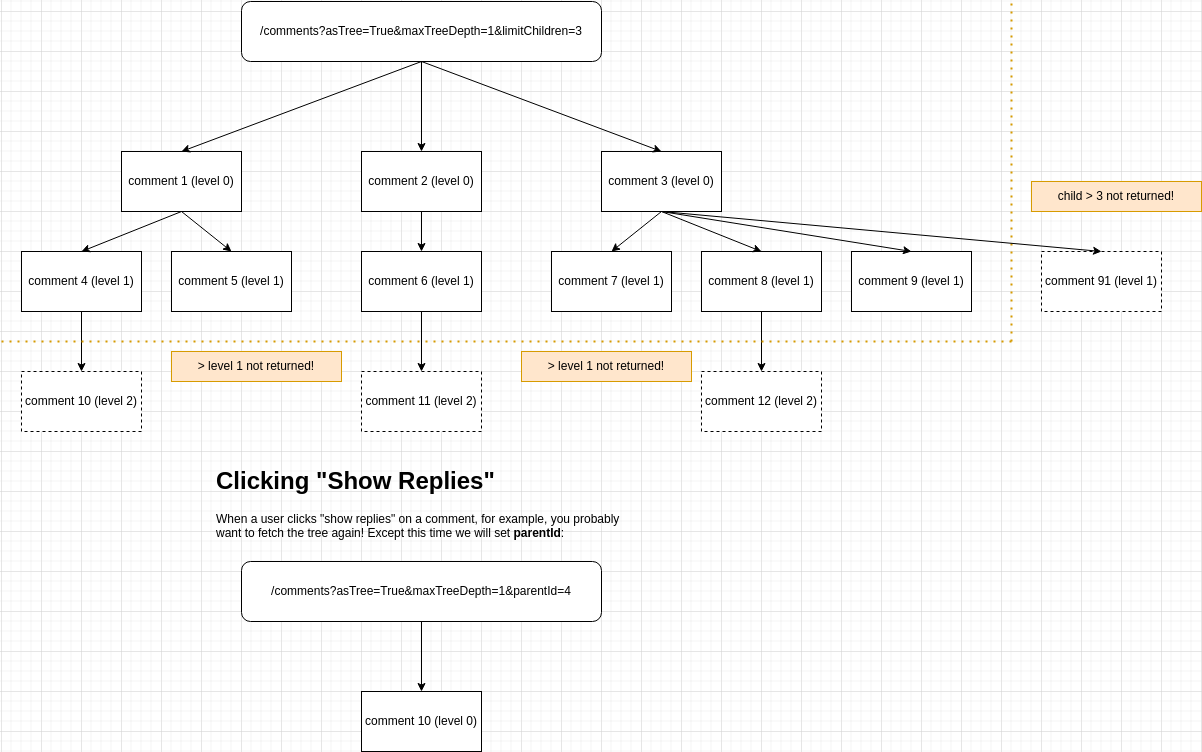
Fetching Comments in The Context of a User
L’API /comments peut être utilisée dans deux contextes, pour différents cas d’utilisation :
- Pour renvoyer des commentaires triés et étiquetés avec des informations pour construire votre propre client.
- Dans ce cas, définissez un paramètre de requête
contextUserId.
- Dans ce cas, définissez un paramètre de requête
- Pour récupérer des commentaires depuis votre backend pour des intégrations personnalisées.
- La plateforme utilisera cela par défaut sans
contextUserId.
- La plateforme utilisera cela par défaut sans
Get Comments as a Tree
Il est possible d’obtenir les commentaires retournés sous forme d’arbre, la pagination ne comptant que les commentaires de niveau supérieur.
Vous voulez uniquement récupérer les commentaires de niveau supérieur et leurs enfants immédiats ? Voici une façon :
Cependant, dans votre interface utilisateur vous pourriez avoir besoin de savoir s’il faut afficher un bouton « afficher les réponses » sur chaque commentaire. Lors de la récupération des commentaires via un arbre, une propriété hasChildren est ajoutée aux commentaires lorsqu’elle est applicable.
Get Comments as a Tree, Searching by Hash Tag
Il est possible de rechercher par hashtag en utilisant l’API, sur l’ensemble de votre locataire (pas limité à une page ou à urlId).
Dans cet exemple, nous omettons urlId et recherchons par plusieurs hashtags. L’API ne renverra que les commentaires contenant tous les hashtags demandés.
All Request Params
The Response
Helpful Tips
URL ID
Vous voudrez probablement utiliser l’API Comment avec le paramètre urlId. Vous pouvez d’abord appeler l’API Pages pour voir à quoi ressemblent les valeurs urlId disponibles.
Anonymous Actions
Pour les commentaires anonymes, vous voudrez probablement passer anonUserId lors de la récupération des commentaires, ainsi que lors du signalement et du blocage.
(!) Ceci est requis pour de nombreux magasins d’applications, car les utilisateurs doivent pouvoir signaler le contenu créé par les utilisateurs qu’ils voient, même s’ils ne sont pas connectés. Ne pas le faire peut entraîner la suppression de votre application de ce magasin.
Comments Not Being Returned
Vérifiez que vos commentaires sont approuvés et ne sont pas du spam.
GET /api/v1/comments/:id
Cette API fournit la capacité de récupérer un commentaire unique par id.
POST /api/v1/comments
Ce endpoint API fournit la capacité de créer des commentaires.
Les cas d'utilisation courants sont les interfaces personnalisées, les intégrations ou les importations.
Notes :
- Cette API peut mettre à jour le widget de commentaires "en direct" si désiré (cela augmente le
creditsCostde1à2). - Cette API créera automatiquement des objets utilisateur dans notre système si un email est fourni.
- Essayer d'enregistrer deux commentaires avec des emails différents, mais le même nom d'utilisateur, entraînera une erreur pour le deuxième commentaire.
- Si vous spécifiez
parentId, et qu'un commentaire enfant anotificationSentForParentà false, nous enverrons des notifications pour le commentaire parent. Cela se fait toutes les heures (nous regroupons les notifications pour diminuer le nombre d'emails envoyés). - Si vous voulez envoyer des emails de bienvenue lors de la création d'utilisateurs, ou des emails de vérification de commentaires, définissez
sendEmailsàtruedans les paramètres de requête. - Les commentaires créés via cette API apparaîtront dans les pages Analytique et Modération de l'application admin.
- Les "mauvais mots" sont toujours masqués dans les noms des commentateurs et le texte des commentaires si le paramètre est activé.
- Les commentaires créés via cette API peuvent toujours être vérifiés pour le spam si désiré.
- Les configurations telles que la longueur maximale des commentaires, si configurées via la page d'administration des règles de personnalisation, s'appliqueront ici.
Les données minimales requises pour soumettre qui s'afficheront dans le widget de commentaires sont les suivantes :
Une requête plus réaliste pourrait ressembler à :
PATCH /api/v1/comments/:id
Ce point de terminaison de l'API permet de mettre à jour un seul commentaire.
Remarques :
- Cette API peut mettre à jour le widget de commentaires "live" si souhaité (cela augmente le
creditsCostde base de1à2).- Cela peut permettre de migrer des commentaires entre des pages "en direct" (en changeant
urlId). - Les migrations coûtent
2crédits supplémentaires car les pages sont précalculées et cela est intensif en CPU.
- Cela peut permettre de migrer des commentaires entre des pages "en direct" (en changeant
- Contrairement à l'API de création, cette API NE créera PAS automatiquement d'objets utilisateur dans notre système si un email est fourni.
- Les commentaires mis à jour via cette API peuvent toujours être vérifiés pour spam si nécessaire.
- La configuration telle que la longueur maximale des commentaires, si configurée via la page d'administration des règles de personnalisation (Customization Rule), s'appliquera ici.
- Pour permettre aux utilisateurs de mettre à jour le texte de leur commentaire, vous pouvez simplement spécifier
commentdans le corps de la requête. Nous générerons lecommentHTMLrésultant.- Si vous définissez à la fois
commentetcommentHTML, nous ne générerons pas automatiquement le HTML. - Si l'utilisateur ajoute des mentions ou des hashtags dans son nouveau texte, ils seront toujours traités comme pour l'API
POST.
- Si vous définissez à la fois
- Lors de la mise à jour de
commenterEmailsur un commentaire, il est préférable de spécifier égalementuserId. Sinon, vous devez vous assurer que l'utilisateur avec cet email appartient à votre tenant, sinon la requête échouera. - Si le commentaire cible est verrouillé (
isLocked: true), la requête est rejetée aveccode: 'locked'. Déverrouillez d'abord le commentaire, mettez-le à jour, puis reverrouillez si souhaité.
DELETE /api/v1/comments/:id
Ce point de terminaison d'API permet de supprimer un commentaire.
Remarques:
- Cette API peut mettre à jour le widget de commentaires "en direct" si souhaité (cela augmente
creditsCostde1à2). - Cette API supprimera tous les commentaires enfants.
- Si le commentaire ciblé est verrouillé (
isLocked: true), la requête est rejetée aveccode: 'locked'. Déverrouillez d'abord le commentaire, puis supprimez-le.
POST /api/v1/comments/:id/flag
Ce endpoint API fournit la capacité de signaler un commentaire pour un utilisateur spécifique.
Notes :
- Cet appel doit toujours être effectué dans le contexte d'un utilisateur. L'utilisateur peut être un utilisateur FastComments.com, un utilisateur SSO ou un utilisateur de locataire.
- Si un seuil de signalement pour masquer est défini, le commentaire sera automatiquement masqué en direct après avoir été signalé le nombre de fois défini.
- Après qu'il soit automatiquement désapprouvé (masqué) - le commentaire ne peut être réapprouvé que par un administrateur ou un modérateur. Annuler le signalement ne réapprouvera pas le commentaire.
Pour le signalement anonyme, nous devons spécifier un anonUserId. Cela peut être un ID qui représente la session anonyme, ou un UUID aléatoire.
Cela nous permet de prendre en charge le signalement et l'annulation du signalement des commentaires même si un utilisateur n'est pas connecté. De cette façon, le commentaire peut être marqué comme
signalé lorsque les commentaires sont récupérés avec le même anonUserId.
POST /api/v1/comments/:id/un-flag
Ce endpoint API fournit la capacité d'annuler le signalement d'un commentaire pour un utilisateur spécifique.
Notes :
- Cet appel doit toujours être effectué dans le contexte d'un utilisateur. L'utilisateur peut être un utilisateur FastComments.com, un utilisateur SSO ou un utilisateur de locataire.
- Après qu'un commentaire soit automatiquement désapprouvé (masqué) - le commentaire ne peut être réapprouvé que par un administrateur ou un modérateur. Annuler le signalement ne réapprouvera pas le commentaire.
Pour le signalement anonyme, nous devons spécifier un anonUserId. Cela peut être un ID qui représente la session anonyme, ou un UUID aléatoire.
POST /api/v1/comments/:id/block
Ce endpoint API fournit la capacité de bloquer un utilisateur qui a écrit un commentaire donné. Il prend en charge le blocage des commentaires écrits par les utilisateurs FastComments.com, les utilisateurs SSO et les utilisateurs de locataire.
Il prend en charge un paramètre de corps commentIdsToCheck pour vérifier si d'autres commentaires potentiellement visibles sur le client doivent être bloqués/débloqués après cette action.
Notes :
- Cet appel doit toujours être effectué dans le contexte d'un utilisateur. L'utilisateur peut être un utilisateur FastComments.com, un utilisateur SSO ou un utilisateur de locataire.
- Le
userIddans la requête est l'utilisateur qui effectue le blocage. Par exemple :Utilisateur Aveut bloquerUtilisateur B. PassezuserId=Utilisateur Aet l'id du commentaire queUtilisateur Ba écrit. - Les commentaires complètement anonymes (pas d'id utilisateur, pas d'email) ne peuvent pas être bloqués et une erreur sera retournée.
Pour le blocage anonyme, nous devons spécifier un anonUserId. Cela peut être un ID qui représente la session anonyme, ou un UUID aléatoire.
Cela nous permet de prendre en charge le blocage des commentaires même si un utilisateur n'est pas connecté en récupérant les commentaires avec le même anonUserId.
POST /api/v1/comments/:id/un-block
Ce endpoint API fournit la capacité de débloquer un utilisateur qui a écrit un commentaire donné. Il prend en charge le déblocage des commentaires écrits par les utilisateurs FastComments.com, les utilisateurs SSO et les utilisateurs de locataire.
Il prend en charge un paramètre de corps commentIdsToCheck pour vérifier si d'autres commentaires potentiellement visibles sur le client doivent être bloqués/débloqués après cette action.
Notes :
- Cet appel doit toujours être effectué dans le contexte d'un utilisateur. L'utilisateur peut être un utilisateur FastComments.com, un utilisateur SSO ou un utilisateur de locataire.
- Le
userIddans la requête est l'utilisateur qui effectue le déblocage. Par exemple :Utilisateur Aveut débloquerUtilisateur B. PassezuserId=Utilisateur Aet l'id du commentaire queUtilisateur Ba écrit. - Les commentaires complètement anonymes (pas d'id utilisateur, pas d'email) ne peuvent pas être bloqués et une erreur sera retournée.
Structure du modèle d'email
Un objet EmailTemplate représente la configuration d'un modèle d'email personnalisé, pour un locataire.
Le système sélectionnera le modèle d'email à utiliser via :
- Son identifiant de type, nous l'appelons
emailTemplateId. Ce sont des constantes. - Le
domain. Nous essaierons d'abord de trouver un modèle pour le domaine auquel l'objet associé (comme unComment) est lié, et si aucune correspondance n'est trouvée, nous essaierons de trouver un modèle où le domaine est null ou*.
La structure de l'objet EmailTemplate est la suivante :
Notes
- Vous pouvez obtenir les valeurs valides de
emailTemplateIddepuis l'endpoint/definitions. - L'endpoint
/definitionsinclut également les traductions et données de test par défaut. - Les modèles échoueront à l'enregistrement avec une structure ou des données de test invalides.
GET /api/v1/email-templates/:id
Les EmailTemplates individuels peuvent être récupérés par leur id correspondant (PAS emailTemplateId).
GET /api/v1/email-templates
Cette API utilise la pagination, fournie par le paramètre de requête page. Les EmailTemplates sont retournés par pages de 100, triés par createdAt puis id.
PATCH /api/v1/email-templates/:id
Ce endpoint API fournit la capacité de mettre à jour un modèle d'email en ne spécifiant que l'id et les attributs à mettre à jour.
Notez que toutes les mêmes validations pour créer un modèle s'appliquent également, par exemple :
- Le modèle doit se rendre. Ceci est vérifié à chaque mise à jour.
- Vous ne pouvez pas avoir de modèles en double pour le même domaine (sinon l'un serait silencieusement ignoré).
POST /api/v1/email-templates
Ce endpoint API fournit la capacité de créer des modèles d'email.
Notes :
- Vous ne pouvez pas avoir plusieurs modèles avec le même
emailTemplateIdavec le même domaine. - Mais vous pouvez avoir un modèle générique (
domain=*) et un modèle spécifique au domaine pour le mêmeemailTemplateId. - Spécifier
domainn'est pertinent que si vous avez différents domaines, ou souhaitez utiliser des modèles spécifiques pour les tests (domaindéfini surlocalhostetc). - Si vous spécifiez
domain, il doit correspondre à unDomainConfig. En cas d'erreur, une liste de domaines valides est fournie. - La syntaxe du modèle est EJS et est rendue avec un timeout de 500ms. Le P99 pour le rendu est <5ms, donc si vous atteignez 500ms, quelque chose ne va pas.
- Votre modèle doit se rendre avec vos
testDatafournies pour être enregistré. Les erreurs de rendu sont agrégées et rapportées dans le tableau de bord (bientôt disponible via l'API).
Les données minimales requises pour ajouter un modèle sont les suivantes :
Vous voudrez peut-être avoir des modèles par site, auquel cas vous définissez domain :
POST /api/v1/email-templates/render
Ce endpoint API fournit la capacité de prévisualiser des modèles d'email.
DELETE /api/v1/email-templates/:id
Cette route fournit la suppression d'un unique EmailTemplate par id.
Structure du post de flux
Un objet FeedPost représente un article dans un flux FastComments. Un flux est un flux d'articles avec leurs propres fils de commentaires, rendu par le widget Feed. Chaque article possède un auteur, un contenu riche optionnel, des médias et des liens, et peut être étiqueté afin qu'un flux puisse être filtré.
La structure de l'objet FeedPost est la suivante :
Remarques :
- Certains de ces champs sont marqués
READONLY– ils sont renvoyés par l'API mais ne peuvent pas être définis. - Les commentaires sur un article sont des commentaires ordinaires dont le
urlIdestpost:suivi de l'_idde l'article. Utilisez cette valeur avec l'API Comment pour lire ou créer des commentaires sur un article.
GET /api/v1/feed-posts
Récupère les publications d'un fil, les plus récentes d'abord. La pagination est basée sur un curseur : passez le _id de la dernière publication que vous avez reçue comme
afterId pour obtenir la page suivante.
Coûte un crédit par dix publications retournées, avec un minimum d'un crédit.
POST /api/v1/feed-posts
Cette route crée un seul FeedPost. Chaque post possède un auteur, donc fromUserId est requis et doit être l'identifiant d'un utilisateur FastComments ou SSO existant sur le compte.
PATCH /api/v1/feed-posts/:id
Cette route met à jour un seul FeedPost. Envoyez uniquement les champs que vous souhaitez modifier.
Structure du hashtag
Un objet HashTag représente un tag qui peut être laissé par un utilisateur. Les HashTags peuvent être utilisés pour créer un lien vers un contenu externe ou pour
relier des commentaires connexes ensemble.
La structure de l'objet HashTag est la suivante :
Notes :
- Dans certains endpoints API, vous verrez que le hashtag est utilisé dans l'URL. N'oubliez pas d'encoder les valeurs en URI. Par exemple,
#devrait être représenté comme%23. - Certains de ces champs sont marqués
READONLY- ils sont retournés par l'API mais ne peuvent pas être définis.
GET /api/v1/hash-tags
Cette API utilise la pagination, fournie par le paramètre de requête page. Les HashTags sont retournés par pages de 100, triés par tag.
PATCH /api/v1/hash-tags/:tag
Cette route fournit la capacité de mettre à jour un seul HashTag.
POST /api/v1/hash-tags
Cette route fournit la capacité d'ajouter un seul HashTag.
POST /api/v1/hash-tags/bulk
Cette route fournit la capacité d'ajouter jusqu'à 100 objets HashTag à la fois.
DELETE /api/v1/hash-tags/:tag
Cette route permet la suppression d'un HashTag utilisateur par le tag fourni.
Notez qu'à moins que la création automatique de HashTag ne soit désactivée, les hashtags peuvent être recréés par un utilisateur fournissant le hashtag lors de la rédaction d'un commentaire.
GET /api/v1/me
Décrit les informations d’identification effectuant la requête : le locataire auquel elles appartiennent et, pour les jetons d’accès OAuth, l’utilisateur qui a autorisé l’application. Les intégrations l’utilisent pour tester une connexion et l’étiqueter.
Avec une clé API, la réponse identifie uniquement le locataire. Avec un jeton d’accès OAuth, elle transporte également l’utilisateur autorisant ainsi que les étendues (scopes) qui ont été accordées.
Structure du modérateur
Un objet Moderator représente la configuration d'un modérateur.
Il existe trois types de modérateurs :
- Les utilisateurs administrateurs qui ont le drapeau
isCommentModeratorAdmin. - Les utilisateurs SSO avec le drapeau
isCommentModeratorAdmin. - Les commentateurs réguliers, ou utilisateurs FastComments.com, qui sont invités en tant que modérateurs.
La structure Moderator est utilisée pour représenter l'état de modération du cas d'utilisation 3.
Si vous souhaitez inviter un utilisateur à être modérateur, via l'API, utilisez l'API Moderator en créant un Moderator et en l'invitant.
Si l'utilisateur n'a pas de compte FastComments.com, l'email d'invitation l'aidera à se configurer. S'il a déjà un compte, il se verra
accorder l'accès de modération à votre locataire et le userId de l'objet Moderator sera mis à jour pour pointer vers son utilisateur. Vous n'aurez pas d'accès API
à son utilisateur, car dans ce cas il lui appartient et est géré par FastComments.com.
Si vous avez besoin d'une gestion complète du compte de l'utilisateur, nous recommandons soit d'utiliser SSO, soit de l'ajouter en tant qu'Utilisateur Locataire et
ensuite d'ajouter un objet Moderator pour suivre ses statistiques.
La structure Moderator peut être utilisée comme mécanisme de suivi des statistiques pour les cas d'utilisation 1 et 2. Après avoir créé l'utilisateur, ajoutez un objet Moderator
avec son userId défini et ses statistiques seront suivies sur la Page des Modérateurs de Commentaires.
La structure de l'objet Moderator est la suivante :
GET /api/v1/moderators/:id
Cette route retourne un seul modérateur par son id.
GET /api/v1/moderators
Cette API utilise la pagination, fournie par le paramètre de requête skip. Les modérateurs sont retournés par pages de 100, triés par createdAt et id.
Le coût est basé sur le nombre de modérateurs retournés, coûtant 1 crédit par 10 modérateurs retournés.
PATCH /api/v1/moderators/:id
Ce endpoint API fournit la capacité de mettre à jour un Moderator par id.
La mise à jour d'un Moderator a les restrictions suivantes :
- Les valeurs suivantes ne peuvent pas être fournies lors de la mise à jour d'un
Moderator:acceptedInvitemarkReviewedCountdeletedCountmarkedSpamCountapprovedCounteditedCountbannedCountverificationIdcreatedAt
- Lorsqu'un
userIdest spécifié, cet utilisateur doit exister. - Lorsqu'un
userIdest spécifié, il doit appartenir au mêmetenantIdspécifié dans les paramètres de requête. - Deux modérateurs dans le même locataire ne peuvent pas être ajoutés avec le même
email. - Vous ne pouvez pas changer le
tenantIdassocié à unModerator.
POST /api/v1/moderators
Cette route fournit la capacité d'ajouter un seul Moderator.
La création d'un Moderator a les restrictions suivantes :
- Un
nameet unemaildoivent toujours être fournis. UnuserIdest optionnel. - Les valeurs suivantes ne peuvent pas être fournies lors de la création d'un
Moderator:acceptedInvitemarkReviewedCountdeletedCountmarkedSpamCountapprovedCounteditedCountbannedCountverificationIdcreatedAt
- Lorsqu'un
userIdest spécifié, cet utilisateur doit exister. - Lorsqu'un
userIdest spécifié, il doit appartenir au mêmetenantIdspécifié dans les paramètres de requête. - Deux modérateurs dans le même locataire ne peuvent pas être ajoutés avec le même
email.
Nous pouvons créer un Moderator pour un utilisateur dont nous ne connaissons que l'email :
Ou nous pouvons créer un Moderator pour un utilisateur qui appartient à notre locataire, pour suivre leurs statistiques de modération :
POST /api/v1/moderators/:id/send-invite
Cette route fournit la capacité d'inviter un seul Moderator.
Les restrictions suivantes existent pour envoyer un email d'invitation à un Moderator :
- Le
Moderatordoit déjà exister. - Le
fromNamene peut pas dépasser100 caractères.
Notes :
- Si un utilisateur avec l'email fourni existe déjà, il sera invité à modérer les commentaires de votre locataire.
- Si un utilisateur avec l'email fourni n'existe pas, le lien d'invitation le guidera dans la création de son compte.
- L'invitation expirera après
30 jours.
Nous pouvons créer un Moderator pour un utilisateur dont nous ne connaissons que l'email :
Cela enverra un email comme Bob de TenantName vous invite à être modérateur...
DELETE /api/v1/moderators/:id
Cette route permet la suppression d'un Moderator par id.
Structure du compteur de notifications
Un objet NotificationCount représente le compteur de notifications non lues et les métadonnées pour un utilisateur.
S'il n'y a pas de notifications non lues, il n'y aura pas de NotificationCount pour l'utilisateur.
Les objets NotificationCount sont créés automatiquement et ne peuvent pas être créés via l'API. Ils expirent également après un an.
Vous pouvez effacer le compteur de notifications non lues d'un utilisateur en supprimant son NotificationCount.
La structure de l'objet NotificationCount est la suivante :
GET /api/v1/notification-count/:user_id
Cette route retourne un seul NotificationCount par id utilisateur. Avec SSO, l'id utilisateur est au format <tenant id>:<user id>.
S'il n'y a pas de notifications non lues, il n'y aura pas de NotificationCount - donc vous obtiendrez un 404.
Ceci est différent de notifications/count en ce qu'il est beaucoup plus rapide, mais ne permet pas le filtrage.
DELETE /api/v1/notification-count/:user_id
Cette route supprime un seul NotificationCount par id utilisateur. Avec SSO, l'id utilisateur est au format <tenant id>:<user id>.
Cela effacera le compteur de notifications non lues de l'utilisateur (la cloche rouge dans le widget de commentaires s'estompera et le compteur disparaîtra).
Structure de notification
Un objet Notification représente une notification pour un utilisateur.
Les objets Notification sont créés automatiquement et ne peuvent pas être créés via l'API. Ils expirent également après un an.
Les notifications ne peuvent pas être supprimées. Elles peuvent cependant être mises à jour pour définir viewed à false, et vous pouvez filtrer par viewed.
Un utilisateur peut également se désabonner des notifications pour un commentaire spécifique en définissant optedOut dans la notification à true. Vous pouvez vous réabonner en le définissant à false.
Il existe différents types de notifications - vérifiez relatedObjectType et type.
Les façons dont les notifications sont créées sont assez flexibles et peuvent être déclenchées par de nombreux scénarios (voir NotificationType).
À ce jour, l'existence d'une Notification n'implique pas réellement qu'un email est ou devrait être envoyé. Plutôt, les notifications
sont utilisées pour le fil de notifications et les intégrations connexes.
La structure de l'objet Notification est la suivante :
GET /api/v1/notifications
Cette route retourne jusqu'à 30 objets Notification triés par createdAt, les plus récents en premier.
Vous pouvez filtrer par userId. Avec SSO, l'id utilisateur est au format <tenant id>:<user id>.
GET /api/v1/notifications/count
Cette route retourne un objet contenant le nombre de notifications sous un paramètre count.
Elle est plus lente que /notification-count/ et double le coût en crédits, mais permet le filtrage sur plus de dimensions.
Vous pouvez filtrer par les mêmes paramètres que l'endpoint /notifications comme userId. Avec SSO, l'id utilisateur est au format <tenant id>:<user id>.
PATCH /api/v1/notifications/:id
Ce endpoint API fournit la capacité de mettre à jour une Notification par id.
La mise à jour d'une Notification a les restrictions suivantes :
- Vous ne pouvez mettre à jour que les champs suivants :
viewedoptedOut
API publique des réactions de page
Page Reacts permet à vos utilisateurs d’aimer une page, ou d’y réagir avec votre propre ensemble d’images de réaction. Le widget Page Reacts et le widget Floating Likes sont construits sur ces points de terminaison, et vous pouvez les appeler vous‑même pour créer votre propre bouton J’aime.
Contrairement au reste de ce guide, les points de terminaison Page Reacts sont publics. Ils sont appelés depuis les navigateurs de vos utilisateurs, ne nécessitent aucune clé API et ne coûtent aucun crédit API. Chaque réaction appartient à l’utilisateur qui effectue la requête, ainsi un utilisateur ne peut ajouter ou supprimer que ses propres réactions.
Il existe deux ensembles de points de terminaison :
/page-reacts/v1/likes/:tenantId– un seul « like » par utilisateur et par page. Utilisez‑les pour un bouton J’aime./page-reacts/v2/:tenantId– plusieurs réactions par page, chacune identifiée par un courtidque vous choisissez (par exempleheartoulaugh).
Les deux sont également disponibles dans nos SDKs dans le cadre du PublicApi, par exemple getV1PageLikes, createV1PageReact et deleteV1PageReact dans le JavaScript SDK.
Affichage des personnes ayant réagi
Passez includeUserInfo=public aux points de terminaison GET pour obtenir également les utilisateurs qui ont aimé ou réagi, avec leurs noms d’utilisateur et avatars, les plus récents en premier. Les utilisateurs qui ont rendu leur activité de profil privée sont exclus, tout comme les utilisateurs anonymes. Jusqu’à 100 réactions sont retournées.
Les utilisateurs SSO sont créés avec une activité de profil privée sauf si votre charge utile SSO définit isProfileActivityPrivate à false, donc définissez‑la pour les utilisateurs que vous souhaitez voir apparaître dans ces listes.
Sur les pages qui nécessitent SSO, seuls les utilisateurs SSO qui peuvent voir la page peuvent lister qui a réagi. Les autres reçoivent un 403 avec le code sso-required ou page-forbidden.
Depuis votre serveur, GET /api/v1/pages/likes et GET /api/v1/pages/reacts renvoient les mêmes listes avec une clé API, et acceptent également includeUserInfo=include-private pour inclure les utilisateurs avec des profils privés.
Identifier l'utilisateur
Les réactions sont liées à l'utilisateur qui effectue la requête :
- Utilisateurs SSO : passez le paramètre de requête
sso, défini sur le JSON encodé en URI du même objet SSO que vous fournissez au widget de commentaire. Voir SSO. - Utilisateurs anonymes : lorsqu’il n’y a pas de paramètre
ssoet aucune connexion FastComments, le serveur attribue au navigateur un identifiant anonyme stocké dans le cookie de session FastComments. Envoyez les requêtes aveccredentials: 'include'afin que le cookie soit conservé entre les requêtes. Les navigateurs qui bloquent les cookies tiers ne conserveront pas l’identifiant anonyme, utilisez donc SSO lorsque chaque utilisateur doit être reconnu de façon fiable.
L'urlId
urlId identifie la page, de la même manière que pour les commentaires. Utilisez le même urlId que vous fournissez au widget de commentaire afin que les likes et les commentaires soient comptés sur la même page. N’oubliez pas de l’encoder en URI.
GET /page-reacts/v1/likes/:tenantId
Renvoie le nombre de likes sur une page, ainsi que le fait que l'utilisateur actuel l'ait aimée. Les pages qui n'existent pas encore renvoient un likeCount de 0.
Passez includeUserInfo=public pour obtenir également les utilisateurs qui ont aimé la page, les plus récents en premier. Les utilisateurs avec une activité de profil privé et les utilisateurs anonymes sont exclus, et jusqu'à 100 likes sont recherchés. Seul public est accepté ici ; include-private renvoie un 422 et est disponible via GET /api/v1/pages/likes avec une clé API. Sur les pages qui nécessitent le SSO, includeUserInfo renvoie un 403 pour les utilisateurs qui ne peuvent pas voir la page.
POST /page-reacts/v1/likes/:tenantId
Aime une page en tant qu'utilisateur actuel. Chaque utilisateur ne peut aimer une page qu'une fois : aimer à nouveau réussit avec le code already-liked et ne modifie pas le compteur.
La page est créée si elle n'existe pas encore. Passez title pour définir ou mettre à jour le titre de la page.
DELETE /page-reacts/v1/likes/:tenantId
Supprime le like de l'utilisateur actuel d'une page. Si l'utilisateur n'a pas aimé la page, la requête réussit avec le code not-liked et ne modifie pas le compteur.
GET /page-reacts/v2/:tenantId
Renvoie le nombre pour chaque réaction sur une page, ainsi que les réactions que l'utilisateur actuel a ajoutées.
Passez includeUserInfo=public pour également obtenir les utilisateurs qui ont réagi, sous forme d'une entrée par réaction avec son identifiant de réaction, la plus récente en premier. Les utilisateurs avec une activité de profil privé et les utilisateurs anonymes sont exclus, et jusqu'à 100 réactions sont recherchées. Seul public est accepté ici ; include-private renvoie un 422 et est disponible depuis GET /api/v1/pages/reacts avec une clé API. Sur les pages qui nécessitent le SSO, includeUserInfo renvoie un 403 pour les utilisateurs qui ne peuvent pas voir la page.
GET /page-reacts/v2/:tenantId/list
Renvoie les noms des utilisateurs qui ont ajouté une réaction à une page, triés par ordre alphabétique. Jusqu'à 100 réactions sont recherchées, et les utilisateurs anonymes ainsi que les utilisateurs avec une activité de profil privé ne sont pas inclus. Sur les pages qui nécessitent SSO, les utilisateurs qui ne peuvent pas voir la page reçoivent un 403 avec le code sso-required ou page-forbidden.
Pour obtenir également les avatars et les identifiants d'utilisateur, utilisez GET /page-reacts/v2/:tenantId avec includeUserInfo=public.
POST /page-reacts/v2/:tenantId
Ajoute une réaction à une page en tant qu'utilisateur actuel. Un utilisateur peut ajouter chaque identifiant de réaction une fois : l'ajouter à nouveau réussit avec le code already-reacted et ne modifie pas le compteur. Un utilisateur peut ajouter plusieurs réactions différentes à la même page.
Les identifiants de réaction sont choisis par vous et peuvent comporter jusqu'à 36 caractères. La page est créée si elle n'existe pas encore. Passez title pour définir ou mettre à jour le titre de la page.
DELETE /page-reacts/v2/:tenantId
Supprime l'une des réactions de l'utilisateur actuel d'une page. Si l'utilisateur n'a pas ajouté cette réaction, la requête réussit avec le code no-react et ne modifie pas le compteur.
Structure de la page
Un objet Page représente la page à laquelle plusieurs commentaires peuvent appartenir. Cette relation est définie par
urlId.
Une Page stocke des informations telles que le titre de la page, le nombre de commentaires et urlId.
La structure de l'objet Page est la suivante :
GET /api/v1/pages
Vous pouvez actuellement uniquement récupérer toutes les pages (ou une seule page via /by-url-id) associées à votre compte. Si vous souhaitez une recherche plus fine, contactez-nous.
Conseil Utile
L'API Comment nécessite un urlId. Vous pouvez d'abord appeler l'API Pages, pour voir à quoi ressemblent les valeurs urlId disponibles pour vous.
GET /api/v1/pages/by-url-id
Les pages individuelles peuvent être récupérées par leur urlId correspondant. Cela peut être utile pour rechercher les titres de pages ou les compteurs de commentaires.
Conseil Utile
N'oubliez pas d'encoder en URI les valeurs comme le urlId.
GET /api/v1/pages/likes
Renvoie le nombre de likes sur une page, et éventuellement les utilisateurs qui l'ont likée, les plus récents en premier. Il s'agit de la version côté serveur de GET /page-reacts/v1/likes/:tenantId.
includeUserInfo contrôle quels utilisateurs sont retournés :
publicexclut les utilisateurs qui ont rendu leurs activités de profil privées.include-privateles inclut. N'utilisez cela que lorsque la liste n'est pas affichée au public.
Les utilisateurs anonymes ne sont jamais inclus, et jusqu'à 100 likes sont recherchés. Les pages qui n'existent pas renvoient un likeCount de 0 et une liste users vide.
Astuce utile
N'oubliez pas d'encoder en URI les valeurs comme le urlId.
GET /api/v1/pages/reacts
Renvoie le nombre pour chaque réaction sur une page, et éventuellement les utilisateurs qui ont réagi, sous forme d'une entrée par réaction avec son identifiant de réaction, la plus récente en premier. Il s'agit de la version côté serveur de GET /page-reacts/v2/:tenantId.
includeUserInfo contrôle quels utilisateurs sont renvoyés :
publicexclut les utilisateurs qui ont rendu privées leurs activités de profil.include-privateles inclut. N'utilisez cela que lorsque la liste n'est pas affichée au public.
Les utilisateurs anonymes ne sont jamais inclus, et jusqu'à 100 réactions sont recherchées. Les pages qui n'existent pas renvoient aucun counts et une liste users vide.
Astuce utile
N'oubliez pas d'encoder en URI les valeurs comme le urlId.
PATCH /api/v1/pages/:id
Cette route fournit la capacité de mettre à jour une seule Page. Les commentaires correspondants seront mis à jour.
Note
Certains paramètres dans l'objet Page sont automatiquement mis à jour. Ce sont les attributs de comptage et de titre. Les comptages ne peuvent pas être mis à jour
via l'API car ce sont des valeurs calculées. Le title de la page peut être défini via l'API, mais serait écrasé si le widget de commentaires est utilisé sur
une page avec le même urlId et un titre de page différent.
POST /api/v1/pages
Ce endpoint API fournit la capacité de créer des pages.
Un cas d'utilisation courant est le contrôle d'accès.
Notes :
- Si vous avez commenté sur un fil de commentaires, ou appelé l'API pour créer un
Comment, vous avez déjà créé un objetPage! Vous pouvez essayer de le récupérer via la routePage/by-url-id, en passant le mêmeurlIdpassé au widget de commentaires. - La structure
Pagecontient certaines valeurs calculées. Actuellement, ce sontcommentCountetrootCommentCount. Elles sont remplies automatiquement et ne peuvent pas être définies par l'API. Tenter de le faire provoquera une erreur de l'API.
DELETE /api/v1/pages/:id
Cette route permet la suppression d'une seule page par id.
Notez qu'interagir avec le widget de commentaires pour une page avec le même urlId recréera simplement la Page de manière transparente.
Structure du sondage
A Poll est attaché à un commentaire, plutôt que d'être un objet à part. Il est créé avec le commentaire
(voir POST /api/v1/comments), ou ajouté à un commentaire existant plus tard avec PUT /api/v1/polls/:commentId.
Les comptes de votes sont conservés sur le sondage lui‑même, ainsi lire un sondage vous donne les résultats sans avoir à les additionner. Les votes individuels derrière ces comptes sont des objets PollVote.
Chaque option possède un id qui est généré lors de la création du sondage. Cet id est ce que vous utilisez pour voter, pour renommer une option, et pour conserver une option (et ses votes) lorsque vous PUT le sondage avec des options ajoutées ou supprimées. C’est la seule façon sûre de référencer une option – jamais sa position dans la liste.
Limites
- Une question est requise, et ne dépasse pas 200 caractères.
- Un sondage comporte entre 2 et 10 options.
- Une étiquette d'option est requise, ne dépasse pas 100 caractères, et doit être unique au sein du sondage (sans tenir compte de la casse).
closesAtdoit être dans le futur lors de la création du sondage. Pour fermer un sondage immédiatement,PATCH‑le avec une date dans le passé.
Paramètres du site
Les sondages respectent la configuration de votre site, que vous pouvez modifier sous Customize Widget :
- Les sondages doivent être activés avant de pouvoir créer un sondage, sinon l'API répond avec
polls-disabled. - Le vote peut être limité aux utilisateurs connectés, auquel cas un vote envoyé avec seulement un
anonUserIdest rejeté avecpoll-login-required.
GET /api/v1/polls/:commentId
Lit le sondage attaché à un commentaire, avec ses comptes de votes actuels.
Les sondages sont également renvoyés avec le commentaire lui‑même par les API de commentaires, donc utilisez ceci lorsque vous ne voulez que les résultats et non le commentaire complet.
Un commentaire qui n’a pas de sondage, un commentaire qui a été supprimé, et un identifiant de commentaire qui n’existe pas répondent tous de la même manière, avec poll-not-found.
PUT /api/v1/polls/:commentId
Attache un sondage à un commentaire existant, ou définit l'état complet du sondage qu'il possède déjà.
Le corps est le sondage complet, et les options que vous envoyez deviennent les options du sondage, dans cet ordre. Chaque option
est associée à son id :
- Une option envoyée avec le
idd'une option existante conserve cette option et ses votes. Son libellé et sa position sont mis à jour selon ce que vous avez envoyé. - Une option envoyée sans
idest ajoutée, sans votes. - Une option existante que vous omettez est supprimée, ainsi que les votes qui y ont été attribués.
totalVotesdiminue du même montant.
Ainsi, pour ajouter une option, envoyez les options actuelles avec leurs ids plus la nouvelle sans id. Pour en supprimer une,
envoyez la liste sans celle‑ci. Les ids d'option se trouvent dans le sondage retourné par GET /api/v1/polls/:commentId.
Envoyer aucun id ne remplace toutes les options et supprime tous les votes déjà enregistrés sur le sondage. Si le sondage a
des votes, cela nécessite replaceVotes=true, et sans cela l'API répond avec replace-votes-required.
Les autres champs sont également remplacés : omettre closesAt, privacy ou requireVoteToSeeResults les réinitialise à
leur valeur par défaut. Pour modifier un seul champ et laisser les autres intacts, utilisez PATCH /api/v1/polls/:commentId.
Autres notes
- Un
idqui n'est pas présent dans le sondage, ou le mêmeidfourni deux fois, échoue avecpoll-invalid. Un commentaire sans sondage n'a pas encore d'identifiants d'option, donc chaque option envoyée doit omettreid. - La confidentialité du sondage peut être restreinte mais pas élargie une fois qu'il a des votes.
- Cette API respecte les paramètres de votre site. Si les sondages ne sont pas activés pour le site ou la page, elle échoue avec
polls-disabled. - Un commentaire verrouillé ne peut pas voir son sondage modifié, et échoue avec
locked. - Les widgets connectés sont mis à jour en temps réel, de sorte que les spectateurs voient le nouveau sondage sans recharger.
PATCH /api/v1/polls/:commentId
Modifie un sondage sans perturber ses votes. Utilisez ceci pour corriger une faute de frappe dans la question ou une option, pour fermer ou rouvrir le sondage, ou pour changer qui peut voir qui a voté.
Les options sont identifiées par leur id, et un PATCH renomme celles que vous indiquez. Pour ajouter, supprimer ou réorganiser
les options, envoyez la liste complète des options à PUT /api/v1/polls/:commentId : les options que vous envoyez avec leurs ids conservent
leurs votes également.
Chaque champ est optionnel, mais au moins un doit être fourni.
Autres notes
- Nommer un id d'option qui n'est pas présent dans le sondage échoue avec
poll-invalidplutôt que de ne rien faire silencieusement. - Les libellés doivent rester uniques dans le sondage, en comptant les options que vous ne modifiez pas.
- Contrairement à la création d'un sondage,
closesAtpeut être dans le passé ici – c'est ainsi que vous fermez immédiatement un sondage. - La confidentialité du sondage peut être restreinte mais pas élargie une fois qu'il possède des votes.
- Un commentaire verrouillé ne peut pas voir son sondage modifié, et échoue avec
locked.
DELETE /api/v1/polls/:commentId
Supprime un sondage de son commentaire, ainsi que tous les votes qui y ont été déposés. Le commentaire lui‑même reste inchangé.
Supprimer le commentaire supprime également son sondage et ses votes, donc cela n’est nécessaire que lorsque vous souhaitez conserver le commentaire.
Structure du vote de sondage
Un PollVote est la réponse d’une personne à un sondage. Les décomptes affichés sur le sondage lui‑même sont maintenus à jour avec ceux‑ci, de sorte que vous n’avez besoin de ces informations que lorsque vous souhaitez savoir qui a voté pour quoi, plutôt que les totaux.
Un électeur ne peut avoir qu’un seul vote par sondage. Voter à nouveau déplace son vote existant vers la nouvelle option au lieu d’en ajouter un second, et updatedAt indique quand cela s’est produit.
voterId est le userId lorsque l’électeur était connecté, et le anonUserId sinon.
Confidentialité
Le paramètre privacy du sondage s’applique à cette API de la même manière qu’il s’applique dans le widget de commentaires :
- Anonymous (par défaut) : personne ne peut voir comment quiconque a voté, donc les votes ne peuvent pas être lus.
GET /api/v1/poll-votesetGET /api/v1/poll-votes/:idrépondent avecpoll-anonymous. Les décomptes du sondage sont toujours disponibles viaGET /api/v1/polls/:commentId. - Admins et modérateurs : votre clé API appartient à l’administrateur de votre site, elle peut donc lire les votes.
- Tout le monde : les votes peuvent être lus.
La confidentialité du sondage peut être restreinte mais pas élargie une fois qu’il possède des votes.
GET /api/v1/poll-votes
Liste les votes individuels derrière les comptes d'un sondage, du plus ancien au plus récent. Un crédit par 100 votes retournés.
Un sondage appartient à un commentaire, donc les votes sont lus un sondage à la fois et commentId est requis. Affinez davantage avec voterId pour vérifier comment une personne a voté, ou avec optionId pour lister tous ceux qui ont choisi une option donnée.
Au maximum 1000 votes sont retournés par appel. Utilisez skip pour paginer davantage.
Le paramètre privacy du sondage est respecté : les votes d'un sondage anonyme ne peuvent pas être lus, et la requête échoue avec poll-anonymous. Consultez la structure PollVote pour plus de détails.
Comptage des votes par option
Vous n'avez pas besoin d'additionner ces votes pour obtenir les résultats – le sondage possède ses propres comptes. Lisez le sondage avec GET /api/v1/polls/:commentId à la place, et utilisez cette API lorsque vous avez besoin de savoir qui a voté.
Tous les sondages sur une page
Il n'existe pas de liste de votes à l'échelle de la page. Pour faire un rapport sur une page entière, récupérez ses commentaires avec GET /api/v1/comments, qui renvoie le sondage de chaque commentaire ainsi que ses comptes, puis lisez les votes des sondages qui vous intéressent.
GET /api/v1/poll-votes/:id
Lit un vote de sondage unique par son identifiant.
Un vote sur un sondage anonyme ne peut pas être lu, et la requête échoue avec poll-anonymous. Voir la structure PollVote
pour comprendre comment le paramètre privacy du sondage s'applique.
POST /api/v1/poll-votes
Enregistre un vote sur un sondage.
Un électeur ne peut avoir qu'un seul vote par sondage. L'appeler à nouveau pour le même électeur déplace son vote vers la nouvelle option plutôt que d'en ajouter un second, et voter pour l'option qu'il a déjà choisie ne fait rien.
La réponse inclut le sondage, vous obtenez ainsi les comptes mis à jour sans une seconde requête.
Votes anonymes
Utilisez anonUserId au lieu de userId pour enregistrer un vote pour une personne qui n'est pas connectée. Cet identifiant n'a pas besoin de correspondre à un utilisateur quelque part – il identifie simplement la session, de sorte que la même personne ne soit pas comptée deux fois.
Le vote anonyme doit être activé pour votre site. Si le vote est limité aux utilisateurs connectés, un vote avec uniquement un anonUserId échoue avec poll-login-required.
Les votes anonymes sont également limités en fréquence par IP et par sondage, afin d'empêcher une personne de gonfler un sondage en réinitialisant sa session. Envoyez l'ip de l'utilisateur final afin que la limite s'applique à lui plutôt qu'à votre serveur.
Autres notes
- Un
userIddoit correspondre à un utilisateur qui existe sur votre site. Les votes pour un utilisateur appartenant à un autre site sont rejetés. - Voter sur un sondage fermé échoue avec
poll-closed. - Cette API met à jour les comptes du sondage et les pousse en direct vers les widgets connectés.
DELETE /api/v1/poll-votes/:id
Retire un vote. L'option sur laquelle il a été exprimé récupère son compteur, et l'électeur peut voter à nouveau.
Autres notes
- Supprimer le même vote deux fois renvoie
not-foundla deuxième fois, et les comptes restent inchangés. - Si le sondage a été remplacé depuis que le vote a été exprimé, le vote est supprimé mais aucun compteur ne change, car le remplacement a commencé à zéro.
Structure d'événement webhook en attente
Un objet PendingWebhookEvent représente un événement webhook en file d'attente qui est en attente.
Les objets PendingWebhookEvent sont créés automatiquement et ne peuvent pas être créés manuellement via l'API. Ils expirent également après un an.
Ils peuvent être supprimés, ce qui retire la tâche de la file d'attente.
Il existe différents types d'événements - vérifiez eventType (OutboundSyncEventType) et type (OutboundSyncType).
Un cas d'utilisation courant pour cette API est d'implémenter une surveillance personnalisée. Vous pouvez vouloir appeler l'endpoint /count périodiquement
pour interroger le compteur en attente pour des filtres donnés.
La structure de l'objet PendingWebhookEvent est la suivante :
GET /api/v1/pending-webhook-events
Cette route retourne une liste d'événements webhook en attente sous un paramètre pendingWebhookEvents.
Cette API utilise la pagination, fournie par le paramètre skip. Les PendingWebhookEvents sont retournés par pages de 100, triés par createdAt les plus récents en premier.
GET /api/v1/pending-webhook-events/count
Cette route retourne un objet contenant le nombre d'événements webhook en attente sous un paramètre count.
Vous pouvez filtrer par les mêmes paramètres que l'endpoint /pending-webhook-events
DELETE /api/v1/pending-webhook-events/:id
Cette route permet la suppression d'un seul PendingWebhookEvent.
Si vous avez besoin d'une suppression en masse, appelez l'API GET avec pagination puis appelez cette API séquentiellement.
Structure d'utilisateur SSO
FastComments fournit une solution SSO facile à utiliser. La mise à jour des informations d'un utilisateur avec l'intégration basée sur HMAC est aussi simple que de faire charger à l'utilisateur la page avec une charge utile mise à jour.
Cependant, il peut être souhaitable de gérer un utilisateur en dehors de ce flux, afin d'améliorer la cohérence de votre application.
L'API SSO User fournit un moyen de CRUD des objets que nous appelons SSOUsers. Ces objets sont différents des Users réguliers et sont gardés séparés pour la sécurité des types.
La structure de l'objet SSOUser est la suivante :
Facturation des utilisateurs SSO
Les utilisateurs SSO sont facturés différemment en fonction de leurs indicateurs d'autorisation :
- Utilisateurs SSO réguliers: Les utilisateurs sans permissions d'administrateur ou de modérateur sont facturés comme des utilisateurs SSO réguliers
- Administrateurs SSO: Les utilisateurs avec les flags
isAccountOwnerouisAdminAdminsont facturés séparément en tant qu'administrateurs SSO (même tarif que les administrateurs réguliers du tenant) - Modérateurs SSO: Les utilisateurs avec le flag
isCommentModeratorAdminsont facturés séparément en tant que modérateurs SSO (même tarif que les modérateurs réguliers)
Important: Pour éviter la double facturation, le système déduplique automatiquement les utilisateurs SSO par rapport aux utilisateurs et modérateurs réguliers du tenant en utilisant l'adresse e-mail. Si un utilisateur SSO a la même adresse e-mail qu'un utilisateur ou modérateur régulier du tenant, il ne sera pas facturé deux fois.
Contrôle d'accès
Les utilisateurs peuvent être répartis en groupes. C'est à cela que sert le champ groupIds, et il est optionnel.
@Mentions
Par défaut, les @mentions utiliseront username pour rechercher d'autres utilisateurs SSO lorsque le caractère @ est tapé. Si displayName est utilisé, alors les résultats correspondant à username seront ignorés lorsqu'il y a une correspondance pour displayName, et les résultats de recherche de @mention utiliseront displayName.
Abonnements
Avec FastComments, les utilisateurs peuvent s'abonner à une page en cliquant sur l'icône de cloche dans le widget de commentaires puis sur S'abonner.
Avec un utilisateur régulier, nous lui envoyons des e-mails de notification en fonction de ses paramètres de notification.
Avec les utilisateurs SSO, nous séparons cela pour assurer la compatibilité descendante. Les utilisateurs ne recevront ces e-mails de notification d'abonnement supplémentaires que si vous définissez optedInSubscriptionNotifications sur true.
Badges
Vous pouvez attribuer des badges aux utilisateurs SSO en utilisant la propriété badgeConfig. Les badges sont des indicateurs visuels qui apparaissent à côté du nom d'un utilisateur dans les commentaires.
badgeIds- Un tableau d'IDs de badges à attribuer à l'utilisateur. Ce sont des badges globaux visibles sur toutes les pages. Doivent être des IDs de badges valides créés dans votre compte FastComments. Limité à 30 badges.pageBadgeIds- Un tableau optionnel d'IDs de badges limité à la page courante (urlId). Ces badges ne sont affichés que sur la page où ils ont été attribués. Différentes pages peuvent avoir des badges page-scopés différents pour le même utilisateur.override- Si true, tous les badges affichés existants seront remplacés par ceux fournis. Les badges globaux et page-scopés sont écrasés indépendamment — écraser les badges globaux n'affecte pas les badges page-scopés, et vice versa. Si false ou omis, les badges fournis seront ajoutés aux badges existants.update- Si true, les propriétés d'affichage des badges seront mises à jour depuis la configuration du tenant chaque fois que l'utilisateur se connecte.
GET /api/v1/sso-users
Cette route retourne les utilisateurs SSO par pages de 100. La pagination est fournie par le paramètre skip. Les utilisateurs sont triés par leur signUpDate et id.
GET /api/v1/sso-users/by-id/:id
Cette route retourne un seul utilisateur SSO par son id.
GET /api/v1/sso-users/by-email/:email
Cette route retourne un seul utilisateur SSO par son email.
PATCH /api/v1/sso-users/:id
Cette route fournit la capacité de mettre à jour un seul utilisateur SSO.
POST /api/v1/sso-users
Cette route permet la création d'un seul utilisateur SSO.
Essayer de créer deux utilisateurs avec le même ID résultera en une erreur.
Dans cet exemple, nous spécifions groupIds pour le contrôle d'accès, mais c'est optionnel.
Note d'Intégration
Les données passées par l'API peuvent être remplacées simplement en passant un payload HMAC d'utilisateur SSO différent. Par exemple, si vous définissez un nom d'utilisateur via l'API, mais passez ensuite un différent via le flux SSO au chargement de la page, nous mettrons automatiquement à jour leur nom d'utilisateur.
Nous ne mettrons pas à jour les paramètres utilisateur dans ce flux à moins que vous ne les spécifiez explicitement ou ne les définissiez à null (pas undefined).
PUT /api/v1/sso-users/:id
Cette route fournit la capacité de mettre à jour un seul utilisateur SSO.
Dans cet exemple, nous spécifions groupIds pour le contrôle d'accès, mais c'est optionnel.
DELETE /api/v1/sso-users/:id
Cette route permet la suppression d'un seul utilisateur SSO par son id.
Notez que charger à nouveau le widget de commentaires avec un payload pour cet utilisateur recréera simplement l'utilisateur de manière transparente.
La suppression des commentaires de l'utilisateur est possible via le paramètre de requête deleteComments. Notez que si cela est vrai :
- Tous les commentaires de l'utilisateur seront supprimés en direct.
- Tous les commentaires enfants (maintenant orphelins) seront supprimés ou anonymisés selon la configuration de page associée à chaque commentaire. Par exemple, si le mode de suppression de fil est "anonymiser", alors les réponses resteront, et les commentaires de l'utilisateur seront anonymisés. Cela s'applique uniquement lorsque
commentDeleteModeestRemove(la valeur par défaut). - Le
creditsCostdevient2.
Commentaires Anonymisés
Vous pouvez conserver les commentaires de l'utilisateur mais simplement les anonymiser en définissant commentDeleteMode=1.
Si les commentaires de l'utilisateur sont anonymisés, les valeurs suivantes sont définies à null :
- commenterName
- commenterEmail
- avatarSrc
- userId
- anonUserId
- mentions
- badges
isDeleted et isDeletedUser sont définis à true.
Lors du rendu, le widget de commentaires utilisera DELETED_USER_PLACEHOLDER (par défaut : "[deleted]") pour le nom de l'utilisateur et DELETED_CONTENT_PLACEHOLDER pour le commentaire. Ceux-ci peuvent être personnalisés via l'interface de personnalisation du widget.
Exemples
Structure d'abonnement
Un objet Subscription représente un abonnement pour un utilisateur.
Les objets Subscription sont créés lorsqu'un utilisateur clique sur la cloche de notification dans le widget de commentaires et clique sur "S'abonner à cette page".
Les abonnements peuvent également être créés via l'API.
Avoir un objet Subscription provoque la génération d'objets Notification, et l'envoi d'emails, lorsque de nouveaux commentaires sont laissés à la racine de la page associée
à laquelle le Subscription est destiné. L'envoi d'emails dépend du type d'utilisateur. Pour les utilisateurs réguliers, cela dépend de optedInNotifications. Pour les utilisateurs SSO, cela dépend de optedInSubscriptionNotifications. Notez que certaines applications peuvent ne pas avoir le concept de page accessible sur le web, auquel cas définissez simplement urlId sur
l'id de l'élément auquel vous vous abonnez (même valeur pour urlId que vous passeriez au widget de commentaires).
La structure de l'objet Subscription est la suivante :
GET /api/v1/subscriptions/:id
Cette route retourne jusqu'à 30 objets Subscription triés par createdAt, les plus récents en premier.
Vous pouvez filtrer par userId. Avec SSO, l'id utilisateur est au format <tenant id>:<user id>.
POST /api/v1/subscriptions
Ce endpoint API fournit la capacité de créer une Subscription. Notez qu'un utilisateur ne peut avoir qu'un seul abonnement par page, car plus est redondant, et essayer
de créer plus d'un abonnement pour le même utilisateur pour la même page résultera en une erreur.
Créer un abonnement résultera en la création d'objets Notification lorsqu'un nouveau commentaire est laissé à la racine du urlId abonné (lorsque le parentId du commentaire est null).
DELETE /api/v1/subscriptions/:id
Cette route supprime un seul objet Subscription par id.
Structure d'utilisation quotidienne du locataire
Un objet TenantDailyUsage représente l'utilisation pour un locataire sur un jour donné. S'il n'y a eu aucune activité pour un locataire donné sur un jour
donné, ce jour n'aura pas d'objet TenantDailyUsage.
L'objet TenantDailyUsage n'est pas en temps réel et peut être en retard de quelques minutes par rapport à l'utilisation réelle.
La structure pour l'objet TenantDailyUsage est la suivante:
GET /api/v1/tenant-daily-usage
Cette route permet de rechercher l'utilisation d'un locataire par année, mois et jour. Jusqu'à 365 objets peuvent être retournés, et le coût est de 1 crédit API par 10 objets.
Les objets de réponse sont triés par la date de création (les plus anciens en premier).
Structure du locataire
Le Tenant définit un client FastComments.com. Ils peuvent être créés via l'API par des locataires ayant accès au white labeling. Les locataires en white label
ne peuvent pas créer d'autres locataires en white label (un seul niveau d'imbrication est autorisé).
La structure de l'objet Tenant est la suivante :
GET /api/v1/tenants/:id
Cette route retourne un seul Tenant par id.
GET /api/v1/tenants
Cette API retourne les locataires qui sont gérés par votre locataire.
La pagination est fournie par le paramètre de requête skip. Les locataires sont retournés par pages de 100, triés par signUpDate et id.
Le coût est basé sur le nombre de locataires retournés, coûtant 1 crédit par 10 locataires retournés.
Vous pouvez définir des paramètres meta sur les objets Tenant et rechercher des locataires correspondants. Par exemple, pour la clé someKey et la valeur meta some-value, nous pouvons
construire un objet JSON avec cette paire clé/valeur puis l'encoder en URI comme paramètre de requête pour filtrer :
POST /api/v1/tenants
Cette route fournit la capacité d'ajouter un seul Tenant.
La création d'un Tenant a les restrictions suivantes :
- Un
nameest requis. domainConfigurationest requis.- Les valeurs suivantes ne peuvent pas être fournies lors de la création d'un
Tenant:hasFlexPricinglastBillingIssueReminderDateflexLastBilledAmount
- Le
signUpDatene peut pas être dans le futur. - Le
namene peut pas dépasser200 caractères. - L'
emailne peut pas dépasser300 caractères. - L'
emaildoit être unique parmi tous les locataires de FastComments.com. - Vous ne pouvez pas créer de locataires si le locataire parent n'a pas de
TenantPackagevalide défini.- Si votre locataire a été créé via FastComments.com, cela ne devrait pas être un problème.
- Vous ne pouvez pas créer plus de locataires que défini sous
maxWhiteLabeledTenantsdans votre forfait. - Vous devez spécifier le paramètre de requête
tenantIdqui est l'id de votrelocataire parentavec le white labeling activé.
Nous pouvons créer un Tenant avec seulement quelques paramètres :
PATCH /api/v1/tenants/:id
Ce endpoint API fournit la capacité de mettre à jour un Tenant par id.
La mise à jour d'un Tenant a les restrictions suivantes :
- Les valeurs suivantes ne peuvent pas être mises à jour :
hasFlexPricinglastBillingIssueReminderDateflexLastBilledAmountmanagedByTenantId
- Le
signUpDatene peut pas être dans le futur. - Le
namene peut pas dépasser200 caractères. - L'
emailne peut pas dépasser300 caractères. - L'
emaildoit être unique parmi tous les locataires de FastComments.com. - Lors de la définition de
billingInfoValidàtrue,billingInfodoit être fourni dans la même requête. - Vous ne pouvez pas mettre à jour le
packageIdassocié à votre propre locataire. - Vous ne pouvez pas mettre à jour le
paymentFrequencyassocié à votre propre locataire.
DELETE /api/v1/tenants/:id
Cette route fournit la suppression d'un Tenant et toutes les données associées (utilisateurs, commentaires, etc) par id.
Les restrictions suivantes existent concernant la suppression de locataires:
- Le locataire doit être le vôtre, ou un locataire en marque blanche que vous gérez.
- Le paramètre de requête
suredoit être défini àtrue.
Structure du forfait locataire
Le TenantPackage définit les informations de forfait disponibles pour un Tenant. Un locataire peut avoir plusieurs forfaits disponibles, mais un seul
en utilisation à un moment donné.
Un Tenant ne peut être utilisé pour aucun produit tant que son packageId ne pointe pas vers un TenantPackage valide.
Il existe deux types d'objets TenantPackage :
- Forfaits à prix fixe - où
hasFlexPricingest faux. - Tarification flexible - où
hasFlexPricingest vrai.
Dans les deux cas, des limites sont définies sur le compte utilisant le forfait, cependant avec Flex, le locataire est facturé un prix de base plus
ce qu'il a utilisé, défini par les paramètres flex*.
Un locataire peut avoir plusieurs forfaits de locataire et avoir la possibilité de changer le forfait lui-même depuis la Page d'Information de Facturation.
Si vous gérerez la facturation pour les locataires vous-mêmes, vous devrez toujours définir un forfait pour chaque locataire pour définir leurs limites. Définissez simplement billingHandledExternally à true sur le Tenant et ils
ne pourront pas changer leurs informations de facturation, ou forfait actif, eux-mêmes.
Vous ne pouvez pas créer de forfaits avec des limites plus élevées que le locataire parent.
La structure de l'objet TenantPackage est la suivante :
GET /api/v1/tenant-packages/:id
Cette route retourne un seul Tenant Package par id.
GET /api/v1/tenant-packages
Cette API utilise la pagination, fournie par le paramètre de requête skip. Les TenantPackages sont retournés par pages de 100, triés par createdAt et id.
Le coût est basé sur le nombre de forfaits de locataire retournés, coûtant 1 crédit par 10 forfaits de locataire retournés.
POST /api/v1/tenant-packages
Cette route fournit la capacité d'ajouter un seul TenantPackage.
La création d'un TenantPackage a les restrictions suivantes:
- Les paramètres suivants sont requis:
nametenantIdmonthlyCostUSD- Peut être null.yearlyCostUSD- Peut être null.maxMonthlyPageLoadsmaxMonthlyAPICreditsmaxMonthlyCommentsmaxConcurrentUsersmaxTenantUsersmaxSSOUsersmaxModeratorsmaxDomainshasDebrandingforWhoTextfeatureTaglineshasFlexPricing- Si true, alors tous les paramètresflex*sont requis.
- Le
namene peut pas dépasser50 caractères. - Chaque élément
forWhoTextne peut pas dépasser200 caractères. - Chaque élément
featureTaglinesne peut pas dépasser100 caractères. - Le
TenantPackagedoit être "plus petit" que le locataire parent. Par exemple, tous les paramètresmax*doivent avoir des valeurs inférieures à celles du locataire parent. - Un locataire en marque blanche peut avoir un maximum de cinq packages.
- Seuls les locataires avec accès à la marque blanche peuvent créer un
TenantPackage. - Vous ne pouvez pas ajouter de packages à votre propre locataire. :)
Nous pouvons créer un TenantPackage comme suit:
PATCH /api/v1/tenant-packages/:id
Ce endpoint API fournit la capacité de mettre à jour un TenantPackage par id.
La mise à jour d'un TenantPackage a les restrictions suivantes:
- Si vous définissez
hasFlexPricingà true, alors tous les paramètresflex*sont requis dans cette même requête. - Le
namene peut pas dépasser50 caractères. - Chaque élément
forWhoTextne peut pas dépasser200 caractères. - Chaque élément
featureTaglinesne peut pas dépasser100 caractères. - Le
TenantPackagedoit être "plus petit" que le locataire parent. Par exemple, tous les paramètresmax*doivent avoir des valeurs inférieures à celles du locataire parent. - Vous ne pouvez pas changer le
tenantIdassocié à unTenantPackage.
DELETE /api/v1/tenant-packages/:id
Cette route fournit la suppression d'un TenantPackage par id.
Vous ne pouvez pas supprimer un TenantPackage qui est en cours d'utilisation (le packageId d'un locataire pointe vers le package). Mettez à jour le Tenant d'abord.
Structure de l'utilisateur locataire
Le TenantUser définit un User qui est géré par un locataire spécifique. Leur compte est sous le contrôle complet du locataire
auquel ils sont associés, et leur compte peut être mis à jour ou supprimé via l'interface utilisateur ou l'API.
Les utilisateurs locataires peuvent être des administrateurs avec toutes les permissions et accès au Tenant, ou ils peuvent être limités à des permissions spécifiques pour
modérer les commentaires, accéder aux clés API, etc.
La structure de l'objet TenantUser est la suivante :
GET /api/v1/tenant-users/:id
Cette route retourne un seul TenantUser par id.
GET /api/v1/tenant-users
Cette API utilise la pagination, fournie par le paramètre de requête skip. Les TenantUsers sont retournés par pages de 100, triés par signUpDate, username et id.
Le coût est basé sur le nombre d'utilisateurs locataires retournés, coûtant 1 crédit par 10 utilisateurs locataires retournés.
POST /api/v1/tenant-users
Cette route fournit la capacité d'ajouter un seul TenantUser.
La création d'un TenantUser a les restrictions suivantes :
- Un
usernameest requis. - Un
emailest requis. - Le
signUpDatene peut pas être dans le futur. - Le
localedoit être dans la liste des Locales Supportées. - Le
usernamedoit être unique parmi tous les FastComments.com. Si c'est un problème, nous suggérons d'utiliser SSO à la place. - L'
emaildoit être unique parmi tous les FastComments.com. Si c'est un problème, nous suggérons d'utiliser SSO à la place. - Vous ne pouvez pas créer plus d'utilisateurs locataires que défini sous
maxTenantUsersdans votre forfait.
Nous pouvons créer un TenantUser comme suit
POST /api/v1/tenant-users/:id/send-login-link
Cette route fournit la capacité d'envoyer un lien de connexion à un seul TenantUser.
Utile lors de la création en masse d'utilisateurs sans avoir à leur expliquer comment se connecter à FastComments.com. Cela leur enverra simplement un "lien magique" de connexion qui
expire après 30 jours.
Les restrictions suivantes existent pour envoyer un lien de connexion à un TenantUser :
- Le
TenantUserdoit déjà exister. - Vous devez avoir accès pour gérer le
Tenantauquel leTenantUserappartient.
Nous pouvons envoyer un lien de connexion à un TenantUser comme suit :
Cela enverra un email comme Bob de TenantName vous invite à être modérateur...
PATCH /api/v1/tenant-users/:id
Cette route fournit la capacité de mettre à jour un seul TenantUser.
La mise à jour d'un TenantUser a les restrictions suivantes :
- Le
signUpDatene peut pas être dans le futur. - Le
localedoit être dans la liste des Locales Supportées. - Le
usernamedoit être unique parmi tous les FastComments.com. Si c'est un problème, nous suggérons d'utiliser SSO à la place. - L'
emaildoit être unique parmi tous les FastComments.com. Si c'est un problème, nous suggérons d'utiliser SSO à la place. - Vous ne pouvez pas mettre à jour le
tenantIdd'un utilisateur.
Nous pouvons créer un TenantUser comme suit
DELETE /api/v1/tenant-users/:id
Cette route permet la suppression d'un TenantUser par id.
La suppression des commentaires de l'utilisateur est possible via le paramètre de requête deleteComments. Notez que si cela est vrai :
- Tous les commentaires de l'utilisateur seront supprimés en direct.
- Tous les commentaires enfants (maintenant orphelins) seront supprimés ou anonymisés selon la configuration de page associée à chaque commentaire. Par exemple, si le mode de suppression de fil est "anonymiser", alors les réponses resteront, et les commentaires de l'utilisateur seront anonymisés. Cela s'applique uniquement lorsque
commentDeleteModeestRemove(la valeur par défaut). - Le
creditsCostdevient2.
Commentaires Anonymisés
Vous pouvez conserver les commentaires de l'utilisateur mais simplement les anonymiser en définissant commentDeleteMode=1.
Si les commentaires de l'utilisateur sont anonymisés, les valeurs suivantes sont définies à null :
- commenterName
- commenterEmail
- avatarSrc
- userId
- anonUserId
- mentions
- badges
isDeleted et isDeletedUser sont définis à true.
Lors du rendu, le widget de commentaires utilisera DELETED_USER_PLACEHOLDER (par défaut : "[deleted]") pour le nom de l'utilisateur et DELETED_CONTENT_PLACEHOLDER pour le commentaire. Ceux-ci peuvent être personnalisés via l'interface de personnalisation du widget.
Exemples
Structure d'utilisateur
User est un objet qui représente un dénominateur commun de tous les utilisateurs.
Gardez à l'esprit qu'à FastComments nous avons un tas de cas d'utilisation différents pour les utilisateurs :
- SSO Sécurisé
- SSO Simple
- Utilisateurs Locataires (Par exemple : Administrateurs)
- Commentateurs
Cette API est pour les Commentateurs et les utilisateurs créés via SSO Simple. En gros, tout utilisateur créé
via votre site peut être accédé via cette API. Les utilisateurs locataires peuvent également être récupérés de cette façon, mais vous obtiendrez plus d'informations en interagissant avec l'API /tenant-users/.
Pour le SSO Sécurisé veuillez utiliser l'API /sso-users/.
Vous ne pouvez pas mettre à jour ces types d'utilisateurs. Ils ont créé leur compte via votre site, donc nous fournissons un accès en lecture seule basique, mais
vous ne pouvez pas faire de modifications. Si vous voulez avoir ce type de flux - vous devez configurer le SSO Sécurisé.
La structure de l'objet User est la suivante :
GET /api/v1/users/:id
Cette route retourne un seul User par id.
Structure du vote
Un objet Vote représente un vote laissé par un utilisateur.
La relation entre les commentaires et le vote est définie via commentId.
La structure de l'objet Vote est la suivante :
GET /api/v1/votes
Les votes doivent être récupérés par urlId.
Types de Votes
Il existe trois types de votes :
- Votes authentifiés, qui sont appliqués au commentaire correspondant. Vous pouvez les créer via cette API.
- Votes authentifiés, qui sont en attente de vérification, et donc ne sont pas encore appliqués au commentaire. Ceux-ci sont créés lorsqu'un utilisateur utilise le mécanisme connexion pour voter de FastComments.com.
- Votes anonymes, qui sont appliqués au commentaire correspondant. Ceux-ci sont créés avec les commentaires anonymes.
Ceux-ci sont retournés dans des listes séparées dans l'API pour réduire la confusion.
Notes sur les Votes Anonymes
Notez que les votes anonymes créés via cette API apparaîtront dans la liste appliedAuthorizedVotes. Ils sont considérés comme autorisés puisqu'ils ont été créés via l'API avec une clé API.
La structure appliedAnonymousVotes est pour les votes créés sans email, clé API, etc.
GET /api/v1/votes/for-user
Permet de récupérer les votes laissés par un utilisateur sur un urlId donné. Prend un userId qui peut être n'importe quel utilisateur FastComments.com ou SSO User.
Ceci est utile si vous voulez montrer si un utilisateur a voté sur un commentaire. Lors de la récupération des commentaires, appelez simplement cette API en même temps pour l'utilisateur avec le
même urlId.
Si vous utilisez le vote anonyme, vous voudrez passer anonUserId à la place.
Notez que les votes anonymes apparaîtront dans la liste appliedAuthorizedVotes. Ils sont considérés comme autorisés puisqu'ils ont été créés via l'API avec une clé API.
POST /api/v1/votes
Cette route fournit la capacité d'ajouter un seul Vote autorisé. Les votes peuvent être up (+1) ou down (-1).
Création de Votes Anonymes
Les votes anonymes peuvent être créés en définissant anonUserId dans les paramètres de requête au lieu de userId.
Cet id n'a pas à correspondre à un objet utilisateur quelque part (d'où anonyme). C'est simplement un identifiant pour la session, afin que vous puissiez récupérer les votes à nouveau dans la même session, pour vérifier si un commentaire a été voté.
Si vous n'avez pas de concept de "sessions anonymes" comme FastComments - vous pouvez simplement définir ceci sur un ID aléatoire, comme un UUID (bien que nous apprécions les identifiants plus petits pour économiser de l'espace).
Autres Notes
- Cette API obéit aux paramètres au niveau du locataire. Par exemple, si vous désactivez le vote pour une page donnée, et que vous tentez de créer un vote via l'API, cela échouera avec le code d'erreur
voting-disabled. - Cette API est en direct par défaut.
- Cette API mettra à jour les
votesduCommentcorrespondant.
DELETE /api/v1/votes/:id
Cette route fournit la capacité de supprimer un seul Vote.
Notes :
- Cette API obéit aux paramètres au niveau du locataire. Par exemple, si vous désactivez le vote pour une page donnée, et que vous tentez de créer un vote via l'API, cela échouera avec le code d'erreur
voting-disabled. - Cette API est en direct par défaut.
- Cette API mettra à jour les
votesduCommentcorrespondant.
Structure de configuration de domaine
Un objet DomainConfig représente la configuration d'un domaine pour un tenant.
La structure de l'objet DomainConfig est la suivante :
Pour l'authentification
Domain Configuration est utilisé pour déterminer quels sites peuvent héberger le widget FastComments pour votre compte. Il s'agit d'une forme basique d'authentification, ce qui signifie que l'ajout ou la suppression de toute configuration de domaine peut affecter la disponibilité de votre installation FastComments en production.
Ne supprimez pas et ne mettez pas à jour la propriété domain d'un Domain Config pour un domaine actuellement utilisé, sauf si l'intention est de désactiver ce domaine.
Cela a le même comportement que la suppression d'un domaine depuis /auth/my-account/configure-domains.
Notez également que la suppression d'un domaine depuis l'interface My Domains supprimera toute configuration correspondante pour ce domaine qui aurait pu être ajoutée via cette interface.
Pour la personnalisation des e-mails
Le lien de désinscription dans le pied de page de l'e-mail, ainsi que la fonctionnalité de désinscription en un clic offerte par de nombreux clients de messagerie, peuvent être configurés via cette API en définissant footerUnsubscribeURL et emailHeaders, respectivement.
Pour DKIM
Après avoir défini vos enregistrements DNS DKIM, mettez simplement à jour le DomainConfig avec votre configuration DKIM en utilisant la structure définie.
GET /api/v1/domain-configs
Cette API fournit la capacité de récupérer tous les objets DomainConfig pour un locataire.
GET /api/v1/domain-configs/:domain
Les DomainConfigs individuels peuvent être récupérés par leur domain correspondant.
POST /api/v1/domain-configs
Ce endpoint API fournit la capacité de créer des configurations de domaine.
Ajouter une configuration pour un domaine autorise ce domaine pour le compte FastComments.
Les cas d'utilisation courants de cette API sont la configuration initiale, si de nombreux domaines doivent être ajoutés, ou une configuration personnalisée pour l'envoi d'emails.
PATCH /api/v1/domain-configs/:domain
Ce endpoint API fournit la capacité de mettre à jour une configuration de domaine en ne spécifiant que le domaine et l'attribut à mettre à jour.
PUT /api/v1/domain-configs/:domain
Ce endpoint API fournit la capacité de remplacer une configuration de domaine.
DELETE /api/v1/domain-configs/:domain
Cette route fournit la suppression d'un unique DomainConfig par id.
- Note : Supprimer un
DomainConfigdésautorisera ce domaine d'utiliser FastComments. - Note : Réajouter un domaine via l'interface utilisateur recréera l'objet (avec seulement
domainrempli).
Structure de configuration de question
FastComments fournit un moyen de construire des questions et d'agréger leurs résultats. Un exemple de question (ci-après appelée QuestionConfig)
pourrait être une évaluation par étoiles, un curseur, ou une question NPS (déterminé via type).
Les données de question peuvent être agrégées individuellement, ensemble, au fil du temps, globalement, par page, et ainsi de suite.
Le framework a toutes les capacités nécessaires pour construire des widgets côté client (avec votre serveur devant cette API), des tableaux de bord d'administration, et des outils de rapports.
D'abord, nous devons définir un QuestionConfig. La structure est la suivante:
GET /api/v1/question-configs
Cette route retourne jusqu'à 100 objets QuestionConfig à la fois, paginés. Le coût est de 1 pour chaque 100 objets. Ils sont
triés par texte de question ascendant (champ question).
GET /api/v1/question-configs/:id
Cette route retourne un seul QuestionConfig par son id.
POST /api/v1/question-configs
Ce endpoint API fournit la capacité de créer un QuestionConfig.
PATCH /api/v1/question-configs/:id
Cette route fournit la capacité de mettre à jour un seul QuestionConfig.
La structure suivante représente toutes les valeurs qui peuvent être modifiées:
DELETE /api/v1/question-configs/:id
Cette route fournit la suppression d'un QuestionConfig par id.
Cela supprimera tous les résultats de question correspondants (mais pas les commentaires). Cela fait partie du coût élevé en crédits.
Structure du résultat de question
Afin de sauvegarder les résultats des questions, vous créez un QuestionResult. Vous pouvez ensuite agréger les résultats de questions, et aussi
les lier aux commentaires à des fins de rapports.
GET /api/v1/question-results
Cette route retourne jusqu'à 1000 objets QuestionResults à la fois, paginés. Le coût est de 1 pour chaque 100 objets. Ils sont
triés par createdAt, ascendant. Vous pouvez filtrer par divers paramètres.
GET /api/v1/question-results/:id
Cette route retourne un seul QuestionResult par son id.
POST /api/v1/question-results
Ce endpoint API fournit la capacité de créer un QuestionResult.
PATCH /api/v1/question-results/:id
Cette route fournit la capacité de mettre à jour un seul QuestionResult.
La structure suivante représente toutes les valeurs qui peuvent être modifiées:
DELETE /api/v1/question-results/:id
Cette route fournit la suppression d'un QuestionResult par id.
GET /api/v1/question-results-aggregate
C'est ici que l'agrégation des résultats se produit.
La structure de réponse d'agrégation est la suivante:
Voici les paramètres de requête disponibles pour l'agrégation:
Voici un exemple de requête:
Exemple de réponse:
Notes de Performance
- Pour un échec de cache, les agrégations prennent généralement cinq secondes par million de résultats.
- Sinon, les requêtes sont en temps constant.
Notes sur le Cache et les Coûts
- Lorsque
forceRecalculateest spécifié, le coût est toujours10, au lieu du2normal. - Si le cache expire et que les données sont recalculées, le coût reste un constant
2siforceRecalculaten'est pas spécifié. Le cache expire en fonction de la taille de l'ensemble de données agrégé (peut varier entre 30 secondes et 5 minutes). - Ceci est pour encourager l'utilisation du cache.
GET /api/v1/question-results-aggregate/combine/comments
C'est ici que la combinaison des résultats avec les commentaires se produit. Utile pour créer un graphique de "commentaires positifs et négatifs récents" pour un produit, par exemple.
Vous pouvez rechercher via une plage de valeurs (inclusive), une ou plusieurs questions, et par une date de début (inclusive).
La structure de réponse est la suivante:
Voici les paramètres de requête disponibles pour l'agrégation:
Voici un exemple de requête:
Exemple de réponse:
Notes sur le Cache et les Coûts
- Lorsque
forceRecalculateest spécifié, le coût est toujours10, au lieu du2normal. - Si le cache expire et que les données sont recalculées, le coût reste un constant
2siforceRecalculaten'est pas spécifié. - Ceci est pour encourager l'utilisation du cache.
Structure du badge utilisateur
UserBadge est un objet qui représente un badge attribué à un utilisateur dans le système FastComments.
Les badges peuvent être attribués aux utilisateurs automatiquement en fonction de leur activité (par exemple le nombre de commentaires, le temps de réponse, le statut de vétéran) ou manuellement par les administrateurs du site.
La structure de l'objet UserBadge est la suivante :
GET /api/v1/user-badges
This endpoint allows you to fetch user badges based on various criteria.
Exemple de requête :
Run You can add various query parameters to filter the results:
userId- Récupérer les badges d'un utilisateur spécifiquebadgeId- Récupérer les instances d'un badge spécifiquetype- Filtrer par type de badge (0=CommentCount, 1=CommentUpVotes, 2=CommentReplies, etc. See UserBadge structure for full list)displayedOnComments- Filtrer selon que le badge est affiché sur les commentaires (true/false)limit- Nombre maximum de badges à renvoyer (par défaut 30, max 200)skip- Nombre de badges à ignorer (pour la pagination)
Exemple de réponse :
Réponses d'erreur possibles :
GET /api/v1/user-badges/:id
Ce endpoint vous permet de récupérer un badge utilisateur spécifique par son ID unique.
Exemple de Requête :
Run Exemple de Réponse :
Réponses d'Erreur Possibles :
POST /api/v1/user-badges
Ce endpoint vous permet de créer une nouvelle attribution de badge utilisateur.
Exemple de Requête :
Run Le corps de la requête doit contenir les paramètres suivants :
userId(requis) - L'ID de l'utilisateur auquel attribuer le badgebadgeId(requis) - L'ID du badge à attribuerdisplayedOnComments(optionnel) - Si le badge doit être affiché sur les commentaires de l'utilisateur (par défaut à true)
Notes Importantes :
- Le badge doit exister et être activé dans le catalogue de badges de votre locataire
- Vous ne pouvez attribuer des badges qu'aux utilisateurs qui appartiennent à votre locataire ou qui ont commenté sur votre site
Exemple de Réponse :
Réponses d'Erreur Possibles :
PUT /api/v1/user-badges/:id
Ce endpoint vous permet de mettre à jour une attribution de badge utilisateur.
Actuellement, la seule propriété qui peut être mise à jour est displayedOnComments, qui contrôle si le badge est affiché sur les commentaires de l'utilisateur.
Exemple de Requête :
Run Exemple de Réponse :
Réponses d'Erreur Possibles :
DELETE /api/v1/user-badges/:id
Ce endpoint vous permet de supprimer une attribution de badge utilisateur.
Exemple de Requête :
Run Exemple de Réponse :
Réponses d'Erreur Possibles :
Structure de progression du badge utilisateur
UserBadgeProgress est un objet qui représente la progression d'un utilisateur vers l'obtention de divers badges dans le système FastComments.
Ce suivi aide à déterminer quand les utilisateurs devraient recevoir des badges automatiques en fonction de leur activité et participation dans votre communauté.
La structure de l'objet UserBadgeProgress est la suivante :
GET /api/v1/user-badge-progress
Ce endpoint vous permet de récupérer les enregistrements de progression de badge utilisateur selon divers critères.
Exemple de Requête :
Run Vous pouvez ajouter divers paramètres de requête pour filtrer les résultats :
userId- Obtenir la progression pour un utilisateur spécifiquelimit- Nombre maximum d'enregistrements à retourner (par défaut 30, max 200)skip- Nombre d'enregistrements à ignorer (pour la pagination)
Exemple de Réponse :
Réponses d'Erreur Possibles :
GET /api/v1/user-badge-progress/:id
Ce endpoint vous permet de récupérer un enregistrement de progression de badge utilisateur spécifique par son ID unique.
Exemple de Requête :
Run Exemple de Réponse :
Réponses d'Erreur Possibles :
GET /api/v1/user-badge-progress/user/:userId
Ce endpoint vous permet de récupérer l'enregistrement de progression de badge d'un utilisateur par son ID utilisateur.
Exemple de Requête :
Run Exemple de Réponse :
Réponses d'Erreur Possibles :
En conclusion
Nous espérons que vous avez trouvé notre documentation de l'API complète et facile à comprendre. Si vous trouvez des lacunes, faites-nous savoir ci-dessous.