
APIs de Comentarios en Vivo
La API de FastComments
FastComments ofrece una API para interactuar con muchos recursos. ¡Crea integraciones con nuestra plataforma, o incluso crea tus propios clientes!
En esta documentación, encontrarás todos los recursos compatibles con la API documentados con sus tipos de solicitud y respuesta.
Para clientes Enterprise, todo el acceso a la API se registra en el Registro de Auditoría.
SDKs generados
FastComments ahora genera una API Spec a partir de nuestro código (esto aún no está completo, pero incluye muchas APIs).
También ahora disponemos de SDKs para lenguajes populares:
- fastcomments-cpp
- fastcomments-go
- fastcomments-java
- fastcomments-sdk-js
- fastcomments-nim
- fastcomments-php
- fastcomments-php-sso
- fastcomments-python
- fastcomments-ruby
- fastcomments-rust
- fastcomments-swift
Autenticación
La API se autentica pasando su api key como encabezado X-API-KEY o como parámetro de consulta API_KEY. También necesitará su tenantId para realizar llamadas a la API. Esto se puede obtener en la misma página que su clave API.
Nota de seguridad
Estas rutas están diseñadas para ser llamadas desde un servidor. NO las llame desde un navegador. Hacerlo expondrá su clave API, lo que otorgará acceso total a su cuenta a cualquiera que pueda ver el código fuente de una página!
Opción de autenticación uno - Encabezados
- Header:
X-API-KEY - Header:
X-TENANT-ID
Opción de autenticación dos - Parámetros de consulta
- Query Param:
API_KEY - Query Param:
tenantId
Opción de autenticación tres - Token Bearer OAuth
- Header:
Authorization: Bearer fcat_...
Aplicaciones de terceros como Zapier y clientes del MCP server obtienen un token mediante OAuth en lugar de una clave API. Ese token funciona en todos los puntos finales aquí. El inquilino (tenant) está implícito en el token, por lo que tenantId es opcional, pero debe coincidir con el token cuando se proporciona. Las solicitudes GET necesitan el alcance read y cualquier otro método necesita el alcance write. El flujo completo, incluida la registro de cliente, PKCE, refresco y revocación, está documentado bajo OAuth Authorization. El descubrimiento comienza en https://fastcomments.com/.well-known/oauth-authorization-server.
Lectura de sus propias escrituras
FastComments ofrece disponibilidad Active-Active. Las solicitudes desde su centro de datos se enrutan al punto de presencia más cercano al suyo. Esto es automático, y normalmente puede observar la semántica de lectura después de escritura. Si desea asegurarse de leer sus propias escrituras, puede fijar sus solicitudes a una región específica usando esa región como host de la API (aunque normalmente no es necesario para la mayoría de integraciones):
- gdc-oregon.fastcomments.com
- gdc-virginia.fastcomments.com
- gdc-singapore.fastcomments.com
- gdc-falkenstein2.fastcomments.com
- gdc-sao-paulo.fastcomments.com
- eudc-helsinki2.fastcomments.com
- eudc-limburg.fastcomments.com
- eudc-france.fastcomments.com
Tenga en cuenta que si hace esto, puede que desee definir una alternativa, ya que hemos desaprobado nodos de punto de entrada en el pasado y usamos nuevos nombres para el cambio.
Recursos API 
Uso de recursos
Debe tenerse en cuenta que la obtención de datos de la API se cuenta como uso en su cuenta.
Cada recurso enumerará ese uso en su propia sección.
Algunos recursos cuestan más de servir que otros. Cada endpoint tiene un costo fijo de créditos por llamada a la API. Para algunos endpoints, el número de créditos varía según las opciones y los tamaños de respuesta.
El uso de la API se puede verificar en la página Billing Analytics y se actualiza cada pocos minutos.
¡Nota!
Sugerimos leer primero la documentación de Pages, para ayudar a limitar la confusión al determinar qué valores pasar para urlId en la API de Comentarios.
Webhooks
Las suscripciones a Webhooks tienen su propia guía. POST, GET y DELETE /api/v1/webhooks, y GET /api/v1/webhooks/sample-payloads, están documentados bajo Managing Subscriptions via API, y las cargas útiles de eventos bajo Webhook Structures.
Autorización OAuth
FastComments es un servidor de autorización OAuth 2.1. Una aplicación puede obtener un token que está vinculado a una cuenta de FastComments y usarlo en cada endpoint de esta guía en lugar de una clave API. Así es como la aplicación Zapier, el servidor MCP y otras integraciones de terceros se conectan.
Los tokens se emiten mediante el flujo de código de autorización con PKCE. No existe concesión de credenciales de cliente ni implícita.
Descubrimiento
Las ubicaciones de los endpoints, los grants compatibles y los métodos de autenticación se publican en la URL estándar de metadatos:

Los endpoints que describe:
Las cuentas en la región EU usan https://eu.fastcomments.com como emisor, con las mismas rutas.
Registro de un cliente
Un cliente necesita un client_id y un redirect_uri registrado antes de poder iniciar el flujo. Hay dos formas de obtenerlo:
- Registro Dinámico de Cliente.
POST /oauth/registercon un cuerpo JSON según RFC 7591 (redirect_uris,client_name,client_uri,logo_uri,token_endpoint_auth_method). La respuesta incluye elclient_idy, para clientes confidenciales, elclient_secret. El registro no requiere autenticación y está limitado por tasa por IP. - Documento de Metadatos de ID de Cliente. El cliente usa una URL
httpsque controla como suclient_id. FastComments recupera esa URL y lee los mismos campos de metadatos. No se necesita una llamada de registro.
Las aplicaciones asociadas listadas en el panel de FastComments, como Zapier, son registradas directamente por FastComments. Contacte al soporte si está creando una lista de marketplace y necesita un cliente de primera parte.
Ámbitos
Una solicitud que no pide ningún ámbito recibe ambos. El usuario ve los ámbitos solicitados en la página de consentimiento. Una solicitud de un ámbito distinto a estos dos falla con invalid_scope.
Paso 1 - Solicitud de autorización
Envíe el navegador del usuario al endpoint de autorización. PKCE con el método S256 es obligatorio para cada cliente.
El usuario inicia sesión en FastComments si es necesario y ve una página de consentimiento que nombra su aplicación, la cuenta a la que se conectará y los ámbitos solicitados. El usuario debe poseer el permiso API Admin en esa cuenta; cualquier otro verá un error de permiso en lugar del formulario de consentimiento. Aprobar redirige el navegador a su redirect_uri con code y state. Denegar redirige con error=access_denied.
El código de autorización es válido durante 10 minutos y puede intercambiarse una sola vez. Un segundo intercambio del mismo código revoca todos los tokens que produjo el primer intercambio.
Paso 2 - Solicitud de token
Intercambie el código por tokens. El cuerpo está codificado como formulario. Los clientes confidenciales se autentican con client_secret_basic (HTTP Basic) o client_secret_post (secreto en el cuerpo). Los clientes públicos envían solo client_id.
Los errores siguen RFC 6749: un cuerpo JSON con error y error_description, HTTP 400 para invalid_request, invalid_grant, invalid_scope, invalid_target y unsupported_grant_type, HTTP 401 para invalid_client, HTTP 429 cuando se supera la tasa.
Paso 3 - Llamada a la API
Envíe el token de acceso como token bearer. El tenant está implícito en el token, por lo que tenantId es opcional. Cuando se proporciona, debe coincidir con el token o la solicitud fallará.
GET /api/v1/me devuelve el tenant, el usuario que autoriza y los ámbitos concedidos, lo que lo convierte en la llamada adecuada para una prueba de conexión. Una solicitud con un token expirado o revocado recibe HTTP 401. Una solicitud cuyo método necesita un ámbito que el token no posee recibe HTTP 403.
Paso 4 - Actualización
La respuesta tiene la misma forma que el intercambio de código. Los tokens de refresco rotan: cada refresco devuelve un nuevo refresh_token y revoca el anterior después de una ventana de gracia de 30 segundos para solicitudes concurrentes. Presentar un token de refresco que se rotó hace más de 30 segundos se trata como repetición y revoca todo el grant. Las aplicaciones asociadas registradas por FastComments están exentas de rotación y reciben el mismo token de refresco con su expiración extendida otros 30 días.
Un refresco también vuelve a comprobar que el usuario que autoriza sigue teniendo el permiso API Admin en la cuenta. Si no, el grant se revoca y la respuesta es invalid_grant.
Revocación
Revocar un token de refresco revoca todos los tokens de acceso emitidos desde el mismo grant. Revocar un token de acceso revoca solo ese token. El endpoint devuelve HTTP 200 con un objeto JSON vacío tanto si el token se encontró como si no, según RFC 7009.
Los usuarios también pueden revocar una conexión desde Aplicaciones Conectadas en el panel de FastComments. Cada token para esa aplicación deja de funcionar inmediatamente.
Agrega tus datos
Esta API Agrega documentos agrupándolos (si se proporciona groupBy) y aplicando múltiples operaciones. Se soportan diferentes operaciones (por ejemplo, sum, countDistinct, avg, etc.).
El costo es variable. Cada 500 objetos escaneados cuesta 1 crédito de API.
El uso máximo de memoria permitido por llamada de API por defecto es de 64MB, y por defecto solo puede tener una agregación ejecutándose a la vez. Si envía múltiples agregaciones simultáneamente, se pondrán en cola y se ejecutarán en el orden enviado. Las agregaciones pendientes esperarán un máximo de 60 segundos, después de eso la solicitud expirará. Las agregaciones individuales pueden ejecutarse hasta por 5 minutos.
Si tiene inquilinos administrados, puede agregar todos los recursos de inquilinos secundarios en una llamada pasando el parámetro de consulta parentTenantId.
Ejemplos
Ejemplo: Contar Únicos
Ejemplo: Contar Distintos
Respuesta:
Ejemplo: Sumar Valores de Múltiples Campos
Respuesta:
Ejemplo: Promediar Valores de Múltiples Campos
Respuesta:
Ejemplo: Valores Mín/Máx de Múltiples Campos
Respuesta:
Ejemplo: Contar Valores Únicos de Múltiples Campos
Respuesta:
Ejemplo: Creación de Consulta
Respuesta:
Ejemplo: Contar Comentarios Pendientes de Revisión
Respuesta:
Ejemplo: Desglose de Comentarios Aprobados, Revisados y Spam
Respuesta:
Estructuras
Los siguientes recursos pueden ser agregados:
- AffiliateEvent
- AnonymousVote
- BannedUser
- BatchJob
- BlockedUser
- Comment
- CommentDeleted
- CommentIdToSyncOutbound
- CommentScheduled
- CommentSyncLog
- CustomConfig
- CustomEmailTemplateRenderError
- EmailToSend
- EventLogEntry
- ImportedCommentScheduled
- ModerationGroup
- Moderator
- Page
- PageReact
- PendingVote
- QuestionResult
- SSOUser
- SentEmail
- SpamEvent
- Tenant
- TenantAuditLog
- TenantBadge
- TenantDailyUsage
- TenantInvoiceHistory
- TenantPackage
- User
- UserBadge
- UserBadgeProgress
- UserNotification
- UserSubscription
- UserUsage
- Vote
Estructura de Registro de Auditoría
Un AuditLog es un objeto que representa un evento auditado para los inquilinos que tienen acceso a esta función.
La estructura del objeto AuditLog es la siguiente:
targetId y targetLabel describen sobre qué se realizó el evento; userId y username describen quién lo realizó. Para actualizaciones, objectDetails.changes contiene un mapa {field: {from, to}} de lo que realmente cambió.
El registro de auditoría es inmutable. Además, no puede ser escrito manualmente. FastComments.com solo puede decidir cuándo escribir en el registro de auditoría. Sin embargo, puedes leerlo a través de esta API.
Los eventos en el registro de auditoría expiran después de dos años.
GET /api/v1/audit-logs
Esta API usa paginación, provista por los parámetros skip, limit, before y after. Los AuditLogs se devuelven en páginas de 1000 por defecto, hasta un limit máximo de 10000, ordenados por when e id. Las páginas son grandes porque este endpoint suele usarse para volcar historial más que para paginarlo interactivamente.
Cada 100 registros devueltos tiene un costo de crédito de 1.
Por defecto, recibirás una lista con los elementos más recientes primero. De esta forma, puedes hacer polling comenzando con skip=0, paginando hasta encontrar el último registro que consumiste.
Alternativamente, puedes ordenar de más antiguo a más reciente, y paginar hasta que no haya más registros.
El ordenamiento se puede hacer estableciendo order a ASC o DESC. El valor predeterminado es DESC.
Consultar por fecha es posible mediante before y after como marcas de tiempo en milisegundos. before y after NO son inclusivos, y cualquiera de los dos puede usarse de forma independiente.
Encontrar qué le ocurrió a una persona
Cada evento registra quién lo realizó (username, userId, ip) y, por separado, sobre qué se realizó. targetLabel es una etiqueta legible para ese objeto, por ejemplo jsmith (jsmith@example.com), y targetId es su id. Usa target para una coincidencia de subcadena sin distinción de mayúsculas/minúsculas en la etiqueta cuando conoces el nombre o correo de una persona pero no su id.
Los borrados capturan la etiqueta en el momento del evento, de modo que un usuario o moderador eliminado aún puede identificarse después de que el registro subyacente haya desaparecido.
Inquilinos gestionados
Si tu inquilino gestiona otros inquilinos, establece includeManagedTenants=true para devolver eventos de tu inquilino y de cada inquilino que gestiona en una sola respuesta. El tenantId de cada registro devuelto indica de qué inquilino proviene.
Estructura de Comentario
Un objeto Comment representa un comentario dejado por un usuario.
La relación entre comentarios padre e hijo se define mediante parentId.
La estructura del objeto Comment es la siguiente:
Algunos de estos campos están marcados READONLY - estos son devueltos por la API pero no se pueden establecer.
Estructura del texto del comentario
Los comentarios se escriben en una variante de markdown de FastComments, que es simplemente markdown más etiquetas de estilo bbcode tradicionales para imágenes, como [img]path[/img].
El texto se almacena en dos campos. El texto que ingresó el usuario se almacena sin modificar en el campo comment. Esto se renderiza y almacena en el campo commentHTML.
Las etiquetas HTML permitidas son b, u, i, strike, pre, span, code, img, a, strong, ul, ol, li, and br.
Se recomienda renderizar el HTML, ya que es un subconjunto muy pequeño de HTML; construir un renderizador es bastante sencillo. Por ejemplo, hay múltiples librerías para React Native y Flutter para ayudar con esto
Puedes optar por renderizar el valor no normalizado del campo comment. Un parser de ejemplo está aquí..
El parser de ejemplo también puede ajustarse para trabajar con HTML y transformar las etiquetas HTML en los elementos esperados para renderizar en tu plataforma.
Etiquetado
Cuando los usuarios son etiquetados en un comentario, la información se almacena en una lista llamada mentions. Cada objeto en esa lista
tiene la siguiente estructura.
Run 
HashTags
Cuando se usan hashtags y se analizan correctamente, la información se almacena en una lista llamada hashTags. Cada objeto en esa lista
tiene la siguiente estructura. Los hashtags también pueden añadirse manualmente al array hashTags del comentario para consultas, si se establece retain.
Run GET /api/v1/comments
Esta API se utiliza para obtener comentarios para mostrarlos a un usuario. Por ejemplo, filtra automáticamente los comentarios no aprobados o spam.
Pagination
La paginación puede realizarse de una de dos maneras, según los requisitos de rendimiento y el caso de uso:
- Más rápido: Paginación precalculada:
- Así es como FastComments funciona cuando utilizas nuestros widgets y clientes preconstruidos.
- Hacer clic en "next" simplemente incrementa el número de página.
- Puedes pensar en esto como una recuperación desde una tienda clave‑valor.
- De esta forma, simplemente define un parámetro
pageque comience en0y una dirección de ordenamiento comodirection. - Los tamaños de página pueden personalizarse mediante reglas de personalización.
- Más flexible: Paginación flexible:
- De esta manera puedes definir parámetros personalizados
limityskip. No pasespage. - También se admite el
directionde ordenamiento. limites el número total a devolver después de aplicarskip.- Ejemplo: establece
skip = 200, limit = 100cuandopage size = 100ypage = 2.
- Ejemplo: establece
- Los comentarios hijos siguen contando en la paginación. Puedes evitarlo usando la opción
asTree.- Puedes paginar los hijos mediante
limitChildrenyskipChildren. - Puedes limitar la profundidad de los hilos devueltos mediante
maxTreeDepth.
- Puedes paginar los hijos mediante
- De esta manera puedes definir parámetros personalizados
Threads
- Cuando se usa
Precalculated Pagination, los comentarios se agrupan por page y los comentarios en hilos afectan la página global.- De esta forma, los hilos pueden determinarse en el cliente basándose en
parentId. - Por ejemplo, con una página que tiene un comentario de nivel superior y 29 respuestas, y estableciendo
page=0en la API, obtendrás solo el comentario de nivel superior y los 29 hijos.
- De esta forma, los hilos pueden determinarse en el cliente basándose en
- Cuando se usa
Flexible Pagination, puedes definir un parámetroparentId.- Establécelo en null para obtener solo los comentarios de nivel superior.
- Luego, para ver los hilos, llama a la API nuevamente y pasa
parentId. - Una solución común es hacer una llamada a la API para los comentarios de nivel superior y luego llamadas paralelas para obtener los comentarios de los hijos de cada comentario.
- NEW As of Feb 2023! Obtén los datos como un árbol usando
&asTree=true.- Puedes pensar en esto como
Flexible Pagination as a Tree. - Solo los comentarios de nivel superior cuentan en la paginación.
- Establece
parentId=nullpara iniciar el árbol en la raíz (debes establecerparentId). - Establece
skipylimitpara la paginación. - Establece
asTreeentrue. - El costo de créditos aumenta a
2x, ya que nuestro backend debe hacer mucho más trabajo en este escenario. - Establece
maxTreeDepth,limitChildrenyskipChildrensegún lo desees.
- Puedes pensar en esto como
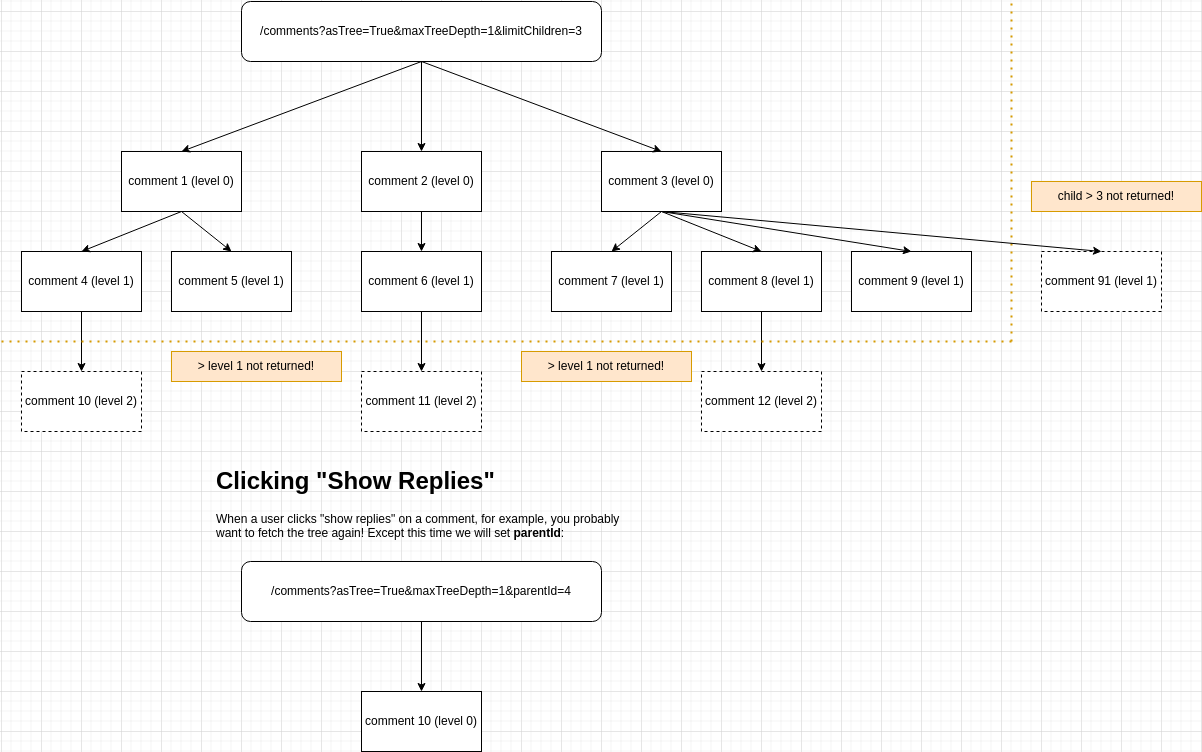
Trees Explained
Cuando se usa asTree, puede ser difícil razonar sobre la paginación. Aquí tienes un gráfico útil:
Fetching Comments in The Context of a User
La API /comments puede usarse en dos contextos, para diferentes casos de uso:
- Para devolver comentarios ordenados y etiquetados con información para construir tu propio cliente.
- En este caso, define un parámetro de consulta
contextUserId.
- En este caso, define un parámetro de consulta
- Para obtener comentarios de tu backend para integraciones personalizadas.
- La plataforma usará esto por defecto sin
contextUserId.
- La plataforma usará esto por defecto sin
Get Comments as a Tree
Es posible obtener los comentarios devueltos como un árbol, con la paginación contando solo los comentarios de nivel superior.
¿Quieres obtener solo los comentarios de nivel superior y sus hijos inmediatos? Aquí tienes una forma:
Sin embargo, en tu UI podrías necesitar saber si mostrar un botón "mostrar respuestas" en cada comentario. Al obtener comentarios mediante un árbol, existe una propiedad hasChildren etiquetada en los comentarios cuando corresponde.
Get Comments as a Tree, Searching by Hash Tag
Es posible buscar por hashtag usando la API, en todo tu tenant (no limitado a una página o urlId).
En este ejemplo, omitimos urlId y buscamos por varios hashtags. La API solo devolverá los comentarios que tengan todos los hashtags solicitados.
All Request Params
The Response
Helpful Tips
URL ID
Probablemente quieras usar la API Comment con el parámetro urlId. Puedes llamar primero a la API Pages para ver cómo se ven los valores urlId disponibles para ti.
Anonymous Actions
Para comentar de forma anónima probablemente quieras pasar anonUserId al obtener comentarios y al realizar marcados y bloqueos.
(!) Esto es requerido por muchas tiendas de aplicaciones, ya que los usuarios deben poder marcar contenido creado por usuarios que pueden ver, incluso si no han iniciado sesión. No hacerlo puede causar que tu aplicación sea eliminada de dicha tienda.
Comments Not Being Returned
Verifica que tus comentarios estén aprobados y que no sean spam.
GET /api/v1/comments/:id
Esta API proporciona la capacidad de obtener un único comentario por id.
POST /api/v1/comments
Este endpoint de API proporciona la capacidad de crear comentarios.
Los casos de uso comunes son interfaces personalizadas, integraciones o importaciones.
Notas:
- Esta API puede actualizar el widget de comentarios "en vivo" si se desea (esto aumenta
creditsCostde1a2). - Esta API creará automáticamente objetos de usuario en nuestro sistema si se proporciona email.
- Intentar guardar dos comentarios con diferentes emails, pero el mismo nombre de usuario, resultará en un error para el segundo comentario.
- Si está especificando
parentId, y un comentario hijo tienenotificationSentForParentcomo false, enviaremos notificaciones para el comentario padre. Esto se hace cada hora (agrupamos las notificaciones para disminuir el número de emails enviados). - Si desea enviar emails de bienvenida al crear usuarios, o emails de verificación de comentarios, establezca
sendEmailsatrueen los parámetros de consulta. - Los comentarios creados a través de esta API aparecerán en las páginas de Análisis y Moderación de la aplicación de administración.
- Las "malas palabras" aún se enmascaran en los nombres de los comentaristas y el texto del comentario si la configuración está activada.
- Los comentarios creados a través de esta API aún pueden ser verificados para spam si se desea.
- La configuración como longitud máxima del comentario, si se configura a través de la página de administración de Reglas de Personalización, se aplicará aquí.
Los datos mínimos requeridos para enviar que se mostrarán en el widget de comentarios, son los siguientes:
Una solicitud más realista podría verse así:
PATCH /api/v1/comments/:id
Este endpoint de la API permite actualizar un único comentario.
Notas:
- Esta API puede actualizar el widget de comentarios "en vivo" si se desea (esto aumenta el
creditsCostbase de1a2).- Esto puede hacer que la migración de comentarios entre páginas sea "en vivo" (cambiando
urlId). - Las migraciones cuestan
2créditos adicionales ya que las páginas se precalculan y esto es intensivo en CPU.
- Esto puede hacer que la migración de comentarios entre páginas sea "en vivo" (cambiando
- A diferencia de la API de creación, esta API NO creará automáticamente objetos de usuario en nuestro sistema si se proporciona el correo electrónico.
- Los comentarios actualizados mediante esta API aún pueden comprobarse por spam si se desea.
- La configuración, como la longitud máxima de comentario, si está configurada mediante la página de administración de la Regla de Personalización, se aplicará aquí.
- Para permitir que los usuarios actualicen el texto de su comentario, puede simplemente especificar
commenten el cuerpo de la solicitud. Nosotros generaremos elcommentHTMLresultante.- Si define tanto
commentcomocommentHTMLno generaremos automáticamente el HTML. - Si el usuario añade menciones o hashtags en su nuevo texto, se procesarán igual que en la API
POST.
- Si define tanto
- Al actualizar
commenterEmailen un comentario, es aconsejable especificar tambiénuserId. De lo contrario, debe asegurarse de que el usuario con ese correo electrónico pertenezca a su tenant, o la solicitud fallará. - Si el comentario objetivo está bloqueado (
isLocked: true), la solicitud se rechazará concode: 'locked'. Desbloquee el comentario primero, actualícelo y luego vuelva a bloquearlo si lo desea.
DELETE /api/v1/comments/:id
Este endpoint de la API permite eliminar un comentario.
Notas:
- Esta API puede actualizar el widget de comentarios "live" si se desea (esto aumenta el
creditsCostde1a2). - Esta API eliminará todos los comentarios secundarios.
- Si el comentario objetivo está bloqueado (
isLocked: true), la solicitud se rechaza concode: 'locked'. Desbloquee el comentario primero, luego elimínelo.
POST /api/v1/comments/:id/flag
Este endpoint de API proporciona la capacidad de marcar un comentario para un usuario específico.
Notas:
- Esta llamada siempre debe hacerse en el contexto de un usuario. El usuario puede ser un Usuario de FastComments.com, Usuario SSO o Usuario de Inquilino.
- Si se establece un umbral de marcar para ocultar, el comentario se ocultará automáticamente en vivo después de haber sido marcado el número definido de veces.
- Después de ser automáticamente desaprobado (oculto) - el comentario solo puede ser re-aprobado por un administrador o moderador. Desmarcar no re-aprobará el comentario.
Para marcar anónimamente, debemos especificar un anonUserId. Este puede ser un ID que representa la sesión anónima, o un UUID aleatorio.
Esto nos permite soportar marcar y desmarcar comentarios incluso si un usuario no ha iniciado sesión. De esta manera, el comentario puede ser marcado como
marcado cuando los comentarios se obtienen con el mismo anonUserId.
POST /api/v1/comments/:id/un-flag
Este endpoint de API proporciona la capacidad de desmarcar un comentario para un usuario específico.
Notas:
- Esta llamada siempre debe hacerse en el contexto de un usuario. El usuario puede ser un Usuario de FastComments.com, Usuario SSO o Usuario de Inquilino.
- Después de que un comentario es automáticamente desaprobado (oculto) - el comentario solo puede ser re-aprobado por un administrador o moderador. Desmarcar no re-aprobará el comentario.
Para desmarcar anónimamente, debemos especificar un anonUserId. Este puede ser un ID que representa la sesión anónima, o un UUID aleatorio.
POST /api/v1/comments/:id/block
Este endpoint de API proporciona la capacidad de bloquear a un usuario que escribió un comentario dado. Soporta el bloqueo de comentarios escritos por Usuarios de FastComments.com, Usuarios SSO y Usuarios de Inquilino.
Soporta un parámetro de cuerpo commentIdsToCheck para verificar si algún otro comentario potencialmente visible en el cliente debe ser bloqueado/desbloqueado después de realizar esta acción.
Notas:
- Esta llamada siempre debe hacerse en el contexto de un usuario. El usuario puede ser un Usuario de FastComments.com, Usuario SSO o Usuario de Inquilino.
- El
userIden la solicitud es el usuario que está haciendo el bloqueo. Por ejemplo:Usuario Aquiere Bloquear aUsuario B. PaseuserId=Usuario Ay el id del comentario que escribióUsuario B. - Los comentarios completamente anónimos (sin id de usuario, sin email) no pueden ser bloqueados y se devolverá un error.
Para bloqueo anónimo, debemos especificar un anonUserId. Este puede ser un ID que representa la sesión anónima, o un UUID aleatorio.
Esto nos permite soportar el bloqueo de comentarios incluso si un usuario no ha iniciado sesión obteniendo los comentarios con el mismo anonUserId.
POST /api/v1/comments/:id/un-block
Este endpoint de API proporciona la capacidad de desbloquear a un usuario que escribió un comentario dado. Soporta el desbloqueo de comentarios escritos por Usuarios de FastComments.com, Usuarios SSO y Usuarios de Inquilino.
Soporta un parámetro de cuerpo commentIdsToCheck para verificar si algún otro comentario potencialmente visible en el cliente debe ser bloqueado/desbloqueado después de realizar esta acción.
Notas:
- Esta llamada siempre debe hacerse en el contexto de un usuario. El usuario puede ser un Usuario de FastComments.com, Usuario SSO o Usuario de Inquilino.
- El
userIden la solicitud es el usuario que está haciendo el desbloqueo. Por ejemplo:Usuario Aquiere Desbloquear aUsuario B. PaseuserId=Usuario Ay el id del comentario que escribióUsuario B. - Los comentarios completamente anónimos (sin id de usuario, sin email) no pueden ser bloqueados y se devolverá un error.
Estructura de Plantilla de Correo
Un objeto EmailTemplate representa la configuración para una plantilla de email personalizada, para un inquilino.
El sistema seleccionará la plantilla de email a usar mediante:
- Su identificador de tipo, lo llamamos
emailTemplateId. Estos son constantes. - El
domain. Primero intentaremos encontrar una plantilla para el dominio al que está vinculado el objeto relacionado (como unComment), y si no se encuentra una coincidencia entonces intentaremos encontrar una plantilla donde domain sea null o*.
La estructura del objeto EmailTemplate es la siguiente:
Notas
- Puede obtener los valores válidos de
emailTemplateIddesde el endpoint/definitions. - El endpoint
/definitionstambién incluye las traducciones predeterminadas y datos de prueba. - Las plantillas fallarán al guardar con estructura o datos de prueba inválidos.
GET /api/v1/email-templates/:id
Los EmailTemplates individuales pueden obtenerse por su id correspondiente (NO emailTemplateId).
GET /api/v1/email-templates
Esta API usa paginación, proporcionada por el parámetro de consulta page. Los EmailTemplates se devuelven en páginas de 100, ordenados por createdAt y luego id.
PATCH /api/v1/email-templates/:id
Este endpoint de API proporciona la capacidad de actualizar una plantilla de email especificando solo el id y los atributos a actualizar.
Tenga en cuenta que todas las mismas validaciones para crear una plantilla también aplican, por ejemplo:
- La plantilla debe renderizarse. Esto se verifica con cada actualización.
- No puede tener plantillas duplicadas para el mismo dominio (de lo contrario una sería ignorada silenciosamente).
POST /api/v1/email-templates
Este endpoint de API proporciona la capacidad de crear plantillas de email.
Notas:
- No puede tener múltiples plantillas con el mismo
emailTemplateIdcon el mismo dominio. - Pero puede tener una plantilla comodín (
domain=*y una plantilla específica de dominio para el mismoemailTemplateId). - Especificar
domainsolo es relevante si tiene diferentes dominios, o quiere usar plantillas específicas para pruebas (domainestablecido alocalhostetc). - Si especifica
domaindebe coincidir con unDomainConfig. En caso de error se proporciona una lista de dominios válidos. - La sintaxis de plantilla es EJS y se renderiza con un timeout de 500ms. P99 para renderizado es <5ms, así que si llega a 500ms algo está mal.
- Su plantilla debe renderizarse con su
testDatadado para guardar. Los errores de renderizado se agregan y reportan en el dashboard (pronto disponible vía API).
Los datos mínimos requeridos para agregar una plantilla son los siguientes:
Puede querer tener plantillas por sitio, en cuyo caso define domain:
POST /api/v1/email-templates/render
Este endpoint de API proporciona la capacidad de previsualizar plantillas de email.
DELETE /api/v1/email-templates/:id
Esta ruta proporciona la eliminación de un único EmailTemplate por id.
Estructura de Publicación de Feed
Un objeto FeedPost representa una publicación en un feed de FastComments. Un feed es una secuencia de publicaciones con sus propios hilos de comentarios, renderizado por el widget Feed. Cada publicación tiene un autor, contenido enriquecido opcional, medios y enlaces, y puede ser etiquetada para que un feed pueda filtrarse.
La estructura del objeto FeedPost es la siguiente:
Notas:
- Algunos de estos campos están marcados como
READONLY- se devuelven por la API pero no pueden ser establecidos. - Los comentarios en una publicación son comentarios regulares cuyo
urlIdespost:seguido del_idde la publicación. Use ese valor con la API de Comentarios para leer o crear comentarios en una publicación.
GET /api/v1/feed-posts
Obtiene publicaciones en un feed, de más reciente a más antiguo. La paginación se basa en cursor: pase el _id de la última publicación que recibió como
afterId para obtener la página siguiente.
Cuesta un crédito por cada diez publicaciones devueltas, con un mínimo de un crédito.
POST /api/v1/feed-posts
Esta ruta crea un solo FeedPost. Cada publicación tiene un autor, por lo que fromUserId es obligatorio y debe ser el id de un usuario FastComments o SSO existente en la cuenta.
PATCH /api/v1/feed-posts/:id
Esta ruta actualiza un solo FeedPost. Envía solo los campos que deseas cambiar.
Estructura de Etiqueta
Un objeto HashTag representa una etiqueta que puede ser dejada por un usuario. Los HashTags pueden usarse para vincular a una pieza externa de contenido o para
vincular comentarios relacionados juntos.
La estructura del objeto HashTag es la siguiente:
Notas:
- En algunos endpoints de API verá que el hashtag se usa en la URL. Recuerde usar valores codificados en URI. Por ejemplo,
#debe representarse como%23. - Algunos de estos campos están marcados como
READONLY- estos son devueltos por la API pero no pueden ser establecidos.
GET /api/v1/hash-tags
Esta API usa paginación, proporcionada por el parámetro de consulta page. Los HashTags se devuelven en páginas de 100, ordenados por tag.
PATCH /api/v1/hash-tags/:tag
Esta ruta proporciona la capacidad de actualizar un único HashTag.
POST /api/v1/hash-tags
Esta ruta proporciona la capacidad de agregar un único HashTag.
POST /api/v1/hash-tags/bulk
Esta ruta proporciona la capacidad de agregar hasta 100 objetos HashTag a la vez.
DELETE /api/v1/hash-tags/:tag
Esta ruta proporciona la eliminación de un HashTag usuario por la etiqueta proporcionada.
Tenga en cuenta que a menos que la creación automática de HashTag esté deshabilitada, los hashtags pueden ser recreados por un usuario que proporcione el hashtag al comentar.
GET /api/v1/me
Describe la credencial que realiza la solicitud: el inquilino al que pertenece y, para tokens de acceso OAuth, el usuario que autorizó la aplicación. Las integraciones lo utilizan para probar una conexión y etiquetarla.
Con una clave API, la respuesta identifica solo al inquilino. Con un token portador OAuth también incluye al usuario que autoriza y los alcances que se concedieron.
Estructura de Moderador
Un objeto Moderator representa la configuración para un moderador.
Hay tres tipos de moderadores:
- Usuarios administradores que tienen la bandera
isCommentModeratorAdmin. - Usuarios SSO con la bandera
isCommentModeratorAdmin. - Comentaristas regulares, o usuarios de FastComments.com, que son invitados como Moderadores.
La estructura Moderator se usa para representar el Estado de Moderación del caso de uso 3.
Si quiere invitar a un usuario a ser moderador, vía la API, use la API de Moderator creando un Moderator e invitándolo.
Si el usuario no tiene una cuenta de FastComments.com, el email de invitación les ayudará a configurarse. Si ya tienen una cuenta, se les dará acceso de moderación a su inquilino y el userId del objeto Moderator se actualizará para apuntar a su usuario. No tendrá acceso API a su usuario, ya que en este caso les pertenece a ellos mismos y es gestionado por FastComments.com.
Si requiere gestión completa de la cuenta del usuario, recomendamos usar SSO, o agregarlos como un Usuario de Inquilino y
luego agregar un objeto Moderator para rastrear sus estadísticas.
La estructura Moderator puede usarse como un mecanismo de seguimiento de estadísticas para los casos de uso 1 y 2. Después de crear el usuario, agregue un objeto Moderator con su userId definido y sus estadísticas serán rastreadas en la Página de Moderadores de Comentarios.
La estructura del objeto Moderator es la siguiente:
GET /api/v1/moderators/:id
Esta ruta devuelve un único moderador por su id.
GET /api/v1/moderators
Esta API usa paginación, proporcionada por el parámetro de consulta skip. Los Moderators se devuelven en páginas de 100, ordenados por createdAt e id.
El costo se basa en el número de moderadores devueltos, costando 1 crédito por cada 10 moderadores devueltos.
PATCH /api/v1/moderators/:id
Este endpoint de API proporciona la capacidad de actualizar un Moderator por id.
Actualizar un Moderator tiene las siguientes restricciones:
- Los siguientes valores no pueden proporcionarse al actualizar un
Moderator:acceptedInvitemarkReviewedCountdeletedCountmarkedSpamCountapprovedCounteditedCountbannedCountverificationIdcreatedAt
- Cuando se especifica un
userId, ese usuario debe existir. - Cuando se especifica un
userId, deben pertenecer al mismotenantIdespecificado en los parámetros de consulta. - Dos moderadores en el mismo inquilino no pueden agregarse con el mismo
email. - No puede cambiar el
tenantIdasociado con unModerator.
POST /api/v1/moderators
Esta ruta proporciona la capacidad de agregar un único Moderator.
Crear un Moderator tiene las siguientes restricciones:
- Siempre debe proporcionarse un
nameyemail. UnuserIdes opcional. - Los siguientes valores no pueden proporcionarse al crear un
Moderator:acceptedInvitemarkReviewedCountdeletedCountmarkedSpamCountapprovedCounteditedCountbannedCountverificationIdcreatedAt
- Cuando se especifica un
userId, ese usuario debe existir. - Cuando se especifica un
userId, deben pertenecer al mismotenantIdespecificado en los parámetros de consulta. - Dos moderadores en el mismo inquilino no pueden agregarse con el mismo
email.
Podemos crear un Moderator para un usuario del cual solo conocemos el email:
O podemos crear un Moderator para un usuario que pertenece a nuestro inquilino, para rastrear sus estadísticas de moderación:
POST /api/v1/moderators/:id/send-invite
Esta ruta proporciona la capacidad de invitar a un único Moderator.
Las siguientes restricciones existen para enviar un email de invitación a un Moderator:
- El
Moderatorya debe existir. - El
fromNameno puede tener más de100 caracteres.
Notas:
- Si un usuario con el email proporcionado ya existe, será invitado a moderar los comentarios de su inquilino.
- Si un usuario con el email proporcionado no existe el enlace de invitación los guiará a través de la creación de su cuenta.
- La invitación expirará después de
30 días.
Podemos crear un Moderator para un usuario del cual solo conocemos el email:
Esto enviará un email como Bob de TenantName te está invitando a ser moderador...
DELETE /api/v1/moderators/:id
Esta ruta proporciona la eliminación de un Moderator por id.
Estructura de Conteo de Notificaciones
Un objeto NotificationCount representa el conteo de notificaciones no leídas y metadatos para un usuario.
Si no hay notificaciones no leídas, no habrá un NotificationCount para el usuario.
Los objetos NotificationCount se crean automáticamente y no pueden crearse vía la API. También expiran después de un año.
Puede limpiar el conteo de notificaciones no leídas de un usuario eliminando su NotificationCount.
La estructura del objeto NotificationCount es la siguiente:
GET /api/v1/notification-count/:user_id
Esta ruta devuelve un único NotificationCount por id de usuario. Con SSO, el id de usuario está en el formato <tenant id>:<user id>.
Si no hay notificaciones no leídas, no habrá un NotificationCount - así que obtendrá un 404.
Esto es diferente de notifications/count en que es mucho más rápido, pero no permite filtrado.
DELETE /api/v1/notification-count/:user_id
Esta ruta elimina un único NotificationCount por id de usuario. Con SSO, el id de usuario está en el formato <tenant id>:<user id>.
Esto limpiará el conteo de notificaciones no leídas del usuario (la campana roja en el widget de comentarios se desvanecerá y el conteo desaparecerá).
Estructura de Notificación
Un objeto Notification representa una notificación para un usuario.
Los objetos Notification se crean automáticamente y no pueden crearse vía la API. También expiran después de un año.
Las notificaciones no pueden eliminarse. Sin embargo, pueden actualizarse para establecer viewed a false, y puede consultar por viewed.
Un usuario también puede optar por no recibir notificaciones para un comentario específico estableciendo optedOut en la notificación a true. Puede optar por participar nuevamente estableciéndolo a false.
Hay diferentes tipos de notificaciones - consulte relatedObjectType y type.
Las formas en que se crean las notificaciones es bastante flexible y puede ser activada por muchos escenarios (ver NotificationType).
A día de hoy, la existencia de una Notification no implica realmente que un email se envíe o deba enviarse. Más bien, las notificaciones
se usan para el feed de notificaciones e integraciones relacionadas.
La estructura del objeto Notification es la siguiente:
GET /api/v1/notifications
Esta ruta devuelve hasta 30 objetos Notification ordenados por createdAt, los más nuevos primero.
Puede filtrar por userId. Con SSO, el id de usuario está en el formato <tenant id>:<user id>.
GET /api/v1/notifications/count
Esta ruta devuelve un objeto que contiene el número de notificaciones bajo un parámetro count.
Es más lento que /notification-count/ y el doble del costo de créditos, pero permite filtrar en más dimensiones.
Puede filtrar por los mismos parámetros que el endpoint /notifications como userId. Con SSO, el id de usuario está en el formato <tenant id>:<user id>.
PATCH /api/v1/notifications/:id
Este endpoint de API proporciona la capacidad de actualizar una Notification por id.
Actualizar una Notification tiene las siguientes restricciones:
- Solo puede actualizar los siguientes campos:
viewedoptedOut
API Pública de Reacciones de Página
Page Reacts permite a tus usuarios dar me gusta a una página, o reaccionar a ella con tu propio conjunto de imágenes de reacción. El widget Page Reacts y el widget Floating Likes están construidos sobre estos endpoints, y puedes llamarlos tú mismo para crear tu propio botón de me gusta.
A diferencia del resto de esta guía, los endpoints de Page Reacts son públicos. Se llaman desde los navegadores de tus usuarios, no requieren una clave API y no consumen créditos de API. Cada reacción pertenece al usuario que realiza la solicitud, por lo que un usuario solo puede agregar o eliminar sus propias reacciones.
Hay dos conjuntos de endpoints:
/page-reacts/v1/likes/:tenantId- un solo "like" por usuario por página. Usa estos para un botón de me gusta./page-reacts/v2/:tenantId- múltiples reacciones por página, cada una identificada por unidcorto que elijas (por ejemploheartolaugh).
Ambos también están disponibles en nuestros SDKs como parte de la PublicApi, por ejemplo getV1PageLikes, createV1PageReact y deleteV1PageReact en el JavaScript SDK.
Mostrar quién reaccionó
Pasa includeUserInfo=public a los endpoints GET para también obtener los usuarios que dieron me gusta o reaccionaron, con sus nombres de usuario y avatares, los más recientes primero. Los usuarios que han configurado su actividad de perfil como privada se omiten, al igual que los usuarios anónimos. Se devuelven hasta 100 reacciones.
Los usuarios SSO se crean con actividad de perfil privada a menos que tu carga útil SSO establezca isProfileActivityPrivate a false, así que configúralo para los usuarios que deseas que aparezcan en estas listas.
En páginas que requieren SSO, solo los usuarios SSO que pueden ver la página pueden listar quién reaccionó. Los demás reciben un 403 con el código sso-required o page-forbidden.
Desde tu servidor, GET /api/v1/pages/likes y GET /api/v1/pages/reacts devuelven las mismas listas con una clave API, y también aceptan includeUserInfo=include-private para incluir a los usuarios con perfiles privados.
Identificar al usuario
Las reacciones están vinculadas al usuario que realiza la solicitud:
- Usuarios SSO: pasa el parámetro de consulta
sso, configurado con el JSON codificado en URI del mismo objeto SSO que le das al widget de comentarios. Ver SSO. - Usuarios anónimos: cuando no hay parámetro
ssoy no hay inicio de sesión en FastComments, el servidor asigna al navegador un id anónimo almacenado en la cookie de sesión de FastComments. Envía solicitudes concredentials: 'include'para que la cookie se mantenga entre peticiones. Los navegadores que bloquean cookies de terceros no conservarán el id anónimo, así que usa SSO cuando cada usuario deba ser reconocido de forma fiable.
El urlId
urlId identifica la página, igual que lo hace para los comentarios. Usa el mismo urlId que le das al widget de comentarios para que los me gusta y los comentarios se cuenten en la misma página. Recuerda codificarlo en URI.
GET /page-reacts/v1/likes/:tenantId
Devuelve el número de likes en una página y si el usuario actual le ha dado like. Las páginas que aún no existen devuelven un likeCount de 0.
Pase includeUserInfo=public para obtener también los usuarios que le dieron like a la página, los más recientes primero. Los usuarios con actividad de perfil privado y los usuarios anónimos se excluyen, y se buscan hasta 100 likes. Sólo se acepta public aquí; include-private devuelve un 422 y está disponible desde GET /api/v1/pages/likes con una clave API. En páginas que requieren SSO, includeUserInfo devuelve un 403 para los usuarios que no pueden ver la página.
POST /page-reacts/v1/likes/:tenantId
Da me gusta a una página como el usuario actual. Cada usuario puede dar me gusta a una página una sola vez: volver a dar me gusta nuevamente tiene éxito con el código already-liked y no cambia el recuento.
La página se crea si aún no existe. Pase title para establecer o actualizar el título de la página.
DELETE /page-reacts/v1/likes/:tenantId
Elimina el like del usuario actual de una página. Si el usuario no ha dado like a la página, la solicitud tiene éxito con el código not-liked y no cambia el recuento.
GET /page-reacts/v2/:tenantId
Devuelve el recuento de cada reacción en una página y qué reacciones ha añadido el usuario actual.
Pase includeUserInfo=public para también obtener los usuarios que reaccionaron, como una entrada por reacción con su id de reacción, más reciente primero. Los usuarios con actividad de perfil privado y los usuarios anónimos se omiten, y se buscan hasta 100 reacciones. Sólo se acepta public; include-private devuelve un 422 y está disponible desde GET /api/v1/pages/reacts con una clave API. En páginas que requieren SSO, includeUserInfo devuelve un 403 para los usuarios que no pueden ver la página.
GET /page-reacts/v2/:tenantId/list
Devuelve los nombres de los usuarios que añadieron una reacción a una página, ordenados alfabéticamente. Se buscan hasta 100 reacciones, y no se incluyen usuarios anónimos ni usuarios con actividad de perfil privado. En páginas que requieren SSO, los usuarios que no pueden ver la página reciben un 403 con el código sso-required o page-forbidden.
Para obtener también avatares e IDs de usuario, use GET /page-reacts/v2/:tenantId con includeUserInfo=public.
POST /page-reacts/v2/:tenantId
Agrega una reacción a una página como el usuario actual. Un usuario puede agregar cada id de reacción una sola vez: volver a agregarla tiene éxito con el código already-reacted y no cambia el recuento. Un usuario puede agregar varias reacciones diferentes a la misma página.
Los ids de reacción los elige usted y pueden tener hasta 36 caracteres. La página se crea si aún no existe. Pase title para establecer o actualizar el título de la página.
DELETE /page-reacts/v2/:tenantId
Elimina una de las reacciones del usuario actual de una página. Si el usuario no ha añadido esa reacción, la solicitud tiene éxito con el código no-react y no cambia el recuento.
Estructura de Página
Un objeto Page representa la página a la que pueden pertenecer muchos comentarios. Esta relación se define por
urlId.
Una Page almacena información como el título de la página, el conteo de comentarios, y urlId.
La estructura del objeto Page es la siguiente:
GET /api/v1/pages
Actualmente solo puede obtener todas las páginas (o una sola página vía /by-url-id) asociadas con su cuenta. Si desea búsqueda más detallada, contáctenos.
Consejo Útil
La API de Comment requiere un urlId. Puede llamar primero a la API de Pages, para ver cómo lucen los valores de urlId disponibles para usted.
GET /api/v1/pages/by-url-id
Las páginas individuales pueden obtenerse por su correspondiente urlId. Esto puede ser útil para buscar títulos de páginas o conteos de comentarios.
Consejo Útil
Recuerde codificar en URI valores como el urlId.
GET /api/v1/pages/likes
Devuelve el número de likes en una página, y opcionalmente los usuarios que le dieron like, los más recientes primero. Esta es la versión del lado del servidor de GET /page-reacts/v1/likes/:tenantId.
includeUserInfo controla qué usuarios se devuelven:
publicomite a los usuarios que han hecho privada su actividad de perfil.include-privatelos incluye. Úselo solo cuando la lista no se muestre al público.
Los usuarios anónimos nunca se incluyen, y se buscan hasta 100 likes. Las páginas que no existen devuelven un likeCount de 0 y una lista users vacía.
Helpful Tip
Recuerde codificar en URI valores como el urlId.
GET /api/v1/pages/reacts
Devuelve el recuento de cada reacción en una página, y opcionalmente los usuarios que reaccionaron, como una entrada por reacción con su id de reacción, la más reciente primero. Esta es la versión del lado del servidor de GET /page-reacts/v2/:tenantId.
includeUserInfo controla qué usuarios se devuelven:
publicomite a los usuarios que han hecho privada la actividad de su perfil.include-privatelos incluye. Úselo solo cuando la lista no se muestra al público.
Los usuarios anónimos nunca se incluyen, y se buscan hasta 100 reacciones. Las páginas que no existen devuelven sin counts y una lista users vacía.
Consejo útil
Recuerde codificar en URI los valores como urlId.
PATCH /api/v1/pages/:id
Esta ruta proporciona la capacidad de actualizar una única Page. Los comentarios correspondientes serán actualizados.
Nota
Algunos parámetros en el objeto Page se actualizan automáticamente. Estos son los atributos de conteos y título. Los conteos no pueden actualizarse
vía la API ya que son valores calculados. El title de la página puede establecerse vía la API, pero sería sobrescrito si el widget de comentarios se usa en
una página con el mismo urlId y un título de página diferente.
POST /api/v1/pages
Este endpoint de API proporciona la capacidad de crear páginas.
Un caso de uso común es el control de acceso.
Notas:
- Si ha comentado en un hilo de comentarios, o llamado a la API para crear un
Comment, ¡ya ha creado un objetoPage! Puede intentar obtenerlo vía la ruta dePage/by-url-id, pasando el mismourlIdpasado al widget de comentarios. - La estructura de
Pagecontiene algunos valores calculados. Actualmente, estos soncommentCountyrootCommentCount. Se llenan automáticamente y no pueden ser establecidos por la API. Intentar hacerlo causará que la API devuelva un error.
DELETE /api/v1/pages/:id
Esta ruta proporciona la eliminación de una única página por id.
Tenga en cuenta que interactuar con el widget de comentarios para una página con el mismo urlId simplemente recreará la Page sin problemas.
Estructura de Encuesta
Una Poll está adjunta a un comentario, en lugar de ser un objeto independiente. Se crea con el comentario (ver POST /api/v1/comments), o se agrega a un comentario existente más tarde con PUT /api/v1/polls/:commentId.
Los recuentos de votos se guardan en la propia encuesta, por lo que leer una encuesta le brinda los resultados sin necesidad de sumarlos. Los votos individuales detrás de esos recuentos son objetos PollVote.
Cada opción tiene un id que se genera cuando se crea la encuesta. Ese id es lo que se usa para emitir un voto, para volver a etiquetar una opción y para conservar una opción (y sus votos) cuando se PUT la encuesta con opciones añadidas o eliminadas. Es la única forma segura de referirse a una opción, nunca su posición en la lista.
Límites
- Se requiere una pregunta, y tiene como máximo 200 caracteres.
- Una encuesta tiene entre 2 y 10 opciones.
- Se requiere una etiqueta de opción, tiene como máximo 100 caracteres y debe ser única dentro de la encuesta (ignorando mayúsculas/minúsculas).
closesAtdebe estar en el futuro cuando se crea la encuesta. Para cerrar una encuesta inmediatamente,PATCHla con una fecha en el pasado.
Configuración del sitio
Las encuestas obedecen la configuración de su sitio, que puede cambiar bajo Personalizar Widget:
- Las encuestas deben estar habilitadas antes de que se pueda crear una encuesta, o la API responde con
polls-disabled. - La votación puede limitarse a usuarios registrados, en cuyo caso un voto enviado solo con un
anonUserIdes rechazado conpoll-login-required.
GET /api/v1/polls/:commentId
Lee la encuesta adjunta a un comentario, con sus recuentos de votos actuales.
Las encuestas también se devuelven en el propio comentario mediante las API de comentarios, así que use esto cuando solo quiera los resultados y no el comentario completo.
Un comentario que no tiene encuesta, un comentario que ha sido eliminado y un ID de comentario que no existe responden de la misma manera, con poll-not-found.
PUT /api/v1/polls/:commentId
Adjunta una encuesta a un comentario existente, o establece el estado completo de la encuesta que ya tiene.
El cuerpo es la encuesta completa, y las opciones que envías se convierten en las opciones de la encuesta, en ese orden. Cada opción
se corresponde por su id:
- Una opción enviada con el
idde una opción existente mantiene esa opción y sus votos. Su etiqueta y posición se actualizan a lo que enviaste. - Una opción enviada sin un
idse agrega, sin votos. - Una opción existente que omites se elimina, junto con los votos emitidos en ella.
totalVotesdisminuye en la misma cantidad.
Así que para agregar una opción, envía las opciones actuales con sus ids más la nueva sin id. Para eliminar una,
envía la lista sin ella. Los ids de las opciones están en la encuesta devuelta por GET /api/v1/polls/:commentId.
Enviar ningún id reemplaza cada opción y elimina todos los votos ya emitidos en la encuesta. Si la encuesta tiene
votos, esto requiere replaceVotes=true, y sin ello la API responde con replace-votes-required.
Los demás campos también se reemplazan: omitir closesAt, privacy o requireVoteToSeeResults lo restablece a
su valor predeterminado. Para cambiar un solo campo y dejar el resto intacto, usa PATCH /api/v1/polls/:commentId.
Other Notes
- Un
idque no está en la encuesta, o el mismoiddado dos veces, falla conpoll-invalid. Un comentario sin encuesta aún no tiene ids de opción, por lo que cada opción enviada a él debe omitirid. - La privacidad de la encuesta puede restringirse pero no ampliarse una vez que tiene votos.
- Esta API respeta la configuración de tu sitio. Si las encuestas no están habilitadas para el sitio o la página, falla con
polls-disabled. - Un comentario bloqueado no puede cambiar su encuesta, y falla con
locked. - Los widgets conectados se actualizan en tiempo real, por lo que los espectadores ven la nueva encuesta sin recargar.
PATCH /api/v1/polls/:commentId
Edita una encuesta sin alterar sus votos. Usa esto para corregir un error tipográfico en la pregunta o en una opción, para cerrar o reabrir la encuesta, o para cambiar quién puede ver quién votó.
Las opciones se identifican por su id, y un PATCH renombra las que indiques. Para agregar, eliminar o reordenar opciones, envía la lista completa de opciones a PUT /api/v1/polls/:commentId: las opciones que envíes con sus ids conservan también sus votos allí.
Cada campo es opcional, pero al menos uno debe proporcionarse.
Otras notas
- Nombrar un id de opción que no está en la encuesta falla con
poll-invaliden lugar de no hacer nada silenciosamente. - Las etiquetas deben permanecer únicas dentro de la encuesta, contando también las opciones que no estás cambiando.
- A diferencia de crear una encuesta,
closesAtpuede estar en el pasado aquí; así es como cierras una encuesta inmediatamente. - La privacidad de la encuesta puede restringirse pero no ampliarse una vez que tiene votos.
- Un comentario bloqueado no puede tener su encuesta modificada, y falla con
locked.
DELETE /api/v1/polls/:commentId
Elimina una encuesta de su comentario, junto con cada voto emitido en ella. El propio comentario queda sin cambios.
Eliminar el comentario también elimina su encuesta y los votos, por lo que esto solo es necesario cuando deseas conservar el comentario.
Estructura de Voto de Encuesta
A PollVote es la respuesta de una persona a una encuesta. Los recuentos mostrados en la propia encuesta se mantienen sincronizados con estos, por lo que solo necesitas estos cuando quieres saber quién votó por qué, en lugar de los totales.
Un votante tiene como máximo un voto por encuesta. Votar de nuevo mueve su voto existente a la nueva opción en lugar de agregar uno segundo, y updatedAt registra cuándo ocurrió eso.
voterId es el userId cuando el votante estaba conectado, y el anonUserId en caso contrario.
Privacidad
La configuración privacy de la encuesta se aplica a esta API de la misma manera que se aplica en el widget de comentarios:
- Anónimo (por defecto): nadie puede ver cómo votó nadie, por lo que los votos no pueden leerse.
GET /api/v1/poll-votesyGET /api/v1/poll-votes/:idresponden conpoll-anonymous. Los recuentos de la encuesta siguen estando disponibles desdeGET /api/v1/polls/:commentId. - Administradores y moderadores: tu clave API pertenece al administrador de tu sitio, por lo que puede leer los votos.
- Todos: los votos pueden leerse.
La privacidad de la encuesta puede estrecharse pero no ampliarse una vez que tiene votos.
GET /api/v1/poll-votes
Enumera los votos individuales detrás de los recuentos de una encuesta, de más antiguo a más reciente. Un crédito por cada 100 votos devueltos.
Una encuesta pertenece a un comentario, por lo que los votos se leen una encuesta a la vez y se requiere commentId. Refina más con voterId para comprobar cómo votó una persona, o con optionId para listar a todos los que eligieron una opción determinada.
Se devuelven como máximo 1000 votos por llamada. Usa skip para paginar y obtener más.
Se respeta la configuración privacy de la encuesta: los votos de una encuesta anónima no pueden leerse, y la solicitud falla con poll-anonymous. Consulta la estructura PollVote para más detalles.
Contar votos por opción
No tienes que sumar estos valores para obtener los resultados; la encuesta lleva sus propios recuentos. Lee la encuesta con GET /api/v1/polls/:commentId en su lugar, y usa esta API cuando necesites saber quién votó.
Cada encuesta en una página
No existe una lista de votos a nivel de página. Para informar de una página completa, obtén sus comentarios con GET /api/v1/comments, lo que devuelve la encuesta de cada comentario y sus recuentos, y luego lee los votos de las encuestas que te interesan.
GET /api/v1/poll-votes/:id
Lee un voto de encuesta único por su id.
Un voto en una encuesta anónima no puede leerse, y la solicitud falla con poll-anonymous. Consulte la estructura PollVote para ver cómo se aplica la configuración privacy de la encuesta.
POST /api/v1/poll-votes
Registra un voto en una encuesta.
Un votante tiene como máximo un voto por encuesta. Llamar a este endpoint nuevamente para el mismo votante mueve su voto a la nueva opción en lugar de agregar uno segundo, y votar por la opción que ya eligió no hace nada.
La respuesta incluye la encuesta, por lo que obtienes los recuentos actualizados sin una segunda solicitud.
Votos anónimos
Establezca anonUserId en lugar de userId para registrar un voto de alguien que no ha iniciado sesión. Ese id no tiene que corresponder a un usuario en ninguna parte; solo identifica la sesión, de modo que la misma persona no se cuente dos veces.
El voto anónimo debe estar habilitado para su sitio. Si la votación está limitada a usuarios registrados, un voto con solo un anonUserId falla con poll-login-required.
Los votos anónimos también están limitados por tasa por IP por encuesta, para evitar que una persona llene una encuesta borrando su sesión. Envíe la ip del usuario final para que el límite se aplique a él en lugar de a su servidor.
Otras notas
- Un
userIddebe ser un usuario que exista en su sitio. Los votos para un usuario que pertenece a otro sitio son rechazados. - Votar en una encuesta cerrada falla con
poll-closed. - Esta API actualiza los recuentos en la encuesta y los envía a los widgets conectados en tiempo real.
DELETE /api/v1/poll-votes/:id
Revierte un voto. La opción en la que se emitió devuelve su recuento, y el votante puede volver a votar.
Other Notes
- Eliminar el mismo voto dos veces responde con
not-foundla segunda vez, y los recuentos permanecen sin cambios. - Si la encuesta fue reemplazada desde que se emitió el voto, el voto se elimina pero no hay cambios en el recuento, ya que el reemplazo comenzó desde cero.
Estructura de Evento Webhook Pendiente
Un objeto PendingWebhookEvent representa un evento de webhook en cola que está pendiente.
Los objetos PendingWebhookEvent se crean automáticamente y no pueden crearse manualmente vía la API. También expiran después de un año.
Pueden eliminarse lo que remueve la tarea de la cola.
Hay diferentes tipos de eventos - consulte eventType (OutboundSyncEventType) y type (OutboundSyncType).
Un caso de uso común para esta API es implementar monitoreo personalizado. Puede querer llamar al endpoint /count periódicamente
para sondear el conteo pendiente para filtros dados.
La estructura del objeto PendingWebhookEvent es la siguiente:
GET /api/v1/pending-webhook-events
Esta ruta devuelve una lista de eventos de webhook pendientes bajo un parámetro pendingWebhookEvents.
Esta API usa paginación, proporcionada por el parámetro skip. Los PendingWebhookEvents se devuelven en páginas de 100, ordenados por createdAt los más nuevos primero.
GET /api/v1/pending-webhook-events/count
Esta ruta devuelve un objeto que contiene el número de eventos de webhook pendientes bajo un parámetro count.
Puede filtrar por los mismos parámetros que el endpoint /pending-webhook-events
DELETE /api/v1/pending-webhook-events/:id
Esta ruta permite la eliminación de un único PendingWebhookEvent.
Si necesita una eliminación masiva, llame a la API GET con paginación y luego llame a esta API secuencialmente.
Estructura de Usuario SSO
FastComments proporciona una solución SSO fácil de usar. Actualizar la información de un usuario con la integración basada en HMAC es tan sencillo como hacer que el usuario cargue la página con una carga útil actualizada.
Sin embargo, puede ser deseable gestionar un usuario fuera de ese flujo, para mejorar la coherencia de su aplicación.
La API SSO User proporciona una forma de crear, leer, actualizar y eliminar (CRUD) objetos que llamamos SSOUsers. Estos objetos son diferentes de los Usuarios regulares y se mantienen separados por seguridad de tipos.
La estructura del objeto SSOUser es la siguiente:
Facturación para usuarios SSO
Los usuarios SSO se facturan de manera diferente según sus banderas de permisos:
- Usuarios SSO regulares: Los usuarios sin permisos de administrador o moderador se facturan como usuarios SSO regulares
- Administradores SSO: Los usuarios con las banderas
isAccountOwneroisAdminAdminse facturan por separado como administradores SSO (misma tarifa que los administradores regulares del tenant) - Moderadores SSO: Los usuarios con la bandera
isCommentModeratorAdminse facturan por separado como moderadores SSO (misma tarifa que los moderadores regulares)
Importante: Para evitar doble facturación, el sistema desduplicará automáticamente los usuarios SSO frente a los usuarios regulares del tenant y moderadores por dirección de correo electrónico. Si un usuario SSO tiene el mismo correo electrónico que un usuario regular del tenant o un moderador, no se le facturará dos veces.
Control de Acceso
Los usuarios se pueden agrupar en grupos. Para ello sirve el campo groupIds, y es opcional.
@Mentions
Por defecto @mentions usará username para buscar otros usuarios SSO cuando se escriba el carácter @. Si se usa displayName, entonces se ignorarán los resultados que coincidan con username cuando haya una coincidencia para displayName, y los resultados de búsqueda de @mention usarán displayName.
Suscripciones
Con FastComments, los usuarios pueden suscribirse a una página haciendo clic en el icono de campana en el widget de comentarios y pulsando Suscribirse.
Con un usuario regular, les enviamos correos electrónicos de notificación según sus ajustes de notificación.
Con usuarios SSO, separamos esto por compatibilidad con versiones anteriores. Los usuarios solo recibirán estos correos electrónicos adicionales de notificación de suscripción si establece optedInSubscriptionNotifications en true.
Insignias
Puedes asignar insignias a los usuarios SSO usando la propiedad badgeConfig. Las insignias son indicadores visuales que aparecen junto al nombre del usuario en los comentarios.
badgeIds- Un array de IDs de insignias para asignar al usuario. Estas son insignias globales visibles en todas las páginas. Deben ser IDs de insignia válidos creados en su cuenta de FastComments. Limitado a 30 insignias.pageBadgeIds- Un array opcional de IDs de insignias con alcance en la página actual (urlId). Estas insignias solo se muestran en la página donde fueron asignadas. Diferentes páginas pueden tener distintas insignias con alcance por página para el mismo usuario.override- Si es true, todas las insignias mostradas existentes serán reemplazadas por las proporcionadas. Las insignias globales y las con alcance por página se sobrescriben de forma independiente — sobrescribir las insignias globales no afecta a las de alcance por página, y viceversa. Si es false u omitido, las insignias proporcionadas se añadirán a las existentes.update- Si es true, las propiedades de visualización de las insignias se actualizarán desde la configuración del tenant cada vez que el usuario inicie sesión.
GET /api/v1/sso-users
Esta ruta devuelve Usuarios SSO en páginas de 100. La paginación se proporciona por el parámetro skip. Los usuarios están ordenados por su signUpDate e id.
GET /api/v1/sso-users/by-id/:id
Esta ruta devuelve un único usuario SSO por su id.
GET /api/v1/sso-users/by-email/:email
Esta ruta devuelve un único usuario SSO por su email.
PATCH /api/v1/sso-users/:id
Esta ruta proporciona la capacidad de actualizar un único usuario SSO.
POST /api/v1/sso-users
Esta ruta proporciona la creación de un único usuario SSO.
Intentar crear dos usuarios con el mismo ID resultará en un error.
En este ejemplo especificamos groupIds para control de acceso, pero esto es opcional.
Nota de Integración
Los datos pasados por la API pueden ser sobrescritos simplemente pasando un payload de Usuario SSO HMAC diferente. Por ejemplo, si establece un nombre de usuario vía la API, pero luego pasa uno diferente vía el flujo SSO al cargar la página, actualizaremos automáticamente su nombre de usuario.
No actualizaremos parámetros de usuario en este flujo a menos que los especifique explícitamente o los establezca a null (no undefined).
PUT /api/v1/sso-users/:id
Esta ruta proporciona la capacidad de actualizar un único usuario SSO.
En este ejemplo especificamos groupIds para control de acceso, pero esto es opcional.
DELETE /api/v1/sso-users/:id
Esta ruta proporciona la eliminación de un único usuario SSO por su id.
Tenga en cuenta que cargar el widget de comentarios nuevamente con un payload para este usuario simplemente recreará el usuario sin problemas.
Eliminar los comentarios del usuario es posible vía el parámetro de consulta deleteComments. Tenga en cuenta que si esto es verdadero:
- Todos los comentarios del usuario serán eliminados en vivo.
- Todos los comentarios hijos (ahora huérfanos) serán eliminados o anonimizados basándose en la configuración de página asociada de cada comentario. Por ejemplo si el modo de eliminación de hilo es "anonimizar", entonces las respuestas permanecerán, y los comentarios del usuario serán anonimizados. Esto solo aplica cuando
commentDeleteModeesRemove(el valor predeterminado). - El
creditsCostse convierte en2.
Comentarios Anonimizados
Puede retener los comentarios del usuario pero simplemente anonimizarlos estableciendo commentDeleteMode=1.
Si los comentarios del usuario son anonimizados entonces los siguientes valores se establecen a null:
- commenterName
- commenterEmail
- avatarSrc
- userId
- anonUserId
- mentions
- badges
isDeleted e isDeletedUser se establecen a true.
Al renderizar, el widget de comentarios usará DELETED_USER_PLACEHOLDER (predeterminado: "[deleted]") para el nombre del usuario y DELETED_CONTENT_PLACEHOLDER para el comentario. Estos pueden personalizarse vía la UI de Personalización del Widget.
Ejemplos
Estructura de Suscripción
Un objeto Subscription representa una suscripción para un usuario.
Los objetos Subscription se crean cuando un usuario hace clic en la campana de notificación en el widget de comentarios y hace clic en "Suscribirse a esta página".
Las suscripciones también pueden crearse vía la API.
Tener un objeto Subscription causa que se generen objetos Notification, y se envíen emails, cuando se dejan nuevos comentarios en la raíz de la página asociada
para la cual es la Subscription. El envío de emails depende del tipo de usuario. Para usuarios regulares esto depende de optedInNotifications. Para Usuarios SSO esto depende de optedInSubscriptionNotifications. Tenga en cuenta que algunas aplicaciones pueden no tener el concepto de una página accesible por web, en cuyo caso simplemente establezca urlId al
id del elemento al que se está suscribiendo (mismo valor para urlId que pasaría al widget de comentarios).
La estructura del objeto Subscription es la siguiente:
GET /api/v1/subscriptions/:id
Esta ruta devuelve hasta 30 objetos Subscription ordenados por createdAt, los más nuevos primero.
Puede filtrar por userId. Con SSO, el id de usuario está en el formato <tenant id>:<user id>.
POST /api/v1/subscriptions
Este endpoint de API proporciona la capacidad de crear una Subscription. Tenga en cuenta que un usuario solo puede tener una suscripción por página, ya que más es redundante, e intentar
crear más de una suscripción para el mismo usuario para la misma página resultará en un error.
Crear una suscripción resultará en objetos Notification siendo creados cuando se deje un nuevo comentario en la raíz del urlId suscrito (cuando parentId del comentario es null).
DELETE /api/v1/subscriptions/:id
Esta ruta elimina un único objeto Subscription por id.
Estructura de Uso Diario del Inquilino
Un objeto TenantDailyUsage representa el uso para un inquilino en un día dado. Si no hubo actividad para un inquilino dado en un día
dado, ese día no tendrá un objeto TenantDailyUsage.
El objeto TenantDailyUsage no es en tiempo real y puede estar minutos detrás del uso real.
La estructura del objeto TenantDailyUsage es la siguiente:
GET /api/v1/tenant-daily-usage
Esta ruta permite buscar el uso de un inquilino por año, mes y día. Pueden devolverse hasta 365 objetos, y el costo es 1 crédito de api por cada 10 objetos.
Los objetos de respuesta están ordenados por la fecha en que fueron creados (los más antiguos primero).
Estructura de Inquilino
El Tenant define un cliente de FastComments.com. Pueden ser creados a través de la API por inquilinos con acceso de marca blanca. Los inquilinos de marca blanca
no pueden crear otros inquilinos de marca blanca (solo se permite un nivel de anidación).
La estructura del objeto Tenant es la siguiente:
GET /api/v1/tenants/:id
Esta ruta devuelve un único Tenant por id.
GET /api/v1/tenants
Esta API devuelve inquilinos que son gestionados por su inquilino.
La paginación se proporciona mediante el parámetro de consulta skip. Los inquilinos se devuelven en páginas de 100, ordenados por signUpDate e id.
El costo se basa en el número de inquilinos devueltos, costando 1 crédito por cada 10 inquilinos devueltos.
Puede definir parámetros meta en los objetos Tenant y consultar inquilinos coincidentes. Por ejemplo, para la clave someKey y el valor meta some-value, podemos
construir un objeto JSON con este par clave/valor y luego codificarlo como URI como parámetro de consulta para filtrar:
POST /api/v1/tenants
Esta ruta proporciona la capacidad de agregar un único Tenant.
Crear un Tenant tiene las siguientes restricciones:
- Se requiere un
name. - Se requiere
domainConfiguration. - Los siguientes valores no pueden ser proporcionados al crear un
Tenant:hasFlexPricinglastBillingIssueReminderDateflexLastBilledAmount
- El
signUpDateno puede estar en el futuro. - El
nameno puede tener más de200 caracteres. - El
emailno puede tener más de300 caracteres. - El
emaildebe ser único en todos los inquilinos de FastComments.com. - No puede crear inquilinos si el inquilino padre no tiene un
TenantPackageválido definido.- Si su inquilino fue creado a través de FastComments.com, esto no debería ser un problema.
- No puede crear más inquilinos de los definidos en
maxWhiteLabeledTenantsen su paquete. - Debe especificar el parámetro de consulta
tenantIdque es el id de suinquilino padrecon marca blanca habilitada.
Podemos crear un Tenant con solo unos pocos parámetros:
PATCH /api/v1/tenants/:id
Este endpoint de API proporciona la capacidad de actualizar un Tenant por id.
Actualizar un Tenant tiene las siguientes restricciones:
- Los siguientes valores no pueden ser actualizados:
hasFlexPricinglastBillingIssueReminderDateflexLastBilledAmountmanagedByTenantId
- El
signUpDateno puede estar en el futuro. - El
nameno puede tener más de200 caracteres. - El
emailno puede tener más de300 caracteres. - El
emaildebe ser único en todos los inquilinos de FastComments.com. - Al establecer
billingInfoValidentrue, se debe proporcionarbillingInfoen la misma solicitud. - No puede actualizar el
packageIdasociado con su propio inquilino. - No puede actualizar la
paymentFrequencyasociada con su propio inquilino.
DELETE /api/v1/tenants/:id
Esta ruta proporciona la eliminación de un Tenant y todos los datos asociados (usuarios, comentarios, etc) por id.
Las siguientes restricciones existen alrededor de eliminar inquilinos:
- El inquilino debe ser el suyo propio, o un inquilino de marca blanca que usted gestiona.
- El parámetro de consulta
suredebe establecerse atrue.
Estructura de Paquete de Inquilino
El TenantPackage define la información del paquete disponible para un Tenant. Un inquilino puede tener muchos paquetes disponibles, pero solo
uno en uso en un momento dado.
Un Tenant no puede ser utilizado para ningún producto hasta que su packageId apunte a un TenantPackage válido.
Hay dos tipos de objetos TenantPackage:
- Paquetes de precio fijo - donde
hasFlexPricinges falso. - Precios flexibles - donde
hasFlexPricinges verdadero.
En ambos casos se definen límites en la cuenta que usa el paquete, sin embargo con Flex el inquilino paga un precio base más
lo que usó, definido por los parámetros flex*.
Un inquilino puede tener múltiples paquetes de inquilino y tener la capacidad de cambiar el paquete ellos mismos desde la Página de Información de Facturación.
Si usted manejará la facturación de los inquilinos por su cuenta, aún necesitará definir un paquete para cada inquilino para definir sus límites. Simplemente establezca billingHandledExternally en true en el Tenant y ellos
no podrán cambiar su información de facturación, o paquete activo, por sí mismos.
No puede crear paquetes con límites más altos que el inquilino padre.
La estructura del objeto TenantPackage es la siguiente:
GET /api/v1/tenant-packages/:id
Esta ruta devuelve un único Paquete de Inquilino por id.
GET /api/v1/tenant-packages
Esta API utiliza paginación, proporcionada por el parámetro de consulta skip. Los TenantPackages se devuelven en páginas de 100, ordenados por createdAt e id.
El costo se basa en el número de paquetes de inquilino devueltos, costando 1 crédito por cada 10 paquetes de inquilino devueltos.
POST /api/v1/tenant-packages
Esta ruta proporciona la capacidad de agregar un único TenantPackage.
Crear un TenantPackage tiene las siguientes restricciones:
- Los siguientes parámetros son requeridos:
nametenantIdmonthlyCostUSD- Puede ser null.yearlyCostUSD- Puede ser null.maxMonthlyPageLoadsmaxMonthlyAPICreditsmaxMonthlyCommentsmaxConcurrentUsersmaxTenantUsersmaxSSOUsersmaxModeratorsmaxDomainshasDebrandingforWhoTextfeatureTaglineshasFlexPricing- Si es verdadero, entonces todos los parámetrosflex*son requeridos.
- El
nameno puede tener más de50 caracteres. - Cada elemento de
forWhoTextno puede tener más de200 caracteres. - Cada elemento de
featureTaglinesno puede tener más de100 caracteres. - El
TenantPackagedebe ser "más pequeño" que el inquilino padre. Por ejemplo, todos los parámetrosmax*deben tener valores más bajos que el inquilino padre. - Un inquilino de marca blanca puede tener un máximo de cinco paquetes.
- Solo inquilinos con acceso de marca blanca pueden crear un
TenantPackage. - No puede agregar paquetes a su propio inquilino. :)
Podemos crear un TenantPackage de la siguiente manera:
PATCH /api/v1/tenant-packages/:id
Este endpoint de API proporciona la capacidad de actualizar un TenantPackage por id.
Actualizar un TenantPackage tiene las siguientes restricciones:
- Si está estableciendo
hasFlexPricinga verdadero, entonces todos los parámetrosflex*son requeridos en esa misma solicitud. - El
nameno puede tener más de50 caracteres. - Cada elemento de
forWhoTextno puede tener más de200 caracteres. - Cada elemento de
featureTaglinesno puede tener más de100 caracteres. - El
TenantPackagedebe ser "más pequeño" que el inquilino padre. Por ejemplo, todos los parámetrosmax*deben tener valores más bajos que el inquilino padre. - No puede cambiar el
tenantIdasociado con unTenantPackage.
DELETE /api/v1/tenant-packages/:id
Esta ruta proporciona la eliminación de un TenantPackage por id.
No puede eliminar un TenantPackage que está en uso (el packageId de un inquilino apunta al paquete). Actualice el Tenant primero.
Estructura de Usuario del Inquilino
El TenantUser define un User que es gestionado por un inquilino específico. Su cuenta está bajo control completo del inquilino
al que están asociados, y su cuenta puede ser actualizada o eliminada a través de la UI o API.
Los usuarios de inquilino pueden ser administradores con todos los permisos y acceso al Tenant, o pueden estar limitados a permisos específicos para
moderar comentarios, acceder a claves de API, etc.
La estructura del objeto TenantUser es la siguiente:
GET /api/v1/tenant-users/:id
Esta ruta devuelve un único TenantUser por id.
GET /api/v1/tenant-users
Esta API utiliza paginación, proporcionada por el parámetro de consulta skip. Los TenantUsers se devuelven en páginas de 100, ordenados por signUpDate, username e id.
El costo se basa en el número de usuarios de inquilino devueltos, costando 1 crédito por cada 10 usuarios de inquilino devueltos.
POST /api/v1/tenant-users
Esta ruta proporciona la capacidad de agregar un único TenantUser.
Crear un TenantUser tiene las siguientes restricciones:
- Se requiere un
username. - Se requiere un
email. - El
signUpDateno puede estar en el futuro. - El
localedebe estar en la lista de Locales Soportados. - El
usernamedebe ser único en todo FastComments.com. Si esto es un problema, sugerimos usar SSO en su lugar. - El
emaildebe ser único en todo FastComments.com. Si esto es un problema, sugerimos usar SSO en su lugar. - No puede crear más usuarios de inquilino de los definidos en
maxTenantUsersen su paquete.
Podemos crear un TenantUser de la siguiente manera
POST /api/v1/tenant-users/:id/send-login-link
Esta ruta proporciona la capacidad de enviar un enlace de inicio de sesión a un único TenantUser.
Útil al crear usuarios por lotes sin tener que instruirles sobre cómo iniciar sesión en FastComments.com. Esto simplemente les enviará un "enlace mágico" para iniciar sesión que
expira después de 30 días.
Las siguientes restricciones existen para enviar un enlace de inicio de sesión a un TenantUser:
- El
TenantUserya debe existir. - Debe tener acceso para administrar el
Tenantal que pertenece elTenantUser.
Podemos enviar un enlace de inicio de sesión a un TenantUser de la siguiente manera:
Esto enviará un email como Bob en TenantName te está invitando a ser moderador...
PATCH /api/v1/tenant-users/:id
Esta ruta proporciona la capacidad de actualizar un único TenantUser.
Actualizar un TenantUser tiene las siguientes restricciones:
- El
signUpDateno puede estar en el futuro. - El
localedebe estar en la lista de Locales Soportados. - El
usernamedebe ser único en todo FastComments.com. Si esto es un problema, sugerimos usar SSO en su lugar. - El
emaildebe ser único en todo FastComments.com. Si esto es un problema, sugerimos usar SSO en su lugar. - No puede actualizar el
tenantIdde un usuario.
Podemos crear un TenantUser de la siguiente manera
DELETE /api/v1/tenant-users/:id
Esta ruta proporciona la eliminación de un TenantUser por id.
Es posible eliminar los comentarios del usuario mediante el parámetro de consulta deleteComments. Tenga en cuenta que si esto es verdadero:
- Todos los comentarios del usuario serán eliminados en vivo.
- Todos los comentarios hijos (ahora huérfanos) serán eliminados o anonimizados según la configuración de página asociada a cada comentario. Por ejemplo, si el modo de eliminación de hilo es "anonimizar", entonces las respuestas permanecerán, y los comentarios del usuario serán anonimizados. Esto solo aplica cuando
commentDeleteModeesRemove(el valor predeterminado). - El
creditsCostse convierte en2.
Comentarios Anonimizados
Puede retener los comentarios del usuario pero simplemente anonimizarlos estableciendo commentDeleteMode=1.
Si los comentarios del usuario son anonimizados, los siguientes valores se establecen en null:
- commenterName
- commenterEmail
- avatarSrc
- userId
- anonUserId
- mentions
- badges
isDeleted e isDeletedUser se establecen en true.
Al renderizar, el widget de comentarios usará DELETED_USER_PLACEHOLDER (predeterminado: "[deleted]") para el nombre del usuario y DELETED_CONTENT_PLACEHOLDER para el comentario. Estos pueden ser personalizados a través de la UI de Personalización del Widget.
Ejemplos
Estructura de Usuario
User es un objeto que representa el denominador más común de todos los usuarios.
Tenga en cuenta que en FastComments tenemos varios casos de uso diferentes para usuarios:
- SSO Seguro
- SSO Simple
- Usuarios de Inquilino (Por ejemplo: Administradores)
- Comentaristas
Esta API es para Comentaristas y usuarios creados a través de SSO Simple. Básicamente, cualquier usuario creado
a través de su sitio puede ser accedido a través de esta API. Los Usuarios de Inquilino también pueden ser obtenidos de esta manera, pero obtendrá más información interactuando con la API /tenant-users/.
Para SSO Seguro por favor use la API /sso-users/.
No puede actualizar estos tipos de usuarios. Ellos crearon su cuenta a través de su sitio, por lo que proporcionamos acceso básico de solo lectura, pero
no puede realizar cambios. Si desea tener este tipo de flujo - necesita configurar SSO Seguro.
La estructura del objeto User es la siguiente:
GET /api/v1/users/:id
Esta ruta devuelve un único User por id.
Estructura de Voto
Un objeto Vote representa un voto dejado por un usuario.
La relación entre comentarios y votos se define mediante commentId.
La estructura del objeto Vote es la siguiente:
GET /api/v1/votes
Los votos deben ser obtenidos por urlId.
Tipos de Votos
Hay tres tipos de votos:
- Votos Autenticados, que se aplican al comentario correspondiente. Puede crear estos a través de esta API.
- Votos Autenticados, que están pendientes de verificación, y por lo tanto aún no se aplican al comentario. Estos se crean cuando un usuario usa el mecanismo de iniciar sesión para votar de FastComments.com.
- Votos Anónimos, que se aplican al comentario correspondiente. Estos se crean junto con los comentarios anónimos.
Estos se devuelven en listas separadas en la API para reducir la confusión.
Notas sobre Votos Anónimos
Tenga en cuenta que los votos anónimos creados a través de esta API aparecerán en la lista appliedAuthorizedVotes. Se consideran autorizados ya que fueron creados a través de la API con una clave de API.
La estructura appliedAnonymousVotes es para votos creados sin un email, clave de API, etc.
GET /api/v1/votes/for-user
Permite obtener votos dejados por un usuario en un urlId dado. Toma un userId que puede ser cualquier usuario de FastComments.com o SSO User.
Esto es útil si desea mostrar si un usuario ha votado en un comentario. Al obtener comentarios, simplemente llame a esta API al mismo tiempo para el usuario con el
mismo urlId.
Si está usando votación anónima, entonces querrá pasar anonUserId en su lugar.
Tenga en cuenta que los votos anónimos aparecerán en la lista appliedAuthorizedVotes. Se consideran autorizados ya que fueron creados a través de la API con una clave de API.
POST /api/v1/votes
Esta ruta proporciona la capacidad de agregar un único Vote autorizado. Los votos pueden ser up (+1) o down (-1).
Creación de Votos Anónimos
Los votos anónimos pueden ser creados estableciendo anonUserId en los parámetros de consulta en lugar de userId.
Este id no tiene que corresponder a un objeto de usuario en ningún lugar (de ahí anónimo). Es simplemente un identificador para la sesión, para que pueda obtener los votos nuevamente en la misma sesión, para verificar si un comentario ha sido votado.
Si no tiene algo como "sesiones anónimas" como FastComments - simplemente puede establecer esto en un ID aleatorio, como un UUID (aunque apreciamos identificadores más pequeños para ahorrar espacio).
Otras Notas
- Esta API obedece la configuración a nivel de inquilino. Por ejemplo, si deshabilita la votación para una página determinada, e intenta crear un voto a través de la API, fallará con el código de error
voting-disabled. - Esta API es en vivo por defecto.
- Esta API actualizará los
votesdelCommentcorrespondiente.
DELETE /api/v1/votes/:id
Esta ruta proporciona la capacidad de eliminar un único Vote.
Notas:
- Esta API obedece la configuración a nivel de inquilino. Por ejemplo, si deshabilita la votación para una página determinada, e intenta crear un voto a través de la API, fallará con el código de error
voting-disabled. - Esta API es en vivo por defecto.
- Esta API actualizará los
votesdelCommentcorrespondiente.
Estructura de Configuración de Dominio
Un objeto DomainConfig representa la configuración de un dominio para un tenant.
La estructura del objeto DomainConfig es la siguiente:
Para autenticación
La Configuración de Dominio se utiliza para determinar qué sitios pueden alojar el widget de FastComments para tu cuenta. Esta es una forma básica de autenticación, lo que significa que agregar o eliminar cualquier Configuración de Dominio puede afectar la disponibilidad de tu instalación de FastComments en producción.
No elimines ni actualices la propiedad domain de un Domain Config para un dominio que está en uso actualmente a menos que se pretenda desactivar ese dominio.
Esto tiene el mismo comportamiento que eliminar un dominio desde /auth/my-account/configure-domains.
Ten en cuenta también que eliminar un dominio desde la interfaz My Domains quitará cualquier configuración correspondiente para ese dominio que haya sido añadida mediante esta interfaz.
Para la personalización de correos electrónicos
El enlace de baja en el pie del correo electrónico, y la función de baja con un solo clic ofrecida por muchos clientes de correo, se pueden configurar a través de esta API definiendo footerUnsubscribeURL y emailHeaders, respectivamente.
Para DKIM
Después de definir tus registros DNS DKIM, simplemente actualiza el DomainConfig con tu configuración DKIM usando la estructura definida.
GET /api/v1/domain-configs
Esta API proporciona la capacidad de obtener todos los objetos DomainConfig para un inquilino.
GET /api/v1/domain-configs/:domain
Los DomainConfigs individuales pueden obtenerse por su domain correspondiente.
POST /api/v1/domain-configs
Este endpoint de API proporciona la capacidad de crear configuraciones de dominio.
Agregar configuración para un dominio autoriza ese dominio para la cuenta de FastComments.
Los casos de uso comunes de esta API son la configuración inicial, si se desean agregar muchos dominios, o configuración personalizada para enviar emails.
PATCH /api/v1/domain-configs/:domain
Este endpoint de API proporciona la capacidad de actualizar una configuración de dominio especificando solo el dominio y el atributo a actualizar.
PUT /api/v1/domain-configs/:domain
Este endpoint de API proporciona la capacidad de reemplazar una configuración de dominio.
DELETE /api/v1/domain-configs/:domain
Esta ruta proporciona la eliminación de un único DomainConfig por id.
- Nota: Eliminar un
DomainConfigdesautorizará ese dominio de usar FastComments. - Nota: Re-agregar un dominio a través de la UI recreará el objeto (con solo
domainpoblado).
Estructura de Configuración de Pregunta
FastComments proporciona una forma de construir preguntas y agregar sus resultados. Un ejemplo de una pregunta (en adelante llamada QuestionConfig)
podría ser una calificación de estrellas, un deslizador, o una pregunta NPS (determinado vía type).
Los datos de preguntas pueden agregarse individualmente, juntos, a lo largo del tiempo, en general, por página, y así sucesivamente.
El framework tiene todas las capacidades necesarias para construir widgets del lado del cliente (con su servidor frente a esta API), dashboards de administración, y herramientas de informes.
Primero, tenemos que definir un QuestionConfig. La estructura es la siguiente:
GET /api/v1/question-configs
Esta ruta devuelve hasta 100 objetos QuestionConfig a la vez, paginados. El costo es 1 por cada 100 objetos. Están
ordenados por texto de pregunta ascendente (campo question).
GET /api/v1/question-configs/:id
Esta ruta devuelve un único QuestionConfig por su id.
POST /api/v1/question-configs
Este endpoint de API proporciona la capacidad de crear un QuestionConfig.
PATCH /api/v1/question-configs/:id
Esta ruta proporciona la capacidad de actualizar un único QuestionConfig.
La siguiente estructura representa todos los valores que pueden cambiarse:
DELETE /api/v1/question-configs/:id
Esta ruta proporciona la eliminación de un QuestionConfig por id.
Esto eliminará todos los resultados de preguntas correspondientes (pero no los comentarios). Esto es parte del alto costo de créditos.
Estructura de Resultado de Pregunta
Para guardar resultados de preguntas, crea un QuestionResult. Luego puede agregar resultados de preguntas, y también
vincularlos a comentarios para propósitos de informes.
GET /api/v1/question-results
Esta ruta devuelve hasta 1000 objetos QuestionResults a la vez, paginados. El costo es 1 por cada 100 objetos. Están
ordenados por createdAt, ascendente. Puede filtrar por varios parámetros.
GET /api/v1/question-results/:id
Esta ruta devuelve un único QuestionResult por su id.
POST /api/v1/question-results
Este endpoint de API proporciona la capacidad de crear un QuestionResult.
PATCH /api/v1/question-results/:id
Esta ruta proporciona la capacidad de actualizar un único QuestionResult.
La siguiente estructura representa todos los valores que pueden cambiarse:
DELETE /api/v1/question-results/:id
Esta ruta proporciona la eliminación de un QuestionResult por id.
GET /api/v1/question-results-aggregate
Aquí es donde ocurre la agregación de resultados.
La estructura de respuesta de agregación es la siguiente:
Aquí están los parámetros de consulta disponibles para agregación:
Aquí hay una solicitud de ejemplo:
Respuesta de ejemplo:
Notas de Rendimiento
- Para un fallo de caché las agregaciones generalmente toman cinco segundos por millón de resultados.
- De lo contrario, las solicitudes son de tiempo constante.
Notas de Caché y Costo
- Cuando se especifica
forceRecalculateel costo es siempre10, en lugar del normal2. - Si el caché expira y los datos se recalculan, el costo sigue siendo un constante
2si no se especificaforceRecalculate. El caché expira basándose en el tamaño del conjunto de datos agregado (puede variar entre 30 segundos y 5 minutos). - Esto es para incentivar el uso del caché.
GET /api/v1/question-results-aggregate/combine/comments
Aquí es donde ocurre la combinación de resultados con comentarios. Útil para crear un gráfico de "comentarios positivos y negativos recientes" para un producto, por ejemplo.
Puede buscar vía un rango de valores (inclusivo), una o más preguntas, y por una fecha de inicio (inclusiva).
La estructura de respuesta es la siguiente:
Aquí están los parámetros de consulta disponibles para agregación:
Aquí hay una solicitud de ejemplo:
Respuesta de ejemplo:
Notas de Caché y Costo
- Cuando se especifica
forceRecalculateel costo es siempre10, en lugar del normal2. - Si el caché expira y los datos se recalculan, el costo sigue siendo un constante
2si no se especificaforceRecalculate. - Esto es para incentivar el uso del caché.
Estructura de Insignia de Usuario
UserBadge es un objeto que representa una insignia asignada a un usuario en el sistema FastComments.
Las insignias pueden asignarse a los usuarios automáticamente según su actividad (como el número de comentarios, el tiempo de respuesta, el estado de veterano) o manualmente por los administradores del sitio.
La estructura del objeto UserBadge es la siguiente:
GET /api/v1/user-badges
This endpoint allows you to fetch user badges based on various criteria.
Example Request:
Run You can add various query parameters to filter the results:
userId- Obtener insignias de un usuario específicobadgeId- Obtener instancias de una insignia específicatype- Filtrar por tipo de insignia (0=CommentCount, 1=CommentUpVotes, 2=CommentReplies, etc. See UserBadge structure for full list)displayedOnComments- Filtrar según si la insignia se muestra en los comentarios (true/false)limit- Número máximo de insignias a devolver (predeterminado 30, máximo 200)skip- Número de insignias a omitir (para paginación)
Example Response:
Possible Error Responses:
GET /api/v1/user-badges/:id
Este endpoint le permite obtener una insignia de usuario específica por su ID único.
Ejemplo de Solicitud:
Run Ejemplo de Respuesta:
Posibles Respuestas de Error:
POST /api/v1/user-badges
Este endpoint le permite crear una nueva asignación de insignia de usuario.
Ejemplo de Solicitud:
Run El cuerpo de la solicitud debe contener los siguientes parámetros:
userId(requerido) - El ID del usuario al que se asignará la insigniabadgeId(requerido) - El ID de la insignia a asignardisplayedOnComments(opcional) - Si la insignia debe mostrarse en los comentarios del usuario (por defecto es true)
Notas Importantes:
- La insignia debe existir y estar habilitada en el catálogo de insignias de su inquilino
- Solo puede asignar insignias a usuarios que pertenecen a su inquilino o han comentado en su sitio
Ejemplo de Respuesta:
Posibles Respuestas de Error:
PUT /api/v1/user-badges/:id
Este endpoint le permite actualizar una asignación de insignia de usuario.
Actualmente, la única propiedad que puede actualizarse es displayedOnComments, que controla si la insignia se muestra en los comentarios del usuario.
Ejemplo de Solicitud:
Run Ejemplo de Respuesta:
Posibles Respuestas de Error:
DELETE /api/v1/user-badges/:id
Este endpoint le permite eliminar una asignación de insignia de usuario.
Ejemplo de Solicitud:
Run Ejemplo de Respuesta:
Posibles Respuestas de Error:
Estructura de Progreso de Insignia de Usuario
UserBadgeProgress es un objeto que representa el progreso de un usuario hacia la obtención de varias insignias en el sistema FastComments.
Este seguimiento ayuda a determinar cuándo los usuarios deben recibir insignias automáticas basadas en su actividad y participación en su comunidad.
La estructura del objeto UserBadgeProgress es la siguiente:
GET /api/v1/user-badge-progress
Este endpoint le permite obtener registros de progreso de insignias de usuario basados en varios criterios.
Ejemplo de solicitud:
Run Puede agregar varios parámetros de consulta para filtrar los resultados:
userId- Obtener el progreso de un usuario específicolimit- Número máximo de registros a devolver (por defecto 30, máximo 200)skip- Número de registros a omitir (para paginación)
Ejemplo de respuesta:
Posibles respuestas de error:
GET /api/v1/user-badge-progress/:id
Este endpoint le permite obtener un registro específico de progreso de insignia de usuario por su ID único.
Ejemplo de Solicitud:
Run Ejemplo de Respuesta:
Posibles Respuestas de Error:
GET /api/v1/user-badge-progress/user/:userId
Este endpoint le permite obtener el registro de progreso de insignias de un usuario por su ID de usuario.
Ejemplo de Solicitud:
Run Ejemplo de Respuesta:
Posibles Respuestas de Error:
En conclusión
Esperamos que haya encontrado nuestra documentación de la API detallada y fácil de entender. Si encuentra alguna laguna, háganoslo saber abajo.