
即時評論 API
FastComments API
FastComments 提供一套 API 讓您與多種資源互動。您可以使用我們的平台建置整合,甚至自行開發客戶端!
在本文件中,您將找到 API 所支援的所有資源,並附有其請求與回應類型的說明。
對於企業客戶,所有 API 存取皆會記錄於稽核日誌中。
產生的 SDK
FastComments 現在會從程式碼產生一份 API Spec(此規格尚未完整,但已包含許多 API)。
我們也提供了多種常見語言的 SDK:
- fastcomments-cpp
- fastcomments-go
- fastcomments-java
- fastcomments-sdk-js
- fastcomments-nim
- fastcomments-php
- fastcomments-php-sso
- fastcomments-python
- fastcomments-ruby
- fastcomments-rust
- fastcomments-swift
認證
API 透過在 X-API-KEY 標頭或 API_KEY 查詢參數中傳遞您的 api key 來驗證。您還需要提供 tenantId 以呼叫 API。tenantId 可從與 API 金鑰相同的頁面取得。
安全說明
這些路由應該由 伺服器 呼叫。請勿 從瀏覽器呼叫。若這樣做會暴露您的 API 金鑰,任何能看到頁面原始碼的人都能取得完整帳號存取權限!
認證方式一 – 標頭
- 標頭:
X-API-KEY - 標頭:
X-TENANT-ID
認證方式二 – 查詢參數
- 查詢參數:
API_KEY - 查詢參數:
tenantId
認證方式三 – OAuth Bearer Token
- 標頭:
Authorization: Bearer fcat_...
第三方應用程式(如 Zapier)以及 MCP 伺服器 的客戶端會透過 OAuth 取得 token,而非使用 API 金鑰。此 token 可用於此處的所有端點。token 已隱含租戶資訊,故 tenantId 為可選,但若提供則必須與 token 相符。GET 請求需要 read 範圍,其他方法則需要 write 範圍。完整流程(包括客戶端註冊、PKCE、刷新與撤銷)請參考 OAuth Authorization。發現端點位於 https://fastcomments.com/.well-known/oauth-authorization-server。
讀取自己的寫入
FastComments 提供 Active-Active 可用性。來自您資料中心的請求會自動路由至離您最近的 presence 點。這是自動化的,通常您可以觀察到讀寫一致性(read‑your‑write)語意。若您想確保讀取自己的寫入,可將請求固定到特定區域的 API 主機(但大多數整合通常不需要這麼做):
- gdc-oregon.fastcomments.com
- gdc-virginia.fastcomments.com
- gdc-singapore.fastcomments.com
- gdc-falkenstein2.fastcomments.com
- gdc-sao-paulo.fastcomments.com
- eudc-helsinki2.fastcomments.com
- eudc-limburg.fastcomments.com
- eudc-france.fastcomments.com
請注意,若您這樣做,可能需要設定備援,因為我們過去已棄用某些入口節點,並使用新名稱進行切換。
API 資源 
資源使用
請注意,從 API 取得資料會計入您帳戶的使用量。
每個資源都會在其各自的章節中列出該使用量。
某些資源的服務成本高於其他資源。每個端點都有固定的每次 API 呼叫所需點數。對於某些端點,點數會根據選項和回應大小而變化。
您可以在 Billing Analytics 頁面檢查 API 使用情況,且資料每隔幾分鐘會更新一次。
注意!
我們建議先閱讀 Pages 文件,以減少在決定傳遞給 Comment API 的 urlId 值時的混淆。
Webhooks
Webhook 訂閱有其專屬指南。POST、GET 與 DELETE /api/v1/webhooks,以及 GET /api/v1/webhooks/sample-payloads,皆在 Managing Subscriptions via API 中說明,事件負載則在 Webhook Structures 中說明。
OAuth 授權
FastComments 是一個 OAuth 2.1 授權伺服器。應用程式可以取得一個綁定到單一 FastComments 帳戶的權杖,並在本指南中的每個端點上使用它來取代 API 金鑰。Zapier 應用程式、MCP 伺服器以及其他第三方整合都是透過這種方式連線的。
權杖透過帶有 PKCE 的授權碼流程(authorization code flow)發放。不支援 client credentials 或隱含授權(implicit grant)。
探索
端點位置、支援的授權類型與驗證方法發布在標準的中繼資料 URL:

它所描述的端點:
EU 區域的帳戶使用 https://eu.fastcomments.com 作為簽發者,路徑相同。
註冊用戶端
用戶端需要一個 client_id 和一個已註冊的 redirect_uri 才能開始流程。取得方式有兩種:
- 動態用戶端註冊(Dynamic Client Registration)。 依照 RFC 7591,以 JSON 內容呼叫
POST /oauth/register(包含redirect_uris、client_name、client_uri、logo_uri、token_endpoint_auth_method)。回應會包含client_id,若是機密用戶端(confidential client)還會包含client_secret。註冊無需驗證,並依 IP 進行速率限制。 - 用戶端 ID 中繼資料文件(Client ID Metadata Document)。 用戶端使用其掌控的
httpsURL 作為client_id。FastComments 會抓取該 URL 並從中讀取相同的中繼資料欄位。無需呼叫註冊端點。
FastComments 儀表板中列出的合作夥伴應用程式(例如 Zapier)由 FastComments 直接註冊。如果您正在建立市集上架項目並需要第一方用戶端,請聯絡支援團隊。
權限範圍(Scopes)
未指定範圍的請求會同時取得兩者。使用者會在同意頁面上看到所請求的範圍。請求這兩個範圍以外的範圍將會失敗並回傳 invalid_scope。
步驟 1 - 授權請求
將使用者的瀏覽器導向授權端點。每個用戶端都必須使用 S256 方法的 PKCE。
使用者如有需要會先登入 FastComments,然後會看到一個同意頁面,其中列出您的應用程式、將連線的帳戶以及所請求的範圍。使用者必須在該帳戶上持有 API Admin 權限;其他人只會看到權限錯誤,而不是同意表單。核准後會將瀏覽器重新導向至您的 redirect_uri,並附帶 code 和 state。拒絕則會以 error=access_denied 重新導向。
授權碼有效期為 10 分鐘,且只能兌換一次。同一個授權碼第二次兌換將會撤銷第一次兌換所產生的所有權杖。
步驟 2 - 權杖請求
以權杖兌換授權碼。請求主體為表單編碼。機密用戶端使用 client_secret_basic(HTTP Basic)或 client_secret_post(金鑰放在主體中)進行驗證。公開用戶端僅傳送 client_id。
錯誤遵循 RFC 6749:JSON 主體包含 error 和 error_description,invalid_request、invalid_grant、invalid_scope、invalid_target 與 unsupported_grant_type 回傳 HTTP 400,invalid_client 回傳 HTTP 401,被速率限制時回傳 HTTP 429。
步驟 3 - 呼叫 API
以 bearer 權杖方式傳送存取權杖。租戶由權杖隱含決定,因此 tenantId 為選填。若有提供,必須與權杖相符,否則請求會失敗。
GET /api/v1/me 會回傳租戶、授權使用者以及授予的範圍,因此是連線測試的理想呼叫。使用已過期或已撤銷權杖的請求會得到 HTTP 401。請求方法所需的範圍若權杖未持有,則會得到 HTTP 403。
步驟 4 - 重新整理
回應的結構與授權碼兌換相同。重新整理權杖會輪替:每次重新整理都會回傳一個新的 refresh_token,並在 30 秒的寬限期(供並行請求使用)後撤銷舊的權杖。提交已輪替超過 30 秒的重新整理權杖會被視為重放攻擊(replay),並撤銷整個授權。由 FastComments 註冊的合作夥伴應用程式不受輪替限制,會取回相同的重新整理權杖,且其到期時間再延長 30 天。
重新整理時也會再次檢查授權使用者是否仍持有該帳戶的 API Admin 權限。若沒有,授權將被撤銷,回應為 invalid_grant。
撤銷
撤銷重新整理權杖會撤銷同一授權所發出的所有存取權杖。撤銷存取權杖僅撤銷該權杖本身。無論是否找到該權杖,此端點都會回傳 HTTP 200 與空的 JSON 物件,符合 RFC 7009。
使用者也可以從 FastComments 儀表板中的 Connected Apps 撤銷連線。該應用程式的所有權杖會立即失效。
彙總您的資料
此 API 透過將文件分組(若有提供 groupBy)並套用多種操作來彙總文件。 支援不同的操作(例如 sum、countDistinct、avg 等)。
費用是變動的。每掃描 500 個物件需花費 1 個 API 點數。
每次 API 呼叫預設允許的最大記憶體用量為 64MB,且預設一次只能執行一個彙總。如果您同時提交多個 彙總請求,它們將會被排入佇列,並按提交順序執行。待處理的彙總最多等待 60 秒,超過後 請求將會逾時。單一彙總最多可執行 5 分鐘。
如果您有受管理的租戶,可以透過傳遞 parentTenantId 查詢參數,在一次呼叫中彙總所有子租戶的資源。
範例
範例:計算唯一值
範例:計算不重複值
回應:
範例:加總多個欄位的值
回應:
範例:計算多個欄位的平均值
回應:
範例:多個欄位的最小值/最大值
回應:
範例:計算多個欄位的唯一值
回應:
範例:查詢建立範例
回應:
範例:計算待審核的留言數
回應:
範例:已核准、已審核與垃圾留言的分類統計
回應:
結構
以下資源可以進行彙總:
- AffiliateEvent
- AnonymousVote
- BannedUser
- BatchJob
- BlockedUser
- Comment
- CommentDeleted
- CommentIdToSyncOutbound
- CommentScheduled
- CommentSyncLog
- CustomConfig
- CustomEmailTemplateRenderError
- EmailToSend
- EventLogEntry
- ImportedCommentScheduled
- ModerationGroup
- Moderator
- Page
- PageReact
- PendingVote
- QuestionResult
- SSOUser
- SentEmail
- SpamEvent
- Tenant
- TenantAuditLog
- TenantBadge
- TenantDailyUsage
- TenantInvoiceHistory
- TenantPackage
- User
- UserBadge
- UserBadgeProgress
- UserNotification
- UserSubscription
- UserUsage
- Vote
稽核日誌結構
An AuditLog 是一個物件,代表具有此功能存取權限的租戶的稽核事件。
AuditLog 物件的結構如下:
targetId 與 targetLabel 描述事件執行的對象;userId 與 username 描述執行者。對於更新,objectDetails.changes 包含一個 {field: {from, to}} 的映射,說明實際變更的內容。
稽核日誌是不可變的,也無法手動寫入。FastComments.com 僅能決定何時寫入稽核日誌。然而,您可以透過此 API 讀取它。
稽核日誌中的事件會在兩年後過期。
GET /api/v1/audit-logs
此 API 使用分頁,由 skip、limit、before 與 after 參數提供。AuditLogs 預設以 1000 筆為一頁返回,最大 limit 為 10000,依 when 與 id 排序。由於此端點通常用於一次性匯出歷史記錄,而非互動式分頁,頁面會相當大。
每返回 100 筆日誌會消耗 1 點信用。
預設情況下,您會收到 最新項目優先 的列表。如此,您可以從 skip=0 開始輪詢,持續分頁直到找到您已消耗的最後一筆記錄。
或者,您也可以將排序設為最舊優先,並持續分頁直到沒有更多記錄。
可透過將 order 設為 ASC 或 DESC 來排序。預設為 DESC。
可使用 before 與 after(以毫秒為單位的時間戳記)進行日期查詢。before 與 after 為不含等於的範圍,且任一參數皆可單獨使用。
找出某人的發生事件
每個事件都會記錄執行者(username、userId、ip)以及被執行的對象。targetLabel 為該對象的可讀標籤,例如 jsmith (jsmith@example.com),targetId 為其 ID。當您知道某人的姓名或電子郵件但不知道其 ID 時,可使用 target 進行不區分大小寫的子字串匹配。
刪除操作會在事件發生時捕獲標籤,因此即使底層記錄已被移除,仍可辨識被刪除的使用者或審核員。
管理的租戶
如果您的租戶管理其他租戶,請將 includeManagedTenants=true,以在單一回應中返回您租戶及其管理的所有租戶的事件。每筆返回的日誌的 tenantId 會告訴您其來源租戶。
批次工作結構
BatchJob 是一個長時間執行的任務,例如匯入、匯出,或是頁面遷移。工作會排入佇列,然後被取出並在背景執行。
processedCount 與 totalCount 顯示進度。它們的單位取決於 type:
migrate-pages:已完成的遷移數量,對應於請求的遷移總數。undo-page-migration:已還原的記錄。此類型沒有totalCount。import、export以及其他工作:已處理的列數。
BatchJob 物件的結構如下:
重試
如果執行頁面遷移工作的伺服器重新啟動,該工作會重新放回佇列,並在最後一次完成的遷移之後繼續執行。工作最多會嘗試 3 次,之後其 status 會變為 failed。
GET /api/v1/batch-jobs
此路由返回租戶的所有類型的批次工作,最新的在前,每頁最多 100 筆。使用 type 和 status 來縮小列表,使用 skip 進行分頁。
GET /api/v1/batch-jobs/:id
此路由會回傳單一批次工作的狀態、進度,以及完成後的結果。請使用它來追蹤由 POST /api/v1/pages/migrations 或 POST /api/v1/pages/migrations/:undoId/undo 啟動的工作。
當工作的 status 為 success 或 failed 時,即表示工作已完成。每次呼叫會消耗 1 個點數,因此請每隔幾秒輪詢一次,而不是持續不斷地輪詢。
評論結構
一個 Comment 物件代表使用者留下的一則評論。
父評論與子評論之間的關聯是透過 parentId 定義的。
Comment 物件的結構如下:
有些欄位被標示為 READONLY — 這些欄位由 API 回傳但無法設定。
評論文字結構
評論是使用 FastComments 的一種 Markdown 變體撰寫,這就是 Markdown 外加傳統 bbcode 風格的圖片標籤,例如 [img]path[/img]。
文字儲存在兩個欄位。使用者輸入的原始文字會不作修改地儲存在 comment 欄位。這會被渲染並儲存在 commentHTML 欄位。
允許的 HTML 標籤為 b, u, i, strike, pre, span, code, img, a, strong, ul, ol, li, and br。
建議渲染該 HTML,因為它是非常小的 HTML 子集,建立一個渲染器相當簡單。舉例來說,針對 React Native 與 Flutter 有多個函式庫可以協助。
你也可以選擇渲染 comment 欄位未正規化的值。 範例解析器在這裡。
這個範例解析器也可以調整以處理 HTML,並將 HTML 標籤轉換成你平台上預期渲染的元素。
標註
當使用者在評論中被標註時,資訊會儲存在名為 mentions 的清單中。該清單中的每個物件具有以下結構。
Run 
主題標籤
當使用 hashtag 並成功解析時,資訊會儲存在名為 hashTags 的清單中。該清單中的每個物件具有以下結構。若設定了 retain,也可以手動將 hashtags 新增到評論的 hashTags 陣列以供查詢。
Run GET /api/v1/comments
此 API 用於取得要顯示給使用者的留言。例如,它會自動過濾掉未核准或垃圾留言。
分頁
分頁可以透過以下兩種方式之一完成,取決於效能需求與使用情境:
- 最快:預先計算分頁:
- 當您使用我們的預建小工具與用戶端時,FastComments 就是這樣運作的。
- 點擊「下一頁」只會增加頁數。
- 您可以將此視為透過鍵值儲存來擷取。
- 如此一來,只需定義一個從
0開始的page參數,以及作為排序方向的direction。 - 頁面大小可透過自訂規則進行自訂。
- 最有彈性:彈性分頁:
- 如此一來,您可以定義自訂的
limit與skip參數。請勿傳遞page。 - 也支援排序
direction。 limit是套用skip之後要回傳的總數。- 範例:當
page size = 100且page = 2時,設定skip = 200, limit = 100。
- 範例:當
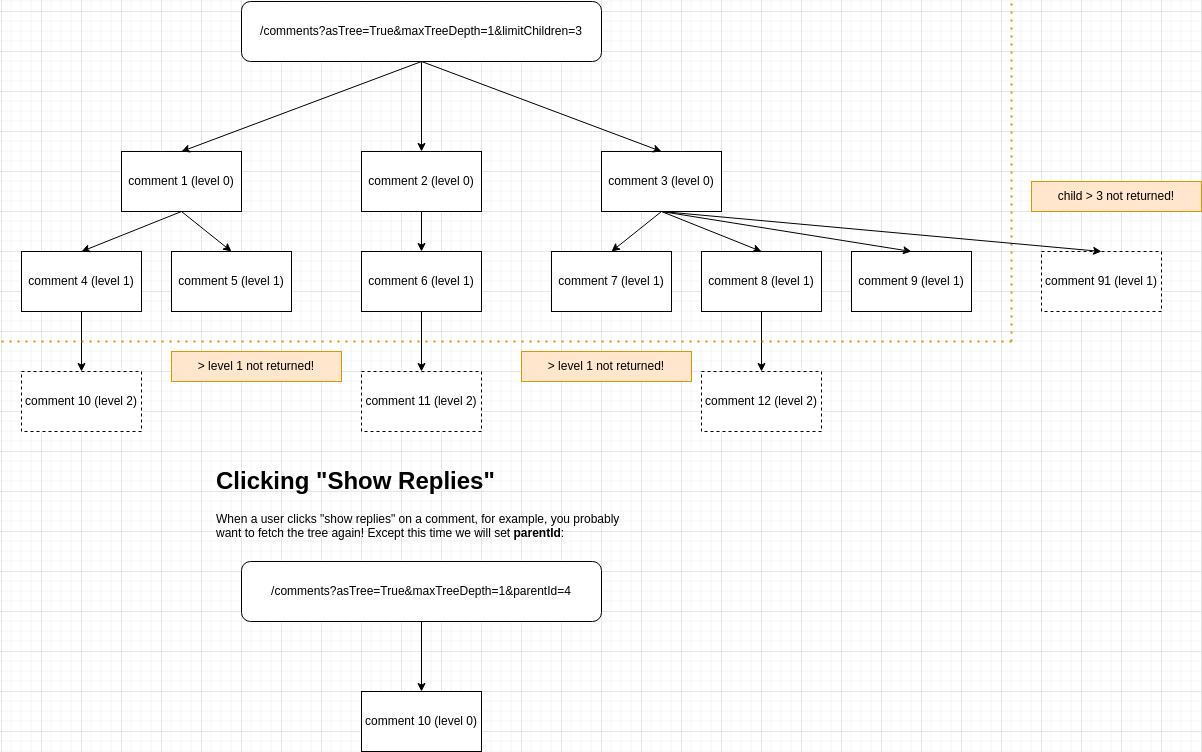
- 子留言仍會計入分頁。您可以使用
asTree選項來解決這個問題。- 您可以透過
limitChildren與skipChildren來分頁子留言。 - 您可以透過
maxTreeDepth限制回傳討論串的深度。
- 您可以透過
- 如此一來,您可以定義自訂的
討論串
- 使用
Precalculated Pagination時,留言會依 頁面 分組,且討論串中的留言會影響整體頁面。- 如此一來,用戶端可以根據
parentId來判斷討論串。 - 例如,一個頁面有一則頂層留言與 29 則回覆,並在 API 中設定
page=0— 您將只會取得該頂層留言與 29 則子留言。
- 如此一來,用戶端可以根據
- 使用
Flexible Pagination時,您可以定義parentId參數。- 將其設為 null 即可只取得頂層留言。
- 然後若要檢視討論串,請再次呼叫 API 並傳遞
parentId。 - 常見的做法是先呼叫 API 取得頂層留言,然後平行呼叫 API 以取得每則留言子留言的內容。
- 2023 年 2 月起新功能! 使用
&asTree=true以樹狀結構擷取。- 您可以將此視為
Flexible Pagination as a Tree。 - 只有頂層留言會計入分頁。
- 設定
parentId=null以從根節點開始樹狀結構(您必須設定parentId)。 - 設定
skip與limit進行分頁。 - 將
asTree設為true。 - 點數成本會增加
2x,因為在此情境下我們的後端需要做更多工作。 - 依需求設定
maxTreeDepth、limitChildren與skipChildren。
- 您可以將此視為
樹狀結構說明
使用 asTree 時,分頁可能不容易理解。以下是方便的圖示:
在使用者情境中擷取留言
/comments API 可在兩種情境中使用,適用於不同的使用案例:
- 用於回傳已排序並標記資訊的留言,以建立您自己的用戶端。
- 在此情況下,請定義
contextUserId查詢參數。
- 在此情況下,請定義
- 用於從您的後端擷取留言以進行自訂整合。
- 若未提供
contextUserId,平台將預設為此模式。
- 若未提供
以樹狀結構取得留言
可以讓留言以樹狀結構回傳,且分頁只計算頂層留言。
只想取得頂層留言與直接子留言?以下是一種方法:
不過,在您的 UI 中,您可能需要知道是否要在每則留言上顯示「顯示回覆」按鈕。以樹狀結構擷取留言時,在適用的情況下,留言上會標記 hasChildren 屬性。
以樹狀結構取得留言,並依主題標籤搜尋
可以使用 API 依主題標籤搜尋,範圍涵蓋您的整個租戶(不限於單一頁面或 urlId)。
在此範例中,我們省略 urlId,並以多個主題標籤進行搜尋。API 只會回傳具有所有要求主題標籤的留言。
所有請求參數
回應
實用提示
URL ID
您可能會想搭配 urlId 參數使用 Comment API。您可以先呼叫 Pages API,以查看您可用的 urlId 值長什麼樣子。
匿名操作
對於匿名留言,您在擷取留言以及執行檢舉與封鎖時,可能需要傳遞 anonUserId。
(!) 許多應用程式商店都要求此參數,因為使用者必須能夠檢舉他們看得到的使用者建立的內容,即使他們未登入也一樣。若不這樣做,可能會導致您的應用程式從該商店被移除。
留言未被回傳
請檢查您的留言是否已核准,且不是垃圾留言。
GET /api/v1/comments/:id
此 API 提供依 id 取得單一評論的功能。
POST /api/v1/comments
此 API 端點提供建立評論的功能。
常見用例包括自訂使用者介面、整合或匯入。
注意事項:
- 如果需要,此 API 可以「即時」更新評論小工具(這會將
creditsCost從1增加到2)。 - 如果提供了 email,這個 API 會自動在系統中建立使用者物件。
- 嘗試儲存兩則使用不同 email 但相同使用者名稱的評論,第二則評論會發生錯誤。
- 如果您指定了
parentId,且子評論的notificationSentForParent為 false,我們將會為父評論發送通知。此操作每小時進行(我們會將通知批次一起發送以減少郵件數量)。 - 如果您想在建立使用者時發送歡迎郵件,或想發送評論驗證郵件,請在查詢參數中將
sendEmails設為true。 - 透過此 API 建立的評論將顯示在管理應用程式的 Analytics 與 Moderation 頁面中。
- 如果該設定已開啟,評論者名稱與評論文字中的「髒話」仍會被遮罩。
- 透過此 API 建立的評論仍可視需要進行垃圾訊息檢查。
- 若透過「自訂規則」管理頁面設定的配置(例如最大評論長度)將在此處套用。
要在評論小工具中顯示,提交的最小資料如下:
更實際的請求範例如下:
PATCH /api/v1/comments/:id
此 API 端點提供更新單則評論的功能。
Notes:
- 此 API 可在需要時將評論元件「即時」更新(這會將基本
creditsCost從1提高為2)。- 這可讓在頁面之間遷移評論成為「即時」(更改
urlId)。 - 由於頁面會被預先計算且此操作耗費大量 CPU,遷移會額外收取
2點額度。
- 這可讓在頁面之間遷移評論成為「即時」(更改
- 與建立 API 不同,如果提供 email,本 API 不會自動在系統中建立使用者物件。
- 透過此 API 更新的評論仍可在需要時進行垃圾郵件檢查。
- 若透過自訂規則管理頁面設定的配置(例如最大評論長度),將在此生效。
- 若要允許使用者更新他們的評論文字,只需在請求主體中指定
comment。我們會生成相應的commentHTML。- 若同時定義了
comment與commentHTML,我們將不會自動生成 HTML。 - 若使用者在新文字中加入提及或標籤,依然會像
POSTAPI 一樣處理。
- 若同時定義了
- 在更新評論的
commenterEmail時,最好也指定userId。否則,您必須確保該 email 所對應的使用者屬於您的租戶,否則請求將失敗。 - 如果目標評論被鎖定(
isLocked: true),則請求會以code: 'locked'被拒絕。請先解除鎖定再更新,若需要可於更新後重新鎖定。
DELETE /api/v1/comments/:id
此 API 端點提供刪除評論的功能。
注意事項:
- 如果需要,此 API 可以將評論小工具 "live" 即時更新(這會將
creditsCost從1增加到2)。 - 此 API 將刪除所有子評論。
- 如果目標評論已鎖定(
isLocked: true),請求會以code: 'locked'被拒絕。請先解鎖該評論,然後再刪除。
POST /api/v1/comments/:id/flag
此 API 端點可讓您為特定使用者標記(檢舉)評論。
注意事項:
- 此呼叫必須在使用者上下文中執行。該使用者可以是 FastComments.com 使用者、SSO 使用者或租戶使用者。
- 若已設定標記以隱藏的閾值,當評論被標記達到該次數時,將會即時自動隱藏該評論。
- 在評論被自動取消核准(隱藏)之後,該評論只能由管理員或版主重新核准。取消標記不會使評論重新核准。
對於匿名檢舉,我們必須指定一個 anonUserId。這可以是代表匿名會話的 ID,或是一個隨機的 UUID。
這讓我們即使在使用者未登入時也能支援對評論的標記與取消標記。這樣一來,該評論可以被標示為
已標記,當以相同的 anonUserId 取回評論時。
POST /api/v1/comments/:id/un-flag
此 API 端點提供為特定使用者取消標記留言的功能。
注意事項:
- 此呼叫必須始終在使用者的上下文中進行。該使用者可以是 FastComments.com 使用者、SSO 使用者或租戶使用者。
- 留言被自動取消核准(隱藏)後,只有管理員或版主才能重新核准該留言。取消標記不會重新核准該留言。
對於匿名標記,我們必須指定 anonUserId。這可以是代表匿名工作階段的 ID,或是隨機的 UUID。
POST /api/v1/comments/:id/block
此 API 端點提供封鎖撰寫特定評論的使用者的功能。它支援封鎖來自 FastComments.com 使用者、SSO 使用者 和 租戶使用者 的評論。
它支援一個 commentIdsToCheck 主體參數,用來檢查在此操作完成後客戶端上是否有任何其他可能可見的評論應該被封鎖/解除封鎖。
注意:
- 此呼叫必須始終在使用者的上下文中進行。該使用者可以是 FastComments.com 使用者、SSO 使用者,或租戶使用者。
- 請求中的
userId是正在「執行封鎖」的使用者。例如:User A想要封鎖User B。傳入userId=User A以及User B所撰寫的評論 id。 - 完全匿名的評論(沒有使用者 id、沒有電子郵件)無法被封鎖,系統將回傳錯誤。
若要對匿名使用者進行封鎖,我們必須指定一個 anonUserId。這可以是代表匿名會話的 ID,或是一個隨機的 UUID。
這允許我們在使用者未登入時,透過使用相同的 anonUserId 來擷取評論並支援封鎖評論。
POST /api/v1/comments/:id/un-block
此 API 端點提供解除對撰寫特定評論之使用者封鎖的功能。它支援解除封鎖由 FastComments.com 使用者、SSO 使用者,以及租戶使用者所撰寫的評論。
它支援一個 commentIdsToCheck 的 body 參數,用來檢查在此操作執行後,客戶端上任何其他可能可見的評論是否應該被封鎖/解除封鎖。
注意:
- 此呼叫必須始終在某個使用者的上下文中進行。該使用者可以是 FastComments.com 使用者、SSO 使用者,或租戶使用者。
- 請求中的
userId指的是正在解除封鎖的那個使用者。例如:User A想要解除封鎖User B。傳入userId=User A以及User B所撰寫的評論 id。 - 完全匿名的評論(沒有使用者 id、沒有 email)無法被封鎖,系統將回傳錯誤。
電子郵件範本結構
一個 EmailTemplate 物件代表租戶的自訂電子郵件範本設定。
系統會透過下列方式選擇要使用的電子郵件範本:
- 其類型識別符,我們稱之為
emailTemplateId。這些是常數。 domain。我們會先嘗試尋找與相關物件(例如Comment)所屬網域相符的範本,若找不到相符者,則會嘗試尋找 domain 為 null 或*的範本。
以下為 EmailTemplate 物件的結構:
注意事項
- 您可以從
/definitions端點取得有效的emailTemplateId值。 /definitions端點也包含預設翻譯和測試資料。- 如果結構或測試資料無效,範本將無法儲存。
GET /api/v1/email-templates/:id
可以透過對應的 id 來擷取單一 EmailTemplate(不是 emailTemplateId)。
GET /api/v1/email-templates
此 API 使用分頁,由 page 查詢參數提供。EmailTemplates 以每頁 100 筆的方式回傳,排序先依 createdAt,再依 id。
PATCH /api/v1/email-templates/:id
此 API 端點允許只指定 id 與要更新的屬性來更新電子郵件範本。
請注意,建立範本時相同的所有驗證也同樣適用,例如:
- 範本必須能正確渲染。每次更新都會檢查此項。
- 同一網域不能有重複的範本(否則其中一個會被靜默忽略)。
POST /api/v1/email-templates
此 API 端點提供建立電子郵件範本的功能。
注意事項:
- 相同網域下不能有多個使用相同
emailTemplateId的範本。 - 但你可以同時擁有通配符範本(
domain=*)以及同一emailTemplateId的特定網域範本。 - 只有在你擁有不同網域,或想針對特定情境使用專屬範本(例如測試時將
domain設為localhost)時,才需要指定domain。 - 如果指定
domain,它必須符合某個DomainConfig。若錯誤,會提供可使用的網域清單。 - 範本語法為 EJS,渲染有 500ms 的逾時限制。渲染的 P99 小於 5ms,因此若達到 500ms 表示有問題。
- 要儲存,範本必須能使用你提供的
testData成功渲染。渲染錯誤會彙總並顯示在儀表板(很快也將透過 API 提供)。
新增範本所需的最少資料如下:
你可能想為每個網站設定範本,在這種情況下請定義 domain:
POST /api/v1/email-templates/render
此 API 端點可用來預覽電子郵件範本。
DELETE /api/v1/email-templates/:id
此路由會刪除單一 EmailTemplate(依 id)。
動態貼文結構
A FeedPost 物件代表 FastComments 供稿中的一篇貼文。供稿是一系列貼文的串流,每篇貼文都有自己的評論串,透過 Feed 小工具呈現。每篇貼文都有作者、可選的富內容、媒體與連結,且可以加上標籤,以便過濾供稿。
FeedPost 物件的結構如下:
注意事項:
- 其中一些欄位標記為
READONLY—— 這些欄位由 API 回傳,但無法設定。 - 貼文的評論是一般評論,其
urlId為post:加上貼文的_id。使用此值搭配評論 API,即可讀取或建立貼文的評論。
GET /api/v1/feed-posts
取得供稿中的貼文,最新的優先。分頁採用游標方式:傳遞您收到的最後一篇貼文的 _id 作為
afterId 以取得下一頁。
每返回十篇貼文消耗一點信用,最低消耗一點信用。
POST /api/v1/feed-posts
此路由會建立單一個 FeedPost。每篇貼文都有作者,因此 fromUserId 為必填,且必須是帳號中已存在的 FastComments 或 SSO 使用者的 ID。
PATCH /api/v1/feed-posts/:id
此路由會更新單一 FeedPost。僅傳送您想變更的欄位。
標籤結構
一個 HashTag 物件代表使用者可以留下的標籤。HashTag 可用於連結到外部的內容或將相關評論串連起來。
HashTag 物件的結構如下:
注意:
- 在某些 API 端點中,你會看到 hashtag 被用在 URL 中。請記得對值進行 URI 編碼。例如,
#應該表示為%23。 - 其中某些欄位被標示為
READONLY- 這些欄位由 API 回傳,但無法設定。
GET /api/v1/hash-tags
此 API 使用分頁,透過 page 查詢參數提供。HashTags 會以每頁 100 筆返回,並依 tag 排序。
PATCH /api/v1/hash-tags/:tag
此路由提供更新單一個 HashTag 的功能。
POST /api/v1/hash-tags
此路由提供新增單一 HashTag 的功能。
POST /api/v1/hash-tags/bulk
此路由允許一次新增最多 100 個 HashTag 物件。
DELETE /api/v1/hash-tags/:tag
此路由提供透過所提供的標籤刪除一個 HashTag 使用者。
請注意,除非停用自動 HashTag 建立,否則使用者在留言時提供該標籤時,該標籤可能會被重新建立。
GET /api/v1/me
描述發出請求的憑證:它所屬的租戶,以及對於 OAuth 存取權杖, 授權該應用程式的使用者。整合會使用它來測試連線並為其加上標籤。
使用 API 金鑰時,回應僅會識別租戶。使用 OAuth bearer token 時,回應還會攜帶 授權的使用者以及已授予的範圍。
版主結構
A Moderator object represents configuration for a moderator.
有三種類型的版主:
- 擁有
isCommentModeratorAdmin標記的管理員使用者。 - 具有
isCommentModeratorAdmin標記的 SSO 使用者。 - 被邀請為版主的一般留言者,或 FastComments.com 的使用者。
Moderator 結構用於表示用例 3 的審核狀態。
如果您想透過 API 邀請某人成為版主,請使用 Moderator API,建立一個 Moderator 並邀請他們。
如果該使用者沒有 FastComments.com 帳號,邀請信將協助他們完成設定。如果他們已經有帳號,他們會被授予對您租戶的審核存取權,且 Moderator 物件的 userId 將更新為指向他們的使用者。您不會有該使用者的 API 存取權,因為在這種情況下該帳號屬於他們自己並由 FastComments.com 管理。
如果您需要完整管理該使用者的帳戶,我們建議使用 SSO,或將他們新增為 租戶使用者,然後再新增一個 Moderator 物件以追蹤他們的統計資料。
Moderator 結構可以用作用例 1 和 2 的統計追蹤機制。建立使用者後,新增一個定義了他們 userId 的 Moderator 物件,他們的統計將會在 留言版主頁面 上被追蹤。
Moderator 物件的結構如下:
GET /api/v1/moderators/:id
此路由會依其 id 回傳單一位管理員。
GET /api/v1/moderators
此 API 使用分頁,由 skip 查詢參數提供。管理員會以每頁 100 名的方式回傳,依據 createdAt 和 id 排序。
成本基於回傳的管理員數量計算,為每回傳 1 credit per 10 名管理員收費。
PATCH /api/v1/moderators/:id
此 API 端點提供透過 id 更新 Moderator 的功能。
更新 Moderator 有以下限制:
- 更新
Moderator時不得提供下列欄位:acceptedInvitemarkReviewedCountdeletedCountmarkedSpamCountapprovedCounteditedCountbannedCountverificationIdcreatedAt
- 當指定
userId時,該使用者必須存在。 - 當指定
userId時,該使用者必須屬於查詢參數中指定的相同tenantId。 - 在相同租戶中,兩名管理員不得使用相同的
email。 - 您不得變更與
Moderator關聯的tenantId。
POST /api/v1/moderators
此路由允許新增單一個 Moderator。
建立 Moderator 有下列限制:
- 必須提供
name和email。userId為選填。 - 建立
Moderator時不得提供下列值:acceptedInvitemarkReviewedCountdeletedCountmarkedSpamCountapprovedCounteditedCountbannedCountverificationIdcreatedAt
- 當指定
userId時,該使用者必須存在。 - 當指定
userId時,他們必須屬於在查詢參數中指定的相同tenantId。 - 同一租戶中不能新增兩位具有相同
email的 moderator。
我們可以為只有電子郵件資訊的使用者建立 Moderator:
或者,我們可以為屬於我們租戶的使用者建立 Moderator,以追蹤其審核統計資料:
POST /api/v1/moderators/:id/send-invite
此路由提供邀請單一 Moderator 的功能。
傳送邀請電子郵件給 Moderator 時有以下限制:
Moderator必須已經存在。fromName的長度不得超過100 characters。
注意事項:
- 如果具有所提供電子郵件的使用者已存在,該使用者將被邀請來審核您租戶的留言。
- 如果具有所提供電子郵件的使用者不存在,邀請連結將引導他們完成帳號建立流程。
- 邀請將於
30 days後失效。
我們可以為只知道電子郵件的使用者建立 Moderator:
這將會發送一封類似 Bob at TenantName is inviting you to be a moderator... 的電子郵件。
DELETE /api/v1/moderators/:id
此路由提供依 id 刪除 Moderator 的功能。
通知計數結構
A NotificationCount 物件表示使用者的未讀通知數量與相關的描述性資訊。
如果沒有未讀通知,該使用者將不會有 NotificationCount。
NotificationCount 物件會自動建立,無法透過 API 建立。它們也會在一年後過期。
您可以透過刪除使用者的 NotificationCount 來清除該使用者的未讀通知數量。
NotificationCount 物件的結構如下:
GET /api/v1/notification-count/:user_id
此路由會依使用者 ID 傳回單一 NotificationCount。若使用 SSO,使用者 ID 的格式為 <tenant id>:<user id>。
若沒有未讀通知,將不會有 NotificationCount,因此會收到 404。
此路由與 notifications/count 不同,因為它更快,但不允許篩選。
DELETE /api/v1/notification-count/:user_id
此路由會依使用者 ID 刪除單一個 NotificationCount。使用 SSO 時,使用者 ID 的格式為 <tenant id>:<user id>。
這將清除使用者的未讀通知數(留言元件中的紅色鈴鐺會淡出,計數會消失)。
通知結構
A Notification 物件代表使用者的通知。
Notification 物件會自動產生,無法透過 API 建立。它們也會在一年後過期。
通知無法被刪除。但可以更新將 viewed 設為 false,且您可以依 viewed 進行查詢。
使用者也可以透過將通知中的 optedOut 設為 true 來取消特定評論的通知。再將其設為 false 即可重新訂閱。
有不同的通知類型 ─ 請檢查 relatedObjectType 與 type。
通知的產生方式相當彈性,可由多種情境觸發(請參考 NotificationType)。
截至目前,Notification 的存在並不代表會或應該發送電子郵件。相反地,通知用於通知資訊流與相關整合。
Notification 物件的結構如下:
GET /api/v1/notifications
此路由會回傳最多 30 個 Notification 物件,依 createdAt 排序,最新的在前。
你可以以 userId 過濾。使用 SSO 時,使用者 id 的格式為 <tenant id>:<user id>。
GET /api/v1/notifications/count
此路由會回傳一個物件,包含在 count 參數下的通知數量。
它比 /notification-count/ 慢且花費雙倍點數,但允許在更多維度上過濾。
您可以使用與 /notifications 端點相同的參數進行過濾,例如 userId。使用 SSO 時,使用者 ID 的格式為 <tenant id>:<user id>。
PATCH /api/v1/notifications/:id
此 API 端點提供透過 id 更新 Notification 的功能。
更新 Notification 有以下限制:
- 您只能更新以下欄位:
viewedoptedOut
頁面回應公開 API
頁面反應(Page Reacts)讓您的使用者可以按讚某個頁面,或使用您自訂的一組反應圖片來對頁面做出反應。Page Reacts 小工具與浮動按讚(Floating Likes)小工具都是基於這些端點建構的,您也可以自行呼叫它們來打造自己的按讚按鈕。
與本指南的其他部分不同,Page Reacts 端點是公開的。它們是從您的使用者瀏覽器呼叫的,不需要 API 金鑰,也不消耗 API 點數。每個反應都屬於發出請求的使用者,因此使用者只能新增或移除自己的反應。
有兩組端點:
/page-reacts/v1/likes/:tenantId- 每位使用者對每個頁面僅能有一個「讚」。用於按讚按鈕。/page-reacts/v2/:tenantId- 每個頁面可有多個反應,每個反應由您選擇的簡短id識別(例如heart或laugh)。
兩者也可透過我們 SDK 中的 PublicApi 使用,例如 JavaScript SDK 中的 getV1PageLikes、createV1PageReact 與 deleteV1PageReact。
顯示誰做出了反應
在 GET 端點傳入 includeUserInfo=public,即可同時取得按讚或做出反應的使用者,包含其使用者名稱與頭像,並按最近時間排序。已將個人資料活動設為私人的使用者會被排除,匿名使用者亦同。最多會回傳 100 筆反應。
SSO 使用者預設會以私人個人資料活動建立,除非您的 SSO 負載將 isProfileActivityPrivate 設為 false,因此請為您希望出現在這些清單中的使用者進行設定。
在需要 SSO 的頁面上,只有能檢視該頁面的 SSO 使用者才能列出誰做出了反應。其他人會收到帶有 sso-required 或 page-forbidden 代碼的 403 錯誤。
從您的伺服器端,GET /api/v1/pages/likes 與 GET /api/v1/pages/reacts 可使用 API 金鑰回傳相同的清單,並且也接受 includeUserInfo=include-private 以包含具有私人個人資料的使用者。
識別使用者
反應會與發出請求的使用者綁定:
- SSO 使用者: 傳入
sso查詢參數,其值為您提供給留言小工具之相同 SSO 物件的 URI 編碼 JSON。請參閱 SSO。 - 匿名使用者: 當沒有
sso參數且沒有 FastComments 登入時,伺服器會為瀏覽器指派一個儲存在 FastComments 工作階段 Cookie 中的匿名 id。請使用credentials: 'include'發送請求,以確保 Cookie 在請求之間被保留。封鎖第三方 Cookie 的瀏覽器將無法保留匿名 id,因此在需要可靠識別每位使用者時,請使用 SSO。
urlId
urlId 用於識別頁面,與留言功能中的用法相同。請使用與您提供給留言小工具相同的 urlId,這樣按讚與留言才會計入同一個頁面。記得要進行 URI 編碼。
GET /page-reacts/v1/likes/:tenantId
返回頁面上的讚數,以及目前使用者是否已讚過。尚未存在的頁面會回傳 likeCount 為 0。
傳入 includeUserInfo=public 以同時取得讚過此頁面的使用者,依最新時間排序。私人個人資料活動的使用者與匿名使用者會被排除,且最多查詢 100 個讚。此處僅接受 public;include-private 會回傳 422,且可透過帶有 API 金鑰的 GET /api/v1/pages/likes 取得。對於需要 SSO 的頁面,includeUserInfo 會對無法檢視頁面的使用者回傳 403。
POST /page-reacts/v1/likes/:tenantId
以當前使用者的身份為頁面點讚。每位使用者只能對同一頁面點讚一次:再次點讚會成功回傳代碼 already-liked,且不會改變計數。
如果頁面尚未存在,系統會自動建立。傳遞 title 以設定或更新頁面的標題。
DELETE /page-reacts/v1/likes/:tenantId
移除目前使用者對頁面的讚。如果使用者尚未對該頁面按讚,請求仍會成功,回傳代碼 not-liked,且不會改變計數。
GET /page-reacts/v2/:tenantId
返回頁面上每個回應的計數,以及目前使用者已添加的回應。
傳入 includeUserInfo=public 以同時取得已回應的使用者,每個回應會以一筆資料列出其回應 ID,且依最新的排序。私人個人資料活動的使用者與匿名使用者會被排除,最多會查詢 100 筆回應。此處僅接受 public;include-private 會回傳 422,且可透過帶有 API 金鑰的 GET /api/v1/pages/reacts 取得。對於需要 SSO 的頁面,includeUserInfo 會對無法檢視頁面的使用者回傳 403。
GET /page-reacts/v2/:tenantId/list
返回對頁面添加了回應的使用者名稱,按字母順序排序。最多查詢 100 個回應,匿名使用者以及具有私人個人資料活動的使用者不會被包含。對於需要 SSO 的頁面,無法檢視該頁面的使用者會收到 403,錯誤代碼為 sso-required 或 page-forbidden。
若也想取得頭像與使用者 ID,請使用 GET /page-reacts/v2/:tenantId 並加上 includeUserInfo=public。
POST /page-reacts/v2/:tenantId
以目前使用者的身份為頁面新增回應。使用者每個回應 id 只能新增一次:再次新增時會成功回傳代碼 already-reacted,且不會改變計數。使用者可以對同一頁面新增多個不同的回應。
回應 id 由您自行決定,長度上限為 36 個字元。如果頁面尚未存在,系統會自動建立。傳遞 title 以設定或更新頁面的標題。
DELETE /page-reacts/v2/:tenantId
從頁面中移除目前使用者的一個回應。如果使用者尚未加入該回應,請求仍會成功,回傳代碼 no-react,且不會改變計數。
頁面結構
一個 Page 物件代表許多評論可能屬於的頁面。這種關係是由 urlId 定義的。
Page 儲存像是頁面標題、評論數量及 urlId 等資訊。
Page 物件的結構如下:
GET /api/v1/pages
目前您只能取得與您的帳戶關聯的所有頁面(或透過 /by-url-id 取得單一頁面)。如果您需要更精細的搜尋功能,請與我們聯繫。
實用提示
Comment API 需要 urlId。您可以先呼叫 Pages API,查看您可用的 urlId 值的樣子。
GET /api/v1/pages/by-url-id
個別頁面可以透過其對應的 urlId 來擷取。這對於查詢頁面標題或留言數量很有幫助。
有用提示
請記得將像 urlId 這類值進行 URI 編碼。
GET /api/v1/pages/likes
返回頁面上的讚數,並可選擇返回點讚的使用者,最近的優先顯示。這是 GET /page-reacts/v1/likes/:tenantId 的伺服器端版本。
includeUserInfo 控制返回哪些使用者:
public會排除已將個人資料活動設為私密的使用者。include-private會包含這些使用者。僅在列表不會向公眾顯示時使用。
匿名使用者永不會被包含,且最多會查詢 100 個讚。不存在的頁面會返回 likeCount 為 0 且 users 為空列表。
實用提示
請記得對像 urlId 之類的值進行 URI 編碼。
GET /api/v1/pages/reacts
返回每個頁面上每種回應的計數,並可選擇返回回應的使用者,每筆回應以其 reaction id 為單位,按最新的先後順序排列。這是 GET /page-reacts/v2/:tenantId 的伺服器端版本。
includeUserInfo 控制返回哪些使用者:
public會排除已將個人資料活動設為私密的使用者。include-private會包含他們。僅在列表不會向公眾顯示時使用此選項。
匿名使用者永不會被包含,且最多會查詢 100 筆回應。不存在的頁面不會返回 counts,且 users 列表為空。
實用提示
請記得對像 urlId 之類的值進行 URI 編碼。
PATCH /api/v1/pages/:id
此路由提供更新單一 Page 的功能。相應的評論也會被更新。
注意
某些 Page 物件中的參數會自動更新。這些包括計數與 title 屬性。計數無法透過 API 更新,因為它們是計算出的值。頁面的 title 可以透過 API 設定,但如果在具有相同 urlId 且頁面標題不同的頁面上使用評論小工具,該標題將會被覆蓋。
POST /api/v1/pages
此 API 端點提供建立頁面的功能。
常見的使用案例是存取控制。
注意事項:
- 如果您曾在留言串中留言,或呼叫 API 建立
Comment,那麼您已經建立了一個Page物件!您可以嘗試透過/by-url-idPage路由取得它,並傳入與留言小工具相同的urlId。 Page結構包含一些計算得出的值。 目前這些值為commentCount和rootCommentCount。 它們會自動填入,無法透過 API 設定。嘗試這樣做會導致 API 回傳錯誤。
DELETE /api/v1/pages/:id
此路由提供依 id 刪除單一頁面的功能。
請注意,對具有相同 urlId 的頁面的評論元件進行互動,將會無縫地重新建立該 Page。
POST /api/v1/pages/migrations
此路由將評論和頁面從一個 urlId 或網域移動到另一個,功能與儀表板中的 Domain Migration tool 相同。每個請求最多可傳送 100 個遷移。它們會依給定順序執行,因此 a 到 b 再到 b 到 c 是可行的。
每個遷移都有一個 type:
urlId會移動urlId完全等於from的頁面。post-1不會匹配post-10。domain會在每個urlId和url中尋找/取代from,並更新每則評論的domain。兩個值都必須是網域,例如old.example.com。
評論、頁面、頁面回應、投票、通知與訂閱都會一起移動。如果 to 位置已存在頁面,兩個頁面將合併。
遷移會作為批次工作執行。回應中包含 batchJobId。請輪詢 GET /api/v1/batch-jobs/:id 以追蹤其進度。工作完成後會針對每個遷移提供結果,並會產生一個 undoId,您可在 90 天內將其傳遞給 POST /api/v1/pages/migrations/:undoId/undo 以復原。
請求會在排入佇列前先進行驗證。如果有任何遷移無效,整個請求會以 422 錯誤失敗,且不會執行任何操作。
排入遷移佇列不會產生費用。工作完成後,依每遷移 1000 條評論收取 1 點信用,最低收取 1 點。
注意事項
- 同一租戶的工作一次只會執行一個,依最舊的先執行。第二個遷移會等待第一個完成。
- 使用
PATCH /api/v1/pages/:id並提供新的urlId只會變更頁面本身,不會影響其評論。請使用此路由來移動頁面的評論。
POST /api/v1/pages/migrations/:undoId/undo
此路由會撤銷單一 POST /api/v1/pages/migrations 作業中的所有遷移。可使用 GET /api/v1/batch-jobs/:id 取得已完成遷移作業的 undoId。undoId 可在 90 天內使用,且只能使用一次。
撤銷會以批次作業的方式執行,與遷移相同,回應中會包含其 batchJobId。作業完成後,其 pageMigrationUndoResult 會回報:
restored:將記錄還原至遷移前的值。skipped:因記錄在遷移後已變更或已不存在而未被處理。之後的編輯不會被覆寫。notRestorable:在合併兩個頁面或移除重複頁面回應時被遷移刪除的記錄。這些記錄無法復原。
遷移會以最新的優先順序撤銷,因此像 a 到 b 再到 c 的鏈結會被逆向回到 a。即使遷移作業在途中失敗,也仍可撤銷,會還原失敗前所做的變更。
排隊執行撤銷不會產生費用。作業完成後,依每恢復 1000 筆記錄收取 1 點信用,最低收取 1 點。
投票結構
Poll 是附加在留言上的,而不是獨立的物件。它會隨留言一起建立(見 POST /api/v1/comments),或稍後透過 PUT /api/v1/polls/:commentId 加入到現有的留言。
投票計數保存在投票本身,因此讀取投票時即可直接取得結果,無需自行加總。這些計數背後的個別投票則是 PollVote 物件。
每個選項都有一個在投票建立時產生的 id。這個 id 用於投票、重新命名選項,以及在您以 PUT 更新投票(新增或移除選項)時保留某個選項(及其投票)。這是引用選項唯一安全的方式——絕不要使用它在清單中的位置。
限制
- 問題為必填,最多 200 個字元。
- 一個投票需有 2 到 10 個選項。
- 選項標籤為必填,最多 100 個字元,且在同一投票內必須唯一(不區分大小寫)。
closesAt在建立投票時必須是未來的時間。若要立即關閉投票,請以過去的日期進行PATCH。
網站設定
投票遵循您的網站設定,您可以在 Customize Widget 下進行更改:
- 必須先啟用投票功能才能建立投票,否則 API 會回應
polls-disabled。 - 投票可以限制為已登入的使用者,在此情況下,僅帶有
anonUserId的投票會被拒絕並回應poll-login-required。
GET /api/v1/polls/:commentId
讀取附加在評論上的投票調查,並顯示其目前的投票數。
投票調查也會透過評論 API 隨評論本身一起返回,因此當您只想取得結果而不需要整個評論時,請使用此端點。
沒有投票調查的評論、已被刪除的評論,以及不存在的評論 ID,都會以相同的方式回應,返回 poll-not-found。
PUT /api/v1/polls/:commentId
將投票附加到現有的評論,或設定其已存在投票的完整狀態。
請求主體是完整的投票,您傳送的選項將成為投票的選項,依序排列。每個選項會依其 id 進行匹配:
- 傳送帶有現有選項
id的選項會保留該選項及其投票。其標籤與位置會更新為您傳送的內容。 - 未帶
id的選項會被新增,且沒有投票。 - 若省略現有的選項,該選項會被移除,連同其投票一起刪除。
totalVotes會相應減少相同數量。
因此,要新增選項,請傳送帶有其 id 的現有選項以及不帶 id 的新選項。要移除選項,則在清單中省略該選項。選項的 id 可在 GET /api/v1/polls/:commentId 回傳的投票中取得。
若完全不傳送任何 id,則會取代所有選項並刪除投票中已存在的所有投票。若投票已有投票,必須加上 replaceVotes=true,否則 API 會回應 replace-votes-required。
其他欄位也會被取代:若省略 closesAt、privacy 或 requireVoteToSeeResults,則會重設為預設值。若只想變更單一欄位而保留其他不變,請使用 PATCH /api/v1/polls/:commentId。
其他說明
- 若
id不在投票中,或同一個id重複提供,會失敗並回傳poll-invalid。尚未有投票的評論沒有任何選項 id,因此傳送給它的每個選項都必須省略id。 - 投票的隱私設定在有投票後只能收緊,無法放寬。
- 此 API 會遵循站台設定。若站台或頁面未啟用投票,則會失敗並回傳
polls-disabled。 - 被鎖定的評論無法變更其投票,會失敗並回傳
locked。 - 已連結的元件會即時更新,觀眾可在不重新載入的情況下看到新的投票。
PATCH /api/v1/polls/:commentId
編輯投票而不影響其投票結果。可用於修正問題或選項中的錯字、關閉或 重新開啟投票,或變更誰可以看到投票者。
選項以其 id 為依據,PATCH 會重新標記您指定的選項。若要新增、移除或重新排序
選項,請將完整的選項清單傳送至 PUT /api/v1/polls/:commentId:您以 id 傳送的選項也會保留
其投票。
每個欄位皆為可選,但至少必須提供一個。
其他說明
- 為投票未包含的選項 id 命名會導致
poll-invalid錯誤,而不是靜默失敗。 - 標籤在投票內必須保持唯一,且需考慮未變更的選項。
- 與建立投票不同,此處的
closesAt可以設定為過去的時間——這就是立即關閉投票的方式。 - 投票的隱私設定在有投票後只能收緊,無法放寬。
- 被鎖定的評論無法變更其投票,且會返回
locked錯誤。
DELETE /api/v1/polls/:commentId
從其評論中移除投票,並同時刪除所有已投的票。評論本身保持不變。
刪除評論會同時移除其投票與投票記錄,因此僅在您想保留評論時才需要此操作。
投票結果結構
A PollVote 是單個使用者對投票的回答。投票本身顯示的計數會與這些保持同步,因此只有在想知道 誰 投了哪個選項,而不是總計時才需要這些資料。
每位投票者在同一個投票中最多只能有一票。再次投票會將他們原本的投票移至新選項,而不是新增第二票,updatedAt 會記錄此變更的時間。
voterId 為投票者登入時的 userId,若未登入則為 anonUserId。
隱私
投票的 privacy 設定對此 API 的作用方式與在評論小工具中的作用方式相同:
- Anonymous(預設):沒有人能看到任何人的投票方式,因此投票內容無法被讀取。
GET /api/v1/poll-votes與GET /api/v1/poll-votes/:id會回傳poll-anonymous。投票的計數仍可從GET /api/v1/polls/:commentId取得。 - Admins and moderators:您的 API 金鑰屬於您網站的管理員,因此可以讀取投票。
- Everyone:投票內容可被讀取。
投票一旦有投票紀錄,其隱私設定只能收緊,無法放寬。
GET /api/v1/poll-votes
列出單一投票的個別票項,依投票時間由舊到新排序。每 100 票返回消耗 1 點信用。
投票屬於某則評論,因此一次只能讀取一個投票的票項,且必須提供 commentId。可進一步使用 voterId 來檢查某位使用者的投票,或使用 optionId 列出所有選擇特定選項的使用者。
每次呼叫最多返回 1000 票。使用 skip 參數可分頁取得更多。
會遵守投票的 privacy 設定:匿名投票的票項無法被讀取,請求會以 poll-anonymous 錯誤失敗。詳情請參閱 PollVote 結構。
依選項計算票數
您不需要自行加總以取得結果——投票本身已包含計數。請改以 GET /api/v1/polls/:commentId 讀取投票,當您需要知道誰投了票時再使用此 API。
每頁的所有投票
沒有整頁的投票列表。若要對整頁進行報告,請使用 GET /api/v1/comments 取得該頁的評論,該回應會返回每則評論的投票及其計數,之後再針對您關心的投票讀取票項。
GET /api/v1/poll-votes/:id
根據其 ID 讀取單一投票。
匿名投票的投票無法被讀取,請求會因 poll-anonymous 錯誤而失敗。請參閱 PollVote 結構以了解投票的 privacy 設定如何套用。
POST /api/v1/poll-votes
記錄在投票上的投票。
每位投票者對同一投票最多只能投一次。再次為相同投票者呼叫此 API 時,會將他們的投票移至新的選項,而不是新增第二票;若投票於已選擇的選項則不會產生任何變化。
回應中會包含投票本身,讓您在不需額外請求的情況下取得更新後的票數。
匿名投票
使用 anonUserId 取代 userId 以記錄未登入使用者的投票。此 ID 不必對應任何使用者——它僅用於識別會話,避免同一人被重複計算。
必須在您的站點啟用匿名投票。若投票僅限已登入使用者,僅提供 anonUserId 的投票會因 poll-login-required 而失敗。
匿名投票亦會依每個 IP、每個投票進行速率限制,以防止同一人透過清除會話來大量投票。請傳送終端使用者的 ip,讓限制套用於該使用者而非您的伺服器。
其他說明
userId必須是您站點上已存在的使用者。屬於其他站點的使用者投票會被拒絕。- 在已關閉的投票上投票會因
poll-closed而失敗。 - 此 API 會更新投票的票數,並即時推送至已連結的小工具。
DELETE /api/v1/poll-votes/:id
撤回一票。被投票的選項會取回其計數,且投票者可以再次投票。
其他注意事項
- 重複刪除同一票時,第二次會回應
not-found,且計數保持不變。 - 如果投票後投票已被替換,該票會被移除但計數不會改變,因為替換後的投票是從零開始計算的。
待處理 Webhook 事件結構
A PendingWebhookEvent 物件代表一個排隊中的 webhook 事件,處於待處理狀態。
PendingWebhookEvent 物件會自動建立,且無法透過 API 手動建立。它們也會在一年後過期。
可以刪除它們,這會將任務從佇列中移除。
有不同的事件類型 - 請檢查 eventType(OutboundSyncEventType)和 type(OutboundSyncType)。
此 API 的常見使用情境是實作自訂監控。您可能會定期呼叫 /count 端點,以根據給定的篩選條件查詢未處理的計數。
PendingWebhookEvent 物件的結構如下:
GET /api/v1/pending-webhook-events
此路由會回傳位於 pendingWebhookEvents 參數下的待處理 webhook 事件列表。
此 API 使用分頁,由 skip 參數提供。PendingWebhookEvents 以每頁 100 筆回傳,依 createdAt 由新到舊排序。
GET /api/v1/pending-webhook-events/count
此路由會回傳一個物件,其在 count 參數中包含待處理的 webhook 事件數量。
您可以使用與 /pending-webhook-events 端點相同的參數進行篩選
DELETE /api/v1/pending-webhook-events/:id
此路由允許刪除單一的 PendingWebhookEvent。
如果需要大量刪除,請先呼叫帶分頁的 GET API,然後依序呼叫此 API。
單點登入使用者結構
FastComments 提供一個易於使用的 SSO 解決方案。使用基於 HMAC 的整合更新使用者資訊就像讓使用者載入含有更新 payload 的頁面一樣簡單。
然而,可能會希望在該流程之外管理使用者,以提高應用程式的一致性。
SSO 使用者 API 提供一種對我們稱為 SSOUsers 的物件進行 CRUD 的方式。這些物件與一般 Users 不同,為了型別安全而分開保存。
SSOUser 物件的結構如下:
SSO 使用者計費
SSO 使用者的計費會根據其權限標記而不同:
- Regular SSO Users:沒有管理或版主權限的使用者會以一般 SSO 使用者計費
- SSO Admins:具有
isAccountOwner或isAdminAdmin標記的使用者會被另外計費為 SSO 管理員(與一般租戶管理員相同費率) - SSO Moderators:具有
isCommentModeratorAdmin標記的使用者會被另外計費為 SSO 版主(與一般版主相同費率)
重要:為避免重複計費,系統會自動根據電子郵件地址對 SSO 使用者與一般租戶使用者及版主進行去重。如果 SSO 使用者的電子郵件與一般租戶使用者或版主相同,將不會重複計費。
存取控制
使用者可以被劃分為群組。這就是 groupIds 欄位的用途,且為選用。
@提及
預設情況下,當輸入 @ 字元時,@mentions 將使用 username 搜尋其他 SSO 使用者。如果使用 displayName,當有符合 displayName 的結果時,會忽略符合 username 的結果,且 @mention 的搜尋結果將使用 displayName。
訂閱
在 FastComments 中,使用者可以透過在留言元件中點擊鈴鐺圖示並點選訂閱,來訂閱某個頁面。
對於一般使用者,我們會根據他們的通知設定發送通知電子郵件。
對於 SSO 使用者,為了向後相容我們將此行為做了區分。僅當您將 optedInSubscriptionNotifications 設為 true 時,使用者才會收到這些額外的訂閱通知電子郵件。
徽章
您可以使用 badgeConfig 屬性為 SSO 使用者指派徽章。徽章是顯示在使用者名稱旁的視覺標示。
badgeIds- 指派給使用者的徽章 ID 陣列。這些為在所有頁面可見的全域徽章。必須是您 FastComments 帳戶中已建立的有效徽章 ID。限制為 30 個徽章。pageBadgeIds- 選用的徽章 ID 陣列,僅限於當前頁面(urlId)。這些徽章只會在指派它們的頁面上顯示。不同頁面對同一使用者可以有不同的頁面範圍徽章。override- 若為 true,所有現有顯示的徽章將被提供的徽章取代。全域與頁面範圍的徽章獨立覆蓋 — 覆蓋全域徽章不會影響頁面範圍徽章,反之亦然。若為 false 或省略,則會將提供的徽章新增到任何現有徽章上。update- 若為 true,使用者登入時會從租戶設定更新徽章顯示屬性。
GET /api/v1/sso-users
此路由會以每頁 100 名的分頁方式回傳 SSO 使用者。分頁由 skip 參數提供。使用者依其 signUpDate 與 id 排序。
GET /api/v1/sso-users/by-id/:id
此路由會依據其 id 回傳單一 SSO 使用者。
GET /api/v1/sso-users/by-email/:email
此路由會依使用者的電子郵件回傳單一 SSO 使用者。
PATCH /api/v1/sso-users/:id
此路由提供更新單一 SSO 使用者的功能。
POST /api/v1/sso-users
此路由用於建立單一 SSO 使用者。
嘗試建立兩個具有相同 ID 的使用者會導致錯誤。
在此範例中我們為存取控制指定了 groupIds,但這是可選的。
整合注意事項
透過 API 傳遞的資料可以透過傳遞不同的 SSO User HMAC payload 來覆寫。例如,如果 您透過 API 設定了一個 username,但在頁面載入時透過 SSO 流程傳遞了不同的 username,我們會自動更新 他們的 username。
除非您明確指定或將其設為 null(不是 undefined),否則我們不會在此流程中更新使用者參數。
PUT /api/v1/sso-users/:id
此路由提供更新單一 SSO 使用者的功能。
在此範例中,我們為存取控制指定了 groupIds,但這是可選的。
DELETE /api/v1/sso-users/:id
此路由可透過使用者的 id 刪除單一 SSO 使用者。
請注意,若再次以該使用者的 payload 載入留言小工具,系統會無縫地重新建立該使用者。
可透過查詢參數 deleteComments 刪除此使用者的留言。若此參數為 true,請注意:
- 該使用者的所有留言將會即時刪除。
- 所有的 子留言(現為孤兒留言)將依據各留言所屬頁面的設定,被刪除或匿名化。例如,若討論串刪除模式為 "anonymize",則回覆會保留,而該使用者的留言會被匿名化。此行為僅適用於
commentDeleteMode為Remove(預設值)時。 creditsCost會變為2。
匿名化留言
您可以保留該使用者的留言,但透過將 commentDeleteMode=1 將其匿名化。
若使用者的留言被匿名化,則下列欄位會被設為 null:
- commenterName
- commenterEmail
- avatarSrc
- userId
- anonUserId
- mentions
- badges
isDeleted 與 isDeletedUser 將被設為 true。
在渲染時,留言小工具會在使用者名稱處使用 DELETED_USER_PLACEHOLDER(預設:"[deleted]"),並在留言內容處使用 DELETED_CONTENT_PLACEHOLDER。可透過 Widget Customization UI 自訂這些內容。
範例
訂閱結構
一個 Subscription 物件代表使用者的訂閱。
Subscription 物件會在使用者在評論小工具中點擊通知鈴鐺並點選 "訂閱此頁面" 時建立。
也可以透過 API 建立訂閱。
擁有 Subscription 物件會在與該 Subscription 相關聯的頁面
根層留下新留言時,會產生 Notification 物件並發送電子郵件。
是否發送電子郵件取決於使用者類型。對於一般使用者,這取決於 optedInNotifications。對於 SSO 使用者,則取決於 optedInSubscriptionNotifications。請注意,有些應用程式可能沒有可由網頁存取的頁面概念,在這種情況下,只需將 urlId 設為
您要訂閱的項目的 id(與傳遞給評論小工具的 urlId 值相同)。
以下為 Subscription 物件的結構:
GET /api/v1/subscriptions/:id
此路由會回傳最多 30 個 Subscription 物件,依 createdAt 排序,最新的在前。
你可以以 userId 過濾。使用 SSO 時,使用者 id 的格式為 <tenant id>:<user id>。
POST /api/v1/subscriptions
此 API 端點提供建立 Subscription 的功能。請注意,每位使用者每個頁面只能有一個訂閱,因為多個訂閱是多餘的,且嘗試為同一使用者在同一頁面建立多於一個訂閱會導致錯誤。
建立訂閱時,當在被訂閱的 urlId 根節點留下新留言(當留言的 parentId 為 null)時,將會建立 Notification 物件。
DELETE /api/v1/subscriptions/:id
此路由會透過 id 刪除單一 Subscription 物件。
租戶每日使用量結構
A TenantDailyUsage 物件代表租戶在特定日期的使用情況。如果在特定日期內該租戶沒有任何活動,則該日不會有 TenantDailyUsage 物件。
TenantDailyUsage 物件 不是即時的,可能會比實際使用量落後數分鐘。
TenantDailyUsage 物件的結構如下:
GET /api/v1/tenant-daily-usage
此路由允許按年份、月份和日期搜尋租戶的使用情況。最多可回傳 365 個物件,費用為每 10 個物件 1 個 API 點數。
回應物件依建立日期排序(最舊的在前)。
租戶結構
The Tenant 定義 FastComments.com 的客戶。具有白標存取權的租戶可以透過 API 建立這些租戶。白標租戶無法建立其他白標租戶(僅允許一層巢狀)。
Tenant 物件的結構如下:
GET /api/v1/tenants/:id
此路由會依 id 回傳單一 Tenant。
GET /api/v1/tenants
此 API 回傳由您的租戶所管理的租戶。
分頁由 skip 查詢參數提供。租戶以每頁 100 筆回傳,依照 signUpDate 與 id 排序。
費用依回傳的租戶數量計算,每回傳 10 位租戶收取 1 credit。
您可以在 Tenant 物件上定義 meta 參數並查詢符合條件的租戶。例如,對於鍵 someKey 與 meta 值 some-value,我們可以建立一個包含該鍵/值對的 JSON 物件,然後將其 URI 編碼作為查詢參數來進行篩選:
POST /api/v1/tenants
此路由提供新增單一個 Tenant 的功能。
建立 Tenant 有以下限制:
- 必須提供
name。 - 必須提供
domainConfiguration。 - 建立
Tenant時不得提供下列值:hasFlexPricinglastBillingIssueReminderDateflexLastBilledAmount
signUpDate不得為未來時間。name長度不得超過200 characters。email長度不得超過300 characters。email必須在所有 FastComments.com 的租戶中保持唯一。- 若父租戶未定義有效的
TenantPackage,則不得建立租戶。- 如果您的租戶是透過 FastComments.com 建立的,這通常不會是問題。
- 您不得建立超過套件中
maxWhiteLabeledTenants定義的租戶數量。 - 您必須指定
tenantId查詢參數,此參數為啟用白牌(white labeling)的parent tenant的 id。
我們只需少數參數即可建立 Tenant:
PATCH /api/v1/tenants/:id
此 API 端點提供依 id 更新 Tenant 的功能。
更新 Tenant 有下列限制:
- 下列值不得更新:
hasFlexPricinglastBillingIssueReminderDateflexLastBilledAmountmanagedByTenantId
signUpDate不能是未來的時間。name的長度不得超過200 characters。email的長度不得超過300 characters。email必須在所有 FastComments.com 的租戶中唯一。- 當將
billingInfoValid設為true時,必須在同一請求中提供billingInfo。 - 您不得更新與您自己的租戶關聯的
packageId。 - 您不得更新與您自己的租戶關聯的
paymentFrequency。
DELETE /api/v1/tenants/:id
此路由依據 id 刪除一個 Tenant 以及所有相關資料(使用者、留言等)。
移除租戶時有下列限制:
- 該租戶必須是您自己的,或是您管理的白標租戶。
sure查詢參數必須設定為true。
租戶套件結構
The TenantPackage 定義可供 Tenant 使用的方案資訊。租戶可能有多個可用方案,但在任何時間點僅能有一個被使用。
A Tenant 在其 packageId 指向有效的 TenantPackage 前,無法用於任何產品。
有兩種類型的 TenantPackage 物件:
- 固定定價方案 - 當
hasFlexPricing為 false。 - 彈性定價 - 當
hasFlexPricing為 true。
在兩種情況下,帳戶使用該方案時都會定義限制,然而在彈性定價(Flex)下,租戶會被收取基本費用外加其實際使用量,使用量由 flex* 參數定義。
租戶可以擁有多個租戶方案,並可從 帳單資訊頁面. 自行變更方案。
如果您將自行為租戶處理帳務,您仍然需要為每個租戶定義一個方案以規定其限制。只要在 Tenant 上將 billingHandledExternally 設為 true,他們就無法自行變更帳務資訊或啟用中的方案。
您不得為子租戶建立高於父租戶限制的方案。
TenantPackage 物件的結構如下:
GET /api/v1/tenant-packages/:id
此路由會根據 id 回傳單一 Tenant Package。
GET /api/v1/tenant-packages
此 API 使用分頁,透過 skip 查詢參數提供。TenantPackages 以每頁 100 筆回傳,依 createdAt 與 id 排序。
費用依回傳的 TenantPackages 數量計算,成本為 1 credit per 10 回傳的 TenantPackages。
POST /api/v1/tenant-packages
此路由允許新增單一個 TenantPackage。
建立 TenantPackage 有下列限制:
- 下列參數為必填:
nametenantIdmonthlyCostUSD- 可為 null。yearlyCostUSD- 可為 null。maxMonthlyPageLoadsmaxMonthlyAPICreditsmaxMonthlyCommentsmaxConcurrentUsersmaxTenantUsersmaxSSOUsersmaxModeratorsmaxDomainshasDebrandingforWhoTextfeatureTaglineshasFlexPricing- 若為 true,則所有flex*參數皆為必填。
name的長度不得超過50 characters。forWhoText的每一項不得超過200 characters。featureTaglines的每一項不得超過100 characters。TenantPackage必須比父租戶「更小」。例如,所有max*參數的值都必須低於父租戶。- 白標租戶最多可有 五個套件。
- 僅具有白標存取權的租戶可以建立
TenantPackage。 - 你不能向自己的租戶新增套件。 :)
我們可以依下列方式建立 TenantPackage:
PATCH /api/v1/tenant-packages/:id
此 API 端點可用於透過 id 更新 TenantPackage。
更新 TenantPackage 有下列限制:
- 如果您將
hasFlexPricing設為 true,則同一請求中必須包含所有flex*參數。 name可能不得超過50 characters。- 每個
forWhoText項目可能不得超過200 characters。 - 每個
featureTaglines項目可能不得超過100 characters。 TenantPackage必須比父租戶「小」。例如,所有的max*參數必須比父租戶的值更低。- 您不得變更與
TenantPackage關聯的tenantId。
DELETE /api/v1/tenant-packages/:id
此路由提供依 id 刪除 TenantPackage 的功能。
您無法移除正在使用中的 TenantPackage(若租戶的 packageId 指向該套件)。請先更新該 Tenant。
租戶使用者結構
TenantUser 定義了一個由特定租戶管理的 User。他們的帳戶完全由所屬的租戶控制,且可以透過 UI 或 API 更新或刪除。
租戶使用者可以是擁有全部權限並可存取該 Tenant 的管理者,或僅限於特定權限以
管理留言、存取 API 金鑰等。
The structure for the TenantUser object is as follows: (Wait, original had backticks around whole sentence? Actually original was: The structure for the TenantUser object is as follows:)
TenantUser 物件的結構如下:
GET /api/v1/tenant-users/:id
此路由會根據 id 回傳單一 TenantUser。
GET /api/v1/tenant-users
此 API 使用分頁機制,由 skip 查詢參數提供。TenantUsers 以每頁 100 筆回傳,排序依序為 signUpDate、username 與 id。
費用依回傳的租戶使用者數量計算,花費為 1 credit per 10(每 10 位租戶使用者)。
POST /api/v1/tenant-users
此路由提供新增單一 TenantUser 的功能。
建立 TenantUser 有下列限制:
username為必填。email為必填。signUpDate不能是未來的時間。locale必須位於 支援的語系 列表中。username必須在整個 FastComments.com 中唯一。如果這成為問題,我們建議改用 SSO。email必須在整個 FastComments.com 中唯一。如果這成為問題,我們建議改用 SSO。- 您不得建立超過套件中
maxTenantUsers定義的租戶使用者數量。
我們可依下列方式建立 TenantUser
POST /api/v1/tenant-users/:id/send-login-link
此路由提供向單一 TenantUser 發送登入連結的功能。
在批量建立使用者且不需指示他們如何登入 FastComments.com 時非常有用。此操作會向他們發送一個可於 30 days 後過期的 "magic link" 用以登入。
發送登入連結給 TenantUser 時有下列限制:
- The
TenantUsermust already exist. - 您必須能管理該
TenantUser所屬的Tenant。
我們可以依下列方式向 TenantUser 發送登入連結:
這將會寄出像 Bob at TenantName is inviting you to be a moderator... 的電子郵件
PATCH /api/v1/tenant-users/:id
此路由提供更新單一 TenantUser 的功能。
更新 TenantUser 有下列限制:
signUpDate不能設定為未來時間。locale必須位於 支援的語系 列表中。username必須在整個 FastComments.com 中唯一。如果這成為問題,我們建議改為使用 SSO。email必須在整個 FastComments.com 中唯一。如果這成為問題,我們建議改為使用 SSO。- 您無法更新使用者的
tenantId。
我們可以建立一個 TenantUser 如下
DELETE /api/v1/tenant-users/:id
此路由提供依 id 刪除 TenantUser 的功能。
可透過 deleteComments 查詢參數刪除使用者的評論。請注意若此值為 true:
- 該使用者的所有評論將會即時刪除。
- 所有 child(現為孤兒)的評論將依各評論所屬頁面的設定被刪除或匿名化。例如若執行緒刪除模式為 "anonymize",則回覆會保留,使用者的評論會被匿名化。此行為僅適用於
commentDeleteMode為Remove(預設值)時。 creditsCost會變為2。
匿名化的評論
您可以保留使用者的評論,但透過設定 commentDeleteMode=1 來將其匿名化。
若使用者的評論被匿名化,則下列欄位會被設為 null:
- commenterName
- commenterEmail
- avatarSrc
- userId
- anonUserId
- mentions
- badges
isDeleted 及 isDeletedUser 會被設為 true。
在渲染時,評論元件會使用 DELETED_USER_PLACEHOLDER(預設:"[deleted]")作為使用者名稱,並使用 DELETED_CONTENT_PLACEHOLDER 作為評論內容。這些可透過 Widget 自訂 UI 來自訂化。
範例
使用者結構
User 是一個物件,代表所有使用者的最常見共同基準。
請注意,在 FastComments 中,我們有多種不同的使用者使用情境:
- Secure SSO
- Simple SSO
- 租戶使用者(例如:管理員)
- 留言者
此 API 適用於留言者以及透過 Simple SSO 建立的使用者。基本上,任何透過您的網站建立的使用者都可以透過此 API 存取。租戶使用者也可以透過此方式取得,但若使用 /tenant-users/ API,您將能獲得更多資訊。
對於 Secure SSO,請使用 /sso-users/ API。
您無法更新這些類型的使用者。他們是透過您的網站建立帳號的,因此我們僅提供一些基本的唯讀存取權限,但您無法進行更改。如果您想要這種類型的流程,您需要設定 Secure SSO。
User 物件的結構如下:
GET /api/v1/users/:id
此路由會根據 id 回傳單一使用者。
投票結構
一個 Vote 物件代表使用者所留下的投票。
留言與投票之間的關係由 commentId 定義。
Vote 物件的結構如下:
GET /api/v1/votes
投票必須透過 urlId 取得。
投票類型
有三種類型的投票:
- 已認證的投票,會套用到相對應的留言。您可以透過此 API 建立這些投票。
- 待驗證的已認證投票,因此尚未套用到留言。當使用者使用 FastComments.com login to vote 機制時,會建立這些投票。
- 匿名投票,會套用到相對應的留言。這些會在匿名留言時一併建立。
為了減少混淆,API 會將這些投票分別回傳在不同的列表中。
匿名投票注意事項
請注意:透過此 API 建立的匿名投票會出現在 appliedAuthorizedVotes 列表中。由於這些是使用 API 金鑰透過 API 建立的,因此被視為已授權。
appliedAnonymousVotes 結構則用於未提供電子郵件、API 金鑰等的投票。
GET /api/v1/votes/for-user
允許取得使用者在指定 urlId 上留下的投票。接受一個 userId,該值可以是任何 FastComments.com 的使用者或 SSO User。
若你想顯示某使用者是否對留言投過票,這會很有用。當取得留言時,只要同時為該使用者對相同的 urlId 呼叫此 API 即可。
如果你使用匿名投票,則應傳入 anonUserId。
請注意匿名投票會出現在 appliedAuthorizedVotes 列表中。它們被視為已授權,因為是透過具有 API 金鑰的 API 建立的。
POST /api/v1/votes
此路由提供新增單一已授權 Vote 的功能。投票可以是 up (+1) 或 down (-1)。
建立匿名投票
可透過在查詢參數中設定 anonUserId 而非 userId 來建立匿名投票。
此 id 不必對應到任何地方的使用者物件(因此為匿名)。它只是一個識別符, 用於識別會話,讓你能在相同會話中再次取得投票,以檢查某則留言是否已被投票。
如果你沒有像 FastComments 那樣的「匿名會話」,你可以將其設為隨機 ID,例如 UUID(但我們偏好較短的識別符以節省空間)。
其他備註
- 此 API 遵從租戶層級的設定。例如,若你對特定頁面停用投票,並嘗試透過 API 建立投票,會以錯誤代碼
voting-disabled失敗。 - 預設此 API 為上線狀態。
- 此 API 會更新對應
Comment的votes。
DELETE /api/v1/votes/:id
此路由提供刪除單一 Vote 的功能。
注意事項:
- 此 API 遵循租戶層級的設定。例如,如果您停用了某個頁面的投票功能,並嘗試透過 API 建立投票,則會失敗並回傳錯誤代碼
voting-disabled。 - 此 API 預設為即時生效。
- 此 API 會更新對應
Comment的votes。
網域設定結構
DomainConfig 物件代表租戶某個網域的設定。
DomainConfig 物件的結構如下:
用於驗證
網域設定用於決定哪些網站可以為您的帳戶託管 FastComments 小工具。這是一種基本的驗證形式,這意味著新增或移除任何網域設定都可能會影響您在正式環境中 FastComments 安裝的可用性。
除非您有意停用某個網域,否則請勿移除或更新目前正在使用之網域的 Domain Config 的 domain 屬性。
此行為與從 /auth/my-account/configure-domains 移除網域相同。
另請注意,從 My Domains 介面移除網域時,也會一併移除透過此介面新增的該網域的任何對應設定。
用於電子郵件自訂
電子郵件頁尾中的取消訂閱連結,以及許多電子郵件用戶端提供的一鍵取消訂閱功能,可分別透過定義 footerUnsubscribeURL 和 emailHeaders 來經由此 API 進行設定。
用於 DKIM
在定義您的 DKIM DNS 記錄之後,只需使用已定義的結構,以您的 DKIM 設定更新 DomainConfig 即可。
GET /api/v1/domain-configs
此 API 提供擷取租戶的所有 DomainConfig 物件的功能。
GET /api/v1/domain-configs/:domain
可根據對應的 domain 取得個別的 DomainConfigs。
POST /api/v1/domain-configs
此 API 端點提供建立網域設定的功能。
為網域新增設定會授權該網域使用 FastComments 帳戶。
此 API 的常見使用情境包括初始設定、需要新增多個網域時,或為發送電子郵件做自訂設定。
PATCH /api/v1/domain-configs/:domain
此 API 端點允許透過僅指定網域與要更新的屬性來更新網域設定。
PUT /api/v1/domain-configs/:domain
此 API 端點提供替換網域設定的功能。
DELETE /api/v1/domain-configs/:domain
此路由提供透過 id 移除單一 DomainConfig 的功能。
- 注意:移除
DomainConfig將會取消該網域使用 FastComments 的授權。 - 注意:透過 UI 重新新增網域會重新建立該物件(只會填入
domain)。
問題設定結構
FastComments 提供了一種建立問題並彙總其結果的方法。問題的一個範例(以下稱為 QuestionConfig)
可以是星級評分、滑桿,或 NPS 問題(由 type 決定)。
問題資料可以單獨彙總、合併彙總、按時間、整體、按頁面等方式彙總。
此框架具備建置客戶端小工具(由您的伺服器置於此 API 之前)、管理儀表板與報表工具所需的所有功能。
首先,我們需要定義一個 QuestionConfig。結構如下:
GET /api/v1/question-configs
此路由會一次回傳最多 100 個 QuestionConfig 物件,並採用分頁。每 100 個物件的成本為 1。它們會
依照問題文字以升冪排序(question 欄位)。
GET /api/v1/question-configs/:id
此路由會依其 id 回傳單一個 QuestionConfig。
POST /api/v1/question-configs
此 API 端點提供建立 QuestionConfig 的功能。
PATCH /api/v1/question-configs/:id
此路由提供更新單一個 QuestionConfig 的功能。
下列結構表示可更改的所有值:
DELETE /api/v1/question-configs/:id
此路由提供透過 id 刪除 QuestionConfig。
這會刪除所有對應的問題結果(但不會刪除評論)。 這是高信用成本的一部分。
問題結果結構
為了儲存問題的結果,您需要建立一個 QuestionResult。接著您可以彙總問題結果,並且將它們
與評論關聯以便進行報告。
GET /api/v1/question-results
此路由一次最多傳回 1000 個 QuestionResults 物件,分頁回傳。費用為每 100 個物件 1。
它們依 createdAt 升序排序。您可以依各種參數進行篩選。
GET /api/v1/question-results/:id
此路由會根據其 id 回傳單一 QuestionResult。
POST /api/v1/question-results
此 API 端點提供建立 QuestionResult 的功能。
PATCH /api/v1/question-results/:id
此路由提供更新單一 QuestionResult 的功能。
下列結構表示所有可變更的值:
DELETE /api/v1/question-results/:id
此路由可用於依 id 刪除 QuestionResult。
GET /api/v1/question-results-aggregate
這裡是結果聚合的地方。
聚合回應的結構如下:
以下是聚合可用的查詢參數:
以下是請求範例:
回應範例:
效能說明
- 快取未命中時,每百萬筆結果的聚合通常需要五秒鐘。
- 否則,請求為常數時間。
快取與成本說明
- 當指定
forceRecalculate時,成本一律為10,而非一般的2。 - 如果快取過期且資料被重新計算,在未指定
forceRecalculate的情況下,成本仍為固定的2。快取會根據聚合的資料集大小過期(介於 30 秒到 5 分鐘之間)。 - 這是為了鼓勵使用快取。
GET /api/v1/question-results-aggregate/combine/comments
這是將結果與留言結合的地方。舉例來說,對於建立某產品的「最近正面與負面留言」圖表非常有用。
你可以透過一個值範圍(包含端點)、一個或多個問題,以及起始日期(包含)來搜尋。
回應結構如下:
以下是可用於彙總的查詢參數:
這是一個範例請求:
範例回應:
快取與成本說明
- 當指定
forceRecalculate時,成本固定為10,而非通常的2。 - 如果快取過期且資料被重新計算,若未指定
forceRecalculate,成本仍維持常數2。 - 這是為了鼓勵使用快取。
使用者徽章結構
UserBadge 是一個物件,代表在 FastComments 系統中指派給使用者的徽章。
徽章可以根據使用者的活動自動指派(例如留言數、回覆時間、資深狀態),也可以由網站管理員手動指派。
UserBadge 物件的結構如下:
GET /api/v1/user-badges
此端點允許您根據各種條件擷取使用者徽章。
範例請求:
Run 您可以新增各種查詢參數以篩選結果:
userId- 取得特定使用者的徽章badgeId- 取得特定徽章的實例type- 依徽章類型篩選 (0=CommentCount, 1=CommentUpVotes, 2=CommentReplies, etc. See UserBadge structure for full list)displayedOnComments- 依徽章是否顯示在留言上篩選 (true/false)limit- 要返回的徽章最大數量(預設 30,最大 200)skip- 跳過的徽章數量(用於分頁)
範例回應:
可能的錯誤回應:
GET /api/v1/user-badges/:id
此端點允許您透過其唯一 ID 取得特定使用者徽章。
範例請求:
Run 範例回應:
可能的錯誤回應:
POST /api/v1/user-badges
此端點可讓您建立新的使用者徽章指派。
請求範例:
Run 請求主體必須包含以下參數:
userId(必要)- 要指派徽章的使用者 IDbadgeId(必要)- 要指派的徽章 IDdisplayedOnComments(選填)- 徽章是否應顯示在使用者的留言上(預設為 true)
重要注意事項:
- 該徽章必須存在於您租戶的徽章目錄中且已啟用
- 您只能將徽章指派給屬於您租戶的使用者,或曾在您的網站上留言的使用者
回應範例:
可能的錯誤回應:
PUT /api/v1/user-badges/:id
此端點允許您更新使用者徽章指派。
目前,唯一可更新的屬性是 displayedOnComments,它用來控制該徽章是否在使用者的評論上顯示。
Example Request:
Run Example Response:
Possible Error Responses:
DELETE /api/v1/user-badges/:id
此端點允許您刪除使用者徽章指派。
範例請求:
Run 範例回應:
可能的錯誤回應:
使用者徽章進度結構
UserBadgeProgress 是一個物件,表示使用者在 FastComments 系統中獲取各種徽章的進度。
此追蹤有助於根據使用者在您的社群中的活動與參與來決定何時應該自動授予徽章。
UserBadgeProgress 物件的結構如下:
GET /api/v1/user-badge-progress
此端點允許您根據各種條件取得使用者徽章進度紀錄。
範例請求:
Run 您可以加入各種查詢參數來篩選結果:
userId- 取得特定使用者的進度紀錄limit- 要返回的最大紀錄數(預設 30,最大 200)skip- 要跳過的紀錄數(用於分頁)
範例回應:
可能的錯誤回應:
GET /api/v1/user-badge-progress/:id
此端點允許您透過其唯一 ID 擷取特定使用者徽章進度紀錄。
範例請求:
Run 範例回應:
可能的錯誤回應:
GET /api/v1/user-badge-progress/user/:userId
此端點允許您透過使用者 ID 擷取該使用者的徽章進度紀錄。
Example Request:
Run Example Response:
Possible Error Responses:
總結
我們希望您覺得我們的 API 文件詳盡且易於理解。如果您發現任何缺漏,請在下方告知我們。