
What are Mentions 
Mentions, or @mentions, are a FastComments feature that let you search for users via autocomplete to tag them, and then send notifications
that they have been tagged.
How to Tag a User
When writing, or editing, a comment, simply type the @ symbol, and the start of the user's name.
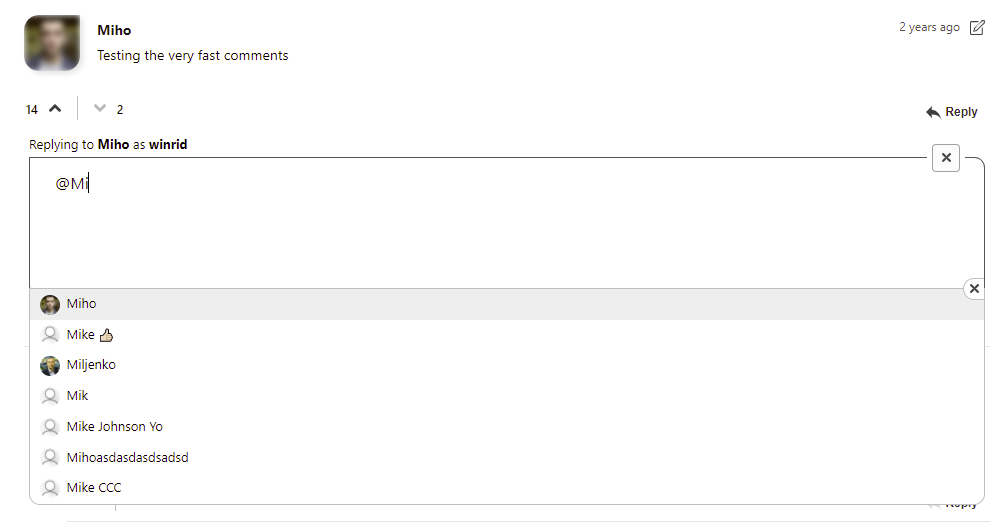
Simply click the user's name you wish to tag.
Additionally, you can use the up and down arrow keys to navigate this list, and hit enter to select, or escape to leave.
We know that you may want to use the @ symbol without tagging a user. FastComments will detect this and not intrude on your typing experience.
Note that autocomplete first prefers case-sensitive matches, and then will also attempt to search for case-insensitive results.
Notifications
Tagged users will receive an email letting them know that they have been tagged, or mentioned, in a comment.
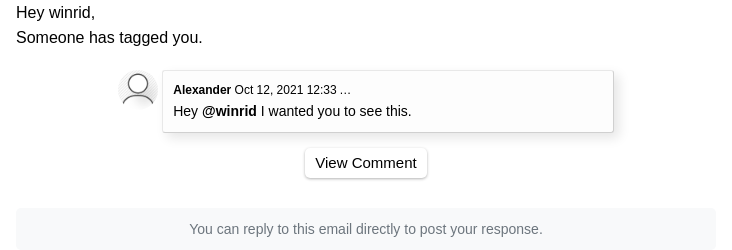
Turning off notifications will prevent these emails, and a header is provided in every email so that email clients can let the user unsubscribe seamlessly.
How Mentions Autocomplete Works
@mentions autocomplete works by autocompleting usernames from various sources.
The users shown in the autocompleted list are determined by:
- Users who have commented on the same page or thread.
- Users who have created their FastComments accounts through the same site.
- Moderators of the current site.
- SSO users who belong to the current tenant.
Populating Mentions
The @mentions autocomplete can be pre-populated with the users in your platform or application by using the API.
By using the API, it is possible to populate both SSO and Tenant Users. Both will appear in @mentions autocomplete depending on group configuration.
In Conclusion
Thanks for reading our documentation on Mentions! Let us know below if you have any questions.