FastComments.com

Add Live Discussions to Super.So Sites

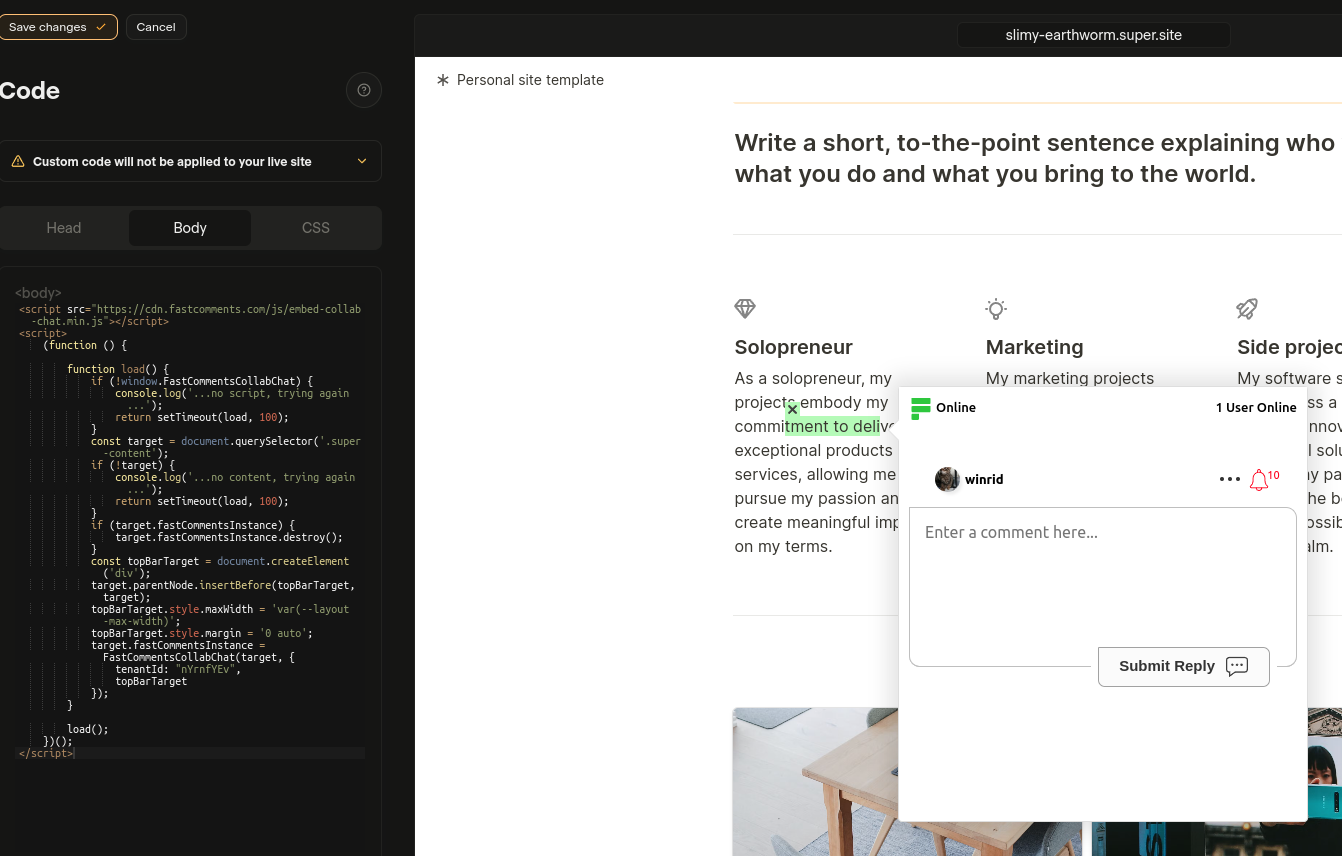
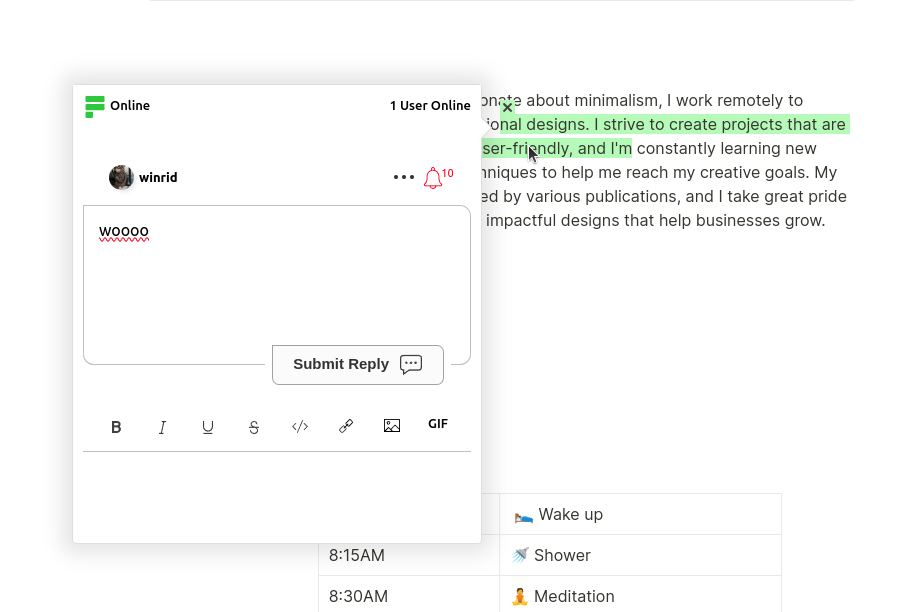
FastComments Collab Chat выводит сайты Super.so на новый уровень, добавляя живые встроенные обсуждения. Пользователи могут выделять и комментировать

фрагменты текста совместно, вместе — в реальном времени!

Здесь мы рассмотрим шаги установки, которые займут всего несколько минут.

Шаг 1: Откройте настройки Internal Link

Сначала нужно открыть редактор кода. Если вы хотите добавить FastComments на все страницы, просто выберите Code в левом нижнем углу:
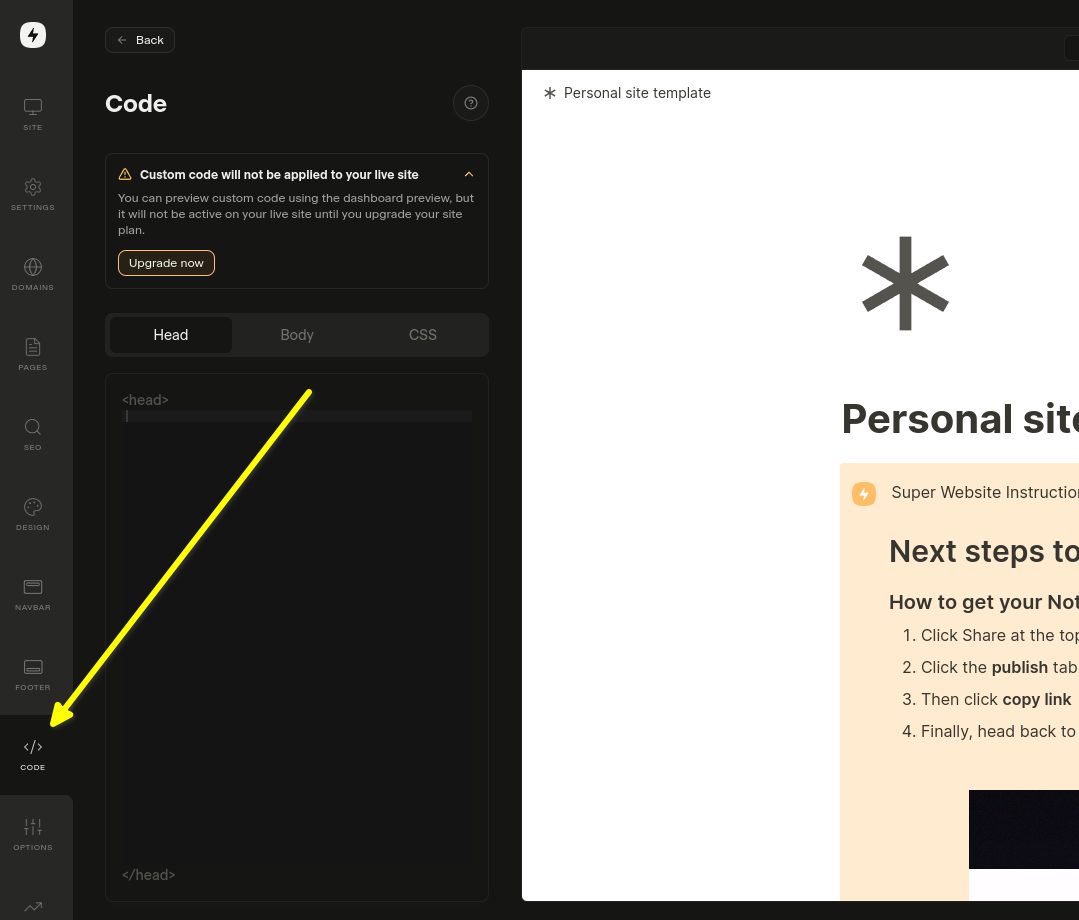
Откройте настройки кода

Если вы хотите добавить его на конкретную страницу, выберите Edit Custom Code в настройках этой страницы.

Теперь давайте выберем вкладку Body. Это важно! Установка фрагмента кода в Head не работает.
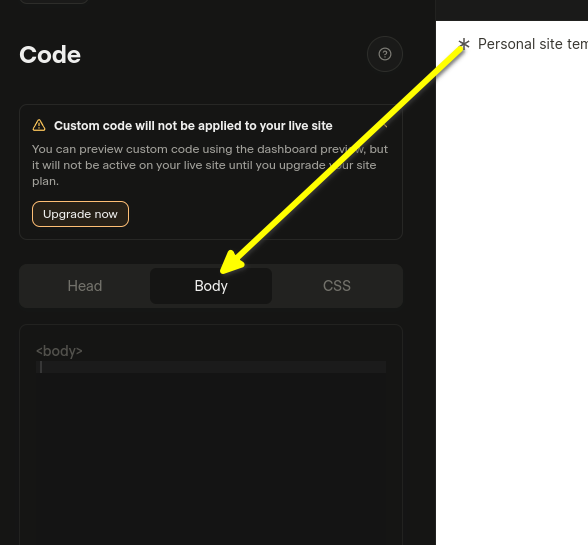
Выберите Body
Выберите Body

Теперь вы готовы к шагу 2.

Шаг 2: Добавьте готовый код Internal Link

На следующем шаге вам нужно скопировать ниже приведённый заранее подготовленный код виджета.

Пока вы вошли в систему на FastComments.com, приведённый ниже фрагмент кода уже будет содержать информацию вашего аккаунта. Скопируем его:

Код Super.so FastComments Collab Chat
Copy Copy
1
2<script src="https://cdn.fastcomments.com/js/embed-collab-chat.min.js"></script>
3<script>
4 (function () {
5 let currentPathname = window.location.pathname;
6 let currentWidget = null;
7 let currentTopBar = null;
8
9 function load() {
10 if (!window.FastCommentsCollabChat) {
11 console.log('...no script, trying again...');
12 return setTimeout(load, 100);
13 }
14
15 const target = document.querySelector('.super-content');
16 if (!target || !target.innerHTML || target.innerHTML.length < 100) {
17 console.log('...no content, trying again...');
18 return setTimeout(load, 100);
19 }
20
21 // Clean up existing instance
22 if (target.fastCommentsInstance) {
23 target.fastCommentsInstance.destroy();
24 }
25
26 // Clean up existing top bar if it exists
27 if (currentTopBar && currentTopBar.parentNode) {
28 currentTopBar.parentNode.removeChild(currentTopBar);
29 }
30
31 // Create new top bar
32 const topBarTarget = document.createElement('div');
33 target.parentNode.insertBefore(topBarTarget, target);
34 topBarTarget.style.maxWidth = 'var(--layout-max-width)';
35 topBarTarget.style.margin = '0 auto';
36 currentTopBar = topBarTarget;
37 currentWidget = target;
38
39 // Initialize FastComments Collab Chat
40 target.fastCommentsInstance = FastCommentsCollabChat(target, {
41 tenantId: "demo",
42 topBarTarget: topBarTarget
43 });
44
45 // Update current pathname
46 currentPathname = window.location.pathname;
47 }
48
49 // Initial load
50 load();
51
52 // Check every 500ms for changes
53 setInterval(() => {
54 // Reload if pathname changed
55 if (window.location.pathname !== currentPathname) {
56 console.log('Pathname changed, reloading...');
57 load();
58 return;
59 }
60
61 // Reload if widget was removed
62 if (currentWidget && !currentWidget.parentNode) {
63 console.log('Widget removed, reloading...');
64 load();
65 return;
66 }
67
68 // Reload if container was emptied
69 const target = document.querySelector('.super-content');
70 if (target && target.innerHTML.length < 100) {
71 console.log('Container emptied, reloading...');
72 load();
73 }
74 }, 500);
75 })();
76</script>
77

Теперь вставьте в область Body:

Вставленный код
Вставленный код

Если после вставки кода вы увидите «это демонстрационное сообщение»:

  • Убедитесь, что вы вошли в свой аккаунт на fastcomments.com.
  • Убедитесь, что у вас включены сторонние файлы cookie.
  • Затем обновите эту страницу и скопируйте фрагмент кода снова. В нём должен быть заполнен параметр tenantId идентификатором вашего тенанта.

См. также: обычный виджет комментариев Internal Link


Добавление виджета живых комментариев в ваши статьи Notion на Super.so

В дополнение к Collab Chat, вы можете добавить традиционный виджет комментариев внизу ваших статей Notion. Это позволяет читателям оставлять комментарии и обсуждать всю статью.

Шаги установки

Скопируйте следующий код и вставьте его в раздел Body настроек вашего сайта Super.so:

Виджет живых комментариев FastComments для Super.so
Copy Copy
1
2<script src="https://cdn.fastcomments.com/js/embed-v2.min.js"></script>
3<script>
4 (function () {
5 let currentPathname = window.location.pathname;
6 let currentWidget = null;
7
8 function load() {
9 if (!window.FastCommentsUI) {
10 console.log('...no script, trying again...');
11 return setTimeout(load, 100);
12 }
13
14 const contentArea = document.querySelector('.notion-root');
15 if (!contentArea || !contentArea.innerHTML || contentArea.innerHTML.length < 100) {
16 console.log('...no content, trying again...');
17 return setTimeout(load, 100);
18 }
19
20 // Очистка существующего экземпляра
21 if (contentArea.fastCommentsInstance) {
22 contentArea.fastCommentsInstance.destroy();
23 }
24
25 // Создать новый целевой элемент
26 const target = document.createElement('div');
27 contentArea.append(target);
28 currentWidget = target;
29
30 // Инициализация FastComments
31 contentArea.fastCommentsInstance = FastCommentsUI(target, {
32 tenantId: "demo",
33 urlId: window.location.pathname
34 });
35
36 // Обновить текущий pathname
37 currentPathname = window.location.pathname;
38 }
39
40 // Начальная загрузка
41 load();
42
43 // Проверять изменения каждые 500 мс
44 setInterval(() => {
45 // Перезагрузить, если pathname изменился
46 if (window.location.pathname !== currentPathname) {
47 console.log('Pathname changed, reloading...');
48 load();
49 return;
50 }
51
52 // Перезагрузить, если виджет был удалён
53 if (currentWidget && !currentWidget.parentNode) {
54 console.log('Widget removed, reloading...');
55 load();
56 return;
57 }
58
59 // Перезагрузить, если контейнер опустел
60 const contentArea = document.querySelector('.notion-root');
61 if (contentArea && contentArea.innerHTML.length < 100) {
62 console.log('Container emptied, reloading...');
63 load();
64 }
65 }, 500);
66 })();
67</script>
68

Важные примечания

  • Виджет комментариев появится внизу ваших статей Notion
  • Для каждой страницы создаётся собственная уникальная ветка комментариев на основе пути URL
  • Обязательно замените "demo" на ваш реальный tenant ID из аккаунта FastComments
  • Виджет автоматически обрабатывает динамическую загрузку страниц Super.so

Настройка Internal Link


FastComments разработан так, чтобы его можно было настроить под ваш сайт.

Если вы хотите добавить собственные стили или изменить конфигурацию, Ознакомьтесь с нашей документацией по настройке, чтобы узнать, как.