
Dodaj komentarze do swojej aplikacji React Native
To oficjalne SDK React Native dla FastComments.
Uzyskaj dostęp do API FastComments bezpośrednio z Twojej aplikacji React Native.
Repozytorium
Agenci kodowania AI 
Daj swojemu agentowi programistycznemu kontekst FastComments, którego potrzebuje – widżety, konfigurację, Secure SSO, REST API i SDK:
npx skills add fastcomments/skillsDziała z Claude Code, Codex, Cursor, Copilot, Gemini oraz każdym innym agentem obsługiwanym przez skills CLI.
Demo na żywo
Wypróbuj każdy widget na żywo pod adresem https://fastcomments.com/commenting-system-for-react-native/.
Instalacja

npm install fastcomments-react-native-sdk --saveO projekcie
Ta biblioteka jest kompletną implementacją react-native dla FastComments.
Obsługuje komentowanie na żywo, czat, wątki, emotikony, powiadomienia, SSO, motywy oraz pełną personalizację poprzez przekazanie obiektu stylesheet. Wszystkie zasoby mogą być również dostosowywane, a biblioteka obsługuje przełączanie różnych zasobów w zależności od trybu ciemnego.
Zaletą tej biblioteki jest to, że jest bardziej elastyczna niż wrapper fastcomments-react-native. Komentarze są renderowane za pomocą natywnych komponentów zamiast wewnątrz webview.
Wszystko działa na backendzie FastComments, więc musisz jedynie zaimplementować UI:
<FastCommentsLiveCommenting config={config} styles={styles} callbacks={callbacks} assets={assets}/>Zobacz example/src aby uzyskać więcej przykładów.
Dodaj czat na żywo do istniejącej aplikacji React Native, albo nawet zbuduj sieć społecznościową!
Zrzuty ekranu
Live threaded commenting with avatars, nested replies, votes, and the built-in rich-text composer, plus a dark theme and a live-chat preset (shown here rendered via react-native-web):
Komentowanie na żywo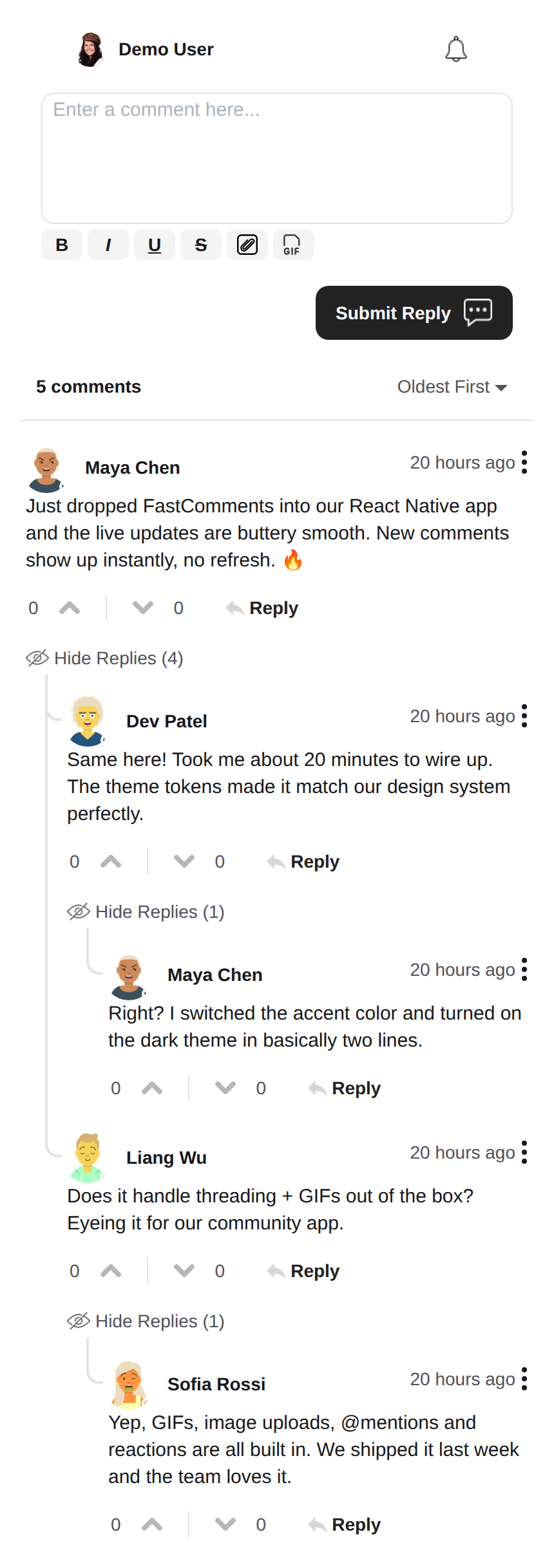 |
Ciemny motyw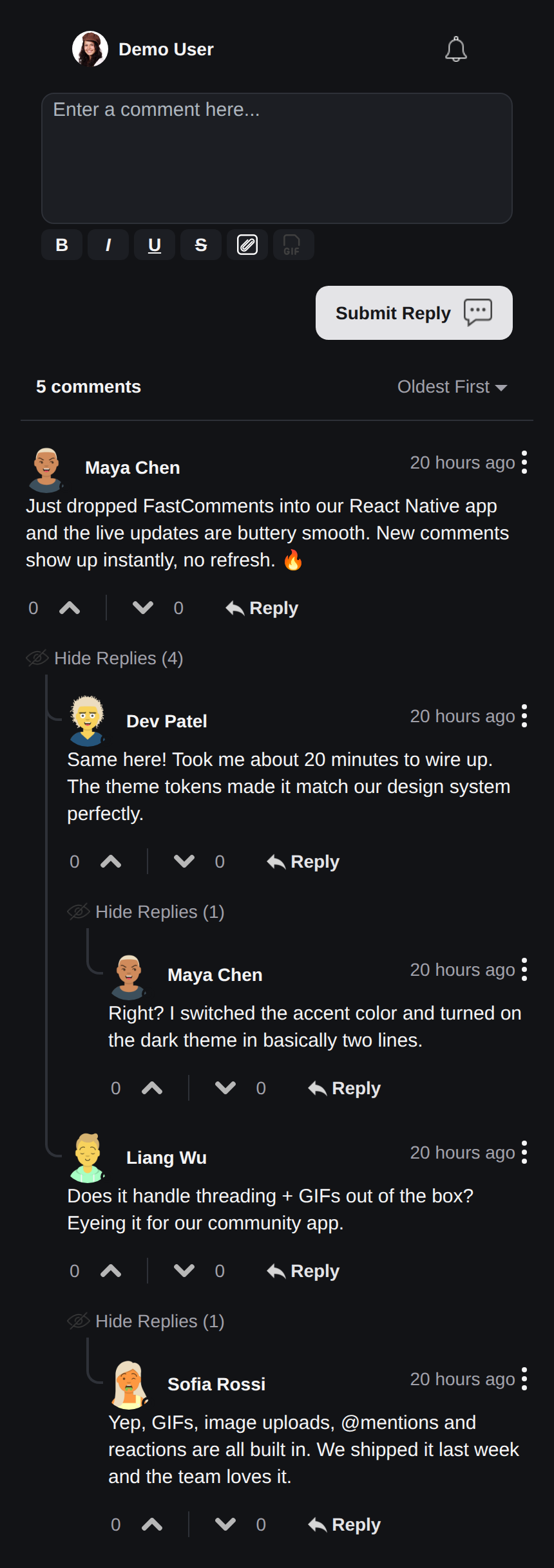 |
Czat na żywo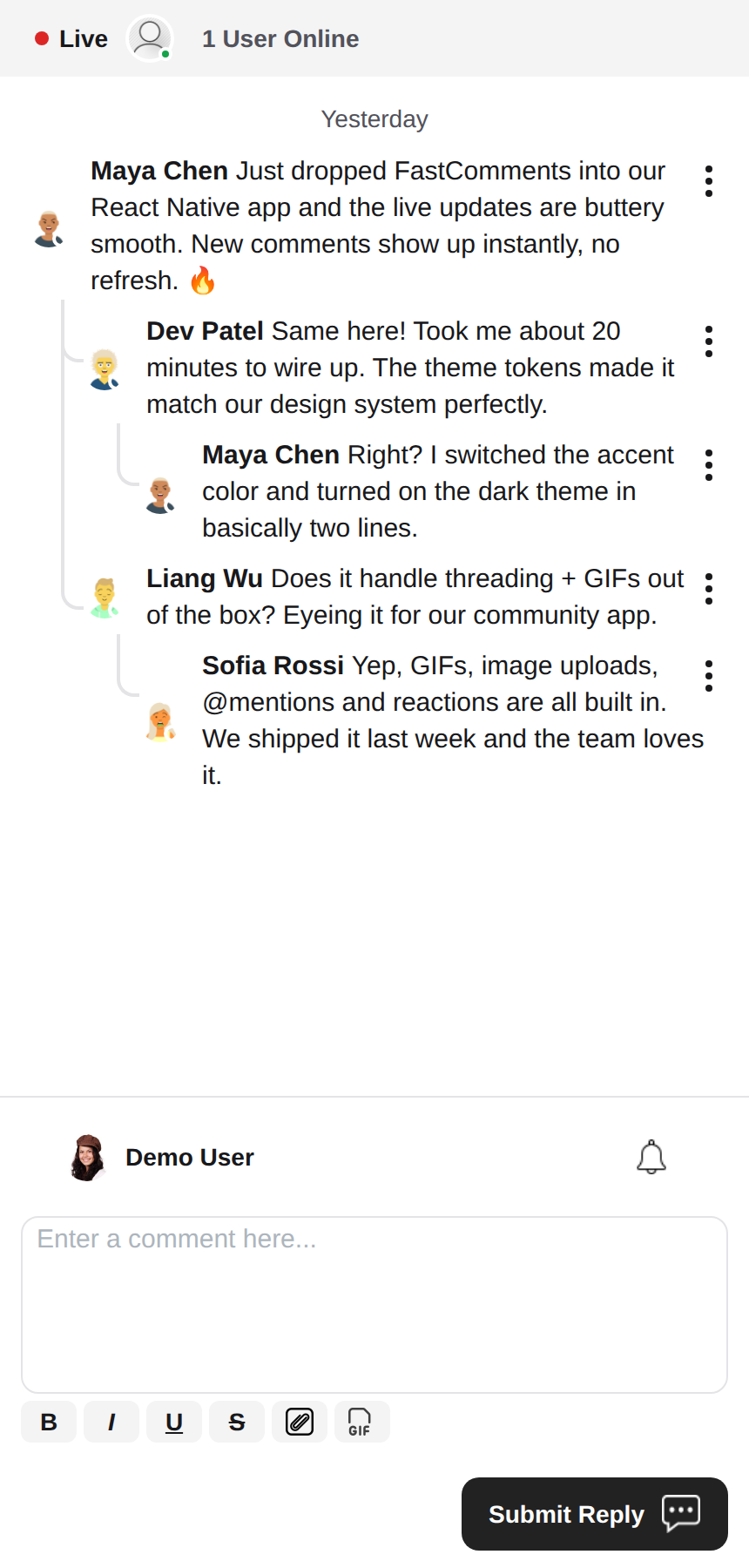 |
Edytor Rich Text
Ta biblioteka używa react-native-enriched do edycji rich text, co zapewnia potężne doświadczenie edycji WYSIWYG. Ten sam edytor napędza iOS, Android oraz web (za pośrednictwem react-native-web), więc kompozytor zachowuje się spójnie na każdej platformie przy jednej implementacji.
react-native-enriched wymaga nowej architektury React Native (Fabric) na natywnych platformach (domyślnie od RN 0.76, opcjonalnie w RN 0.72‑0.75) oraz bundlera, który rozwiązuje warunki exports pakietu. Ten SDK jest rozwijany i testowany pod kątem RN 0.81 / React 19. Ten sam edytor działa również w webie poprzez react-native-web; wersja webowa edytora enriched jest nadal oznaczona jako eksperymentalna w upstream.
Widżety
SDK dostarcza trzy widżety, odzwierciedlające FastComments Android SDK:
FastCommentsLiveCommenting– wątkowe komentowanie z głosowaniami, odpowiedziami, paginacją, wzmiankami, powiadomieniami i aktualizacjami na żywo.FastCommentsLiveChat– preset czatu oparty na tym samym silniku: wiadomości w kolejności chronologicznej, nowe na dole, kompozytor pod listą, pasek nagłówka na żywo (kropka połączenia + liczba użytkowników), nieskończona historia ładowana przewijaniem w górę, automatyczne przewijanie do nowych wiadomości, bez głosowań i wątkowania odpowiedzi. Każdy preset można nadpisać za pomocąconfig.FastCommentsFeed– kanał społecznościowy z kompozytorem postów, mediami, reakcjami, obserwacjami i banerami nowo dodanych postów na żywo.
<FastCommentsLiveChat config=\{{ tenantId: 'demo', urlId: 'my-room' }}/>Motywy
Domyślny wygląd jest generowany z zestawu semantycznych tokenów projektowych (FastCommentsTheme): kolory, odstępy, promienie, rozmiary czcionek, wagi czcionek i rozmiary awatarów. Przekaż częściowe nadpisania tokenów (typowane jako FastCommentsThemeOverrides) przez właściwość theme w dowolnym widżecie, a cały drzewo stylów zostanie spójnie przestylizowane:
<FastCommentsLiveCommenting config={config} theme=\{{ colors: { primary: '#FF5500' } }}/>Tryb ciemny jest oddalony o jeden zestaw tokenów:
import { getDarkTheme } from 'fastcomments-react-native-sdk';

    <FastCommentsLiveCommenting config={config} theme={getDarkTheme()}/>
Właściwość styles nadal akceptuje surowe drzewo IFastCommentsStyles dla precyzyjnej kontroli. Gdy podane są zarówno theme, jak i styles, explicite style mają pierwszeństwo przed drzewem tematycznym; gdy podane są tylko styles, zastępują one całkowicie domyślne (pierwotne zachowanie, więc istniejące integracje i skiny pozostają niezmienione). setupDarkModeSkin jest przestarzałe na rzecz właściwości theme.
Opcje konfiguracji
Ta biblioteka ma na celu obsługę wszystkich opcji konfiguracyjnych zdefiniowanych w fastcomments-typescript, tak jak implementacja webowa.
Na ich bazie React Native dodaje kilka opcji specyficznych dla SDK poprzez FastCommentsRNConfig:
hideTopBar– ukrywa pasek zalogowanego użytkownika / dzwonek powiadomień wyświetlany nad kompozytorem.usePressToEdit– przytrzymaj komentarz, aby otworzyć jego menu.disableDownVoting– ukrywa przyciski negatywnego głosowania.renderCommentInline– renderuje informacje o komentującym wewnątrz tego samego bloku HTML co treść komentarza.renderLikesToRight– przenosi obszar głosowania/polubień na prawo od komentarza zamiast pod nim.renderDateBelowComment– wyświetla datę pod komentarzem.showLiveStatus– wyświetla pasek nagłówka w stylu czatu „Live” + liczba użytkowników nad komentarzami.useInlineSubmitButton– renderuje przycisk wysyłania jako ikonę wewnątrz kompozytora.countAboveToggle– wraz zuseShowCommentsToggle, określa, ile komentarzy renderować powyżej przełącznika „Pokaż komentarze”.preserveFeedScrollPosition–FastCommentsFeedzapamiętuje pozycję przewijania pomiędzy odmontowaniem a ponownym zamontowaniem (domyślnie true).
Koncepcje FastComments
Główne pojęcia, które należy znać, aby rozpocząć, to tenantId i urlId. tenantId jest identyfikatorem Twojego konta FastComments.com. urlId określa, do czego będą powiązane wątki komentarzy. Może to być adres URL strony, identyfikator produktu, identyfikator artykułu itp.
Lokalizacja
Wszystkie teksty widoczne dla użytkownika w tych widżetach (etykiety przycisków, pola podpowiedzi, stany pustych danych, względne daty takie jak „5 minut temu”, komunikaty o błędach itp.) są sterowane przez serwer. Komponenty nie mają zakodowanych na stałe angielskich ciągów; renderują tłumaczenia dostarczane przez FastComments dla żądanego języka.
Aby żądać konkretnego języka, ustaw locale w swojej konfiguracji:
const config = {
    tenantId: 'your-tenant-id',
    urlId: 'some-page',
    locale: 'de_de', // de_de, fr_fr, ja_jp, es_es, etc.
};
Gdy locale nie jest ustawione, FastComments podaje domyślny język najemcy.
Edycja tekstu: tłumaczenia są zarządzane w panelu FastComments, a nie w tym SDK. Aby zmienić sformułowanie, nadpisz domyślną treść lub dodaj język, edytuj tłumaczenia dla swojego konta w panelu – zmiana jest automatycznie wykrywana przez widżety bez konieczności wydania nowej wersji aplikacji. SDK nie dostarcza angielskich wersji awaryjnych, więc każdy klucz, który pozostawisz pusty w panelu, będzie wyświetlany jako pusty; utrzymuj klucze wypełnione dla każdego obsługiwanego języka.
Powiadomienia użytkownika
FastComments obsługuje powiadomienia dla wielu scenariuszy. Powiadomienia są konfigurowalne, można je wyłączyć globalnie lub na poziomie powiadomienia/komentarza, oraz obsługuje subskrypcje na poziomie strony, dzięki czemu użytkownicy mogą subskrybować wątki konkretnej strony lub artykułu.
Na przykład, można użyć Secure SSO do uwierzytelnienia użytkownika, a następnie okresowo odpytywać o nieprzeczytane powiadomienia i przesyłać je do użytkownika.
Zobacz przykład AppNotificationSecureSSO, aby dowiedzieć się, jak pobierać i tłumaczyć nieprzeczytane powiadomienia użytkownika.
Przeglądarka GIF
Domyślnie nie jest włączony wybór obrazów ani gifów. Zobacz example/src/AppCommentingImageSelection.tsx, aby dowiedzieć się, jak obsługiwać przesyłanie obrazów i gifów. W bibliotece znajduje się Przeglądarka GIF, która anonimowo przeszukuje i udostępnia obrazy; wystarczy ją używać.
Wydajność
Prosimy o otwarcie zgłoszenia z przykładem reprodukcji, w tym używanym urządzeniem, jeśli napotkasz problemy z wydajnością. Wydajność jest priorytetem we wszystkich bibliotekach FastComments.
Potrzebujesz pomocy?
Jeśli napotkasz jakiekolwiek problemy lub masz pytania dotyczące SDK dla React Native, prosimy:
Współpraca
Wkład jest mile widziany! Prosimy odwiedzić repozytorium GitHub w celu zapoznania się z wytycznymi dotyczącymi wkładu.