
Add Comments to Your React Native App
This is the official React Native SDK for FastComments.
Access the FastComments API directly from your React Native application.
Repository
AI coding agents 
Give your coding agent the FastComments context it needs - widgets, configuration, Secure SSO, the REST API, and the SDKs:
npx skills add fastcomments/skillsWorks with Claude Code, Codex, Cursor, Copilot, Gemini, and every other agent the skills CLI supports.
Live Demo
Try every widget live at https://fastcomments.com/commenting-system-for-react-native/.
Installation

npm install fastcomments-react-native-sdk --saveAbout
This library is a complete react-native implementation of FastComments.
It supports live commenting, chat, threads, emoticons, notifications, SSO, skins, and full customization by passing in a stylesheet object. All assets can also be customized, and it supports toggling different assets based on dark mode.
The benefit of this library is that it is more flexible than the fastcomments-react-native wrapper. Comments are rendered with native components rather than inside a webview.
It all runs on the FastComments backend, so you only have to incorporate the UI:
<FastCommentsLiveCommenting config={config} styles={styles} callbacks={callbacks} assets={assets}/>See example/src for more examples.
Add live chat to your existing React Native application, or even build a social network!
Screenshots
Live threaded commenting with avatars, nested replies, votes, and the built-in rich-text composer, plus a dark theme and a live-chat preset (shown here rendered via react-native-web):
Live Commenting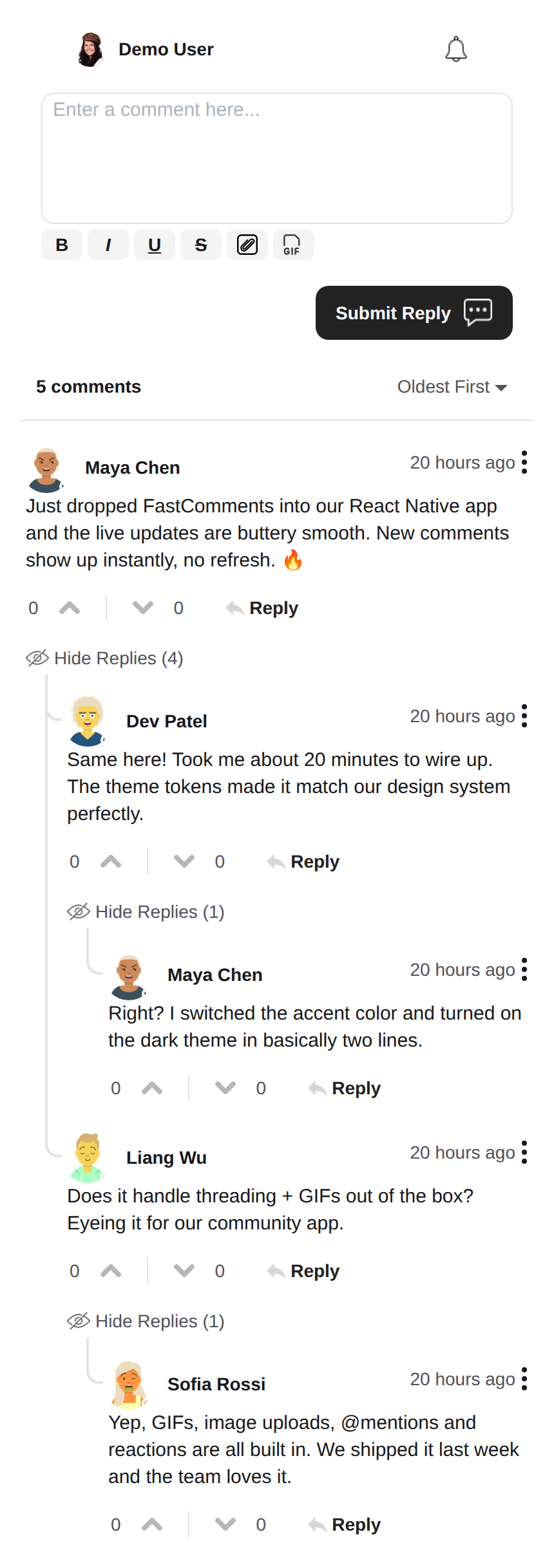 |
Dark Theme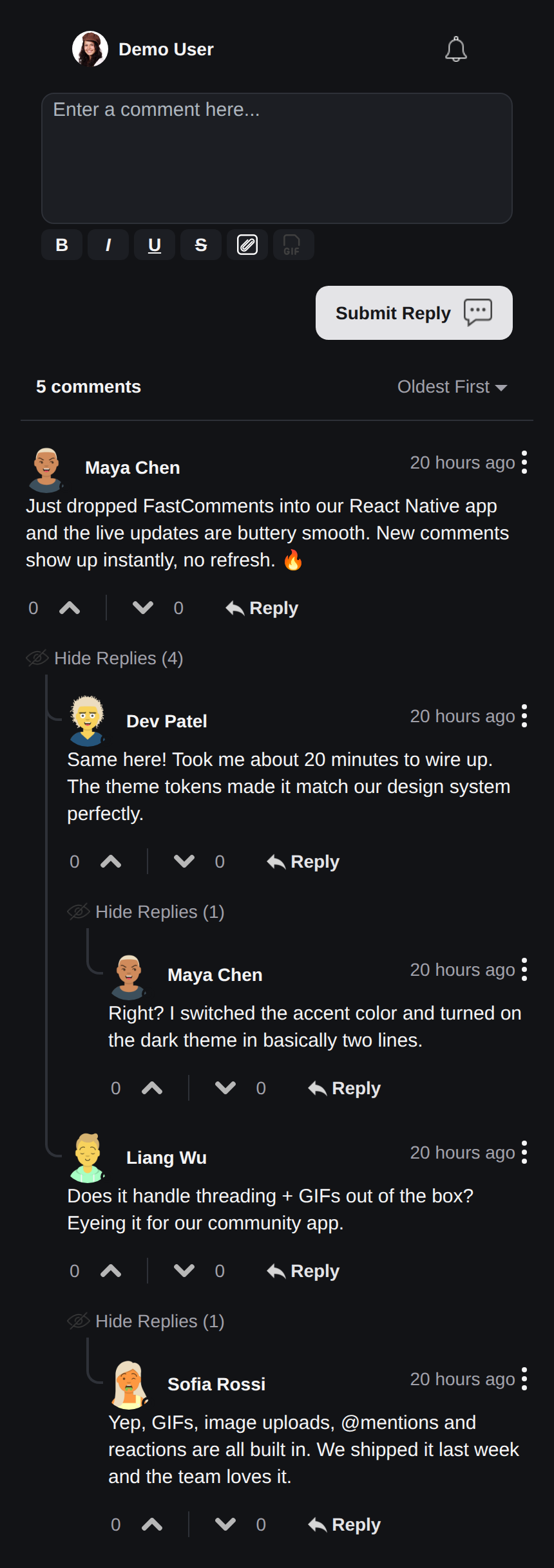 |
Live Chat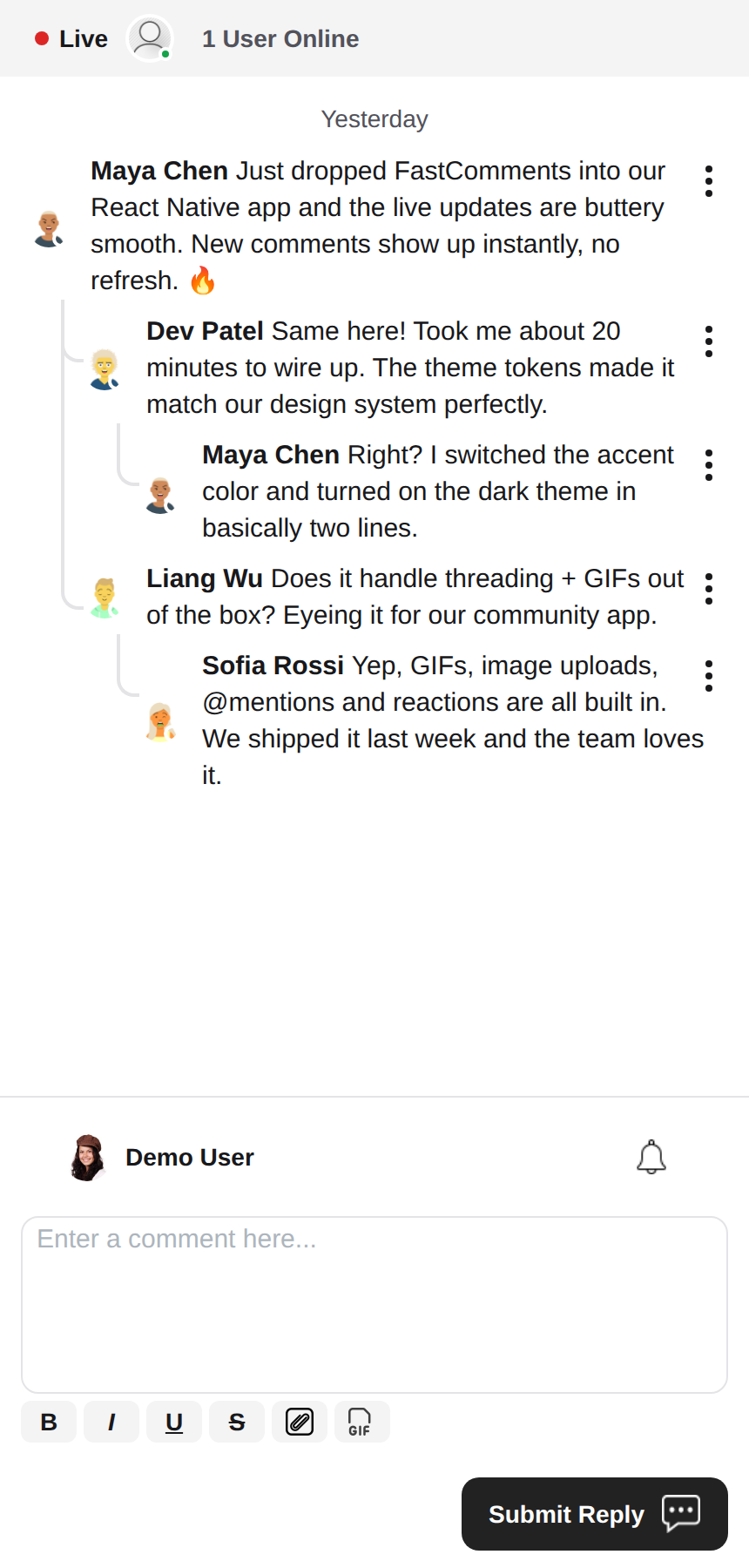 |
Rich Text Editor
This library uses react-native-enriched for rich text editing, which provides a powerful WYSIWYG editing experience. The same editor powers iOS, Android, and the web (via react-native-web), so the composer behaves consistently across every platform with a single implementation.
react-native-enriched requires the React Native New Architecture (Fabric) on native (the default since RN 0.76, opt-in on RN 0.72-0.75), and a bundler that resolves package exports conditions. This SDK is developed and tested against RN 0.81 / React 19. The same editor also runs on web through react-native-web; the enriched editor's web build is still marked experimental upstream.
Widgets
The SDK ships three widgets, mirroring the FastComments Android SDK:
FastCommentsLiveCommenting- threaded commenting with votes, replies, pagination, mentions, notifications, and live updates.FastCommentsLiveChat- a chat preset over the same engine: chronological messages with new ones at the bottom, the composer below the list, a live header strip (connection dot + user count), infinite history loaded by scrolling up, auto-scroll to new messages, no votes or reply threading. Every preset can be overridden viaconfig.FastCommentsFeed- a social feed with post composer, media, reactions, follows, and live new-post banners.
<FastCommentsLiveChat config=\{{ tenantId: 'demo', urlId: 'my-room' }}/>Theming
The default look is generated from a set of semantic design tokens (FastCommentsTheme): colors, spacing, radius, font sizes, font weights, and avatar sizes. Pass partial token overrides (typed FastCommentsThemeOverrides) through the theme prop on any widget and the entire style tree restyles consistently:
<FastCommentsLiveCommenting config={config} theme=\{{ colors: { primary: '#FF5500' } }}/>Dark mode is one token set away:
import { getDarkTheme } from 'fastcomments-react-native-sdk';

    <FastCommentsLiveCommenting config={config} theme={getDarkTheme()}/>
The styles prop still accepts a raw IFastCommentsStyles tree for surgical control. When theme and styles are both provided, the explicit styles win over the themed tree; when only styles is provided, it replaces the defaults entirely (the original behavior, so existing integrations and skins are unaffected). setupDarkModeSkin is deprecated in favor of the theme prop.
Configuration Options
This library aims to support all configuration options defined in fastcomments-typescript, just like the web implementation.
On top of those, React Native adds a few SDK-specific options via FastCommentsRNConfig:
hideTopBar- hide the logged-in user / notification-bell strip shown above the composer.usePressToEdit- press-and-hold a comment to open its menu.disableDownVoting- hide down-vote buttons.renderCommentInline- render commenter info inside the same HTML block as the comment content.renderLikesToRight- move the vote/like area to the right of the comment instead of below it.renderDateBelowComment- render the date below the comment.showLiveStatus- show the chat-style "Live" + user-count header strip above comments.useInlineSubmitButton- render the submit button as an icon inside the composer.countAboveToggle- withuseShowCommentsToggle, how many comments render above the "Show Comments" toggle.preserveFeedScrollPosition-FastCommentsFeedremembers its scroll offset across unmount/remount (default true).
FastComments Concepts
The main concepts to be aware of to get started are tenantId and urlId. tenantId is your FastComments.com account identifier. urlId is where comment threads
will be tied to. This could be a page URL, or a product id, an article id, etc.
Localization
All user-facing text in these widgets (button labels, placeholders, empty states, relative dates like "5 minutes ago", error messages, etc.) is server-driven. The components do not hard-code English strings; they render the translations FastComments serves for the requested locale.
To request a locale, set locale in your config:
const config = {
    tenantId: 'your-tenant-id',
    urlId: 'some-page',
    locale: 'de_de', // de_de, fr_fr, ja_jp, es_es, etc.
};
When no locale is set, FastComments serves the tenant's default language.
Editing the text: translations are managed in your FastComments dashboard, not in this SDK. To change wording, override the default copy, or add a language, edit the translations for your account in the dashboard - the change is picked up by the widgets automatically with no app release required. The SDK ships no English fallbacks, so any key you blank out in the dashboard renders empty; keep the keys populated for every locale you support.
User Notifications
FastComments supports notifications for many scenarios. Notifications are configurable, can be opted-out globally or at a notification/comment level, and supports page-level subscriptions so that users can subscribe to threads of a specific page or article.
For example, it is possible to use Secure SSO to authenticate the user and then periodically poll for unread notifications and push them to the user.
See the example AppNotificationSecureSSO for how to get and translate unread user notifications.
Gif Browser
By default, no image or gif selection is enabled. See example/src/AppCommentingImageSelection.tsx for how to support image and gif uploads. There is a Gif Browser that anonymizes searches and images provided in this library, you simply have to use it.
Performance
Please open a ticket with an example to reproduce, including device used, if you identify any performance problems. Performance is a first-class citizen of all FastComments libraries.
Need Help?
If you encounter any issues or have questions about the React Native SDK, please:
Contributing
Contributions are welcome! Please visit the GitHub repository for contribution guidelines.