
Webhooks
Με το FastComments είναι δυνατό να κληθεί ένα API endpoint κάθε φορά που ένα σχόλιο προστίθεται, ενημερώνεται ή αφαιρείται από το σύστημά μας.
Αυτό το επιτυγχάνουμε με ασύγχρονα webhooks μέσω HTTP/HTTPS.
Τι είναι τα Webhooks 
Ένα Webhook είναι ένας μηχανισμός, ή μια ενσωμάτωση, μεταξύ δύο συστημάτων όπου ο "παραγωγός" (FastComments) πυροδοτεί ένα συμβάν που ο "καταναλωτής" (Εσείς) καταναλώνει μέσω κλήσης API.
Υποστηριζόμενα Γεγονότα & Πόροι
Το FastComments υποστηρίζει webhooks μόνο για τον πόρο Comment.
Υποστηρίζουμε webhooks για τη δημιουργία, την αφαίρεση και την ενημέρωση σχολίων.
Κάθε ένα από αυτά θεωρείται ξεχωριστό γεγονός στο σύστημά μας και ως εκ τούτου έχει διαφορετική σημασιολογία και δομή για τα γεγονότα webhook.
Οποιοσδήποτε αριθμός τελικών σημείων μπορεί να εγγραφεί στο ίδιο γεγονός, είτε από τον πίνακα ελέγχου είτε μέσω του API (δείτε τη Διαχείριση Webhooks μέσω του API). Κάθε webhook παραδίδεται ανεξάρτητα.
Ρύθμιση Τοπικής Ανάπτυξης
Για τοπική ανάπτυξη, χρησιμοποιήστε ένα εργαλείο όπως το ngrok.
Για να απλοποιηθεί η διατήρηση του συστήματος ασφαλούς, η τοπική ανάπτυξη ακολουθεί την ίδια διαδικασία με τη ρύθμιση και την ασφάλιση άλλων περιβαλλόντων.
Βήμα 1: Προσθέστε το "localhost" στα domains στον λογαριασμό σας.
Προσθέστε το "localhost" ως domain εδώ.


Βήμα 2: Επιλέξτε ένα API Key
Θα προσθέσουμε ρύθμιση webhook για το domain σας, οπότε θα χρειαστούμε ένα API key. Μπορείτε να το κάνετε εδώ.

Στην ενότητα "Associate with domain" - επιλέξτε το domain "localhost" σας.
ΣΗΜΕΙΩΣΗ: Εναλλακτικά, μπορείτε να χρησιμοποιήσετε ένα API Secret για όλες τις δοκιμαστικές δραστηριότητες και τα περιβάλλοντα staging. Απλώς προσθέστε ένα API Secret για "All Domains" και δώστε του ένα όνομα όπως "test".
Βεβαιωθείτε ότι έχετε ορίσει ένα API Secret για τα production domain(s) σας. Τα γεγονότα για όλα τα άλλα domains θα χρησιμοποιούν το wildcard (testing) secret.
Βήμα 3: Προσθέστε το Webhook Σας
Κατά τη λειτουργία του ngrok ή παρόμοιου εργαλείου, ορίστε την τιμή για το "localhost" εδώ.
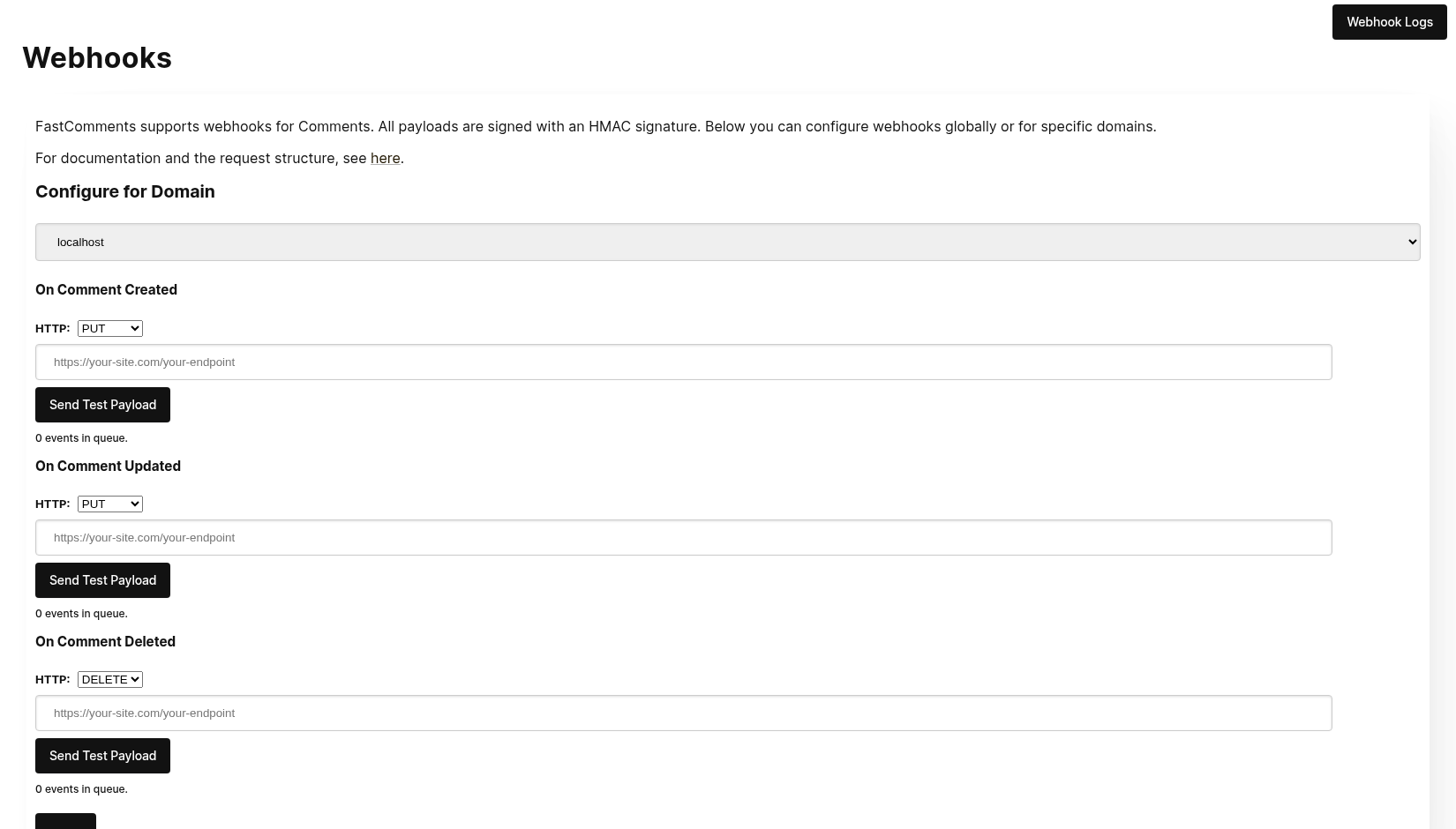
Κατά το κλικ στο Send Test Payload, θα στείλουμε δύο δοκιμαστικά γεγονότα για να ελέγξουμε ότι επικυρώνετε το API key.
Μόλις επικυρωθεί, πατήστε Save.
Βήμα 4: Προσθέστε ένα Σχόλιο
Τώρα μπορείτε να προσθέσετε, επεξεργαστείτε ή διαγράψετε σχόλια και θα πρέπει να δείτε το σύστημα να καλεί το τοπικό σας μηχάνημα ανάπτυξης με τα γεγονότα, χρησιμοποιώντας το testing API key σας. Μπορεί να υπάρξει καθυστέρηση έως 30 δευτερόλεπτα για να φτάσουν τα γεγονότα στο μηχάνημά σας.
Ρύθμιση
Ακολουθήστε τα ίδια βήματα για το localhost όπως θα κάνατε στην παραγωγή. Βεβαιωθείτε ότι έχετε ρυθμίσει τα production domains και τα API Secrets.
Πρώτα, μεταβείτε στο Webhooks admin. Αυτό είναι προσβάσιμο μέσω Manage Data -> Webhooks.
Η σελίδα εμφανίζει κάθε webhook στον λογαριασμό σας:
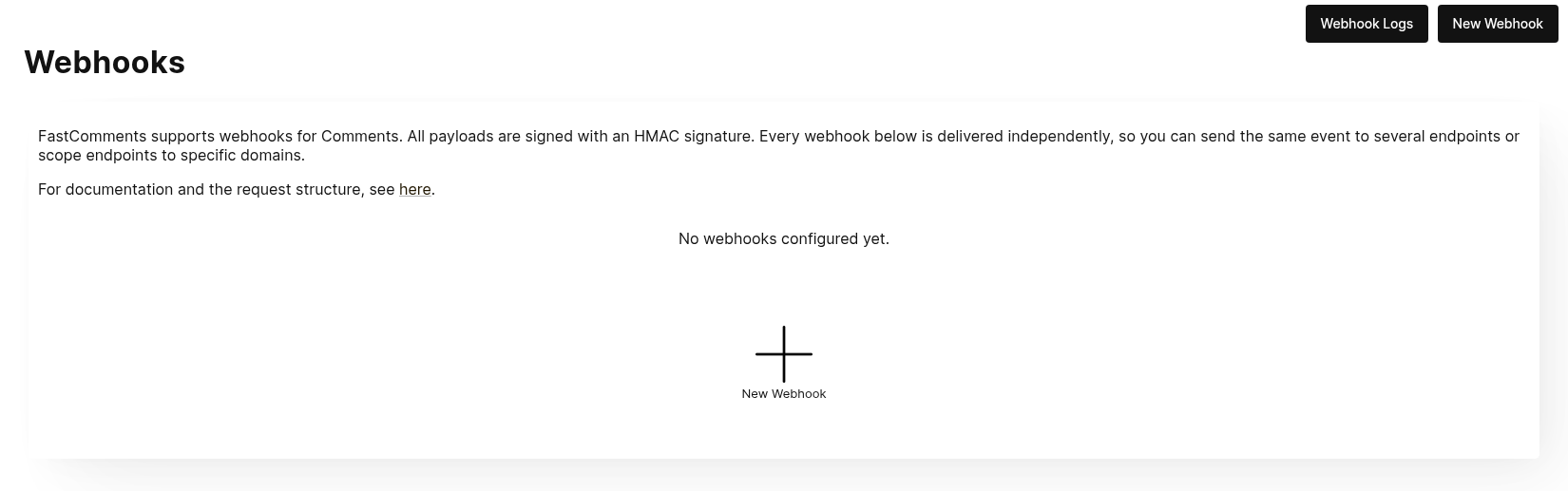
Κάντε κλικ στο New Webhook για να προσθέσετε ένα. Κάθε webhook έχει ένα URL, ένα γεγονός σχολίου (δημιουργήθηκε, ενημερώθηκε ή διαγράφηκε), ένα domain και μια μέθοδο HTTP:
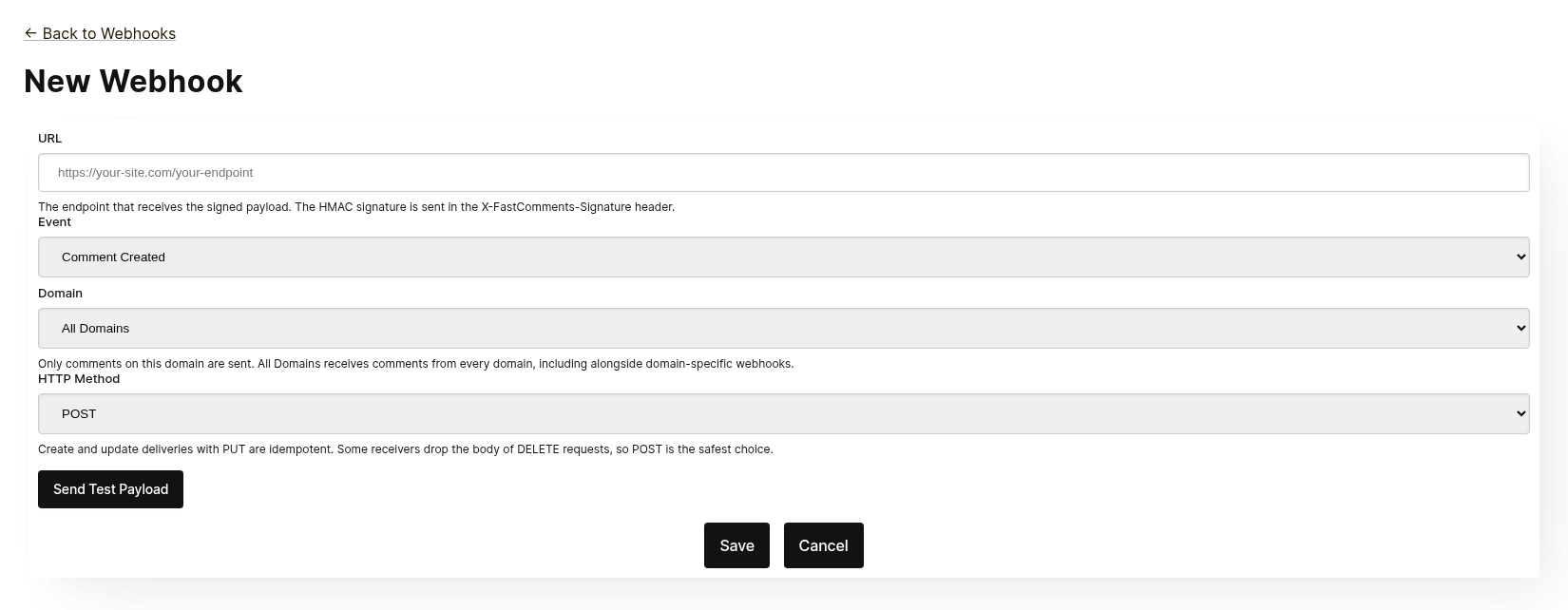
Κάθε webhook παραδίδεται ανεξάρτητα. Μπορείτε να στείλετε το ίδιο γεγονός σε πολλαπλά endpoints, και ένα webhook που περιορίζεται σε All Domains λαμβάνει σχόλια από κάθε domain ακόμη και όταν υπάρχει ένα domain-specific webhook για το ίδιο γεγονός. Το ίδιο URL, γεγονός και domain δεν μπορούν να προστεθούν δύο φορές.
Πριν αποθηκεύσετε, κάντε κλικ στο Send Test Payload για να ελέγξετε αν το endpoint δέχεται μια υπογεγραμμένη αίτηση. Δείτε την επόμενη ενότητα, "Testing", για λεπτομέρειες.
Από τη λίστα μπορείτε να επεξεργαστείτε, να απενεργοποιήσετε, να ενεργοποιήσετε ξανά ή να διαγράψετε ένα webhook. Η απενεργοποίηση διατηρεί τα γεγονότα στην ουρά μέχρι το webhook να ενεργοποιηθεί ξανά· η διαγραφή τα απορρίπτει.
Τα Webhooks μπορούν επίσης να δημιουργηθούν μέσω του API, για παράδειγμα από το Zapier. Αυτά εμφανίζονται στην ίδια λίστα με την πηγή API. Δείτε τη διαχείριση Webhooks μέσω του API.
Δοκιμή
Οι νέες και οι σελίδες επεξεργασίας webhook διαθέτουν ένα κουμπί Send Test Payload που στέλνει ένα αίτημα στη διεύθυνση URL που βρίσκεται αυτή τη στιγμή στη φόρμα, ανεξάρτητα από το αν έχει αποθηκευτεί. Τα γεγονότα Create και Update στέλνουν ένα ψεύτικο αντικείμενο WebhookComment, ενώ η δοκιμή Delete θα στείλει ένα ψεύτικο σώμα αιτήματος με μόνο ένα ID.
Επαλήθευση Φορτίων
Κατά τη δοκιμή της ενσωμάτωσης webhook, επαληθεύστε ότι τα εισερχόμενα αιτήματα περιλαμβάνουν τις ακόλουθες κεφαλίδες:
X-FastComments-Timestamp- Χρονική σήμανση Unix (δευτερόλεπτα)X-FastComments-Signature- Υπογραφή HMAC-SHA256
Τα webhooks που δημιουργήθηκαν πριν εισαχθεί το σχήμα υπογραφής λαμβάνουν επίσης μια κεφαλίδα token που περιέχει το API Secret σας. Τα νέα webhooks δεν το κάνουν.
Χρησιμοποιήστε την επαλήθευση υπογραφής HMAC για να διασφαλίσετε ότι τα φορτία είναι αυθεντικά.
Εργαλεία Δοκιμής
Μπορείτε να χρησιμοποιήσετε εργαλεία όπως το webhook.site ή το ngrok για να ελέγξετε τα εισερχόμενα φορτία webhook κατά την ανάπτυξη.
Τύποι Συμβάντων
- Create Event: Ενεργοποιείται όταν δημιουργείται ένα νέο σχόλιο.
- Update Event: Ενεργοποιείται όταν ένα σχόλιο επεξεργάζεται.
- Delete Event: Ενεργοποιείται όταν ένα σχόλιο διαγράφεται.
Κάθε webhook συνδέεται με ένα γεγονός και μία μέθοδο HTTP (POST, PUT ή DELETE). Κάθε γεγονός περιλαμβάνει τα πλήρη δεδομένα του σχολίου στο σώμα του αιτήματος (δείτε το Data Structures για τη μορφή του φορτίου).
Δομές Δεδομένων
Η μόνη δομή που αποστέλλεται μέσω webhooks είναι το αντικείμενο WebhookComment, περιγραφόμενο σε TypeScript παρακάτω.
Η Δομή του Αντικειμένου WebhookComment
Η Δομή του Γεγονότος "Create"
Το σώμα του αιτήματος του γεγονότος "create" είναι ένα αντικείμενο WebhookComment.
Η Δομή του Γεγονότος "Update"
Το σώμα του αιτήματος του γεγονότος "update" είναι ένα αντικείμενο WebhookComment.
Η Δομή του Γεγονότος "Delete"
Το σώμα του αιτήματος του γεγονότος "delete" είναι ένα αντικείμενο WebhookComment.
Αλλαγή από 14 Νοεμβρίου 2023
Πριν, το σώμα του αιτήματος του γεγονότος "delete" περιείχε μόνο το id του σχολίου. Τώρα περιέχει ολόκληρο το σχόλιο τη στιγμή της διαγραφής.
Κάθε κλειδί είναι πάντα παρόν στο σώμα. Όταν το σχόλιο δεν έχει τιμή για ένα πεδίο, το σώμα μεταφέρει null (ή false για boolean και [] για λίστες), έτσι η δομή μιας παράδοσης δεν διαφέρει ποτέ από ένα σχόλιο στο άλλο.
 Run
Run Όταν χρήστες επισημαίνονται σε ένα σχόλιο, οι πληροφορίες αποθηκεύονται σε μια λίστα που ονομάζεται mentions. Κάθε αντικείμενο σε αυτή τη λίστα έχει την ακόλουθη δομή.
Run Μέθοδοι HTTP
Μπορείτε να ρυθμίσετε τη μέθοδο HTTP για κάθε τύπο γεγονότος webhook στον πίνακα διαχείρισης:
- Create Event: POST ή PUT (προεπιλογή: PUT)
- Update Event: POST ή PUT (προεπιλογή: PUT)
- Delete Event: DELETE, POST ή PUT (προεπιλογή: DELETE)
Δεδομένου ότι όλα τα αιτήματα περιέχουν ένα ID, οι λειτουργίες Δημιουργίας και Ενημέρωσης είναι ιδεομερείς από προεπιλογή (PUT). Η επανάληψη του ίδιου αιτήματος Δημιουργίας ή Ενημέρωσης δεν πρέπει να δημιουργεί διπλότυπα αντικείμενα από την πλευρά σας.
Κεφαλίδες Αιτήματος
Κάθε αίτημα webhook περιλαμβάνει τις ακόλουθες κεφαλίδες:
| Header | Description |
|---|---|
Content-Type | application/json |
token | Το Μυστικό API σας |
X-FastComments-Timestamp | Χρονική σήμανση Unix (δευτερόλεπτα) όταν υπογράφηκε το αίτημα |
X-FastComments-Signature | Υπογραφή HMAC‑SHA256 (sha256=<hex>) |
Δείτε το Ασφάλεια & Διακριτικά API για πληροφορίες σχετικά με την επαλήθευση της υπογραφής HMAC.
Ασφάλεια & Διακριτικά API
Τα αιτήματα webhook του FastComments περιλαμβάνουν πολλούς μηχανισμούς πιστοποίησης για λόγους ασφάλειας.
Κεφαλίδες που αποστέλλονται
| Κεφαλίδα | Περιγραφή |
|---|---|
token | Το API Secret σας (για συμβατότητα προς τα πίσω) |
X-FastComments-Timestamp | Unix timestamp (δευτερόλεπτα) όταν υπογράφηκε το αίτημα |
X-FastComments-Signature | HMAC-SHA256 υπογραφή του payload |
Επαλήθευση Υπογραφής HMAC (Συνιστάται)
Συνιστούμε θερμά την επαλήθευση της υπογραφής HMAC για να διασφαλίσετε ότι τα payloads των webhook είναι αυθεντικά και δεν έχουν παραποιηθεί.
Signature Format: sha256=<hex-encoded-signature>
Πώς υπολογίζεται η υπογραφή:
- Concatenate:
timestamp + "." + JSON_payload_body - Compute HMAC-SHA256 using your API Secret as the key
- Hex-encode the result
Παράδειγμα Επαλήθευσης (Node.js)
const crypto = require('crypto');

function verifyWebhookSignature(req, apiSecret) {
    const timestamp = req.headers['x-fastcomments-timestamp'];
    const signature = req.headers['x-fastcomments-signature'];

    if (!timestamp || !signature) {
        return false;
    }

    // Επαλήθευση ότι το timestamp είναι πρόσφατο (εντός 5 λεπτών)
    const now = Math.floor(Date.now() / 1000);
    if (Math.abs(now - parseInt(timestamp, 10)) > 300) {
        return false;  // Πρόληψη επίθεσης επανάληψης
    }

    // Επαλήθευση υπογραφής
    const payload = JSON.stringify(req.body);
    const expectedSignature = crypto
        .createHmac('sha256', apiSecret)
        .update(`${timestamp}.${payload}`)
        .digest('hex');

    return signature === `sha256=${expectedSignature}`;
}
Παράδειγμα Επαλήθευσης (Python)
import hmac
import hashlib
import time
import json

def verify_webhook_signature(headers, body, api_secret):
    timestamp = headers.get('X-FastComments-Timestamp')
    signature = headers.get('X-FastComments-Signature')

    if not timestamp or not signature:
        return False

    # Επαλήθευση ότι το timestamp είναι πρόσφατο
    now = int(time.time())
    if abs(now - int(timestamp)) > 300:
        return False

    # Επαλήθευση υπογραφής
    payload = json.dumps(body, separators=(',', ':'))
    message = f"{timestamp}.{payload}"
    expected = hmac.new(
        api_secret.encode(),
        message.encode(),
        hashlib.sha256
    ).hexdigest()

    return signature == f"sha256={expected}"
Παράδειγμα Επαλήθευσης (PHP)
function verifyWebhookSignature($headers, $body, $apiSecret) {
    $timestamp = $headers['X-FastComments-Timestamp'] ?? null;
    $signature = $headers['X-FastComments-Signature'] ?? null;

    if (!$timestamp || !$signature) {
        return false;
    }

    // Επαλήθευση ότι το timestamp είναι πρόσφατο (εντός 5 λεπτών)
    $now = time();
    if (abs($now - intval($timestamp)) > 300) {
        return false;
    }

    // Επαλήθευση υπογραφής
    $payload = json_encode($body, JSON_UNESCAPED_SLASHES);
    $message = $timestamp . '.' . $payload;
    $expectedSignature = 'sha256=' . hash_hmac('sha256', $message, $apiSecret);

    return hash_equals($expectedSignature, $signature);
}
Παλιός Τρόπος Πιστοποίησης
Η κεφαλίδα token που περιέχει το API Secret σας εξακολουθεί να αποστέλλεται για συμβατότητα προς τα πίσω. Ωστόσο, συνιστούμε τη μετάβαση στην επαλήθευση HMAC για βελτιωμένη ασφάλεια καθώς προστατεύει από επιθέσεις επανάληψης.
Διαχείριση Webhooks μέσω του API
Webhooks can also be managed through the REST API. This is how integrations such as Zapier subscribe to comment events without touching the dashboard, and it follows the REST Hooks pattern: subscribe, receive events, unsubscribe.
API subscriptions live alongside the webhooks configured in the dashboard. A comment event is delivered to every webhook that matches its domain, each as its own delivery, whichever way the webhook was created.
Αυθεντικοποίηση
Every request needs your API Key in the x-api-key header (or the API_KEY query parameter) and
your tenant ID in the tenantId query parameter. Both are shown on the API Secret page in the dashboard.
Εγγραφή
POST https://fastcomments.com/api/v1/webhooks?tenantId=YOUR_TENANT_ID
x-api-key: YOUR_API_KEY
Content-Type: application/json

{
    "url": "https://hooks.zapier.com/hooks/catch/123/abc",
    "event": "comment-created"
}| Πεδίο | Απαιτείται | Περιγραφή |
|---|---|---|
url | Ναι | Ένα απόλυτο URL http ή https. |
event | Ναι | comment-created, comment-updated ή comment-deleted. |
domain | Όχι | Ένα domain από τη ρύθμιση λογαριασμού σας. Προεπιλογή είναι *, που λαμβάνει συμβάντα για κάθε domain. |
method | Όχι | POST (προεπιλογή), PUT ή DELETE. |
The response contains the subscription:
{
    "status": "success",
    "webhook": {
        "id": "66f1c4c1e7a2b3d4f5a6b7c8",
        "url": "https://hooks.zapier.com/hooks/catch/123/abc",
        "event": "comment-created",
        "domain": "*",
        "method": "POST",
        "source": "api",
        "enabled": true,
        "createdAt": "2026-09-08T12:00:00.000Z"
    }
}
Subscribing the same URL to the same event and domain again returns the existing subscription rather than creating a duplicate, so a client can safely retry. Each tenant can have up to 50 API subscriptions.
Λίστα
GET https://fastcomments.com/api/v1/webhooks?tenantId=YOUR_TENANT_IDReturns every webhook for the tenant, including those managed in the dashboard ("source": "dashboard").
Filter with event, domain or source.
Κατάργηση εγγραφής
DELETE https://fastcomments.com/api/v1/webhooks/SUBSCRIPTION_ID?tenantId=YOUR_TENANT_IDDeleting a subscription also discards any events still queued for it. Only subscriptions created
through the API can be deleted this way; a dashboard webhook, or an id that does not exist on your
account, answers 404 with code not-found. Dashboard webhooks are edited on the Webhooks page.
Περιεχόμενα και υπογραφή
Deliveries use the same payload as dashboard webhooks (see Data Structures) and are signed with the same
HMAC scheme (see Security & API Tokens). API subscriptions never receive the legacy token header, so
verify the X-FastComments-Signature header instead.
Δείγμα περιεχομένων
GET https://fastcomments.com/api/v1/webhooks/sample-payloads?tenantId=YOUR_TENANT_ID&event=comment-created&limit=3Returns the account's most recent comments in exactly the shape a delivery carries, so an integration can
show real sample data before the first event arrives. event is optional and only validated, since every
event delivers the same comment object. limit defaults to 3 and accepts 1 to 10. Costs 2 API credits.
{
    "status": "success",
    "payloads": [
        {
            "id": "66f1c4c1e7a2b3d4f5a6b7c8",
            "urlId": "https://example.com/blog/hello-world",
            "commenterName": "Jane Reader",
            "comment": "Great article!",
            "date": "2026-09-08T12:00:00.000Z",
            "approved": true
        }
    ]
}
Απάντηση με 410 Gone
If an API subscription's endpoint responds with HTTP 410 Gone, FastComments treats that as an
unsubscribe: the subscription is deleted along with its queued events, and no further deliveries are
attempted. Webhooks configured in the dashboard are never deleted automatically; for them a 410 is an
ordinary failure. Any other failure status is retried and eventually disables the webhook, as described
in How it Works & Handling Retries.
Πίνακας ελέγχου
API subscriptions appear in the Webhooks list with the source API, where an administrator can edit, disable, re-enable or delete them.
Πώς Λειτουργεί & Διαχείριση Επανάληψης
Όλες οι αλλαγές στο αντικείμενο Comment στο σύστημα πυροδοτούν ένα συμβάν που καταλήγει σε μια ουρά.
Το αρχικό συμβάν webhook αποστέλλεται συνήθως εντός έξι δευτερολέπτων από τη στιγμή που συμβαίνει η πηγή του συμβάντος.
Μπορείτε να παρακολουθήσετε αυτήν την ουρά στη διαχείριση Webhooks σε περίπτωση που το API σας διακοπεί.
Εάν ένα αίτημα προς το API σας αποτύχει, θα το επανατοποθετήσουμε στην ουρά σύμφωνα με ένα χρονοδιάγραμμα.
Αυτό το χρονοδιάγραμμα είναι 1 Minute * the retry count. Εάν η κλήση αποτύχει μία φορά, θα προσπαθήσει ξανά σε
ένα λεπτό. Εάν αποτύχει δύο φορές, τότε θα περιμένει δύο λεπτά, και ούτω καθεξής. Αυτό γίνεται ώστε να
μην υπερφορτώσουμε το API σας σε περίπτωση που παρουσιάζει προβλήματα λόγω φόρτου.
Τα Webhooks μπορούν να ακυρωθούν από τη σελίδα καταγραφών.
Συμπερασματικά
Με αυτό ολοκληρώνεται η τεκμηρίωση των Webhooks.
Ελπίζουμε να βρείτε την ενσωμάτωση Webhook του FastComments εύκολη στην κατανόηση και γρήγορη στη ρύθμιση.
Εάν πιστεύετε ότι έχετε εντοπίσει κενά στην τεκμηρίωσή μας, ενημερώστε μας παρακάτω.