
Webhook
FastComments では、コメントがシステムに追加、更新、または削除されるたびに API エンドポイントを呼び出すことができます。
これは HTTP/HTTPS を介した非同期 Webhook によって実現します。
Webhookとは何か 
Webhookは、2つのシステム間の仕組み、または統合であり、"producer" (FastComments) がイベントを発生させ "consumer" (あなた) がAPIコールでそれを受け取るものです。
サポートされているイベントとリソース
FastComments は Comment リソースに対してのみ Webhook をサポートしています。
コメントの作成、削除、更新に対する Webhook をサポートしています。
これらはすべて当社システム内で個別のイベントとみなされ、そのため Webhook イベントには異なるセマンティクス と構造があります。
ダッシュボードまたは API を通じて(「API での Webhook の管理」を参照)、任意の数のエンドポイントが同じイベントを購読できます。 各 Webhook は個別に配信されます。
ローカル開発のセットアップ
For Local development, use a tool like ngrok.
In order to simplify keeping the system secure, local development follows the same process as setting up and securing other environments.
Step 1: Add "localhost" to domains in your account.
Add "localhost" as a domain here.


Step 2: Pick an API Key
We're going to be adding webhook configuration for your domain, so we'll need an API key. You can do that here.

Under "Associate with domain" - select your "localhost" domain.
NOTE: Alternatively, you can use one API Secret for all testing activity and staging environments. Simply add an API Secret for "All Domains", and give it a name like "test".
注: 代わりに、すべてのテスト活動とステージング環境用に 1 つの API シークレットを使用できます。「All Domains」用に API シークレットを追加し、名前を「test」のように付けるだけです。
Ensure you have an API Secret defined for your production domain(s). Events for all other domains will use the wildcard (testing) secret.
Step 3: Add Your Webhook
While running ngrok or similar tool, set the value for "localhost" here.
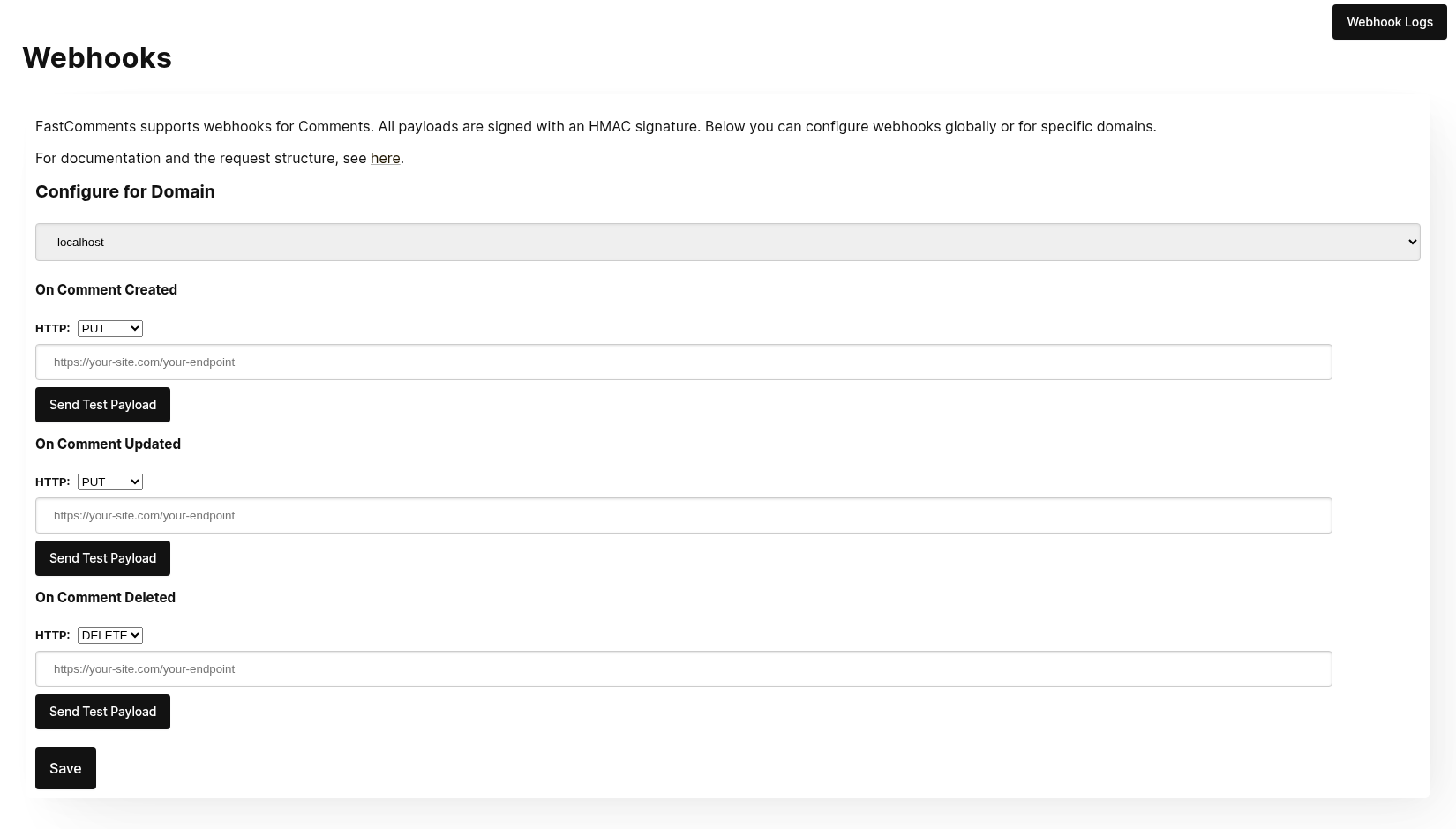
When clicking Send Test Payload, we will send two test events to check that you validate the API key.
Once it validates, hit Save.
Step 4: Add A Comment
Now you can add, edit, or delete comments and should see us call your local development machine with the events, using your testing API key. There may be up to 30 seconds delay for the events to reach your machine.
セットアップ
localhost に対しても本番と同じ手順を実行してください。プロダクション用ドメインと API シークレットが設定されていることを確認してください。
まず、Webhooks 管理 に移動します。これは「Manage Data」→「Webhooks」からアクセスできます。
このページにはアカウントにあるすべてのWebhookが一覧表示されます:
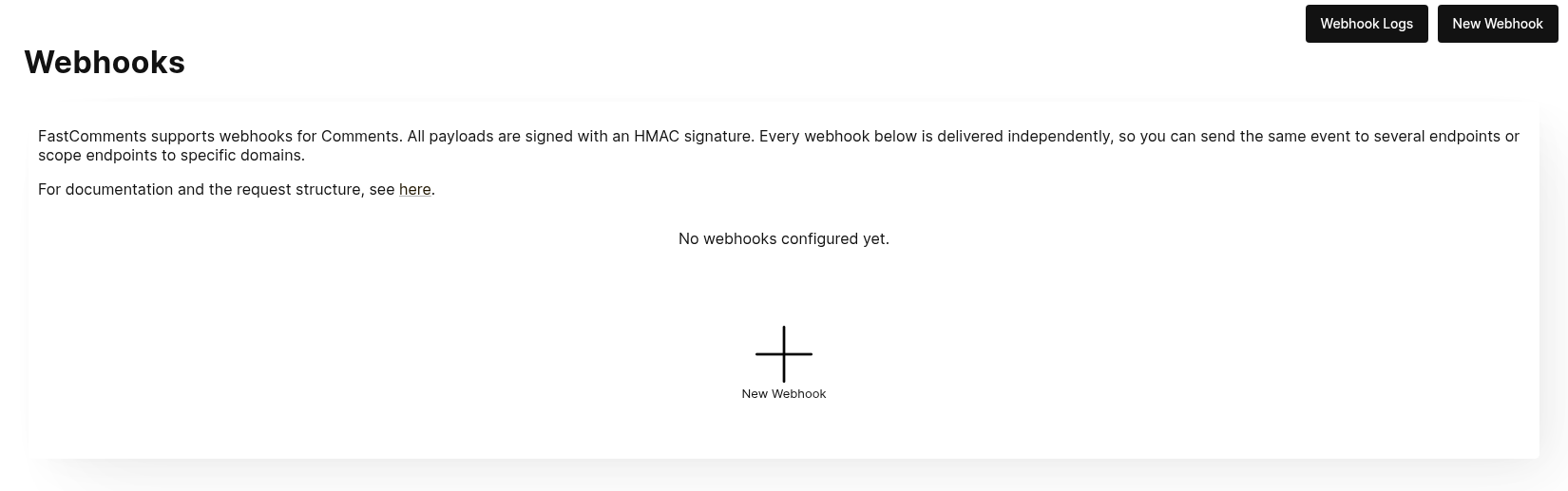
New Webhook をクリックして追加します。各Webhookには URL、1つのコメントイベント(作成、更新、削除のいずれか)、ドメイン、HTTP メソッドがあります:
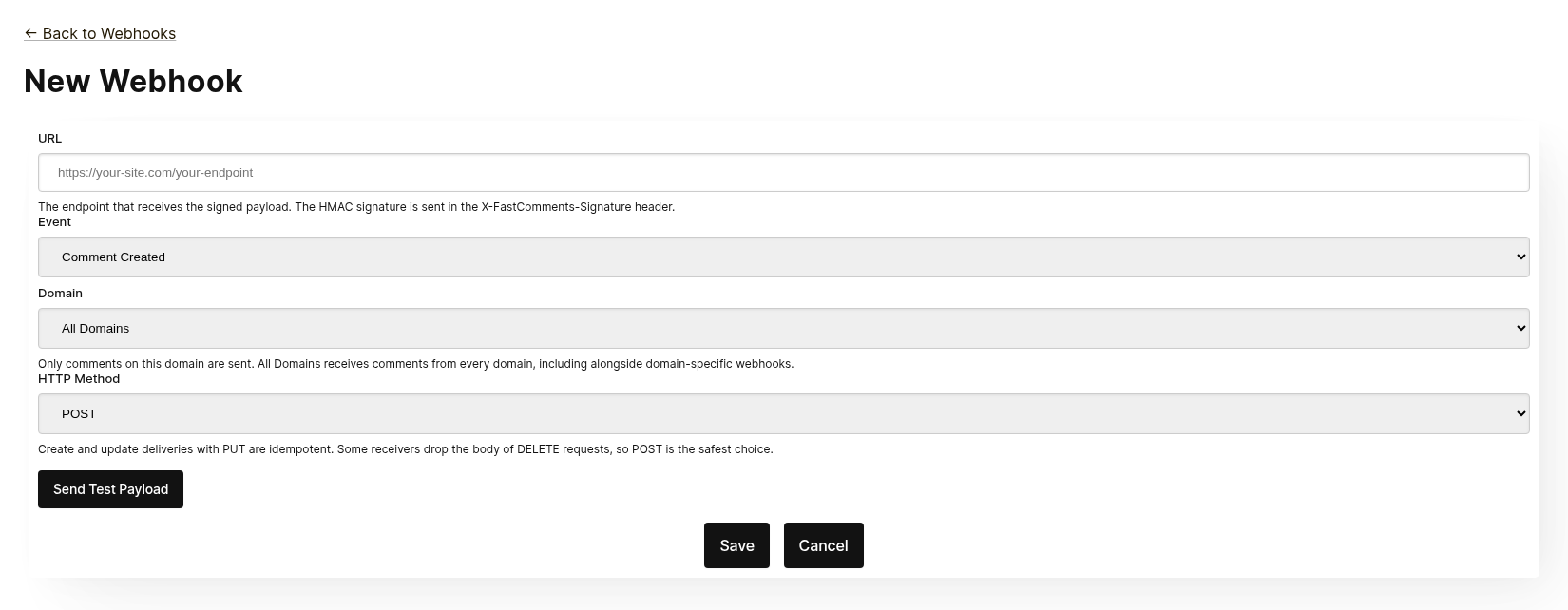
各Webhookは独立して配信されます。同じイベントを複数のエンドポイントに送信できます。また、All Domains にスコープされたWebhookは、同じイベントに対してドメイン固有のWebhookが存在していても、すべてのドメインからのコメントを受け取ります。同一の URL、イベント、ドメインの組み合わせは二度追加できません。
保存する前に Send Test Payload をクリックして、エンドポイントが署名付きリクエストを受け入れるか確認してください。詳細は次のセクション「Testing」を参照してください。
一覧からWebhookを編集、無効化、再有効化、削除できます。無効化すると、Webhookが再有効化されるまでキューに入ったイベントは保持されます。削除するとそれらは破棄されます。
WebhookはAPI経由でも作成できます(例: Zapier)。この場合、同じ一覧にソースが API として表示されます。API を使用した Webhook の管理については、Managing Webhooks via the API を参照してください。
テスト
The new and edit webhook pages have a Send Test Payload button that sends a request to the URL currently in the form, whether or not it has been saved. The Create and Update events send a dummy WebhookComment object, while testing Delete will send a dummy request body with just an ID.
ペイロードの検証
When testing your webhook integration, verify the incoming requests include the following headers:
X-FastComments-Timestamp- Unix タイムスタンプ(秒)X-FastComments-Signature- HMAC-SHA256 署名
Webhooks created before the signature scheme was introduced also receive a token header containing your API Secret. New webhooks do not.
Use the HMAC signature verification to ensure payloads are authentic.
テストツール
You can use tools like webhook.site or ngrok to inspect incoming webhook payloads during development.
イベントタイプ
- Create Event: 新しいコメントが作成されたときにトリガーされます。
- Update Event: コメントが編集されたときにトリガーされます。
- Delete Event: コメントが削除されたときにトリガーされます。
Each webhook is tied to one event and one HTTP method (POST, PUT or DELETE). Each event includes the full comment data in the request body (see Data Structures for the payload format).
データ構造
The only structure sent via webhooks is the WebhookComment object, outlined in TypeScript below.
WebhookComment オブジェクト構造
「Create」イベント構造
「create」イベントのリクエストボディは WebhookComment オブジェクトです。
「Update」イベント構造
「update」イベントのリクエストボディは WebhookComment オブジェクトです。
「Delete」イベント構造
「delete」イベントのリクエストボディは WebhookComment オブジェクトです。
2023年11月14日以降の変更
以前は「delete」イベントのリクエストボディはコメント ID のみが含まれていました。現在は削除時点の完全なコメントが含まれます。
すべてのキーは常にボディに存在します。フィールドに値がない場合、ボディは null(ブール値の場合は false、リストの場合は [])を保持します。そのため、配信の形状はコメントごとに変わりません。
 Run
Run コメント内でユーザーがタグ付けされると、その情報は mentions というリストに保存されます。そのリスト内の各オブジェクトは以下の構造を持ちます。
Run HTTP メソッド
管理パネルで各 webhook イベントタイプの HTTP メソッドを設定できます:
- Create Event: POST または PUT(デフォルト: PUT)
- Update Event: POST または PUT(デフォルト: PUT)
- Delete Event: DELETE、POST、または PUT(デフォルト: DELETE)
すべてのリクエストに ID が含まれるため、Create と Update の操作はデフォルトで冪等です(PUT)。同じ Create または Update リクエストを繰り返しても、側で重複したオブジェクトは作成されません。
リクエストヘッダー
各 webhook リクエストには以下のヘッダーが含まれます:
| Header | Description |
|---|---|
Content-Type | application/json |
token | あなたの API シークレット |
X-FastComments-Timestamp | リクエストが署名されたときの Unix タイムスタンプ(秒) |
X-FastComments-Signature | HMAC-SHA256 署名 (sha256=<hex>) |
HMAC 署名の検証に関する情報は、Security & API Tokens を参照してください。
セキュリティとAPIトークン
FastComments の webhook リクエストは、セキュリティのために複数の認証メカニズムを含みます。
送信されるヘッダー
| ヘッダー | 説明 |
|---|---|
token | API シークレット (下位互換性のため) |
X-FastComments-Timestamp | リクエストが署名されたときの Unix タイムスタンプ(秒) |
X-FastComments-Signature | ペイロードの HMAC-SHA256 署名 |
HMAC 署名検証(推奨)
Webhook のペイロードが正当で改ざんされていないことを保証するために、HMAC 署名の検証を強く推奨します。
署名形式: sha256=<hex-encoded-signature>
署名の計算方法:
- 連結:
timestamp + "." + JSON_payload_body - API シークレットをキーとして HMAC-SHA256 を計算
- 結果を十六進エンコード
検証例 (Node.js)
const crypto = require('crypto');

function verifyWebhookSignature(req, apiSecret) {
    const timestamp = req.headers['x-fastcomments-timestamp'];
    const signature = req.headers['x-fastcomments-signature'];

    if (!timestamp || !signature) {
        return false;
    }

    // タイムスタンプが最近(5 分以内)かを確認
    const now = Math.floor(Date.now() / 1000);
    if (Math.abs(now - parseInt(timestamp, 10)) > 300) {
        return false;  // リプレイ攻撃防止
    }

    // 署名を確認
    const payload = JSON.stringify(req.body);
    const expectedSignature = crypto
        .createHmac('sha256', apiSecret)
        .update(`${timestamp}.${payload}`)
        .digest('hex');

    return signature === `sha256=${expectedSignature}`;
}
検証例 (Python)
import hmac
import hashlib
import time
import json

def verify_webhook_signature(headers, body, api_secret):
    timestamp = headers.get('X-FastComments-Timestamp')
    signature = headers.get('X-FastComments-Signature')

    if not timestamp or not signature:
        return False

    # タイムスタンプが最近かを確認
    now = int(time.time())
    if abs(now - int(timestamp)) > 300:
        return False

    # 署名を確認
    payload = json.dumps(body, separators=(',', ':'))
    message = f"{timestamp}.{payload}"
    expected = hmac.new(
        api_secret.encode(),
        message.encode(),
        hashlib.sha256
    ).hexdigest()

    return signature == f"sha256={expected}"
検証例 (PHP)
function verifyWebhookSignature($headers, $body, $apiSecret) {
    $timestamp = $headers['X-FastComments-Timestamp'] ?? null;
    $signature = $headers['X-FastComments-Signature'] ?? null;

    if (!$timestamp || !$signature) {
        return false;
    }

    // タイムスタンプが最近(5 分以内)かを確認
    $now = time();
    if (abs($now - intval($timestamp)) > 300) {
        return false;
    }

    // 署名を確認
    $payload = json_encode($body, JSON_UNESCAPED_SLASHES);
    $message = $timestamp . '.' . $payload;
    $expectedSignature = 'sha256=' . hash_hmac('sha256', $message, $apiSecret);

    return hash_equals($expectedSignature, $signature);
}
レガシー認証
token ヘッダーは下位互換性のために引き続き送信されますが、リプレイ攻撃から保護するために、セキュリティ向上の観点から HMAC 検証への移行を推奨します。
APIを使用したWebhookの管理
Webhooks は REST API を通じても管理できます。これは、Zapier のような統合がダッシュボードに触れずにコメントイベントを購読する方法で、REST Hooks パターン(購読、イベント受信、購読解除)に従います。
API サブスクリプションは、ダッシュボードで設定された Webhooks と共存します。コメントイベントは、ドメインが一致するすべての Webhook に対して個別に配信され、Webhook の作成方法に関係なく配信されます。
Authentication
すべてのリクエストは、x-api-key ヘッダー(または API_KEY クエリパラメータ)に API キーを、tenantId クエリパラメータにテナント ID を含める必要があります。これらはダッシュボードの API Secret ページに表示されています。
Subscribe
POST https://fastcomments.com/api/v1/webhooks?tenantId=YOUR_TENANT_ID
x-api-key: YOUR_API_KEY
Content-Type: application/json

{
    "url": "https://hooks.zapier.com/hooks/catch/123/abc",
    "event": "comment-created"
}| Field | Required | Description |
|---|---|---|
url | Yes | 絶対的な http または https の URL。 |
event | Yes | comment-created、comment-updated、または comment-deleted。 |
domain | No | アカウント設定からのドメイン。デフォルトは * で、すべてのドメインのイベントを受信します。 |
method | No | POST(デフォルト)、PUT、または DELETE。 |
レスポンスにはサブスクリプションが含まれます:
{
    "status": "success",
    "webhook": {
        "id": "66f1c4c1e7a2b3d4f5a6b7c8",
        "url": "https://hooks.zapier.com/hooks/catch/123/abc",
        "event": "comment-created",
        "domain": "*",
        "method": "POST",
        "source": "api",
        "enabled": true,
        "createdAt": "2026-09-08T12:00:00.000Z"
    }
}
同じ URL を同じイベントとドメインで再度購読すると、重複を作成せずに既存のサブスクリプションが返されるため、クライアントは安全に再試行できます。各テナントは最大 50 件の API サブスクリプションを持つことができます。
List
GET https://fastcomments.com/api/v1/webhooks?tenantId=YOUR_TENANT_IDテナントのすべての Webhook を返します。ダッシュボードで管理されているもの("source": "dashboard")も含まれます。event、domain、または source でフィルタリングできます。
Unsubscribe
DELETE https://fastcomments.com/api/v1/webhooks/SUBSCRIPTION_ID?tenantId=YOUR_TENANT_IDサブスクリプションを削除すると、キューに残っているイベントも破棄されます。この方法で削除できるのは API 経由で作成されたサブスクリプションのみです。ダッシュボードの Webhook や、アカウントに存在しない ID は 404 とコード not-found を返します。ダッシュボードの Webhook は Webhooks ページで編集します。
Payloads and signing
配信はダッシュボードの Webhook と同じペイロードを使用し(Data Structures 参照)、同じ HMAC 方式で署名されます(Security & API Tokens 参照)。API サブスクリプションはレガシーの token ヘッダーを受け取らないため、代わりに X-FastComments-Signature ヘッダーを検証してください。
Sample payloads
GET https://fastcomments.com/api/v1/webhooks/sample-payloads?tenantId=YOUR_TENANT_ID&event=comment-created&limit=3配信が保持する形そのままで、アカウントの最新コメントを返すため、統合は最初のイベントが到着する前に実際のサンプルデータを表示できます。event はオプションで、すべてのイベントが同じコメントオブジェクトを配信するため検証のみ行われます。limit のデフォルトは 3 で、1 から 10 の範囲で指定可能です。2 API クレジットが消費されます。
{
    "status": "success",
    "payloads": [
        {
            "id": "66f1c4c1e7a2b3d4f5a6b7c8",
            "urlId": "https://example.com/blog/hello-world",
            "commenterName": "Jane Reader",
            "comment": "Great article!",
            "date": "2026-09-08T12:00:00.000Z",
            "approved": true
        }
    ]
}
Responding with 410 Gone
API サブスクリプションのエンドポイントが HTTP 410 Gone を返した場合、FastComments はそれを購読解除とみなし、サブスクリプションとキューに残っているイベントが削除され、以降の配信は行われません。ダッシュボードで設定された Webhook は自動的に削除されることはなく、410 は通常の失敗として扱われます。その他の失敗ステータスは再試行され、最終的に Webhook が無効化されます(How it Works & Handling Retries 参照)。
Dashboard
API サブスクリプションは Webhooks リストに API ソースとして表示され、管理者はそれらを編集、無効化、再有効化、または削除できます。
仕組みとリトライの処理
システム内の Comment オブジェクトへのすべての変更は、イベントを発生させ、そのイベントはキューに送られます。
最初の webhook イベントは通常、イベント発生から6秒以内に送信されます。
API がダウンした場合に備えて、このキューは Webhooks 管理画面で監視できます。
あなたの API へのリクエストが失敗した場合、当社はそれをスケジュールに基づいて再キューします。
そのスケジュールは 1 Minute * the retry count です。コールが1回失敗した場合は1分後に再試行します。2回失敗した場合は2分待ち、以降同様に増えていきます。これは、負荷に関連する理由で API がダウンしている場合に、あなたの API に過剰な負荷をかけないためです。
Webhooks はログページからキャンセルできます。
結論
これで Webhooks ドキュメントは終了です。
FastComments の Webhook 統合がわかりやすく、迅速に設定できることを願っています。
ドキュメントに不備があると感じた場合は、下記からお知らせください。