
웹훅
FastComments를 사용하면 댓글이 시스템에 추가되거나, 업데이트되거나, 제거될 때마다 API 엔드포인트를 호출할 수 있습니다.
우리는 이를 HTTP/HTTPS를 통한 비동기 웹후크로 구현합니다.
웹훅이란 무엇인가 
웹훅은 두 시스템 간의 메커니즘 또는 통합으로, "생산자" (FastComments)가 이벤트를 발생시키고 "소비자" (사용자)가 API 호출을 통해 해당 이벤트를 소비합니다.
지원되는 이벤트 및 리소스
FastComments는 Comment 리소스에 대해서만 웹훅을 지원합니다.
우리는 댓글 생성, 삭제 및 업데이트에 대한 웹훅을 지원합니다.
이 각각은 우리 시스템에서 별개의 이벤트로 간주되며, 따라서 서로 다른 의미를 그리고 웹훅 이벤트에 대한 구조를 가집니다.
대시보드 또는 API를 통해 동일한 이벤트에 여러 엔드포인트가 (Managing Webhooks via the API 참조). 각 웹훅은 독립적으로 전달됩니다.
로컬 개발 설정
For Local development, use a tool like ngrok.
In order to simplify keeping the system secure, local development follows the same process as setting up and securing other environments.
Step 1: Add "localhost" to domains in your account.
Add "localhost" 여기에서 도메인으로 추가.


Step 2: Pick an API Key
We're going to be adding webhook configuration for your domain, so we'll need an API key. 여기에서 할 수 있습니다.

Under "Associate with domain" - select your "localhost" domain.
NOTE: Alternatively, you can use one API Secret for all testing activity and staging environments. Simply add an API Secret for "All Domains", and give it a name like "test".
Ensure you have an API Secret defined for your production domain(s). Events for all other domains will use the wildcard (testing) secret.
Step 3: Add Your Webhook
While running ngrok or similar tool, set the value for "localhost" 여기.
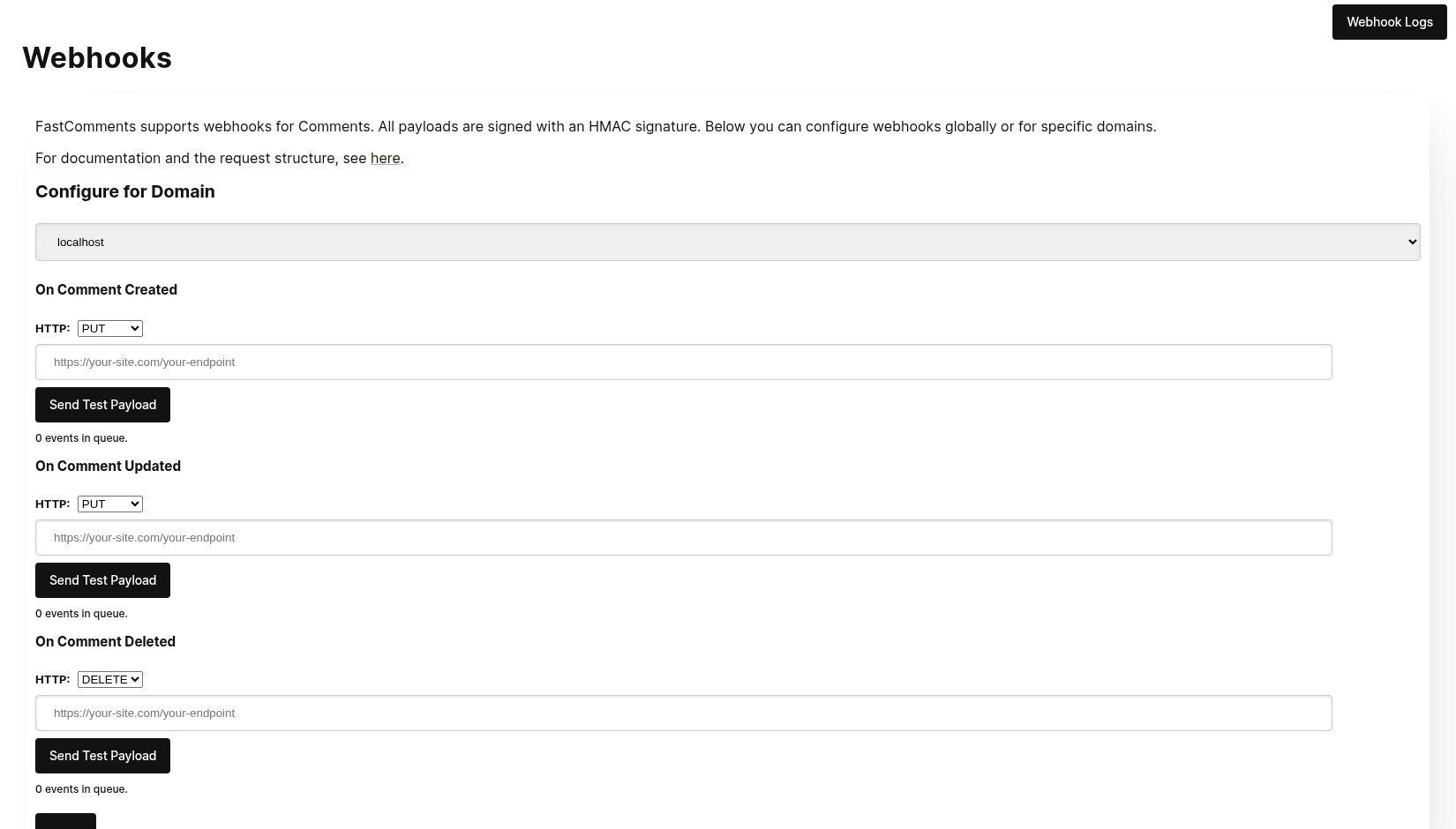
When clicking Send Test Payload, we will send two test events to check that you validate the API key.
Once it validates, hit Save.
Step 4: Add A Comment
Now you can add, edit, or delete comments and should see us call your local development machine with the events, using your testing API key. There may be up to 30 seconds delay for the events to reach your machine.
설정
localhost에 대해 프로덕션과 동일한 단계를 따르세요. 프로덕션 도메인 및 API 비밀키가 설정되어 있는지 확인하세요.
먼저, Webhooks admin으로 이동합니다. 이는 Manage Data -> Webhooks에서 접근할 수 있습니다.
이 페이지는 계정에 있는 모든 웹훅을 나열합니다:
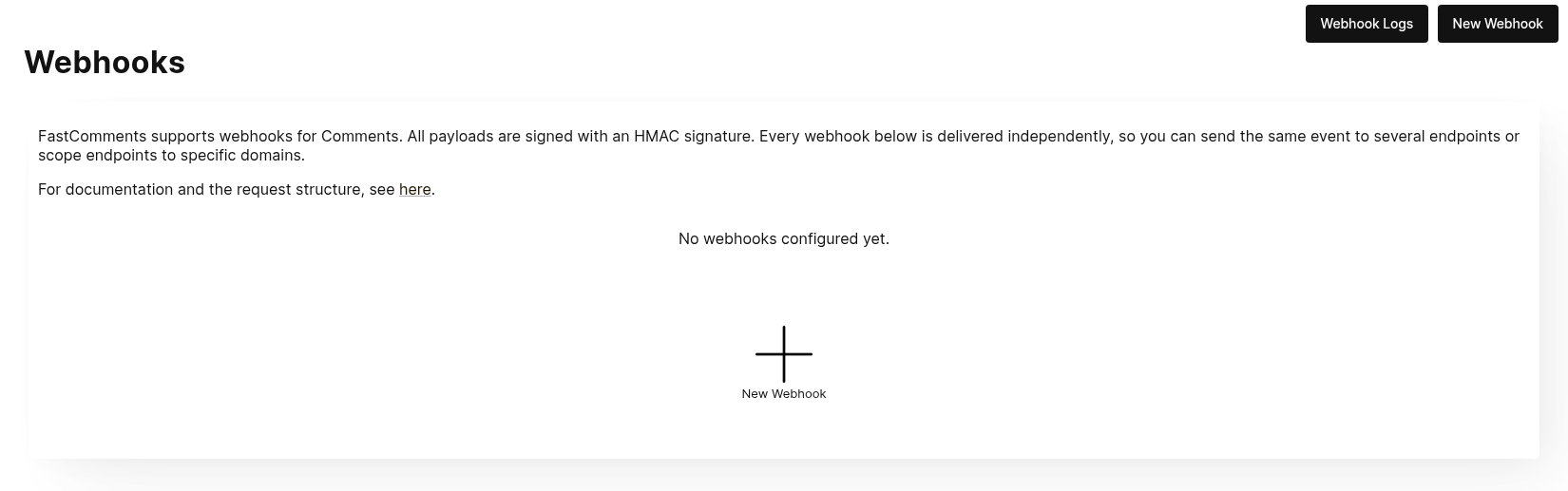
New Webhook을 클릭하여 추가합니다. 각 웹훅은 URL, 하나의 댓글 이벤트(생성, 업데이트 또는 삭제), 도메인 및 HTTP 메서드를 가집니다:
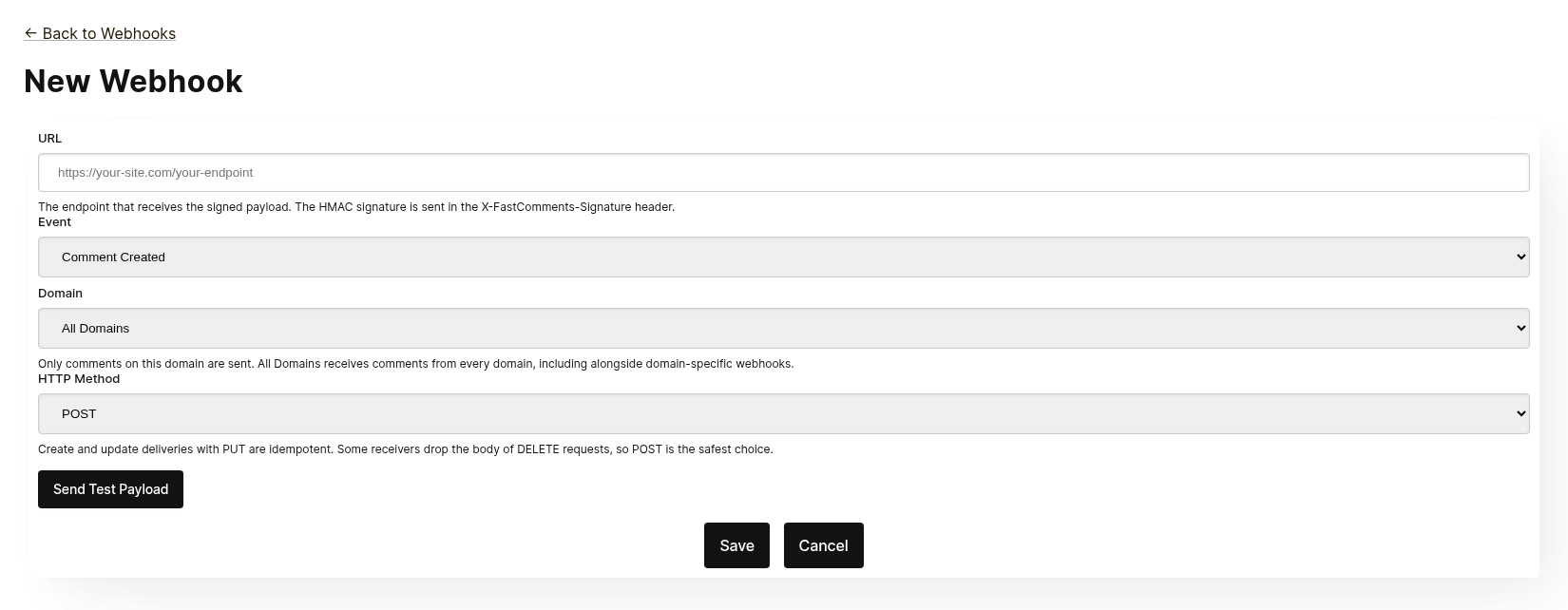
각 웹훅은 독립적으로 전달됩니다. 동일한 이벤트를 여러 엔드포인트에 보낼 수 있으며, All Domains에 범위가 지정된 웹훅은 동일한 이벤트에 대한 도메인별 웹훅이 존재하더라도 모든 도메인의 댓글을 수신합니다. 동일한 URL, 이벤트 및 도메인은 두 번 추가할 수 없습니다.
저장하기 전에 Send Test Payload을 클릭하여 엔드포인트가 서명된 요청을 수락하는지 확인합니다. 자세한 내용은 다음 섹션인 "Testing"을 참조하세요.
목록에서 웹훅을 편집, 비활성화, 재활성화 또는 삭제할 수 있습니다. 비활성화하면 웹훅이 재활성화될 때까지 대기 중인 이벤트가 유지되며, 삭제하면 이벤트가 폐기됩니다.
웹훅은 Zapier와 같은 API를 통해서도 생성할 수 있습니다. 이러한 웹훅은 API 소스로 동일한 목록에 표시됩니다. API를 통한 웹훅 관리를 참조하세요.
테스트
The new and edit webhook pages have a Send Test Payload button that sends a request to the URL currently in the form, whether or not it has been saved. The Create and Update events send a dummy WebhookComment object, while testing Delete will send a dummy request body with just an ID.
페이로드 검증
When testing your webhook integration, verify the incoming requests include the following headers:
X-FastComments-Timestamp- Unix 타임스탬프(초)X-FastComments-Signature- HMAC-SHA256 서명
Webhooks created before the signature scheme was introduced also receive a token header containing your API Secret. New webhooks do not.
Use the HMAC signature verification to ensure payloads are authentic.
테스트 도구
You can use tools like webhook.site or ngrok to inspect incoming webhook payloads during development.
이벤트 유형
- Create Event: 새 댓글이 생성될 때 트리거됩니다.
- Update Event: 댓글이 편집될 때 트리거됩니다.
- Delete Event: 댓글이 삭제될 때 트리거됩니다.
Each webhook is tied to one event and one HTTP method (POST, PUT or DELETE). Each event includes the full comment data in the request body (see Data Structures for the payload format).
데이터 구조
The only structure sent via webhooks is the WebhookComment object, outlined in TypeScript below.
WebhookComment 객체 구조
"Create" 이벤트 구조
The "create" event request body is a WebhookComment object.
"Update" 이벤트 구조
The "update" event request body is a WebhookComment object.
"Delete" 이벤트 구조
The "delete" event request body is a WebhookComment object.
2023년 11월 14일 변경
이전에는 "delete" 이벤트 요청 본문에 댓글 ID만 포함되었습니다. 이제 삭제 시점의 전체 댓글이 포함됩니다.
Every key is always present in the body. When the comment has no value for a field the body carries null
(or false for booleans and [] for lists), so the shape of a delivery never varies from one comment to the next.
 Run
Run When users are tagged in a comment, the information is stored in a list called mentions. Each object in that list
has the following structure.
Run HTTP 메서드
You can configure the HTTP method for each webhook event type in the admin panel:
- Create Event: POST 또는 PUT (기본값: PUT)
- Update Event: POST 또는 PUT (기본값: PUT)
- Delete Event: DELETE, POST 또는 PUT (기본값: DELETE)
Since all requests contain an ID, Create and Update operations are idempotent by default (PUT). Repeating the same Create or Update request should not create duplicate objects on your side.
요청 헤더
Each webhook request includes the following headers:
| Header | Description |
|---|---|
Content-Type | application/json |
token | 귀하의 API 비밀키 |
X-FastComments-Timestamp | 요청이 서명된 시점의 Unix 타임스탬프(초) |
X-FastComments-Signature | HMAC-SHA256 서명 (sha256=<hex>) |
See Security & API Tokens for information on verifying the HMAC signature.
보안 및 API 토큰
FastComments 웹훅 요청에는 보안을 위해 여러 인증 메커니즘이 포함되어 있습니다.
전송되는 헤더
| 헤더 | 설명 |
|---|---|
token | 귀하의 API Secret(하위 호환성용) |
X-FastComments-Timestamp | 요청이 서명될 때의 Unix 타임스탬프(초) |
X-FastComments-Signature | 페이로드의 HMAC-SHA256 서명 |
HMAC 서명 검증 (권장)
웹훅 페이로드가 진본이며 변조되지 않았는지 확인하기 위해 HMAC 서명 검증을 강력히 권장합니다.
서명 형식: sha256=<hex-encoded-signature>
서명이 계산되는 방법:
- 결합:
timestamp + "." + JSON_payload_body - API Secret을 키로 사용하여 HMAC-SHA256을 계산
- 결과를 16진수로 인코딩
예시 검증 (Node.js)
const crypto = require('crypto');

function verifyWebhookSignature(req, apiSecret) {
    const timestamp = req.headers['x-fastcomments-timestamp'];
    const signature = req.headers['x-fastcomments-signature'];

    if (!timestamp || !signature) {
        return false;
    }

    // 타임스탬프가 최근인지 확인합니다 (5분 이내)
    const now = Math.floor(Date.now() / 1000);
    if (Math.abs(now - parseInt(timestamp, 10)) > 300) {
        return false;  // 재생 공격 방지
    }

    // 서명 검증
    const payload = JSON.stringify(req.body);
    const expectedSignature = crypto
        .createHmac('sha256', apiSecret)
        .update(`${timestamp}.${payload}`)
        .digest('hex');

    return signature === `sha256=${expectedSignature}`;
}
예시 검증 (Python)
import hmac
import hashlib
import time
import json

def verify_webhook_signature(headers, body, api_secret):
    timestamp = headers.get('X-FastComments-Timestamp')
    signature = headers.get('X-FastComments-Signature')

    if not timestamp or not signature:
        return False

    # 타임스탬프가 최신인지 확인합니다
    now = int(time.time())
    if abs(now - int(timestamp)) > 300:
        return False

    # 서명 검증
    payload = json.dumps(body, separators=(',', ':'))
    message = f"{timestamp}.{payload}"
    expected = hmac.new(
        api_secret.encode(),
        message.encode(),
        hashlib.sha256
    ).hexdigest()

    return signature == f"sha256={expected}"
예시 검증 (PHP)
function verifyWebhookSignature($headers, $body, $apiSecret) {
    $timestamp = $headers['X-FastComments-Timestamp'] ?? null;
    $signature = $headers['X-FastComments-Signature'] ?? null;

    if (!$timestamp || !$signature) {
        return false;
    }

    // 타임스탬프가 최신인지 확인합니다 (5분 이내)
    $now = time();
    if (abs($now - intval($timestamp)) > 300) {
        return false;
    }

    // 서명 검증
    $payload = json_encode($body, JSON_UNESCAPED_SLASHES);
    $message = $timestamp . '.' . $payload;
    $expectedSignature = 'sha256=' . hash_hmac('sha256', $message, $apiSecret);

    return hash_equals($expectedSignature, $signature);
}
레거시 인증
하위 호환성을 위해 귀하의 API Secret이 포함된 token 헤더는 여전히 전송됩니다. 그러나 HMAC 검증은 재생 공격으로부터 보호하므로 보안 향상을 위해 HMAC 검증으로 마이그레이션할 것을 권장합니다.
API를 통한 웹훅 관리
Webhooks는 REST API를 통해서도 관리할 수 있습니다. 이는 Zapier와 같은 통합이 대시보드에 손대지 않고도 댓글 이벤트를 구독하는 방식이며, REST Hooks 패턴을 따릅니다: 구독, 이벤트 수신, 구독 취소.
API 구독은 대시보드에 설정된 웹훅과 함께 존재합니다. 댓글 이벤트는 해당 도메인과 일치하는 모든 웹훅에 각각 별개의 전달로 전송되며, 웹훅이 생성된 방식에 관계없이 전달됩니다.
인증
모든 요청에는 x-api-key 헤더(또는 API_KEY 쿼리 매개변수)에 API 키를, tenantId 쿼리 매개변수에 테넌트 ID를 포함해야 합니다. 두 값은 대시보드의 API 비밀 페이지에 표시됩니다.
구독
POST https://fastcomments.com/api/v1/webhooks?tenantId=YOUR_TENANT_ID
x-api-key: YOUR_API_KEY
Content-Type: application/json

{
    "url": "https://hooks.zapier.com/hooks/catch/123/abc",
    "event": "comment-created"
}| Field | Required | Description |
|---|---|---|
url | Yes | 절대적인 http 또는 https URL입니다. |
event | Yes | comment-created, comment-updated 또는 comment-deleted. |
domain | No | 계정 설정에서 지정한 도메인입니다. 기본값은 *, 이는 모든 도메인의 이벤트를 수신합니다. |
method | No | POST(기본값), PUT 또는 DELETE. |
응답에는 구독 정보가 포함됩니다:
{
    "status": "success",
    "webhook": {
        "id": "66f1c4c1e7a2b3d4f5a6b7c8",
        "url": "https://hooks.zapier.com/hooks/catch/123/abc",
        "event": "comment-created",
        "domain": "*",
        "method": "POST",
        "source": "api",
        "enabled": true,
        "createdAt": "2026-09-08T12:00:00.000Z"
    }
}
같은 URL을 동일한 이벤트와 도메인에 다시 구독하면 중복을 생성하는 대신 기존 구독을 반환하므로 클라이언트가 안전하게 재시도할 수 있습니다. 각 테넌트는 최대 50개의 API 구독을 가질 수 있습니다.
목록
GET https://fastcomments.com/api/v1/webhooks?tenantId=YOUR_TENANT_ID테넌트에 대한 모든 웹훅을 반환하며, 대시보드에서 관리되는 웹훅("source": "dashboard")도 포함됩니다. event, domain 또는 source 로 필터링할 수 있습니다.
구독 취소
DELETE https://fastcomments.com/api/v1/webhooks/SUBSCRIPTION_ID?tenantId=YOUR_TENANT_ID구독을 삭제하면 해당 구독에 아직 대기 중인 이벤트도 모두 폐기됩니다. 이 방법으로 삭제할 수 있는 것은 API를 통해 생성된 구독뿐이며, 대시보드 웹훅이나 계정에 존재하지 않는 ID는 404와 코드 not-found를 반환합니다. 대시보드 웹훅은 웹훅 페이지에서 편집합니다.
페이로드 및 서명
전달은 대시보드 웹훅과 동일한 페이로드를 사용합니다(데이터 구조 참조) 및 동일한 HMAC 방식으로 서명됩니다(보안 및 API 토큰 참조). API 구독은 레거시 token 헤더를 받지 않으므로 대신 X-FastComments-Signature 헤더를 검증합니다.
샘플 페이로드
GET https://fastcomments.com/api/v1/webhooks/sample-payloads?tenantId=YOUR_TENANT_ID&event=comment-created&limit=3전달이 포함하는 형태와 정확히 동일하게 계정의 최신 댓글을 반환하므로, 통합에서 첫 이벤트가 도착하기 전에 실제 샘플 데이터를 표시할 수 있습니다. event는 선택 사항이며 검증만 수행됩니다(모든 이벤트가 동일한 댓글 객체를 전달하기 때문). limit은 기본값이 3이며 1에서 10까지 허용됩니다. API 크레딧 2개가 소모됩니다.
{
    "status": "success",
    "payloads": [
        {
            "id": "66f1c4c1e7a2b3d4f5a6b7c8",
            "urlId": "https://example.com/blog/hello-world",
            "commenterName": "Jane Reader",
            "comment": "Great article!",
            "date": "2026-09-08T12:00:00.000Z",
            "approved": true
        }
    ]
}
410 Gone 응답
API 구독의 엔드포인트가 HTTP 410 Gone 응답을 반환하면 FastComments는 이를 구독 취소로 간주합니다: 구독이 삭제되고 대기 중인 이벤트도 함께 삭제되며, 이후 전달이 시도되지 않습니다. 대시보드에 설정된 웹훅은 자동으로 삭제되지 않으며, 이 경우 410은 일반적인 실패로 처리됩니다. 다른 실패 상태는 재시도되며 결국 웹훅이 비활성화됩니다. 자세한 내용은 작동 방식 및 재시도 처리 를 참고하십시오.
대시보드
API 구독은 웹훅 목록에 API 소스로 표시되며, 관리자는 이를 편집, 비활성화, 재활성화 또는 삭제할 수 있습니다.
작동 방식 및 재시도 처리
시스템 내 Comment 객체에 대한 모든 변경은 이벤트를 발생시키며 그 이벤트는 큐에 들어갑니다.
초기 웹훅 이벤트는 보통 이벤트 소스가 발생한 후 6초 이내에 전송됩니다.
API가 다운되는 경우를 대비해 Webhooks 관리자에서 이 큐를 모니터링할 수 있습니다.
귀하의 API에 대한 요청이 실패하면, 우리는 그것을 일정에 따라 다시 큐에 넣습니다.
That schedule is 1 Minute * the retry count. If the call fails once, it'll try again in
a minute. If it fails twice, it'll then wait two minutes, and so on. This is so that we
don't overload your API if you are going down to load related reasons.
웹훅은 로그 페이지에서 취소할 수 있습니다.
결론
이로써 우리의 Webhooks 문서가 마무리됩니다.
FastComments Webhook 통합이 이해하기 쉽고 빠르게 설정되기를 바랍니다.
문서에서 누락된 부분을 발견하셨다고 생각되면 아래에 알려주세요.