
Вебхуки
За допомогою FastComments можна викликати кінцеву точку API щоразу, коли коментар додається, оновлюється або видаляється з нашої системи.
Ми реалізуємо це за допомогою асинхронних вебхуків через HTTP/HTTPS.
Що таке вебхуки 
Вебхук — це механізм або інтеграція між двома системами, де "виробник" (FastComments) ініціює подію яку "споживач" (Ви) обробляє через виклик API.
Підтримувані події та ресурси
FastComments підтримує вебхуки лише для ресурсу Comment.
Ми підтримуємо вебхуки для створення, видалення та оновлення коментарів.
Кожен з цих випадків розглядається як окрема подія у нашій системі, і тому має різну семантику та структуру вебхук‑подій.
Будь-яка кількість кінцевих точок може підписатися на одну й ту ж подію, з панелі керування або через API (див. Управління вебхуками через API). Кожен вебхук доставляється незалежно.
Налаштування локальної розробки
For Local development, use a tool like ngrok.
In order to simplify keeping the system secure, local development follows the same process as setting up and securing other environments.
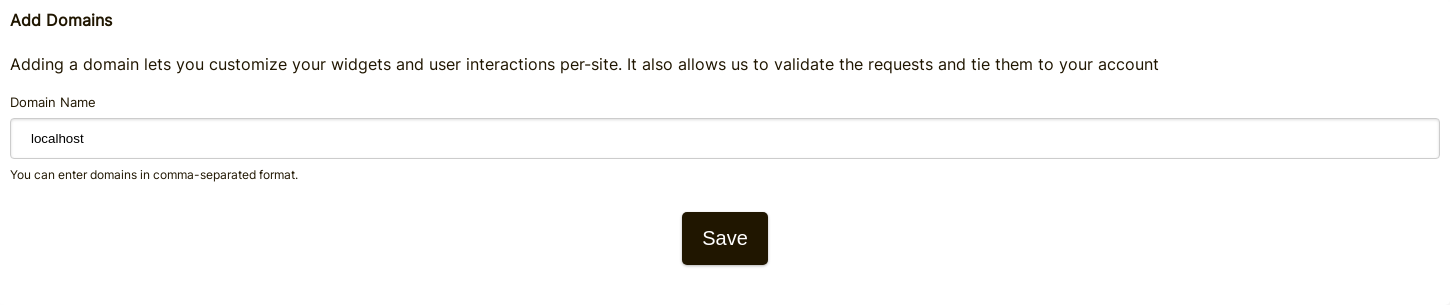
Крок 1: Додайте "localhost" до доменів у вашому обліковому записі.
Add "localhost" as a domain here.

Крок 2: Виберіть API Key
We're going to be adding webhook configuration for your domain, so we'll need an API key. You can do that here.

Under "Associate with domain" - select your "localhost" domain.
ПРИМІТКА: Альтернативно, ви можете використовувати один API Secret для всіх тестових дій та середовищ підготовки. Просто додайте API Secret для "All Domains", і дайте йому назву, наприклад "test".
Ensure you have an API Secret defined for your production domain(s). Events for all other domains will use the wildcard (testing) secret.
Крок 3: Додайте ваш Webhook
While running ngrok or similar tool, set the value for "localhost" here.
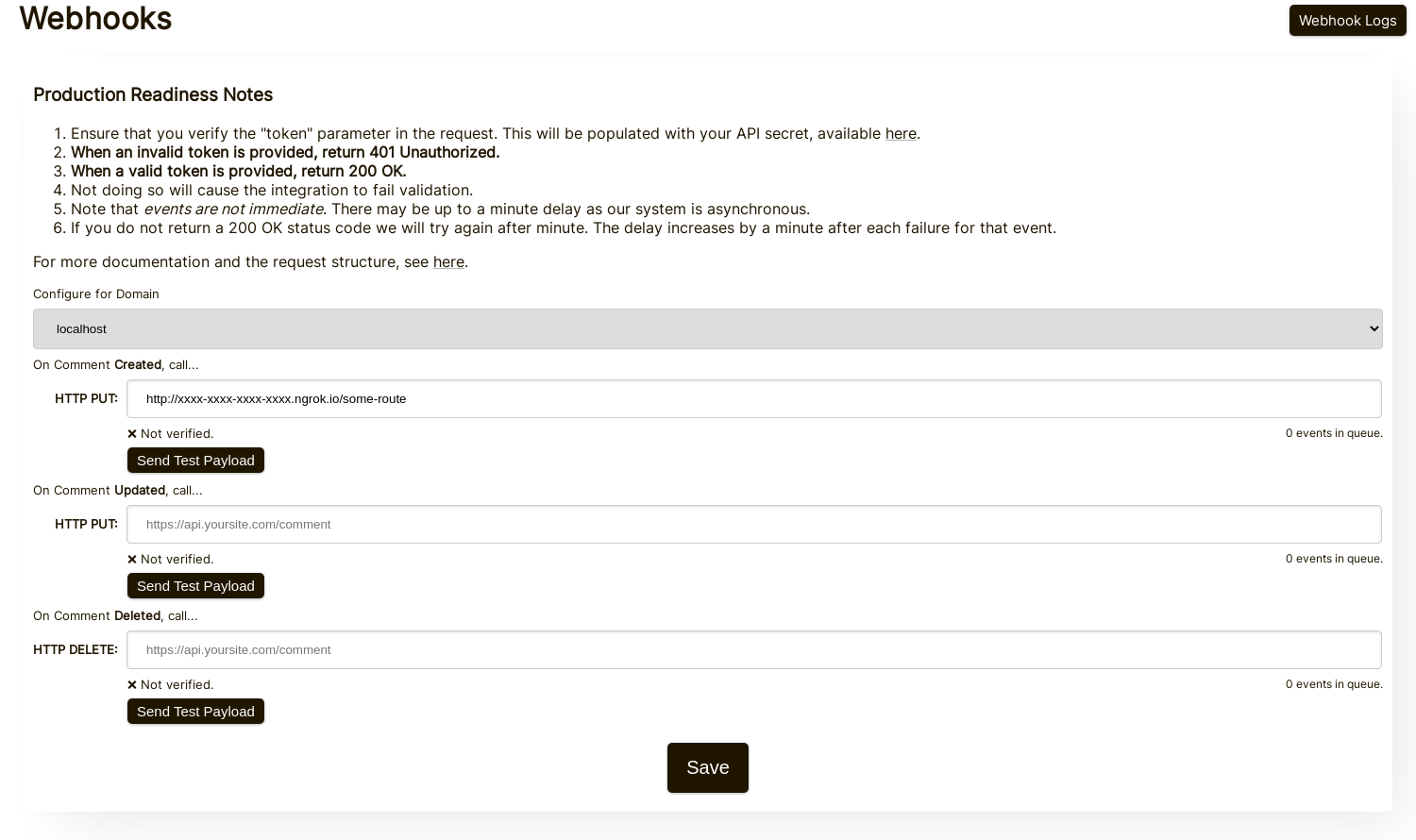
When clicking Send Test Payload, we will send two test events to check that you validate the API key.
Once it validates, hit Save.
Крок 4: Додайте A Comment
Now you can add, edit, or delete comments and should see us call your local development machine with the events, using your testing API key. There may be up to 30 seconds delay for the events to reach your machine.
Налаштування
Виконуйте ті ж кроки для localhost, що й для продакшн. Переконайтеся, що у вас налаштовані домени продакшн та API Secrets.
Спочатку перейдіть до Webhooks admin. Це доступно через Manage Data -> Webhooks.
Сторінка показує всі вебхуки у вашому обліковому записі:
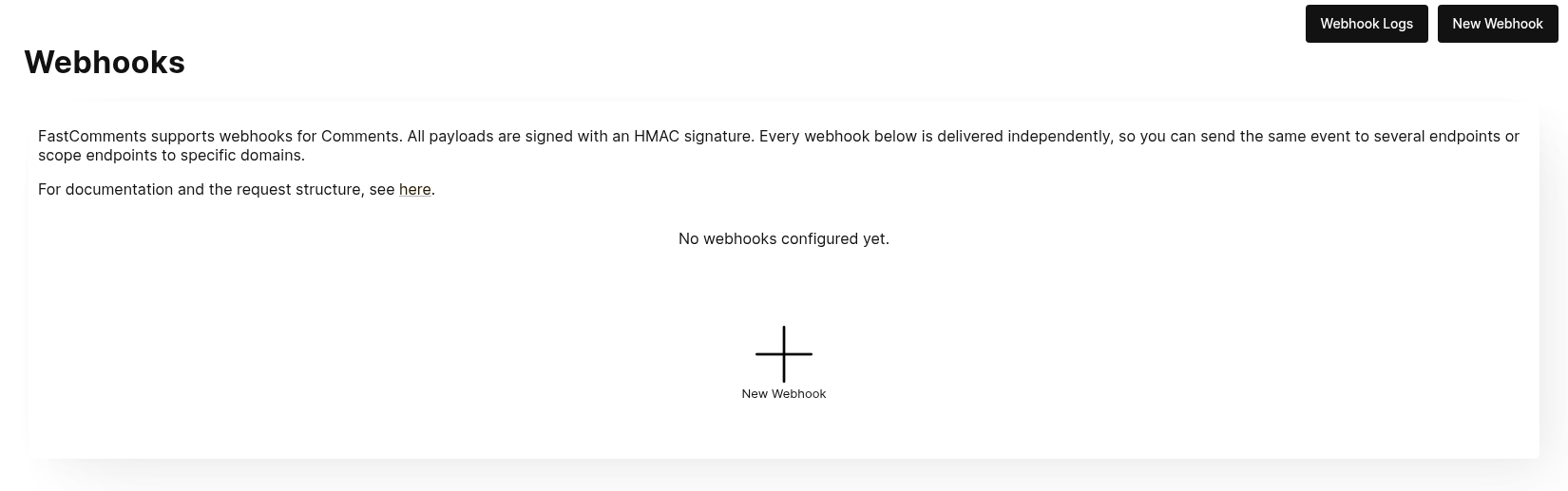
Натисніть New Webhook, щоб додати його. Кожен вебхук має URL, одну подію коментаря (створено, оновлено або видалено), домен та HTTP-метод:
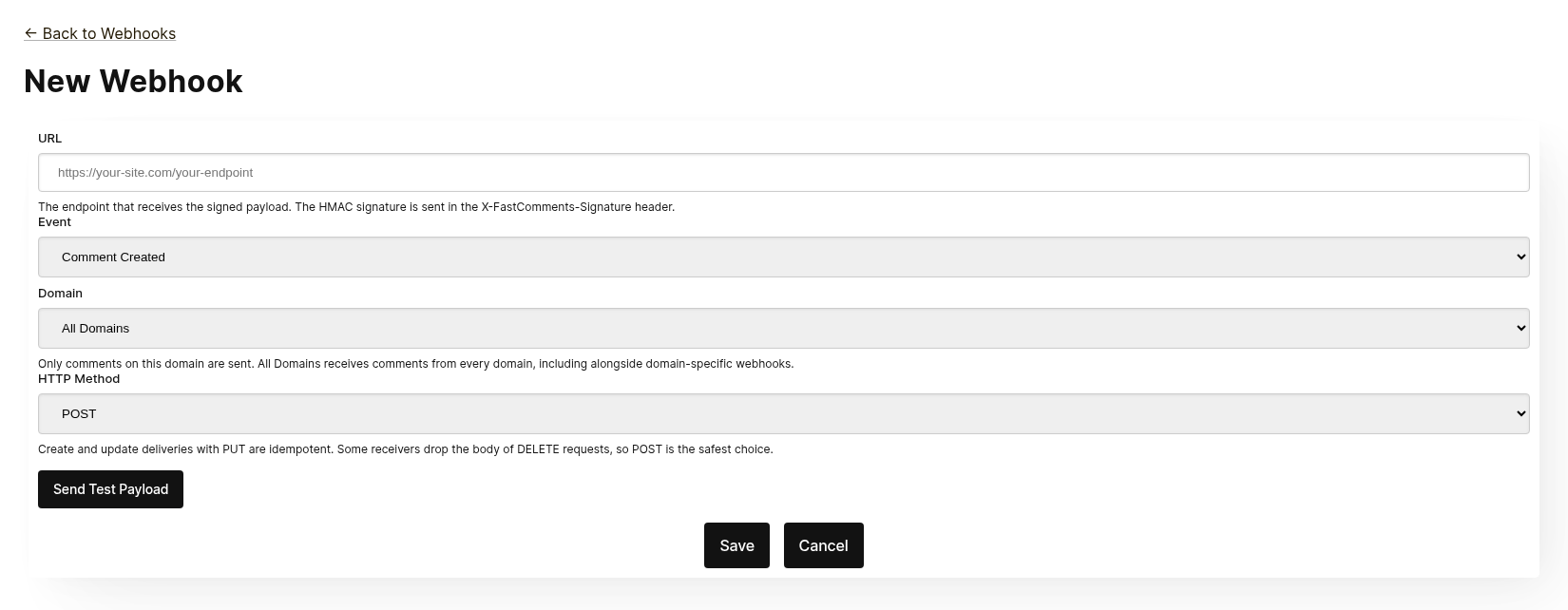
Кожен вебхук доставляється незалежно. Ви можете надсилати одну й ту ж подію на кілька кінцевих точок, і вебхук, обмежений All Domains, отримує коментарі з усіх доменів, навіть якщо існує вебхук, специфічний для домену, для тієї ж події. Однакові URL, подія та домен не можна додати двічі.
Перед збереженням натисніть Send Test Payload, щоб перевірити, чи кінцева точка приймає підписаний запит. Дивіться наступний розділ "Testing" для деталей.
У списку ви можете редагувати, вимикати, повторно вмикати або видаляти вебхук. Вимкнення зберігає заплановані події, доки вебхук не буде повторно увімкнено; видалення їх скидає.
Вебхуки також можна створювати через API, наприклад за допомогою Zapier. Вони з’являються в тому ж списку з джерелом API. Дивіться Managing Webhooks via the API.
Тестування
The new and edit webhook pages have a Send Test Payload button that sends a request to the URL currently in the form, whether or not it has been saved. The Create and Update events send a dummy WebhookComment object, while testing Delete will send a dummy request body with just an ID.
Перевірка payloads
When testing your webhook integration, verify the incoming requests include the following headers:
X-FastComments-Timestamp- Unix‑часова мітка (секунди)X-FastComments-Signature- HMAC‑SHA256 підпис
Webhooks created before the signature scheme was introduced also receive a token header containing your API Secret. New webhooks do not.
Use the HMAC signature verification to ensure payloads are authentic.
Інструменти тестування
You can use tools like webhook.site or ngrok to inspect incoming webhook payloads during development.
Типи подій
- Create Event: Спрацьовує, коли створюється новий коментар.
- Update Event: Спрацьовує, коли коментар редагується.
- Delete Event: Спрацьовує, коли коментар видаляється.
Each webhook is tied to one event and one HTTP method (POST, PUT or DELETE). Each event includes the full comment data in the request body (see Data Structures for the payload format).
Структури даних
The only structure sent via webhooks is the WebhookComment object, outlined in TypeScript below.
Структура об’єкта WebhookComment
Структура події "Create"
The "create" event request body is a WebhookComment object.
Структура події "Update"
The "update" event request body is a WebhookComment object.
Структура події "Delete"
The "delete" event request body is a WebhookComment object.
Change as of Nov 14th 2023
Previously the "delete" event request body only contained the comment id. It now contains the full comment at the time of deletion.
Зміна станом на 14 листопада 2023 року
Раніше тіло запиту події "delete" містило лише ідентифікатор коментаря. Тепер воно містить повний коментар на момент видалення.
Every key is always present in the body. When the comment has no value for a field the body carries null
(or false for booleans and [] for lists), so the shape of a delivery never varies from one comment to the next.
Кожен ключ завжди присутній у тілі. Якщо у коментаря немає значення для поля, тіло містить null (або false для булевих значень і [] для списків), тому структура доставки ніколи не змінюється від коментаря до коментаря.
 Run
Run When users are tagged in a comment, the information is stored in a list called mentions. Each object in that list
has the following structure.
Коли користувачі згадуються в коментарі, інформація зберігається у списку під назвою mentions. Кожен об’єкт у цьому списку має таку структуру.
Run HTTP-методи
You can configure the HTTP method for each webhook event type in the admin panel:
- Create Event: POST або PUT (за замовчуванням: PUT)
- Update Event: POST або PUT (за замовчуванням: PUT)
- Delete Event: DELETE, POST або PUT (за замовчуванням: DELETE)
Since all requests contain an ID, Create and Update operations are idempotent by default (PUT). Repeating the same Create or Update request should not create duplicate objects on your side.
Оскільки всі запити містять ID, операції Create та Update за замовчуванням є ідемпотентними (PUT). Повторення одного і того ж запиту Create або Update не повинно створювати дублікати об’єктів у вас.
Заголовки запиту
Each webhook request includes the following headers:
| Заголовок | Опис |
|---|---|
Content-Type | application/json |
token | Ваш секрет API |
X-FastComments-Timestamp | Unix‑таймстамп (секунди) коли запит був підписаний |
X-FastComments-Signature | Підпис HMAC‑SHA256 (sha256=<hex>) |
See Безпека та токени API for information on verifying the HMAC signature.
Безпека та токени API
FastComments webhook requests include multiple authentication mechanisms for security.
Відправлені заголовки
| Заголовок | Опис |
|---|---|
token | Ваш API Secret (для зворотної сумісності) |
X-FastComments-Timestamp | Unix-часова мітка (секунди) коли запит був підписаний |
X-FastComments-Signature | HMAC-SHA256 підпис навантаження |
Перевірка підпису HMAC (рекомендовано)
Ми настійно рекомендуємо перевіряти підпис HMAC, щоб переконатися, що навантаження вебхука є автентичними і не були підроблені.
Формат підпису: sha256=<hex-encoded-signature>
Як обчислюється підпис:
- Конкатенувати:
timestamp + "." + JSON_payload_body - Обчислити HMAC-SHA256, використовуючи ваш API Secret як ключ
- Перетворити результат у шістнадцятковий формат
Приклад перевірки (Node.js)
const crypto = require('crypto');

function verifyWebhookSignature(req, apiSecret) {
    const timestamp = req.headers['x-fastcomments-timestamp'];
    const signature = req.headers['x-fastcomments-signature'];

    if (!timestamp || !signature) {
        return false;
    }

    // Перевірити, чи часова мітка недавня (протягом 5 хвилин)
    const now = Math.floor(Date.now() / 1000);
    if (Math.abs(now - parseInt(timestamp, 10)) > 300) {
        return false;  // Запобігання повторній атаці
    }

    // Перевірити підпис
    const payload = JSON.stringify(req.body);
    const expectedSignature = crypto
        .createHmac('sha256', apiSecret)
        .update(`${timestamp}.${payload}`)
        .digest('hex');

    return signature === `sha256=${expectedSignature}`;
}
Приклад перевірки (Python)
import hmac
import hashlib
import time
import json

def verify_webhook_signature(headers, body, api_secret):
    timestamp = headers.get('X-FastComments-Timestamp')
    signature = headers.get('X-FastComments-Signature')

    if not timestamp or not signature:
        return False

    # Перевірити, чи часова мітка недавня
    now = int(time.time())
    if abs(now - int(timestamp)) > 300:
        return False

    # Перевірити підпис
    payload = json.dumps(body, separators=(',', ':'))
    message = f"{timestamp}.{payload}"
    expected = hmac.new(
        api_secret.encode(),
        message.encode(),
        hashlib.sha256
    ).hexdigest()

    return signature == f"sha256={expected}"
Приклад перевірки (PHP)
function verifyWebhookSignature($headers, $body, $apiSecret) {
    $timestamp = $headers['X-FastComments-Timestamp'] ?? null;
    $signature = $headers['X-FastComments-Signature'] ?? null;

    if (!$timestamp || !$signature) {
        return false;
    }

    // Перевірити, чи часова мітка недавня (протягом 5 хвилин)
    $now = time();
    if (abs($now - intval($timestamp)) > 300) {
        return false;
    }

    // Перевірити підпис
    $payload = json_encode($body, JSON_UNESCAPED_SLASHES);
    $message = $timestamp . '.' . $payload;
    $expectedSignature = 'sha256=' . hash_hmac('sha256', $message, $apiSecret);

    return hash_equals($expectedSignature, $signature);
}
Спадкова автентифікація
Заголовок token, що містить ваш API Secret, все ще надсилається для зворотної сумісності. Однак ми рекомендуємо перейти на перевірку HMAC для підвищеної безпеки, оскільки вона захищає від повторних атак.
Керування вебхуками через API
Webhooks can also be managed through the REST API. This is how integrations such as Zapier subscribe to comment events without touching the dashboard, and it follows the REST Hooks pattern: subscribe, receive events, unsubscribe.
API subscriptions live alongside the webhooks configured in the dashboard. A comment event is delivered to every webhook that matches its domain, each as its own delivery, whichever way the webhook was created.
Authentication
Every request needs your API Key in the x-api-key header (or the API_KEY query parameter) and
your tenant ID in the tenantId query parameter. Both are shown on the API Secret page in the dashboard.
Subscribe
POST https://fastcomments.com/api/v1/webhooks?tenantId=YOUR_TENANT_ID
x-api-key: YOUR_API_KEY
Content-Type: application/json

{
    "url": "https://hooks.zapier.com/hooks/catch/123/abc",
    "event": "comment-created"
}| Поле | Обов’язково | Опис |
|---|---|---|
url | Так | Абсолютний URL http або https. |
event | Так | comment-created, comment-updated або comment-deleted. |
domain | Ні | Домен з налаштувань вашого облікового запису. За замовчуванням *, який отримує події для всіх доменів. |
method | Ні | POST (за замовчуванням), PUT або DELETE. |
The response contains the subscription:
{
    "status": "success",
    "webhook": {
        "id": "66f1c4c1e7a2b3d4f5a6b7c8",
        "url": "https://hooks.zapier.com/hooks/catch/123/abc",
        "event": "comment-created",
        "domain": "*",
        "method": "POST",
        "source": "api",
        "enabled": true,
        "createdAt": "2026-09-08T12:00:00.000Z"
    }
}
Subscribing the same URL to the same event and domain again returns the existing subscription rather than creating a duplicate, so a client can safely retry. Each tenant can have up to 50 API subscriptions.
List
GET https://fastcomments.com/api/v1/webhooks?tenantId=YOUR_TENANT_IDReturns every webhook for the tenant, including those managed in the dashboard ("source": "dashboard").
Filter with event, domain or source.
Unsubscribe
DELETE https://fastcomments.com/api/v1/webhooks/SUBSCRIPTION_ID?tenantId=YOUR_TENANT_IDDeleting a subscription also discards any events still queued for it. Only subscriptions created
through the API can be deleted this way; a dashboard webhook, or an id that does not exist on your
account, answers 404 with code not-found. Dashboard webhooks are edited on the Webhooks page.
Payloads and signing
Deliveries use the same payload as dashboard webhooks (see Data Structures) and are signed with the same
HMAC scheme (see Security & API Tokens). API subscriptions never receive the legacy token header, so
verify the X-FastComments-Signature header instead.
Sample payloads
GET https://fastcomments.com/api/v1/webhooks/sample-payloads?tenantId=YOUR_TENANT_ID&event=comment-created&limit=3Returns the account's most recent comments in exactly the shape a delivery carries, so an integration can
show real sample data before the first event arrives. event is optional and only validated, since every
event delivers the same comment object. limit defaults to 3 and accepts 1 to 10. Costs 2 API credits.
{
    "status": "success",
    "payloads": [
        {
            "id": "66f1c4c1e7a2b3d4f5a6b7c8",
            "urlId": "https://example.com/blog/hello-world",
            "commenterName": "Jane Reader",
            "comment": "Great article!",
            "date": "2026-09-08T12:00:00.000Z",
            "approved": true
        }
    ]
}
Responding with 410 Gone
If an API subscription's endpoint responds with HTTP 410 Gone, FastComments treats that as an
unsubscribe: the subscription is deleted along with its queued events, and no further deliveries are
attempted. Webhooks configured in the dashboard are never deleted automatically; for them a 410 is an
ordinary failure. Any other failure status is retried and eventually disables the webhook, as described
in How it Works & Handling Retries.
Dashboard
API subscriptions appear in the Webhooks list with the source API, where an administrator can edit, disable, re-enable or delete them.
Як це працює та обробка повторних спроб
Усі зміни об'єкта Comment у системі викликають подію, яка потрапляє в чергу.
Початковий вебхук зазвичай надсилається протягом шести секунд після виникнення джерела події.
Ви можете відстежувати цю чергу в панелі адміністрування Webhooks на випадок, якщо ваш API вийде з ладу.
Якщо запит до вашого API не вдається, ми повторно помістимо його в чергу за певним графіком.
Цей графік — 1 Minute * the retry count. Якщо виклик не вдається один раз, він спробує ще раз через
хвилину. Якщо він не вдасться двічі, тоді зачекає дві хвилини, і так далі. Це зроблено для того, щоб ми
не перевантажували ваш API, якщо він виходить з ладу з причин, пов'язаних з навантаженням.
Вебхуки можна скасувати на сторінці журналу.
На завершення
Цим завершується наша документація Webhooks.
Ми сподіваємося, що інтеграція FastComments Webhook є зрозумілою та швидкою у налаштуванні.
Якщо ви вважаєте, що виявили будь-які прогалини в нашій документації, повідомте нас нижче.