
网络钩子
使用 FastComments,可以在每当评论被添加、更新或从我们的系统中删除时调用一个 API 端点。
我们通过基于 HTTP/HTTPS 的异步 webhooks 来实现这一功能。
什么是网络钩子 
Webhook 是一种机制,或两套系统之间的集成,其中“生产者”(FastComments)触发一个事件 由“消费者”(您)通过 API 调用来消费该事件。
支持的事件和资源
FastComments 仅支持对 Comment 资源的 webhook。
我们支持对评论的创建、删除和更新的 webhook。
这些在我们的系统中被视为独立的事件,因此 webhook 事件具有不同的语义和结构。
任意数量的端点可以从仪表板或通过 API 订阅同一事件(参见通过 API 管理 Webhook)。每个 webhook 都会独立发送。
本地开发设置
对于本地开发,请使用类似 ngrok 的工具。
为了简化系统安全的维护,本地开发遵循与设置和保护其他环境相同的流程。
步骤 1:在您的账户中添加 “localhost” 到域名列表。
在此处将 “localhost” 添加为域名。


步骤 2:选择 API 密钥
我们需要为您的域名添加 webhook 配置,因此需要一个 API 密钥。您可以在此处创建。

在 “Associate with domain”(关联到域名)下,选择您的 “localhost” 域名。
注意: 另外,您可以为所有测试活动和预发布环境使用同一个 API Secret。只需为 “All Domains”(所有域)添加一个 API Secret,并将其命名为 “test”。
确保已为您的生产域名定义了 API Secret。其他所有域名的事件将使用通配符(测试)密钥。
步骤 3:添加您的 Webhook
在运行 ngrok 或类似工具时,在 此处 为 “localhost” 设置值。
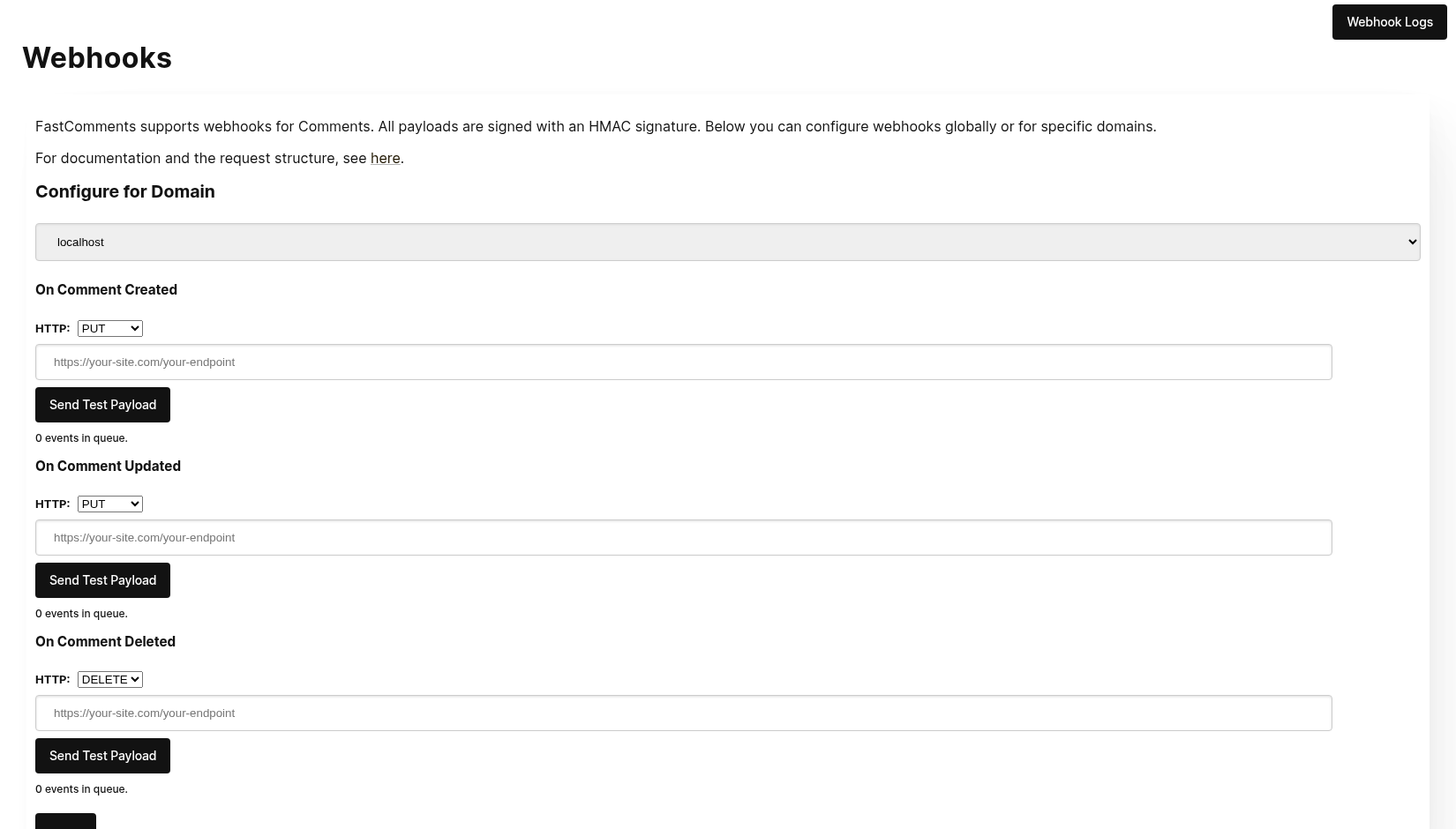
点击 Send Test Payload 时,我们会发送两个测试事件,以检查您是否验证了 API 密钥。
验证通过后,点击 Save。
步骤 4:添加评论
现在您可以添加、编辑或删除评论,并应看到我们使用您的测试 API 密钥调用本地开发机器发送事件。事件到达您的机器可能会有最多 30 秒的延迟。
设置
对 localhost 按照生产环境的相同步骤进行操作。确保已设置生产域名和 API 密钥。
首先,前往 Webhooks 管理页面。该页面可通过 “管理数据 -> Webhooks” 访问。
该页面列出您账户中的所有 webhook:
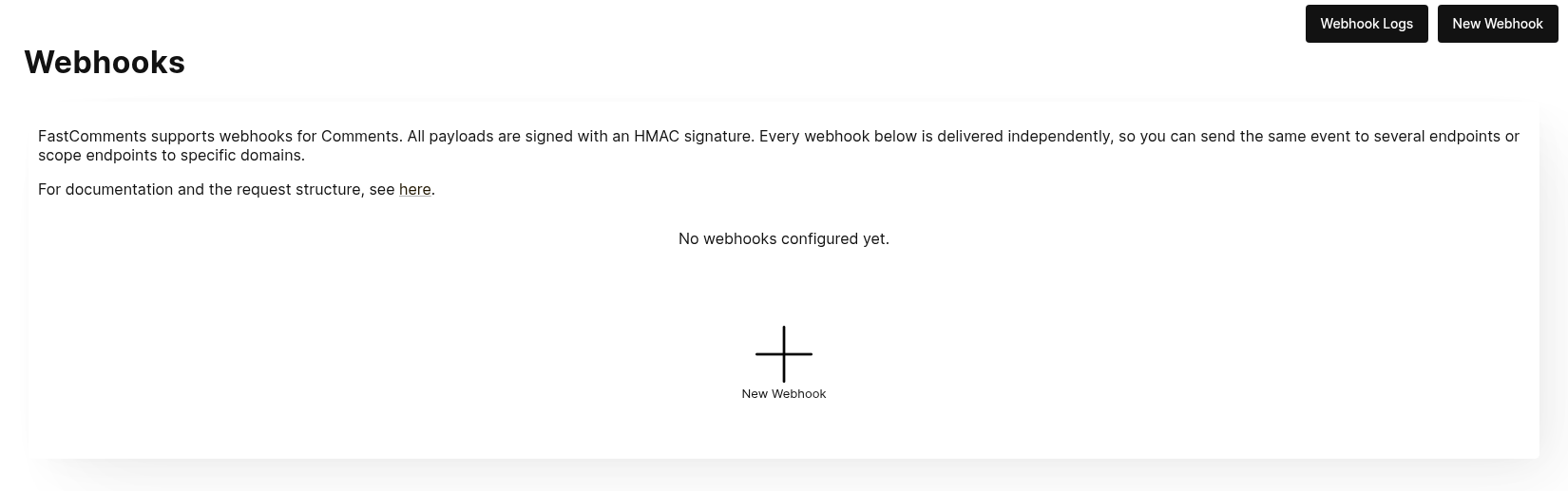
点击 新建 Webhook 以添加。每个 webhook 包含一个 URL、一个评论事件(创建、更新或删除)、一个域名和一个 HTTP 方法:
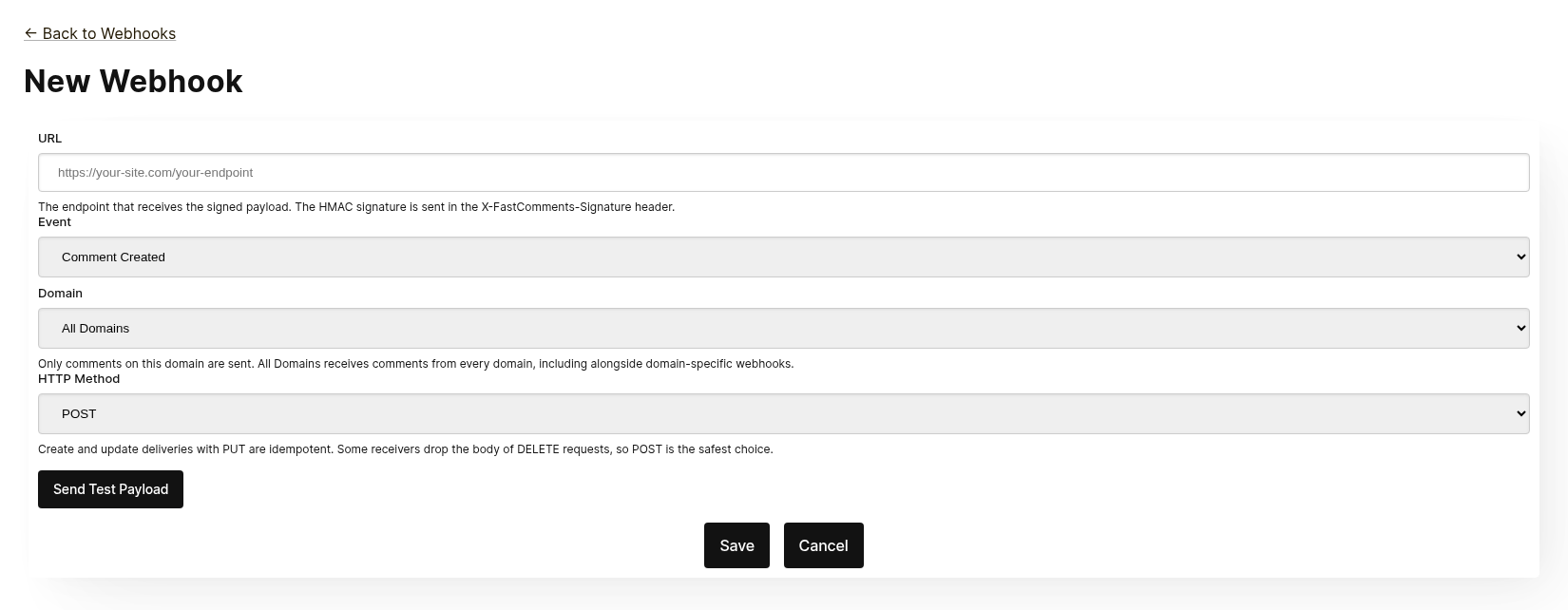
每个 webhook 独立发送。您可以将相同的事件发送到多个端点,并且作用域为 所有域 的 webhook 会接收来自所有域的评论,即使同一事件在特定域上已有 webhook。相同的 URL、事件和域名不能重复添加。
保存前,点击 发送测试负载 以检查端点是否接受已签名的请求。详情请参见下一节 “测试”。
在列表中,您可以编辑、禁用、重新启用或删除 webhook。禁用后会保留排队的事件,直至重新启用;删除则会丢弃这些事件。
也可以通过 API 创建 webhook,例如使用 Zapier。这些 webhook 会在同一列表中显示,来源标记为 API。请参阅通过 API 管理 webhook。
测试
The new and edit webhook pages have a Send Test Payload button that sends a request to the URL currently in the form, whether or not it has been saved. The Create and Update events send a dummy WebhookComment object, while testing Delete will send a dummy request body with just an ID.
验证负载
在测试 webhook 集成时,请验证传入请求包含以下头部:
X-FastComments-Timestamp- Unix 时间戳(秒)X-FastComments-Signature- HMAC-SHA256 签名
在引入签名方案之前创建的 webhook 仍会收到包含您 API Secret 的 token 头部。新 webhook 不会收到此头部。
使用 HMAC 签名验证来确保负载的真实性。
测试工具
您可以使用诸如 webhook.site 或 ngrok 等工具,在开发期间检查传入的 webhook 负载。
事件类型
- Create Event:当创建新评论时触发。
- Update Event:当编辑评论时触发。
- Delete Event:当删除评论时触发。
每个 webhook 绑定一个事件和一种 HTTP 方法(POST、PUT 或 DELETE)。每个事件在请求体中包含完整的评论数据(请参阅 Data Structures 了解负载格式)。
数据结构
The only structure sent via webhooks is the WebhookComment object, outlined in TypeScript below.
WebhookComment 对象结构
“Create” 事件结构
“create” 事件的请求体是一个 WebhookComment 对象。
“Update” 事件结构
“update” 事件的请求体是一个 WebhookComment 对象。
“Delete” 事件结构
“delete” 事件的请求体是一个 WebhookComment 对象。
更改于 2023 年 11 月 14 日
之前,“delete” 事件的请求体仅包含评论 ID。现在它在删除时包含完整的评论。
Every key is always present in the body. When the comment has no value for a field the body carries null
(or false for booleans and [] for lists), so the shape of a delivery never varies from one comment to the next.
 Run
Run When users are tagged in a comment, the information is stored in a list called mentions. Each object in that list has the following structure.
Run HTTP 方法
You can configure the HTTP method for each webhook event type in the admin panel:
- Create 事件:POST 或 PUT(默认:PUT)
- Update 事件:POST 或 PUT(默认:PUT)
- Delete 事件:DELETE、POST 或 PUT(默认:DELETE)
Since all requests contain an ID, Create and Update operations are idempotent by default (PUT). Repeating the same Create or Update request should not create duplicate objects on your side.
请求头
Each webhook request includes the following headers:
| 头部 | 描述 |
|---|---|
Content-Type | application/json |
token | 您的 API 密钥 |
X-FastComments-Timestamp | 请求签名时的 Unix 时间戳(秒) |
X-FastComments-Signature | HMAC-SHA256 签名(sha256=<hex>) |
See Security & API Tokens for information on verifying the HMAC signature.
安全性与 API 令牌
FastComments 的 webhook 请求包含多种身份验证机制以确保安全。
发送的请求头
| 请求头 | 描述 |
|---|---|
token | 您的 API Secret(用于向后兼容) |
X-FastComments-Timestamp | 请求签名时的 Unix 时间戳(秒) |
X-FastComments-Signature | 负载的 HMAC-SHA256 签名 |
HMAC 签名验证(推荐)
我们强烈建议验证 HMAC 签名,以确保 webhook payload 是真实且未被篡改。
Signature Format: sha256=<hex-encoded-signature>
签名的计算方法:
- 连接:
timestamp + "." + JSON_payload_body - 使用您的 API Secret 作为密钥计算 HMAC-SHA256
- 对结果进行十六进制编码
示例验证(Node.js)
const crypto = require('crypto');

function verifyWebhookSignature(req, apiSecret) {
    const timestamp = req.headers['x-fastcomments-timestamp'];
    const signature = req.headers['x-fastcomments-signature'];

    if (!timestamp || !signature) {
        return false;
    }

    // 验证时间戳是否近期(在 5 分钟内)
    const now = Math.floor(Date.now() / 1000);
    if (Math.abs(now - parseInt(timestamp, 10)) > 300) {
        return false;  // 防止重放攻击
    }

    // 验证签名
    const payload = JSON.stringify(req.body);
    const expectedSignature = crypto
        .createHmac('sha256', apiSecret)
        .update(`${timestamp}.${payload}`)
        .digest('hex');

    return signature === `sha256=${expectedSignature}`;
}
示例验证(Python)
import hmac
import hashlib
import time
import json

def verify_webhook_signature(headers, body, api_secret):
    timestamp = headers.get('X-FastComments-Timestamp')
    signature = headers.get('X-FastComments-Signature')

    if not timestamp or not signature:
        return False

    # 验证时间戳是否近期
    now = int(time.time())
    if abs(now - int(timestamp)) > 300:
        return False

    # 验证签名
    payload = json.dumps(body, separators=(',', ':'))
    message = f"{timestamp}.{payload}"
    expected = hmac.new(
        api_secret.encode(),
        message.encode(),
        hashlib.sha256
    ).hexdigest()

    return signature == f"sha256={expected}"
示例验证(PHP)
function verifyWebhookSignature($headers, $body, $apiSecret) {
    $timestamp = $headers['X-FastComments-Timestamp'] ?? null;
    $signature = $headers['X-FastComments-Signature'] ?? null;

    if (!$timestamp || !$signature) {
        return false;
    }

    // 验证时间戳是否近期(在 5 分钟内)
    $now = time();
    if (abs($now - intval($timestamp)) > 300) {
        return false;
    }

    // 验证签名
    $payload = json_encode($body, JSON_UNESCAPED_SLASHES);
    $message = $timestamp . '.' . $payload;
    $expectedSignature = 'sha256=' . hash_hmac('sha256', $message, $apiSecret);

    return hash_equals($expectedSignature, $signature);
}
旧版身份验证
包含您 API Secret 的 token 请求头仍会出于向后兼容而发送。然而,我们建议迁移到 HMAC 验证以提高安全性,因为它可以防止重放攻击。
通过 API 管理网络钩子
Webhooks 也可以通过 REST API 进行管理。这正是 Zapier 等集成在不触及仪表板的情况下订阅评论事件的方式,它遵循 REST Hooks 模式:订阅、接收事件、取消订阅。
API 订阅与仪表板中配置的 Webhooks 并存。评论事件会发送到每个匹配其域名的 webhook,每个 webhook 都是一次独立的投递,无论该 webhook 是以何种方式创建的。
身份验证
每个请求都需要在 x-api-key 头部(或 API_KEY 查询参数)中提供您的 API Key,并在 tenantId 查询参数中提供租户 ID。这两项信息均显示在仪表板的 API Secret 页面上。
订阅
POST https://fastcomments.com/api/v1/webhooks?tenantId=YOUR_TENANT_ID
x-api-key: YOUR_API_KEY
Content-Type: application/json

{
    "url": "https://hooks.zapier.com/hooks/catch/123/abc",
    "event": "comment-created"
}| 字段 | 必填写 | 描述 |
|---|---|---|
url | 是 | 绝对的 http 或 https URL。 |
event | 是 | comment-created、comment-updated 或 comment-deleted。 |
domain | 否 | 您账户配置中的域名。默认 *,表示接收所有域名的事件。 |
method | 否 | POST(默认)、PUT 或 DELETE。 |
响应中包含订阅信息:
{
    "status": "success",
    "webhook": {
        "id": "66f1c4c1e7a2b3d4f5a6b7c8",
        "url": "https://hooks.zapier.com/hooks/catch/123/abc",
        "event": "comment-created",
        "domain": "*",
        "method": "POST",
        "source": "api",
        "enabled": true,
        "createdAt": "2026-09-08T12:00:00.000Z"
    }
}
再次使用相同的 URL、相同的事件和域名下订阅时,会返回已有的订阅,而不是创建重复项,因此客户端可以安全地重试。每个租户最多可拥有 50 个 API 订阅。
列表
GET https://fastcomments.com/api/v1/webhooks?tenantId=YOUR_TENANT_ID返回该租户的所有 webhook,包括在仪表板中管理的("source": "dashboard")。可使用 event、domain 或 source 进行过滤。
取消订阅
DELETE https://fastcomments.com/api/v1/webhooks/SUBSCRIPTION_ID?tenantId=YOUR_TENANT_ID删除订阅的同时也会丢弃仍在队列中的任何事件。仅能删除通过 API 创建的订阅;仪表板中的 webhook 或在您账户中不存在的 ID 会返回 404,错误码为 not-found。仪表板 webhook 可在 Webhooks 页面进行编辑。
负载与签名
投递使用与仪表板 webhook 相同的负载(参见数据结构),并使用相同的 HMAC 方案进行签名(参见安全性与 API 令牌)。API 订阅永远不会收到旧版的 token 头部,请改为验证 X-FastComments-Signature 头部。
示例负载
GET https://fastcomments.com/api/v1/webhooks/sample-payloads?tenantId=YOUR_TENANT_ID&event=comment-created&limit=3返回账户最近的评论,形状与投递时的负载完全一致,便于在首次事件到达前展示真实的示例数据。event 为可选参数,仅用于验证,因为每种事件都会投递相同的评论对象。limit 默认 3,取值范围 1 到 10。消耗 2 个 API 积分。
{
    "status": "success",
    "payloads": [
        {
            "id": "66f1c4c1e7a2b3d4f5a6b7c8",
            "urlId": "https://example.com/blog/hello-world",
            "commenterName": "Jane Reader",
            "comment": "Great article!",
            "date": "2026-09-08T12:00:00.000Z",
            "approved": true
        }
    ]
}
响应 410 Gone
如果 API 订阅的端点返回 HTTP 410 Gone,FastComments 会将其视为取消订阅:该订阅连同其排队的事件一起被删除,且不再尝试投递。仪表板中配置的 webhook 永远不会被自动删除;对它们而言 410 只是一次普通的失败。其他任何失败状态都会被重试,最终会禁用该 webhook,详见「工作原理与重试处理」章节。
仪表板
API 订阅会在 Webhooks 列表中显示,来源标记为 API,管理员可以对其进行编辑、禁用、重新启用或删除。
工作原理与重试处理
系统中对 Comment 对象的所有更改都会触发一个事件,该事件最终会进入队列。
初始 webhook 事件通常会在事件源发生后的六秒内发送。
如果您的 API 宕机,您可以在 Webhooks 管理页面监控此队列。
如果对您的 API 的请求失败,我们会按照一个计划将其重新排入队列。
该计划为 1 Minute * the retry count。如果调用失败一次,它将在一分钟后重试。如果失败两次,则会等待两分钟,依此类推。这样做是为了避免在因为负载相关原因导致您的 API 宕机时对其造成过载。
可以在日志页面取消 Webhooks。
结论
本 Webhooks 文档到此结束。
我们希望您觉得 FastComments Webhook 集成易于理解且便于快速设置。
如果您认为已发现我们文档中的任何空白或不足,请在下方告知我们。