
Webhook
Con FastComments è possibile invocare un endpoint API ogni volta che un commento viene aggiunto, aggiornato o rimosso dal nostro sistema.
Realizziamo questo tramite webhook asincroni su HTTP/HTTPS.
Cosa sono i Webhook 
Un Webhook è un meccanismo, o un'integrazione, tra due sistemi in cui il "produttore" (FastComments) scatena un evento che il "consumatore" (tu) consuma tramite una chiamata API.
Eventi e risorse supportati
FastComments supporta i webhook solo per la risorsa Comment.
Supportiamo i webhook per la creazione, la rimozione e l'aggiornamento dei commenti.
Ciascuno di questi è considerato un evento separato nel nostro sistema e, come tale, ha semantiche e strutture diverse per gli eventi webhook.
Un numero qualsiasi di endpoint può iscriversi allo stesso evento, dal dashboard o tramite l'API (vedi Managing Webhooks via the API). Ogni webhook viene consegnato in modo indipendente.
Configurazione per lo sviluppo locale
For lo sviluppo locale, usa uno strumento come ngrok.
Per semplificare il mantenimento della sicurezza del sistema, lo sviluppo locale segue lo stesso processo di configurazione e protezione di altri ambienti.
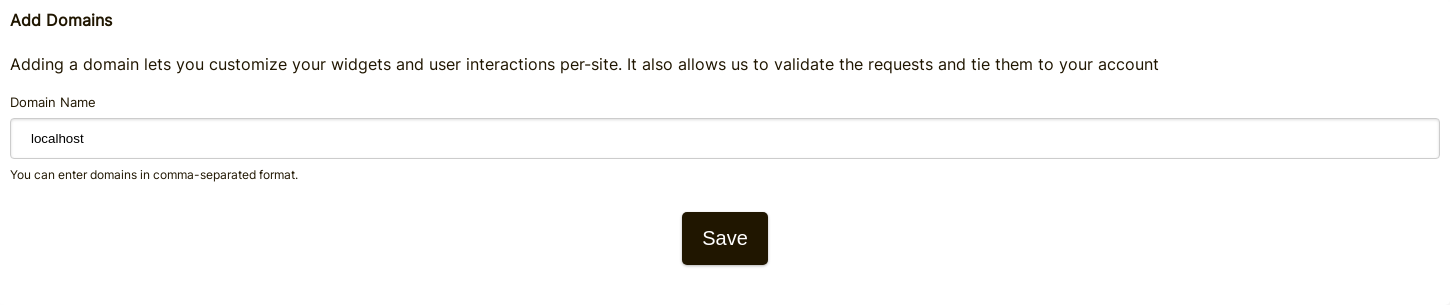
Passo 1: Aggiungi "localhost" ai domini nel tuo account.
Aggiungi "localhost" come dominio qui.

Passo 2: Scegli una API Key
Aggiungeremo la configurazione del webhook per il tuo dominio, quindi avremo bisogno di una chiave API. Puoi farlo qui.

Sotto "Associate with domain" - seleziona il tuo dominio "localhost".
NOTA: In alternativa, puoi usare un unico API Secret per tutte le attività di test e gli ambienti di staging. Basta aggiungere un API Secret per "All Domains" e dargli un nome come "test".
Assicurati di avere un API Secret definito per i tuoi domini di produzione. Gli eventi per tutti gli altri domini utilizzeranno il segreto wildcard (di test).
Passo 3: Aggiungi il tuo webhook
Mentre esegui ngrok o uno strumento simile, imposta il valore per "localhost" qui.
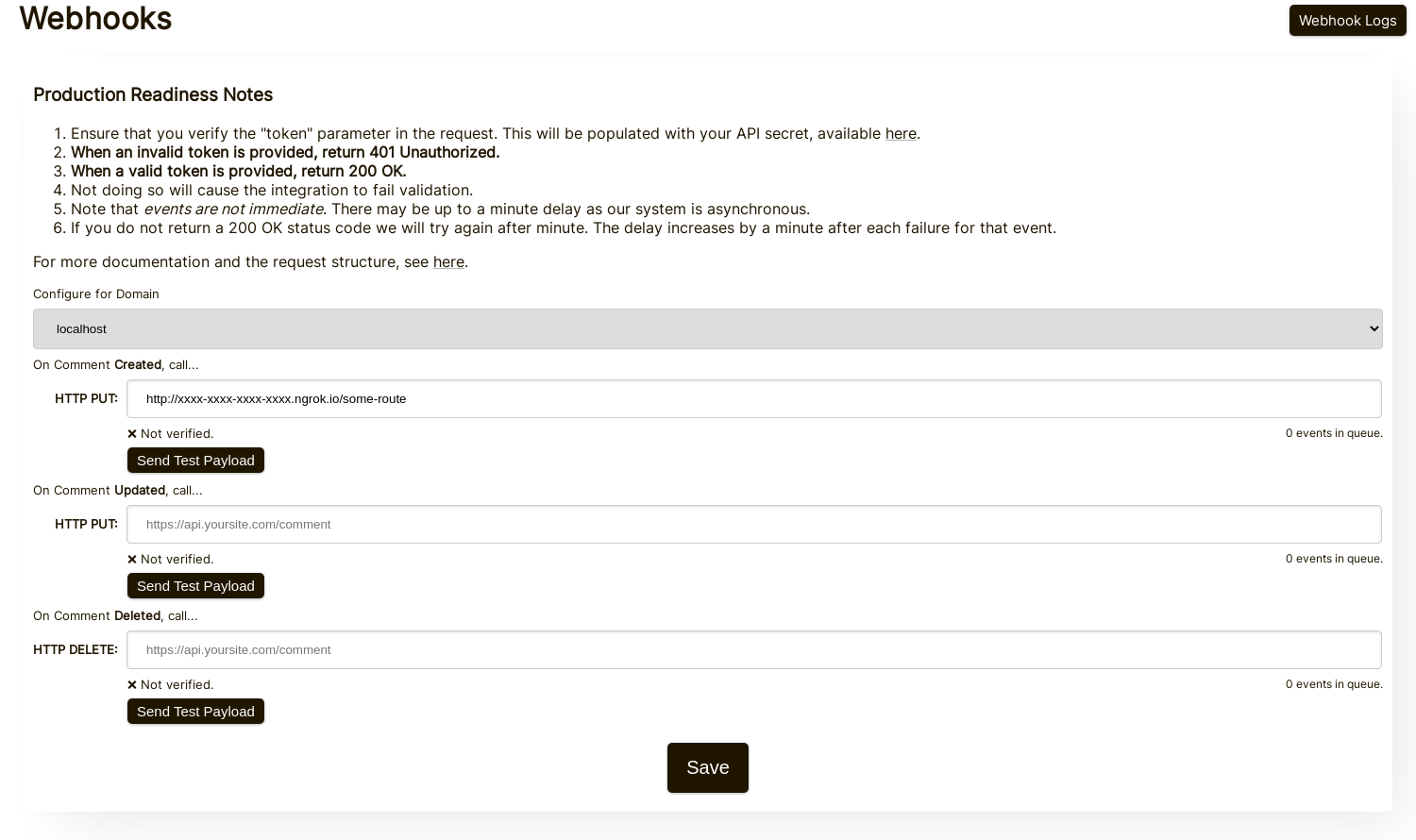
Facendo clic su Send Test Payload, invieremo due eventi di test per verificare che tu abbia validato la chiave API.
Una volta validato, premi Save.
Passo 4: Aggiungi un commento
Ora puoi aggiungere, modificare o eliminare commenti e dovresti vedere che chiamiamo la tua macchina di sviluppo locale con gli eventi, usando la tua chiave API di test. Potrebbe esserci un ritardo fino a 30 secondi perché gli eventi raggiungano la tua macchina.
Configurazione
Segui gli stessi passaggi per localhost come faresti in produzione. Assicurati di aver configurato i domini di produzione e i Segreti API.
Prima, vai alla Amministrazione Webhook. È accessibile tramite Manage Data -> Webhooks.
La pagina elenca tutti i webhook del tuo account:
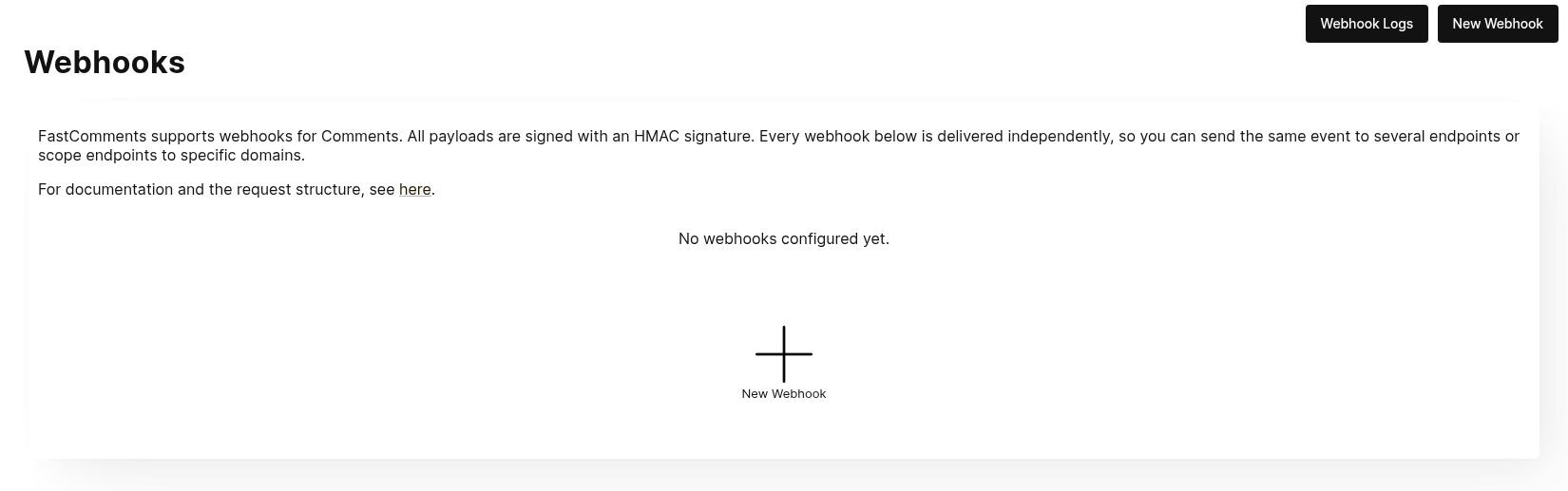
Fai clic su New Webhook per aggiungerne uno. Ogni webhook ha un URL, un evento di commento (creato, aggiornato o eliminato), un dominio e un metodo HTTP:
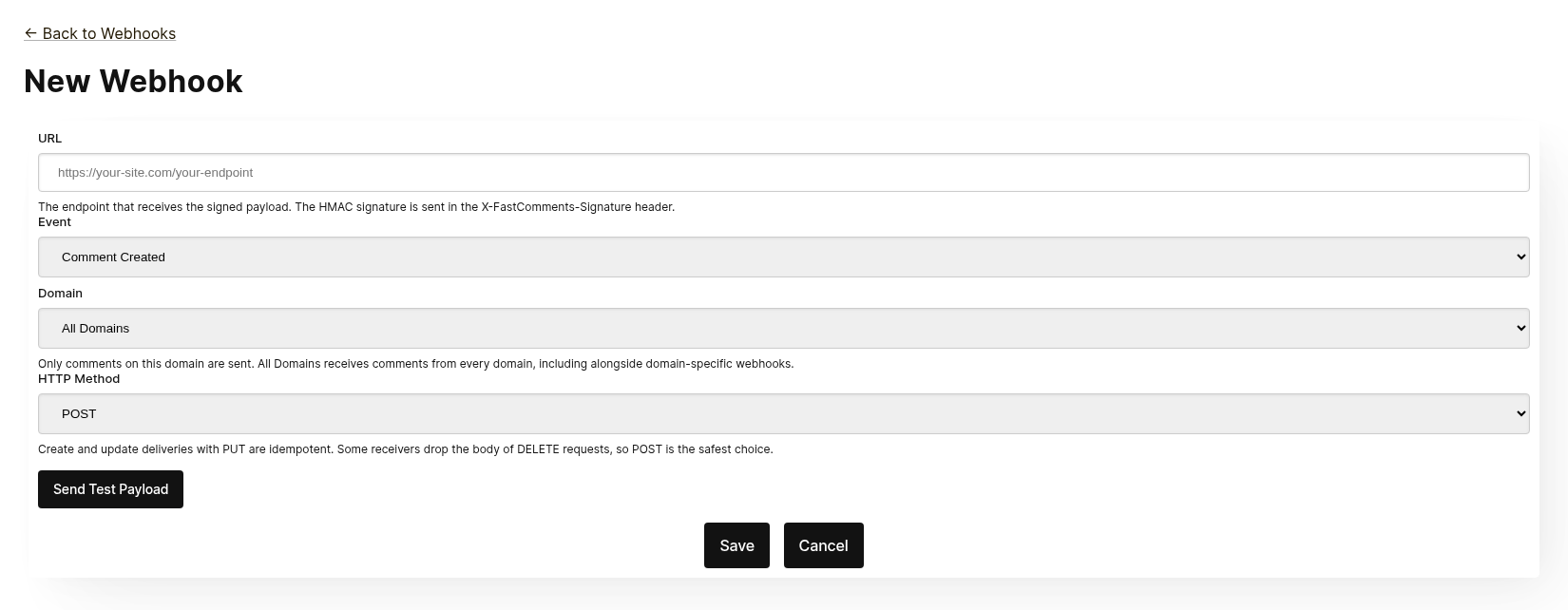
Ogni webhook viene consegnato in modo indipendente. Puoi inviare lo stesso evento a più endpoint, e un webhook con ambito All Domains riceve commenti da tutti i domini anche quando esiste un webhook specifico per dominio per lo stesso evento. Lo stesso URL, evento e dominio non possono essere aggiunti due volte.
Prima di salvare, fai clic su Send Test Payload per verificare che l'endpoint accetti una richiesta firmata. Consulta la sezione successiva, "Testing", per i dettagli.
Dall'elenco puoi modificare, disabilitare, riabilitare o eliminare un webhook. La disabilitazione mantiene gli eventi in coda fino a quando il webhook non viene riabilitato; l'eliminazione li scarta.
I webhook possono anche essere creati tramite l'API, ad esempio con Zapier. Questi appaiono nello stesso elenco con la fonte API. Consulta Managing Webhooks via the API.
Test
Le nuove pagine di webhook e quelle di modifica hanno un pulsante Send Test Payload che invia una richiesta all'URL attualmente presente nel modulo, sia che sia stato salvato o meno. Gli eventi Create e Update inviano un oggetto WebhookComment fittizio, mentre il test Delete invierà un corpo di richiesta fittizio contenente solo un ID.
Verifica dei payload
Durante il test della tua integrazione webhook, verifica che le richieste in arrivo includano le seguenti intestazioni:
X-FastComments-Timestamp- timestamp Unix (secondi)X-FastComments-Signature- firma HMAC-SHA256
I webhook creati prima dell'introduzione dello schema di firma ricevono anche un'intestazione token contenente il tuo segreto API. I nuovi webhook no.
Utilizza la verifica della firma HMAC per garantire che i payload siano autentici.
Strumenti di test
Puoi utilizzare strumenti come webhook.site o ngrok per ispezionare i payload webhook in arrivo durante lo sviluppo.
Tipi di evento
- Create Event: Attivato quando viene creato un nuovo commento.
- Update Event: Attivato quando un commento viene modificato.
- Delete Event: Attivato quando un commento viene eliminato.
Ogni webhook è associato a un singolo evento e a un metodo HTTP (POST, PUT o DELETE). Ogni evento include i dati completi del commento nel corpo della richiesta (vedi Data Structures per il formato del payload).
Strutture dati
The only structure sent via webhooks is the WebhookComment object, outlined in TypeScript below.
La struttura dell'oggetto WebhookComment
Struttura dell'evento "Create"
Il corpo della richiesta dell'evento "create" è un oggetto WebhookComment.
Struttura dell'evento "Update"
Il corpo della richiesta dell'evento "update" è un oggetto WebhookComment.
Struttura dell'evento "Delete"
Il corpo della richiesta dell'evento "delete" è un oggetto WebhookComment.
Modifica a partire dal 14 novembre 2023
In precedenza il corpo della richiesta dell'evento "delete" conteneva solo l'ID del commento. Ora contiene il commento completo al momento dell'eliminazione.
Ogni chiave è sempre presente nel corpo. Quando il commento non ha valore per un campo, il corpo contiene null (o false per i booleani e [] per le liste), quindi la forma di una consegna non varia mai da un commento all'altro.
 Run
Run Quando gli utenti sono taggati in un commento, le informazioni sono memorizzate in un elenco chiamato mentions. Ogni oggetto in quell'elenco ha la seguente struttura.
Run Metodi HTTP
Puoi configurare il metodo HTTP per ogni tipo di evento webhook nel pannello di amministrazione:
- Evento Create: POST o PUT (predefinito: PUT)
- Evento Update: POST o PUT (predefinito: PUT)
- Evento Delete: DELETE, POST o PUT (predefinito: DELETE)
Poiché tutte le richieste contengono un ID, le operazioni Create e Update sono idempotenti per impostazione predefinita (PUT). Ripetere la stessa richiesta Create o Update non dovrebbe creare oggetti duplicati sul tuo lato.
Intestazioni della richiesta
Ogni richiesta webhook include le seguenti intestazioni:
| Intestazione | Descrizione |
|---|---|
Content-Type | application/json |
token | Il tuo segreto API |
X-FastComments-Timestamp | Timestamp Unix (secondi) quando la richiesta è stata firmata |
X-FastComments-Signature | Firma HMAC-SHA256 (sha256=<hex>) |
Vedi Sicurezza e token API per informazioni su come verificare la firma HMAC.
Sicurezza e token API
FastComments webhook requests include multiple authentication mechanisms for security.
Intestazioni inviate
| Intestazione | Descrizione |
|---|---|
token | Il tuo API Secret (per compatibilità con le versioni precedenti) |
X-FastComments-Timestamp | Timestamp Unix (secondi) quando la richiesta è stata firmata |
X-FastComments-Signature | Firma HMAC-SHA256 del payload |
Verifica della firma HMAC (Consigliata)
Raccomandiamo vivamente di verificare la firma HMAC per assicurarsi che i payload dei webhook siano autentici e non siano stati manomessi.
Formato della firma: sha256=<hex-encoded-signature>
Come viene calcolata la firma:
- Concatena:
timestamp + "." + JSON_payload_body - Calcola HMAC-SHA256 usando il tuo API Secret come chiave
- Codifica il risultato in esadecimale
Esempio di verifica (Node.js)
const crypto = require('crypto');

function verifyWebhookSignature(req, apiSecret) {
    const timestamp = req.headers['x-fastcomments-timestamp'];
    const signature = req.headers['x-fastcomments-signature'];

    if (!timestamp || !signature) {
        return false;
    }

    // Verifica che il timestamp sia recente (entro 5 minuti)
    const now = Math.floor(Date.now() / 1000);
    if (Math.abs(now - parseInt(timestamp, 10)) > 300) {
        return false;  // Prevenzione di attacchi di replay
    }

    // Verifica della firma
    const payload = JSON.stringify(req.body);
    const expectedSignature = crypto
        .createHmac('sha256', apiSecret)
        .update(`${timestamp}.${payload}`)
        .digest('hex');

    return signature === `sha256=${expectedSignature}`;
}
Esempio di verifica (Python)
import hmac
import hashlib
import time
import json

def verify_webhook_signature(headers, body, api_secret):
    timestamp = headers.get('X-FastComments-Timestamp')
    signature = headers.get('X-FastComments-Signature')

    if not timestamp or not signature:
        return False

    # Verifica che il timestamp sia recente
    now = int(time.time())
    if abs(now - int(timestamp)) > 300:
        return False

    # Verifica la firma
    payload = json.dumps(body, separators=(',', ':'))
    message = f"{timestamp}.{payload}"
    expected = hmac.new(
        api_secret.encode(),
        message.encode(),
        hashlib.sha256
    ).hexdigest()

    return signature == f"sha256={expected}"
Esempio di verifica (PHP)
function verifyWebhookSignature($headers, $body, $apiSecret) {
    $timestamp = $headers['X-FastComments-Timestamp'] ?? null;
    $signature = $headers['X-FastComments-Signature'] ?? null;

    if (!$timestamp || !$signature) {
        return false;
    }

    // Verifica che il timestamp sia recente (entro 5 minuti)
    $now = time();
    if (abs($now - intval($timestamp)) > 300) {
        return false;
    }

    // Verifica la firma
    $payload = json_encode($body, JSON_UNESCAPED_SLASHES);
    $message = $timestamp . '.' . $payload;
    $expectedSignature = 'sha256=' . hash_hmac('sha256', $message, $apiSecret);

    return hash_equals($expectedSignature, $signature);
}
Autenticazione legacy
L'intestazione token contenente il tuo API Secret viene ancora inviata per compatibilità con le versioni precedenti. Tuttavia, consigliamo di migrare alla verifica HMAC per una sicurezza migliorata poiché protegge dagli attacchi di replay.
Gestione dei webhook tramite API
I Webhook possono anche essere gestiti tramite l'API REST. Questo è il modo in cui integrazioni come Zapier si iscrivono agli eventi dei commenti senza toccare il cruscotto, e segue il modello REST Hooks: subscribe, receive events, unsubscribe.
Le sottoscrizioni API convivono con i webhook configurati nel cruscotto. Un evento di commento viene consegnato a ogni webhook che corrisponde al suo dominio, ciascuno come una consegna separata, indipendentemente dal modo in cui il webhook è stato creato.
Authentication
Ogni richiesta richiede la tua API Key nell'intestazione x-api-key (o nel parametro di query API_KEY) e il tuo tenant ID nel parametro di query tenantId. Entrambi sono mostrati nella pagina API Secret nel cruscotto.
Subscribe
POST https://fastcomments.com/api/v1/webhooks?tenantId=YOUR_TENANT_ID
x-api-key: YOUR_API_KEY
Content-Type: application/json

{
    "url": "https://hooks.zapier.com/hooks/catch/123/abc",
    "event": "comment-created"
}| Campo | Obbligatorio | Descrizione |
|---|---|---|
url | Sì | Un URL http o https assoluto. |
event | Sì | comment-created, comment-updated o comment-deleted. |
domain | No | Un dominio dalla configurazione del tuo account. Il valore predefinito è *, che riceve eventi per tutti i domini. |
method | No | POST (predefinito), PUT o DELETE. |
La risposta contiene la sottoscrizione:
{
    "status": "success",
    "webhook": {
        "id": "66f1c4c1e7a2b3d4f5a6b7c8",
        "url": "https://hooks.zapier.com/hooks/catch/123/abc",
        "event": "comment-created",
        "domain": "*",
        "method": "POST",
        "source": "api",
        "enabled": true,
        "createdAt": "2026-09-08T12:00:00.000Z"
    }
}
Iscrivere nuovamente lo stesso URL allo stesso evento e dominio restituisce la sottoscrizione esistente invece di crearne una duplicata, così un client può riprovare in sicurezza. Ogni tenant può avere fino a 50 sottoscrizioni API.
List
GET https://fastcomments.com/api/v1/webhooks?tenantId=YOUR_TENANT_IDRestituisce tutti i webhook per il tenant, inclusi quelli gestiti nel cruscotto ("source": "dashboard"). Filtra con event, domain o source.
Unsubscribe
DELETE https://fastcomments.com/api/v1/webhooks/SUBSCRIPTION_ID?tenantId=YOUR_TENANT_IDEliminare una sottoscrizione scarta anche tutti gli eventi ancora in coda per essa. Solo le sottoscrizioni create tramite l'API possono essere eliminate in questo modo; un webhook del cruscotto, o un ID che non esiste nel tuo account, restituisce 404 con il codice not-found. I webhook del cruscotto vengono modificati nella pagina Webhooks.
Payloads and signing
Le consegne utilizzano lo stesso payload dei webhook del cruscotto (vedi Data Structures) e sono firmate con lo stesso schema HMAC (vedi Security & API Tokens). Le sottoscrizioni API non ricevono mai l'intestazione legacy token, quindi verifica invece l'intestazione X-FastComments-Signature.
Sample payloads
GET https://fastcomments.com/api/v1/webhooks/sample-payloads?tenantId=YOUR_TENANT_ID&event=comment-created&limit=3Restituisce i commenti più recenti dell'account esattamente nella forma che una consegna trasporta, così un'integrazione può mostrare dati di esempio reali prima che arrivi il primo evento. event è opzionale e solo convalidato, poiché ogni evento consegna lo stesso oggetto commento. limit è impostato di default a 3 e accetta valori da 1 a 10. Costa 2 crediti API.
{
    "status": "success",
    "payloads": [
        {
            "id": "66f1c4c1e7a2b3d4f5a6b7c8",
            "urlId": "https://example.com/blog/hello-world",
            "commenterName": "Jane Reader",
            "comment": "Great article!",
            "date": "2026-09-08T12:00:00.000Z",
            "approved": true
        }
    ]
}
Responding with 410 Gone
Se l'endpoint di una sottoscrizione API risponde con HTTP 410 Gone, FastComments lo interpreta come una cancellazione dell'iscrizione: la sottoscrizione viene eliminata insieme ai suoi eventi in coda, e non vengono tentate ulteriori consegne. I webhook configurati nel cruscotto non vengono mai eliminati automaticamente; per loro un 410 è un errore ordinario. Qualsiasi altro stato di errore viene ritentato e alla fine disabilita il webhook, come descritto in How it Works & Handling Retries.
Dashboard
Le sottoscrizioni API appaiono nell'elenco Webhooks con la sorgente API, dove un amministratore può modificarle, disabilitarle, riabilitarle o eliminarle.
Come funziona e gestione dei tentativi
Tutte le modifiche all'oggetto Comment nel sistema generano un evento che finisce in una coda.
L'evento webhook iniziale viene solitamente inviato entro sei secondi dall'occorrenza della sorgente dell'evento.
Puoi monitorare questa coda nell'amministrazione Webhooks nel caso in cui la tua API vada offline.
Se una richiesta alla tua API fallisce, la rimetteremo in coda secondo una pianificazione.
Quella pianificazione è 1 Minute * the retry count. Se la chiamata fallisce una volta, riproverà in
un minuto. Se fallisce due volte, allora aspetterà due minuti, e così via. Questo serve a evitare che
sovraccarichiamo la tua API se stai andando offline per motivi legati al carico.
I Webhooks possono essere annullati dalla pagina dei log.
In conclusione
Questa conclude la nostra documentazione sui Webhooks.
Speriamo che troviate l'integrazione FastComments Webhook facile da comprendere e veloce da configurare.
Se ritenete di aver individuato delle lacune nella nostra documentazione, fatecelo sapere qui sotto.