
Webhooki
Z FastComments je mogoče poklicati API endpoint vsakič, ko je komentar dodan, posodobljen ali odstranjen iz našega sistema.
To dosežemo z asinhronimi webhooks prek HTTP/HTTPS.
Kaj so webhooki 
Webhook je mehanizem, ali integracija, med dvema sistemoma, kjer "producent" (FastComments) sproži dogodek ki ga "potrošnik" (Vi) prejme prek API klica.
Podprti dogodki in viri
FastComments podpira webhooks samo za vir Comment.
Podpiramo webhooks za ustvarjanje komentarjev, odstranjevanje in posodobitev.
Vsak od teh se v našem sistemu šteje kot ločen dogodek in zato ima različne semantike in strukture za webhook dogodke.
Poljubno število končnih točk se lahko naroči na isti dogodek, iz nadzorne plošče ali prek API-ja (glejte Managing Webhooks via the API). Vsak webhook se dostavi neodvisno.
Nastavitev lokalnega razvoja
For Local development, use a tool like ngrok.
In order to simplify keeping the system secure, local development follows the same process as setting up and securing other environments.
Step 1: Add "localhost" to domains in your account.
Add "localhost" as a domain here.


Step 2: Pick an API Key
We're going to be adding webhook configuration for your domain, so we'll need an API key. You can do that here.

Under "Associate with domain" - select your "localhost" domain.
OPOMBA: Alternatively, you can use one API Secret for all testing activity and staging environments. Simply add an API Secret for "All Domains", and give it a name like "test".
Ensure you have an API Secret defined for your production domain(s). Events for all other domains will use the wildcard (testing) secret.
Step 3: Add Your Webhook
While running ngrok or similar tool, set the value for "localhost" here.
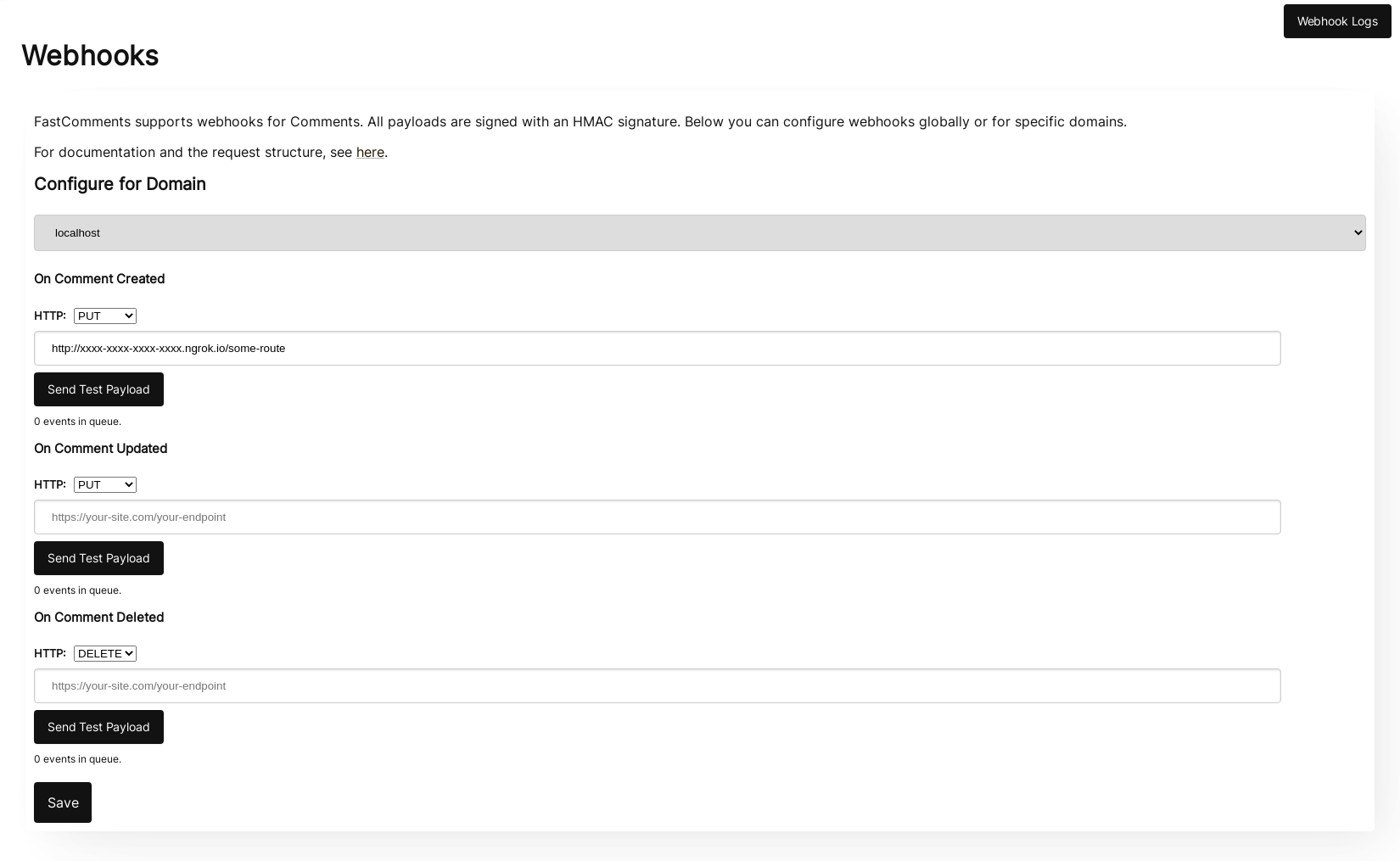
When clicking Send Test Payload, we will send two test events to check that you validate the API key.
Once it validates, hit Save.
Step 4: Add A Comment
Now you can add, edit, or delete comments and should see us call your local development machine with the events, using your testing API key. There may be up to 30 seconds delay for the events to reach your machine.
Nastavitev
Follow the same steps for localhost as you would production. Ensure you have production domains and API Secrets setup.
First, navigate to the Webhooks admin. This is accessible via Manage Data -> Webhooks.
The page lists every webhook on your account:
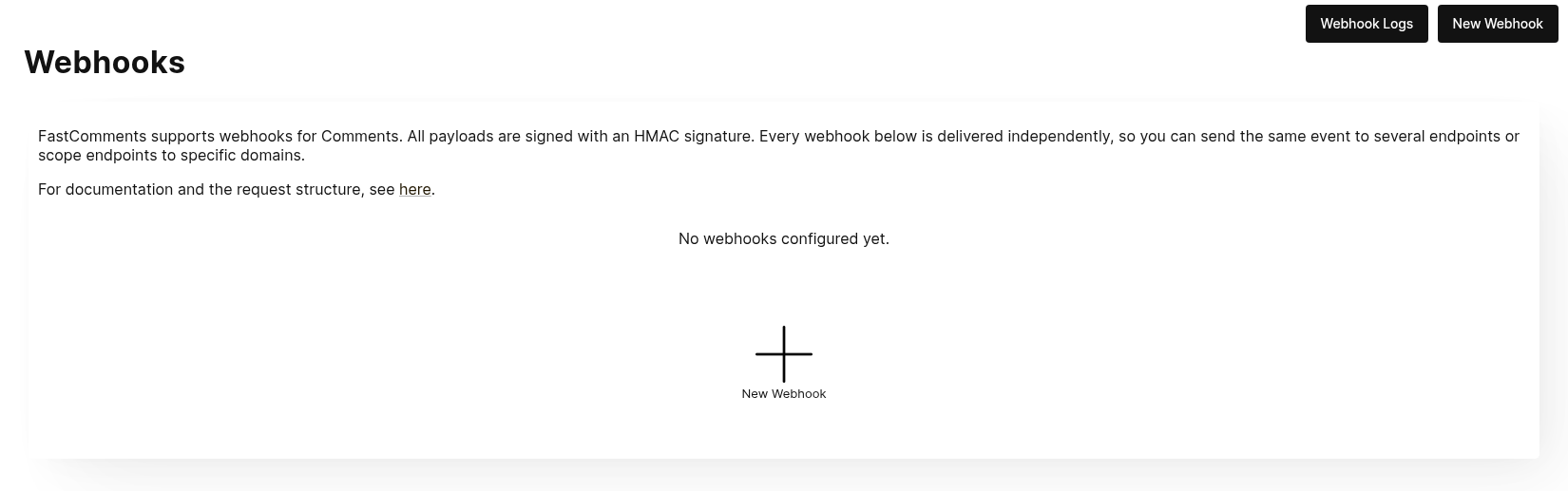
Click New Webhook to add one. Each webhook has a URL, one comment event (created, updated or deleted), a domain, and an HTTP method:
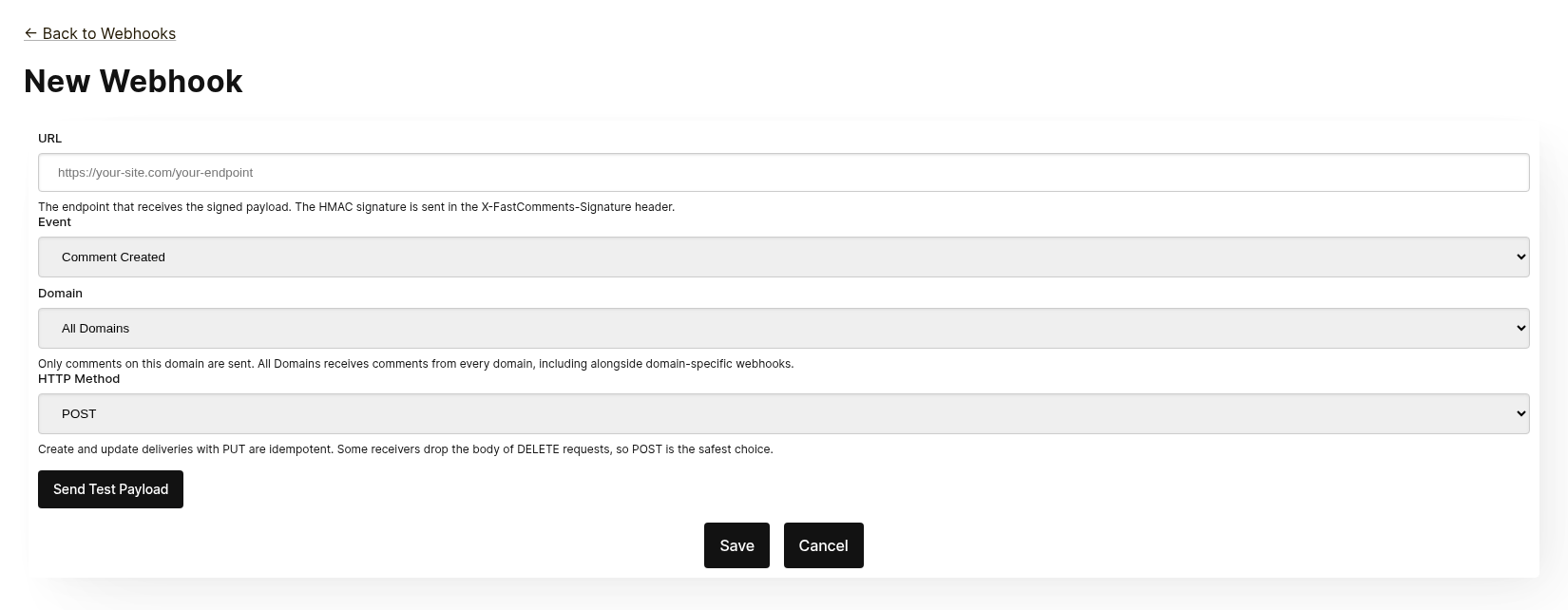
Every webhook is delivered independently. You can send the same event to several endpoints, and a webhook scoped to All Domains receives comments from every domain even when a domain-specific webhook exists for the same event. The same URL, event and domain cannot be added twice.
Before saving, click Send Test Payload to check the endpoint accepts a signed request. See the next section, "Testing", for details.
From the list you can edit, disable, re-enable or delete a webhook. Disabling keeps queued events until the webhook is re-enabled; deleting discards them.
Webhooks can also be created through the API, for example by Zapier. Those appear in the same list with the source API. See Managing Webhooks via the API.
Testiranje
The new and edit webhook pages have a Send Test Payload button that sends a request to the URL currently in the form, whether or not it has been saved. The Create and Update events send a dummy WebhookComment object, while testing Delete will send a dummy request body with just an ID.
Verifying Payloads
When testing your webhook integration, verify the incoming requests include the following headers:
X-FastComments-Timestamp- Unix timestamp (seconds)X-FastComments-Signature- HMAC-SHA256 signature
Webhooks created before the signature scheme was introduced also receive a token header containing your API Secret. New webhooks do not.
Use the HMAC signature verification to ensure payloads are authentic.
Testing Tools
You can use tools like webhook.site or ngrok to inspect incoming webhook payloads during development.
Event Types
- Create Event: Triggered when a new comment is created.
- Update Event: Triggered when a comment is edited.
- Delete Event: Triggered when a comment is deleted.
Each webhook is tied to one event and one HTTP method (POST, PUT or DELETE). Each event includes the full comment data in the request body (see Data Structures for the payload format).
Podatkovne strukture
The only structure sent via webhooks is the WebhookComment object, outlined in TypeScript below.
Struktura objekta WebhookComment
Struktura dogodka "Create"
The "create" event request body is a WebhookComment object.
Struktura dogodka "Update"
The "update" event request body is a WebhookComment object.
Struktura dogodka "Delete"
The "delete" event request body is a WebhookComment object.
Sprememba od 14. novembra 2023
Prej je telo zahteve za dogodek "delete" vsebovalo le ID komentarja. Zdaj vsebuje celoten komentar v času brisanja.
Every key is always present in the body. When the comment has no value for a field the body carries null
(or false for booleans and [] for lists), so the shape of a delivery never varies from one comment to the next.
 Run
Run When users are tagged in a comment, the information is stored in a list called mentions. Each object in that list
has the following structure.
Run HTTP metode
You can configure the HTTP method for each webhook event type in the admin panel:
- Create Event: POST or PUT (default: PUT) -> Create Event: POST ali PUT (privzeto: PUT)
- Update Event: POST or PUT (default: PUT) -> Update Event: POST ali PUT (privzeto: PUT)
- Delete Event: DELETE, POST, or PUT (default: DELETE) -> Delete Event: DELETE, POST ali PUT (privzeto: DELETE)
Since all requests contain an ID, Create and Update operations are idempotent by default (PUT). Repeating the same Create or Update request should not create duplicate objects on your side.
Glave zahteve
Each webhook request includes the following headers:
| Header | Description |
|---|---|
Content-Type | application/json |
token | Vaše API skrivnost |
X-FastComments-Timestamp | Unix časovni žig (sekunde), ko je bila zahteva podpisana |
X-FastComments-Signature | HMAC-SHA256 podpis (sha256=<hex>) |
See Varnost in API žetoni for information on verifying the HMAC signature.
Varnost in API žetoni
FastComments webhook zahtevki vsebujejo več mehanizmov za overjanje za zagotavljanje varnosti.
Poslane glave
| Glava | Opis |
|---|---|
token | Vaš API skrivni ključ (za združljivost z starejšimi različicami) |
X-FastComments-Timestamp | Unix časovni žig (v sekundah), ko je bil zahtevek podpisan |
X-FastComments-Signature | HMAC-SHA256 podpis vsebine |
Preverjanje HMAC podpisa (priporočeno)
Močno priporočamo preverjanje HMAC podpisa, da zagotovite, da so podatki webhooka avtentični in da z njimi ni bilo manipulirano.
Oblika podpisa: sha256=<hex-encoded-signature>
Kako se izračuna podpis:
- Združi:
timestamp + "." + JSON_payload_body - Izračunajte HMAC-SHA256 z vašim API skrivnim ključem kot ključem
- Hex-kodirajte rezultat
Primer preverjanja (Node.js)
const crypto = require('crypto');

function verifyWebhookSignature(req, apiSecret) {
    const timestamp = req.headers['x-fastcomments-timestamp'];
    const signature = req.headers['x-fastcomments-signature'];

    if (!timestamp || !signature) {
        return false;
    }

    // Preveri, ali je časovni žig svež (v 5 minutah)
    const now = Math.floor(Date.now() / 1000);
    if (Math.abs(now - parseInt(timestamp, 10)) > 300) {
        return false;  // Preprečevanje ponovitvenega napada
    }

    // Preveri podpis
    const payload = JSON.stringify(req.body);
    const expectedSignature = crypto
        .createHmac('sha256', apiSecret)
        .update(`${timestamp}.${payload}`)
        .digest('hex');

    return signature === `sha256=${expectedSignature}`;
}
Primer preverjanja (Python)
import hmac
import hashlib
import time
import json

def verify_webhook_signature(headers, body, api_secret):
    timestamp = headers.get('X-FastComments-Timestamp')
    signature = headers.get('X-FastComments-Signature')

    if not timestamp or not signature:
        return False

    # Preveri, ali je časovni žig svež
    now = int(time.time())
    if abs(now - int(timestamp)) > 300:
        return False

    # Preveri podpis
    payload = json.dumps(body, separators=(',', ':'))
    message = f"{timestamp}.{payload}"
    expected = hmac.new(
        api_secret.encode(),
        message.encode(),
        hashlib.sha256
    ).hexdigest()

    return signature == f"sha256={expected}"
Primer preverjanja (PHP)
function verifyWebhookSignature($headers, $body, $apiSecret) {
    $timestamp = $headers['X-FastComments-Timestamp'] ?? null;
    $signature = $headers['X-FastComments-Signature'] ?? null;

    if (!$timestamp || !$signature) {
        return false;
    }

    // Preveri, ali je časovni žig svež (v 5 minutah)
    $now = time();
    if (abs($now - intval($timestamp)) > 300) {
        return false;
    }

    // Preveri podpis
    $payload = json_encode($body, JSON_UNESCAPED_SLASHES);
    $message = $timestamp . '.' . $payload;
    $expectedSignature = 'sha256=' . hash_hmac('sha256', $message, $apiSecret);

    return hash_equals($expectedSignature, $signature);
}
Zastarelo overjanje
Glava token, ki vsebuje vaš API skrivni ključ, se še vedno pošilja zaradi združljivosti z starejšimi različicami. Vendar priporočamo prehod na preverjanje preko HMAC zaradi boljše varnosti, saj ščiti pred ponovitvenimi napadi.
Upravljanje webhookov prek API-ja
Webhooks can also be managed through the REST API. This is how integrations such as Zapier subscribe to comment events without touching the dashboard, and it follows the REST Hooks pattern: subscribe, receive events, unsubscribe.
API subscriptions live alongside the webhooks configured in the dashboard. A comment event is delivered to every webhook that matches its domain, each as its own delivery, whichever way the webhook was created.
Avtentikacija
Every request needs your API Key in the x-api-key header (or the API_KEY query parameter) and
your tenant ID in the tenantId query parameter. Both are shown on the API Secret page in the dashboard.
Naročanje
POST https://fastcomments.com/api/v1/webhooks?tenantId=YOUR_TENANT_ID
x-api-key: YOUR_API_KEY
Content-Type: application/json

{
    "url": "https://hooks.zapier.com/hooks/catch/123/abc",
    "event": "comment-created"
}| Polje | Obvezno | Opis |
|---|---|---|
url | Da | An absolute http or https URL. |
event | Da | comment-created, comment-updated or comment-deleted. |
domain | Ne | A domain from your account configuration. Defaults to *, which receives events for every domain. |
method | Ne | POST (default), PUT or DELETE. |
The response contains the subscription:
{
    "status": "success",
    "webhook": {
        "id": "66f1c4c1e7a2b3d4f5a6b7c8",
        "url": "https://hooks.zapier.com/hooks/catch/123/abc",
        "event": "comment-created",
        "domain": "*",
        "method": "POST",
        "source": "api",
        "enabled": true,
        "createdAt": "2026-09-08T12:00:00.000Z"
    }
}
Subscribing the same URL to the same event and domain again returns the existing subscription rather than creating a duplicate, so a client can safely retry. Each tenant can have up to 50 API subscriptions.
Seznam
GET https://fastcomments.com/api/v1/webhooks?tenantId=YOUR_TENANT_IDReturns every webhook for the tenant, including those managed in the dashboard ("source": "dashboard").
Filter with event, domain or source.
Odjava
DELETE https://fastcomments.com/api/v1/webhooks/SUBSCRIPTION_ID?tenantId=YOUR_TENANT_IDDeleting a subscription also discards any events still queued for it. Only subscriptions created
through the API can be deleted this way; a dashboard webhook, or an id that does not exist on your
account, answers 404 with code not-found. Dashboard webhooks are edited on the Webhooks page.
Telesa zahtevkov in podpisovanje
Deliveries use the same payload as dashboard webhooks (see Data Structures) and are signed with the same
HMAC scheme (see Security & API Tokens). API subscriptions never receive the legacy token header, so
verify the X-FastComments-Signature header instead.
Vzorčna telesa
GET https://fastcomments.com/api/v1/webhooks/sample-payloads?tenantId=YOUR_TENANT_ID&event=comment-created&limit=3Returns the account's most recent comments in exactly the shape a delivery carries, so an integration can
show real sample data before the first event arrives. event is optional and only validated, since every
event delivers the same comment object. limit defaults to 3 and accepts 1 to 10. Costs 2 API credits.
{
    "status": "success",
    "payloads": [
        {
            "id": "66f1c4c1e7a2b3d4f5a6b7c8",
            "urlId": "https://example.com/blog/hello-world",
            "commenterName": "Jane Reader",
            "comment": "Great article!",
            "date": "2026-09-08T12:00:00.000Z",
            "approved": true
        }
    ]
}
Odgovor z 410 Gone
If an API subscription's endpoint responds with HTTP 410 Gone, FastComments treats that as an
unsubscribe: the subscription is deleted along with its queued events, and no further deliveries are
attempted. Webhooks configured in the dashboard are never deleted automatically; for them a 410 is an
ordinary failure. Any other failure status is retried and eventually disables the webhook, as described
in How it Works & Handling Retries.
Nadzorna plošča
API subscriptions appear in the Webhooks list with the source API, where an administrator can edit, disable, re-enable or delete them.
Kako deluje in obravnava ponovnih poskusov
Vse spremembe objekta Comment v sistemu sprožijo dogodek, ki se znajde v vrsti.
Prvotni webhook dogodek je običajno poslan v šestih sekundah po nastanku vira dogodka.
To vrsto lahko spremljate v Webhooks admin v primeru, da vaš API preneha delovati.
Če zahteva do vašega API ne uspe, jo bomo ponovno uvrstili v vrsto po urniku.
Ta urnik je 1 Minute * the retry count. Če klic ne uspe enkrat, bo poskus ponovljen čez
minuto. Če ne uspe dvakrat, bo nato počakal dve minuti, in tako naprej. To je zato, da ne
preobremenimo vašega API, če imate izpade zaradi obremenitve.
Webhooks je mogoče preklicati na stran z dnevniki.
Za zaključek
To zaključuje našo dokumentacijo o Webhookih.
Upamo, da boste integracijo FastComments Webhookov našli enostavno za razumevanje in hitro za nastavitev.
Če menite, da ste odkrili kakšne vrzeli v naši dokumentaciji, nam sporočite spodaj.