
Webhooki
Z FastComments możliwe jest wywołanie punktu końcowego API za każdym razem, gdy komentarz zostanie dodany, zaktualizowany lub usunięty z naszego systemu.
Realizujemy to za pomocą asynchronicznych webhooków przez HTTP/HTTPS.
Czym są webhooki 
Webhook to mechanizm, lub integracja, pomiędzy dwoma systemami gdzie "producent" (FastComments) wyzwala zdarzenie które "konsument" (Ty) odbiera za pomocą wywołania API.
Obsługiwane zdarzenia i zasoby
FastComments obsługuje webhooki tylko dla zasobu Comment.
Obsługujemy webhooki dla tworzenia komentarzy, ich usuwania oraz aktualizacji.
Każdy z nich jest traktowany jako osobne zdarzenie w naszym systemie i w związku z tym ma różne semantyki i struktury zdarzeń webhooków.
Dowolna liczba endpointów może subskrybować to samo zdarzenie, z poziomu panelu sterowania lub poprzez API (zobacz Managing Webhooks via the API). Każdy webhook jest dostarczany niezależnie.
Konfiguracja lokalnego środowiska deweloperskiego
For Local development, use a tool like ngrok.
In order to simplify keeping the system secure, local development follows the same process as setting up and securing other environments.
Krok 1: Dodaj „localhost” do domen w swoim koncie.
Add "localhost" as a domain here.


Krok 2: Wybierz klucz API
We're going to be adding webhook configuration for your domain, so we'll need an API key. You can do that here.

Under "Associate with domain" - select your "localhost" domain.
UWAGA: Alternatywnie możesz używać jednego tajnego klucza API dla całej aktywności testowej i środowisk staging. Po prostu dodaj tajny klucz API dla "All Domains", i nadaj mu nazwę, np. "test".
Ensure you have an API Secret defined for your production domain(s). Events for all other domains will use the wildcard (testing) secret.
Krok 3: Dodaj swój webhook
While running ngrok or similar tool, set the value for "localhost" here.
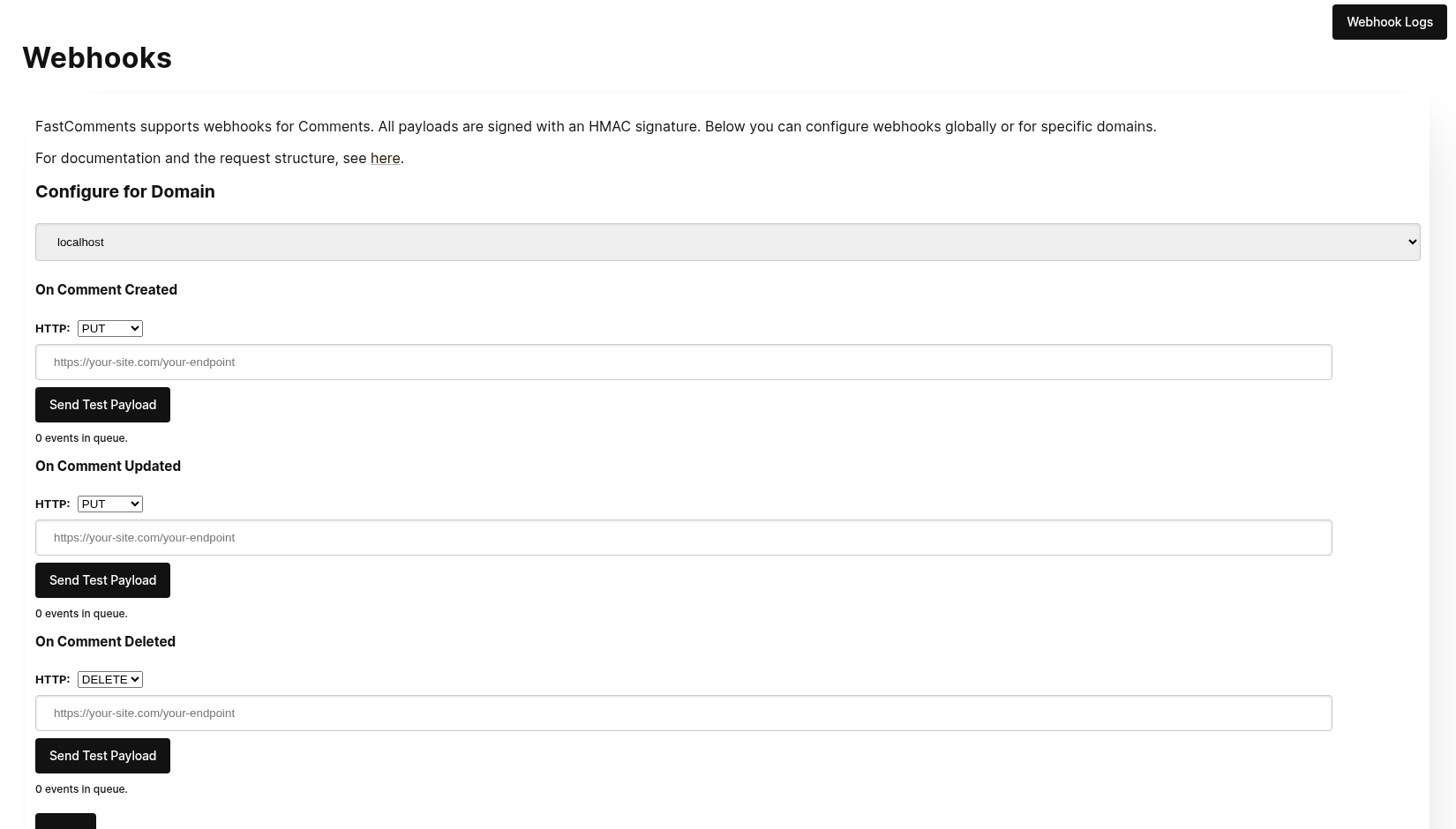
When clicking Send Test Payload, we will send two test events to check that you validate the API key.
Once it validates, hit Save.
Krok 4: Dodaj komentarz
Now you can add, edit, or delete comments and should see us call your local development machine with the events, using your testing API key. There may be up to 30 seconds delay for the events to reach your machine.
Konfiguracja
Postępuj zgodnie z tymi samymi krokami dla localhost, tak jak w środowisku produkcyjnym. Upewnij się, że masz skonfigurowane domeny produkcyjne i sekrety API.
Najpierw przejdź do Webhooks admin. Jest to dostępne poprzez Zarządzanie danymi -> Webhooks.
Strona wyświetla wszystkie webhooki w Twoim koncie:
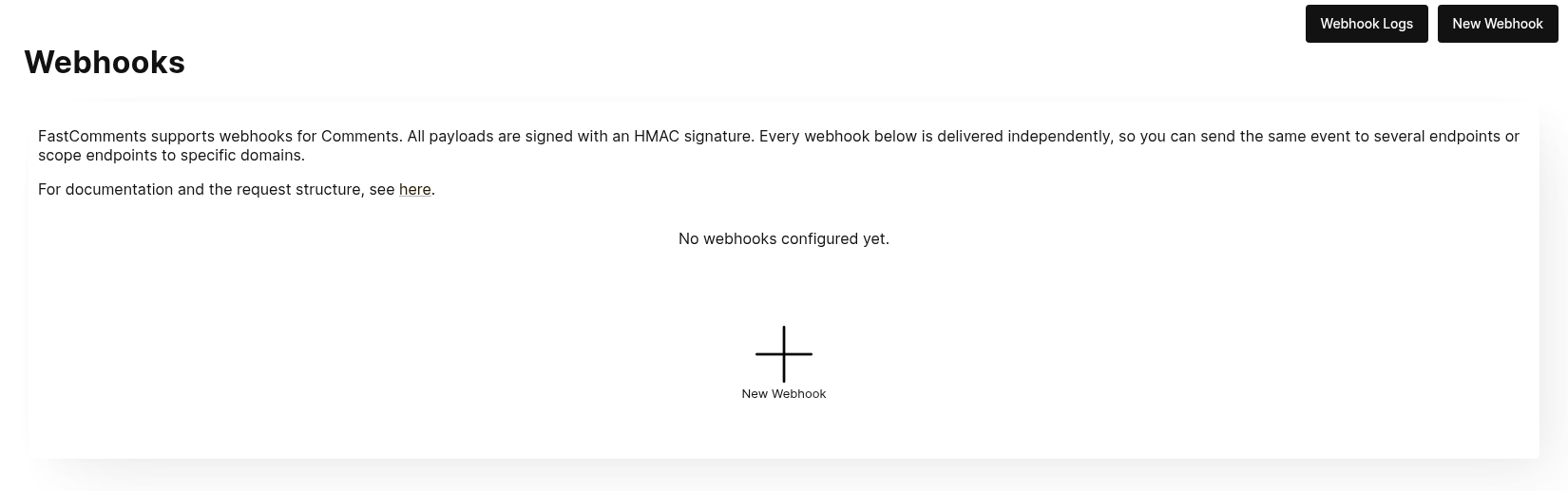
Kliknij Nowy webhook, aby dodać go. Każdy webhook ma URL, jedno zdarzenie komentarza (utworzone, zaktualizowane lub usunięte), domenę oraz metodę HTTP:
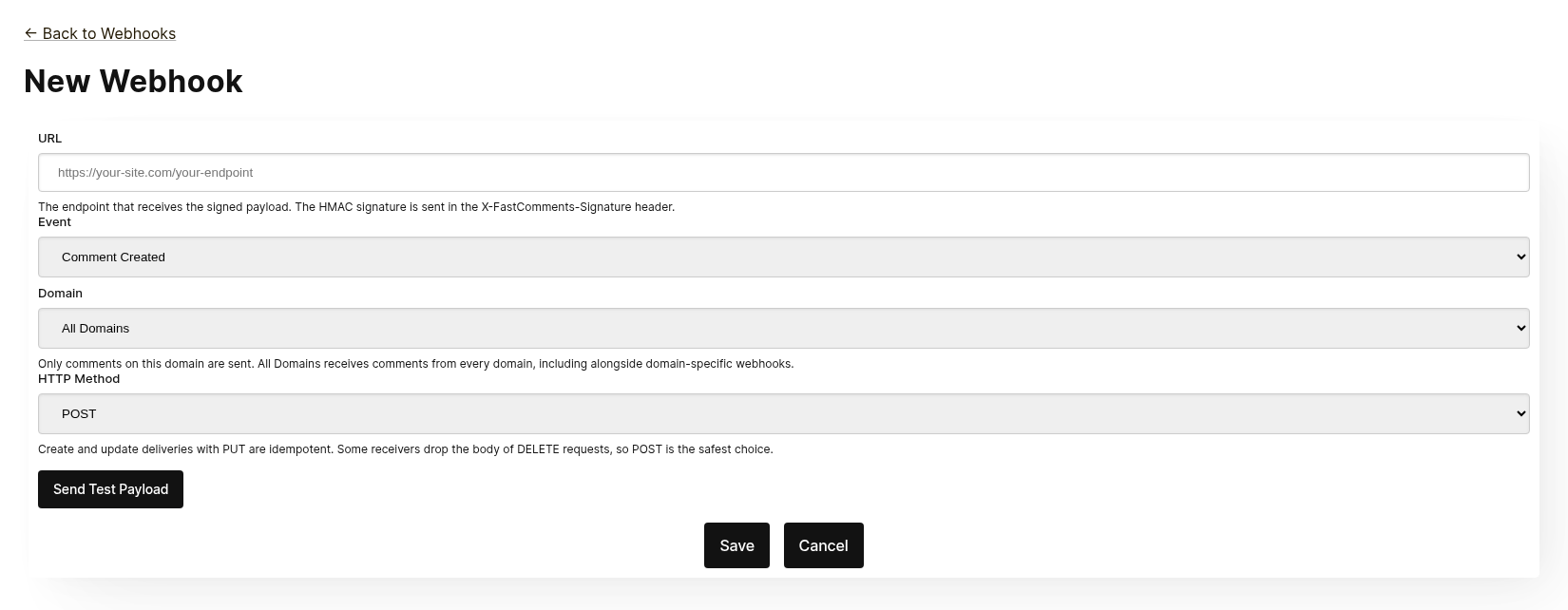
Każdy webhook jest dostarczany niezależnie. Możesz wysłać to samo zdarzenie do kilku punktów końcowych, a webhook o zakresie Wszystkie domeny otrzymuje komentarze ze wszystkich domen, nawet gdy istnieje webhook specyficzny dla domeny dla tego samego zdarzenia. Ten sam URL, zdarzenie i domena nie mogą być dodane dwukrotnie.
Przed zapisaniem kliknij Wyślij testowy ładunek, aby sprawdzić, czy punkt końcowy akceptuje podpisane żądanie. Zobacz następną sekcję, „Testowanie”, aby uzyskać szczegóły.
Z listy możesz edytować, wyłączyć, ponownie włączyć lub usunąć webhook. Wyłączenie zachowuje oczekujące zdarzenia, aż webhook zostanie ponownie włączony; usunięcie powoduje ich odrzucenie.
Webhooki mogą być również tworzone za pośrednictwem API, na przykład przez Zapier. Pojawiają się na tej samej liście ze źródłem API. Zobacz Zarządzanie webhookami za pomocą API.
Testowanie
Nowe i edytowane strony webhooków mają przycisk Send Test Payload, który wysyła żądanie do adresu URL aktualnie znajdującego się w formularzu, niezależnie od tego, czy został on zapisany. Zdarzenia Create i Update wysyłają przykładowy obiekt WebhookComment, natomiast testowanie Delete wyśle przykładowe ciało żądania zawierające jedynie identyfikator.
Weryfikacja ładunków
Podczas testowania integracji webhooka, sprawdź, czy przychodzące żądania zawierają następujące nagłówki:
X-FastComments-Timestamp– znacznik czasu Unix (sekundy)X-FastComments-Signature– podpis HMAC‑SHA256
Webhooki utworzone przed wprowadzeniem schematu podpisu otrzymują również nagłówek token zawierający Twój sekret API. Nowe webhooki go nie mają.
Użyj weryfikacji podpisu HMAC, aby zapewnić autentyczność ładunków.
Narzędzia testowe
Możesz używać narzędzi takich jak webhook.site lub ngrok, aby przeglądać przychodzące ładunki webhooków podczas programowania.
Typy zdarzeń
- Zdarzenie Create: wywoływane, gdy zostaje utworzony nowy komentarz.
- Zdarzenie Update: wywoływane, gdy komentarz zostaje edytowany.
- Zdarzenie Delete: wywoływane, gdy komentarz zostaje usunięty.
Każdy webhook jest powiązany z jednym zdarzeniem i jedną metodą HTTP (POST, PUT lub DELETE). Każde zdarzenie zawiera pełne dane komentarza w ciele żądania (zobacz Data Structures po format ładunku).
Struktury danych
The only structure sent via webhooks is the WebhookComment object, outlined in TypeScript below.
Struktura obiektu WebhookComment
Struktura zdarzenia „Create”
The "create" event request body is a WebhookComment object.
Struktura zdarzenia „Update”
The "update" event request body is a WebhookComment object.
Struktura zdarzenia „Delete”
The "delete" event request body is a WebhookComment object.
Change as of Nov 14th 2023
Previously the "delete" event request body only contained the comment id. It now contains the full comment at the time of deletion.
Every key is always present in the body. When the comment has no value for a field the body carries null
(or false for booleans and [] for lists), so the shape of a delivery never varies from one comment to the next.
 Run
Run When users are tagged in a comment, the information is stored in a list called mentions. Each object in that list
has the following structure.
Run Metody HTTP
You can configure the HTTP method for each webhook event type in the admin panel:
- Zdarzenie Create: POST or PUT (default: PUT)
- Zdarzenie Update: POST or PUT (default: PUT)
- Zdarzenie Delete: DELETE, POST, or PUT (default: DELETE)
Since all requests contain an ID, Create and Update operations are idempotent by default (PUT). Repeating the same Create or Update request should not create duplicate objects on your side.
Nagłówki żądania
Each webhook request includes the following headers:
| Nagłówek | Opis |
|---|---|
Content-Type | application/json |
token | Your API Secret |
X-FastComments-Timestamp | Unix timestamp (seconds) when the request was signed |
X-FastComments-Signature | HMAC-SHA256 signature (sha256=<hex>) |
See Security & API Tokens for information on verifying the HMAC signature.
Bezpieczeństwo i tokeny API
FastComments webhook requests include multiple authentication mechanisms for security.
Wysyłane nagłówki
| Nagłówek | Opis |
|---|---|
token | Twój API Secret (w celu zachowania zgodności wstecznej) |
X-FastComments-Timestamp | Znacznik czasu Unix (sekundy), kiedy żądanie zostało podpisane |
X-FastComments-Signature | Podpis HMAC-SHA256 ładunku |
Weryfikacja podpisu HMAC (zalecane)
Zdecydowanie zalecamy weryfikację podpisu HMAC, aby upewnić się, że ładunki webhooków są autentyczne i nie zostały zmienione.
Format podpisu: sha256=<hex-encoded-signature>
Jak obliczany jest podpis:
- Połącz:
timestamp + "." + JSON_payload_body - Oblicz HMAC-SHA256 używając swojego API Secret jako klucza
- Zakoduj wynik w hex
Przykład weryfikacji (Node.js)
const crypto = require('crypto');

function verifyWebhookSignature(req, apiSecret) {
    const timestamp = req.headers['x-fastcomments-timestamp'];
    const signature = req.headers['x-fastcomments-signature'];

    if (!timestamp || !signature) {
        return false;
    }

    // Zweryfikuj, że znacznik czasu jest aktualny (w ciągu 5 minut)
    const now = Math.floor(Date.now() / 1000);
    if (Math.abs(now - parseInt(timestamp, 10)) > 300) {
        return false;  // Zapobieganie atakom powtórzeniowym
    }

    // Verify signature
    const payload = JSON.stringify(req.body);
    const expectedSignature = crypto
        .createHmac('sha256', apiSecret)
        .update(`${timestamp}.${payload}`)
        .digest('hex');

    return signature === `sha256=${expectedSignature}`;
}
Przykład weryfikacji (Python)
import hmac
import hashlib
import time
import json

def verify_webhook_signature(headers, body, api_secret):
    timestamp = headers.get('X-FastComments-Timestamp')
    signature = headers.get('X-FastComments-Signature')

    if not timestamp or not signature:
        return False

    # Zweryfikuj, że znacznik czasu jest aktualny
    now = int(time.time())
    if abs(now - int(timestamp)) > 300:
        return False

    # Zweryfikuj podpis
    payload = json.dumps(body, separators=(',', ':'))
    message = f"{timestamp}.{payload}"
    expected = hmac.new(
        api_secret.encode(),
        message.encode(),
        hashlib.sha256
    ).hexdigest()

    return signature == f"sha256={expected}"
Przykład weryfikacji (PHP)
function verifyWebhookSignature($headers, $body, $apiSecret) {
    $timestamp = $headers['X-FastComments-Timestamp'] ?? null;
    $signature = $headers['X-FastComments-Signature'] ?? null;

    if (!$timestamp || !$signature) {
        return false;
    }

    // Zweryfikuj, że znacznik czasu jest aktualny (w ciągu 5 minut)
    $now = time();
    if (abs($now - intval($timestamp)) > 300) {
        return false;
    }

    // Zweryfikuj podpis
    $payload = json_encode($body, JSON_UNESCAPED_SLASHES);
    $message = $timestamp . '.' . $payload;
    $expectedSignature = 'sha256=' . hash_hmac('sha256', $message, $apiSecret);

    return hash_equals($expectedSignature, $signature);
}
Starsze uwierzytelnianie
Nagłówek token zawierający Twój API Secret wciąż jest wysyłany dla zachowania zgodności wstecznej. Jednak zalecamy przejście na weryfikację HMAC dla lepszego bezpieczeństwa, ponieważ chroni ona przed atakami powtórzeniowymi.
Zarządzanie webhookami za pomocą API
Webhooks można również zarządzać za pośrednictwem REST API. Tak integracje takie jak Zapier subskrybują zdarzenia komentarzy bez użycia panelu, i stosują wzorzec REST Hooks: subskrybuj, odbieraj zdarzenia, wypisz się.
Subskrypcje API współistnieją z webhookami skonfigurowanymi w panelu. Zdarzenie komentarza jest dostarczane do każdego webhooka, który pasuje do jego domeny, każde jako osobna dostawa, niezależnie od tego, w jaki sposób webhook został utworzony.
Uwierzytelnianie
Każde żądanie wymaga Twojego klucza API w nagłówku x-api-key (lub parametrze zapytania API_KEY) oraz identyfikatora najemcy w parametrze zapytania tenantId. Oba są wyświetlane na stronie API Secret w panelu.
Subskrypcja
POST https://fastcomments.com/api/v1/webhooks?tenantId=YOUR_TENANT_ID
x-api-key: YOUR_API_KEY
Content-Type: application/json

{
    "url": "https://hooks.zapier.com/hooks/catch/123/abc",
    "event": "comment-created"
}| Pole | Wymagane | Opis |
|---|---|---|
url | Tak | Bezwzględny adres URL http lub https. |
event | Tak | comment-created, comment-updated lub comment-deleted. |
domain | Nie | Domena z konfiguracji Twojego konta. Domyślnie *, co oznacza odbieranie zdarzeń ze wszystkich domen. |
method | Nie | POST (domyślnie), PUT lub DELETE. |
Odpowiedź zawiera subskrypcję:
{
    "status": "success",
    "webhook": {
        "id": "66f1c4c1e7a2b3d4f5a6b7c8",
        "url": "https://hooks.zapier.com/hooks/catch/123/abc",
        "event": "comment-created",
        "domain": "*",
        "method": "POST",
        "source": "api",
        "enabled": true,
        "createdAt": "2026-09-08T12:00:00.000Z"
    }
}
Subskrybowanie tego samego URL do tego samego zdarzenia i domeny ponownie zwraca istniejącą subskrypcję zamiast tworzyć duplikat, więc klient może bezpiecznie ponowić próbę. Każdy najemca może mieć maksymalnie 50 subskrypcji API.
Lista
GET https://fastcomments.com/api/v1/webhooks?tenantId=YOUR_TENANT_IDZwraca wszystkie webhooki dla najemcy, w tym te zarządzane w panelu ("source": "dashboard"). Filtruj za pomocą event, domain lub source.
Anulowanie subskrypcji
DELETE https://fastcomments.com/api/v1/webhooks/SUBSCRIPTION_ID?tenantId=YOUR_TENANT_IDUsunięcie subskrypcji usuwa również wszystkie zdarzenia, które nadal są w kolejce. Tylko subskrypcje utworzone przez API mogą być usunięte w ten sposób; webhook z panelu lub identyfikator nieistniejący na Twoim koncie zwraca 404 z kodem not-found. Webhooki z panelu są edytowane na stronie Webhooks.
Ładunki i podpisy
Dostawy używają takiego samego ładunku jak webhooki z panelu (zobacz Struktury Danych) i są podpisane tym samym schematem HMAC (zobacz Bezpieczeństwo & Tokeny API). Subskrypcje API nigdy nie otrzymują starszego nagłówka token, więc należy weryfikować nagłówek X-FastComments-Signature.
Przykładowe ładunki
GET https://fastcomments.com/api/v1/webhooks/sample-payloads?tenantId=YOUR_TENANT_ID&event=comment-created&limit=3Zwraca najnowsze komentarze konta w dokładnym formacie, jaki ma dostawa, dzięki czemu integracja może wyświetlić rzeczywiste przykładowe dane przed przyjściem pierwszego zdarzenia. event jest opcjonalny i jedynie walidowany, ponieważ każde zdarzenie dostarcza ten sam obiekt komentarza. limit domyślnie wynosi 3 i przyjmuje wartości od 1 do 10. Kosztuje 2 kredyty API.
{
    "status": "success",
    "payloads": [
        {
            "id": "66f1c4c1e7a2b3d4f5a6b7c8",
            "urlId": "https://example.com/blog/hello-world",
            "commenterName": "Jane Reader",
            "comment": "Great article!",
            "date": "2026-09-08T12:00:00.000Z",
            "approved": true
        }
    ]
}
Odpowiadanie kodem 410 Gone
Jeśli endpoint subskrypcji API odpowie kodem HTTP 410 Gone, FastComments traktuje to jako wypisanie się: subskrypcja jest usuwana wraz z oczekującymi zdarzeniami i nie są podejmowane dalsze próby dostawy. Webhooki skonfigurowane w panelu nigdy nie są usuwane automatycznie; dla nich 410 oznacza zwykłą awarię. Każdy inny kod błędu jest ponawiany i ostatecznie wyłącza webhook, jak opisano w sekcji Jak to działa & Obsługa ponowień.
Panel
Subskrypcje API pojawiają się na liście Webhooks ze źródłem API, gdzie administrator może je edytować, wyłączać, ponownie włączać lub usuwać.
Jak to działa i obsługa ponownych prób
Wszystkie zmiany obiektu Comment w systemie wywołują zdarzenie, które trafia do kolejki.
Początkowe zdarzenie webhook jest zwykle wysyłane w ciągu sześciu sekund od wystąpienia źródła zdarzenia.
Możesz monitorować tę kolejkę w panelu administracyjnym Webhooks na wypadek, gdyby Twoje API przestało działać.
Jeśli żądanie do Twojego API się nie powiedzie, ponownie umieścimy je w kolejce zgodnie z harmonogramem.
Ten harmonogram to 1 Minute * the retry count. Jeśli wywołanie zakończy się niepowodzeniem raz, spróbuje ponownie za
minutę. Jeśli nie powiedzie się dwa razy, poczeka wtedy dwie minuty, i tak dalej. Dzięki temu
nie przeciążymy Twojego API, jeśli przestaje działać z powodów związanych z obciążeniem.
Webhooks można anulować z strony logów.
Podsumowanie
To kończy naszą dokumentację Webhooks.
Mamy nadzieję, że integracja FastComments Webhook jest łatwa do zrozumienia i szybka do skonfigurowania.
Jeśli uważasz, że zidentyfikowałeś jakiekolwiek luki w naszej dokumentacji, daj nam znać poniżej.