
Webhooks
Uz FastComments moguće je pozvati API endpoint kad god se komentar doda, ažurira ili ukloni iz našeg sustava.
Ovo ostvarujemo pomoću asinkronih webhookova preko HTTP/HTTPS.
Što su Webhookovi 
Webhook je mehanizam, ili integracija, između dvaju sustava gdje "proizvođač" (FastComments) pokreće događaj koji "potrošač" (Vi) konzumira putem API poziva.
Podržani događaji i resursi
FastComments podržava webhookove samo za resurs Comment.
Podržavamo webhookove za stvaranje komentara, uklanjanje i ažuriranje.
Svaki od ovih smatra se zasebnim događajem u našem sustavu i stoga ima različitu semantiku i strukture za webhook događaje.
Bilo koji broj krajnjih točaka može se pretplatiti na isti događaj, putem nadzorne ploče ili kroz API (pogledajte Upravljanje webhookovima putem API-ja). Svaki webhook se isporučuje neovisno.
Postavljanje lokalnog razvoja
Za lokalni razvoj, koristite alat poput ngrok.
Kako bi se pojednostavilo održavanje sigurnosti sustava, lokalni razvoj slijedi isti proces kao postavljanje i osiguravanje drugih okruženja.
Korak 1: Dodajte "localhost" u domene na vašem računu.
Dodajte "localhost" kao domenu ovdje.


Korak 2: Odaberite API ključ
Dodavat ćemo konfiguraciju webhooka za vašu domenu, pa nam je potreban API ključ. To možete učiniti ovdje.

Pod "Associate with domain" – odaberite vašu domenu "localhost".
NAPOMENA: Alternativno, možete koristiti jedan API tajni za sve testne aktivnosti i testna okruženja. Jednostavno dodajte API tajnu za "All Domains", i dajte joj ime poput "test".
Provjerite imate li definiranu API tajnu za svoje produkcijske domene. Događaji za sve ostale domene koristit će wildcard (testnu) tajnu.
Korak 3: Dodajte svoj webhook
Dok koristite ngrok ili sličan alat, postavite vrijednost za "localhost" ovdje.
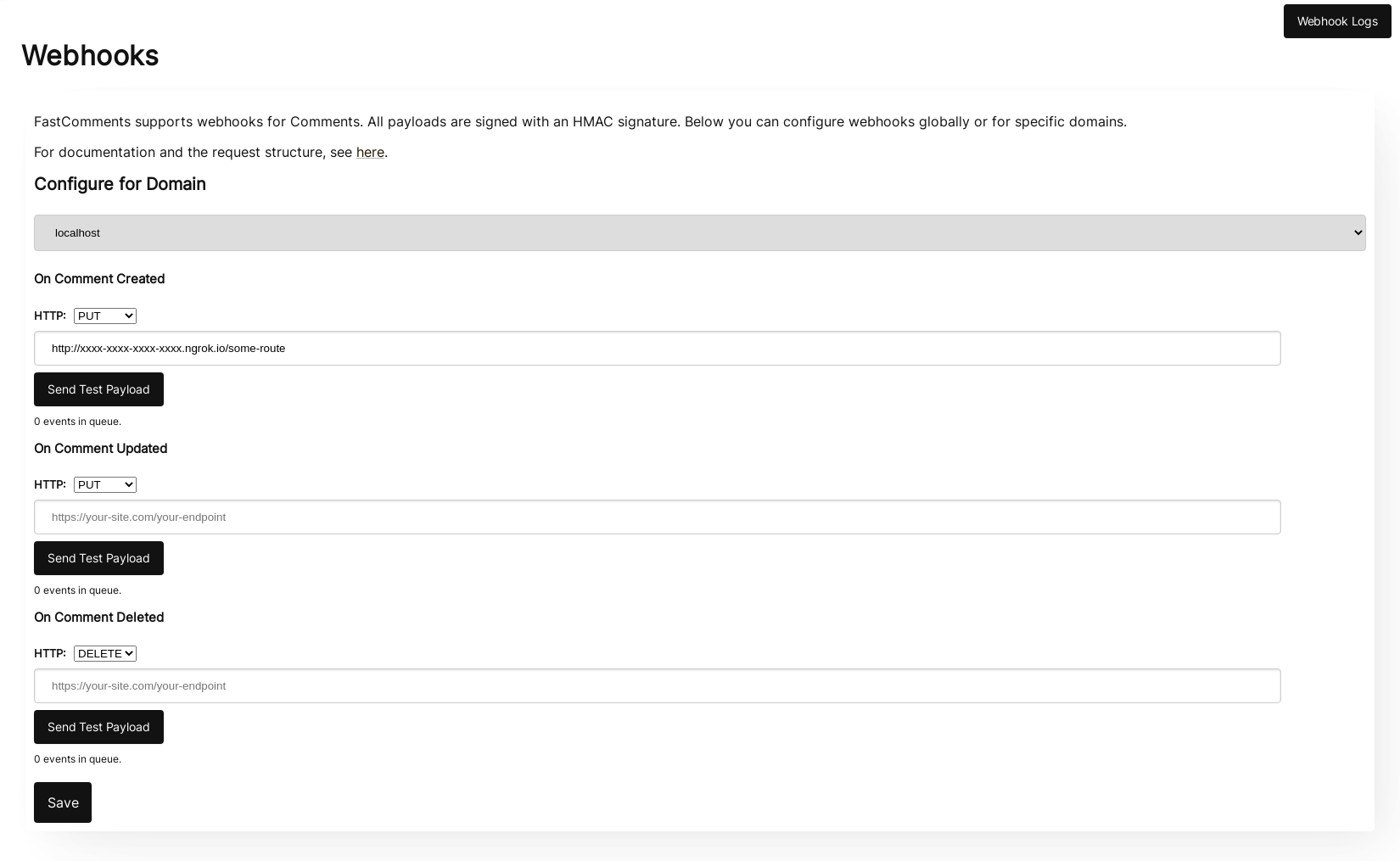
Kad kliknete Send Test Payload, poslati ćemo dva testna događaja kako bismo provjerili da li validirate API ključ.
Kad se validira, pritisnite Save.
Korak 4: Dodajte komentar
Sada možete dodavati, uređivati ili brisati komentare i trebali biste vidjeti kako pozivamo vaše lokalno razvojno računalo s događajima, koristeći vaš testni API ključ. Može proći do 30 sekundi prije nego što događaji stignu do vašeg računala.
Postavljanje
Slijedite iste korake za localhost kao i za produkciju. Provjerite imate li postavljene produkcijske domene i API tajne.
Prvo, idite na Webhooks admin. Ovo je dostupno putem Manage Data -> Webhooks.
Stranica prikazuje sve webhookove na vašem računu:
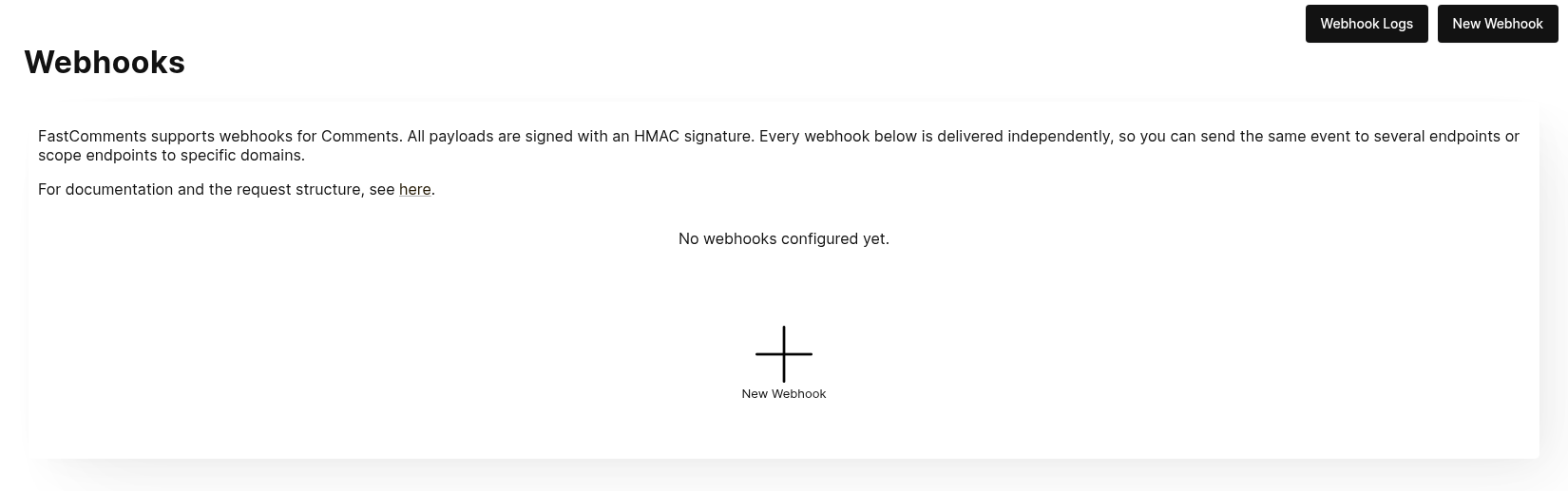
Kliknite New Webhook da biste dodali jedan. Svaki webhook ima URL, jedan događaj komentara (kreiran, ažuriran ili izbrisan), domenu i HTTP metodu:
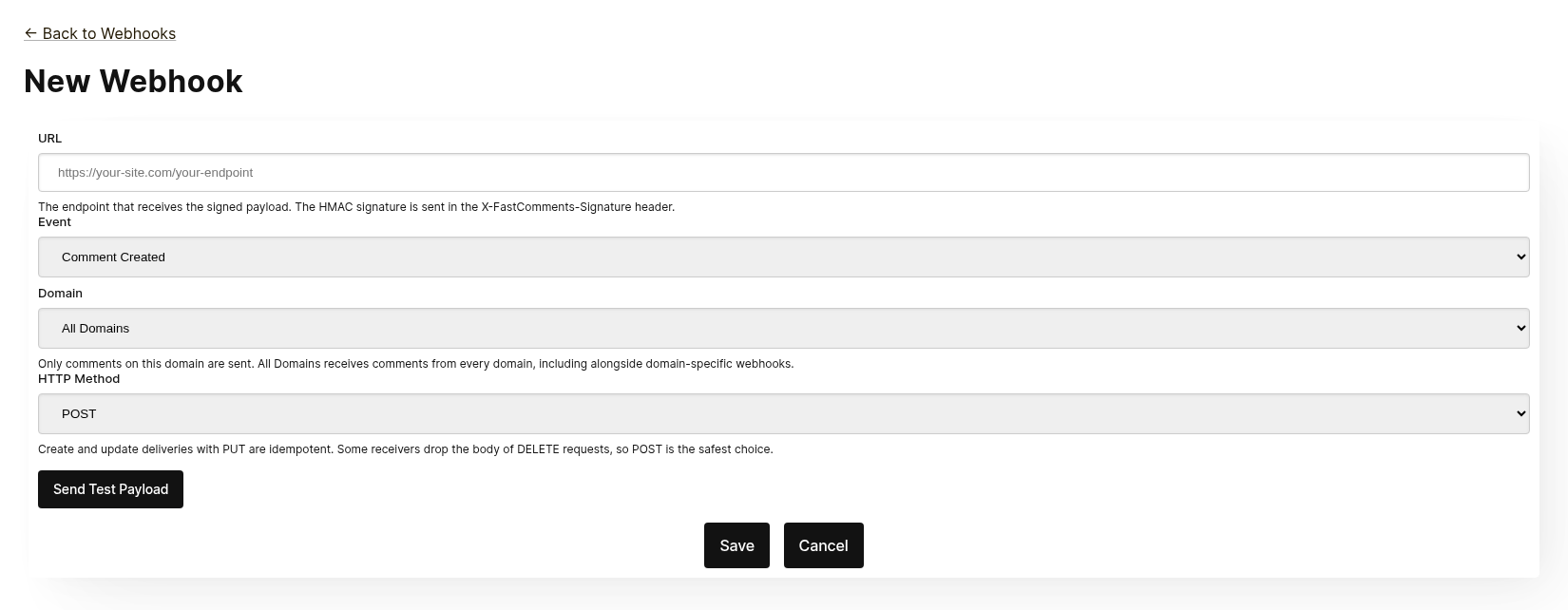
Svaki webhook se isporučuje neovisno. Možete poslati isti događaj na više krajnjih točaka, a webhook ograničen na All Domains prima komentare sa svih domena čak i kada postoji webhook specifičan za domenu za isti događaj. Isti URL, događaj i domena ne mogu se dodati dva puta.
Prije spremanja, kliknite Send Test Payload kako biste provjerili prihvaća li krajnja točka potpisani zahtjev. Pogledajte sljedeći odjeljak, "Testing", za detalje.
Sa popisa možete uređivati, onemogućiti, ponovo omogućiti ili izbrisati webhook. Onemogućavanje zadržava zakazane događaje dok se webhook ne ponovo omogući; brisanje ih odbacuje.
Webhookove je također moguće kreirati putem API-ja, na primjer pomoću Zapiera. Oni se pojavljuju u istom popisu s izvorom API. Pogledajte Managing Webhooks via the API.
Testiranje
The new and edit webhook pages have a Send Test Payload button that sends a request to the URL currently in the form, whether or not it has been saved. The Create and Update events send a dummy WebhookComment object, while testing Delete will send a dummy request body with just an ID.
Provjera payloada
When testing your webhook integration, verify the incoming requests include the following headers:
X-FastComments-Timestamp- Unix timestamp (seconds)X-FastComments-Signature- HMAC-SHA256 signature
Webhooks created before the signature scheme was introduced also receive a token header containing your API Secret. New webhooks do not.
Use the HMAC signature verification to ensure payloads are authentic.
Alati za testiranje
You can use tools like webhook.site or ngrok to inspect incoming webhook payloads during development.
Vrste događaja
- Create Event: Triggered when a new comment is created.
- Update Event: Triggered when a comment is edited.
- Delete Event: Triggered when a comment is deleted.
Each webhook is tied to one event and one HTTP method (POST, PUT or DELETE). Each event includes the full comment data in the request body (see Data Structures for the payload format).
Strukture podataka
The only structure sent via webhooks is the WebhookComment object, outlined in TypeScript below.
The WebhookComment Object Structure
The "Create" Event Structure
The "create" event request body is a WebhookComment object.
The "Update" Event Structure
The "update" event request body is a WebhookComment object.
The "Delete" Event Structure
The "delete" event request body is a WebhookComment object.
Change as of Nov 14th 2023
Previously the "delete" event request body only contained the comment id. It now contains the full comment at the time of deletion.
Promjena od 14. studenog 2023. Prethodno je tijelo zahtjeva za događaj "delete" sadržavalo samo ID komentara. Sada sadrži cijeli komentar u trenutku brisanja.
Every key is always present in the body. When the comment has no value for a field the body carries null
(or false for booleans and [] for lists), so the shape of a delivery never varies from one comment to the next.
Svaki ključ je uvijek prisutan u tijelu. Kada komentar nema vrijednost za neko polje, tijelo nosi null
(ili false za boolean vrijednosti i [] za liste), tako da oblik isporuke nikada ne varira od jednog komentara do drugog.
 Run
Run When users are tagged in a comment, the information is stored in a list called mentions. Each object in that list
has the following structure.
Kada su korisnici označeni u komentaru, informacije se pohranjuju u popisu pod nazivom mentions. Svaki objekt u tom popisu
ima sljedeću strukturu.
Run HTTP Methods
Možete konfigurirati HTTP metodu za svaki tip webhook događaja u administratorskom sučelju:
- Create Event: POST ili PUT (zadano: PUT)
- Update Event: POST ili PUT (zadano: PUT)
- Delete Event: DELETE, POST ili PUT (zadano: DELETE)
Budući da svi zahtjevi sadrže ID, operacije Create i Update su po defaultu idempotentne (PUT). Ponovno slanje istog Create ili Update zahtjeva ne bi trebalo stvoriti duple objekte na vašoj strani.
Request Headers
| Header | Description |
|---|---|
Content-Type | application/json |
token | Vaša API tajna |
X-FastComments-Timestamp | Unix vremenski žig (sekunde) kada je zahtjev potpisan |
X-FastComments-Signature | HMAC-SHA256 potpis (sha256=<hex>) |
Pogledajte Security & API Tokens za informacije o provjeri HMAC potpisa.
Sigurnost i API tokeni
FastComments webhook zahtjevi uključuju više mehanizama provjere autentičnosti radi sigurnosti.
Zaglavlja koja se šalju
| Zaglavlje | Opis |
|---|---|
token | Vaš API Secret (za kompatibilnost unatrag) |
X-FastComments-Timestamp | Unix vremenska oznaka (sekunde) kada je zahtjev potpisan |
X-FastComments-Signature | HMAC-SHA256 potpis payloada |
Verifikacija HMAC potpisa (preporučeno)
Toplo preporučujemo provjeru HMAC potpisa kako biste osigurali da su webhook podaci autentični i da nisu izmijenjeni.
Format potpisa: sha256=<hex-encoded-signature>
Kako se potpis izračunava:
- Spojite:
timestamp + "." + JSON_payload_body - Izračunajte HMAC-SHA256 koristeći svoj API Secret kao ključ
- Hex-kodirajte rezultat
Primjer verifikacije (Node.js)
const crypto = require('crypto');

function verifyWebhookSignature(req, apiSecret) {
    const timestamp = req.headers['x-fastcomments-timestamp'];
    const signature = req.headers['x-fastcomments-signature'];

    if (!timestamp || !signature) {
        return false;
    }

    // Provjerite je li vremenska oznaka svježa (u roku od 5 minuta)
    const now = Math.floor(Date.now() / 1000);
    if (Math.abs(now - parseInt(timestamp, 10)) > 300) {
        return false;  // Sprječavanje replay napada
    }

    // Provjerite potpis
    const payload = JSON.stringify(req.body);
    const expectedSignature = crypto
        .createHmac('sha256', apiSecret)
        .update(`${timestamp}.${payload}`)
        .digest('hex');

    return signature === `sha256=${expectedSignature}`;
}
Primjer verifikacije (Python)
import hmac
import hashlib
import time
import json

def verify_webhook_signature(headers, body, api_secret):
    timestamp = headers.get('X-FastComments-Timestamp')
    signature = headers.get('X-FastComments-Signature')

    if not timestamp or not signature:
        return False

    # Provjerite je li vremenska oznaka svježa
    now = int(time.time())
    if abs(now - int(timestamp)) > 300:
        return False

    # Provjerite potpis
    payload = json.dumps(body, separators=(',', ':'))
    message = f"{timestamp}.{payload}"
    expected = hmac.new(
        api_secret.encode(),
        message.encode(),
        hashlib.sha256
    ).hexdigest()

    return signature == f"sha256={expected}"
Primjer verifikacije (PHP)
function verifyWebhookSignature($headers, $body, $apiSecret) {
    $timestamp = $headers['X-FastComments-Timestamp'] ?? null;
    $signature = $headers['X-FastComments-Signature'] ?? null;

    if (!$timestamp || !$signature) {
        return false;
    }

    // Provjerite je li vremenska oznaka svježa (u roku od 5 minuta)
    $now = time();
    if (abs($now - intval($timestamp)) > 300) {
        return false;
    }

    // Provjerite potpis
    $payload = json_encode($body, JSON_UNESCAPED_SLASHES);
    $message = $timestamp . '.' . $payload;
    $expectedSignature = 'sha256=' . hash_hmac('sha256', $message, $apiSecret);

    return hash_equals($expectedSignature, $signature);
}
Naslijeđena autentikacija
token zaglavlje koje sadrži vaš API Secret i dalje se šalje radi kompatibilnosti unatrag. Međutim, preporučujemo prelazak na HMAC provjeru radi poboljšane sigurnosti jer štiti od replay napada.
Upravljanje webhookovima putem API-ja
Webhooks također mogu biti upravljani putem REST API‑ja. Tako integracije poput Zapiera pretplaćuju se na događaje komentara bez dodirivanja nadzorne ploče, a slijede uzorak REST Hooks: pretplata, primanje događaja, odjava.
API pretplate koegzistiraju uz webhooks konfigurirane u nadzornoj ploči. Događaj komentara isporučuje se svakom webhooku koji odgovara njegovoj domeni, svaki kao zasebna isporuka, bez obzira kako je webhook kreiran.
Autentifikacija
Svaki zahtjev treba vaš API ključ u zaglavlju x-api-key (ili u parametru upita API_KEY) i
vaš ID najamnika u parametru upita tenantId. Oba su prikazana na stranici API tajne u nadzornoj ploči.
Pretplata
POST https://fastcomments.com/api/v1/webhooks?tenantId=YOUR_TENANT_ID
x-api-key: YOUR_API_KEY
Content-Type: application/json

{
    "url": "https://hooks.zapier.com/hooks/catch/123/abc",
    "event": "comment-created"
}| Polje | Obavezno | Opis |
|---|---|---|
url | Da | Apsolutni http ili https URL. |
event | Da | comment-created, comment-updated ili comment-deleted. |
domain | Ne | Domena iz konfiguracije vašeg računa. Zadano je *, što prima događaje za svaku domenu. |
method | Ne | POST (zadano), PUT ili DELETE. |
Odgovor sadrži pretplatu:
{
    "status": "success",
    "webhook": {
        "id": "66f1c4c1e7a2b3d4f5a6b7c8",
        "url": "https://hooks.zapier.com/hooks/catch/123/abc",
        "event": "comment-created",
        "domain": "*",
        "method": "POST",
        "source": "api",
        "enabled": true,
        "createdAt": "2026-09-08T12:00:00.000Z"
    }
}
Ponovna pretplata na isti URL za isti događaj i domenu vraća postojeću pretplatu umjesto stvaranja duplikata, pa klijent može sigurno ponoviti pokušaj. Svaki najamnik može imati najviše 50 API pretplata.
Popis
GET https://fastcomments.com/api/v1/webhooks?tenantId=YOUR_TENANT_IDVraća svaki webhook za najamnika, uključujući one upravljane u nadzornoj ploči ("source": "dashboard").
Filtrirajte pomoću event, domain ili source.
Odjava
DELETE https://fastcomments.com/api/v1/webhooks/SUBSCRIPTION_ID?tenantId=YOUR_TENANT_IDBrisanje pretplate također odbacuje sve događaje koji su još u redu za nju. Samo pretplate kreirane
preko API‑ja mogu se izbrisati na ovaj način; webhook iz nadzorne ploče ili ID koji ne postoji u vašem
računu odgovara s 404 i kodom not-found. Webhookovi iz nadzorne ploče uređuju se na stranici Webhooks.
Učitci i potpisivanje
Isporuke koriste isti učitak kao webhookovi iz nadzorne ploče (pogledajte Strukture podataka) i potpisane su istim
HMAC shemom (pogledajte Sigurnost i API tokeni). API pretplate nikada ne primaju zastarjelo zaglavlje token, pa
provjerite zaglavlje X-FastComments-Signature umjesto toga.
Primjeri učitaka
GET https://fastcomments.com/api/v1/webhooks/sample-payloads?tenantId=YOUR_TENANT_ID&event=comment-created&limit=3Vraća najnovije komentare računa u točnom obliku koji isporuka nosi, tako da integracija može
prikazati stvarne primjere podataka prije nego prvi događaj stigne. event je opcionalan i samo se provjerava, budući da svaki
događaj isporučuje isti objekt komentara. limit je zadano 3 i prihvaća vrijednosti od 1 do 10. Troši 2 API kredita.
{
    "status": "success",
    "payloads": [
        {
            "id": "66f1c4c1e7a2b3d4f5a6b7c8",
            "urlId": "https://example.com/blog/hello-world",
            "commenterName": "Jane Reader",
            "comment": "Great article!",
            "date": "2026-09-08T12:00:00.000Z",
            "approved": true
        }
    ]
}
Odgovor s 410 Gone
Ako krajnja točka API pretplate odgovori s HTTP 410 Gone, FastComments to tretira kao
odjavu: pretplata se briše zajedno s događajima u redu, a daljnje isporuke se ne pokušavaju. Webhookovi konfigurirani u nadzornoj ploči nikada se ne brišu automatski; za njih je 410 obična greška. Svaki drugi status greške se ponavlja i na kraju onemogućuje webhook, kako je opisano u Kako funkcionira i rukovanje ponovnim pokušajima.
Nadzorna ploča
API pretplate pojavljuju se u popisu Webhooks s izvorom API, gdje administrator može uređivati, onemogućiti, ponovo omogućiti ili izbrisati ih.
Kako funkcionira i rukovanje ponovnim pokušajima
Sve promjene na objektu Comment u sustavu pokreću događaj koji završi u redu.
Početni webhook događaj obično se šalje unutar šest sekundi od nastanka izvora događaja.
Ovaj red možete nadzirati u administratorskom sučelju Webhooks u slučaju da vaš API padne.
Ako zahtjev prema vašem API-ju ne uspije, ponovno ćemo ga staviti u red prema rasporedu.
Taj raspored je 1 Minute * the retry count. Ako poziv ne uspije jednom, pokušat će ponovno za
minutu. Ako ne uspije dvaput, tada će pričekati dvije minute, i tako dalje. Ovo je kako bismo
izbjegli preopterećenje vašeg API-ja ako pada iz razloga povezanih s opterećenjem.
Webhooks se mogu otkazati sa stranice zapisnika.
Zaključno
Ovim završava naša dokumentacija za Webhooks.
Nadamo se da integraciju FastComments Webhooka smatrate jednostavnom za razumijevanje i brzom za postavljanje.
Ako smatrate da ste u našoj dokumentaciji uočili neke nedostatke, javite nam u nastavku.