
Webhooks
Met FastComments is het mogelijk een API-eindpunt aan te roepen telkens wanneer een reactie aan ons systeem wordt toegevoegd, bijgewerkt of verwijderd.
Wij realiseren dit met asynchrone webhooks via HTTP/HTTPS.
Wat zijn Webhooks 
Een Webhook is een mechanisme, of een integratie, tussen twee systemen waar de "producent" (FastComments) een gebeurtenis die de "consument" (U) via een API-aanroep verwerkt.
Ondersteunde gebeurtenissen en bronnen
FastComments ondersteunt webhooks alleen voor de Comment resource.
We ondersteunen webhooks voor het aanmaken, verwijderen en bijwerken van commentaar.
Elk van deze wordt beschouwd als een afzonderlijk evenement in ons systeem en heeft daarom verschillende semantiek en structuren voor de webhook‑evenementen.
Een willekeurig aantal eindpunten kan zich abonneren op hetzelfde evenement, via het dashboard of via de API (zie Managing Webhooks via de API). Elke webhook wordt onafhankelijk afgeleverd.
Lokale ontwikkelomgeving
For lokale ontwikkeling, gebruik een tool zoals ngrok.
Om het beveiligen van het systeem te vereenvoudigen, volgt lokale ontwikkeling hetzelfde proces als het opzetten en beveiligen van andere omgevingen.
Stap 1: Voeg "localhost" toe aan domeinen in uw account.
Voeg "localhost" als een domein hier toe.


Stap 2: Kies een API-sleutel
We gaan webhookconfiguratie voor uw domein toevoegen, dus hebben we een API-sleutel nodig. U kunt dat hier doen.

Onder "Associate with domain" - selecteer uw "localhost" domein.
OPMERKING: Als alternatief kunt u één API-secret gebruiken voor alle testactiviteiten en staging-omgevingen. Voeg eenvoudig een API-secret toe voor "All Domains", en geef het een naam zoals "test".
Zorg ervoor dat u een API-secret heeft gedefinieerd voor uw productiedomein(en). Gebeurtenissen voor alle andere domeinen zullen de wildcard (test) secret gebruiken.
Stap 3: Voeg uw webhook toe
Terwijl u ngrok of een vergelijkbare tool draait, stel de waarde voor "localhost" hier in.
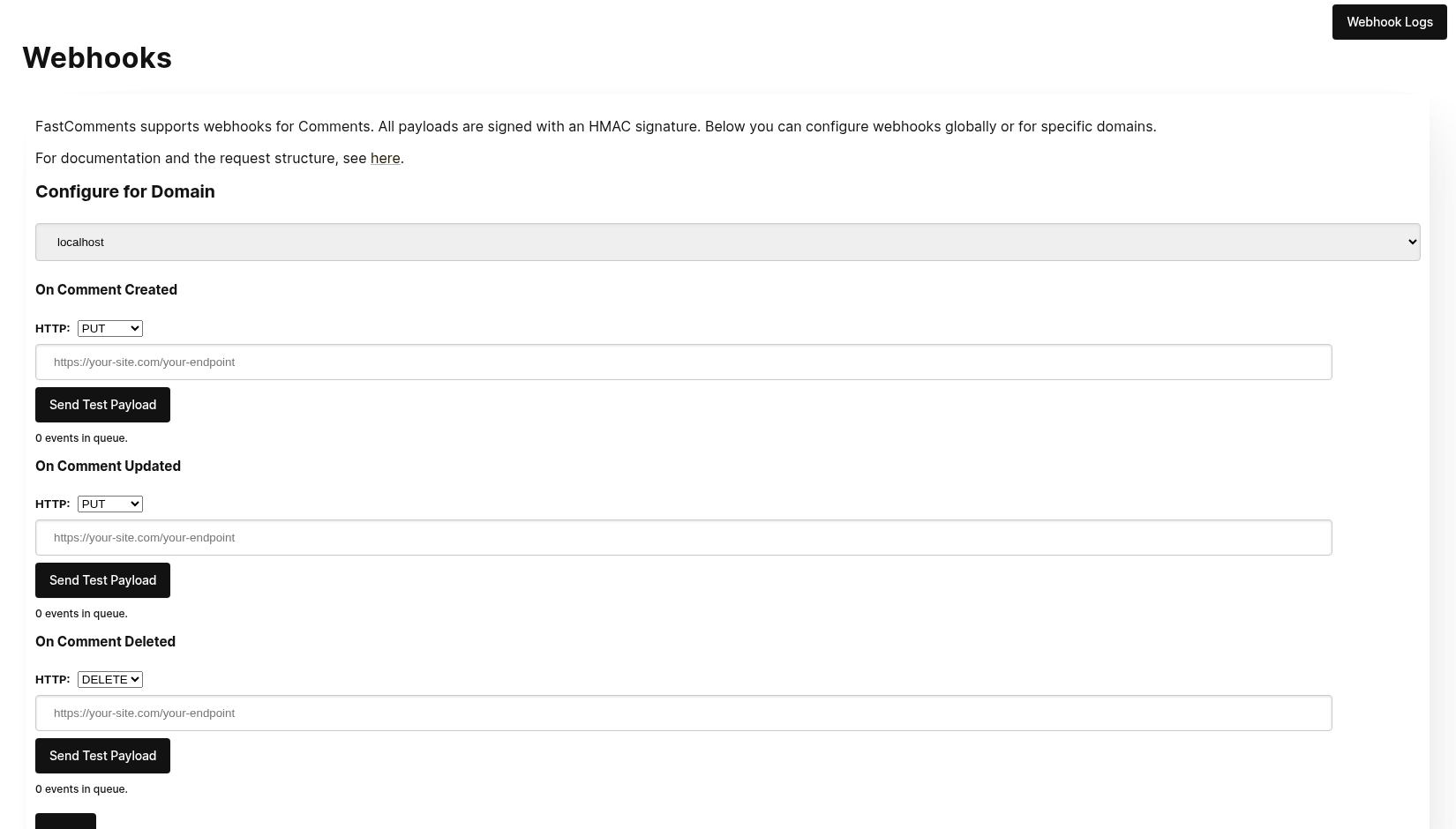
Bij het klikken op Send Test Payload zullen we twee testgebeurtenissen verzenden om te controleren of u de API-sleutel valideert.
Zodra het gevalideerd is, klik op Save.
Stap 4: Voeg een reactie toe
Nu kunt u reacties toevoegen, bewerken of verwijderen en zou moeten zien dat we uw lokale ontwikkelmachine aanroepen met de gebeurtenissen, met behulp van uw test-API-sleutel. Er kan een vertraging van maximaal 30 seconden zijn voordat de gebeurtenissen uw machine bereiken.
Configuratie
Volg dezelfde stappen voor localhost als voor productie. Zorg ervoor dat je productiedomeinen en API‑geheimen hebt ingesteld.
Ga eerst naar de Webhooks-beheer. Dit is toegankelijk via Beheer Data -> Webhooks.
De pagina geeft een overzicht van alle webhooks in je account:
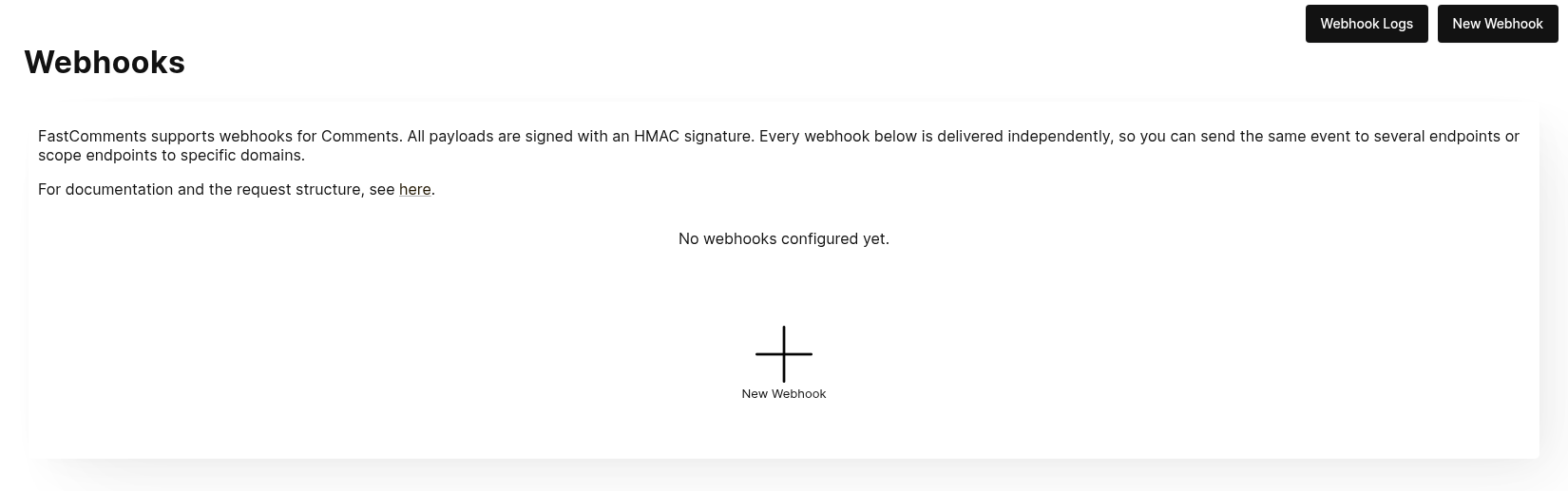
Klik op Nieuwe Webhook om er een toe te voegen. Elke webhook heeft een URL, één reactie‑gebeurtenis (aangemaakt, bijgewerkt of verwijderd), een domein en een HTTP‑methode:
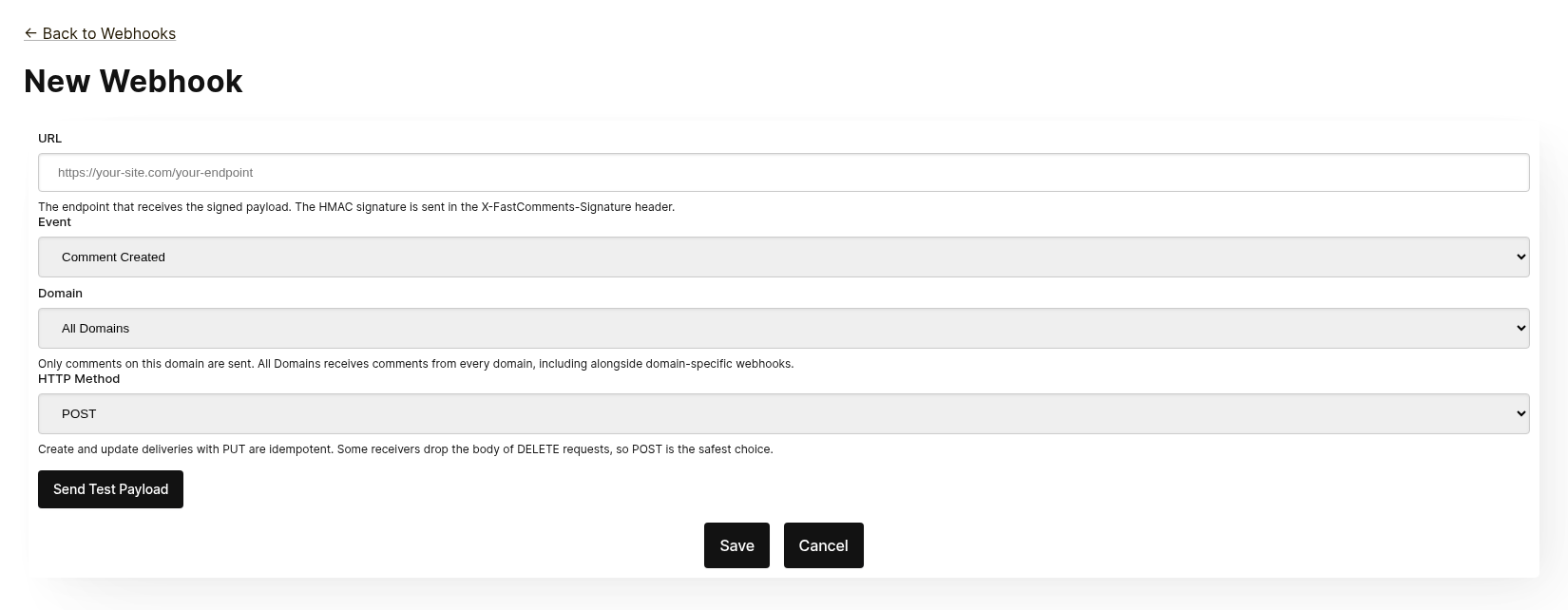
Elke webhook wordt onafhankelijk afgeleverd. Je kunt dezelfde gebeurtenis naar meerdere eindpunten sturen, en een webhook die is ingesteld op Alle Domeinen ontvangt reacties van elk domein, zelfs wanneer er een domeinspecifieke webhook bestaat voor dezelfde gebeurtenis. Dezelfde URL, gebeurtenis en domein kunnen niet twee keer worden toegevoegd.
Klik vóór het opslaan op Testpayload Verzenden om te controleren of het eindpunt een ondertekend verzoek accepteert. Zie de volgende sectie, "Testen", voor details.
Vanaf de lijst kun je een webhook bewerken, uitschakelen, opnieuw inschakelen of verwijderen. Uitschakelen houdt de in de wachtrij staande gebeurtenissen vast totdat de webhook opnieuw wordt ingeschakeld; verwijderen gooit ze weg.
Webhooks kunnen ook via de API worden aangemaakt, bijvoorbeeld door Zapier. Deze verschijnen in dezelfde lijst met de bron API. Zie Webhooks beheren via de API.
Testen
De nieuwe en bewerk webhook‑pagina's hebben een Send Test Payload‑knop die een verzoek naar de URL in het formulier stuurt, ongeacht of deze is opgeslagen. De Create‑ en Update‑gebeurtenissen sturen een dummy WebhookComment‑object, terwijl bij het testen van Delete een dummy request‑body met alleen een ID wordt verzonden.
Verifiëren van payloads
Bij het testen van je webhook‑integratie, controleer of de binnenkomende verzoeken de volgende headers bevatten:
X-FastComments-Timestamp– Unix‑tijdstempel (seconden)X-FastComments-Signature– HMAC‑SHA256‑handtekening
Webhooks die zijn aangemaakt vóór de introductie van het handtekeningschema ontvangen ook een token‑header met je API‑secret. Nieuwe webhooks niet.
Gebruik de HMAC‑handtekeningverificatie om te garanderen dat payloads authentiek zijn.
Testhulpmiddelen
Je kunt tools zoals webhook.site of ngrok gebruiken om binnenkomende webhook‑payloads tijdens de ontwikkeling te inspecteren.
Evenementtypen
- Create Event: Wordt geactiveerd wanneer een nieuw commentaar wordt aangemaakt.
- Update Event: Wordt geactiveerd wanneer een commentaar wordt bewerkt.
- Delete Event: Wordt geactiveerd wanneer een commentaar wordt verwijderd.
Elke webhook is gekoppeld aan één evenement en één HTTP‑methode (POST, PUT of DELETE). Elk evenement bevat de volledige commentaargegevens in de request‑body (zie Data Structures voor het payload‑formaat).
Gegevensstructuren
The only structure sent via webhooks is the WebhookComment object, outlined in TypeScript below.
The WebhookComment Object Structure
The "Create" Event Structure
The "create" event request body is a WebhookComment object.
The "Update" Event Structure
The "update" event request body is a WebhookComment object.
The "Delete" Event Structure
The "delete" event request body is a WebhookComment object.
Change as of Nov 14th 2023
Previously the "delete" event request body only contained the comment id. It now contains the full comment at the time of deletion.
Every key is always present in the body. When the comment has no value for a field the body carries null
(or false for booleans and [] for lists), so the shape of a delivery never varies from one comment to the next.
 Run
Run When users are tagged in a comment, the information is stored in a list called mentions. Each object in that list
has the following structure.
Run HTTP Methods
You can configure the HTTP method for each webhook event type in the admin panel:
- Create Event: POST or PUT (default: PUT)
- Update Event: POST or PUT (default: PUT)
- Delete Event: DELETE, POST, or PUT (default: DELETE)
Since all requests contain an ID, Create and Update operations are idempotent by default (PUT). Repeating the same Create or Update request should not create duplicate objects on your side.
Request Headers
Each webhook request includes the following headers:
| Header | Description |
|---|---|
Content-Type | application/json |
token | Your API Secret |
X-FastComments-Timestamp | Unix timestamp (seconds) when the request was signed |
X-FastComments-Signature | HMAC-SHA256 signature (sha256=<hex>) |
See Security & API Tokens for information on verifying the HMAC signature.
Beveiliging & API-tokens
FastComments webhookverzoeken bevatten meerdere authenticatiemechanismen voor beveiliging.
Verzonden headers
| Header | Beschrijving |
|---|---|
token | Uw API Secret (voor achterwaartse compatibiliteit) |
X-FastComments-Timestamp | Unix-timestamp (seconden) wanneer het verzoek werd ondertekend |
X-FastComments-Signature | HMAC-SHA256-handtekening van de payload |
HMAC-handtekeningverificatie (aanbevolen)
We raden sterk aan de HMAC-handtekening te verifiëren om ervoor te zorgen dat webhook-payloads authentiek zijn en niet zijn gewijzigd.
Handtekeningformaat: sha256=<hex-encoded-signature>
Hoe de handtekening wordt berekend:
- Samenvoegen:
timestamp + "." + JSON_payload_body - Bereken HMAC-SHA256 met uw API Secret als sleutel
- Hex-encodeer het resultaat
Voorbeeldverificatie (Node.js)
const crypto = require('crypto');

function verifyWebhookSignature(req, apiSecret) {
    const timestamp = req.headers['x-fastcomments-timestamp'];
    const signature = req.headers['x-fastcomments-signature'];

    if (!timestamp || !signature) {
        return false;
    }

    // Controleer of de timestamp recent is (binnen 5 minuten)
    const now = Math.floor(Date.now() / 1000);
    if (Math.abs(now - parseInt(timestamp, 10)) > 300) {
        return false;  // Ter voorkoming van replay-aanvallen
    }

    // Verifieer handtekening
    const payload = JSON.stringify(req.body);
    const expectedSignature = crypto
        .createHmac('sha256', apiSecret)
        .update(`${timestamp}.${payload}`)
        .digest('hex');

    return signature === `sha256=${expectedSignature}`;
}
Voorbeeldverificatie (Python)
import hmac
import hashlib
import time
import json

def verify_webhook_signature(headers, body, api_secret):
    timestamp = headers.get('X-FastComments-Timestamp')
    signature = headers.get('X-FastComments-Signature')

    if not timestamp or not signature:
        return False

    # Controleer of de timestamp recent is
    now = int(time.time())
    if abs(now - int(timestamp)) > 300:
        return False

    # Verifieer handtekening
    payload = json.dumps(body, separators=(',', ':'))
    message = f"{timestamp}.{payload}"
    expected = hmac.new(
        api_secret.encode(),
        message.encode(),
        hashlib.sha256
    ).hexdigest()

    return signature == f"sha256={expected}"
Voorbeeldverificatie (PHP)
function verifyWebhookSignature($headers, $body, $apiSecret) {
    $timestamp = $headers['X-FastComments-Timestamp'] ?? null;
    $signature = $headers['X-FastComments-Signature'] ?? null;

    if (!$timestamp || !$signature) {
        return false;
    }

    // Controleer of de timestamp recent is (binnen 5 minuten)
    $now = time();
    if (abs($now - intval($timestamp)) > 300) {
        return false;
    }

    // Verifieer handtekening
    $payload = json_encode($body, JSON_UNESCAPED_SLASHES);
    $message = $timestamp . '.' . $payload;
    $expectedSignature = 'sha256=' . hash_hmac('sha256', $message, $apiSecret);

    return hash_equals($expectedSignature, $signature);
}
Verouderde authenticatie
De token-header die uw API Secret bevat, wordt nog steeds verzonden voor achterwaartse compatibiliteit. We raden echter aan over te stappen op HMAC-verificatie voor verbeterde beveiliging, omdat dit beschermt tegen replay-aanvallen.
Webhooks beheren via de API
Webhooks kunnen ook worden beheerd via de REST‑API. Dit is hoe integraties zoals Zapier zich abonneren op commentaar‑gebeurtenissen zonder het dashboard aan te raken, en het volgt het REST‑Hooks‑patroon: abonneren, gebeurtenissen ontvangen, afmelden.
API‑abonnementen bestaan naast de webhooks die in het dashboard zijn geconfigureerd. Een commentaar‑gebeurtenis wordt geleverd aan elke webhook die overeenkomt met zijn domein, elk als een eigen levering, ongeacht hoe de webhook is aangemaakt.
Authenticatie
Elke aanvraag heeft uw API‑sleutel nodig in de x-api-key‑header (of de API_KEY‑queryparameter) en
uw tenant‑ID in de tenantId‑queryparameter. Beide worden weergegeven op de API‑Secret‑pagina in het dashboard.
Abonneren
POST https://fastcomments.com/api/v1/webhooks?tenantId=YOUR_TENANT_ID
x-api-key: YOUR_API_KEY
Content-Type: application/json

{
    "url": "https://hooks.zapier.com/hooks/catch/123/abc",
    "event": "comment-created"
}| Veld | Verplicht | Beschrijving |
|---|---|---|
url | Ja | Een absolute http‑ of https‑URL. |
event | Ja | comment-created, comment-updated of comment-deleted. |
domain | Nee | Een domein uit uw accountconfiguratie. Standaard *, wat gebeurtenissen voor elk domein ontvangt. |
method | Nee | POST (standaard), PUT of DELETE. |
De respons bevat het abonnement:
{
    "status": "success",
    "webhook": {
        "id": "66f1c4c1e7a2b3d4f5a6b7c8",
        "url": "https://hooks.zapier.com/hooks/catch/123/abc",
        "event": "comment-created",
        "domain": "*",
        "method": "POST",
        "source": "api",
        "enabled": true,
        "createdAt": "2026-09-08T12:00:00.000Z"
    }
}
Het opnieuw abonneren van dezelfde URL op dezelfde gebeurtenis en hetzelfde domein retourneert het bestaande abonnement in plaats van een duplicaat te maken, zodat een client veilig kan herhalen. Elke tenant kan tot 50 API‑abonnementen hebben.
Lijst
GET https://fastcomments.com/api/v1/webhooks?tenantId=YOUR_TENANT_IDRetourneert elke webhook voor de tenant, inclusief die beheerd in het dashboard ("source": "dashboard").
Filter met event, domain of source.
Afmelden
DELETE https://fastcomments.com/api/v1/webhooks/SUBSCRIPTION_ID?tenantId=YOUR_TENANT_IDHet verwijderen van een abonnement verwijdert ook eventuele nog in de wachtrij staande gebeurtenissen. Alleen abonnementen die
via de API zijn aangemaakt, kunnen op deze manier worden verwijderd; een dashboard‑webhook, of een id die niet bestaat in uw
account, geeft 404 met code not-found. Dashboard‑webhooks worden bewerkt op de Webhooks‑pagina.
Payloads en ondertekening
Leveringen gebruiken dezelfde payload als dashboard‑webhooks (zie Data Structures) en worden ondertekend met hetzelfde
HMAC‑schema (zie Security & API Tokens). API‑abonnementen ontvangen nooit de legacy token‑header, dus
verifieer in plaats daarvan de X-FastComments-Signature‑header.
Voorbeeldpayloads
GET https://fastcomments.com/api/v1/webhooks/sample-payloads?tenantId=YOUR_TENANT_ID&event=comment-created&limit=3Retourneert de meest recente commentaren van het account in precies de vorm die een levering heeft, zodat een integratie
echte voorbeeldgegevens kan tonen voordat de eerste gebeurtenis arriveert. event is optioneel en alleen gevalideerd, aangezien elke
gebeurtenis hetzelfde commentaarobject levert. limit standaard op 3 en accepteert 1 tot 10. Kost 2 API‑credits.
{
    "status": "success",
    "payloads": [
        {
            "id": "66f1c4c1e7a2b3d4f5a6b7c8",
            "urlId": "https://example.com/blog/hello-world",
            "commenterName": "Jane Reader",
            "comment": "Great article!",
            "date": "2026-09-08T12:00:00.000Z",
            "approved": true
        }
    ]
}
Reageren met 410 Gone
Als het eindpunt van een API‑abonnement reageert met HTTP 410 Gone, behandelt FastComments dat als een
afmelding: het abonnement wordt verwijderd samen met de in de wachtrij staande gebeurtenissen, en er worden geen verdere leveringen meer geprobeerd. Webhooks die in het dashboard zijn geconfigureerd, worden nooit automatisch verwijderd; voor hen is een 410 een gewone fout. Elke andere foutstatus wordt opnieuw geprobeerd en schakelt uiteindelijk de webhook uit, zoals beschreven in How it Works & Handling Retries.
Dashboard
API‑abonnementen verschijnen in de Webhooks‑lijst met de bron API, waar een beheerder ze kan bewerken, uitschakelen, opnieuw inschakelen of verwijderen.
Hoe het werkt en het afhandelen van herpogingen
Alle wijzigingen aan het Comment object in het systeem veroorzaken een gebeurtenis die op een wachtrij terechtkomt.
Het initiële webhook-evenement wordt meestal binnen zes seconden na het optreden van de gebeurtenisbron verzonden.
U kunt deze wachtrij in de Webhooks-admin monitoren voor het geval uw API uitvalt.
Als een verzoek naar uw API faalt, plaatsen we het opnieuw in de wachtrij volgens een schema.
Dat schema is 1 Minute * the retry count. Als de oproep één keer faalt, zal er opnieuw een poging worden gedaan na
een minuut. Als het twee keer faalt, zal het vervolgens twee minuten wachten, en zo verder. Dit is zodat we
uw API niet overbelasten als uw API uitvalt door load-gerelateerde redenen.
Webhooks kunnen worden geannuleerd vanaf de logpagina.
Tot slot
Hiermee is onze Webhooks-documentatie afgerond.
We hopen dat je de FastComments Webhook-integratie gemakkelijk te begrijpen vindt en snel kunt instellen.
Als je denkt dat er hiaten in onze documentatie zitten, laat het ons hieronder weten.