
カスタマイズと設定
カスタマイズと設定
コンテキスト
ここでは、コメントウィジェットがサポートする各機能と設定についての詳細なドキュメントを確認できます。
本ドキュメントではコアコンセプトをカバーし、各機能領域について使い方やよくある落とし穴を含めて詳しく説明します。
コード例を示し、該当する行をハイライトします。該当する場合は設定ページのスクリーンショットも提供します。
コード例では当社のバニラJavaScriptライブラリを使用しますが、設定オプションはコメントウィジェットの全バージョン(React、Vue など)でまったく同じ名前を使用しています。
このガイドで説明するほとんどの設定と機能は、コードを書く必要はありません。
アカウントの識別 
コメントウィジェットは例えばテナントIDに "demo" を使って利用できることに気付くかもしれません:
 Run
Run 
これはコメントウィジェットを試して遊ぶためのものです。 本番環境では、次のようにあなたのテナントIDを渡します:
Run あなたのテナントIDは、コメントウィジェットのあなたのアカウント内のコードスニペットに既に適用されているのが確認できます。
テナントIDを見つけたり、APIキーを管理したりするには、API認証情報ページをご覧ください。
以降、FastCommentsにログインしている場合、コード例ではあなたの実際のテナントIDが使用されます(https://fastcomments.com にログインしている場合)。
コメントがページや記事に結び付けられる方法
コメントスレッドを表示したり、コメントを投稿したりする際、FastComments はそのコメントが属するページ、記事、または製品を把握する必要があります。
そのために、私たちは「URL ID」と呼ばれるものを使用します。これは文字列や数値のような識別子、または URL のいずれかです。
デフォルトでは、urlId を指定しない場合はページの URL が使用されます。現在のページ URL を取得し、一般的なマーケティングパラメータやトラッキング識別子を除去してクリーンにします。
WordPress などのサードパーティ統合の場合、プラグインは通常、現在表示されている情報を表す識別子(例:記事/ページ ID)を URL ID として使用します。
Run このドキュメントで頻繁に参照するものの一つは、ウィジェットカスタマイズ UIです。
この UI を使用すると、コードを書かずにコメントウィジェットに多数の変更を加えることができます。
カスタマイズルールを作成する際、通常はサイト全体のすべてのページに適用したいと考えます。しかし、特定のページでコメントウィジェットをカスタマイズしたい場合もあります。たとえば、カスタムスタイルを適用したり、そのページのコメントを匿名化したりすることが考えられます。また、例として、あるページではライブコメントをすぐに表示し、別のページでは通知ボタンの下に隠すことも可能です。
これらはすべて、このページの URL ID 入力フィールドを使用して実現できます。フィールドは以下のようになります:

このフィールドの値は、コメントウィジェットに渡される urlId パラメータと一致する必要があります。カスタマイズルールを urlId に依存させたくない場合は、このフィールドを空にするか、* を入力してください。
2023年現在、ウィジェットカスタマイズの URL ID フィールドはパターンも受け付けるようになりました!たとえば、*/blog/* を使用してブログ専用のスタイルを追加したり、*/store/* を使用してストア専用のスタイルを適用したりできますが、ドメインは同じままです。
Gotchas
- ページにハッシュパラメータ(例: example.com#page-1)が含まれている場合、デフォルトでそれが URL ID の一部になります。
- 移行中、たとえば WordPress から Gatsby への移行の場合、初回の移行後に URL ID のコメント値を移行する必要があるかもしれません。その際はお問い合わせください。
異なるページで同じコメントを表示する
urlId パラメータはコメントがどのページ、またはどのIDに紐づくかを定義できるため、これらのページでは単に urlId を同じ値に設定すればよいです。
Run カスタムスタイリング
FastComments はカスタマイズ可能になるよう設計されています。コメントウィジェット自体はセキュリティ上の理由で iframe 内で実行されるため、カスタムスタイリングを適用するには以下の 2 つのアプローチのいずれかに従う必要があります。
最初の、最も簡単なアプローチであり、当社が推奨する方法は、ウィジェットカスタマイズページ を使用することです。
ウィジェットカスタマイズページで「高度なオプションを表示」セクションを確認すると、そこに「Custom CSS」とラベル付けされた領域があります:

このアプローチにはいくつかの利点があります:
- 入力された CSS はユーザーに送信される前に圧縮され、編集 UI でのフォーマットが一貫して保たれます。
- ウィジェットカスタマイズ UI のすべての利点を活用でき、例えばサイトごとにコメントウィジェットを簡単にカスタマイズできます。
- コメントウィジェットに変更を加える際、カスタムスタイリングはリリースプロセスの一部としてテストされます。
2 番目のアプローチは、ウィジェット設定で customCSS パラメータを指定する方法です。例:
Run ただし、これには 制限 があります:
- ヘッダーサイズの制限により、サーバーがリクエストを拒否するまでに渡せるカスタム CSS の量に上限があります。
- カスタム CSS をインフラストラクチャやビルドシステムで管理する必要があります。これはデメリットというよりメリットになることもあります。
- この使用ケースでは、カスタム CSS をネットワーク上で 2 回 送信する追加のオーバーヘッドがあります(サーバーに送信され、iframe コンテンツとして返されます)。ただし、ほとんどのペイロードサイズでは目立ちません。
- 一般的な最適化として CSS を圧縮してネットワーク上のサイズを削減しますが、このアプローチでは自分で処理する必要があります。
- コメントウィジェットに変更が加わった際、カスタム CSS はテストされません。
外部 CSS ファイル
@import を使用してウィジェットに外部ファイルを取得させることができます!
@import はカスタマイズルール内に入れることが推奨されます。こうすれば、コメントウィジェットに変更が必要になった際に、当社の自動化ツールで設定を検証できます。たとえば、ウィジェットカスタマイズ UI でカスタマイズルールを作成し、Advanced をクリックして Custom CSS に次のように入力します:
@import url(https://example.com/styles.css);コードでの使用 - 推奨しません
customCSS プロパティを使用して外部 CSS ファイルをロードすることもできます:
Run ただし、これを行うと当社が CSS をテストできなくなることに注意してください。
ユーザープロファイルモーダルのスタイリング
ユーザープロファイルモーダルもカスタム CSS でスタイリングできます。ただし、ユーザープロファイルにカスタムスタイリングを適用するには、すべての CSS セレクタに .user-profile プレフィックスを付ける必要があります。このプレフィックスがないと、ユーザープロファイルモーダルのカスタムスタイリングは無視されます。
例:
Run 後方互換性
FastComments では、顧客がコメントウィジェットをカスタマイズすることを前提に設計されています。これは意図的なものであり、製品が顧客のデザインに不整合をもたらすことは望んでいません。
この重要な機能のため、当社はリリースごとにコメントウィジェットの変更を顧客ごとにレビューできるビルドパイプラインを備えています。
小さな問題が見つかった場合は、リリースが円滑に進むようにアカウントを更新します。重大な破壊的変更が見つかった場合は、リリースを中止できるようにしています。
カスタムフォント
FastComments はカスタマイズ可能になるよう設計されており、ウィジェットで使用するフォントも例外ではありません。
デフォルトでは、FastComments は幅広いデバイスでできるだけ見栄えが良くなるように system font stack を使用します。
独自のフォントを定義するには、Custom CSS ドキュメント を参照してください。
そこにはカスタム CSS を定義する方法が記載されており、希望するフォントを設定できるようになります。
フォントの定義方法
フォントを上書きするには、.fast-comments, textarea セレクタを使用して CSS を定義することをお勧めします。例:
Run ブランドの削除
Pro または Enterprise アカウントをお持ちのお客様は、ホワイトラベリングが可能です。単に お問い合わせください。喜んでお手伝いします。
コメントウィジェットから当社のロゴを削除したいだけの場合、Flex および Pro プランではこれが自動的に有効になります。
これらのプランは、当社のプラットフォームから送信されるメールについても同じ機能を提供します。
ダーク背景(ダークモード)への対応
デフォルトでは、FastComments のコメントウィジェットはほとんどのサイトでダークモードを自動的に検出します。
ダークモードが検出されると、FastComments は白背景に黒い文字から黒背景に白い文字へ切り替わります。画像も変更されます。
ページ読み込み時に、ウィジェットはコメントウィジェットの背後にあるページの背景がどれくらい暗いかを判定しようとします。これはつまり ページ自体は白い背景でも、コメントウィジェットを黒い背景のコンテナ内に置けば、ダークモードが コメントを読みやすくするために自動的に有効になるはず、ということです。
しかし、「luminance」を判定する検出メカニズムは、望むときにダークモードを有効にしない場合があります。強制的に有効にするには、次のように hasDarkBackground フラグを true に設定してください:
Run ダークモードの切り替え
ページの初回読み込み後にダークモードの切り替えを許可するサイトでは、これにはもう少し手間がかかります。
まず、Commentウィジェットライブラリのすべての現在のバージョン(React、Vue)には、それぞれのリポジトリにダークモード切り替えの例があります。
VanillaJSウィジェットについては、もう少し作業が必要です。まず、FastCommentsUIは "destroy" と "update" の関数を持つオブジェクトを返します。
コメントウィジェットの設定を更新したいたびに、単純にupdate関数を呼び出すことができます。以下は、VanillaJSウィジェットでダークモードを切り替える完全に動作する例です。
Run テキストの上書き
FastComments を使用すると、コメントウィジェット内のすべてのテキストをカスタマイズできます。
送信ボタンのような単一のテキストや、コメントウィジェット全体のすべてのテキストを上書きすることができます。
デフォルトでは、コメントウィジェットのテキストはユーザーのロケールに基づいて翻訳されます。ただし、テキストを上書きすることができ、もし自信がある場合 ユーザー層が同じロケール/言語を使用していると確信できる場合、例えば:
Run カスタマイズ可能なすべての翻訳は、こちらの「高度なオプション」タブで確認できます。
しかし、ウィジェットカスタマイズ UI を使用すると、より簡単な方法があります。そこでは、EN_US ロケールでコメントウィジェットに表示されるテキストを見つけて、置き換えを指定し、
置き換えます。

すべての翻訳上書きは現在、すべてのロケールに影響します。
デフォルトアバターの変更
ユーザーが FastComments で初めてコメントすると、https://gravatar.com/ からアバターを取得しようとします。
ただし、アバターが見つからない場合や、ユーザーがアカウントで設定していない場合は、静的なデフォルトアバター画像を表示します。
独自の静的アバター画像を指定するには、defaultAvatarSrc 設定を使用します。
Run コードを使用せずに行うこともできます。ウィジェットカスタマイズページで「Default Avatar」セクションをご覧ください。

SSO などで特定のユーザーのアバターを定義する方法は、別のセクションで説明しています。
アバターの無効化
アバターは、ユーザーが独自のアバターを設定している場合でも、コメントウィジェットから完全に削除できます。
Run これはコードなしで、ウィジェットカスタマイズページでカスタマイズできます。

すべてのデフォルトスタイルの無効化
より大規模なカスタムスタイリングプロジェクトでは、デフォルトのスタイリングを全く使用せず、クリーンな状態から始めることが望ましい場合があります。
すべてのデフォルトスタイリングは、noStyles パラメータを true に設定することで削除できます。以下のように:
Run これは、コードを使用せずに、ウィジェットカスタマイズページの「詳細オプション」セクションでカスタマイズできます:

コメントからページへのリンク
通知メールを送信したり、モデレーションページのようなユーザーインターフェースでコメントを表示したりする際に、コメントから それが掲載されているページへリンクできると便利です。
If URL ID isn't always an ID, then we have to store the URL some place else. That's what the "url" property is for, defined as follows.
Run 一般的なユースケースは、コメントスレッドを記事のような識別子に紐付け、その後特定のページにリンクすることです。例えば:
Run The URL does not get cleaned of common marketing parameters. By default, whatever the current page URL is, is the URL stored with the comment.
デフォルトで返信を折りたたむ
デフォルトでは、トップレベルのコメントへの返信が表示されます。
これを設定すると、ユーザーはトップレベルのコメントで「Show Replies」をクリックして子コメントを表示する必要があります。
Run コードを使用せずに、ウィジェットカスタマイズページでカスタマイズできます:

この設定は、最初に読み込まれるトップレベルコメントの数には影響しません。この設定が有効な場合、トップレベルコメントが1つで子コメントが29件あると、次のようになります。
- トップレベルのコメントを見る。
- このコメントの下に「Show Replies (29)」が表示されます。
このオプションと組み合わせてすべてのトップレベルコメントを表示したい場合は、starting page to -1 を設定してください。
WYSIWYG を有効化
デフォルトでは、FastComments の書式機能は、テキストの周りに <b></b> のような可視のアンカータグを追加することで実現されます。ツールバーをクリックするかショートカットを使用すると、これが自動的に行われます。ただし、一部のコミュニティではアンカータグなしで書式設定を使用したい場合があります。これは WYSIWYG(What You See Is What You Get)エディタを有効にすることと呼ばれます。このエディタはデフォルトのものと見た目は全く同じですが、可視のアンカータグなしで太字、下線などを可能にする追加コードをロードします。
Run コードを書かずにこれを行うこともできます。ウィジェットカスタマイズページで「高度な書式設定を有効にする」オプションを確認してください。

ツールバーの無効化
デフォルトでは、FastComments はコメントを書いているときにツールバーを表示し、テキストの装飾や画像のアップロード のショートカットを提供します。
このツールバーはコードまたはカスタマイズ UI で無効にできます。
Run コードを使用せずにこれを行うこともできます。ウィジェットのカスタマイズページで、"Disable The Reply Toolbar" オプションを確認してください。

ブロック機能の無効化
デフォルトでは、FastComments はユーザーが他のユーザーをブロックできるようにしています。ユーザーをブロックすると、そのコメントが
マスクされ、ユーザー間の通知が防止されるなどの効果があります。
この機能を無効にしたい場合があります。以下のように実行できます:
Run コードを使用せずに、ウィジェットカスタマイズ UI を使用して実行することもでき、これにより適切なサーバー側検証も有効になります:

表示するページの決定
コメントを取得してレンダリングする際、コメントウィジェットはどのページから開始するかを知る必要があります。デフォルトでは最初のページから始まり、そのページのみがレンダリングされます。
必要に応じて、描画する正確なページを設定 startingPage としてコメントウィジェットに渡すことができます。
Run ページ番号は0から始まることに注意してください。そのため、上の例は2ページ目をレンダリングします。
ページをリロードせずにコメントスレッドを切り替える
We've covered how urlId is the page or article id the comments are tied to.
Also, to recap, if not defined the urlId will default to the current page URL.
What about SPAs, or Single-Page-Applications, where the page or content the comments are tied to changes dynamically without a fresh page reload?
Angular、React、Vue など
With our libraries such as Angular and React, simply updating the urlId property passed to the widget
will cause the comment widget to refresh. You can see this in action for the React app, for example, こちら.
VanillaJS
If you're using the VanillaJS library it is slightly more complicated as there isn't a framework like Angular or React to handle the data binding or state propagation.
When you instantiate the VanillaJS widget, it returns some functions which can be called to update it.
Here's a functional example where we change the page hash and update the comment widget:
Run 絶対日時(人間に優しいタイムスタンプの無効化)
デフォルトでは、ローカライズされた相対日時が使用されます。例えば、最近投稿されたコメントの横に「11 分前」と表示されることがあります。
絶対日時を使用する必要がある、または使用したい場合は、このパラメータを true に設定します。
Run コードを使用せずに、ウィジェットのカスタマイズページの「詳細オプション」セクションでカスタマイズできます。

絶対日時と相対日時の両方を表示
デフォルトでは、ローカライズされた相対日時が使用されます。例えば、最近投稿されたコメントの横に「11 分前」と表示されることがあります。
この相対日時形式を保持しつつ、完全な日付も併せて表示したい、または必要な場合は、このパラメータを true に設定します。
Run この設定はコードを書かずに、ウィジェットカスタマイズページの「高度なオプション」セクションでカスタマイズできます。まず、UI でこのオプションを表示させるために「絶対日時」を有効にする必要があります。

ヘッダーテキストの追加
ヘッダーやメッセージのようなテキストは、コメント数の下、ログインステータスのテキストの上に表示できます。
これをヘッダーと呼び、デフォルトでは非表示になっています。
Run コードを使用せずに、ウィジェットカスタマイズページの「高度なオプション」セクションでカスタマイズできます。

リンクをテキストとして表示
デフォルトでは、FastComments は次のようにリンクをレンダリングします: https://exmaple.com - リンク URL がクリック可能な HTML アンカータグになります。
一部のサイトでは、たとえば詐欺師を抑止するためにこれを無効にしたい場合があります。この機能は、Comment HTML Rendering Option を Links as Text に設定することで提供されます。
この設定はコードを書かずに、ウィジェットカスタマイズページで、ドメイン全体または個別のページごとにカスタマイズできます。

ボタンでコメントの切り替え
デフォルトでは、FastComments はコメント入力ボックスとコメントスレッドを同時に表示します。垂直方向のスペースを節約するため、ウィジェットが操作されるまで他の必須フィールドは非表示になります。
ただし、コメントウィジェットはボタンの背後に隠すことができます。例として:
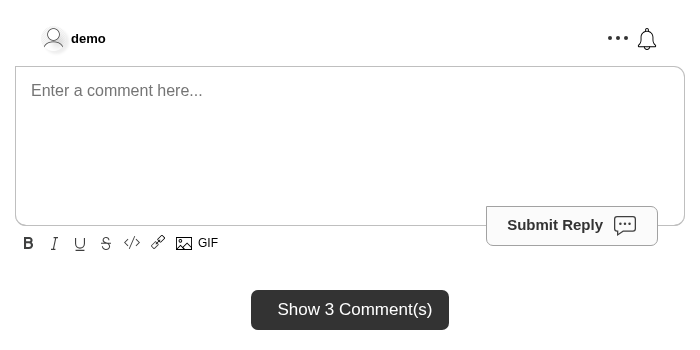
ボタンは、コメントが現在表示されているかどうかに応じて異なる翻訳テキストを使用します。コメントが非表示の場合は translations.SHOW_COMMENTS_BUTTON_TEXT を使用し、コメントが表示されている場合は translations.HIDE_COMMENTS_BUTTON_TEXT を使用します。翻訳テキストには [count] を含めることができ、ローカライズされた件数に置き換えられます。
Run これは hideCommentsUnderCountTextFormat 設定の代わりに使用することを意図しています。
件数はコメントスレッドとリアルタイムで更新されます。コメントがない場合、ボタンは表示されません。
コードを書かずに、カスタマイズルールを作成し「Click to Show Comments」を有効にすることで有効化できます。

コメント数テキストのカスタマイズ
コメントウィジェットの上部に表示されるコメント数はカスタマイズできます。
任意の文字列に置き換えることができ、値 [count] はユーザー向けにローカライズされたカウント値に置き換えられます。
Run コードなしで、ウィジェットのカスタマイズページでカスタマイズできます。
![ウィジェットカスタマイズページのコメント数テキストフィールド。ここで [count] はリアルタイムの合計に置き換えられます](/images/8f5c6e31e1885d089b072b89c169783c.png)
画像リダイレクトの無効化
デフォルトでは、FastComments はユーザーが画像をアップロードできるようにしています。ユーザーがその画像をクリックすると、FastComments はデフォルトで 別タブを開き、その画像をフルサイズで表示します。このフラグを true に設定するとこの動作が無効になります:
Run 画像のクリックを自分で捕捉する予定がない場合(onImageClicked を参照)、画像がクリック可能に見える見た目を取り除くために、これを何らかのスタイリングと組み合わせることを推奨します。
自動ハッシュタグ作成の無効化
ユーザーがハッシュタグ(例: #someexampletag)を入力すると、FastComments は自動的にその HashTag を作成し、コメント内でハイライトします。
場合によっては、この機能を無効にしたり、API を通じて使用できるハッシュタグを制御したりしたいことがあります。
そのためには、ウィジェットカスタマイズ UI で Disable Automatic #hashtag Creation を有効にするだけです。

通知ベルの無効化
デフォルトでは、FastComments はコメント領域の右上に通知ベルを表示します。
このベルは赤くなり、ユーザーが受け取っている通知の数を表示します。例として以下の通知があります:
- ユーザーがあなたに返信しました。
- ユーザーがあなたがコメントしたスレッドで返信しました。
- ユーザーがあなたのコメントに賛成票を付けました。
- ユーザーがあなたが購読しているページに返信しました。
通知ベルは、ページ全体を購読する機能も提供します。
ただし、通知ベルを完全に無効にすることもできます:
Run コードを使用せずにこれを行うこともできます。ウィジェットカスタマイズページで「Disable Notification Bell」セクションを参照してください。

プロフィールの無効化
デフォルトでは、FastComments はユーザーのアバターをクリックするとそのユーザーのプロファイルを表示します。
ただし、この機能は無効にすることができます:
Run コードを使用せずにこの設定を行うこともできます。ウィジェットのカスタマイズページで「プロファイルの無効化」セクションを確認してください。

プロフィールコメントの無効化
デフォルトでは、FastComments はユーザープロフィールに「Profile Comments」タブを表示し、訪問者が誰かのプロフィールにコメントを残すことができます。
ただし、このタブを無効にすることができます:
Run コードを使用せずにもこれを行うことができます。ウィジェットカスタマイズページで「Disable Profile Comments」セクションをご覧ください。

プロフィールのダイレクトメッセージの無効化
デフォルトでは、FastComments はユーザープロフィールに「ダイレクトメッセージ」タブを表示し、訪問者がユーザーに直接メッセージを送信できるようにします。
ただし、このタブを無効化することができます:
Run コードを使用せずにも設定できます。ウィジェットカスタマイズページの「ダイレクトメッセージを無効化」セクションをご覧ください。

成功メッセージの無効化
デフォルトでは、FastComments はコメント投稿後に成功メッセージを表示します。これを無効にするには、以下のようにします:
Run コードを使用せずに行うこともできます。ウィジェットのカスタマイズページで:

GIF のコンテンツレーティングを変更
デフォルトでは、FastComments のコメントウィジェットは gif rating を pg に設定します。
利用可能なオプションは g、pg、pg-13、および r です。
この設定はコードまたは UI で行うことができます。コードでは次のように設定できます:
Run UI では、Disable Image Uploads? がチェックされていない限り、Gif Picker Rating の下にこの設定があります。

画像コンテンツのモデレーション
デフォルトでは、FastComments のコメントウィジェットは画像コンテンツのモデレーションが off に設定されています。
利用可能なオプションは off、low、medium、high です。
ウィジェットのカスタマイズ UI では、Disable Image Uploads? がチェックされていない限り、Image Content Moderation Level の下にこの設定があります。

投票スタイルの変更
デフォルトでは、FastComments は投票オプションを上下矢印として表示し、ユーザーはコメントに対して賛成または反対の投票ができます。
ただし、投票ツールバーのスタイルを変更することが可能です。現在のオプションはデフォルトの上下ボタン、またはハートスタイルの投票メカニズムです。
voteStyle フラグは次のように使用します:
Run コードなしで行うことを強くお勧めします。これによりサーバー側の検証も有効になります。ウィジェットカスタマイズページの「Vote Style」セクションをご覧ください。

投票は無効にすることもできます。スタイルオプションの上にある Disable Voting を参照してください。
削除の無効化
デフォルトでは、FastComments はユーザーが自分のコメントを削除できるようにします。
ただし、これを防止することも可能です。
ウィジェットカスタマイズページで、"Disable Deleting" オプションをご確認ください。

- これは通常のコメント投稿者にのみ影響し、モデレーターや管理者には影響しません。彼らは引き続き削除できます。
- また、
contextUserIdが渡された場合の API 統合にも影響します。
編集の無効化
デフォルトでは、FastComments はユーザーが自分のコメントを編集できるようにします。
ただし、これを防止することも可能です。
ウィジェットカスタマイズページで、「編集の無効化」オプションをご確認ください。

- これは通常のコメント投稿者にのみ影響し、モデレーターや管理者には影響しません。彼らは引き続き編集可能です。
contextUserIdが渡された場合の API 統合にも影響します。
新しいコメントのハイライト
FastComments は新しいコメントを強調表示するためのいくつかの方法を提供します。
First and foremost, by default comments that triggered an in-app notification (replies, replies in same thread, or comments on a page
あなたが購読しているページのコメント)が自動的にユーザーのアバターがわずかに光る形で強調表示されます。色は CSS
を使用して is-unread クラスでカスタマイズできます。
過去24時間に投稿されたコメントには 24hr クラスが適用されており、スタイリングに使用できます。
Finally, any new live comments that show up in the user's session will be highlighted for several seconds via an animation. This is done via the
is-live CSS class and can be customized as well.
ページサイズ
デフォルトでは、FastComments のページサイズは 30 です。これにはスレッド内の返信も含まれます。
ページサイズは、ウィジェット設定 UI で 10 から 200 までのさまざまなサイズにカスタマイズできます。
ページサイズを変更すると、アカウント内のすべてのコメントスレッドを再計算する必要があることに注意してください。これには数分かかる場合があります。
ページはサーバー側で計算されるため、クライアント側のウィジェットでは設定できません。
以下に設定例を示します:

ページサイズは、グローバル、ドメイン単位、ページ単位で、異なるカスタマイズルールを作成することでカスタマイズできます。
これにより、当社プラットフォームを通じてコメントを表示するすべてのクライアント、統合、フレームワークに影響が及びます。
メールテンプレート
FastComments からお客様へ送信されるメールはカスタマイズできます。テンプレート、ロジック、 翻訳もすべて変更できます。テキストはロケールごとにカスタマイズでき、スタイリング ドメインごとに変更することも可能です。 カスタムメールテンプレートの詳細はこちら
ユーザー名形式
By default, FastComments will show the user's name as they entered it, or how it was passed to us via SSO.
しかし、ユーザー名をマスクしたり、別の方法で表示したりしたい場合があります。たとえば、ユーザー名が Allen Rex の場合、"Allen R." のみを表示したいかもしれません。
This can be done without code in the Widget Customization UI, under the setting called Commenter Name Format:

The available formats are:
- Capitalize(例のユーザーを Example User と表示)
- Last Initial(例のユーザーを Example U. と表示)
- All Initials(例のユーザーを E. U. と表示)
- 匿名を表示
The effect of changing this is immediate. User's will still see their full username at the top of the comment area, for themselves, but their comments will show the modified username.
Usernames are masked server-side to protect users.
画像アップロードの無効化
デフォルトでは FastComments は画像のアップロードを許可しています。この設定は noImageUploads フラグを true に設定することで無効にできます。
Run コードを使用せずに、ウィジェットのカスタマイズページでカスタマイズできます:

メディア埋め込みを許可
デフォルトでは、FastComments はコメント内で iframe を許可していません。メディア埋め込みを有効にすると、コメント投稿者は YouTube、Vimeo、SoundCloud、Spotify などの信頼できるプロバイダーから埋め込みコード(<iframe> スニペット)を貼り付けることができ、コメント内にインラインで表示されます。
セキュリティ上、これはクライアント側のウィジェット設定フラグではありません。サーバー側の設定で、各コメントが保存される際に検証されるため、ページ上からオンにすることはできません。組み込みの信頼できるプロバイダーリストに該当する iframe のみが許可され、その他の iframe は削除されます。
これはコードを書かずに、ウィジェットカスタマイズページで行えます:

独自のプロバイダーを追加する
組み込みの信頼リストにないプロバイダーからの埋め込みを許可したい場合は、同じページの「Additional Embed Domains」フィールドにそのホスト名を追加します。これらのホスト名は組み込みプロバイダーに加えて許可されます。マッチは完全一致なので、フルホスト名(例: player.example.com)を入力してください。リストに含めなかったものはブロックされたままです。
プレーンなコメントボックスと WYSIWYG エディタの両方で埋め込みの貼り付けがサポートされています。WYSIWYG エディタでは、埋め込みは削除可能なブロックとして挿入されます。
検索ボックスを有効化
デフォルトでは、コメントウィジェットに検索ボックスは表示されません。
ただし、enableSearch フラグを true に設定することでこれを有効にできます:
Run これはコードなしでも行えます。ウィジェットのカスタマイズページで「Enable Search Box」オプションを確認してください。

スポイラーを有効化
enableSpoilers フラグを true に設定することで、スポイラーサポートを有効にできます:
Run コードを使用せずにこれを行うこともできます。ウィジェットカスタマイズページで「Enable Spoilers」オプションを確認してください。

テキストがハイライトされ、表示された SPOILER ボタンがクリックされると、テキストはマスクされ、ユーザーがマウスオーバーするまで隠れたままになります。ダークモードの場合は、同様の動作を行いますが、ダークモードにより適した異なる色を使用します。
これは WYSIWYG エディタでも互換性があります。
コメント閲覧数を有効化
デフォルトでは、FastComments は各コメントを誰が閲覧したかを追跡せず、これに関する統計情報も提供しません。
ただし、この機能を有効にすれば、システムは各ユーザーがコメントにスクロールした際に追跡を開始します。
このようになると、各コメントに表示される目のアイコンの横にあるカウントが増加します。カウントはリアルタイムで更新され、ユーザーのロケールに合わせて省略形で表示されます。
enableViewCounts フラグを true に設定することで、この機能を有効にできます:
Run コードを書かずに、ウィジェットのカスタマイズページで設定できます:

コメントを閲覧したユーザーID* を1週間追跡します。そのため、同じ週内に再度コメントを閲覧してもカウントは増加しません。1週間が経過した後に再度閲覧すると、カウントは再び増加します。
- *注: 匿名セッションID、またはユーザーのIPをハッシュ化した値でも構いません。
ライブコメントをすぐに表示
デフォルトでは、ライブコメントが有効になっています。これは、コメントが追加、削除、編集、またはピン留めされた場合、変更がコメントスレッドを閲覧しているすべてのユーザーに同時に表示されることを意味します。
しかし、デフォルトでは新しいコメントは「Show 2 New Comments」のようなテキストが表示された動的なボタンの下に表示されます。
新しいコメントがページへの直接の返信である場合、ボタンはコメントスレッドの上部に表示されます。特定のコメントへの返信である場合、ボタンはそのコメントの下に表示されます。
これは、ページサイズがユーザー側で常に変化するのを防ぎ、スクロールバーを掴もうとしたときのフラストレーションを防ぐためです。
ライブ入札やオンラインイベントなどの一部のユースケースでは、この動作は望ましくありません。コメントウィジェットを「チャット」ボックスのように、新しいコメントが「すぐに表示」されるようにしたい場合があります。
したがって、その機能を有効にするフラグの名前は showLiveRightAway です。
We can turn it on as follows:
Run This can be customized without code, on the widget customization page:

ライブコメントの無効化
デフォルトでは、FastComments はライブコメント機能が有効になっています。
これは、コメントスレッドのすべての閲覧者が同じ内容を見ることになることを意味します。
例えば、コメントが追加された場合、そのコメントが表示されます。コメントが編集または削除された場合、
そのコメントがスレッドのすべての閲覧者に対して編集または削除されます。投票やすべてのモデレーションアクションも同様です。
ただし、これを無効にすることができます。
Run コードを使用せずにこれを行うこともできます。ウィジェットカスタマイズページで「ライブコメントの無効化」セクションを確認してください。

新しいライブコメントを下部に表示
デフォルトでは、新しいライブコメントはリアルタイムで投稿されるとコメント一覧の上部に表示されます。
このオプションを有効にすると、新しいライブコメントは代わりに一覧の下部に追加されます。これは、ユーザーがコメントスレッドを閲覧している間にコメントがライブで投稿されたときの表示方法に影響します。
Run With this setting enabled:
- 他のユーザーが投稿した新しいライブコメントはコメント一覧の下部に表示されます
- ユーザーは既存のコメントの下に新しいコメントがリアルタイムで表示されるのを確認できます
- これはライブコメントの更新にのみ影響し - 初回のページ読み込みには影響しません
- ユーザーが議論を追っているときに読み進める流れを維持するのに役立ちます
Note that this setting only affects where new live comments are placed as they arrive in real-time. It does not affect the initial sort order when the page loads.
無限スクロールの有効化
デフォルトでは、FastComments ウィジェットは表示されているすべてのコメントに合わせて縦方向に自動的にサイズを調整します。ページネーションは現在のページ末尾にある「次を表示」ボタンで行われます。これは多くのユーザーにとって最も自然に感じられる操作方法であると判断しているためです。
しかし、無限スクロールの方が好まれるケースもあります。例えば、Stream Chat 製品ではこの機能を使用しています。
enableInfiniteScrolling フラグを true に設定することで、「次を表示」ボタンを非表示にして無限スクロールに切り替えることができます:
Run これにはカスタム CSS の追加も必要です。スクロールを有効にするには、.comments セレクタに対して次のようなカスタム CSS を追加します。例えば:
Run 完全な動作例は次のとおりです:
Run 上の例では customCSS プロパティを使用していますが、パフォーマンスの観点からは代わりにウィジェット設定 UI を使用することを推奨します。 カスタム CSS のドキュメントを参照してください。
デフォルトのソート方向の変更
デフォルトでは、FastComments はコメントを「最も関連性が高い」ソート方向で並べ替えます。
「最も関連性が高い」ソートは、コメントが投稿された時間と投票数を考慮して並べ替えます。
ユーザーはコメントウィジェットの UI で、ソート方向を「最も古い」または「最新」へ変更できます。
ただし、デフォルトを3つのいずれかに変更できます。たとえば、最も古いコメントを最初に表示したい場合は次のようにします:
Run defaultSortDirection の値を "OF" に設定して、方向を "OF" にします。
最新順のソート方向にするには、次のようにします:
Run defaultSortDirection の有効な値は次のとおりです:
- MR: "最新"
- NF: "最新順"
- OF: "最も古い順"
これはコードなしでも行えます。ウィジェットのカスタマイズページで「Default Sort Direction」セクションをご覧ください。

各ページの各ソート方向のコメントは事前に計算されているため、すべてのソート方向で同じパフォーマンスになります。
すべてのコメントを一度に表示 - ページネーションの無効化
ページネーションを無効にして、すべてのコメントを一度にレンダリングするには、startingPageを-1に設定します。
Run 返信ボックスをコメントの後に移動
デフォルトでは、コメント入力エリアはコメントスレッドの 前 にあります。 ただし、この設定パラメータ を true に設定すると、後 に移動できます。
Run コードを使用せずに、ウィジェットカスタマイズページでカスタマイズできます:

コメント長さの制限
コメント入力フィールドに入力できる最大文字数は、maxCommentCharacterLength パラメータで制限できます。
デフォルトは 2000 です。
画像 URL などは文字数の計算に含まれません。
Run コードなしで、ウィジェットのカスタマイズページで設定できます。

複数行コメントの無効化
デフォルトでは、FastComments はユーザーが好きなだけの行数でコメントを入力でき、デフォルトの文字数制限まで許可します。
ただし、ユーザーがテキストを1行だけ入力できるように制限したい場合があります。例として、オンライン入札やライブチャットなど、FastComments を利用できるケースがあります。
次のように useSingleLineCommentInput フラグを有効にします:
Run これはコードなしでも設定できます。ウィジェットカスタマイズページで「Enable Single-Line Comment Input」セクションを確認してください。

なお、各ページのコメントは各ソート方向ごとに事前に計算されているため、すべてのソート方向で同じパフォーマンスが得られます。
ユーザーごとのコメント量の制限
デフォルトでは、各ユーザーは同じ分内に最大 5 コメント を投稿できます。
これはユーザーID、匿名ユーザーID、IPアドレス(ハッシュ化)で追跡されます。
コードを書かずに、ウィジェットカスタマイズページでカスタマイズできます。

コメント作成APIを使用している場合、レートリミットが適用されるように、ユーザーの元の ip アドレスをリクエストでバックエンドに渡す必要があることに注意してください
ユーザー単位で適用され、アカウント全体に対しては適用されません。
新しいトップレベルコメントの防止
noNewRootComments を true に設定すると、ウィジェットはルート返信エリアを非表示にしますが、ユーザーは返信
を子コメントに対して行うことができます。例えば、ページ読み込み時に条件付きでこれを設定し、一部のユーザーのみがトップレベルのコメントを残せるようにすることができます。
Run 最大返信深さ
デフォルトでは、FastComments は返信のネストを無制限に許可し、ユーザーが返信に対して際限なく返信できるスレッド構造を作成します。
maxReplyDepth オプションを使うと、返信スレッドの深さを制限できます。最大深度に達すると、そのレベルのコメントには返信ボタンが表示されなくなります。
Run With maxReplyDepth set to 2:
- ユーザーはトップレベルでコメントできます(depth 0)
- ユーザーはトップレベルのコメントに返信できます(depth 1)
- その返信にさらに返信できます(depth 2)
- depth 2 を超える返信は許可されません
maxReplyDepth を 1 に設定すると、トップレベルのコメントへの返信のみが許可され、より平坦な議論の構造になります。
maxReplyDepth を 0 に設定すると、すべての返信が無効になり、トップレベルのコメントのみが許可されます。指定しない場合、返信は無制限にネストされます。
利用規約への同意を必須にする
FastCommentsでは、初めてコメントするユーザーにコメントを送信する前に利用規約への同意を求めることができます。
有効にすると:
- 匿名ユーザー はコメントするたびに利用規約のチェックボックスが表示されます
- 認証済みユーザー は最初のコメント時、または利用規約を更新したときのみチェックボックスが表示されます
Configuration
ウィジェットのカスタマイズページに移動し、"利用規約の受諾を必須にする" チェックボックスを有効にします。有効化すると、以下のオプションが表示されます:

- TOS Text Mode: デフォルトでは、チェックボックスは「利用規約およびプライバシーポリシーに同意します」というテキストと両方のドキュメントへのリンクを表示します。「ロケールごとにテキストをカスタマイズ」を選択すると、各言語向けに独自のテキストを提供できます。
- TOS Last Updated Date: 利用規約を更新する際にこの日付を設定します。この日付以前に同意したユーザーは、再度同意が必要になります。
How It Works
- TOS の受諾タイムスタンプはユーザーごと、コメントごとに保存されます
- ユーザーが TOS に同意すると、その日付がユーザープロファイル(テナントごと)に記録されます
- 「最終更新」日付をユーザーの受諾日より後に設定した場合、ユーザーは再度同意する必要があります
- 追跡できない匿名ユーザーの場合、チェックボックスはすべてのコメント送信時に表示されます
未送信コメントがある状態で離脱しようとしたときに警告
デフォルトでは、ユーザーがコメントを入力し、送信前にページをリロードしたり、タブを閉じたり、別のページへ移動したりすると、下書きは黙って失われます。
warnOnUnsavedComment を true に設定すると、コメントボックスや編集中のテキストが残っている間にページを離れようとした際、ブラウザがユーザーに確認を求めます。コメントが送信されるとテキストはクリアされるため、プロンプトは表示されません。
Run このプロンプトはブラウザ固有のダイアログを使用します。最新のブラウザは独自の文言を表示し、カスタムテキストは無視されるため、メッセージをカスタマイズすることはできません。
このオプションは必要に応じて小さな拡張機能をロードするため、無効にしているサイトのウィジェットには何も追加されません。
シングルサインオン(SSO)概要
SSO(シングルサインオン)は、ユーザーが別のアカウントを作成することなく FastComments を利用できるようにするための一連の規約です。
匿名コメントを許可していないと仮定すると、FastComments でコメントするにはアカウントが必要です。サインアップは非常に簡単で、ユーザーはコメント時にメールアドレスを入力するだけです。 しかし、それすらも避けたいサイトがあることは理解しています。
どうやって利用できますか?
現在、すべてのアカウントタイプで SSO にアクセスできます。ただし、SSO ユーザーの最大数はプランによって異なります。他の機能と同様に、Pro プラン以上では直接的な開発サポートが提供されます。
オプションを比較した後、各オプションの詳細を説明します。
ユーザーとコメントの移行
Disqus のような SSO を提供するプラットフォームから移行する場合、すでにユーザーとそのコメントが存在します。
コメントは移行の一環として、API、Import UI、またはカスタマーサポートによってインポートされます。使用しているプラットフォームを Import UI がサポートしている場合、エラー処理、アバターやメディアの抽出とアップロード、バッチジョブの監視システムが組み込まれているため、Import UI を使用することを推奨します。
ユーザー自体は、コメントスレッドを初めて表示したときに自動的に追加されます。あるいは、API を通じて事前に追加することもできますが、その作業は多くの利点をもたらしません。
コメントがインポートされ、SSO ユーザーが API で手動追加されていない場合、ユーザーが任意のコメントスレッドを初めて表示してアカウントが作成される際に、該当するコメントは自動的にそのユーザーのアカウントに移行されます。その後、ユーザーは元のコメントを管理、編集、削除できるようになります。
自動移行はメールアドレスまたはユーザー名で行われます。Disqus のようにエクスポート時にメールアドレスを提供しないプラットフォームもあるため、その場合はユーザー名にフォールバックします。
- SSO ペイロードに一致するユーザー名とメールアドレスを渡している限り、通知やメンションが機能するように、個々のコメントオブジェクトにそのメールアドレスを追加します。
コメントとユーザーを同時にインポートしたい場合は、API を介してユーザーがインポートされた後に、サポートと連携してコメントをそれぞれのユーザーアカウントに移行してください。
まとめると、移行で最も簡単な手順は次のとおりです:
- Import comments.
- Import UI を
Manage Data -> Importsで使用している場合、アバターやその他のメディアは自動的に移行されます。
- Import UI を
- Setup Secure or Simple SSO.
- Let the migration happen per-user automatically when they log in for the first time.
- 一般的に、ユーザーが 50,000 件未満のコメントしか持っていない場合、ページ読み込み時間に追加される時間は通常 1 秒未満です。
WordPress Users
If you're using our WordPress プラグイン then there is no code to write! Simply go to the plugin's Admin page, click SSO Settings, and then Enable.
This will take you to a single-button click wizard which will create your API key, send it over to your WordPress install and turn SSO on. We've consolidated this into a single button click for you.
Note that if you are installing the plugin for the first time you will have to follow up the setup process before you see the admin page with the SSO Settings button.
WordPress SSO - Moderators
FastComments WordPress plugin でコメントした際にモデレーターの横に "Moderator" バッジを表示するには、該当ユーザーが FastComments ダッシュボードでも Moderator として追加され、メールアドレスが確認済みである必要がある点に注意してください。
カスタム統合
カスタム統合の場合、2 つのオプションがあります。
オプション1 - Secure SSO
With Secure SSO, FastComments knows that the user commenting, voting, and reading comments is a real user on your site.
As long as you create a valid payload, the user will always have a seamless commenting experience.
With Secure SSO, the SSO payload is created server-side using HMAC authentication and then passed to the widget on the client.
With Secure SSO, the user's account is completely separate from the rest of the FastComments user-base. This means if we have two partners Company A and Company B, each can have an SSO user with the username "Bob".
要件
- サーバーサイド開発に関する基本的な知識。
- 秘密の API キーを扱う際の基本的な知識。
- API 開発またはサーバーサイドレンダリングに関する基本的な知識。
利点
- セキュア。
- シームレスなコメント体験。
欠点
- サーバーサイドの開発を要する。
ユーザーデータの更新
Secure SSO では、SSO ユーザーペイロードを渡すたびに、そのユーザーの情報を最新の内容で更新します。例えば、ユーザー名が X の場合に SSO ペイロードで Y を渡すと、ユーザー名は Y になります。
この方法で値を削除したい場合は、それらを null に設定してください(undefined ではありません)。
Secure SSO API
SSO ユーザーと対話するための API も提供しています。詳細は ドキュメント を参照してください。
Note that when using Secure SSO, users are automatically created behind the scenes on page load. You do not have to bulk import your users.
オプション2 - Simple SSO
The alternative to Secure SSO is to simply pass the user information to the commenting widget.
Providing an email with Simple SSO is not required, however without this their comments will show as "Unverified".
注: As of early 2022 usernames with Simple SSO do not need to be unique across all of FastComments.com.
Ideally, Simple SSO should only be picked when developing on a platform that doesn't provide backend access.
要件
- クライアントサイド開発に関する基本的な知識。
- 少なくともユーザーのメールアドレスを把握していること。
利点
- 単純。
- すべてのアクティビティは引き続き検証されます。
- ユーザーが自分のユーザー名やメールアドレスを入力することはありません。
欠点
- クライアント側のペイロードが偽造されて任意のユーザーになり得るため、Secure SSO より安全性は低くなります。
Simple SSO API
Simple SSO フローで自動的に作成されたユーザーは SSOUser オブジェクトとして保存されます。これらは SSOUser API を介してアクセスおよび管理できます。詳細は ドキュメント を参照してください。
カスタム統合 - 安全なシングルサインオン(SSO)
FastComments Secure SSO は SSO を実装するメカニズムとして HMAC-SHA256 暗号化を使用します。まず全体アーキテクチャを説明し、例と詳細な手順を示します。
類似の SSO メカニズムを持つ他のプロバイダからの移行や相違点に関するドキュメントもあります。
フローは以下のようになります:
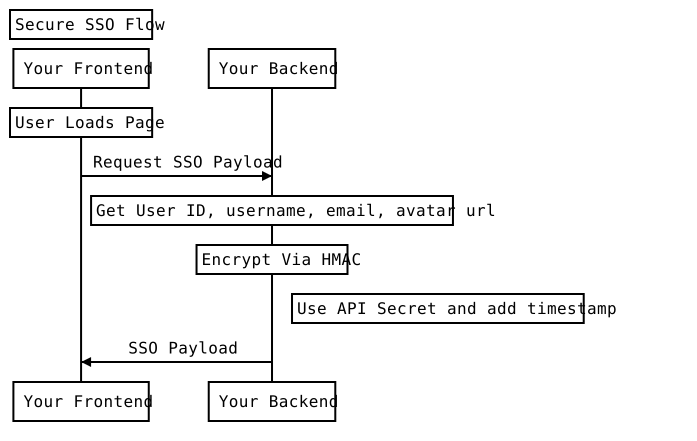
Secure SSO はフルスタックの開発を伴うため、Java/Spring、NodeJS/Express、およびバニラ PHP の完全な動作コード例が現在 GitHub にあります。
NodeJS の例では ExpressJS、Java の例では Spring を使用していますが、FastComments SSO を実装するためにこれらの実行環境でフレームワーク/ライブラリは必須ではありません - ネイティブの crypto パッケージで動作します。
FastComments SSO では新しい API エンドポイントを作成する必要はありません。シークレットキーでユーザー情報を暗号化し、そのペイロードをコメントウィジェットに渡すだけです。
Get Your API Secret Key
API シークレットは このページ から取得できます。マイアカウントに移動し、API/SSO タイルをクリックしてから "Get API Secret Key" をクリックしてもこのページにアクセスできます。
Comment Widget Parameters
コメントウィジェットのハイレベルな API ドキュメントは こちら にあります。
これらのパラメータが何を意味するか、詳細を見ていきます。
コメントウィジェットは設定オブジェクトを受け取ります - FastComments を使用している場合、customer id(tenantId と呼ばれます)を渡して既にこのオブジェクトを渡しているはずです。
SSO を有効にするには、新しい "sso" オブジェクトを渡します。そのオブジェクトには次のパラメータが必要です。値はサーバー側で生成してください。
- userDataJSONBase64: ユーザーのデータを JSON 形式で表したものを Base64 エンコードしたもの。
- verificationHash: UNIX_TIME_MILLIS + userDataJSONBase64 から作成した HMAC-SHA256 ハッシュ。
- timestamp: エポックタイムスタンプ、ミリ秒単位。未来の時刻であってはならず、過去2日以上前でもいけません。
- loginURL: コメントウィジェットがログイン表示に使える URL。
- logoutURL: コメントウィジェットがログアウト表示に使える URL。
- loginCallback: login URL の代わりに指定した場合、コメントウィジェットがログインボタンをクリックしたときに呼び出す関数。
- logoutCallback: logout URL の代わりに指定した場合、コメントウィジェットがログアウトボタンをクリックしたときに呼び出す関数。
The User Object
ユーザーオブジェクトは次のスキーマを持ちます:
Moderators and Administrators
For admins and moderators, pass the respective isAdmin or isModerator flags in the SSOUser object.
Notifications
通知を有効または無効にするには、optedInNotifications の値をそれぞれ true または false に設定します。ユーザーがこの値を含む SSO ペイロードでページを最初に読み込んだときに、通知設定が更新されます。
さらに、ユーザーが購読したページでのアクティビティに関する通知メール(アプリ内通知だけでなく)を受け取りたい場合は、optedInSubscriptionNotifications を true に設定してください。
VIP Users & Special Labels
オプションの "displayLabel" フィールドを使用して、ユーザー名の横に特別なラベルを表示できます。
Unauthenticated users
認証されていないユーザーを表すには、単に userDataJSONBase64、verificationHash、または timestamp を設定しないでください。loginURL を提供します。
これらのユーザーはコメントできず、代わりにログインメッセージ(設定によってメッセージ、リンク、またはボタン)が表示されます。
Direct Examples for Serializing and Hashing User Data
詳細な例は こちら(js)、こちら(java)、および こちら(php)にあります。
統合は複雑で困難な場合があることを理解しています。担当者に連絡するか、サポートページを利用してください。
カスタム統合 - シンプルなシングルサインオン(SSO)
Simple SSO を使うと、コメントウィジェットにユーザー情報を提供できるため、ユーザーはコメント時にユーザー名やメールアドレスを入力する必要がなくなります。
Simple SSO は次のように設定できます:
Run ユーザーはログインした状態になり、裏で SSO ユーザーが作成されます。API から取得された場合、ユーザーの createdFromSimpleSSO は true に設定されます。
Notes:
- メールアドレスは Simple SSO における一意の識別子です。
- Simple SSO でメールアドレスを提供する必要はありませんが、デフォルトではコメントは "Unverified" と表示されます。 メールアドレスが提供されない場合、ユーザーは完全に認証されません。
- NEW 2022年1月以降: fastcomments.com 全体でユーザー名が一意である必要はありません
- メールアドレスが提供され、かつユーザーが元々 Secure SSO から作成されていなかった場合、Simple SSO は SSO ユーザーを自動的に作成および更新できます。
- ユーザーに付与するバッジは
badgeConfigプロパティで指定できます。badgeIds配列にはユーザーに関連付けるグローバルバッジの ID が含まれます。pageBadgeIds配列には現在のページ(urlId)にスコープされたバッジ ID が含まれます — これらのバッジは割り当てられたページでのみ表示されます。overrideがtrueに設定されている場合、既存の表示中のバッジを置き換えます(グローバルとページスコープは独立して上書きされます);falseの場合は既存のバッジに追加されます。
カスタム統合 - Disqus SSO からの移行
Disqus と FastComments Secure SSO の最大の違いは、Disqus が暗号化に SHA1 を使用しているのに対し、当社は SHA256 を使用している点です。
つまり、Disqus からの移行は簡単です - 使用するハッシュアルゴリズムを SHA1 から SHA256 に変更し、UI に渡されるプロパティ名を更新するだけです。
カスタム統合 - Commento SSO からの移行
Commento は大幅に異なる SSO アプローチを採用しています - ユーザーを認証するために呼び出すエンドポイントを用意する必要があります。
FastComments はその逆で - 単にユーザーの情報をあなたの秘密鍵でエンコードしてハッシュし、それを渡すだけです。
シングルサインオンでコメントスレッドを保護
FastComments SSO (詳細はこちら) は、ユーザーが別のプラットフォームにログインせずにコメントできる方法を提供します。
しかし、これだけではコメントスレッドは保護されません。デフォルトではコメントデータは公開情報であり、ページを閲覧できる人は誰でもコメントを見ることができます。
設定を変更することで、管理者または有効な SSO ユーザーでない限り、コメントの取得を制限できます。
コード不要の設定
SSO が設定されている場合、カスタマイズルールを作成することで、コメントスレッドの閲覧と操作を防止できます。
その際、SSO を検索すると、次のオプションが見つかります:

それを有効にし、カスタマイズルールを保存します。
特定のドメインまたはページのみ保護する
特定のドメインまたはページだけを保護するには、カスタマイズルールを設定すれば簡単です。
カスタマイズ UI の上部に、Domain と URL ID の 2 つの入力欄があります。
特定のドメインだけを保護するには、対象のドメインを "domain" フィールドに入力します。
特定のページを保護するには、"URL ID" フィールドにページの URL を入力します。FastComments とカスタム統合している場合は、URL の代わりに ID の種類をここに入力できます。
セキュリティレベル
SSO を必須にする場合、Simple SSO を要求するか Secure SSO を要求するかを決める必要があります。Simple SSO を要求すると、どちらでも許可されますが、Secure SSO を要求する場合、コンテンツは API キーでハッシュされた Secure SSO ペイロードで取得されなければ表示できません。
"コメント閲覧に SSO が必要" を選択すると、セキュリティレベルのオプションが表示されます。
読み取り以外の保護
このオプションを有効にすると、ユーザーが SSO でログインしていない限り、ページまたはドメインへのコメントが保護されます。
注意点
SSO 統合前にコメントを作成したユーザーは、SSO 統合でログインしない限り、コメントを見ることができません。
匿名コメントを許可
デフォルトでは、FastComments はコメントする際にメールアドレスの入力を必須とします。メールアドレスが有効である必要はありませんが、ユーザーが送信されたリンクをクリックするまで、コメントには「未確認コメント」ラベルが表示されます。
ただし、メールアドレスの必須設定は解除できます。メール入力フィールドは引き続き表示されますが、必須ではなくなります。
この設定はウィジェットカスタマイズ UI から構成できます:

ユーザー名は依然として必須です。そのステップも省略したい場合は、全員が共有するデフォルトのユーザー名を設定するか、FastComments に各訪問者ごとにユニークなユーザー名を自動生成させることができます。
匿名コメントの期限切れ防止
FastComments は、希望する日数経過後に未確認コメントを削除するように設定できます。これによりスパム対策が支援されます。
デフォルトでは、削除されません。
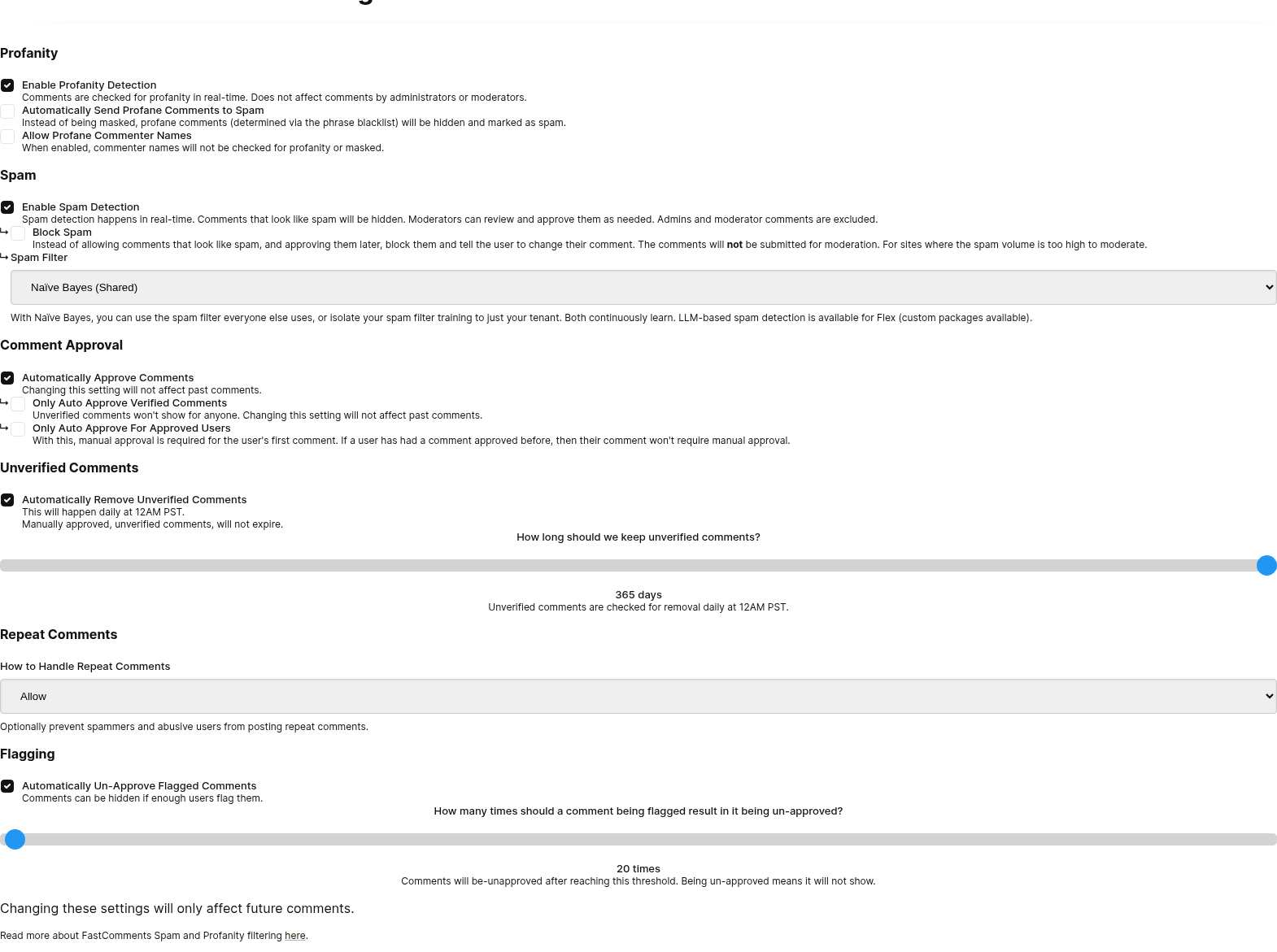
これは、モデレーション設定ページから設定または無効化できます。
メール入力の無効化
When users comment, and they are not logged in, they will be asked to provide their email.
This will create an "unverified session" for that user, and we will ask them to verify that session via email.
For some sites, or applications, it's desirable not to ask the user for their email when commenting or voting.
Enabling anonymous commenting makes the email input field optional. However, we can disable it completely. First, enable anonymous commenting, and then the option to disable the email input fields will appear.

With this on, the email fields will not show at all in all of our commenting products.
Note that, with this configuration, all comments will be unverified unless the user creates an account and logs into https://fastcomments.com.
You may want to consider 未確認ラベルを無効化.
未確認ラベルの無効化
デフォルトでは、FastComments は、未確認のブラウザー セッションを持つユーザーに対して残されたコメントに「Unverified Comment」ラベルを表示します。未確認コメントについての詳細はこちらをご覧ください。
Run さらに、この機能はコードを書かずにカスタマイズ UI で使用できます。

匿名投票を許可
ユーザーがコメントに投票しようとし、ログインしていない場合、ユーザー名とメールアドレスの入力を求められます。
この要件を削除すれば、誰でも情報を残さずにコメントに投票できるようになります。

デフォルトユーザー名の設定
When users comment or vote, and they are not logged in, they will be asked to provide their email and username.
In the case of anonymous commenting, sometimes it is desirable to define a default username to reduce the friction when commenting. This can be done from the Customization UI. Anonymous Commenting must be enabled first.

デフォルトユーザー名の共有
The default username is a shared display name, not an identity. A visitor who keeps the default and enters their email gets their own account, with the default shown as their public name. Any number of visitors can keep the same default, so "Anonymous" is never reported as already taken.
Usernames that a visitor types themselves still have to be unique.
If you would rather each visitor get a distinct name without having to think of one, see Generate Usernames Automatically.
ユーザー名を自動生成
When users comment or vote, and they are not logged in, they will be asked to provide their email and username.
For some sites, asking a visitor to invent a unique username is a hurdle, particularly on mobile. FastComments can
generate a neutral username for each new visitor and prefill it in the username field, like BraveOtter4172.
The visitor can leave it as‑is, or replace it with a name of their choosing.
This can be enabled from the Customization UI, under the setting called Generate Usernames Automatically:

動作の概要
- Each generated name is unique. It is checked against existing accounts and reserved for that visitor's browser session, so two visitors are not offered the same name.
- The name is only generated for visitors who do not have one yet. Logged in users, SSO users, and visitors who have already commented keep their existing name.
- It works with or without anonymous commenting. With anonymous commenting off, the visitor still enters their email, but no longer has to think of a username.
- A returning visitor who enters an email they have used before is matched to their existing account, and keeps the name on that account.
- If a Default Username is also set, the generated name takes precedence.
コールバック
コメントウィジェット用のすべてのライブラリ(現在は Angular、React、Vue)はコールバックをサポートしています。
コールバックは設定オブジェクトで指定し、各ライブラリで同じシグネチャを持ちます。
サポートされているコールバックは以下です:
- onInit
- onAuthenticationChange
- onRender
- commentCountUpdated
- onReplySuccess
- onVoteSuccess
- onImageClicked
- onOpenProfile
- onCommentSubmitStart
- onCommentsRendered
正確なシグネチャはTypeScript 定義で確認できます。
以下はすべてのコールバックを使用した例です:
Run ユーザーのロケールを手動で定義
デフォルトでは、FastComments はユーザーのシステムとブラウザで決定されたロケールでコメントウィジェットを表示します。
ユーザーがコメントしたりログインしたりすると、最後に使用したロケールを更新し、メール送信にもこのロケールを使用します。
これにより、コメントウィジェットの翻訳がユーザー向けにどのように行われるかが影響を受けます。ロケールはユーザーの言語と地域で構成されるため、ロケールを設定すると通常、ユーザーに表示されるテキストの言語が変更されます。
UI から
ウィジェットカスタマイズ UI を使用して設定できます。「ロケール / 言語」オプションをご覧ください:

コードから
希望するロケールで上書きできます。
Run サポートされている言語とロケールコード
サポートされている言語と対応するロケールコードの完全なリストは、こちらで確認できます。
SSO に関する注意
SSO を使用している場合、ユーザーオブジェクトにユーザーのロケールを渡すと、メールやその他の項目が正しくローカライズされます。
許可言語の制限
デフォルトでは、FastComments はコメントに使用される言語を制限しません。
コミュニティが使用する言語を制限したい場合があります。
この設定はコードを書かずに、ウィジェットカスタマイズページで行えます:

システムはコメントを解析して言語を判定し、許可リストと照合します。
コメントが許可されていない言語で書かれている場合、ローカライズされたエラーメッセージが表示されます。
ページタイトル
現在のページタイトルは指定された urlId に関連付けられ、モデレーションツールで使用するために保存されます。
デフォルトでは、これは document.title から取得されます。
必要に応じて、独自のページタイトルを次のように指定できます:
Run 新しい返信の防止と投票の無効化
readonly フラグを true に設定することで、コメント機能をロックし、新しいコメントや投票を受け付けなくすることができます。
コメントは編集や削除もできなくなります。
Run これはコードを書かずに、ウィジェットカスタマイズページで、ドメイン全体または個別ページ単位でカスタマイズできます。

更新!
2022年11月以降、スレッドは管理者やモデレーターが返信エリア上部の三点メニューから リアルタイム にロックまたはロック解除できます。
これにより新しいコメントは防止されますが、投票は引き続き可能で、必要に応じてユーザーは自分のコメントを削除できるようになります。一方、readonly ではこれらの操作は許可されません。
Page API の isClosed フィールドに対応しています。
リンクドメインの制限
デフォルトでは、FastComments は任意の外部サイトへのリンクを許可します。
これを、希望するサイトやドメインのリストに限定することができます。定義されたリストに含まれないサイトやドメインへのリンクを投稿しようとすると、ユーザーにエラーが表示されます。
この検証は Comment Widget と API のみ対象です。インポートには影響しません。
この設定はコードを書かずに、ウィジェットのカスタマイズページで行えます:

コメント数とすべての入れ子返信のカウカウント
コメントウィジェットの上部に表示されるコメント数は、すべての「トップレベル」コメントを表示することもできます。すなわちページや記事自体に直接返信された返信を表示することも、 またはすべてのネストされたコメントの総数を表示することもできます。
By default, this is true - it is a count of the latter - all comments. コメントウィジェットの古いバージョンでは、
デフォルト値は false です。
We can change the behavior, so that it is a count of all nested comments by setting the countAll flag to true.
Run If we wanted the count to reflect only the top level comments, we set the flag to false.
Run This currently cannot be customized without code changes.
コメント投稿者リンクの有効化
デフォルトでは、FastComments はユーザーにコメント、ユーザー名、メールアドレスのみを求めます。
しかし、状況によっては、ユーザーに自分のブログやウェブサイトへのリンクを残してもらいたい場合があります。
enableCommenterLinks フラグを true に設定することで、ユーザーのウェブサイト URL を入力する追加フィールドを表示できるようにします:
Run その URL が提供されると、ユーザーのアカウントが更新され、過去および将来のすべてのコメントでユーザー名がこの URL にリンクされます。
これはコードを書かずに、ウィジェットカスタマイズページでカスタマイズできます:

モデレーショングループ
このリストはModeration Groupsページで生成されたIDの一覧です。
指定すると、その構成を使用して投稿されたコメントには同じセットの moderationGroupIds が含まれます。
もし Moderator が1つ以上の Moderation Groups を定義している場合、
自分のグループに関連する Moderate Comments ページのコメントのみを見ることができます。
Run メンショングループID
オートコンプリートの**@mentions**で使用するIDの一覧。ユーザー同士のグループが交差していない場合にタグ付けされないようにしたいときに便利です。
指定すると、@文字を入力したときに、他のグループに属するユーザーのみがオートコンプリートに表示されます。
Run サードパーティクッキー回避
認証のために、FastComments はブラウザでサードパーティークッキーが有効になっていることに依存しています。これが無効だと、ユーザーは常にコメントする際にメールアドレスを入力しなければならず(メール入力フィールドが非表示でない限り)、コメントはデフォルトで未確認として表示されます。
この問題を回避するには、サードパーティークッキー バイパスを有効にできます。
この設定を有効にすると、ユーザーがログイン中であることを示すメッセージを表示する小さなポップアップが表示されます。このポップアップは、ユーザーがコメントウィジェットとやり取りするたびに表示されます。たとえば、コメントを残すときなどです。
コードでこれを行うには、enableThirdPartyCookieBypass フラグを true に設定します:
Run ウィジェットカスタマイズ UI でも、Enable Third-Party Cookie Popup の下でこの設定を行うことができます:

返信付きコメントの削除
デフォルトでは、ユーザーは自分のコメントを削除できます。また、コメントを削除すると、スレッド内のすべての子コメントおよび一時的なコメントが自動的に削除されます。この動作はリアルタイムでも適用されます。
次の方法でこれを制限できます:
- 代わりに、削除されたコメントを匿名化します(名前とテキストを
[deleted]またはカスタム値に設定)。 - 返信がある場合、コメントの削除を許可しません。カスタマイズ可能なエラーメッセージが表示されます。
- コメントに返信がある場合の削除を、管理者とモデレーターのみに制限します。
Comment Thread Deletion セクションで、ウィジェットカスタマイズ UI から設定できます。

トップバーにバッジを表示
デフォルトでは、FastComments はコメントスレッド内のコメントに対してのみユーザーバッジを表示します。
ただし、ウィジェットカスタマイズページでこの機能を有効にすることで、コメントフォーム上部の名前の横にユーザーバッジを表示できます。

これにより、トップバー領域でユーザーの名前の横にバッジが表示され、コメント作成時にユーザーの実績やステータスがより目立つようになります。
この機能が動作するには、ウィジェットカスタマイズ UI で有効にする必要があることに注意してください。サーバーレベルで有効になっている場合でも、コード設定で showBadgesInTopBar フラグを false に設定して個別に無効化することができます。
Run オンラインユーザーリストを表示
デフォルトでは、FastComments はページ上にユーザーリストを表示しません。
ページを現在閲覧しているユーザーのリストを、コメントウィジェットと一緒に表示できます。ユーザーが参加したり離脱したりするとリストはリアルタイムで更新され、名前、アバター、オンラインインジケーターが表示されます。
There are three layout options:
1- 上部: コメントの上に表示される、重なり合うアバターの横一列。2- 左側: ウィジェットの左側に表示される、名前とオンラインドットのサイドバー。3- 右側: ウィジェットの右側に表示される同様のサイドバー。
Set the usersListLocation flag to enable the feature:
Run デフォルトでは、リストは現在オンラインのユーザーのみを表示します。過去にページにコメントしたが現在は閲覧していないユーザーも含めるには、usersListIncludeOffline を true に設定します:
Run 過去のコメント投稿者は緑色のオンラインドットが表示されないため、現在誰がオンラインかが明確になります。
プライベートプロフィールのユーザーは、汎用アバターと「プライベートプロフィール」ラベルで表示され、身元を明かさずにカウントが正確に保たれます。
コードを書かずに設定することもできます。ウィジェットのカスタマイズページで「Users List Location」オプションを確認してください。場所が Off 以外に設定されていると、下に「Include past commenters」チェックボックスが表示されます。

過去 500 人のライブユーザーについて、リストは最大で 30 秒遅れています。