
自訂與設定
自訂與設定
背景
在此您將找到關於評論小工具支援的每項功能與設定的深入文件。
本文件將涵蓋核心概念,並深入探討各功能領域,包含操作說明與常見陷阱。
將提供程式碼範例並以重點標示相關行;在適用情況下也會提供設定頁面的截圖。
程式碼範例將使用我們的原生 JavaScript 函式庫;然而,設定選項在所有版本的評論小工具(React、Vue 等)中使用完全相同的名稱。
本指南中概述的大多數設定與功能都不需要撰寫任何程式碼。
識別您的帳戶 
您可能會注意到,可以使用租戶 ID 為 "demo" 的評論小工具,例如:
 Run
Run 
這僅供您試用評論小工具。在生產環境中,您會像下面這樣傳遞您的租戶 ID:
Run 您的租戶 ID 已套用在評論小工具的 程式碼片段 中,您可以在那裡找到。
您也可以在 API 憑證頁面 找到您的租戶 ID 並管理您的 API 金鑰。
從此之後,如果您已登入 FastComments,程式碼範例將會使用您的實際租戶 ID(如果您是在 https://fastcomments.com 登入的話)。
評論如何與頁面和文章關聯
在呈現評論串或發表評論時,FastComments 需要知道這些評論屬於哪個頁面、文章或產品。
為此,我們使用稱為「URL ID」的概念。它可以是識別碼,例如字串或數字,或是一個 URL。
預設情況下,如果未指定 urlId,系統會使用頁面 URL。我們會取得目前頁面的 URL,並清除常見的行銷參數或追蹤識別碼。
對於第三方整合(例如 WordPress),我們的外掛通常會使用代表目前所檢視資訊的識別碼作為 URL ID,例如文章/頁面的 ID。
Run 本文件中我們常會提到的其中一項內容是 Widget Customization UI。
此 UI 可用於在不撰寫程式碼的情況下對評論小工具進行多項變更。
在建立自訂規則時,我們通常希望它套用至網站的所有頁面。然而,在某些情況下,我們可能想要在特定頁面上自訂評論小工具,無論是套用自訂樣式,或是讓該頁面的評論匿名。例如,你也可以讓某些頁面立即顯示即時評論,而在其他頁面則將評論隱藏在通知按鈕下。
這一切都可以透過此頁面的 URL ID 輸入欄位完成,欄位長相如下:

此欄位的值應與傳入評論小工具的 urlId 參數相符。如果希望自訂規則對 urlId 不敏感,請將此欄位留空或輸入 *。
自 2023 年起,widget 自訂中的 URL ID 欄位也支援模式!例如,你可以使用 */blog/* 為部落格添加特定樣式,或使用 */store/* 為商店添加特定樣式,同時使用相同的網域。
Gotchas
- 如果你的頁面包含雜湊參數(例如 example.com#page-1),預設情況下這些參數會成為 URL ID 的一部份。
- 在遷移期間,例如從 WordPress 遷移至 Gatsby,可能需要在初次遷移後遷移 URL ID 評論值。如有需要,請與我們聯繫。
在不同頁面上呈現相同的評論
由於 urlId 參數允許我們定義留言綁定到哪個頁面或 id,我們只需在那些頁面上將 urlId 設為相同的值即可。
Run 自訂樣式
FastComments 設計為可自訂。評論小工具本身因安全考量在 iframe 中執行,因此若要套用自訂樣式,必須遵循以下兩種方法之一。
第一種,也是最簡單且我們首選的方法,是使用小工具自訂頁面。
在小工具自訂頁面,請查看「顯示進階選項」區段,其下有一個標示為「Custom CSS」的區域:

此方法有以下好處:
- 輸入的 CSS 會在送出給使用者之前被壓縮,且編輯介面的格式保持一致。
- 您可獲得小工具自訂 UI 的所有好處,例如能輕鬆為不同網站自訂不同的評論小工具。
- 當我們對評論小工具進行變更時,您的自訂樣式將作為我們發布流程的一部分進行測試。
第二種方法是於小工具設定中指定 customCSS 參數,如下所示:
Run 然而,這種方式有 限制:
- 由於標頭大小的限制,傳遞的自訂 CSS 數量有上限,超過後我們的伺服器會拒絕請求。
- 您必須在自己的基礎建設與建置系統中管理自訂 CSS。這也可能是一個優勢而非劣勢。
- 在此情境下,會額外產生兩次傳送自訂 CSS 的網路開銷:一次傳送至我們的伺服器,然後再回傳至 iframe 內容。但對於大多數負載大小而言,影響不大。
- 常見的最佳化方式是壓縮 CSS 以減少網路傳輸大小,但使用此方法時您必須自行處理。
- 當我們進行變更時,您的自訂 CSS 不會被測試。
External CSS Files
您可以使用 @import 讓小工具取得外部檔案!
建議將 @import 放在自訂規則中。如此一來,若我們需要對評論小工具進行變更,便能使用自動化工具驗證您的設定。例如,您可以在小工具自訂 UI 中建立自訂規則,點選 Advanced,並在 Custom CSS 中輸入:
@import url(https://example.com/styles.css);In Code - Not Recommended
您也可以透過 customCSS 屬性載入外部 CSS 檔案:
Run 但請記住,若這樣做,我們將無法測試您的 CSS。
User Profile Modal Styling
使用者個人資料彈出視窗也可以使用自訂 CSS 進行樣式設定。然而,為確保自訂樣式套用於使用者個人資料,所有 CSS 選擇器必須以 .user-profile 為前綴。若未加此前綴,對使用者個人資料彈出視窗的自訂樣式將被忽略。
例如:
Run Backwards Compatibility
在 FastComments,我們了解客戶會自訂評論小工具。這本就是設計初衷——我們最不希望的是,我們的產品在您的產品中造成設計不一致。
鑑於這是我們產品的重要部分,我們擁有一條建置管線,能在每次發布時針對每位客戶審查評論小工具的變更。
若我們發現小問題,會更新您的帳號以確保發布順利進行。若發現重大破壞性變更,我們則會暫停發布。
自訂字體
FastComments 設計上可供客製化,我們小工具使用的字型也不例外。
預設情況下,FastComments 使用 system font stack,以在各種裝置上呈現最佳外觀。
若要定義您自己的字型,請參閱 自訂 CSS 文件。
在該處您會找到定義自訂 CSS 的方法,從而讓您能指定所需的字型。
如何定義字型
要覆寫字型,我們建議使用 .fast-comments, textarea 選擇器來定義您的 CSS。範例如下:
Run 移除品牌標誌
對於擁有 Pro 或 Enterprise 帳戶的客戶,允許進行白牌化。只要 與我們聯絡,我們很樂意協助。
如果您只想從評論小工具移除我們的標誌,這項功能會在 Flex 與 Pro 計畫上自動啟用。
這些計畫也為從我們平台發送的電子郵件提供相同的功能。
支援深色背景(暗色模式)
預設情況下,FastComments 的留言小工具會在大多數網站上自動偵測深色模式。
當偵測到深色模式時,FastComments 會將原本白底黑字的顯示切換為黑底白字。圖片也會相應變化。
在頁面載入時,小工具會嘗試判斷留言小工具背後頁面背景的明暗程度。這表示頁面可能是白色背景,但如果你將留言小工具放在一個黑色背景的容器內,仍應自動啟用深色模式以確保留言可讀。
然而,這個依賴判定「亮度」的偵測機制,有時可能不會在你想要的情況下啟用深色模式。若要強制啟用,請將 hasDarkBackground 標記設為 true,如下所示:
Run 切換暗色模式
對於允許在初始頁面載入後切換深色模式的網站,這會比較複雜。
首先,所有現行版本的評論元件函式庫(React、Vue)在它們各自的程式庫中都有切換深色模式的範例。
對於 VanillaJS 元件,我們需要多做一些工作。首先,FastCommentsUI 會回傳一個含有 "destroy" 和 "update" 函式的物件。
我們可以在每次想要更新評論元件設定時簡單地呼叫 update 函式,如下所示。以下是一個使用 VanillaJS 元件切換 深色模式的完整可運作範例。
Run 覆寫文字
使用 FastComments 時,評論小工具中的所有文字皆可自訂。
您可以覆寫單一文字,例如送出按鈕,或是整個評論小工具中的所有文字。
預設情況下,評論小工具中的文字會根據使用者的語系進行翻譯。然而,如果我們確信使用者群使用相同的地區/語言,我們可以覆寫文字,例如:
Run 所有可自訂的翻譯可在 此處 的「進階選項」分頁中找到。
不過,有更簡單的方法,可透過小工具自訂 UI。在那裡,我們只要找到 EN_US 語系下評論小工具顯示的文字,並指定替換文字即可。

所有翻譯覆寫目前會影響所有語系。
更改預設頭像
當使用者首次使用 FastComments 發表評論時,我們會嘗試從 https://gravatar.com/ 取得他們的頭像。
然而,如果找不到頭像,或使用者從未在其帳號中設定頭像,我們會顯示一個靜態的預設頭像圖像。
若要指定您自己的靜態頭像圖像,可使用 defaultAvatarSrc 設定。
Run 這也可以不使用程式碼完成。在小工具自訂頁面中,請參閱「Default Avatar」區段。

請注意,為特定使用者(例如使用 SSO)定義頭像的說明已在其專屬章節中說明。
停用頭像
頭像可以完全從評論小工具中移除,即使使用者已設定自己的頭像。
Run 這可以在小工具自訂頁面上,無需編寫程式碼即可自訂:

停用所有預設樣式
對於較大的自訂樣式專案,可能希望從零開始,完全不使用預設樣式。
可以透過將 noStyles 參數設為 true 來移除所有預設樣式,如下所示:
Run 這可以在小工具自訂頁面的「進階選項」中,無需撰寫程式碼即可自訂:

從評論連結至頁面
當傳送通知電子郵件,或在像審核頁面這類的使用者介面中呈現留言時,能夠從留言連結回其所在的頁面會很有幫助。
如果 URL ID 並不總是實際的識別碼,我們就必須在其他地方儲存 URL。這就是 "url" 屬性的用途,定義如下。
Run 一個常見的使用情境是將留言串綁定到一個識別碼(例如文章),然後再連回特定頁面,例如:
Run URL 不會移除常見的行銷參數。預設情況下,會以當前頁面的 URL 作為與留言一起儲存的 URL。
預設折疊回覆
默認情況下,頂層評論的回覆會顯示。
可以將其設定為使用者必須點擊頂層評論上的「Show Replies」才能看到子回覆。
Run 這可以在小工具自訂頁面上,無需編寫程式碼即可自訂:

此設定不會影響最初載入的頂層評論數量。若您只有一則頂層評論,且有 29 個子評論,啟用此設定後,您將會:
- 看到該頂層評論。
- 在此評論下看到「Show Replies (29)」。
若您希望在使用此選項的同時顯示所有頂層評論,請將 起始頁面設為 -1 設為 -1。
啟用所見即所得編輯器
預設情況下,FastComments 的格式化功能是透過在文字周圍加入可見的錨點標籤(例如 <b></b>)來實現。點擊工具列
或使用快捷鍵會為您自動完成此操作。然而,某些社群可能希望使用不帶錨點標籤的格式化。這稱為啟用
WYSIWYG(所見即所得)編輯器。此編輯器與預設編輯器外觀完全相同,只是會載入一些
額外的程式碼,允許使用者在不顯示錨點標籤的情況下加粗、加底線等。
Run 這也可以不寫程式碼完成。在小工具自訂頁面中,請查看「啟用進階格式化」選項。

停用工具列
預設情況下,FastComments 會在撰寫評論時顯示工具列,以提供裝飾文字和上傳 圖片的快捷方式。
此工具列可以透過程式碼或自訂 UI 予以停用。
Run 也可以不使用程式碼完成此操作。在小工具自訂頁面中,請查看「停用回覆工具列」選項。

停用封鎖功能
預設情況下,FastComments 允許使用者封鎖其他使用者。封鎖使用者會導致其評論被隱藏,阻止使用者之間的通知,等等。
可能需要停用此功能。可以這樣做:
Run 也可以不使用程式碼,透過小工具自訂 UI 來完成,這同時也能啟用正確的伺服器端驗證:

決定要呈現的頁面
在擷取與呈現評論時,評論小工具需要知道要從哪一頁開始。預設情況下,它會從 第一頁開始,只呈現該頁。
如有需要,可將要呈現的確切頁面作為設定 startingPage 傳給評論小工具。
Run 請注意,頁碼從零開始,因此上述範例會呈現第二頁。
在不重新載入頁面的情況下切換評論串
我們已說明 urlId 是評論所綁定的頁面或文章識別碼。
再說一次,如果未定義,urlId 將預設為當前頁面的 URL。
那麼對於 SPA(單頁應用程式),當評論所綁定的頁面或內容在沒有重新載入整頁的情況下動態變更時該怎麼辦?
Angular、React、Vue 等
使用我們的函式庫(例如 Angular 與 React),只要更新傳入 widget 的 urlId 屬性,評論元件就會重新整理。你可以在 React 範例中看到這個行為,例如 這裡。
VanillaJS
如果你使用 VanillaJS 函式庫,情況會比較複雜,因為沒有像 Angular 或 React 這類的框架來處理資料綁定或狀態傳播。
當你實例化 VanillaJS widget 時,它會回傳一些函式,可藉由呼叫這些函式來更新元件。
下面是一個實用範例,示範如何更改頁面 hash 並更新評論元件:
Run 絕對日期(停用人性化時間戳記)
預設情況下,使用本地化的相對日期。例如,在最近發表的評論旁邊,您可能會看到「11 分鐘前」。
可能需要或希望使用絕對日期,在這種情況下,您需要將此參數設為 true。
Run 這可以在小工具自訂頁面的「進階選項」中,無需編寫程式碼即可自訂:

同時顯示絕對與相對日期
預設情況下,會使用本地化的相對日期。例如,在最近留下的評論旁邊,您可能會看到「11 分鐘前」。
可能需要或希望保留此相對日期格式,同時在旁邊顯示完整日期,這時您可以將此參數設為 true。
Run 此設定可在小工具自訂頁面的「進階選項」中,無需撰寫程式碼即可自訂。您必須先啟用「絕對日期」才能在 UI 中看到此選項。

新增標題文字
某些文字,例如標題或訊息,可以顯示在評論計數下方、登入狀態文字上方。
我們稱之為標頭,預設情況下它是隱藏的。
Run 這可以在小工具自訂頁面的「進階選項」下,無需程式碼即可自訂:

將連結呈現為文字
預設情況下,FastComments 會將連結渲染成這樣:https://exmaple.com - 其中連結 URL 會變成可點擊的 HTML 錨點標籤。
某些網站可能想要停用此功能,例如為了防止詐騙者。我們提供的方式是將 Comment HTML Rendering Option 設定為 Links as Text。
此設定可在不撰寫程式碼的情況下於小工具自訂頁面進行調整,適用於整個網域或單一頁面:

使用按鈕切換評論顯示
預設情況下,FastComments 會同時呈現評論輸入框和評論串。為了節省垂直空間,它還會隱藏其他任何必填欄位,直到使用者與小工具互動為止。
然而,評論小工具可以隱藏在按鈕後面,例如:
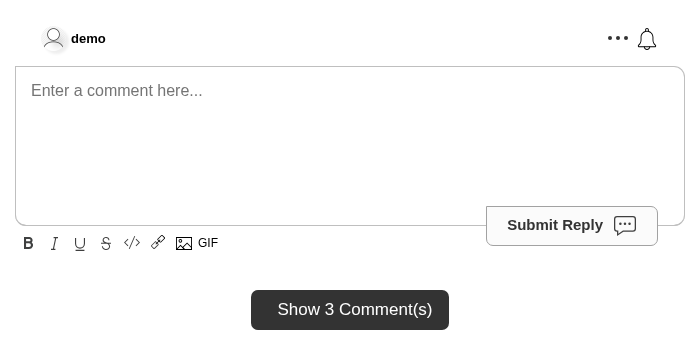
按鈕會根據評論目前是顯示還是隱藏而使用不同的翻譯文字。若評論被隱藏,會使用 translations.SHOW_COMMENTS_BUTTON_TEXT。若評論已顯示,則使用 translations.HIDE_COMMENTS_BUTTON_TEXT。翻譯文字可以包含 [count],此佔位符會被本地化的計數取代。
Run 此設計用於取代 hideCommentsUnderCountTextFormat 設定。
計數會隨著評論串即時更新。若沒有評論,按鈕不會顯示。
可以透過建立自訂規則並啟用「點擊以顯示評論」來在不撰寫程式碼的情況下啟用此功能:

自訂評論計數文字
在評論小工具頂部顯示的評論計數可以自訂。
這可以被任何字串取代,且 [count] 會被替換為使用者本地化的計數值。
Run 這可以在小工具自訂頁面上,無需程式碼即可自訂:
![小工具自訂頁面上的評論計數文字欄位,會以即時總數取代 [count]](/images/29e0393434a76b2116709c18f4f222a2.png)
停用圖片重定向
預設情況下,FastComments 允許使用者上傳圖片。當使用者點擊該圖片時,FastComments 預設會, 在新分頁中開啟並完整顯示該圖片。將此旗標設為 true 可停用此行為:
Run 如果您不打算自行攔截圖片點擊事件(參見 onImageClicked),我們建議將此設定與一些樣式結合使用 以移除圖片可被點擊的外觀。
停用自動標籤建立
當使用者輸入標籤(例如 #someexampletag)時,FastComments 會自動建立該 HashTag,並在他們的評論中將其突顯。
在某些情況下,可能希望停用此功能,或透過 API 控制可使用的標籤。
為此,只需在小工具自訂 UI 中啟用 Disable Automatic #hashtag Creation。

停用通知鈴鐺
預設情況下,FastComments 會在評論區的右上角顯示通知鈴。
此鈴會變成紅色,並顯示使用者擁有的通知數量。以下是一些範例通知:
- 使用者回覆了您。
- 使用者在您參與的討論串中回覆。
- 使用者為您的評論點讚。
- 使用者回覆了您已訂閱的頁面。
通知鈴同時也提供訂閱整個頁面的機制。
然而,我們可以完全停用通知鈴:
Run 這也可以不使用程式碼完成。在小工具自訂頁面,請參閱「Disable Notification Bell」區段。

停用個人檔案
預設情況下,FastComments 會在您點擊使用者的頭像時顯示其個人資料。
然而,我們可以停用此功能:
Run 這也可以不寫程式碼完成。在小工具自訂頁面,請參閱「停用個人檔案」區段。

停用個人檔案評論
預設情況下,FastComments 會在使用者個人檔案上顯示「個人檔案評論」分頁,允許訪客在某人的個人檔案上留下評論。
然而,我們可以停用此分頁:
Run 也可以不寫程式碼完成此操作。在小工具自訂頁面中,請參閱「停用個人檔案評論」區段。

停用個人檔案直接訊息
預設情況下,FastComments 會在使用者個人檔案上顯示「直接訊息」分頁,允許訪客向使用者發送直接訊息。
然而,我們可以停用此分頁:
Run 這也可以在不撰寫程式碼的情況下完成。在小工具自訂頁面中,請參閱「停用直接訊息」區段。

停用成功訊息
預設情況下,FastComments 會在發表評論後顯示成功訊息。可以透過以下方式停用:
Run 也可以不使用程式碼完成此操作。在小工具自訂頁面:

更改 GIF 的內容分級
預設情況下,FastComments 評論小工具會將 gif rating 設為 pg。
可用的選項有 g、pg、pg-13 與 r。
這可以在程式碼中或透過 UI 設定。以下是在程式碼中的設定方式:
Run 在 UI 中,只要未勾選 Disable Image Uploads?,您就會在 Gif Picker Rating 下找到此設定。

圖片內容審核
預設情況下,FastComments 評論小工具的圖像內容審核已設定為 off。
可用的選項有 off、low、medium 和 high。
在小工具自訂 UI 中,只要未勾選 Disable Image Uploads?,您就可以在 Image Content Moderation Level 下找到此設定。

更改投票樣式
預設情況下,FastComments 會以向上和向下的箭頭呈現投票選項,允許使用者對評論進行讚或倒讚。
然而,您可以更改投票工具列的樣式。目前的選項包括預設的上下按鈕,或使用心形投票機制。
我們使用 voteStyle 旗標如下:
Run 我們強烈建議您在不編寫程式碼的情況下完成此操作,因為它同時啟用了伺服器端驗證。請在小工具自訂頁面中查看「Vote Style」區段。

投票也可以被停用,請參閱樣式選項上方的 Disable Voting。
停用刪除功能
預設情況下,FastComments 允許使用者刪除他們的評論。
然而,也可以防止此行為。
在小工具自訂頁面中,請查看「Disable Deleting」選項。

- 這僅影響一般評論者,而不影響版主或管理員,後者仍然可以刪除。
- 這也會影響在傳遞
contextUserId時的 API 整合。
停用編輯功能
預設情況下,FastComments 允許使用者編輯他們的評論。
然而,也可以防止此行為。
在小工具自訂頁面中,請查看「停用編輯」選項。

- 這僅影響一般評論者,而不影響版主或管理員,他們仍然可以編輯。
- 這也會影響在傳遞
contextUserId時的 API 整合。
突顯新評論
FastComments 提供幾種方法來突顯新的留言。
首先,預設情況下,會觸發應用內通知的留言(回覆、同一討論串的回覆,或你訂閱的頁面
上的留言),會自動以使用者頭像略微發光的方式突顯。顏色可以透過 CSS
使用 is-unread 類別自訂。
過去 24 小時內發佈的留言會被套用 24hr 類別,可用於樣式設定。
最後,任何在使用者工作階段中即時出現的新留言會透過動畫突顯數秒鐘。這是透過
is-live CSS 類別實現的,也可以進行自訂。
頁面大小
預設情況下,FastComments 的頁面大小為 30。此數值包括線程中的回覆。
可以在 Widget Configuration UI 中自訂頁面大小,範圍從 10 到 200 不等。
請注意,變更頁面大小需要重新計算您帳戶中的所有評論線程。這可能需要幾分鐘的時間。
此設定無法在客戶端小工具中配置,因為頁面是由伺服器端計算的。
以下示範了設定範例:

頁面大小可以透過建立不同的自訂規則,以全域、每個網域或每個頁面的方式進行自訂。
這將影響您使用我們平台顯示評論的所有客戶端、整合與框架。
電子郵件範本
FastComments 寄給您客戶的電子郵件可以自訂。範本、邏輯與翻譯都可以更改。文字可以針對每個語系自訂,樣式甚至可以針對每個網域更改。 在此了解有關自訂電子郵件範本的更多資訊。
使用者名稱格式
預設情況下,FastComments 會顯示使用者輸入的名稱,或是透過 SSO 傳遞給我們的名稱。
然而,有時可能需要以不同方式遮蔽或顯示使用者的名稱。例如,若使用者的名稱是 Allen Rex,您可能只想顯示「Allen R.」。
這可以在 Widget Customization UI 中,於名為 Commenter Name Format 的設定下,無需撰寫程式碼即可完成:

可用的格式有:
- 首字母大寫(顯示範例使用者為 Example User)
- 姓氏首字母(顯示 Example User 為 Example U.)
- 全部首字母(顯示 Example User 為 E. U.)
- 顯示「Anonymous」
變更此設定的效果會立即生效。使用者仍會在評論區上方看到自己的完整使用者名稱,但其評論將顯示已修改的使用者名稱。
使用者名稱會在伺服器端被遮蔽,以保護使用者。
停用圖片上傳
預設情況下,FastComments 允許上傳圖片。可以透過將 noImageUploads 旗標設為 true 來停用此功能。
Run 這可以在小工具自訂頁面上,無需撰寫程式碼即可自訂:

允許媒體嵌入
預設情況下,FastComments 不允許在評論中使用 iframe。啟用媒體嵌入後,評論者可以貼上來自受信任提供者(如 YouTube、Vimeo、SoundCloud 和 Spotify)的嵌入代碼(<iframe> 片段),它將在評論中內嵌顯示。
出於安全考量,這不是客戶端小工具設定旗標。它是伺服器端設定,於每則評論儲存時驗證,因此無法從頁面上開啟。僅允許指向內建受信任提供者清單的 iframe。其他任何 iframe 都會被移除。
此操作無需撰寫程式碼,可在小工具自訂頁面完成:

添加您自己的提供者
如果您想允許來自未列於內建受信任清單的提供者的嵌入,請在同一頁面的「Additional Embed Domains」欄位中加入其主機名稱。這些主機名稱會與內建提供者一起被允許。匹配採用完全相符的方式,因此請包含完整的主機名稱(例如,player.example.com)。未列出的任何主機皆會被封鎖。
純文字評論框與 WYSIWYG 編輯器皆支援貼上嵌入內容。在 WYSIWYG 編輯器中,嵌入會以可移除的區塊形式插入。
啟用搜尋框
預設情況下,評論小工具不會顯示搜尋框。
但是,我們可以透過將 enableSearch 旗標設為 true 來開啟它:
Run 也可以不寫程式碼完成此設定。在小工具自訂頁面中,請查看「啟用搜尋框」選項。

啟用劇透
我們可以透過將 enableSpoilers 旗標設為 true 來啟用 spoiler 支援:
Run 這也可以不寫程式碼完成。在 widget 自訂頁面中,請查看「Enable Spoilers」選項。

當文字被選取,且現在可見的 SPOILER 按鈕被點擊時,文字會被遮蔽,直到使用者將滑鼠移到上面。對於深色模式,我們以相同方式處理,只是使用更適合深色模式的顏色。
這也相容於 WYSIWYG 編輯器。
啟用評論檢視次數
預設情況下,FastComments 不會追蹤誰檢視了每則評論,也不會提供任何相關統計。
然而,我們可以啟用此功能,系統將會在每位使用者捲動至評論時開始追蹤。
發生此情況時,每則評論旁的眼睛圖示旁的計數會遞增。計數會即時更新,並依使用者的語系進行縮寫。
我們可以透過將 enableViewCounts 旗標設為 true 來啟用此功能:
Run 此設定可在小工具自訂頁面上,無需撰寫程式碼即可自訂:

我們會追蹤檢視評論的使用者 ID*,保留一週。若在同一週內再次檢視該評論,計數不會遞增。若在一週過後再次檢視,計數將再次遞增。
- *注意:或是匿名會話 ID,或是使用者的 IP(以雜湊值形式)。
立即顯示即時評論
預設情況下,即時評論功能是啟用的。這表示如果有任何評論被新增、刪除、編輯或置頂,變更會即時顯示給所有正在觀看該評論串的使用者。
然而,預設情況下這些新評論會出現在一個動態顯示的按鈕下,按鈕文字類似於「顯示 2 則新評論」。
如果新評論是直接回覆到頁面,按鈕會顯示在評論串的頂部;如果它們是回覆到特定評論,按鈕則會顯示在該評論之下。
這樣的設計是為了避免頁面大小不斷變化,從而在使用者嘗試抓取捲軸時造成挫折感。
對於某些使用情境,例如即時競標或線上活動,這並非理想的行為——您可能希望評論小工具更像「聊天」框,讓新評論「立即顯示」。
因此,啟用此功能的旗標名稱為:showLiveRightAway。
我們可以這樣開啟它:
Run 此設定也可以在小工具自訂頁面上,無需撰寫程式碼即可調整:

停用即時評論
預設情況下,FastComments 會啟用即時評論功能。
這表示評論串的每位觀看者都應該看到相同的內容。
例如,若新增一則評論,該評論應該會顯示。若評論被編輯或刪除, 則所有觀看此串的使用者都會看到相同的編輯或刪除。投票以及所有審核操作亦同。
然而,我們可以停用此功能:
Run 也可以不使用程式碼完成。在小工具自訂頁面,請參閱「停用即時評論」區段。

新即時評論顯示於底部
預設情況下,新即時評論會在發佈時即時顯示於評論列表的最上方。
啟用此選項後,新即時評論會改為加入列表底部。這會影響使用者在瀏覽評論串時,即時發佈的評論顯示方式。
Run 啟用此設定後:
- 其他使用者發表的新即時評論會顯示在評論列表的底部
- 使用者會即時看到新評論出現在現有評論的下方
- 這只會影響即時評論更新 - 不會影響初始頁面載入時的排序
- 當使用者在追蹤討論時,這有助於維持閱讀流程
請注意,此設定僅影響新即時評論在即時到達時的放置位置。它不會影響頁面載入時的初始排序。
啟用無限滾動
預設情況下,FastComments 小工具會自動在垂直方向調整大小以容納所有可見評論。分頁是透過在目前頁面末端的「檢視下一頁」 按鈕來實現,因為我們發現這種互動對大多數使用者來說是最舒服的。
然而,有些情況會偏好使用無限滾動。例如,我們在 Stream Chat 產品中使用此功能。
我們可以透過將 enableInfiniteScrolling 標誌設為 true 來隱藏「檢視下一頁」按鈕並改用無限滾動:
Run 這還需要加入自定義 CSS。為 .comments 選擇器新增自定義 CSS 以啟用捲動,例如:
Run 完整的可運作範例如下:
Run 在上述範例中我們使用 customCSS 屬性,但建議改為使用 Widget Configuration UI 以提升效能。請參閱自定義 CSS 文件。 See the Custom CSS documentation.
更改預設排序方向
預設情況下,FastComments 會依照「最相關」排序方向對評論進行排序。
「最相關」排序會考慮評論發表的時間以及投票數量來進行排序。
使用者之後可以在評論小工具的 UI 中將排序方向更改為「最舊優先」或「最新優先」。
然而,我們可以將預設值改為這三種之一。例如,如果您想先顯示最舊的評論:
Run 我們將 defaultSortDirection 的值設定為「OF」以將方向設為「OF」。
若要使用「最新優先」排序方向,我們可以這樣做:
Run defaultSortDirection 的有效值如下:
- MR: 「最新」
- NF: 「最新優先」
- OF: 「最舊優先」
這也可以不使用程式碼完成。在小工具自訂頁面中,請參閱「預設排序方向」區段。

請注意,每個頁面在每種排序方向下的評論都是預先計算好的,因此所有排序方向的效能相同。
一次呈現所有評論 - 停用分頁
若要停用分頁,並一次呈現所有評論,將 startingPage 設為 -1。
Run 將回覆框移至評論之後
預設情況下,評論輸入區域位於評論串的 before。然而,將此設定參數設為 true 後,我們可以將它移至 after。
Run 這可以在 widget customization page 上,無需程式碼即可自訂:

限制評論長度
可在評論輸入欄位中輸入的最大字元數可透過 maxCommentCharacterLength 參數加以限制。
預設值為 2000。
像是圖片 URL 之類的內容不會計入長度計算。
Run 這可以在小工具自訂頁面上,無需撰寫程式碼即可自訂:

停用多行評論
預設情況下,FastComments 允許使用者輸入任意行數的評論,直至預設的字元限制。
然而,可能需要限制使用者只能輸入單行文字。某些範例使用情境包括線上競標或即時聊天,FastComments 可用於此類情況。
我們可以如下啟用 useSingleLineCommentInput 旗標:
Run 這也可以不使用程式碼完成。在小工具自訂頁面中,請參閱「啟用單行評論輸入」區段。

請注意,每個頁面在每個排序方向的評論都是預先計算的,因此所有排序方向的效能相同。
限制每位使用者的評論量
預設情況下,每位使用者在同一分鐘內最多可提交 5 comments。
此會根據 user id、anon user id 以及 ip address(已雜湊)進行追蹤。
此設定可在小工具自訂頁面上,無需撰寫程式碼即可自訂:

請注意,如果您使用評論建立 API,可能需要在請求中傳遞使用者原始的 ip 位址給我們的後端,以便將速率限制套用於每位使用者,而非全域套用於您的帳號。
阻止新頂層評論
將 noNewRootComments 設為 true 會使小工具隱藏根回覆區域,但仍允許使用者回覆
子評論。舉例來說,您可以在頁面載入時有條件地設定此項,以僅允許部分使用者發表頂層評論。
Run 最大回覆深度
預設情況下,FastComments 允許無限制的回覆層級,會建立一個討論串結構,使用者可以無限地對回覆再進行回覆。
The maxReplyDepth option allows you to limit how deep reply threads can go. When the maximum depth is reached, users will no longer see a reply button on comments at that level.
Run 當 maxReplyDepth 設為 2:
- 使用者可以在頂層發表評論(深度 0)
- 使用者可以回覆頂層評論(深度 1)
- 使用者可以回覆那些回覆(深度 2)
- 深度超過 2 不允許再有進一步回覆
Setting to 1 would only allow replies to top-level comments, creating a flatter discussion structure.
Setting maxReplyDepth to 0 would disable all replies, allowing only top-level comments. If not specified, replies can be nested without limit.
要求接受服務條款
FastComments 允許您在提交評論之前,要求首次評論者接受您的服務條款。
啟用後:
- 匿名使用者 每次評論時都會看到服務條款勾選框
- 已驗證使用者 只會在他們的第一條評論時或當您更新服務條款時看到此勾選框
設定
前往小工具自訂頁面,勾選「要求接受服務條款」核取方塊。啟用後,您會看到以下選項:

- TOS 文字模式:預設情況下,勾選框顯示「我同意服務條款與隱私政策」並附有兩份文件的連結。選取「依語系自訂文字」以為每種語言提供您自己的文字。
- 服務條款最後更新日期:當您更新服務條款時,設定此日期。先前在此日期之前接受的使用者將需要再次接受。
運作方式
- 服務條款接受時間戳記會依使用者與評論分別儲存
- 當使用者接受服務條款時,日期會記錄在其使用者資料中(每個租戶)
- 如果您設定的「最後更新」日期晚於使用者的接受日期,他們將需要重新接受
- 對於無法追蹤的匿名使用者,勾選框會在每次提交評論時出現
離開前若有未送出的評論則警告
預設情況下,如果使用者輸入評論後,刷新頁面、關閉分頁或在提交前離開頁面,草稿會悄悄遺失。
將 warnOnUnsavedComment 設為 true,會在使用者離開頁面時(只要任何評論框或正在編輯的內容仍有文字)顯示瀏覽器確認對話框。提交評論後文字會被清除,因而不會顯示提示。
Run 此提示使用瀏覽器內建的對話框。現代瀏覽器會顯示自己的文字並忽略自訂文字,因此無法自訂訊息內容。
此選項會在需要時載入一個小型擴充套件,對於未啟用此功能的站點,對小工具本身不會產生任何額外負擔。
單一登入(SSO)概覽
SSO,或稱單一登入,是一套慣例,用來讓您或您的使用者在不需建立另一組帳號的情況下使用 FastComments。
假設您不允許匿名留言,則需有帳號才能在 FastComments 留言。我們讓這個註冊流程非常簡單——使用者只要在留言時留下一個電子郵件地址即可。 不過,我們理解連這一點對某些網站來說也是額外摩擦。
我們可以透過為整個網站只使用一個登入流程來減少這種摩擦。
How do I get it?
所有帳號類型目前都可使用 SSO。不過,SSO 使用者的最大數量會依您購買的方案而有所不同。與其他功能一樣,Pro 計畫及以上方案提供直接的開發支援。
讓我們比較各個選項,然後深入說明每個選項的細節。
User and Comment Migrations
當從像 Disqus 這類具有 SSO 的平台遷移時,您原本就會有使用者及其留言。
留言會作為遷移的一部分被匯入,無論是透過 API、我們的匯入介面 (Import UI),或是客服支援。如果匯入介面支援您要遷移的來源平台,則建議使用匯入介面,因為它包含錯誤處理、頭像與媒體的擷取與上傳,以及批次工作監控系統。
使用者本身會在第一次檢視留言串時自動加入。或是,他們也可以透過 API 事先加入,但這樣做沒有太多優勢。
如果留言已被匯入,而 SSO 使用者並未透過 API 手動新增,則當使用者在第一次檢視任何留言串時,留言會自動被遷移到該使用者的帳戶。之後他們就能管理、編輯和刪除自己原本所發表的留言。
自動遷移是透過電子郵件或使用者名稱進行。有些平台在匯出時不提供電子郵件,例如 Disqus,因此在這種情況下我們會退而求其次使用使用者名稱。
- 只要您在 SSO payload 中傳遞相符的使用者名稱及電子郵件,我們就會將電子郵件加入到個別的留言物件中,以便通知和提及功能能正常運作。
如果您希望同時匯入留言和使用者,請與支援團隊合作,在透過 API 匯入使用者後,將留言遷移到對應的使用者帳戶。
總結來說,遷移的最簡單路徑是:
- 匯入留言。
- 如果在
Manage Data -> Imports使用匯入介面,頭像和其他媒體會自動被遷移。
- 如果在
- 設定 Secure 或 Simple SSO。
- 讓遷移在使用者首次登入時自動發生。
- 如果使用者的留言數少於 50k,這通常只會增加不到一秒的頁面載入時間。
WordPress Users
如果您使用我們的 WordPress 外掛,就不需要撰寫任何程式碼!只要前往外掛的管理頁面,點選 SSO 設定,然後啟用即可。
這會帶您進入一個單按鈕的精靈,該精靈會為您建立 API 金鑰、將金鑰傳送到您的 WordPress 安裝並啟用 SSO。我們已將這些步驟整合為單一按鈕點擊以簡化流程。
請注意,如果您是第一次安裝該外掛,必須完成設定流程,才能看到包含 SSO 設定按鈕的管理頁面。
WordPress SSO - Moderators
請注意,目前要在使用者透過 FastComments WordPress 外掛留言時,讓「Moderator」徽章顯示在您的版主旁邊, 他們也必須在 FastComments 儀表板中被新增為版主,並且其電子郵件需經過驗證。
Custom Integrations
對於自訂整合,有兩種選項。
Option One - Secure SSO
使用 Secure SSO 時,FastComments 可以確認正在留言、投票與閱讀留言的使用者確實是您網站上的真實使用者。
只要您建立一個有效的 payload,使用者就會獲得無縫的留言體驗。
在 Secure SSO 中,SSO payload 是在伺服器端使用 HMAC 驗證建立,然後傳遞到客戶端的小工具(widget)。
使用 Secure SSO 時,使用者帳戶與其他 FastComments 使用者群是完全分離的。這表示如果我們有兩個合作夥伴 Company A 與 Company B,兩者都可以擁有使用者名稱為 "Bob" 的 SSO 使用者。
Requirements
- 基本的後端開發知識。
- 基本的祕密 API 金鑰處理知識。
- 基本的 API 開發或伺服器端渲染知識。
Pros
- 安全。
- 無縫的留言體驗。
Cons
- 需要後端開發。
Updating User Data
使用 Secure SSO 時,每次您傳遞 sso user payload,我們都會使用最新的資訊來更新該使用者。例如,如果
使用者原本的使用者名稱是 X,而您在 SSO payload 中傳入 Y,則他們的使用者名稱會變更為 Y。
如果您想用此方法移除某些值,請將它們設定為 null(不是 undefined)。
Secure SSO API
我們也提供與 SSO 使用者互動的 API。請參閱 the docs。
請注意,使用 Secure SSO 時,使用者會在頁面載入時自動在背景建立。您不需要批次匯入使用者。
Option Two - Simple SSO
Simple SSO 的替代方案是直接把使用者資訊傳給留言小工具。
使用 Simple SSO 時並不需要提供電子郵件,但若沒有電子郵件,他們的留言將顯示為「未驗證」。
注意! 截至 2022 年初,使用 Simple SSO 的使用者名稱不需要在整個 FastComments.com 上保持唯一。
理想上,只有在您開發的平台無法提供後端存取時,才應選用 Simple SSO。
Requirements
- 基本的前端(client-side)開發知識。
- 至少需要知道使用者的電子郵件。
Pros
- 簡單。
- 所有活動仍會被驗證。
- 使用者不需輸入他們的使用者名稱或電子郵件。
Cons
- 比 Secure SSO 安全性較低,因為客戶端的 payload 可能被構造為任意使用者。
Simple SSO API
透過 Simple SSO 流程自動建立的使用者會以 SSOUser 物件儲存。它們可以透過 SSOUser API 存取與管理。請參閱 the docs。
自訂整合 - 安全單一登入(SSO)
FastComments Secure SSO 使用 HMAC-SHA256 作為實作 SSO 的加密機制。首先我們會介紹整體架構、提供範例,以及詳細步驟。
也有一些關於從其他使用類似 SSO 機制的提供者遷移的文件,以及差異說明。
流程如下:
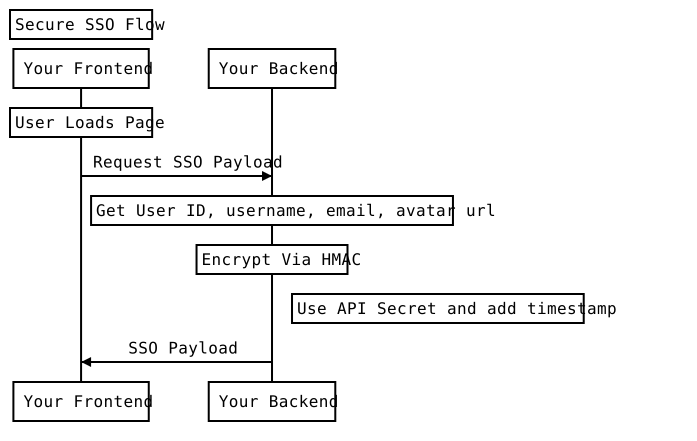
由於 Secure SSO 涉及全端開發,完整的可執行範例程式碼(Java/Spring、NodeJS/Express、以及原生 PHP)目前都放在 GitHub。
雖然我們在 NodeJS 範例中使用 ExpressJS,在 Java 範例中使用 Spring,但在這些執行環境中實作 FastComments SSO 並不需要其它框架/函式庫 — 原生的 crypto 套件就足夠了。
使用 FastComments SSO 不需要你新增任何 API 端點。只要用你的 secret key 加密使用者資訊,並將負載傳給留言元件即可。
取得你的 API Secret Key
你的 API Secret 可從 此頁面 取得。你也可以從 我的帳戶(My Account)→ 點選 API/SSO 區塊 → 然後點選「取得 API Secret Key」找到此頁面。
留言元件參數
留言元件的高階 API 文件可在 這裡 找到。
以下更詳細說明這些參數的含義。
留言元件接受一個設定物件 — 如果你已經在使用 FastComments 並傳入 tenantId(稱為 customer id),你應該已經在傳遞該物件。
要啟用 SSO,傳入一個新的 "sso" 物件,其必須包含下列參數。這些值應該在伺服器端產生。
- userDataJSONBase64: 使用者的資料(JSON 格式),然後進行 Base64 編碼。
- verificationHash: 由 UNIX_TIME_MILLIS + userDataJSONBase64 使用 HMAC-SHA256 所產生的雜湊。
- timestamp: 時間戳記,單位為 毫秒。不得為未來時間,且不得早於超過兩天前。
- loginURL: 留言元件可顯示用來登入使用者的 URL。
- logoutURL: 留言元件可顯示用來登出使用者的 URL。
- loginCallback: 當提供此函式而非 login URL 時,留言元件在點擊登入按鈕時會呼叫該函式。
- logoutCallback: 當提供此函式而非 logout URL 時,留言元件在點擊登出按鈕時會呼叫該函式。
The User Object
The User object contains the following schema:
Moderators and Administrators
For admins and moderators, pass the respective isAdmin or isModerator flags in the SSOUser object.
Notifications
To enable or disable notifications, set the value of optedInNotifications to true or false respectively. The first time the user loads the page with this value in the SSO payload, their notification settings will be updated.
Additionally, if you want users to receive notification emails for activity on pages they subscribed to (as opposed to just in-app notifications), then set optedInSubscriptionNotifications to true.
VIP Users & Special Labels
You can display a special label next to the user's name by using the optional "displayLabel" field.
Unauthenticated users
To represent an unauthenticated user, simply do not populate userDataJSONBase64, verificationHash, or timestamp. Provide a loginURL.
These users will not be able to comment, and instead will be presented with a login message (message, link, or button, depending on configuration).
Direct Examples for Serializing and Hashing User Data
More details as an examples here (js), here (java) and here (php).
We understand that any integration can be a complicated and painful process. Don't hesitate to reach out to your representative or use the support page.
自訂整合 - 簡易單一登入(SSO)
使用 Simple SSO,我們可以向評論小工具提供使用者資訊,讓他們在留言時不必輸入使用者名稱或電子郵件。
我們可以如下配置 Simple SSO:
Run 使用者將會被登入,並在後台建立一個 SSO 使用者。如果從 API 擷取,該使用者的 createdFromSimpleSSO 將會被設為 true。
Notes:
- 電子郵件是 Simple SSO 的唯一識別符。
- 在 Simple SSO 中提供電子郵件不是必要的,但預設情況下,他們的評論會顯示為「Unverified」。 如果未提供電子郵件,該使用者無法被完全驗證。
- NEW 自 2022 年 1 月起:使用者名稱不必在整個 fastcomments.com 上唯一
- 如果提供電子郵件,且該使用者最初不是由 Secure SSO 建立,Simple SSO 可以自動建立和更新 SSO 使用者。
- 你可以使用
badgeConfig屬性為使用者指定徽章。badgeIds陣列包含要與使用者關聯的全域徽章 ID。pageBadgeIds陣列包含限定於當前頁面(urlId)的徽章 ID — 這些徽章只會在被指派的該頁面上顯示。如果override設為true,將會取代現有顯示的徽章(全域與頁面範圍徽章分別獨立覆寫);若為false則會加入到現有徽章中。
自訂整合 - 從 Disqus SSO 遷移
Disqus 與 FastComments Secure SSO 之間最大的差異是 Disqus 使用 SHA1 進行加密,而我們使用 SHA256。
這表示從 Disqus 遷移很容易 - 將使用的雜湊演算法從 SHA1 改為 SHA256,並更新傳遞給 UI 的屬性名稱。
自訂整合 - 從 Commento SSO 遷移
Commento 使用截然不同的 SSO 方式 - 他們要求你有一個端點,他們會呼叫該端點來驗證使用者。FastComments 則相反 - 只需使用你的密鑰對使用者的資訊進行編碼並雜湊,然後傳遞即可。
使用單一登入保護評論串
FastComments SSO(此處詳情)為您的使用者提供一種無需登入其他平台即可發表評論的方式。
然而,僅此並不能保護您的評論串,因為預設情況下,評論資料是公開資訊——任何能檢視頁面的人都能看到評論。
透過更改設定,我們可以限制只有管理員或有效的 SSO 使用者才能取得評論。
無程式碼設定
當設定了 SSO 時,我們可以透過建立自訂規則來防止檢視和互動我們的評論串。
執行此操作時,搜尋 SSO,您會找到此選項:

啟用它並儲存自訂規則。
僅保護特定網域或頁面
若只想保護特定的網域或頁面,我們只需設定自訂規則即可。
在自訂 UI 的頂部,我們會看到兩個輸入欄位:Domain(網域)和 URL ID。
若只想保護特定網域,請在「domain」欄位中輸入該網域。
若要保護特定頁面,請在「URL ID」欄位中輸入頁面 URL。如果您與 FastComments 有自訂整合,您也可以在此輸入某種 ID 代替 URL。
安全等級
在要求 SSO 時,您需要決定是使用 Simple SSO(簡易 SSO)還是 Secure SSO(安全 SSO)。如果選擇 Simple SSO,則兩者皆可接受;但若選擇 Secure SSO,則必須使用以您的 API 金鑰雜湊的 Secure SSO 載荷來取得內容,才能檢視。
當您選取「Require SSO To View Comments」時,安全等級選項會出現。
閱讀之外的保護
啟用此選項後,除非使用者透過 SSO 登入,否則將無法在該頁面或網域上發表評論。
注意事項
在您整合 SSO 之前已發表評論的使用者,除非透過您的 SSO 整合登入,否則將無法看到自己的評論。
允許匿名評論
預設情況下,FastComments 需要使用者提供電子郵件才能發表評論。雖然不必是有效的電子郵件,但在使用者點擊寄給他的連結之前,他的評論會顯示「未驗證的評論」標籤。
然而,我們可以移除電子郵件的必填要求。電子郵件輸入欄位仍會顯示,但不再是必填。
這可以透過小工具自訂 UI 進行設定:

仍然需要使用者名稱。若也想省去此步驟,您可以 設定預設使用者名稱讓所有人共用,或讓 FastComments 產生唯一的使用者名稱為每位訪客。
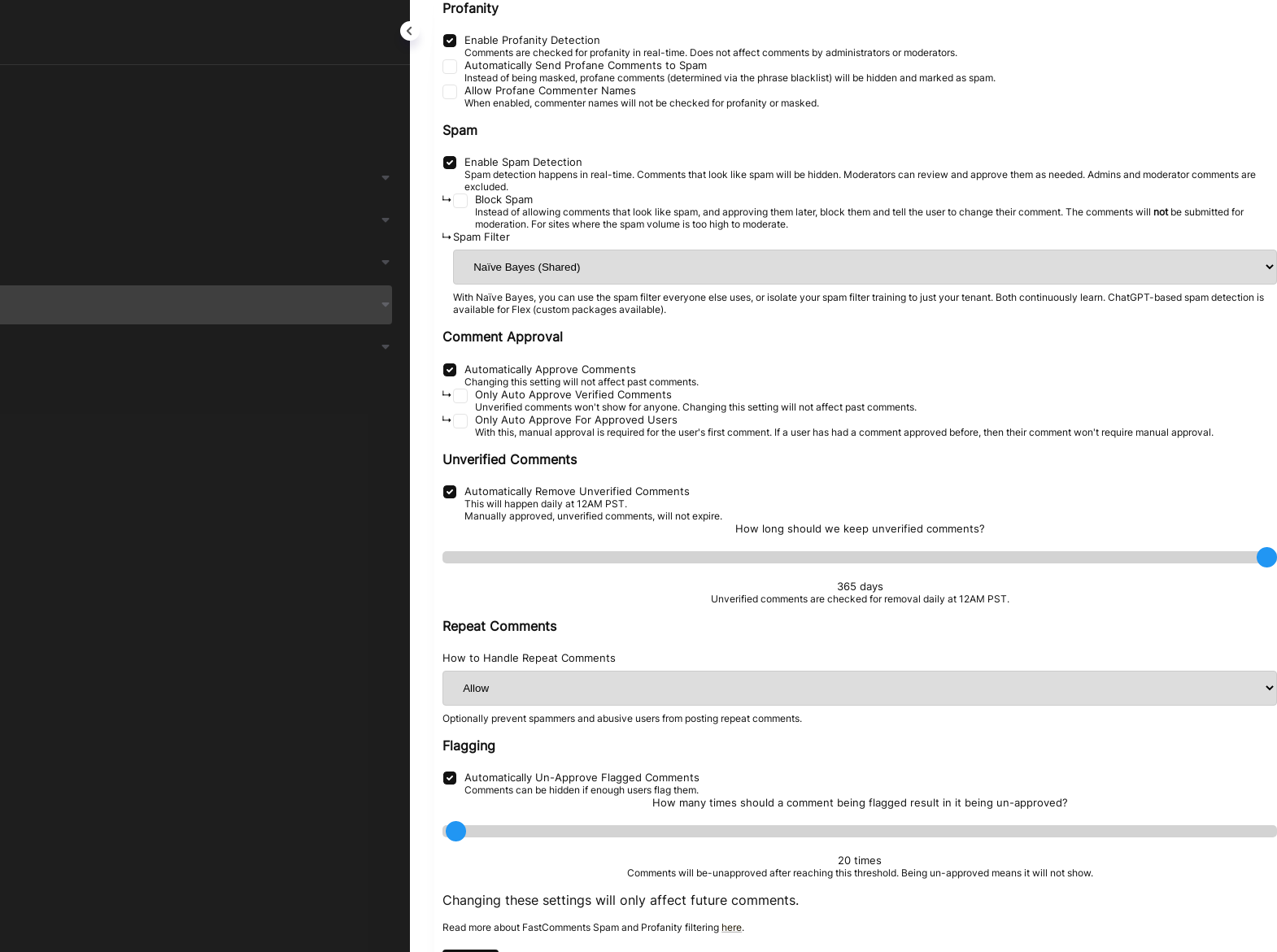
防止匿名評論過期
停用電子郵件輸入
When users comment, and they are not logged in, they will be asked to provide their email.
This will create an "unverified session" for that user, and we will ask them to verify that session via email.
For some sites, or applications, it's desirable not to ask the user for their email when commenting or voting.
Enabling anonymous commenting makes the email input field optional. However, we can disable it completely. First, enable anonymous commenting, and then the option to disable the email input fields will appear.

With this on, the email fields will not show at all in all of our commenting products.
Note that, with this configuration, all comments will be unverified unless the user creates an account and logs into https://fastcomments.com.
You may want to consider 停用未驗證標籤.
停用未驗證標籤
預設情況下,FastComments 會為留下給未驗證瀏覽器會話的使用者的評論顯示「未驗證評論」標籤。欲了解更多關於未驗證評論的資訊,請點擊此處。
Run 此外,您可以在自訂 UI 中使用此功能,無需撰寫程式碼:

允許匿名投票
當使用者嘗試對評論投票,且未登入時,系統會要求他們提供使用者名稱和電子郵件。
我們可以移除此需求,允許任何人對評論投票而不留下任何資訊。

設定預設使用者名稱
當使用者發表評論或投票,且未登入時,系統會要求他們提供電子郵件和使用者名稱。
在匿名評論的情況下,有時希望設定預設使用者名稱以降低發表評論的阻力。這可以在自訂 UI 中完成。必須先啟用匿名評論。

分享預設使用者名稱
預設使用者名稱是一個共享的顯示名稱,而非身份識別。保留預設名稱並輸入電子郵件的訪客會擁有自己的帳號,且預設名稱會顯示為其公開名稱。任意數量的訪客都可以使用相同的預設名稱,因此「Anonymous」永不會被報告為已被使用。
訪客自行輸入的使用者名稱仍必須是唯一的。
如果您希望每位訪客都能取得獨特的名稱,而不必自行思考,請參閱自動產生使用者名稱。
自動產生使用者名稱
當使用者發表評論或投票,且未登入時,系統會要求他們提供電子郵件和使用者名稱。
對於某些網站而言,要求訪客自行想出唯一的使用者名稱是一個障礙,尤其在行動裝置上。FastComments 可以為每位新訪客產生一個中性的使用者名稱,並預先填入使用者名稱欄位,例如 BraveOtter4172。
訪客可以保持原樣,或自行更換為他們想要的名稱。
這項功能可在自訂 UI 中的 Generate Usernames Automatically 設定啟用:

它的運作方式
- 每個產生的名稱都是唯一的。系統會檢查現有帳號,並為該訪客的瀏覽器會話保留該名稱,確保不會有兩位訪客被提供相同的名稱。
- 僅在訪客尚未擁有名稱時才會產生。已登入的使用者、SSO 使用者,以及已發表過評論的訪客會保留其現有名稱。
- 它在開啟或關閉匿名評論時皆可運作。若關閉匿名評論,訪客仍需輸入電子郵件,但不再需要思考使用者名稱。
- 再次造訪的訪客若輸入先前使用過的電子郵件,系統會將其對應到現有帳號,並保留該帳號的名稱。
- 如果同時設定了預設使用者名稱,產生的名稱將優先使用。
回呼函式
所有評論小工具的函式庫(目前為 Angular、React、Vue)都支援回呼。
回呼在設定物件中指定,且每個函式庫使用相同的簽名。
支援的回呼包括:
- onInit
- onAuthenticationChange
- onRender
- commentCountUpdated
- onReplySuccess
- onVoteSuccess
- onImageClicked
- onOpenProfile
- onCommentSubmitStart
- onCommentsRendered
精確的簽名可在 TypeScript 定義 中找到。
以下範例示範如何使用所有回呼:
Run 手動定義使用者語系
預設情況下,FastComments 會根據使用者的系統與瀏覽器所決定的語系來呈現評論小工具。
當使用者發表評論或登入時,我們會更新他們最後使用的語系,並將其用於發送電子郵件。
這會影響評論小工具為使用者顯示的翻譯方式。語系包含使用者的語言與地區,因此設定語系通常會改變顯示給使用者的文字語言。
透過 UI
這可以透過小工具自訂 UI 來設定。請參閱「Locale / Language」選項:

透過程式碼
這可以使用想要的語系來覆寫。
Run 支援的語言與語系代碼
SSO 注意事項
如果您使用 SSO,您可能想在使用者物件中傳遞使用者的語系,以便電子郵件和其他項目能正確地為其本地化。
限制允許的語言
預設情況下,FastComments 不會限制評論時使用的語言。
可能需要限制社群使用的語言。
這可以在小工具自訂頁面上,無需編寫程式碼即可設定:

系統會解析他們的評論並判斷其語言,然後與允許清單進行比對。
如果評論使用了未被允許的語言,系統會顯示本地化的錯誤訊息。
頁面標題
目前的頁面標題會與指定的 urlId 關聯,並儲存以供審核工具使用。
預設情況下,此值會從 document.title 擷取。
如有需要,可指定自訂的頁面標題,如下所示:
Run 阻止新回覆並停用投票
可以透過將 readonly 旗標設為 true 來鎖定評論,從而不允許留下新評論或投票。
評論也將無法被編輯或刪除。
Run 這可以在小工具自訂頁面上,針對整個網域或單一頁面,無需撰寫程式碼即可自訂:

Update!
自 2022 年 11 月起,管理員與版主可透過回覆區上方的三點選單即時 鎖定 或 解鎖 討論串。
這將阻止新評論,同時仍允許投票,且使用者若願意仍可刪除自己的評論,而 readonly 則不允許這些操作。
這對應到 Page API 中的 isClosed 欄位。
限制連結域名
預設情況下,FastComments 允許連結到任何外部網站。
這可以限制為僅允許特定的網站或網域清單。若嘗試發佈連結至未在定義清單中的網站或網域,將會向使用者顯示錯誤。
此驗證僅適用於評論小工具和 API,匯入不受影響。
此操作無需編寫程式碼,可在小工具自訂頁面完成:

評論計數與計算所有巢狀回覆
評論小工具頂部顯示的評論數可以只顯示所有「頂層」評論,也就是那些回覆 是直接回覆頁面或文章本身的,或者它可以是 all 巢狀評論的計數。
預設情況下,這個設定為 true - 它是後者的計數 - 全部評論。在舊版本的評論小工具中,
預設值為 false。
我們可以更改此行為,透過將 countAll 標記設為 true,讓它計算 所有 巢狀評論。
Run 如果我們希望計數只反映頂層評論,則將標記設為 false。
Run 目前無法在不更改程式碼的情況下自訂此行為。
啟用評論者連結
預設情況下,FastComments 只會向使用者詢問他們的評論、使用者名稱以及電子郵件。
然而,在某些情況下,您可能希望使用者留下他們自己的部落格或網站連結。
我們可以透過將 enableCommenterLinks 旗標設為 true,來啟用顯示額外的輸入欄位,以留下使用者的網站 URL:
Run 當提供該 URL 後,使用者的帳號將會被更新,且其過去與未來所有評論中的使用者名稱都會連結至此 URL。
這可以在小工具自訂頁面上,無需撰寫程式碼即可自訂:

審核群組
從 審核群組 頁面產生的 id 列表。
若有指定,使用該設定留下的評論將包含相同的 moderationGroupIds 集合。
如果一位 Moderator 定義了一個或多個 審核群組,他們將會
只在 Moderate Comments 頁面中看到與其群組相關聯的評論。
Run 提及群組 ID
一個用於 @mentions 自動完成的 ID 列表。當你想要防止在沒有交集群組的使用者被標註時,這會很有用。
指定時,輸入 @ 字元後,自動完成只會提供其他群組的使用者。
Run 第三方 Cookie 繞過
對於驗證,FastComments 依賴於瀏覽器中啟用第三方 Cookie。若未啟用,使用者必須留下電子郵件才能發表評論(除非隱藏了電子郵件輸入欄位),且他們的評論預設會顯示為未驗證。
為了解決此問題,您可以啟用第三方 Cookie 繞過。
啟用此設定後,會出現一個小彈出視窗,顯示使用者正在登入的訊息。此彈出視窗會在使用者與評論小工具互動時顯示,例如留下評論時。
我們可以在程式碼中將 enableThirdPartyCookieBypass 旗標設為 true 來達成:
Run 我們也可以透過 Widget 自訂介面設定此項,位於 Enable Third-Party Cookie Popup 之下:

刪除含回覆的評論
預設情況下,使用者可以刪除自己的評論。且刪除評論時會自動刪除該討論串中所有子評論和暫時性評論。此行為亦為即時生效。
您可以透過以下方式限制此行為:
- 改為匿名化已刪除的評論(將名稱與文字設為
[deleted]或自訂值)。 - 當評論有回覆時不允許刪除。會顯示可自訂的錯誤訊息。
- 僅允許管理員與版主在評論有回覆時進行刪除。
此設定可於 Widget Customization UI 中的 Comment Thread Deletion 區段進行配置。

在頂部欄顯示徽章
預設情況下,FastComments 只會在評論串中的使用者評論上顯示使用者徽章。
然而,我們可以透過在小工具自訂頁面啟用此功能,將使用者徽章顯示在評論表單上方、名稱旁邊:

這將在頂部列區域中,將使用者的徽章與其名稱並排顯示,讓他們在撰寫評論時,其成就與身分更加顯眼。
請注意,此功能必須在小工具自訂 UI 中啟用才能生效。您也可以在程式碼設定中選擇性地將 showBadgesInTopBar 標誌設為 false,即使在伺服器層面已開啟,也能將其停用:
Run 顯示線上使用者清單
預設情況下,FastComments 不會在頁面上顯示使用者列表。
您可以在評論小工具旁顯示目前正在檢視頁面的使用者列表。該列表會即時更新,隨著使用者加入或離開,並顯示他們的姓名、頭像以及線上指示器。
有三種版面配置選項:
1- Top: 在評論上方呈現的水平排列、重疊的頭像列。2- Left: 在小工具左側呈現的側邊欄,顯示姓名與線上點。3- Right: 同樣的側邊欄顯示在小工具右側。
設定 usersListLocation 旗標以啟用此功能:
Run 預設情況下,列表僅顯示目前線上的使用者。若要同時包含過去在頁面上發表過評論(但目前未在檢視)的使用者,請將 usersListIncludeOffline 設為 true:
Run 過去的評論者會以不帶綠色線上點的方式呈現,以便清楚顯示目前在場的使用者。
擁有私人檔案的使用者會顯示通用頭像與「私人檔案」標籤,確保人數統計正確且不洩露身分。
此設定也可透過介面完成。於小工具自訂頁面中,請參考「Users List Location」選項。當位置設定為非「關閉」時,會在其下方顯示「包含過去的評論者」勾選框。

過去 500 名即時使用者,列表最多延遲 30 秒。