
向网站添加评论
安装
FastComments 让你轻松为你的网站添加评论,无论是静态还是动态、浅色主题还是深色主题、对公众开放的页面还是内部页面。它应该易于安装 并适应任何类型的网站或基于 Web 的应用程序。这可以立即为你提供实时评论,在许多情况下无需进一步配置即可使用。
WordPress 
VanillaJS / HTML 片段
The VanillaJS 版本的 widget 是向您的网站添加评论的最简单方式,不需要任何构建系统或服务器端代码。
只需将以下代码片段添加到任何页面,就可以为您的网站添加评论:
 Run
Run 
您可以在多个页面上使用相同的代码片段;它会为每个页面自动创建一个独立的线程。
许多应用都有“HTML 嵌入代码”选项。选择它并将上述代码片段粘贴进去。
您也不需要账户即可试用! 如果您未登录,您可能会在上面的代码片段中看到 "tenantId: demo"。这样它将使用演示账户。
您可以在 此处 找到有关配置该组件的文档。
所有版本的 FastComments widget 都是围绕核心 VanillaJS 库的封装。这使我们能够在一个地方添加功能并修复问题——更改会自动传播到评论组件的其他变体。
Angular
要在基于 Angular 构建的网站中添加评论,您可以在 NPM 上找到我们的 Angular 库,链接在 这里。
FastComments Angular 评论小部件支持与 VanillaJS 相同的所有功能 —— 实时评论、单点登录 (SSO) 等。
您将需要 fastcomments-typescript,它是一个 peer 依赖。请确保此依赖包含在您的 TypeScript 编译中。未来,该 peer 依赖将迁移到 @types/fastcomments,从而简化此安装。
该 peer 依赖应添加到您的 tsconfig.json 文件中,例如:
然后,将 FastCommentsModule 添加到您的应用中:
用法
要开始使用,我们为演示租户传入一个配置对象:
由于配置可能相当复杂,我们可以传入对象引用:
该小部件使用变更检测,因此更改配置对象的任何属性将导致其重新加载。
您可以在 此处 找到 Angular 组件支持的配置。
React
要在使用 React 构建的网站上添加评论,您可以在 NPM 上找到我们的 React 库 这里。
FastComments 的 React 评论组件支持与 VanillaJS 相同的所有功能——实时评论、sso 等。
如果您位于欧盟,请像下面这样设置 region 参数:
您可以在 这里 找到 React 组件支持的配置。
React Native
要向您的 React Native 应用添加评论,您可以在 NPM 上找到我们的 React Native 库 这里。
FastComments React Native 评论小部件支持与 VanillaJS 相同的所有功能 — 实时评论、单点登录(SSO)等。
配置的指定方式与 fastcomments-react 库略有不同:
如果您位于欧盟,您需要设置 region 参数:
您可以在 这里 找到 React Native 组件支持的配置。
Vue
要在使用 Vue 构建的网站上添加评论,您可以在 NPM 上找到我们的 Vue 库 此处。
此外,vue-next 库也在 NPM 上,见 此处
源代码可在 GitHub 上找到。
FastComments Vue 评论组件支持与 VanillaJS 相同的所有功能 - live commenting、sso 等。
下面的说明针对 Vue 3,因为它已经发布有一段时间;但是 FastComments 也通过 fastcomments-vue 库支持 Vue 2。
如果您在欧盟,应将 region 设置为 EU:
fastcomments-vue 和 fastcomments-vue-next 库支持与 VanillaJS 评论组件相同的配置。
您可以在 此处 找到 Vue 组件支持的配置。
同一页面上的多个实例
评论小部件的每个实例都是隔离的。因此,FastComments本质上支持每页多个实例,或多个实例指向同一聊天线程。
例如,对于VanillaJS库,您只需将评论小部件绑定到不同的DOM节点。如果您只想更新页面上的当前线程,请参阅无需重新加载页面切换评论线程;
在多个实例之间同步身份验证状态
让我们来看一个自定义单页应用程序的例子,它是一个常见问题列表,每个问题都有自己的评论线程。
在这种情况下,我们在DOM中同时有多个FastComments实例。
这没问题,但会给用户体验带来一些挑战。
考虑这个流程:
- 用户访问包含问题列表的页面,每个问题都有自己的评论小部件。
- 用户输入用户名和电子邮件,并在其中一个线程上留下问题。
- 他们看到另一个有疑问的FAQ项目。
- 他们去再次评论。他们需要再次输入电子邮件和用户名吗?
在这种情况下,FastComments会为您处理小部件实例之间的身份验证状态同步。在第四步,用户将已经临时通过身份验证,因为他们在同一页面上输入了用户名和电子邮件。
常见使用场景
立即显示实时评论
评论小部件默认是实时的,但实时评论会显示在“显示 N 条新评论”按钮下,以防止页面内容移动。
在某些情况下,仍然希望立即显示新评论,而无需点击按钮。
此时,您需要启用 showLiveRightAway 标志,相关文档可在此处查阅。
允许匿名评论(不要求电子邮件)
默认情况下,FastComments 要求用户在评论时留下电子邮件地址。
此功能可以关闭,说明位于此处。
若想免除访客自行选择用户名,FastComments 可以为每位访客生成一个用户名。
自定义样式
我们的许多客户会为评论小部件应用自定义样式。您可以在此处找到文档。
在多个域名上显示相同的评论
在多个站点上显示相同的评论是 FastComments 开箱即用的功能。请参阅我们的此主题文档。
更改当前页面
FastComments 支持单页应用(SPA)和复杂的应用程序。更改当前页面非常简单,相关内容在此处有说明。
调试常见问题
下面列出一些我们常见的问题及常见解决方法。
“这是演示” 消息
当您从我们的主页复制了小部件代码(主页使用的是我们的演示租户)时,会显示此消息。要使用您的租户,请从这里复制小部件代码。
“FastComments cannot load on this domain” 错误
FastComments 需要知道哪些域名属于您,以便对与您帐户相关的请求进行身份验证。请查阅我们的文档 以了解如何解决此错误(只需将确切的子域 + 域添加到您的帐户中)。
请注意,这种情况通常只会在试用期结束后发生。在试用期间,来自新域的任何请求会自动添加到您的帐户中。
自定义安装后迁移的评论未显示
通常发生在导入的评论与 Page ID 关联,而您传递的是 URL(或未传值,此时默认使用页面 URL)。
您可以通过导出您的评论并查看 URL ID 列(当前为列 B)来调试此问题。
确保您在 URL ID 列中看到的值与您在小部件配置中作为 urlId 参数传递的值相同。
有关详细说明,请阅读我们的评论如何与页面和文章关联 文档。
如果仍然无法解决,请联系我们。
评论小部件未显示
如果评论小部件未显示,请检查 Chrome 开发者控制台中的错误。
对于大多数配置错误,如果评论小部件能够加载,至少会在页面上显示错误。什么也看不到通常表明存在脚本错误。
期望的配置未按预期工作
尝试使用我们的Chrome 扩展查看传递给评论小部件的配置。如果仍然无法解决,请截取 Chrome 扩展显示内容的屏幕截图并联系我们。
相同 URL 但不同 Hash Bang 时评论缺失
默认情况下,FastComments 会使用页面 URL 作为存储评论的“桶”。如果您的 URL 包含 #hashbangs,而这些 #hashbangs 不应成为标识评论线程的标识符的一部分,我们可以简单地忽略 hash bang 值,例如:
请注意,在进行此更改后,现有评论必须进行迁移。为此,请联系我们。
URL 查询参数影响小部件
默认情况下,FastComments 会使用页面 URL 作为存储评论的“桶”。如果您的 URL 包含不应成为标识评论线程的标识符一部分的查询参数,我们可以简单地忽略它们,例如:
请注意,在进行此更改后,现有评论必须进行迁移。为此,请联系我们。
未收到电子邮件
在 FastComments,我们投入大量工作以确保邮件投递尽可能可靠。然而,一些邮件服务提供商的投递可靠性 notoriously 有问题。请检查您来自 fastcomments.com 的邮件是否被放入了垃圾邮件文件夹。
如果您联系我们,我们通常可以提供更多关于您可能未看到我们邮件的原因的见解。
Notion 和 Google Sites
想要在 Notion 页面、Google Sites 或 Nimbus Notes 添加评论吗?我们可以帮您实现。
Notion
要在 Notion 文档中添加评论,请观看此说明视频。
Google Sites
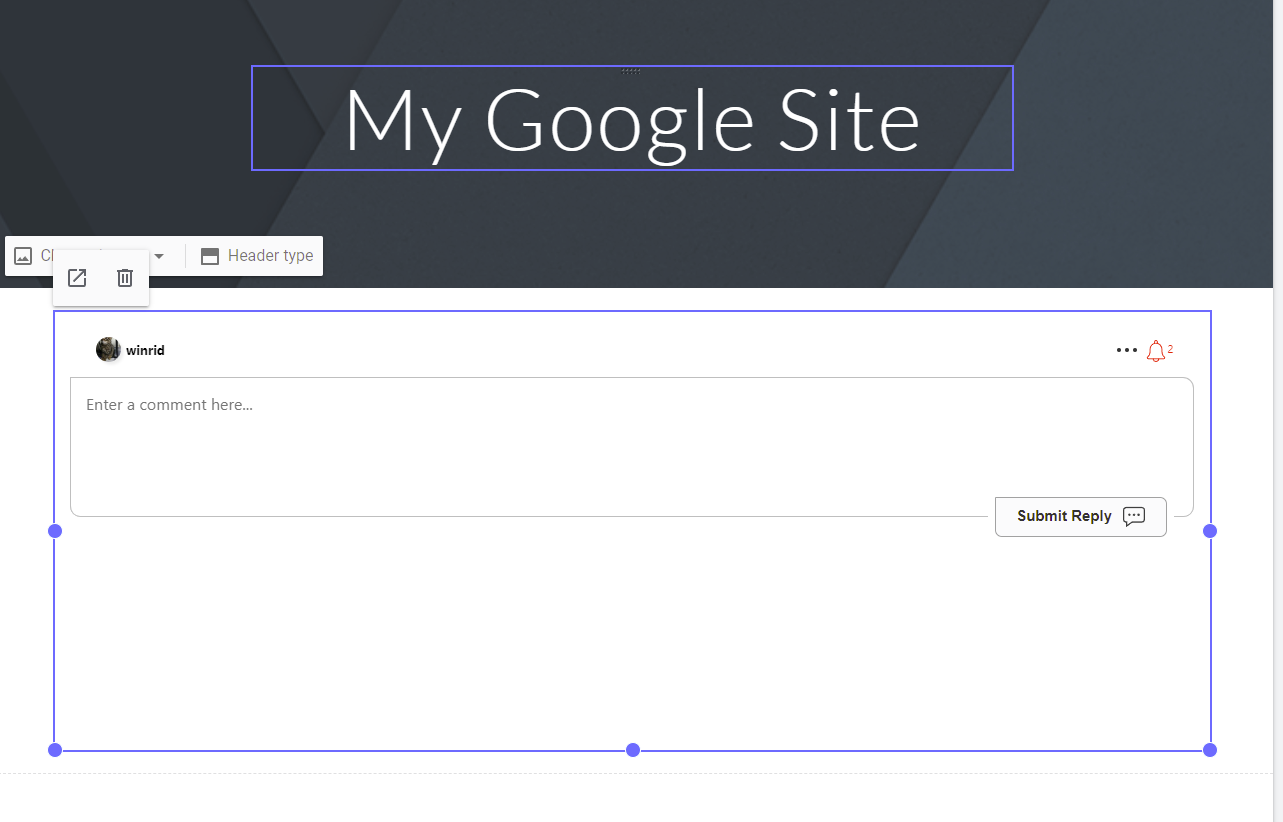
Google Sites 也受支持,流程类似。
- 创建一个要嵌入的会话。
- 当您在编辑 Google Site 时,导航到
Insert->Embed。选择By URL。 - 粘贴第 1 步的 URL。
- 点击
Insert。完成!
Nimbus Note
将实时评论添加到 Nimbus Note 也受支持,流程与 Notion 类似。
- 创建一个要嵌入的会话。
- 在编辑笔记时,添加一个嵌入块。
- 使用第 1 步的 URL 作为要嵌入的 URL。
- 完成!