
在網站新增留言
安裝
FastComments 讓你輕鬆在網站上加入留言功能,無論網站是靜態或動態、淺色或深色主題、公開或內部頁面。它應該易於安裝 並能適應任何類型的網站或網路應用程式。這可立即為你提供即時留言功能,在許多情況下無需進一步設定。
WordPress 
VanillaJS / HTML 片段
The VanillaJS 版本的 widget 是將評論加入您網站的最簡單方式,無需任何建置系統或伺服器端程式碼。
只要將下列程式碼片段加入任何頁面,即可在您的網站新增評論:
 Run
Run 
您可以在多個頁面使用相同的程式碼片段;它會自動為每個頁面建立獨立的討論串。
許多應用程式都有 "HTML Embed Code" 選項。選取該選項並將上方的程式碼片段貼入。
您也不需要帳戶即可試用! 如果您尚未登入,您可能會在上方的程式碼片段中看到 "tenantId: demo"。這樣會使用 demo 帳戶。
您可以在此找到有關設定 widget 的文件 這裡。
所有版本的 FastComments widget 都是包裹在核心 VanillaJS 函式庫的封裝器。這讓我們能夠在一個地方新增功能並修正問題 - 變更會自動傳播到其他評論 widget 的變體。
Angular
要在使用 Angular 建置的網站中加入評論,您可以在 NPM 找到我們的 Angular 函式庫 這裡。
FastComments 的 Angular 評論元件支援與 VanillaJS 相同的所有功能 — 即時評論、單一登入(SSO)等等。
您需要 fastcomments-typescript,它是一個 peer 相依。請確保此相依已包含在您的 TypeScript 編譯中。 未來,此 peer 相依將移至 @types/fastcomments,這會簡化安裝程序。
這個 peer 相依應該被加入到您的 tsconfig.json 檔案中,例如:
接著,將 FastCommentsModule 新增到您的應用程式中:
使用
要開始,傳入示範租戶的設定物件:
由於設定可能變得相當複雜,我們也可以傳入物件參考:
該元件使用變更偵測,因此變更設定物件的任何屬性都會導致其重新載入。
您可以在 這裡 找到 Angular 元件所支援的設定。
React
若要在使用 React 建立的網站加入留言功能,您可以在 NPM 上找到我們的 React 函式庫 這裡。
FastComments React 評論元件支援與 VanillaJS 相同的所有功能 - 即時評論、SSO,等等。
如果您位於歐盟(EU),您可能需要這樣設定 region 參數:
您可以在 這裡 找到 React 元件所支援的設定。
React Native
要在您的 React Native 應用中新增留言,您可以在 NPM 上找到我們的 React Native 函式庫 這裡。
FastComments React Native 留言元件支援與 VanillaJS 相同的所有功能 — 即時留言、SSO 等等。
設定方式與 fastcomments-react 函式庫相比略有不同:
如果您位於歐盟,您會想要設定 region 參數:
您可以在 這裡 找到 React Native 元件所支援的設定。
Vue
若要在以 Vue 建置的網站中加入留言,您可以在 NPM 找到我們的 Vue 函式庫,請見 這裡。
此外,vue-next 函式庫也可在 NPM 找到,請見 這裡
原始程式碼可在 GitHub 找到。
FastComments Vue 留言元件支援與 VanillaJS 相同的所有功能 - 即時留言、sso,等等。
以下說明針對 Vue 3,因為它已經推出一段時間;不過 FastComments 也透過 fastcomments-vue 函式庫支援 Vue 2。
如果您位於歐盟,您會想將 region 設為 EU:
The fastcomments-vue and fastcomments-vue-next libraries support the same configuration as the VanillaJS commenting widget.
您可以在 這裡 找到 Vue 元件支援的設定。
同一頁面上的多個實例
評論小工具的每個實例都是隔離的。因此,FastComments本質上支援每頁多個實例,或多個實例指向同一聊天串。
例如,對於VanillaJS函式庫,您只需將評論小工具繫結到不同的DOM節點。如果您只想更新頁面上的當前串,請參閱無需重新載入頁面切換評論串;
在多個實例之間同步身份驗證狀態
讓我們來看一個自訂單頁應用程式的例子,它是一個常見問題列表,每個問題都有自己的評論串。
在這種情況下,我們在DOM中同時有多個FastComments實例。
這沒問題,但會給使用者體驗帶來一些挑戰。
考慮這個流程:
- 使用者訪問包含問題列表的頁面,每個問題都有自己的評論小工具。
- 使用者輸入使用者名稱和電子郵件,並在其中一個串上留下問題。
- 他們看到另一個有疑問的FAQ項目。
- 他們去再次評論。他們需要再次輸入電子郵件和使用者名稱嗎?
在這種情況下,FastComments會為您處理小工具實例之間的身份驗證狀態同步。在第四步,使用者將已經臨時通過身份驗證,因為他們在同一頁面上輸入了使用者名稱和電子郵件。
常見使用情境
立即顯示即時評論
評論小工具預設為即時模式,但即時評論會顯示在「顯示 N 條新評論」按鈕下,以防止頁面內容移動。
在某些情況下,仍希望立即顯示新評論,而不必點擊按鈕。
此時,您需要啟用 showLiveRightAway 旗標,相關文件可在此處取得。
允許匿名評論(不需要電子郵件)
預設情況下,FastComments 要求使用者在評論時留下電子郵件。
此設定可被停用,相關說明請見此處。
若也想免除訪客自行選擇使用者名稱,FastComments 可以為每位訪客自動產生使用者名稱。
自訂樣式
許多客戶會為評論小工具套用自訂樣式。相關文件可在此處取得。
在多個網域上顯示相同的評論
在多個網站上顯示相同的評論是 FastComments 內建支援的功能。請參閱此處的文件說明。
變更當前頁面
FastComments 支援 SPA 與複雜的應用程式。變更當前頁面相當簡單,相關說明請見此處。
排除常見問題
以下是我們常見遇到的一些症狀,以及常見的解決方案。
"This is a demo" 訊息
當您從我們的首頁複製小工具程式碼時,會顯示此訊息,因為首頁使用示範租戶。要使用您的租戶,請從 這裡 複製小工具程式碼。
"FastComments cannot load on this domain" 錯誤
FastComments 需要知道哪些網域是您擁有的,以便驗證與您的帳戶相關的請求。請參閱我們的文件 以了解如何解決此錯誤(只需將完全的子網域 + 網域新增到您的帳戶即可)。
請注意,這通常只會在試用期結束後發生。在試用期間,來自新網域的任何請求會自動新增到您的帳戶。
自訂安裝中已遷移的評論未顯示
通常這會發生在匯入的評論綁定到 Page ID,而您傳遞的是 URL(或沒有值,此時會預設為該頁面的 URL)。
您可以透過匯出您的評論 並查看 URL ID 欄(目前為第 B 欄)來進行除錯。
請確保您在 URL ID 欄看到的值,與您傳給小工具設定的 urlId 參數值相同。
如需進一步說明,請參閱我們的評論如何與頁面與文章綁定的說明文件。
如果仍無法解決,請聯絡我們。
評論小工具未顯示
如果評論小工具未顯示,請檢查 Chrome 開發者主控台是否有錯誤。
對於大多數設定錯誤來說,只要評論小工具能夠載入,至少會在頁面上顯示錯誤。完全看不到通常表示有腳本錯誤。
設定未按預期運作
請嘗試使用我們的 Chrome 擴充功能 來查看傳遞給評論小工具的設定。如果仍然失敗,請截圖該 Chrome 擴充功能所顯示的內容,然後聯絡我們。
相同 URL 但不同 Hash Bang 的評論遺失
預設情況下,FastComments 會使用頁面 URL 作為存放評論的「bucket」。如果您的 URL 包含 #hashbangs,且這些 #hashbangs 不應該成為識別評論串的識別符的一部分,我們可以簡單地忽略 hash bang 的值,例如:
請注意,在進行此變更之後,現有的評論將需要執行一次遷移。關於此部分,請聯絡我們。
影響小工具的 URL 查詢參數
預設情況下,FastComments 會使用頁面 URL 作為存放評論的「bucket」。如果您的 URL 包含不應該成為識別評論串的識別符一部分的查詢參數,我們可以簡單地忽略它們,例如:
請注意,在進行此變更之後,現有的評論將需要執行一次遷移。關於此部分,請聯絡我們。
未收到電子郵件
在 FastComments,我們投入大量工作以確保電子郵件的傳遞盡可能可靠。然而,有些電子郵件提供商確實很難穩定地投遞。請檢查您的垃圾郵件資料夾中是否有來自 fastcomments.com 的郵件。
如果您聯絡我們,我們通常可以提供更多關於您可能未看到我們郵件的原因的資訊。
Notion 與 Google Sites
想在你的 Notion 頁面、Google Sites,或 Nimbus Notes 中加入評論嗎?我們可以幫你。
Notion
若要為 Notion 文件新增評論,請參閱 說明影片。
Google Sites
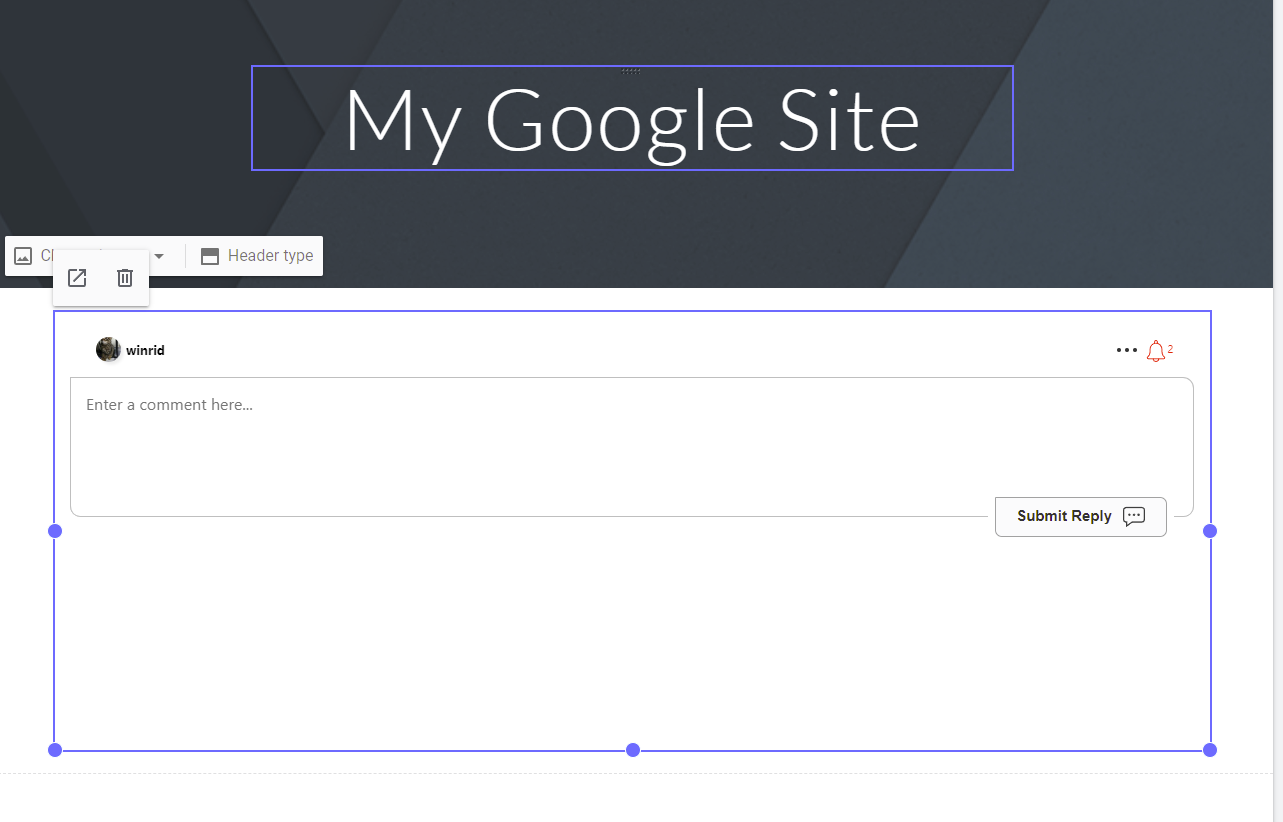
我們也支援 Google Sites,流程類似。
- Create a conversation to embed.
- 在編輯你的 Google Site 時,前往
Insert->Embed。選擇By URL。 - 貼上步驟 1 的 URL。
- 按下
Insert。完成!
Nimbus Note
我們也支援在 Nimbus Note 新增即時評論,流程與 Notion 類似。
- Create a conversation to embed.
- 在編輯你的筆記時,新增一個嵌入區塊。
- 使用步驟 1 的 URL 作為嵌入的網址。
- 完成!