
마이그레이션
마이그레이션
FastComments는 자체 서비스 도구와 플랫폼으로의 마이그레이션, 플랫폼 내 데이터의 마이그레이션, 그리고 제품으로부터의 내보내기를 위한 직접 개발자 지원을 제공합니다.
이 가이드에서는 이 세 가지에 대해 모두 알아봅니다.
다른 제공업체에서의 마이그레이션 
다른 제공업체에서 마이그레이션할 때 고려해야 할 몇 가지 사항은 다음과 같습니다:
- 답글을 포함한 기존 댓글 데이터.
- 아바타를 포함한 사용자 계정.
- 맞춤 스타일.
다음 몇 섹션에서 설명하는 셀프 서비스 데이터 가져오기는 처음 두 항목을 다룹니다. 사용자 지정을 위해서는 당사의 사용자 지정 안내서.
데이터 가져오기
FastComments 지원팀이 마이그레이션을 도와줄 수 있지만, 대부분은 지원 직원의 개입 없이도 쉽게 수행하고 모니터링할 수 있습니다.
다음 제공업체의 내보내기 데이터를 기본적으로 가져올 수 있습니다:
- Commento
- Disqus
- Hyvor Talk
- Muut Comments
- IntenseDebate
- Just-Comments
- Cusdis
- WordPress (via the plugin, or an XML or CSV export)
- AnyComment (Via WordPress Import/Export)
다음 링크 here를 통해 마이그레이션할 데이터를 포함한 파일을 업로드할 수 있습니다.


가져오기 모니터링
FastComments는 가져오기 및 내보내기를 처리하기 위해 작업 처리 시스템을 사용합니다. 시스템이 작업을 수신하면, 가져오기 또는 내보내기 UI에서 작업 상태를 주기적으로 보고합니다.
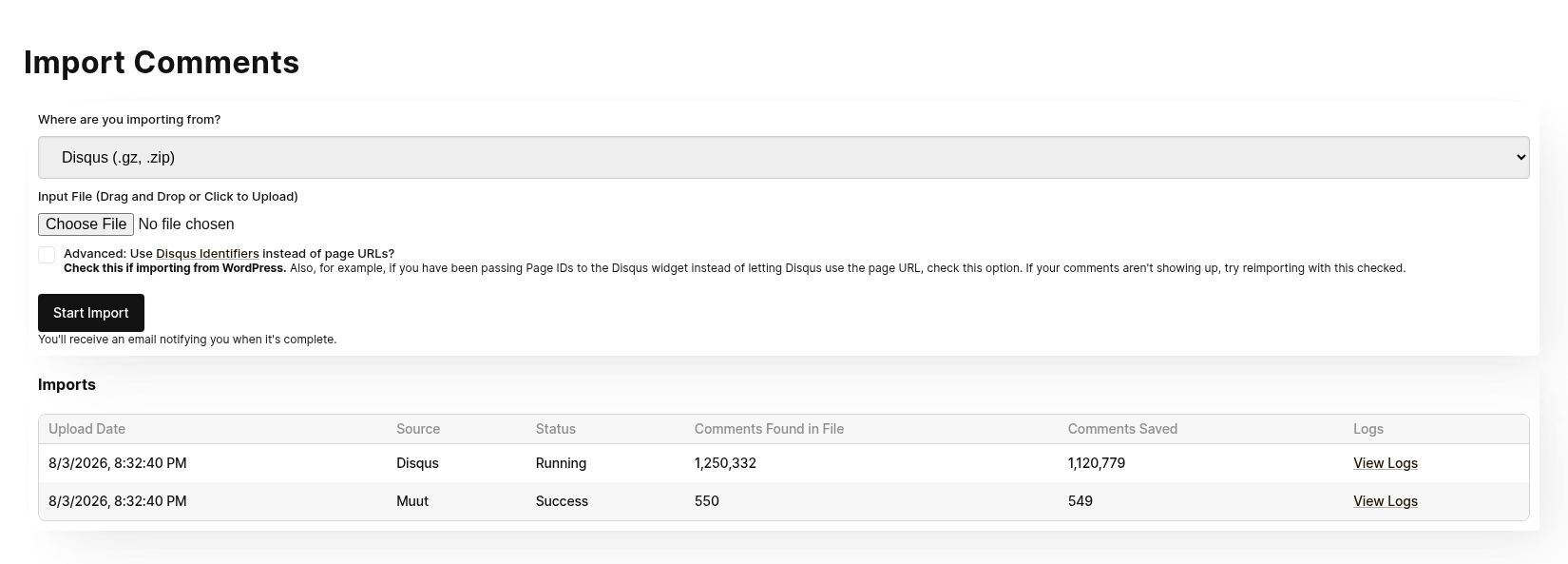
가져오기 및 내보내기 상태는 계정의 모든 관리자에게 표시됩니다.
작업이 실패하면 자동으로 재시작되지 않습니다. 가져오기를 다시 시도해야 합니다. 가져오기 또는 내보내기가 실패하면 시스템 관리자가 자동으로 알림을 받습니다. 문제가 확인되면 도움을 드릴 수 있는지 연락드리겠습니다.
가져오기 재실행
일부 마이그레이션에서는 가져오기를 여러 번 실행해야 할 수 있습니다. 예를 들어, 테스트를 위해 첫 번째 마이그레이션을 수행한 후, 스위치를 전환하기 전에 최신 데이터로 다시 가져오기를 실행하는 것이 일반적입니다.
같은 콘텐츠를 다시 가져와도 중복이 생성되지 않습니다.
데이터 보안 및 만료
가져오기 파일은 외부 요청을 통해 어떠한 방식으로도 접근할 수 없으며, 가져오기가 완료되는 즉시 시스템에서 삭제됩니다.
워드프레스 댓글 가져오기
Our WordPress Plugin은 강력한 UI 기반 가져오기 메커니즘을 제공합니다. 플러그인을 설치하면, FastComments와 WordPress 설치를 연결하고 기존 댓글 데이터를 복사하도록 안내합니다.
이 작업은 수동으로 복사하거나 다운로드하지 않고 수행됩니다.
마이그레이션 과정은 UI를 통해 표시됩니다. 대부분의 마이그레이션은 몇 분만에 완료됩니다.
이 메커니즘은 마이그레이션 중에 WordPress 설치에 과도한 부하가 걸리지 않도록 설계되었습니다.
WordPress를 떠나는 경우 플러그인을 사용하지 않고 WordPress XML 또는 CSV 내보내기를 가져올 수 있습니다. 자세히 보기 Moving Your Comments to a New Site.
CloudFlare & FireWalls
자동 WordPress 설정이 작동하려면 WordPress 설치에 호출을 해야 합니다. Cloudflare와 같은 방화벽이 이를 차단하여 통합이 실패할 수 있습니다. 이런 경우, we can provide you와 함께 통합을 위해 화이트리스트에 추가할 IP 목록을 제공해 드릴 수 있습니다.
Data Ownership
우리의 WordPress 마이그레이션에서는 새로운 댓글 데이터나 업데이트된 댓글 데이터가 자동으로 백그라운드에서 WordPress 설치와 동기화됩니다. 이는 댓글이 FastComments 자체에서 제공되어 WordPress 배포에 대한 부하를 줄이는 동안, 우리가 also 데이터베이스에 백업으로 저장한다는 의미입니다. 또한 FastComments를 사용 중단하고 싶을 경우, 데이터가 이미 마이그레이션되어 최신 상태임을 의미합니다.
사용자 및 중재자 마이그레이션
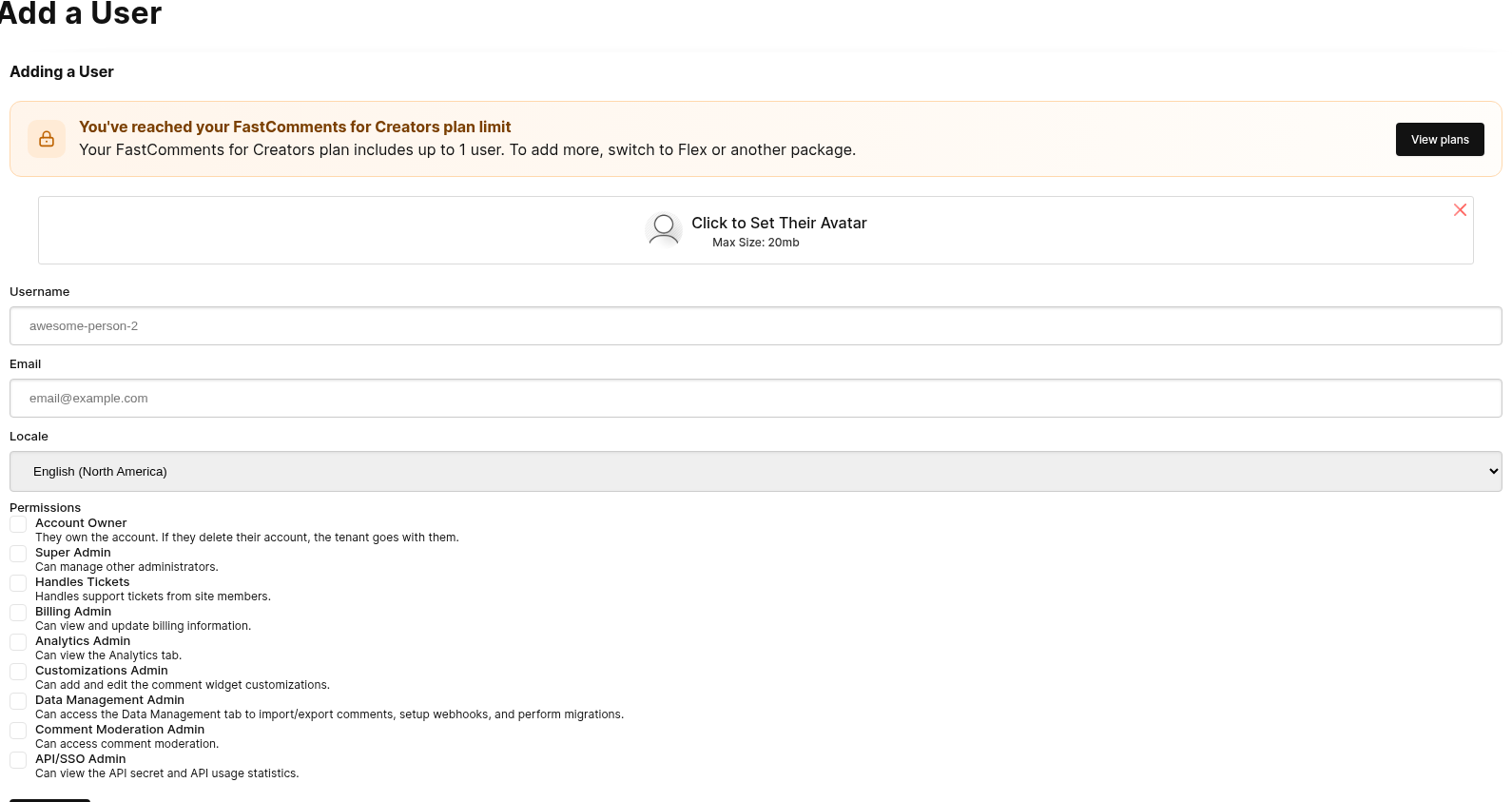
도메인 마이그레이션
FastComments는 도메인 간에 댓글을 마이그레이션할 수 있는 자동화된 방법을 제공합니다.
도메인 마이그레이션은 단순히 from 및 to 도메인만 필요합니다.
이 작업은 댓글을 이동시키며, 복사하지 않습니다. 댓글을 복사하고 싶다면, 저희에게 연락하십시오.
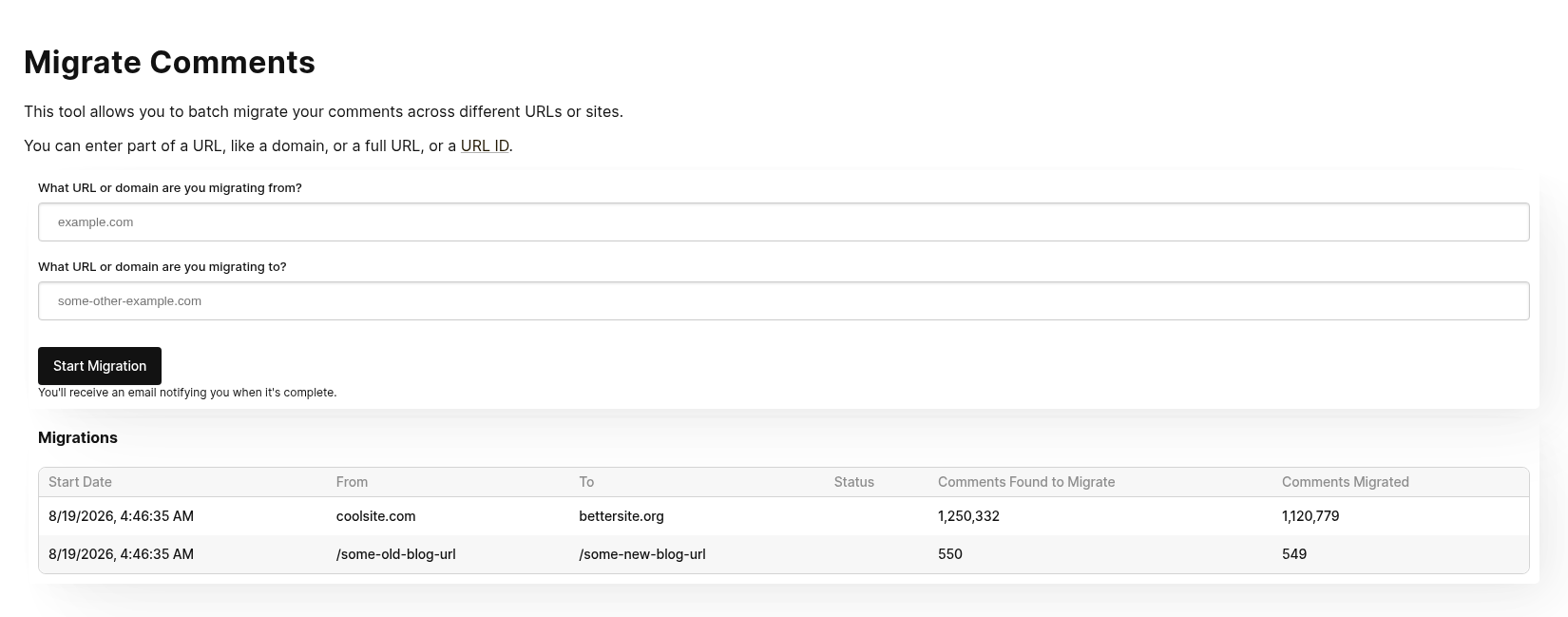
예를 들어 FastComments로의 마이그레이션 중에 다른 제공업체에서 마이그레이션하는 부분이 포함된 경우에도 유용합니다. 이 경우 댓글 가져오기 데이터에 마이그레이션이 필요한 데이터가 포함될 수 있습니다. 이런 경우 먼저 가져오기를 실행하고, 그 다음 도메인 마이그레이션을 수행할 수 있습니다.
진행 상황 모니터링
도메인 마이그레이션 도구는 다른 데이터 관리 도구와 동일한 FastComments 작업 처리 시스템을 사용합니다.
마이그레이션이 시작되기 전에 지연이 발생할 수 있습니다. 이는 시스템이 주기적으로 처리할 새로운 작업을 확인하기 때문에 정상적인 현상입니다.
작업이 진행되는 동안 마이그레이션할 댓글 수와 현재까지 마이그레이션된 댓글 수를 표시합니다.
API를 통한 도메인 마이그레이션
도메인은 type을 domain으로 설정하여 POST /api/v1/pages/migrations 로도 마이그레이션할 수 있습니다. 진행 상황은 GET /api/v1/batch-jobs/:id 에서 확인할 수 있으며, 마이그레이션은 90일 동안 취소할 수 있습니다.
페이지 마이그레이션
이 도구의 이름은 Domain Migration tool이지만, 개별 페이지의 댓글을 마이그레이션하는 데에도 사용할 수 있습니다.
단순히 from 및 to 입력 필드에 기존 및 새로운 urlId 값을 입력하십시오.
Migrating Pages via API
여러 페이지를 한 번에 마이그레이션하려면 POST /api/v1/pages/migrations를 사용하십시오. 이 요청은 한 번에 최대 100개의 from 및 to 쌍을 받아 배치 작업으로 실행합니다.
type을 urlId로 설정하면, urlId가 정확히 from인 페이지만 이동되므로 post-1은 post-10과 일치하지 않습니다. 대시보드 도구에는 이 옵션이 없습니다.
각 API 마이그레이션은 POST /api/v1/pages/migrations/:undoId/undo를 사용하여 90일 동안 되돌릴 수 있습니다.
댓글 복사
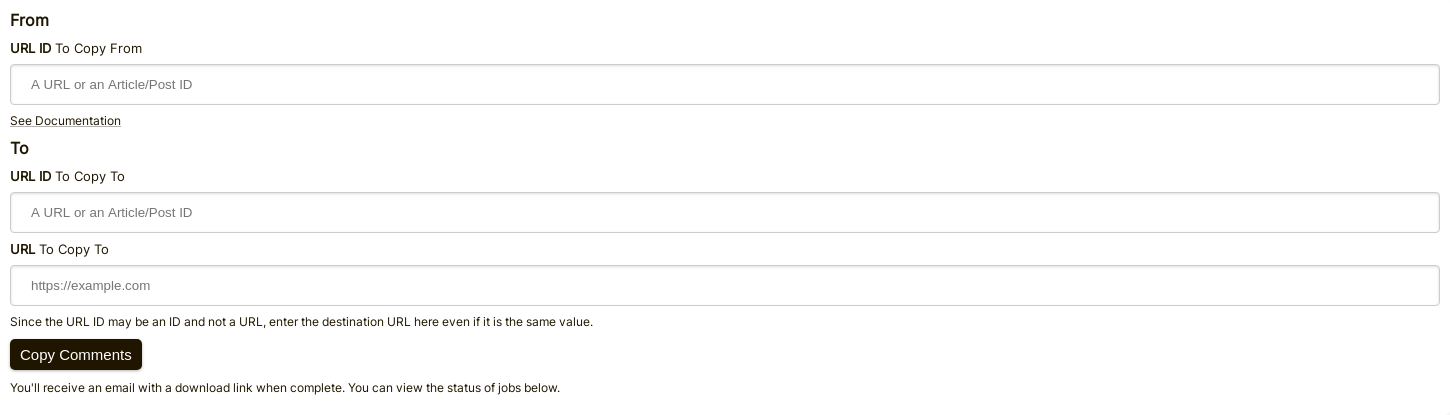
In the event that data needs to be moved around, FastComments provides a self-service tool for moving comments between pages and articles.
Here's what the comment copy page form looks like:
"From" 필드 입력하기
To decide where to move comments from, we simply need to know the source URL ID.
If you aren't passing a value for urlId in the comment widget configuration, then this will be a "clean" version of the page URL.
You can see what values your comments have for URL ID by exporting them.
"To" 필드 입력하기
To decide where to move comments to, we need to know the target URL ID and URL.
The URL ID will be the bucket that the comment goes in. The URL field is used so that you can navigate directly
to the comment from emails and moderation tools.
WordPress
If you are using WordPress, you would for example enter the Article IDs in the To/From URL ID fields in the migration tool,
rather than a URL.
데이터 내보내기
모든 댓글 데이터는 당사 플랫폼에서 CSV 형식으로 내보낼 수 있습니다.
이 파일의 날짜는 UTC 시간대의 ISO 형식임을 유의하세요.
FastComments에서 주기적으로 데이터를 가져오려는 경우 웹후크를 사용할 것을 권장합니다.
WordPress
WordPress 통합의 경우, FastComments는 데이터를 귀하의 WordPress 설치로 정기적으로 자동 동기화합니다. 이 때문에 FastComments에서 마이그레이션하려면 단순히 이를 비활성화하면 됩니다.